
The best 3D printers for artists make it easier to turn sketches, digital sculptures, and design concepts into physical work. The right model depends on whether you prioritize fine detail, bold multicolor output, speed, material flexibility, or an easy creative workflow.
We’ve gathered 10 options spanning fast FDM printers, high-resolution resin machines, multicolor systems, compact starters, and a versatile 3D pen. Use the guide below to match each type of printer to your studio, skill level, and artistic process.
Best 10 3d Printers for Artists Picks for 2026
Fast Start Pick
Adventurer 5M Auto-Leveling 3D Printer

- One-click automatic leveling
- Up to 600mm/s printing speed
- Run-out and power-loss recovery
Best For: Artists wanting quick setup and convenient everyday printing
Hands-On Detail Pick
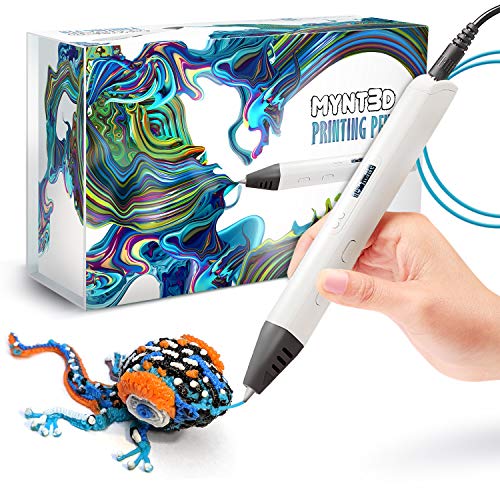
- Adjustable speed and material flow
- 140–230°C temperature control
- Includes three PLA filament colors
Best For: Freehand 3D drawing, detailing, and small creative projects
Multicolor Studio Pick
Kobra X Native 4-Color Printer

- Built-in four-color printing
- Expandable to up to 19 colors
- 260mm cubed build volume
Best For: Colorful models and larger mixed-material artwork
Precision Materials Pick
Adventurer 5M High-Precision Printer

- Four interchangeable nozzle sizes
- Fast Core XY structure
- Broad multi-material support
Best For: Artists alternating between fine detail and fast production
Best for Fine Detail

- 10K resolution for intricate models
- Uniform lighting helps smooth surfaces
- Beginner-friendly four-point leveling
Best For: Detailed resin sculptures, miniatures, and display pieces
Best for Multicolor Projects

- Print with up to four colors
- Automatic filament detection and refilling
- 220mm cube build volume
Best For: Vibrant artwork, prototypes, and flexible-material prints
Best Beginner FDM Value

- Auto leveling simplifies setup
- Supports PLA, PETG, and TPU
- Fast printing with quieter operation
Best For: Beginners making prototypes and everyday filament projects
Fast Precision Pick

- Automatic leveling for easier setup
- Fast CoreXY printing with quick-swap nozzles
- Remote monitoring and power-loss recovery
Best For: Artists seeking fast, flexible, low-maintenance printing
Best Heavy-Duty Pick

- Four-color printing without extra setup
- 500mm/s CoreXY printing performance
- Automatic safeguards for long prints
Best For: Artists creating colorful props, models, and décor
Beginner-Friendly Mini Pick

- Fully assembled and ready to start quickly
- App-based creative tools and model library
- Compact, quiet design with auto leveling
Best For: Beginners making small creative and STEM projects
Fast Start Pick – Adventurer 5M Auto-Leveling 3D Printer
For artists seeking 3d printers for artists that are quick to set up and easy to run, the FLASHFORGE Adventurer 5M combines one-click auto-leveling with high-speed Core XY printing. Its 220 x 220 x 220mm build area suits many sculptures, props, prototypes, and decorative pieces.
Best For: Artists who want fast, mostly hands-off printing with dependable first layers.
Pros:
- One-click automatic leveling helps create consistent first layers.
- Up to 600mm/s speed, vibration compensation, and a 32mm³/s high-flow nozzle support efficient printing.
- Filament run-out sensing and power-loss recovery add convenience for longer projects.
- Supports PLA, PETG, TPU, and selected carbon-fiber materials with compatible nozzles.
Cons:
- The open design is best used in a well-ventilated environment.
- The standard build volume may feel limited for larger artworks.
Choose this model if speed, simple calibration, and reliable everyday operation matter more than an enclosed build chamber or oversized workspace.
Hands-On Detail Pick – MYNT3D Professional 3D Pen
The MYNT3D Professional 3D Pen is a compact alternative to traditional 3d printers for artists, letting you draw, sculpt, repair, and add raised details by hand. Adjustable feed speed and temperature provide direct control over the material as you work.
Best For: Artists exploring freehand 3D drawing, embellishment, small repairs, and tactile design work.
Pros:
- Adjustable feed speed helps regulate material flow for controlled lines.
- Temperature adjusts from 140 to 230°C in one-degree increments.
- OLED display makes the selected material temperature easy to monitor.
- Includes three PLA filament colors, an adapter, and an ergonomic pen.
Cons:
- It is a handheld 3D pen rather than an automated printer.
- The included filament selection is limited to three colors.
This is a strong fit for artists who value direct, sketch-like control over repeatable automated output and large-format printing.
Multicolor Studio Pick – Kobra X Native 4-Color Printer
For artists who want vivid, multi-material pieces, the Anycubic Kobra X stands out among 3d printers for artists with native four-color printing and expansion up to 19 colors using ACE 2 Pro units. Its 260mm cubed build volume also leaves room for larger character models, art objects, and prototypes.
Best For: Artists creating colorful models, mixed-material pieces, and larger desktop artworks.
Pros:
- Native four-color printing can expand to as many as 19 colors with compatible accessories.
- Up to 600mm/s speed and reduced filament purging help shorten multicolor jobs.
- 49-point LeviQ 3.0 calibration supports consistent first layers.
- Supports PLA, PETG, TPU, PVA, and ASA with a 300°C nozzle.
Cons:
- Filament is not included and must be purchased separately.
- Expanded 19-color capability requires additional ACE 2 Pro units.
- Its multicolor system may add complexity compared with single-color printers.
This is the most compelling choice here for color-driven artwork, especially if you can take advantage of its larger build area and optional multicolor expansion.
Precision Materials Pick – Adventurer 5M High-Precision Printer
The FLASHFORGE Adventurer 5M gives artists using 3d printers for artists a balance of speed, surface quality, and material flexibility. Its interchangeable nozzle sizes let you prioritize fine detail or faster output, while automatic leveling and vibration compensation simplify the workflow.
Best For: Artists who need both detailed models and efficient production across several filament types.
Pros:
- Supports 0.25, 0.4, 0.6, and 0.8mm nozzles for detail or throughput.
- Up to 600mm/s travel speed and 20,000mm/s² acceleration reduce print times.
- One-click automatic leveling and a dual-sided PEI platform support easier print preparation and removal.
- Compatible with a broad range of PLA, PETG, ABS, ASA, flexible, and composite filaments.
Cons:
- The camera kit for remote monitoring is an additional purchase.
- The open-frame design may require careful placement and ventilation.
Consider this version when nozzle choice and broad material support are central to your art practice, particularly for switching between highly detailed and larger, faster prints.
Best for Fine Detail – Photon Mono 4
For artists comparing 3d printers for artists, the ANYCUBIC Photon Mono 4 is a resin model focused on fine surface detail. Its 10K monochrome LCD, uniform LighTurbo illumination, and compact build area make it suited to highly detailed sculptures, miniatures, and display pieces.
Best For: Artists prioritizing intricate details and smooth resin print surfaces.
Pros:
- 9024 x 5120 resolution with 17 x 17μm X/Y pixels for highly detailed models.
- LighTurbo matrix lighting helps reduce layer lines and rasterization.
- Laser-engraved platform improves adhesion while keeping print removal manageable.
- Four-point leveling and power-loss resume support a beginner-friendly workflow.
Cons:
- The 153.4 x 87 x 165mm build volume is more limited than larger-format options.
- Anycubic APP service is not supported.
The Photon Mono 4 is a strong choice when visual detail matters more than print volume. Its resin-focused design and straightforward leveling system can help artists move from setup to detailed work with fewer manual adjustments.
Best for Multicolor Projects – FlashForge AD5X
Among 3d printers for artists, the FLASHFORGE AD5X stands out for creating colorful FDM models without limiting designs to a single filament color. Its four-color system, automated filament management, and large 220mm cube build volume support vibrant artwork and practical prototypes.
Best For: Artists and designers creating multicolor models, prototypes, and flexible-material projects.
Pros:
- Supports up to four colors simultaneously for vibrant, intricate designs.
- Intelligent Filament System automatically detects and refills filament to reduce interruptions.
- Up to 600mm/s printing and 20,000mm/s² acceleration support faster project turnaround.
- Core XY construction helps minimize vibration, while TPU support expands material flexibility.
Cons:
- At 24.3 pounds, it is heavier than the other listed options.
- Its multicolor and IFS features may be more capability than needed for single-color work.
The AD5X is the most color-oriented option in this group. It makes sense for artists who want a broad creative palette, dependable filament handling, and enough build space for larger pieces or batches of smaller work.
Best Beginner FDM Value – Ender 3 V3 SE
For newcomers seeking 3d printers for artists, the Creality Ender 3 V3 SE combines simple setup with useful everyday versatility. Auto leveling, automatic Z-offset calibration, and a direct-drive extruder make it a practical starting point for PLA, PETG, and TPU projects.
Best For: Beginners making prototypes, functional artwork, and everyday filament prints.
Pros:
- CR Touch auto leveling and automatic Z-offset calibration simplify first-layer setup.
- Up to 250mm/s printing helps shorten prototype and project times.
- Sprite Direct Drive Extruder supports PLA, PETG, and TPU filament feeding.
- Flexible PC spring steel plate supports easier print removal, and the silent board reduces noise.
Cons:
- It does not offer the dedicated multicolor capability of the AD5X.
- Its supplied notes do not specify a maximum build volume.
The Ender 3 V3 SE is a sensible entry point for artists who want accessible FDM printing rather than resin-level detail or multicolor automation. Its automatic calibration and material flexibility make it easy to use across varied project types.
Fast Precision Pick – FLASHFORGE AD5M
For artists who want to move quickly from concept to finished object, the FLASHFORGE AD5M is one of the more capable 3d printers for artists. Its CoreXY structure, automatic calibration, multiple nozzle options, and 220mm cubed build volume support both detailed work and larger creative pieces.
Best For: Artists and makers who want fast, dependable printing with easy maintenance and flexible nozzle choices.
Pros:
- Fully automatic one-click leveling simplifies setup and supports consistent first layers.
- CoreXY all-metal motion structure is designed for high-speed, stable, low-noise printing.
- Quick-release nozzles in four diameters support either fine detail or higher efficiency.
- Remote monitoring, power-loss recovery, and a flexible double-sided PEI plate add convenience.
Cons:
- The 22-pound printer has a relatively substantial footprint for smaller workspaces.
- Advanced network and slicer features may be more than beginners need.
The AD5M is a strong choice when creative projects demand speed without giving up control. Its automatic setup and tool-free nozzle changes make experimentation less disruptive, while the build volume suits many sculptures, props, and functional art pieces.
Best Heavy-Duty Pick – Creality K2 SE 4C
The Creality K2 SE 4C stands out among 3d printers for artists who want color variation without assembling a separate upgrade. Its four-color printing, fast CoreXY system, and compact multicolor design make it suitable for expressive prototypes, props, décor, and display models.
Best For: Creators who prioritize ready-to-use multicolor printing, speed, and automated print protection.
Pros:
- Four-color printing is available out of the box without complicated upgrades.
- 500mm/s maximum speed and 20,000mm²/s acceleration help shorten print times.
- Auto leveling and a rigid all-metal frame support consistent, detailed results.
- Filament monitoring, power-loss recovery, and skip-partial-failure features help protect long prints.
Cons:
- At 35.5 pounds, it is notably heavier than the other listed options.
- The advanced Creality OS, Fluidd UI, and root-access features may require a learning curve.
For artists building colorful characters, cosplay accessories, or presentation models, the K2 SE 4C offers an efficient path from design to multicolor output. Its ready-to-print setup keeps the entry barrier manageable while leaving room for more advanced customization.
Beginner-Friendly Mini Pick – Entina Tina2C
The compact Entina Tina2C is a practical entry point for beginners exploring 3d printers for artists. It arrives fully assembled, can begin printing in as little as eight minutes, and combines app guidance, automatic leveling, and a small footprint for approachable home creative work.
Best For: Beginners, families, and artists making small models, STEM projects, and simple creative pieces in limited space.
Pros:
- Fully assembled design and guided app setup help users start quickly.
- Poloprint Cloud provides AI-powered search, photo-to-print tools, and more than 25 creative modules.
- WiFi and TF card printing offer flexible workflows, while automatic leveling reduces setup effort.
- Compact, quiet construction with LED lighting suits home, office, and creative spaces.
Cons:
- The 3.9-inch cubed print volume limits larger sculptures and oversized parts.
- Its mini format is better suited to small builds than ambitious studio-scale artwork.
The Tina2C favors accessibility over scale. Its small build area is a clear limitation, but quick setup, app-based creative tools, and simple maintenance make it a convenient choice for learning, experimenting, and producing small artistic objects.
How We Picked the Best 3d Printers for Artists
We focused on features that matter in creative work rather than treating print speed or specifications as the whole story. The selection covers FDM, resin, multicolor, compact, and pen-based tools so artists can compare different ways to make physical objects. We considered print quality, setup and calibration, material support, build convenience, color capability, software or app controls, and suitability for beginners.
Because artistic projects vary widely, no single printer is ideal for every user. A detailed miniature requires different hardware from a large sculptural form, a colorful prototype, or an educational project. We also included models with automated leveling and calibration, which can reduce setup time and let creators spend more time designing.
Quick Comparison
- Best for high-resolution detail: A resin printer such as the Anycubic Photon Mono 4.
- Best for fast general-purpose printing: A Flashforge Adventurer or AD5M-series FDM printer.
- Best for multicolor projects: The Anycubic Kobra X, Flashforge AD5X, or Creality K2 SE.
- Best for beginners: The Creality Ender 3 V3 SE or Entina Tina2C.
- Best for hands-on drawing: The MYNT3D Professional 3D Pen.
Key Buying Factors for 3d Printers for Artists
Print Technology and Surface Detail
FDM printers melt filament and are generally practical for larger props, functional sculptures, display pieces, and affordable experimentation. Resin printers cure liquid resin and typically produce finer surface detail, making them better suited to miniatures, intricate figures, jewelry prototypes, and highly detailed forms. Resin workflows require ventilation, washing, curing, and more careful handling.
Build Volume and Speed
Check the maximum print size against the work you actually create. A larger build area can reduce the need to split sculptures, while fast motion systems shorten production time for prototypes and repeated pieces. Advertised top speeds are not guaranteed on every material or model, so treat them as a comparison point rather than a promise of consistent real-world output.
Color and Material Flexibility
Multicolor systems are useful for character models, visual prototypes, and decorative pieces, but they may add material waste, maintenance, or workflow complexity. Also check nozzle temperature, heated-bed capability, and supported filament types if you plan to use specialty materials. For resin, compare compatible resin types and the cost of ongoing supplies.
Ease of Use and Maintenance
Auto leveling, automatic calibration, quick-detachable components, Wi-Fi or app control, and a well-designed interface can make a major difference in a creative studio. Consider whether you are comfortable tuning settings, replacing parts, cleaning resin equipment, and troubleshooting failed prints.
Who Should Buy Which 3d Printers for Artists?
Choose a high-detail resin model if your priority is intricate small work and you can manage the required cleanup and safety procedures. Pick a fast FDM printer for larger sculptures, props, prototypes, and a more straightforward material workflow. Multicolor models are a strong choice for artists who want finished-looking pieces with less manual painting, while a beginner-focused compact printer makes sense for classrooms, first-time users, and smaller projects. A 3D pen is best for freehand forms, repairs, embellishment, and tactile experimentation rather than repeatable machine-made parts.