
A smart car kit can make coding tangible: program the board, test a sensor, and watch the vehicle respond. The right choice depends on whether you want a straightforward first build or a project with cameras, wireless control, or self-balancing.
These 10 kits span starter bundles, wheeled cars, a tank-style robot, and more specialized builds. Compare what is included and how each kit is programmed before choosing.
Best 10 Arduino Smart Car Kits Picks for 2026
Best for FPV Driving
ELEGOO UNO R3 Smart Robot Car Kit V4

- Live FPV view from onboard camera
- Line tracking and obstacle avoidance
- Guided wiring and rechargeable battery
Best For: Guided builds with camera-based driving
Best Modern Arduino Board
SunFounder 3-in-1 Uno R4 Minima Kit

- Original Arduino Uno R4 Minima
- Smart-car and ESP8266 IoT projects
- More than 50 guided tutorials
Best For: Learning Arduino, car robotics, and IoT together
Best for Balancing Robotics

- Two-wheel self-balancing design
- App, IR, follow, and avoidance modes
- Arduino IDE examples to modify
Best For: Hands-on feedback and motion-control projects
Best Project Variety
SunFounder Ultimate 3-in-1 Starter Kit

- 192 items and 87 projects
- Arduino-compatible Uno included
- Online tutorials and video courses
Best For: Beginners seeking a broad project library
Best for Mixed Terrain
ACEBOTT ESP32 Smart Tank Robot Kit

- Tracked acrylic chassis for varied surfaces
- App and IR control plus obstacle avoidance
- Battery sold separately
Best For: Young builders exploring coding and tracked robots
Best R3 Starter

- R3 board compatible with Arduino IDE
- Tutorial includes lessons, code, and libraries
- Batteries not included
Best For: Beginners learning assembly and basic sensor projects
Best for Multi-Mode Projects

- Multiple sensors and five-channel tracking
- App and IR control options
- Video tutorials, schematics, and sample code
Best For: Teens and adults exploring multiple robot-car modes
Best for Camera Exploration
ACEBOTT Smart Robot Car with 3MP Camera

- Built-in 3MP camera streams video to a phone.
- 16 guided tutorials; Arduino and Scratch compatible.
- Mecanum wheels move sideways and rotate.
Best For: Camera-focused robotics and beginner coding.
Best for Movement Modes
ACEBOTT QD001 Mecanum Robot Car
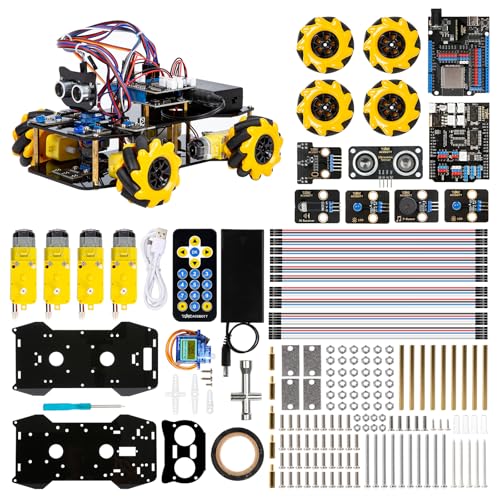
- Mecanum wheels enable sideways and diagonal moves.
- Includes obstacle avoidance and follow mode.
- Batteries and expansion packs are separate.
Best For: Exploring robot driving and navigation behaviors.
Best for Coding Flexibility
ACEBOTT QD106 Smart Robot Car Kit

- Supports Scratch, Arduino, and Python.
- Coding works on computers and mobile devices.
- No-solder build; batteries not included.
Best For: Learners who want multiple coding languages and mobile access.
Best for FPV Driving – ELEGOO UNO R3 Smart Robot Car Kit V4
Among arduino smart car kits, this ELEGOO model stands out if you want to build a car and then drive it using live video from its onboard camera. It also offers line tracking, ultrasonic obstacle avoidance, and app or IR control.
Best For: Beginners who want a guided robot-car build with camera-based driving and multiple sensor modes.
Pros:
- Onboard camera supports live FPV viewing.
- Illustrated instructions, example programs, and keyed connectors help with assembly.
- Includes an UNO R3 controller, sensors, IR remote, and rechargeable battery.
Cons:
- First-time builders may need adult guidance.
- Exploring custom behavior requires working with Arduino IDE code.
This is a practical pick when the finished car matters as much as the build: you can start with its driving modes, then modify the example code as your skills grow.
Best Modern Arduino Board – SunFounder 3-in-1 Uno R4 Minima Kit
If you’re comparing arduino smart car kits but also want a broader electronics curriculum, this SunFounder bundle pairs an original Arduino Uno R4 Minima with smart-car and IoT projects. Its 50-plus tutorials provide a path from basic circuits to motors and wireless projects.
Best For: Learners who want an original Uno R4 Minima and projects beyond the robot car.
Pros:
- Includes an original Arduino Uno R4 Minima.
- Combines Arduino basics, smart-car work, and ESP8266 Wi-Fi projects.
- More than 50 step-by-step tutorials explain components and code logic.
Cons:
- The broad project scope may be more than someone seeking only a car build needs.
- Working through the full curriculum takes more time than assembling a single-purpose kit.
Choose this one for the learning path rather than just the vehicle: its controller and tutorial sequence give you room to keep experimenting after the car project.
Best for Balancing Robotics – ELEGOO Tumbller Robot Car Kit
The ELEGOO Tumbller takes a different approach to arduino smart car kits: its two-wheel robot uses motion sensing and motor control to stay upright. Alongside balance experiments, you can try auto-follow, obstacle avoidance, bounce mode, and app or IR control.
Best For: Builders interested in balance, feedback, and motion-control experiments.
Pros:
- Self-balancing design makes feedback control visible in action.
- Offers multiple play modes, including bounce and obstacle avoidance.
- Illustrated tutorial and modifiable Arduino IDE examples support continued learning.
Cons:
- Its two-wheel balancing format is less suited to shoppers who want a conventional four-wheel car.
- Making custom changes involves studying and editing code.
This kit makes sense when the balancing mechanism is the main attraction; its other modes give you more to test after the robot’s first successful run.
Best Project Variety – SunFounder Ultimate 3-in-1 Starter Kit
For shoppers who want arduino smart car kits as part of a larger beginner course, this SunFounder kit offers 192 items and 87 projects. Its Arduino-compatible Uno, online tutorials, and video lessons cover basics before moving into robot-car and IoT work.
Best For: Beginners who want a wide selection of parts and a progressive project library.
Pros:
- 192 included items support a range of electronics experiments.
- 87 projects span introductory circuits, a robot car, and IoT applications.
- Video courses and online tutorials provide structured instruction.
Cons:
- The included controller is Arduino-compatible, not described as an original Arduino board.
- The large component selection may be unnecessary if you only want one car project.
Pick this bundle if you expect to keep building after the car: the varied sensors and guided projects are its strongest reason to buy.
Best for Mixed Terrain – ACEBOTT ESP32 Smart Tank Robot Kit
Among arduino smart car kits, the ACEBOTT tank is worth considering if you want a tracked robot rather than a standard wheeled car. Its ESP32 controller supports Arduino programming, while the acrylic chassis and tank tracks are designed for surfaces such as grass and sand.
Best For: Young builders who want to practice coding and explore robot movement beyond smooth indoor floors.
Pros:
- Offers app and IR remote control, follow mode, and obstacle avoidance.
- Includes ultrasonic and infrared sensors for hands-on experiments.
- Provides assembly instructions, code, and an assembly video through ACEBOTT’s website.
Cons:
- Battery is not included and must be purchased separately.
- Instructions and code require access to the manufacturer’s online resources.
Choose this kit for its tracked build and range of control modes; plan to source a battery before starting assembly.
Best R3 Starter – LAFVIN Smart Robot Car Kit
The LAFVIN kit is a straightforward entry point among arduino smart car kits for beginners who want to assemble a car and learn with an R3 controller board compatible with the Arduino IDE. Its tutorial covers assembly, code, libraries, and lessons for the included modules.
Best For: First-time builders who want guided practice with sensors, line tracking, and remote control.
Pros:
- Includes an R3 board, HC-SR04 ultrasonic sensor, extension board, and line-tracking module.
- Supports line tracking, obstacle avoidance, and IR remote control projects.
- Provides lessons and code to guide assembly and programming.
Cons:
- Batteries are not included.
- The supplied notes do not list app control.
This is a sensible pick for learning core car-and-sensor functions without making app connectivity the priority.
Best for Multi-Mode Projects – OSOYOO 2WD V2 Robot Car Kit
The OSOYOO 2WD V2 stands out among arduino smart car kits for its variety of included modules and driving modes. Its motor shield integrates the driver chip, power switch, and sensor connections, giving builders a starting point for adding and testing car functions.
Best For: Teens and adults who want a guided build with several sensor and control projects to try afterward.
Pros:
- Includes Bluetooth, ultrasonic, obstacle, and five-channel tracking modules.
- Supports app and IR control, line tracking, follow mode, and obstacle avoidance.
- Provides video instructions, schematics, sample code, and installation steps.
- Chassis markings and a voltage meter help with assembly and power checks.
Cons:
- The range of modules may mean more setup to work through than a simpler car kit.
- Manufacturer recommends ages 14 and up, so it is not positioned for younger builders.
Pick this model if you value project variety and detailed build resources more than a minimal first assembly.
Best for Camera Exploration – ACEBOTT Smart Robot Car with 3MP Camera
Among arduino smart car kits, this ACEBOTT model stands out for its built-in 3MP camera, which streams live video to a smartphone and takes snapshots. Its ESP32 controller, 16 story-based tutorials, and Arduino and Scratch compatibility give beginners a guided path into building and coding.
Best For: Learners who want camera-based exploration alongside hands-on robot building and coding.
Pros:
- Built-in camera supports live smartphone viewing and snapshots.
- Mecanum wheels allow sideways movement, drifting, and rotation.
- Includes app and IR remote control; supports optional modular add-ons.
Cons:
- Robotic arm, tank-track, and solar expansions are sold separately.
- Manufacturer recommends ages 13 and up, despite the broader ages in the title.
Choose this version if seeing through the robot’s camera is the priority. The guided lessons and varied movement provide plenty to try before considering add-ons.
Best for Movement Modes – ACEBOTT QD001 Mecanum Robot Car
For buyers comparing arduino smart car kits, the ACEBOTT QD001 puts movement and navigation at the center of the project. Its ESP32 controller and 16 story-based tutorials introduce programming and electronics, while mecanum wheels support sideways, diagonal, and rotating moves.
Best For: Learners who want to experiment with omnidirectional driving, obstacle avoidance, and follow mode.
Pros:
- Mecanum wheels support 360-degree movement and drifting.
- Includes multi-direction obstacle avoidance, cruise, and follow modes.
- Offers app and IR remote control, with optional expansion packs.
Cons:
- Batteries are not included.
- Camera, robotic arm, tank, and solar features require separate expansion packs.
This is a practical pick when driving behavior matters more than having a camera out of the box. Budget for batteries and any expansions you want to explore.
Best for Coding Flexibility – ACEBOTT QD106 Smart Robot Car Kit
Among arduino smart car kits, the ACEBOTT QD106 is a strong option for learners who want more than one way to code. It supports Scratch, Arduino, and Python, with programming available on computers, tablets, and mobile devices; 16 story-based tutorials help guide the build and lessons.
Best For: Beginners and growing coders who want language choices and the option to program from a phone or tablet.
Pros:
- Supports Scratch, Arduino, and Python for different skill levels.
- Allows coding on computers, tablets, and smartphones.
- Offers no-solder assembly guidance, app control, and an included IR remote.
Cons:
- Batteries are not included.
- Manufacturer recommends ages 12 and up, narrower than the title’s 8–16 range.
Pick this kit if flexible coding access is more useful to you than a built-in camera. Its instructions and control options make it approachable, while Python offers room to progress.
How We Picked These Arduino Smart Car Kits
We focused on the practical differences visible in the selected kits: controller type, stated Arduino compatibility, included components, project format, and learning resources. The lineup includes traditional wheeled cars, a tank-style build, a self-balancing robot, and broader starter kits that also teach non-car projects. Because kit contents and software support can change, check the current parts list and tutorial links before buying.
Quick Comparison
For a conventional wheeled build, start by comparing the ELEGOO UNO R3 V4, LAFVIN, OSOYOO, and standard ACEBOTT car kits. The ELEGOO V4 and one ACEBOTT model list cameras; the LAFVIN kit lists an ultrasonic sensor. ACEBOTT’s ESP32 tank offers a different driving platform, while the ELEGOO Tumbller focuses on balancing rather than a typical four-wheel car build. SunFounder’s two 3-in-1 bundles suit buyers who also want basic electronics and connected-project lessons; the version with an original Arduino Uno R4 Minima explicitly lists that board.
Key Buying Factors for Arduino Smart Car Kits
Controller and Compatibility
“Compatible with Arduino” does not always mean an official Arduino board is included. Check the exact controller, its programming instructions, and whether the kit requires you to supply anything separately. The Uno R4 Minima, UNO R3-compatible boards, and ESP32-based options may call for different setup steps and libraries.
Projects and Programming
Decide what you want to learn first: basic assembly and movement, sensor-based behavior, camera projects, wireless control, or a wider electronics curriculum. Look for tutorials that match the included hardware and your preferred coding method. If a child plans to use Scratch or an app, verify which projects support it; a kit’s Arduino compatibility alone does not guarantee every programming option works with every feature.
Build Demands and Support
Consider the builder’s age, comfort with wiring, and willingness to troubleshoot. Clear diagrams, labeled connections, replacement-part availability, and current example code matter more to a first-time builder than a long feature list. Check whether batteries and a charger are included, and confirm the required tools and device compatibility before checkout.
Who Should Buy Which Arduino Smart Car Kits?
Choose a conventional car kit if your goal is to assemble a vehicle and learn movement and sensors step by step. Pick a camera-equipped model if you specifically want to explore visual or remote-driving projects, but verify what its camera and software actually support. Choose the Tumbller for a balancing challenge or the tank kit if that chassis appeals to you. A SunFounder 3-in-1 bundle makes more sense when you want lessons beyond the car; prioritize the original Uno R4 Minima package if that specific board is important to you. For younger builders, compare the ACEBOTT kits’ stated age ranges and coding options against the support an adult can provide.