
Preserving books, manuscripts, photographs, and other bound materials requires more than a basic flatbed scanner. The best book scanners for archival projects combine gentle overhead capture with clear imaging, page-flattening tools, OCR, and workflows that reduce handling time.
We compared ten options across capture size, resolution, software, portability, and productivity features to help archivists, libraries, educators, researchers, and home users choose a scanner suited to their collections.
Best 10 Book Scanners for Archival Projects Picks for 2026
Best Overhead Scanner

- Non-destructive overhead scanning
- Automatic page and finger correction
- Page-turn detection for book workflows
Best For: Home archives, libraries, and bound books
Best for Organized Archives

- BookMaker organization software included
- OCR and full-text search tools
- Cloud sharing and synchronization option
Best For: Searchable research and reference collections
Best Large-Format Scanner

- Captures A2/A3 archival materials
- 26MP camera with page correction tools
- OCR exports to multiple editable formats
Best For: Maps, newspapers, manuscripts, and oversized documents
Best Portable Scanner

- About one-second scanning per page
- Foldable 4-pound design
- OCR supports 180+ languages
Best For: Portable scanning of flat materials and thinner books
Large-Format Archival Pick
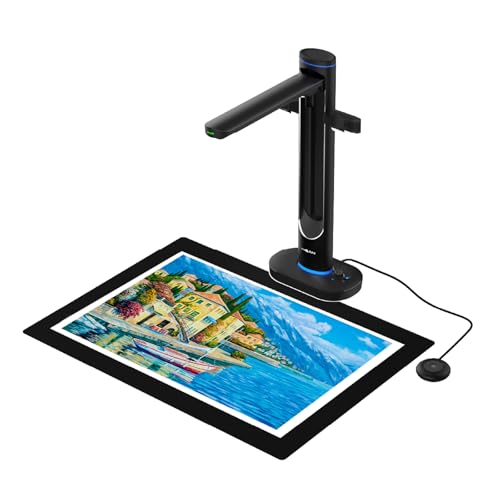
- A2 overhead scanning avoids pressing fragile books flat.
- Dual 48MP cameras deliver up to 600-DPI capture.
- AI processing, OCR, and text-to-speech aid workflows.
Best For: Large or delicate books, maps, and archival materials
Fast A3 Book Scanning Pick

- Curved-page technology helps flatten bound book pages.
- Scans documents up to A3 size at about two seconds per page.
- ABBYY OCR converts scans into searchable and editable formats.
Best For: A3 books and documents requiring fast OCR conversion
Portable Archiving Pick

- Handheld design and rechargeable battery support mobile scanning.
- Saves JPEG or PDF files to MicroSD or via USB.
- Scans at up to 1050 DPI and includes OCR software.
Best For: Mobile A4 document and photo archiving
High-Resolution Archival Pick

- 38MP sensor with 410 DPI capture
- Curve-flattening for bound books
- 180+ language OCR and A3 support
Best For: Detailed archival scans and large bound volumes
Versatile A3 Scanning Choice

- Two-second page scanning
- Laser-assisted page flattening
- Adjustable glare-free lighting
Best For: Convenient home and office archiving
High-Detail Overhead Scanner

- 48MP capture with up to 600 DPI
- AI page flattening and auto splitting
- 4K document-camera mode
Best For: Archiving plus teaching and document review
Best Overhead Scanner – ScanSnap SV600
The ScanSnap SV600 is a practical choice among book scanners for archival projects when you need to digitize books, newspapers, magazines, photos, or documents without cutting or damaging the originals. Its overhead design combines automatic page correction, page-turn detection, and multi-document scanning.
Best For: Home archives, libraries, and users digitizing bound books or mixed paper collections.
Pros:
- Scans books and other materials without cutting or damaging them
- Automatically corrects curved book pages and can remove captured fingers
- Page-turn detection and time mode support more streamlined scanning sessions
- Multi Document Detection can crop and rotate several items in one scan
Cons:
- USB connectivity requires a compatible computer setup
- Supported operating systems are limited to Windows 10/11 and macOS Monterey 12 or later
The SV600 is particularly useful when preservation matters more than compactness. Its automated corrections can reduce post-processing, although the one-page standard capacity and computer-based workflow are best suited to deliberate desktop scanning.
Best for Organized Archives – Plustek OpticBook 4900
The Plustek OpticBook 4900 stands out among book scanners for archival projects because its included BookMaker software is designed to organize scanned books, magazines, notes, and reference documents. OCR, tagging, note-taking, and full-text search make it useful beyond basic image capture.
Best For: Researchers and professional users who need searchable, organized digital reference collections.
Pros:
- BookMaker supports folder creation, scanning or importing, editing, and exporting
- OCR can create editable formats and searchable text
- Search can use file names, chapters, page content, or notes
- Includes one year of eDoc cloud storage for sharing and synchronization after registration
Cons:
- Uses a USB-connected flatbed workflow rather than an overhead camera design
- Driver downloads may be required from Plustek’s website
- Cloud features require registration
The OpticBook 4900 is a strong fit when archive usability is as important as scanning. Its software tools can help turn a collection into a searchable research library, while Windows and macOS support broadens compatibility.
Best Large-Format Scanner – VIISAN S21 A2 Book Scanner
The VIISAN S21 is one of the more versatile book scanners for archival projects, with an A2 capture area suited to large newspapers, maps, manuscripts, and journals. Its overhead camera offers up to 26MP resolution, while software can flatten pages, remove fingers, split facing pages, and apply OCR.
Best For: Archives containing oversized documents, maps, newspapers, and large-format books.
Pros:
- A2/A3 adjustable design handles materials up to 594 × 420 mm
- Automatic flattening, finger removal, edge repair, and double-page splitting simplify cleanup
- OCR can export files to PDF, Word, Excel, EPUB, or text formats
- Built-in LED lighting has three brightness levels for low-light capture
Cons:
- Bundled OfficeCam software is not compatible with ARM-based devices such as Surface Pro X
- Glare-prone paper is not recommended with the built-in LEDs
- USB 2.0 connectivity may limit transfer speeds
The S21 is the most capable option here for oversized archival material. Its large capture area and correction tools are valuable for fragile or unwieldy originals, but buyers should verify computer architecture and plan around the USB workflow.
Best Portable Scanner – CZUR Shine Ultra
The CZUR Shine Ultra is a compact option among book scanners for archival projects, designed for A3 and A4 materials and scanning at about one second per page. Its foldable, height-adjustable body includes automatic cropping, smart paging, OCR, and technology for flattening curved pages in thinner books.
Best For: Portable digitization of flat documents and thinner books in home, classroom, or office settings.
Pros:
- Scans A3 and A4 materials at approximately one second per page
- OCR supports more than 180 languages, with stated language limitations
- Foldable, height-adjustable design weighs about 4 pounds and includes a foot pedal
- Can function as both a USB document camera and scanner
Cons:
- Curved-page flattening is intended for thinner books; CZUR recommends the ET series for thicker books
- Not compatible with Android or iOS devices
- Thai, Hebrew, and Arabic are not supported by the listed OCR capability
The Shine Ultra is a convenient choice when portability and speed matter. It is better suited to flat papers and thinner books than bulky volumes, making it a practical secondary scanner for mobile or occasional archival work.
Large-Format Archival Pick – VIISAN S48 Duo
For book scanners for archival projects involving oversized or fragile materials, the VIISAN S48 Duo is built around a non-contact overhead design. Its A2 capture area, dual 48MP cameras, and up-to-600-DPI resolution suit bound books, maps, manuscripts, and other documents that should not be pressed flat.
Best For: Libraries, schools, offices, and archival workflows handling large or delicate bound materials.
Pros:
- Scans A2-size books and documents without flattening pages or bindings.
- Dual 48MP cameras capture detailed text, lines, and color at up to 600 DPI.
- AI processing helps flatten curved pages, remove finger marks, correct edge distortion, and clean backgrounds.
- OCR and text-to-speech support searchable and accessibility-focused content.
Cons:
- Requires a USB connection and a compatible Windows or macOS computer.
- The recommended setup includes 16GB of RAM and at least 20GB of hard-drive space.
- At 2.8 kg, it is less portable than a handheld scanner.
The S48 is the strongest option here for large-format preservation and careful handling of bound materials. Its extra imaging capability and OCR features make it particularly useful when an archive needs both high-quality capture and searchable output.
Fast A3 Book Scanning Pick – CZUR ET18 Pro
For book scanners for archival projects centered on standard large-format books, the CZUR ET18 Pro combines an overhead camera with curved-page flattening. It supports documents up to A3 size, uses an 18MP sensor, and can produce editable, searchable files through ABBYY OCR.
Best For: Users digitizing A3-size books and documents who prioritize quick scans and editable output.
Pros:
- Patented processing helps flatten curved book pages.
- A3 capture accommodates documents up to 16.5 by 11.7 inches.
- ABBYY OCR supports more than 180 languages and exports to PDF, Word, and Excel.
- Scanning takes about two seconds per page after becoming familiar with the workflow.
Cons:
- Its 275-DPI imaging is lower resolution than the VIISAN S48.
- Very glossy paper is not recommended.
- It uses a cable connection and does not support Wi-Fi.
The ET18 Pro is a practical middle ground for A3 archival work, especially when speed and document conversion matter more than maximum resolution. Its language coverage is broad, but users should verify support for any specialized languages before buying.
Portable Archiving Pick – IRIScan Book 7
For book scanners for archival projects that require mobility, the IRIScan Book 7 is a handheld option with rechargeable power, MicroSD storage, and USB connectivity. It scans at 300, 600, or 1050 DPI and saves JPEG or PDF files for later transfer and OCR processing.
Best For: Amateur archivists, researchers, travelers, and professionals who need to capture documents away from a desk.
Pros:
- Compact, lightweight handheld design supports scanning on the go.
- Offers resolutions from 300 to 1050 DPI for different capture needs.
- Can save directly to the included MicroSD card or connect by USB.
- Includes Readiris OCR and PDF editing software for Windows and Mac compatibility.
Cons:
- Handheld scanning requires steadier user movement than an overhead book scanner.
- It is designed for A4 pages rather than oversized A3 or A2 materials.
- It does not support Wi-Fi, and an AC adapter is not included.
The Book 7 is best viewed as a convenient field-scanning tool rather than a replacement for a large-format archival setup. Its battery, SD storage, and high maximum resolution make it useful when portability and immediate capture are the main priorities.
High-Resolution Archival Pick – CZUR ET MAX
For book scanners for archival projects that demand detailed image capture, the CZUR ET MAX combines a 38MP CMOS sensor, 410 DPI resolution, and a large A3 scanning area. Its curve-flattening technology is designed to digitize bound books without unbinding them, while fast scanning and OCR support help streamline larger projects.
Best For: Archival users who need high-resolution scans, A3 support, and broad OCR capabilities.
Pros:
- 38MP sensor and 7168 × 5376 resolution capture detailed pages.
- Curve-flattening technology helps reduce distortion in bound books.
- OCR supports more than 180 languages and outputs searchable PDFs, Word, and Excel files.
- Works with Windows, macOS, and supported Ubuntu versions.
Cons:
- Not recommended for glossy or highly reflective materials.
- Arabic OCR is limited to ET Series scanners on Windows, while Thai and Hebrew are unsupported.
The ET MAX is a strong fit for demanding archival workflows where image detail, bound-book handling, and searchable output matter more than compact simplicity.
Versatile A3 Scanning Choice – CZUR Aura Pro
The CZUR Aura Pro is a practical option for book scanners for archival projects when you want A3 and A4 capture, quick two-second page scanning, and built-in lighting for both scanning and reading. Its laser-based page-flattening system is designed to improve clarity when working with curved book pages.
Best For: Home archivists and small offices seeking fast, flexible book and document scanning with integrated lighting.
Pros:
- Scans pages in about two seconds and exports JPG, Word, PDF, and searchable PDF files.
- Three laser lines help flatten curved pages for clearer reproductions.
- 32 LEDs and supplemental side lights provide adjustable, glare-free illumination.
- Compatible with Windows and current supported macOS versions.
Cons:
- OCR does not currently support Thai, Hebrew, or Arabic.
- Its listed resolution is lower than the ET MAX and VIISAN K48.
With its smart-lamp design and straightforward multi-format workflow, the Aura Pro suits everyday digitization where convenience and versatile lighting are priorities.
High-Detail Overhead Scanner – VIISAN K48
For book scanners for archival projects that also need modern workflow features, the VIISAN K48 offers up to 600 DPI capture, AI-assisted page flattening, and automatic page splitting. It can create searchable or editable files with OCR and also functions as a 4K USB document camera for teaching and review.
Best For: Users digitizing textbooks, reference books, and archive files who also want document-camera functionality.
Pros:
- 48MP capture and up to 600 DPI are suited to detailed text and diagrams.
- AI-assisted flattening and automatic page splitting can reduce manual cleanup.
- OCR creates searchable PDFs and editable documents, with text-to-speech support.
- Works as a 4K-at-30fps USB document camera with Windows and Mac.
Cons:
- At 2.8 kg, it is heavier than the CZUR models listed here.
- The supplied specifications list a 900 DPI resolution, while the product description highlights capture up to 600 DPI.
The K48 stands out for combining archival capture with automated page processing and live camera use, making it particularly flexible for mixed scanning, teaching, and review tasks.
How We Picked the Best Book Scanners for Archival Projects
We focused on scanners designed to capture bound or fragile materials without forcing pages flat against a glass platen. Our evaluation considered optical or camera resolution, maximum page size, lighting and page-flattening technology, OCR support, file formats, software usability, and connection options. We also included portable models for smaller collections and high-capacity overhead scanners for libraries, archives, and digitization projects involving large books or documents.
Because archival needs vary, no single specification determines the best choice. High resolution matters for fine print and illustrations, while consistent lighting, accurate page alignment, and efficient software can matter more for lengthy scanning sessions.
Quick Comparison
- Best overall flexibility: ScanSnap SV600 combines overhead capture with a straightforward workflow for books and mixed documents.
- Best for flat-page fidelity: Plustek OpticBook 4900 suits users who prioritize traditional flatbed scanning and book-edge access.
- Best for large materials: VIISAN S48 Duo, VIISAN K48, and the large-format VIISAN scanner are suited to A2/A3 originals.
- Best portable options: CZUR Shine Ultra and IRIScan Book 7 are easier to transport or use in multiple locations.
- Best for advanced productivity: CZUR ET MAX, CZUR ET18 Pro, and CZUR Aura Pro offer camera-based capture and document-processing features.
Key Buying Factors for Book Scanners for Archival Projects
Capture Size and Book Clearance
Check the maximum scan area before buying. A4 and letter-size coverage works for most modern books, but oversized maps, albums, newspapers, and archival volumes may require A3 or A2 support. An overhead design also needs enough space around the book for comfortable positioning.
Resolution and Image Quality
Higher megapixel ratings can preserve small type, line art, and photographic detail, but effective results also depend on lens quality, lighting, color accuracy, and software processing. For text-heavy projects, consistent sharpness and low distortion are often more useful than headline resolution alone.
Page Flattening and Handling
Look for automatic curve correction, finger removal, laser positioning, or other tools that improve pages photographed near the spine. These features can reduce retakes and help protect fragile bindings by minimizing pressure during capture.
OCR, Export, and Workflow
OCR converts images into searchable or editable text, which is valuable for research collections. Confirm supported operating systems, export formats, batch processing, searchable PDF creation, and whether essential software is included or requires a separate license.
Portability and Connectivity
USB models are often dependable for long sessions, while wireless or SD-card options can be useful for fieldwork. Consider desk space, lighting conditions, power requirements, and whether the scanner will be shared between rooms or institutions.
Who Should Buy Which Book Scanners for Archival Projects?
Choose a traditional flatbed-style scanner if maximum contact with the page and detailed reproduction are your priorities. Select an overhead scanner for bound books, fragile material, or faster two-page capture. Large-format VIISAN models are better for oversized originals, while CZUR professional models suit users who want automated correction and document-management tools. Portable CZUR and IRIScan options make sense for researchers, teachers, and occasional users who need mobility more than high-volume throughput.
Before purchasing, measure your largest materials, estimate your weekly scanning volume, and confirm software compatibility. For archival work, also plan for lossless or minimally compressed master files, consistent naming, redundant backups, and separate access copies optimized for everyday reading.