
Preserving books, journals, family records, and other bound documents is easier when you choose a scanner designed for page curvature, large formats, and efficient OCR.
These 10 book scanners for archiving span portable models, flatbeds, and professional overhead systems, helping you match image quality, speed, workspace, and budget to your project.
Best 10 Book Scanners for Archiving Picks for 2026
Best High-Resolution Pick

- 24MP camera with A3 capture
- Curved-page flattening technology
- 180+ language OCR
Best For: Detailed book and document archiving
Best for Organized Digital Libraries

- 1200 DPI flatbed scanning
- BookMaker organization software
- OCR search, tags, and notes
Best For: Searchable research and reference archives
Best for Hands-Free Page Turning

- Overhead scanning preserves bound books
- Page Turning Detection
- Automatic curve and finger correction
Best For: Non-destructive, semi-automated book scanning
Best Compact A3 Scanner

- About two seconds per page
- A3/A4 capture with laser flattening
- Built-in adjustable reading lamp
Best For: Fast home archiving in limited workspace
Best Large-Format Archive Scanner
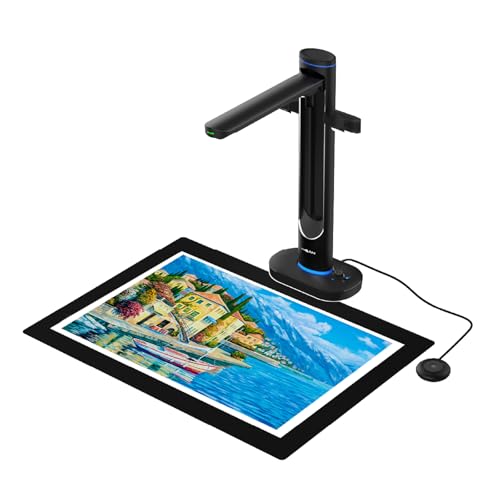
- A2 overhead scanning without flattening bindings
- Dual 48MP cameras with up to 600 DPI
- AI cleanup, OCR, and text-to-speech
Best For: Fragile, oversized books and archival materials
Best High-Speed OCR Scanner

- A3 scanning with a 38MP sensor
- Curve flattening for bound books
- Fast capture and OCR for searchable files
Best For: Bulk book digitization and multilingual OCR workflows
Best Versatile A3 Book Scanner

- 48MP overhead capture for detailed pages
- Automatic flattening and page splitting
- OCR, text-to-speech, and 4K camera mode
Best For: Home, classroom, and office archiving
Best Portable Pick

- About one-second-per-page scanning
- A3/A4 capture with 13MP camera
- Portable, foldable design with OCR
Best For: Fast archiving of papers and thinner books
Best for Large Archives

- A3 overhead scanning for large pages
- 16MP camera with up to 300 DPI
- Anti-glare LED lighting
Best For: Digitizing oversized books, artwork, and archival documents
Best Smart Scanning Setup

- Laser-based curved-page flattening
- About two-second-per-page scanning
- Auto page detection and supplemental lights
Best For: Automated archiving of books and glossy materials
Best High-Resolution Pick – CZUR ET24 Pro
For demanding book scanners for archiving projects, the CZUR ET24 Pro combines a 24MP camera, A3 capture, curved-page flattening, and OCR. Its HDMI connection and upgraded processing are useful when you want a fast, flexible desktop setup for books, magazines, documents, and other oversized materials.
Best For: High-resolution home, office, and professional archiving of A3- and A4-sized books and documents.
Pros:
- 24MP camera with 5696 × 4272 resolution and 320 DPI.
- Flattening technology helps correct curved book pages.
- Supports A3-size materials and OCR in more than 180 languages.
- Works with Windows, compatible macOS versions, and Ubuntu 20.04–24.04.
Cons:
- Very glossy papers are not recommended.
- Thai and Hebrew OCR are unsupported; Arabic OCR is limited by operating system.
- Its desktop design requires dedicated workspace.
The ET24 Pro is a strong choice when image detail, large-format support, and page-shape correction matter most. Check your computer platform and material types before buying, particularly if you archive highly reflective pages.
Best for Organized Digital Libraries – Plustek OpticBook 4900
The Plustek OpticBook 4900 stands out among book scanners for archiving because its BookMaker software is built around organizing reference material. Alongside 1200 DPI scanning and OCR, it supports tagging, notes, full-text search, and export workflows for books, magazines, PDFs, and handwritten documents.
Best For: Researchers, professionals, and teams who need searchable, categorized digital reference collections.
Pros:
- BookMaker provides folder creation, editing, exporting, tagging, and note-taking tools.
- OCR enables editable formats and full-text searching.
- Includes one year of eDoc cloud storage after registration.
- Supports Windows 7–11 64-bit and macOS 10.13–14.x.
Cons:
- Uses a flatbed design rather than an overhead scanner.
- BookMaker and driver downloads may require additional setup.
- Standard sheet capacity is limited to one page.
This model is especially appealing if archiving means more than creating image files. Its software tools help turn scans into a searchable, organized library, making it a practical fit for reference-heavy workflows.
Best for Hands-Free Page Turning – ScanSnap SV600
The ScanSnap SV600 is a practical overhead option for book scanners for archiving when you want to scan bound books without cutting or damaging them. Page Turning Detection can start scans as pages are turned, while Auto Book Correction, automatic cropping, and finger removal reduce common cleanup tasks.
Best For: Hands-free digitization of books, newspapers, magazines, photos, and mixed paper materials.
Pros:
- Scans bound materials directly without cutting or damaging them.
- Automatically corrects book curves and supports finger removal.
- Page Turning Detection and Time Mode support batch-style scanning.
- Multi Document Detection can crop and rotate several items in one scan.
Cons:
- Compatible computer requirements are limited to specified Windows and macOS versions.
- Its overhead footprint is relatively wide.
- Scanning features depend on software-assisted correction and cleanup.
The SV600 is a good fit for careful, non-destructive book archiving, particularly when reducing manual scan starts is important. Its automated correction features can make long scanning sessions more manageable.
Best Compact A3 Scanner – CZUR Aura Pro
For shoppers seeking compact book scanners for archiving, the CZUR Aura Pro offers A3 and A4 capture in a lightweight design. It scans a page in about two seconds, uses laser-based flattening for curved books, and produces JPG, Word, PDF, and searchable PDF files with OCR.
Best For: Home users who want fast A3/A4 book scanning plus a built-in reading light in a compact unit.
Pros:
- Approximately two-second-per-page scanning speed.
- Three laser lines help flatten curved book pages.
- Supports A3 and A4 materials and multiple output formats.
- Includes adjustable LED lighting with four color temperatures and side lights.
Cons:
- OCR does not support Thai, Hebrew, or Arabic.
- Connects by USB rather than Wi-Fi or Bluetooth.
- Its 4320 × 3240 resolution is lower than the ET24 Pro’s listed resolution.
The Aura Pro balances speed, portability, and page correction well for everyday archiving. It is particularly useful when desk space is limited or when the scanner will also serve as a glare-free reading lamp.
Best Large-Format Archive Scanner – VIISAN S48 Duo
For libraries, schools, and offices looking for book scanners for archiving, the VIISAN S48 Duo combines an overhead A2-capable design with dual 48MP cameras and up to 600 DPI capture. Its non-flattening workflow is suited to oversized or fragile bound materials.
Best For: Large books, maps, manuscripts, and archival materials that should be scanned without pressing pages flat.
Pros:
- Captures books and documents up to A2 size without flattening bindings.
- Dual 48MP cameras provide detailed text, fine lines, and color capture at up to 600 DPI.
- AI processing can flatten curved pages, remove finger marks, correct edge distortion, and clean backgrounds.
- OCR and text-to-speech support searchable and accessible digital content.
Cons:
- Its 2.8 kg build and large-format capability may require more desk space than a compact scanner.
- USB connectivity and stated Windows/macOS requirements should be checked against your setup.
The S48 Duo is the strongest fit here when preservation-friendly handling and large-format coverage matter most. It also adds value for distance education and presentations through its UVC camera functionality.
Best High-Speed OCR Scanner – CZUR ET MAX
The CZUR ET MAX is a practical choice among book scanners for archiving when fast page capture and searchable files are priorities. Its 38MP sensor, A3 scanning area, curve-flattening technology, and OCR workflow support larger digitization projects.
Best For: Bulk scanning of bound books and A3 documents where speed, OCR, and broad operating-system compatibility are important.
Pros:
- Scans up to A3 size with a 38MP CMOS sensor and 7168 × 5376 resolution.
- Patented curve-flattening technology helps correct bound-page distortion without unbinding books.
- OCR converts scans into editable Word and Excel files or searchable PDFs, with support for more than 180 languages.
- Works with Windows, macOS, and supported Ubuntu Linux versions, and includes HDMI output for live display.
Cons:
- The listed 410 DPI is lower than the 600 DPI rating of the VIISAN models.
- It is not recommended for glossy or highly reflective materials.
- OCR support has language and operating-system limitations for Thai, Hebrew, and Arabic.
With a stated 1.5-second page scan under practiced operation, the ET MAX is well suited to high-volume projects. Consider it when efficient OCR and system flexibility outweigh the need for the highest listed DPI.
Best Versatile A3 Book Scanner – VIISAN K48
The VIISAN K48 is a flexible option for book scanners for archiving, combining A3 overhead capture with 48MP image quality, up to 600 DPI, and automatic page-processing tools. It is designed for books, reports, worksheets, and reference materials on Windows or Mac.
Best For: Home offices, classrooms, and smaller archive projects that need scanning plus a document-camera mode.
Pros:
- Captures detailed pages at up to 600 DPI with a 48MP sensor.
- AI-assisted page flattening and automatic page splitting can reduce manual cleanup.
- OCR creates searchable PDFs and editable documents, while text-to-speech supports audio playback.
- Functions as a 4K-at-30fps USB document camera for teaching and live document sharing.
Cons:
- Its overhead design may need more workspace than a conventional compact document scanner.
- The supplied details list a 900 DPI resolution specification in addition to the up-to-600-DPI description, so buyers should confirm the desired mode.
- USB operation means it is dependent on a compatible computer setup.
The K48 balances archive features with everyday teaching and review functions. It is a sensible middle ground for users who want searchable book scans without giving up a high-resolution document camera.
Best Portable Pick – CZUR Shine Ultra
For shoppers comparing book scanners for archiving, the CZUR Shine Ultra is a compact overhead option that handles A3 and A4 materials at roughly one second per page. Its USB connection, OCR software, and foldable design make it practical for digitizing papers and thinner books at home or in a small office.
Best For: Fast scanning of thinner books, papers, and smaller-than-A3 materials on Windows or macOS.
Pros:
- Scans at about one second per page and supports A3-sized materials.
- 13MP CMOS camera with automatic cropping, smart paging, and multiple color modes.
- OCR supports more than 180 languages and the unit folds for portable storage.
Cons:
- Designed for thinner books; the manufacturer recommends the ET series for thicker books.
- Not compatible with Android or iOS.
- OCR does not currently support Thai, Hebrew, or Arabic.
The Shine Ultra is a strong fit when speed, portability, and document-camera functionality matter. Its curved-page technology is useful for thinner books, but thicker volumes may require a different scanner.
Best for Large Archives – VIISAN DL16 A3 Book Scanner
The VIISAN DL16 is an A3 overhead scanner built for book scanners for archiving projects involving bound books, oversized pages, artwork, sheet music, and other large documents. Its 16MP camera, 300 DPI capture, and anti-glare lighting are suited to organized digital storage on Windows or Mac.
Best For: Libraries, offices, educators, and home users digitizing large books, artwork, and archival documents.
Pros:
- A3 overhead design accommodates oversized pages and bound materials.
- 16MP camera provides up to 300 DPI scanning for document detail.
- Anti-glare LED lighting helps reduce reflections and uneven shadows.
Cons:
- USB connection requires a compatible Windows or Mac computer.
- It is an overhead document scanner rather than a conventional flatbed design.
The DL16 makes the most sense for users who need A3 coverage and cleaner overhead captures. It is a practical archival choice when page size and lighting control are more important than a compact handheld format.
Best Smart Scanning Setup – CZUR Aura Pro Book Scanner
The CZUR Aura Pro combines A3 document capture with book-focused page flattening, making it a versatile choice among book scanners for archiving. Its three laser lines, automatic page detection, supplemental lights, and approximately two-second-per-page speed simplify scanning books and individual sheets.
Best For: Home and office users who want automated scanning of curved books, loose pages, and glossy materials.
Pros:
- Three laser lines help flatten curved pages for clearer reproductions.
- Scans materials smaller than A3 at about two seconds per page.
- Auto-detects page turns, supports a foot pedal, and includes supplemental side lights.
Cons:
- Weighs about 3 kg, so it is less lightweight than the Shine Ultra.
- OCR does not currently support Thai, Hebrew, or Arabic.
- Sound-controlled lamp features can be affected by noise and distance.
The Aura Pro is a good match for repetitive book digitization where automatic page detection and curved-page correction can save effort. Its built-in lamp functions add versatility, although the larger weight may matter if portability is a priority.
How We Picked the Best Book Scanners for Archiving
We focused on scanners suited to real archival workflows rather than occasional single-page copying. Our comparison considers capture resolution, supported page sizes, book-flattening technology, OCR capability, lighting, scanning speed, software, and connection requirements. We also included several form factors because a compact portable scanner can be more practical for travel, while a large-format overhead unit may be better for oversized books and fragile materials.
Specifications such as megapixel count and stated DPI are useful starting points, but they do not tell the whole story. Page curvature correction, consistent lighting, software quality, and the ability to work without pressing a book flat can have an even greater effect on usable results.
Quick Comparison
| Best for | Look for | Most suitable type |
|---|---|---|
| Large archival projects | Fast capture, automatic page processing, reliable software | Professional overhead scanner |
| Oversized books and documents | A2 or A3 support, high-resolution cameras, broad lighting | Large-format overhead scanner |
| Rare or delicate books | Non-contact capture, page flattening, adjustable lighting | Overhead book scanner |
| Portable scanning | Compact design, USB power, quick setup | Portable document or book scanner |
| Maximum flat-page consistency | Glass platen, sorting tools, dependable color handling | Flatbed scanner |
Key Buying Factors for Book Scanners for Archiving
Resolution and Image Quality
Higher resolution preserves small type, illustrations, marginal notes, and fine details, but it also creates larger files. For text-heavy books, a well-designed 300 to 600 DPI workflow may be sufficient; photographs, maps, and detailed illustrations benefit from greater capture resolution and good optical performance.
Book Handling and Page Flattening
Overhead scanners are often the safest choice for bound volumes because they avoid forcing the spine against a platen. Look for automatic page flattening, curvature correction, laser positioning, or software that can split facing pages and remove fingers or background areas.
Format, Speed, and Workflow
Check whether the scanner supports A4, A3, A2, or larger materials before buying. A dual-camera system or rapid overhead capture can reduce scanning time, while automatic page turning assistance and batch processing matter for hundreds of pages.
OCR and File Management
OCR turns scanned pages into searchable and sometimes editable text. Confirm the supported languages and export formats, and consider whether the included software can create searchable PDFs, organize files, sort pages, and process batches efficiently.
Lighting, Connectivity, and Workspace
Even lighting and anti-glare features help with glossy pages and photographs. Also check USB requirements, operating-system compatibility, power needs, footprint, and whether the stand folds for storage. A technically capable scanner is less useful if it cannot fit comfortably beside your computer or worktable.
Who Should Buy Which Book Scanners for Archiving?
Choose a professional overhead model if you are digitizing extensive collections, need fast repeatable capture, or want advanced page-processing tools. Choose a large-format A3 or A2 scanner for oversized books, newspapers, artwork, maps, and archival documents that will not fit on standard equipment.
Choose a portable model if you scan in multiple locations, have limited desk space, or need a flexible device for occasional books and documents. Choose a flatbed when maximum contact with loose pages, photos, and flat originals matters more than rapid bound-book capture.
Before ordering, estimate your weekly page volume, largest original, preferred output format, and available workspace. Those four details usually narrow the field faster than headline resolution alone.