
Scanning a bound book is harder than scanning loose sheets: curved pages, deep gutters, uneven lighting, and visible fingers can all reduce image quality. The right overhead scanner can make the process faster while preserving readable, well-aligned pages.
We selected 10 options ranging from portable handheld models to high-resolution A3 overhead scanners. Use the comparison and buying advice below to match your workflow, book sizes, software needs, and budget.
Best 10 Book Scanners for Bound Documents Picks for 2026
Best Overall

- Overhead scanning protects bound books
- Automatic curve correction
- Page-turn detection for batch work
Best For: Digitizing bound books, magazines, and mixed documents
Best for High-Resolution OCR

- 18MP camera and high-resolution capture
- A3 scanning area
- Editable output through ABBYY OCR
Best For: Large books and searchable document conversion
Best Portable Option

- Handheld and rechargeable
- MicroSD and USB saving
- Up to 1050 dpi with OCR
Best For: Travel, fieldwork, and quick mobile document capture
Best with Integrated Lighting

- Built-in adjustable smart lamp
- Two-second page scanning
- A3/A4 capture with page flattening
Best For: Home offices and book scanning with added workspace lighting
Best High-Resolution Pick

- 48MP capture and up to 600 DPI detail
- AI page flattening, splitting, and OCR
- Also works as a 4K USB document camera
Best For: Detailed archiving, searchable files, teaching, and presentations
Best for Fast Book Projects

- 16MP camera with rapid 1.5-second scanning
- Curved-page flattening for bound books
- OCR supports over 180 languages
Best For: Large book projects and mixed office materials
Best for Comfort
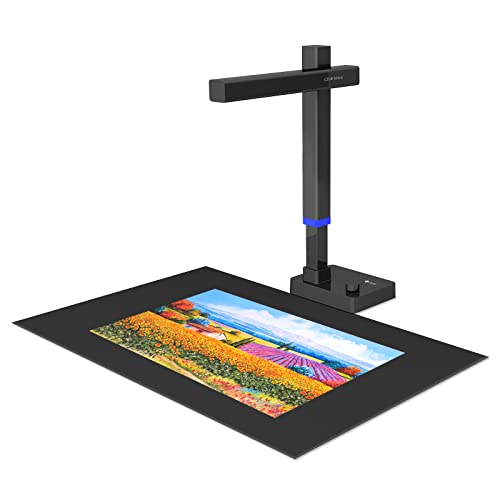
- 24MP capture with curved-page flattening
- Exports JPG, PDF, searchable PDF, Word, and Excel
- Foldable, height-adjustable design weighs 2 pounds
Best For: Portable book and document scanning with flexible file exports
Large-Format Pick

- A3 overhead scanning for books and large documents
- 16MP camera with up to 300 DPI resolution
- Auto page flattening and anti-glare LED lighting
Best For: Home archives, libraries, offices, and oversized bound materials
Best Heavy-Duty Pick
CZUR Lens1200 Pro Document Scanner

- Foldable design weighs about 0.93 pounds
- About one-second page scanning with multi-target capture
- OCR exports to Word, Excel, and searchable PDF workflows
Best For: Portable scanning of standard-size documents and book pages
Advanced Archiving Pick

- Interchangeable A2 and A3 scanning formats
- 26MP sensor with software-enhanced 600 DPI output
- Auto-flattening, page repair, and 180-plus-language OCR
Best For: Large-format archives, books, maps, and searchable document conversion
Best Overall – ScanSnap SV600
The ScanSnap SV600 is a strong choice among book scanners for bound documents because its overhead design scans books, magazines, newspapers, and loose pages without cutting or damaging them. Automatic book correction helps flatten curved pages, while page-turn detection can streamline repeated scanning.
Best For: Home archivists, offices, and libraries digitizing bound books or mixed document collections.
Pros:
- Scans bound materials directly without cutting or damaging them
- Automatically flattens and corrects curved book pages
- Page Turning Detection can begin scans as pages are turned
- Multi Document Detection crops and rotates multiple items automatically
Cons:
- USB connection; Wi-Fi is not listed
- Requires a compatible Windows or macOS computer
- Its 6.6-pound size is less portable than handheld scanners
Choose the SV600 if protecting original books and automating page capture matter more than compact size. Point Retouch can also remove captured fingers from finished scans.
Best for High-Resolution OCR – CZUR ET18 Pro
The CZUR ET18 Pro combines an 18MP camera with curved-page flattening, making it a capable option among book scanners for bound documents. Its ABBYY OCR software can create editable Word, Excel, and PDF files, while the A3 scanning area accommodates larger pages.
Best For: Researchers, professionals, and offices scanning large bound documents into searchable or editable files.
Pros:
- Flattening technology corrects curved book pages
- 18MP imaging with up to 4896 × 3672 resolution
- OCR supports more than 180 languages, with stated exceptions
- Scans documents up to A3 size
Cons:
- USB cable connection only; Wi-Fi is not supported
- Very glary paper is not recommended
- OCR support excludes Thai and Hebrew, with Arabic limited by operating system
For large-format books and OCR-heavy workflows, the ET18 Pro offers a useful balance of speed, imaging detail, and document conversion. Expect to work at a computer because wireless operation is unavailable.
Best Portable Option – IRIScan Book 7
The IRIScan Book 7 is a compact handheld option for occasional pages and lightweight field work. For users comparing book scanners for bound documents, its rechargeable battery, microSD storage, and selectable 300, 600, or 1050 dpi settings make it convenient when a full-size overhead scanner is impractical.
Best For: Students, travelers, lawyers, and archivists who need portable scanning away from a desk.
Pros:
- Compact handheld design with rechargeable battery
- Saves scans directly to a supplied SD card or transfers by USB
- Offers 300, 600, and 1050 dpi settings
- Includes OCR and PDF editing software
Cons:
- Handheld scanning may require more careful alignment on bound pages
- Does not support Wi-Fi
- AC adapter is not provided
The Book 7 is best when portability and independent storage outweigh automated page flattening. Its LCD preview and included software add flexibility for quick JPEG, PDF, Word, or Excel workflows.
Best with Integrated Lighting – CZUR Aura Pro
The CZUR Aura Pro pairs overhead book scanning with built-in lighting, making it a practical choice among book scanners for bound documents and reading areas. Three laser lines help flatten curved pages, while the software supports JPG, Word, PDF, and searchable PDF output.
Best For: Home offices, students, and readers who want a book scanner that also functions as an adjustable smart lamp.
Pros:
- Scans pages in about two seconds each
- Laser-based flattening technology addresses curved book pages
- Built-in lighting includes four color-temperature settings
- OCR supports more than 180 languages, with stated exceptions
Cons:
- No Wi-Fi or Bluetooth connection
- OCR does not support Thai, Hebrew, or Arabic according to the notes
- USB connection is required
The Aura Pro is a versatile fit for users who want efficient book capture plus dedicated illumination. Its A3 and A4 support and searchable-PDF output make it suitable for both everyday documents and larger bound materials.
Best High-Resolution Pick – VIISAN K48
For shoppers comparing book scanners for bound documents, the VIISAN K48 stands out as a high-resolution overhead model designed for detailed pages and larger A3-size materials. Its page-flattening, page-splitting, and OCR tools are aimed at reducing cleanup during book digitization.
Best For: Detailed book archiving, searchable documents, teaching, and users who want a document camera as well as a scanner.
Pros:
- 48MP capture with support for up to 600 DPI detail.
- AI-assisted page flattening and automatic page splitting help streamline bound-book scanning.
- OCR and text-to-speech can create searchable files and audio playback.
- Works as a 4K-at-30fps USB document camera with Windows and Mac.
Cons:
- At 2.8 kg, it is less portable than the foldable option in this roundup.
- USB connection is required for use.
The K48 is a versatile choice when image detail and workflow features matter most. It is particularly well suited to larger scanning projects, accessibility-focused file creation, and live document presentation.
Best for Fast Book Projects – CZUR ET16 Plus
The CZUR ET16 Plus is built for shoppers seeking book scanners for bound documents with a fast scanning workflow. Its 16MP camera, curved-page flattening, and dedicated lighting are intended to make large book digitization projects more efficient than conventional flatbed scanning.
Best For: Rapidly scanning books, binders, business cards, vouchers, and other mixed materials in home, office, or archive settings.
Pros:
- Claims a 1.5-second-per-page scanning speed and can scan a 300-page book within 10 minutes.
- Patented technology flattens curved book pages after image processing.
- OCR supports more than 180 languages, with stated language limitations.
- Ten LED lights plus two supplemental lights are designed for shadowless exposure.
Cons:
- Very glossy paper is not recommended.
- Arabic OCR support is limited by operating system, while Thai and Hebrew are not supported.
- At 4.4 pounds, it is not the lightest portable option.
The ET16 Plus makes the most sense when throughput is a priority. Its broader media support is useful for offices and archives, though users should check paper glare and OCR-language compatibility before buying.
Best for Comfort – CZUR Shine Ultra Pro
For buyers who need book scanners for bound documents without a bulky setup, the CZUR Shine Ultra Pro offers a compact alternative. Its foldable, height-adjustable design and 2-pound weight make it easier to move between workspaces while retaining curved-page flattening for books.
Best For: Portable scanning at home, school, or the office, especially when searchable PDFs and editable office files are useful.
Pros:
- 24MP camera provides high-resolution document capture.
- Curved-page flattening is designed for bound books.
- Can create JPG, PDF, searchable PDF, Word, and Excel files.
- Folds to 90 degrees, is height adjustable, and weighs only 2 pounds.
Cons:
- USB connection is required.
- It is described as a document scanner rather than an A3 model, so larger materials may be less convenient.
- OCR language coverage is not specified in the supplied product notes.
The Shine Ultra Pro is the practical pick for users who value portability and flexible export formats. Its foldable design is especially helpful when the scanner must be stored or transported between scanning sessions.
Large-Format Pick – VIISAN DL16 A3 Book Scanner
For shoppers comparing book scanners for bound documents, the VIISAN DL16 is a practical overhead option when you need to capture full-size books, artwork, sheet music, or other oversized pages. Its A3 scanning area, 16MP camera, and page-flattening features are suited to home archives, offices, libraries, and study spaces.
Best For: A3 books, large documents, archives, artwork, and bound materials that are difficult to use with a flatbed scanner.
Pros:
- A3 overhead format handles books and large documents.
- 16MP camera provides up to 300 DPI scanning.
- Auto page flattening and anti-glare LED lighting support cleaner book captures.
- Works with both Windows and Mac through USB.
Cons:
- Designed for desktop use rather than highly portable scanning.
- Its 300 DPI resolution may be less suited to users seeking higher-resolution archival output.
The DL16 is a sensible choice when page size and bound-document handling matter more than portability. It offers a straightforward feature set for organized digitization of books, records, and oversized materials.
Best Heavy-Duty Pick – CZUR Lens1200 Pro Document Scanner
The CZUR Lens1200 Pro is a compact option for shoppers seeking book scanners for bound documents that can travel between workspaces. Its foldable 12MP camera scans pages without feeding or touching them, while the included software adds cropping, page combining, and OCR functions.
Best For: Portable scanning of standard-size documents, forms, contracts, letters, and select book pages when convenience is a priority.
Pros:
- Lightweight, foldable design weighs about 0.93 pounds.
- Scans a page in about one second and can capture multiple targets.
- OCR converts scans to Word, Excel, PDF, editable PDF, and other formats.
- Recognizes more than 180 languages and connects with one USB cable.
Cons:
- Not recommended for very glossy paper and books.
- Scanning area is limited to approximately 8.27 by 11.69 inches.
- Thai, Hebrew, and Arabic are not currently supported by the stated OCR coverage.
The Lens1200 Pro stands out for portability and fast everyday capture, especially for loose documents and moderate scanning workloads. Its limitations with glossy books and standard-size coverage make it less suitable for oversized or highly reflective bound materials.
Advanced Archiving Pick – S21 Pro A2/A3 Book Scanner
For demanding book scanners for bound documents, the S21 Pro combines interchangeable A2 and A3 formats with a 26MP sensor and software-assisted 600 DPI output. Its auto-flattening, page repair, fingerprint removal, and OCR tools target users digitizing books, newspapers, maps, drawings, and other materials at home, in classrooms, or in libraries.
Best For: Large-format book scanning, archival projects, searchable document conversion, and users who want advanced page-processing features.
Pros:
- Switches between A2 and A3 capture sizes for different materials.
- 26MP sensor supports detailed captures and software-enhanced 600 DPI output.
- Automatically flattens pages, removes fingerprints, repairs edges, and splits spreads.
- OCR supports more than 180 languages and exports to PDF, Word, Excel, ePub, and TXT.
Cons:
- Not recommended for highly glossy or glare-prone paper.
- Not compatible with ARM-based devices such as Surface Pro X.
- Its broader feature set may be more than needed for simple document capture.
The S21 Pro is the most versatile option in this group for users handling varied page sizes and wanting extensive software assistance. A2/A3 flexibility and automated book corrections are particularly useful for serious digitization projects, provided your materials are not highly glossy.
How We Picked the Best Book Scanners for Bound Documents
We focused on features that matter when digitizing bound material rather than ordinary office paperwork. The selection considers camera resolution, maximum scan size, page-flattening technology, OCR support, lighting, capture speed, portability, and compatibility with common computers and software.
Models with automatic page curvature correction, finger removal, laser positioning, or dual-page capture can be especially useful for books. However, higher megapixel counts do not guarantee better results on their own; lighting, software processing, and stable positioning are equally important.
Quick Comparison
| Feature | What to look for |
|---|---|
| Best overall workflow | Automatic flattening, page splitting, and reliable OCR |
| Best for large pages | A3 or larger capture area with even edge-to-edge lighting |
| Best portability | Compact USB or wireless design with onboard storage |
| Best image detail | High-resolution camera, strong optics, and low distortion |
| Best convenience | Fast software, automatic cropping, and batch scanning |
Key Buying Factors for Book Scanners for Bound Documents
Page Flattening and Gutter Correction
Look for software or hardware that corrects curved pages near the spine. Automatic flattening can save substantial editing time, especially with thick books. Finger-removal features are useful when you need to hold pages open during capture.
Resolution and Lighting
For text-heavy books, a well-processed 12MP to 18MP camera may be sufficient. Higher-resolution models are more useful for illustrations, maps, archival material, or cropping. Even, glare-resistant lighting is essential for glossy pages and dark bindings.
Capture Area and Book Size
A4 coverage suits many paperback and standard documents, while A3 models provide more room for oversized books, newspapers, music sheets, and open spreads. Check the usable area rather than relying only on the product name.
OCR and File Formats
If you want searchable or editable files, confirm that OCR software is included and supports your operating system and preferred languages. Also check whether the scanner exports PDF, searchable PDF, JPEG, TIFF, or Word files.
Speed, Controls, and Connectivity
Foot pedals, page-turn detection, automatic cropping, and batch modes improve high-volume work. USB is generally dependable; wireless or SD-card support can be more convenient for mobile use but may involve slower transfers or extra setup.
Who Should Buy Which Book Scanners for Bound Documents?
Choose a full-size overhead model if you are digitizing many bound books, archival material, or oversized pages at a desk. Prioritize automatic flattening and fast batch software for libraries, researchers, teachers, and family-history projects.
A portable scanner is a better fit for occasional work, classrooms, travel, or users with limited desk space. These models trade some automation and stability for easier storage and transport.
For image-heavy books, select the highest-quality camera and lighting system your budget allows. For mostly black-and-white text, prioritize OCR accuracy, page processing, and workflow speed over headline megapixel figures. Before buying, verify operating-system support, included accessories, warranty coverage, and whether the scanner can handle the thickness and dimensions of your books.