
Finding the best book scanner for Mac means balancing software compatibility, scan quality, page handling, and setup convenience. The right model can turn bound books, receipts, notes, and office documents into searchable digital files without unnecessary rework.
This roundup compares 10 options for different workflows, including portable scanners, flatbeds, and overhead book scanners designed for fast two-page capture.
Best 10 Book Scanners for Mac Picks for 2026
Best Overall

- Two-second page scanning
- Curved-page flattening technology
- Supports Apple Silicon and Intel Macs
Best For: Fast book and document digitization with smart lighting
Best Portable Pick

- USB-powered mobile design
- Creates searchable PDFs
- Handles documents up to 34 inches long
Best For: Portable receipts, cards, and document scanning
Best Professional Model
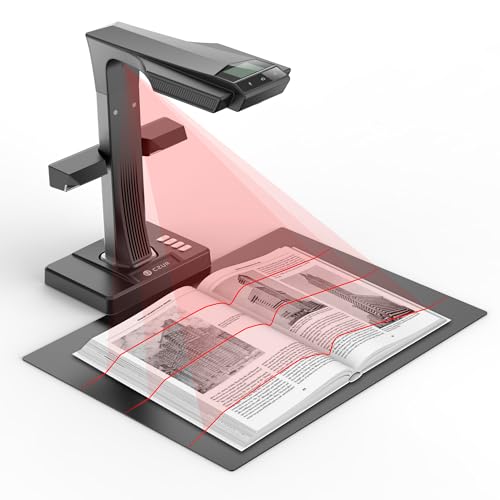
- 24MP camera with 320 DPI capture
- Scans materials up to A3 size
- Supports Mac, Windows, and select Linux systems
Best For: High-resolution large-format book and document scanning
Best Budget Flatbed

- 2400 × 2400 dpi optical resolution
- Auto Scan Mode simplifies operation
- Slim design for desk use
Best For: Occasional photos, documents, receipts, and cards
Best for Easy Setup

- About one-second-per-page scanning
- A3/A4 capture with 13MP camera
- Foldable design and 180+ OCR languages
Best For: Portable scanning of thinner books, papers, and teaching materials
Best for Thick Books

- 18MP camera with 275 DPI capture
- A3 scanning at about two seconds per page
- ABBYY OCR for editable document formats
Best For: Bound books, archives, and high-detail A3 digitization
Best for Glare Control

- A3 overhead scanning for books and artwork
- 16MP camera with up to 300 DPI
- Anti-glare LED lighting for glossy pages
Best For: Mac-compatible archiving of large or glare-prone materials
Best with Extra Features

- Lightweight, foldable A4 scanner
- One-second-per-page scanning
- OCR for 180+ languages
Best For: Portable Mac document scanning
Best High-Resolution Choice
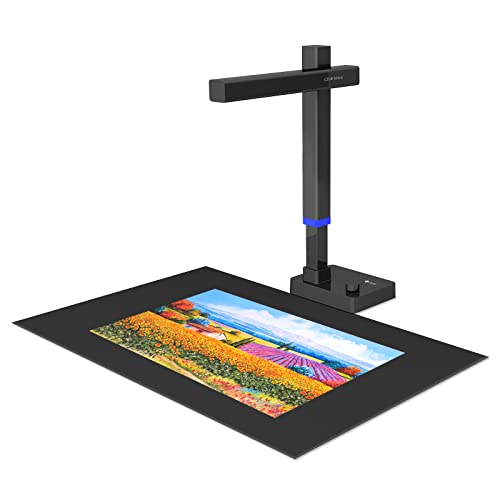
- 24MP document camera
- Flattens curved book pages
- Creates searchable PDFs and office files
Best For: Detailed Mac book scanning
Best for Hands-Free Book Scanning

- Flattens curved pages with laser lines
- Automatic page-turn detection
- Supports materials smaller than A3
Best For: Mac users digitizing bound books
Best Overall – CZUR Aura Pro
The CZUR Aura Pro is a versatile choice among book scanners for Mac, combining fast page capture with book-flattening technology. It supports Apple Silicon Macs running macOS 13 or later and Intel Macs running macOS 12 or later, with output options including JPG, Word, PDF, and searchable PDF.
Best For: Mac users digitizing books, documents, and reading materials who want fast scanning and built-in lighting.
Pros:
- Scans a page in about two seconds.
- Three laser lines help flatten curved book pages.
- OCR supports more than 180 languages, with searchable PDF output.
- Includes adjustable, glare-free smart lighting with four color temperatures.
Cons:
- Thai, Hebrew, and Arabic are not currently supported for OCR.
- Requires macOS 13 or later on Apple Silicon Macs.
With its compact design, strong OCR feature set, and page-flattening system, the Aura Pro is a well-rounded option for Mac-based book digitization. Its lighting features also make it useful for reading between scanning sessions.
Best Portable Pick – Fujitsu ScanSnap S1100i
The Fujitsu ScanSnap S1100i is a compact, USB-powered option for shoppers seeking book scanners for Mac that can also handle everyday paperwork. It scans documents from about one inch up to 34 inches long and supports searchable PDFs plus editable Word and Excel files.
Best For: Mac users who need a lightweight scanner for receipts, business cards, documents, and occasional long pages.
Pros:
- USB powered for convenient mobile use.
- Creates searchable PDFs with one-touch scanning.
- Scans paper from approximately one inch to 34 inches long.
- Includes software for business cards and receipts.
Cons:
- Designed for single-sheet feeding rather than book pages.
- The listed system requirements specify Windows 7, so Mac software compatibility should be confirmed before purchase.
The S1100i is better suited to portable document capture than bulk book scanning. Its small format and searchable-file workflow make it practical for receipts, forms, and travel-related paperwork.
Best Professional Model – CZUR ET24 Pro
The CZUR ET24 Pro is a professional-format choice among book scanners for Mac, using a 24MP camera and upgraded flattening technology to capture books and documents up to A3 size. It supports macOS 10.13 or later on Intel Macs and macOS 13 or later on Apple Silicon Macs.
Best For: Mac users digitizing large books, magazines, artwork, and other A3-size materials who want high-resolution capture.
Pros:
- 24MP camera delivers up to 5696 × 4272 resolution and 320 DPI.
- Captures materials up to A3 size.
- Flattening technology corrects curved book surfaces.
- Supports OCR conversion to editable PDF, Excel, and Word files.
Cons:
- Its 4.5 kg weight and larger footprint are less convenient for portable use.
- Very glossy papers are not recommended.
- Thai and Hebrew OCR are unsupported; Arabic OCR on Mac is not supported.
The ET24 Pro stands out when image detail and large-format scanning matter more than portability. Its side lighting, preview screen, HDMI support, and book-flattening features make it especially capable for a dedicated scanning workstation.
Best Budget Flatbed – Canon CanoScan LiDE 300
The Canon CanoScan LiDE 300 is a straightforward USB flatbed for shoppers comparing book scanners for Mac with general-purpose document and photo models. Its 2400 × 2400 dpi optical resolution and Auto Scan Mode make it useful for digitizing individual documents, photos, receipts, and cards.
Best For: Mac users who want a slim flatbed scanner for occasional single-page documents and images.
Pros:
- Offers 2400 × 2400 dpi optical resolution.
- Auto Scan Mode detects the type of material being scanned.
- Handles photos, receipts, business cards, and paper.
- Compact 1.7-inch-high design fits easily on a desk.
Cons:
- It is a flatbed document and photo scanner, not a dedicated book scanner.
- The supplied system requirements list Windows 7, so Mac compatibility should be verified.
- Single-sheet capacity makes it less suitable for high-volume scanning.
The LiDE 300 is a sensible basic flatbed when your priority is occasional document and photo scanning rather than rapid book capture. Its high optical resolution and automatic scan detection add convenience for everyday tasks.
Best for Easy Setup – CZUR Shine Ultra
If you want a portable option among book scanners for Mac, the CZUR Shine Ultra combines overhead capture, automatic cropping, and fast one-second-per-page scanning. It supports macOS 10.13 or later according to the product notes, though the listed requirements specify macOS 12 or later for Intel Macs and macOS 13 or later for Apple Silicon.
Best For: Mac users scanning thinner books, A3 or A4 documents, and papers who also want document-camera functionality for remote teaching.
Pros:
- Scans pages in about one second and supports documents up to A3 size.
- 13MP camera with smart paging, auto cropping, and multiple color modes.
- OCR supports more than 180 languages and the unit folds to a portable form.
Cons:
- Its curved-page flattening technology is intended for thinner books; thicker books may need an ET-series model.
- Not compatible with Android or iOS.
- Thai, Hebrew, and Arabic are not supported for OCR.
The Shine Ultra is a practical fit when portability and speed matter more than handling thick volumes. Its USB connection and Mac support make it a flexible choice for home, study, or teaching workflows.
Best for Thick Books – CZUR ET18 Pro
The CZUR ET18 Pro is a strong choice for shoppers comparing book scanners for Mac and needing high-resolution A3 capture. Its overhead design uses curved-page flattening technology and ABBYY OCR to turn scans into searchable or editable files.
Best For: Mac users digitizing bound books, large documents, and archives who prioritize image detail and editable output.
Pros:
- 18MP camera captures at 4896 × 3672 resolution and 275 DPI.
- Curved-page flattening technology helps process bound book pages.
- ABBYY OCR can convert documents into editable PDF, Excel, and Word files.
- Scans A3-size documents at about two seconds per page after becoming proficient.
Cons:
- Uses a cable connection and does not support Wi-Fi.
- Very glossy paper is not recommended.
- Thai and Hebrew are not supported for OCR; Arabic support is limited to ET Series scanners under Windows.
The ET18 Pro is better suited to demanding book-digitization projects than casual paper scanning. Its high-resolution camera and OCR workflow add value for archives, research, and document conversion.
Best for Glare Control – VIISAN DL16 A3 Book Scanner
The VIISAN DL16 is a useful option for buyers seeking book scanners for Mac with A3 overhead capture and lighting designed for challenging pages. Its 16MP camera, 300 DPI resolution, and anti-glare LEDs suit books, artwork, sheet music, and oversized documents.
Best For: Mac-compatible home archives, libraries, offices, and study spaces scanning bound books, glossy materials, artwork, or large-format pages.
Pros:
- Captures A3 pages and other large documents with an overhead design.
- 16MP camera provides up to 300 DPI resolution.
- Anti-glare LED lighting helps reduce glare and uneven shadows.
- Compatible with Windows and Mac and weighs about 3 pounds.
Cons:
- The supplied notes do not specify a scanning speed.
- The product notes do not list supported macOS versions.
- Its USB connection means it is intended for a wired desktop setup.
The DL16 stands out when page visibility and large-format capture are more important than compact flatbed styling. It is a practical choice for organized digitization projects involving books, archives, and artwork.
Best with Extra Features – CZUR Lens800 Pro
If you need book scanners for Mac that are easy to carry, the CZUR Lens800 Pro is a compact option for documents, letters, business cards, and other materials up to A4 size. Its 8MP camera, one-second-per-page scanning, and Mac compatibility make it practical for quick desk or mobile scanning.
Best For: Mac users who want a lightweight, foldable scanner for A4 documents and everyday paperwork.
Pros:
- Compact 0.93-pound foldable design with one USB connection for power and data.
- Scans at up to one page per second and can capture multiple targets such as business cards.
- Software supports OCR and conversion to Word, Excel, PDF, and editable PDF in more than 180 languages.
- Can also function as an HD webcam.
Cons:
- Maximum capture size is A4, so it is not suited to larger books or documents.
- Not recommended for very glossy paper.
- Mac support requires macOS 13 or later on Apple Silicon or macOS 12 or later on Intel Macs.
The Lens800 Pro stands out when portability and fast document capture matter more than large-format book scanning. Its non-contact design also helps protect files and cards from jams or feeding damage.
Best High-Resolution Choice – CZUR Shine Ultra Pro
For shoppers comparing book scanners for Mac, the CZUR Shine Ultra Pro combines a 24MP camera with software designed to flatten curved book pages. It can create JPG, PDF, searchable PDF, Word, and Excel files while folding for easier storage and transport.
Best For: Mac users who want high-resolution book and document scanning with curved-page flattening.
Pros:
- 24MP resolution supports detailed document and book-page captures.
- Curved-page flattening helps reproduce pages from bound books.
- Exports scans as JPG, PDF, searchable PDF, Word, or Excel files.
- 90-degree foldable, height-adjustable design weighs 2 pounds.
Cons:
- Its 2-pound weight is less travel-friendly than the smaller Lens800 Pro.
- Mac support requires macOS 13 or later on Apple Silicon or macOS 12 or later on Intel Macs.
- The supplied notes do not specify an automatic page-turn feature.
The Shine Ultra Pro is a strong fit when image detail and book-page flattening are priorities. It offers broader output options than a basic document camera, including searchable PDFs and editable office formats.
Best for Hands-Free Book Scanning – CZUR Aura Pro
The CZUR Aura Pro is designed for shoppers seeking book scanners for Mac with automated page handling. Its laser-based curved-page technology, automatic page-turn detection, supplemental side lights, and foot-pedal support make it suited to scanning books and materials smaller than A3.
Best For: Mac users scanning bound books who want automatic page detection, lighting controls, and large-format support.
Pros:
- Laser-line technology helps flatten curved book pages and improve image clarity.
- Scans single sheets and double-page books in about two seconds per page.
- Supports materials smaller than A3 and OCR in more than 180 languages.
- Auto-detects page turns and supports hands-free triggering with a foot pedal.
Cons:
- At 3 kg, it is substantially less portable than the Lens800 Pro.
- Mac compatibility requires macOS 13 or later on Apple Silicon or macOS 12 or later on Intel Macs.
- Sound-control performance can be affected by background noise and distance.
The Aura Pro is the most book-focused choice in this group, particularly for longer scanning sessions. Its supplemental lights can help reduce reflections on glossy paper, while the lamp functions add utility to a desk setup.
How We Picked the Best Book Scanners for Mac
We focused on scanners that can work with macOS through included software, standard USB connections, or widely supported scanning workflows. The selection covers several categories: overhead book scanners, portable document cameras, compact sheet-fed models, and flatbed scanners.
We also considered resolution, optical or camera-based capture, OCR support, page-flattening technology, lighting, portability, scan speed, document size, and the type of material each model handles best. Because book scanning is different from ordinary paper scanning, we gave extra attention to curved-page correction, glare control, and the ability to capture pages without removing a book’s binding.
Quick Comparison
Overhead models such as the CZUR and VIISAN scanners are generally the most practical for bound books because they capture pages from above and may include automatic page flattening or curve correction. They are also useful for magazines, textbooks, artwork, and mixed-size documents.
Portable models are better for travel, classrooms, home offices, and occasional scanning. The Fujitsu ScanSnap S1100i and CZUR Lens800 Pro are compact choices for loose pages and lighter workloads. A flatbed such as the Canon CanoScan LiDE 300 is a straightforward option for photos, single sheets, and documents that benefit from direct contact with the glass.
Key Buying Factors for Book Scanners for Mac
MacOS Compatibility
Check the manufacturer’s current macOS support before buying, especially if your Mac uses Apple silicon or a newer version of macOS. Confirm whether the scanner requires proprietary software, a driver, or a USB adapter. A model that supports searchable PDF, JPEG, and common export formats will fit more workflows.
Book Size and Capture Area
A3-capable scanners provide more room for textbooks, large art books, and open two-page spreads. A4 models are more compact and usually sufficient for novels, standard office documents, and smaller notebooks.
Resolution and OCR
Higher camera resolution can preserve small print and illustrations, but software quality matters just as much. OCR is valuable when you need searchable or editable text. Look for reliable text recognition and export options rather than choosing solely by megapixel count.
Page Flattening and Lighting
For bound books, automatic curve correction, finger-removal tools, and page-flattening features can save substantial editing time. Anti-glare lighting is particularly useful for glossy pages, dark print, and uneven surfaces.
Portability and Workflow
Choose a portable scanner if you scan occasionally or move between locations. For large projects, prioritize automatic page detection, batch capture, foot pedals or timed scanning, and fast processing over the smallest possible footprint.
Who Should Buy Which Book Scanners for Mac?
- For frequent book digitization: Choose an overhead scanner with page flattening, OCR, and a generous capture area.
- For textbooks and large books: An A3 model is usually the better fit, particularly when capturing facing pages.
- For travel or small workspaces: Pick a compact portable scanner that connects easily to your Mac and stores without much setup.
- For loose office documents: A sheet-fed or portable document scanner may be faster and simpler than a book-focused overhead model.
- For photos and occasional flat documents: A flatbed scanner offers consistent contact with the original and a familiar scanning process.
Before ordering, verify the included software, required cables, maximum page size, and current macOS compatibility. Those details often matter more to day-to-day satisfaction than headline resolution alone.