
Digitizing books on a Windows PC is easier with a scanner designed for curved pages, oversized formats, and readable text. The right model can reduce hand cropping, improve OCR accuracy, and preserve fragile pages more safely than a conventional flatbed scanner.
These 10 book scanners for Windows include overhead, portable, wireless, and professional options. Use the buying guide below to match scanning quality, workflow speed, software features, and budget to your needs.
Best 10 Book Scanners for Windows Picks for 2026
Best Large-Format Pick

- A2 capture area for oversized pages
- 26MP imaging with up to 600 DPI enhancement
- Automatic flattening, OCR, and page splitting
Best For: Large-format books, maps, newspapers, and manuscripts
Best Portable Value

- About one-second scanning per page
- Foldable 4-pound A3/A4 design
- OCR and document-camera functionality
Best For: Portable scanning, thin books, and remote teaching
Best High-Resolution Option

- 48MP capture with up to 600 DPI
- AI flattening and automatic page splitting
- 4K document-camera mode with OCR
Best For: High-detail book digitization, archives, and teaching
Best Reading-Light Combo

- A3/A4 scanning at about two seconds per page
- Laser-assisted curved-page flattening
- Adjustable smart lamp with four color temperatures
Best For: Home offices, reading, and everyday book scanning
Best All-in-One Pick
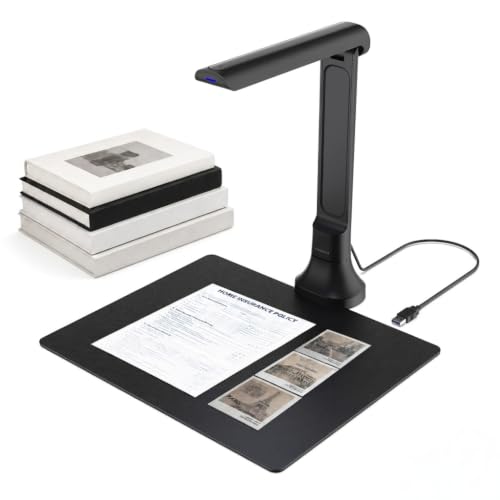
- 16MP autofocus camera for books and documents
- OCR, text-to-speech, and Gemini AI features
- Foldable USB design for Windows and macOS
Best For: Versatile scanning, accessibility, and remote learning
Best Professional Option
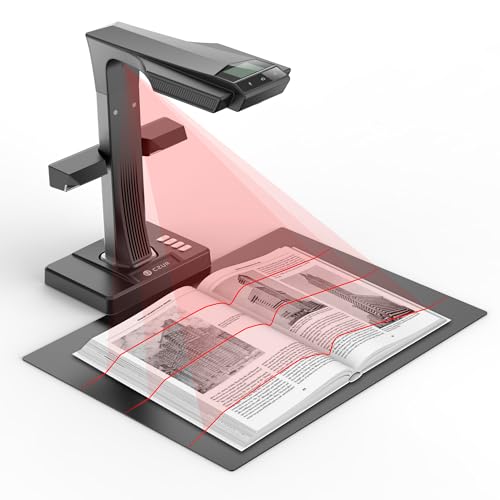
- 24MP camera with 320 DPI capture
- A3 support and page-flattening technology
- ABBYY OCR with 180+ language recognition
Best For: Large-format books and professional desktop scanning
Best Portable Choice
IRIScan Book 7 Handheld Scanner

- Handheld design with rechargeable battery
- Up to 1050 DPI and MicroSD storage
- Readiris OCR and PDF tools included
Best For: Travel, mobile scanning, and quick Windows transfers
Best with Extra Features

- 38MP sensor and 410 DPI capture detailed scans
- Flattens curved book pages without unbinding
- A3 area, fast scanning, and 180+ language OCR
Best For: High-volume digitization and detailed Windows scanning
Best Heavy-Duty Pick
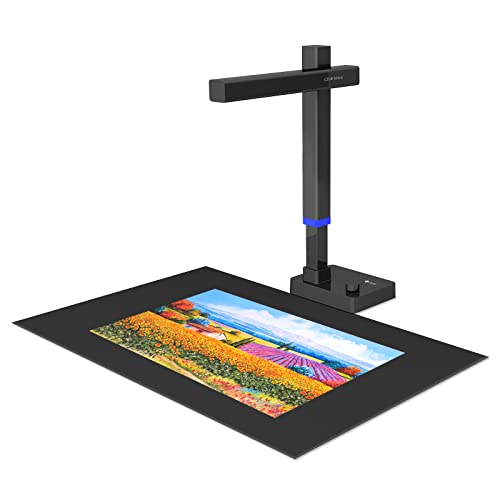
- Works with Windows XP through Windows 11
- Flattens curved pages and creates searchable files
- Foldable, height-adjustable design weighs 2 pounds
Best For: Portable book and document scanning
Best Value Book Workflow

- Scans pages in about 1.5 seconds
- Flattens curved pages for bound-book scanning
- Handles books, binders, cards, vouchers, and objects
Best For: Fast book digitization and versatile document work
Best Large-Format Pick – VIISAN S21 A2 Book Scanner
For shoppers comparing book scanners for windows, the VIISAN S21 stands out when you need to capture oversized materials. Its A2 scanning area, adjustable overhead design, and book-focused software make it suitable for large pages as well as ordinary documents.
Best For: Large-format journals, newspapers, maps, manuscripts, books, and mixed media.
Pros:
- A2 capture size supports materials up to 594 × 420 mm.
- 26MP capture with software-enhanced resolution up to 600 DPI.
- Auto-flattens curved pages, removes fingers, repairs edges, and splits facing pages.
- OCR can export files to PDF, Word, Excel, EPUB, or text formats.
Cons:
- Bundled OfficeCam software supports Windows x64/x86 but not ARM-based devices such as Surface Pro X.
- Glare-prone paper is not recommended, and the built-in light is not intended for bright conditions.
- Its larger A2 design may be more scanner than some home users need.
The S21 is a particularly flexible choice for Windows users who need more than standard letter-size scanning. Confirm your computer uses a supported processor architecture before buying.
Best Portable Value – CZUR Shine Ultra Book Scanner
The CZUR Shine Ultra is a practical option among book scanners for windows if portability and quick page capture matter. It scans pages in about one second, folds for transport, and doubles as a USB document camera for remote teaching or meetings.
Best For: Portable A3/A4 scanning, thin books, classroom use, and fast document digitization.
Pros:
- Scans pages in approximately one second.
- Foldable, lightweight design with a two-level adjustable neck and foot pedal.
- OCR supports more than 180 languages, with searchable and editable file workflows.
- Works as both a scanner and a document camera compatible with Zoom and Google Meet.
Cons:
- Its curved-page flattening technology is intended for thinner books; CZUR recommends the ET series for thicker books.
- Thai, Hebrew, and Arabic are not supported by the listed OCR functionality.
- Not compatible with Android or iOS.
Choose the Shine Ultra when you want a compact Windows-compatible scanner for frequent travel, teaching, or everyday paper capture. Its limitations are most relevant to thick books and unsupported OCR languages.
Best High-Resolution Option – VIISAN K48 48MP Book Scanner
For demanding Windows scanning projects, the VIISAN K48 combines high-resolution capture with book-friendly automation. It is designed to produce detailed digital copies while reducing cleanup through AI-assisted flattening and automatic page splitting.
Best For: Textbooks, archives, reports, worksheets, and users who also need a 4K document camera.
Pros:
- 48MP capture and support for up to 600 DPI for detailed pages.
- AI-assisted page flattening and automatic page splitting streamline book scanning.
- OCR creates searchable PDFs and editable digital documents.
- Functions as a 4K USB document camera at 30fps for teaching and presentations.
Cons:
- Its advanced feature set may be more than needed for occasional basic scans.
- Connection is USB, so it is intended for a connected desktop setup.
- The supplied notes specify a one-year manufacturer warranty but do not list detailed software compatibility versions.
The K48 is a strong fit when image detail and productivity features take priority. It is especially appealing for Windows users digitizing many bound pages or switching between scanning and live document sharing.
Best Reading-Light Combo – CZUR Aura Pro Book Scanner
The CZUR Aura Pro is a versatile choice among book scanners for windows, combining A3/A4 scanning with a glare-free smart lamp. Its laser-based page flattening and OCR features make it useful for both digitizing books and working with printed documents.
Best For: Home offices, reading areas, A3/A4 documents, and users who want scanning plus adjustable lighting.
Pros:
- Scans at approximately two seconds per page and supports JPG, Word, PDF, and searchable PDF output.
- Three laser lines and AI processing help flatten curved book pages.
- 32 LEDs plus supplemental side lights provide four color-temperature settings.
- OCR supports more than 180 languages and the unit works with Windows and macOS.
Cons:
- Thai, Hebrew, and Arabic are not supported by the listed OCR functionality.
- It connects by USB and does not require or provide Wi-Fi or Bluetooth connectivity.
- Its A3/A4 format may not suit oversized materials beyond that range.
The Aura Pro makes sense for users who want a scanner that also improves their desk or reading setup. It offers a balanced combination of book flattening, fast capture, OCR, and adjustable lighting.
Best All-in-One Pick – VIISAN DB8401 Book Scanner
For shoppers comparing book scanners for Windows, the VIISAN DB8401 combines a 16MP autofocus camera with OCR, text-to-speech, and a compact foldable design. It is suited to digitizing books and documents while also handling live presentations and video calls.
Best For: Windows users who want a versatile scanner for books, documents, accessibility, and remote learning.
Pros:
- 16MP autofocus camera captures books, papers, photos, receipts, and 3D objects.
- OCR can create editable Word, Excel, PDF, and searchable text files.
- Text-to-speech, multilingual recognition, and Gemini-powered translation and summaries add useful accessibility features.
- Foldable, portable design works with Windows and macOS through USB without requiring drivers.
Cons:
- AI features require the VisualCam Lite Web UI and Chrome connection to Gemini.
- It is a USB document camera rather than a standalone scanner with onboard storage.
The DB8401 is a strong choice when you need more than page capture. Its camera format, OCR, read-aloud tools, and portability make it particularly flexible for study, office work, and online teaching.
Best Professional Option – CZUR ET24 Pro Book Scanner
The CZUR ET24 Pro is a professional-style option among book scanners for Windows, with a 24MP camera, A3 scanning support, page-flattening technology, and ABBYY OCR. Its multiple lights and HDMI connection are useful for larger books, glossy pages, and document-camera work.
Best For: Offices, libraries, researchers, and Windows users scanning large-format books and documents.
Pros:
- 24MP camera delivers up to 5696 × 4272 resolution and 320 DPI.
- Scans materials up to A3 size, including books, magazines, artwork, receipts, and business cards.
- ABBYY OCR supports conversion to editable PDF, Excel, and Word files across 180+ languages.
- Page flattening, three-angle lighting, HDMI, and a real-time preview screen support controlled scanning.
Cons:
- At 4.5 kg, it is substantially less portable than handheld scanners.
- Very glossy paper is not recommended, despite the included side-lighting options.
- Some OCR language limitations apply, including Thai and Hebrew; Arabic support depends on Windows.
The ET24 Pro is best suited to demanding desktop workflows where image quality, page handling, and large-format support matter more than compactness. Windows compatibility extends back to XP, with newer macOS and Ubuntu support also listed.
Best Portable Choice – IRIScan Book 7 Handheld Scanner
The IRIScan Book 7 takes a different approach to book scanners for Windows: it is a lightweight handheld scanner that saves JPEG or PDF files to a MicroSD card or transfers them by USB. With selectable resolutions up to 1050 DPI and included OCR software, it is designed for scanning away from a desk.
Best For: Students, travelers, lawyers, and mobile users who need quick handheld scanning with Windows and Mac support.
Pros:
- Compact, rechargeable, and portable for home, office, library, or travel use.
- Scans at 300, 600, or 1050 DPI and stores files directly on the included MicroSD card.
- Included Readiris software supports OCR, PDF editing, and conversion to Word, PDF, and Excel.
- USB-C connectivity supports computer transfers, while the battery can scan up to 750 pages daily at 300 DPI under stated conditions.
Cons:
- It does not support Wi-Fi, so wireless transfer is not available.
- Scanning is manual and slower at higher resolution, taking up to 11 seconds per A4 page at 1050 DPI.
- An AC adapter is not included.
The IRIScan Book 7 is the most travel-friendly option here. Choose it when portability, MicroSD storage, and occasional document or book capture are more important than automated page flattening or camera-style presentation features.
Best with Extra Features – CZUR ET MAX
For shoppers comparing book scanners for Windows, the CZUR ET MAX stands out with a 38MP sensor, automatic curve flattening, and fast USB scanning. It supports Windows, macOS, and Ubuntu Linux, while its A3 scanning area suits larger books and documents.
Best For: High-volume book digitization, detailed archival scans, and users who need broad OCR support on Windows.
Pros:
- 38MP sensor captures high-resolution 7168 × 5376 images.
- Curve-flattening technology corrects bound-book distortion without unbinding.
- OCR exports editable Word and Excel files plus searchable PDFs in 180+ languages.
- Scans pages in about 1.5 seconds with practiced operation.
Cons:
- Not recommended for glossy or highly reflective materials.
- Arabic OCR is limited to Windows on the ET Series, while Thai and Hebrew are unsupported.
- Linux support is limited to Ubuntu 20.04 through 24.04.
The ET MAX is the strongest choice here when resolution, speed, and large-format flexibility matter most. Its HDMI output is also useful for live demonstrations or projection.
Best Heavy-Duty Pick – CZUR Shine Ultra Pro
The CZUR Shine Ultra Pro is a practical option among book scanners for Windows when portability is important. Its 24MP camera, page-flattening capability, and foldable design make it suitable for moving between workspaces while still supporting searchable and editable output.
Best For: Students, mobile professionals, and home users who want a lightweight scanner for books and everyday documents.
Pros:
- Compatible with Windows XP/7/8/10/11 and recent macOS versions.
- Flattens curved book pages through pixel transformation.
- Exports JPG, PDF, searchable PDF, Word, and Excel files.
- 90-degree foldable, height-adjustable design weighs only 2 pounds.
Cons:
- Its 24MP resolution is lower than the ET MAX’s 38MP sensor.
- Uses a USB connection rather than a stated wireless connection.
- The supplied notes do not specify an OCR language count.
Choose the Shine Ultra Pro if you value a compact footprint and flexible file output more than maximum image resolution. Its Windows 11 compatibility and low weight make it easy to integrate into a portable setup.
Best Value Book Workflow – CZUR ET16 Plus
The CZUR ET16 Plus is designed for efficient book scanning on Windows, combining a 16MP camera with automatic page flattening and a stated 1.5-second-per-page scanning speed. It can also handle business cards, vouchers, binders, and some physical objects.
Best For: Users digitizing complete books who want fast batch scanning and versatile document handling.
Pros:
- Can scan a 300-page book in about 10 minutes according to the supplied notes.
- Flattening technology corrects the 3D curve of book pages.
- Supports books, binders, business cards, vouchers, and physical objects.
- OCR supports more than 180 languages, with Windows-specific Arabic support.
Cons:
- Very reflective or glare-prone paper is not recommended.
- Its 16MP camera offers less resolution than the ET MAX and Shine Ultra Pro.
- Thai and Hebrew OCR are not supported.
The ET16 Plus is a sensible fit for large scanning projects where speed and flexibility outweigh top-end resolution. Its supplemental lighting and flattening system are particularly useful for bound books.
How We Picked These Book Scanners for Windows
We focused on scanners and document cameras that are practical for Windows-based workflows, with attention to capture resolution, maximum page size, OCR support, automatic page flattening, lighting, portability, and connection options. Models with overhead designs can scan bound books without forcing pages flat, while handheld and compact units are better suited to travel or occasional use.
We also considered workflow features that reduce editing time, including finger removal, laser positioning, autofocus, automatic cropping, and bundled scanning software. Specifications can vary by software, lighting, and computer configuration, so verify current Windows compatibility and included drivers before buying.
Quick Comparison
| Best For | Features to Prioritize |
|---|---|
| Frequent book digitization | High-resolution camera, page flattening, OCR, fast capture |
| Large books and artwork | A3 or A2 capture area, strong lighting, adjustable framing |
| Portable scanning | Compact design, USB or wireless operation, onboard storage |
| Archival-quality documents | High optical resolution, consistent illumination, reliable file export |
| Teaching and presentations | Autofocus, responsive preview, document-camera functionality |
Key Buying Factors for Book Scanners for Windows
Windows Software and OCR
Confirm that the scanner supports your Windows version and that the software can export searchable PDF, Word, or image files. OCR is especially useful for research, receipts, manuals, and textbooks, but accuracy depends on print quality, font size, page curvature, and contrast.
Capture Size and Resolution
Choose an A3 scanner for most large books, magazines, and sheet music; A2 coverage is useful for oversized material. Higher megapixel counts can preserve more detail, but lighting and software processing matter just as much as the headline specification.
Page Flattening and Book Handling
Automatic page flattening, finger removal, and laser guidance can make overhead scanning substantially faster. For delicate bindings, a non-contact design is usually preferable to pressing the book against glass.
Connection, Speed, and Storage
USB models are generally straightforward for Windows desktops and laptops, while wireless or SD-card support can improve portability. Check whether the scanner requires constant computer access and whether the included cable, stand, and software meet your setup requirements.
Who Should Buy Which Book Scanners for Windows?
Choose a professional overhead model if you scan books regularly, need high throughput, or work with large pages. Prioritize page-flattening tools, a wide capture area, and dependable OCR.
Choose a portable document scanner if you travel, scan intermittently, or have limited desk space. Compact models are convenient, though they may offer less flexibility for very large books and thick bindings.
Choose a versatile document camera if you need one device for books, loose documents, demonstrations, and remote teaching. Autofocus and a responsive preview are valuable for switching between subjects.
Choose a wireless handheld option for quick scans away from a desk or when onboard storage matters most. It is best for convenience and portability rather than high-volume book digitization.