
External recorders can make focus pulling more dependable by giving you a larger, brighter monitoring surface, clearer image tools, and recording options beyond your camera’s internal codec. The right model depends on your camera outputs, lens workflow, crew setup, and whether you need a compact monitor or a full production recorder.
We’ve gathered 10 options ranging from HDMI monitor-recorders and professional video interfaces to compact capture and on-camera recording tools. Use the guide below to narrow the list by resolution, recording format, monitoring features, power, and budget.
Best 10 Camera External Recorders for Focus Pulling Picks for 2026
Best RAW Monitor-Recorder

- 1500-nit 5.2-inch HDR display
- Focus peaking, false color, and waveform tools
- ProRes RAW recording with camera control
Best For: Detailed focus monitoring and RAW recording
Best Computer Capture Unit
Blackmagic UltraStudio Mini Recorder 12G

- 12G-SDI and HDMI inputs
- Supports UHD 4K60 signals
- Thunderbolt 4 computer output
Best For: Computer-based capture and monitoring workflows
Best All-Around HDMI Monitor
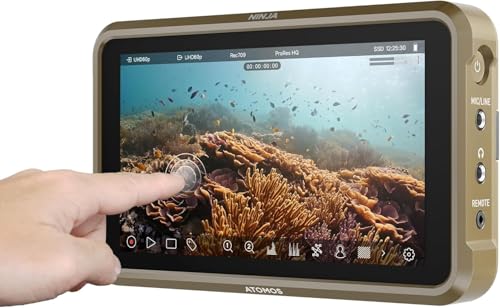
- 5.2-inch, 1000-nit monitor
- Records 4Kp60 and up to 6Kp30 ProRes RAW
- Supports ProRes, DNxHD, and H.265
Best For: Compact HDMI camera rigs needing monitoring and recording
Best Audio-Focused Recorder

- Clip-resistant 32-bit float audio
- Mono and two stereo pickup modes
- Built-in shock mount and camera safety output
Best For: On-camera audio capture alongside a separate focus monitor
Professional Monitoring Pick
Blackmagic Video Assist 5'' 3G

- 5-inch 1080p LCD with 2500 cd/m² brightness
- Focus assist, scopes, 3D LUTs, and HDR support
- Portable HDMI monitor-recorder design
Best For: Compact professional monitoring and focus-pulling assistance
Advanced RAW Recording Pick

- 1500-nit touchscreen with touch-to-focus control
- Records ProRes RAW and other professional codecs
- Captures up to 6K RAW to CFexpress or USB-C storage
Best For: High-end focus monitoring and flexible RAW recording
Budget Focus-Assist Pick
RH35 Unlimited Recording Monitor
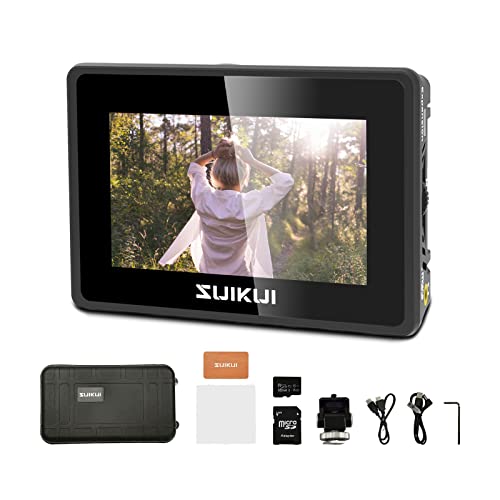
- Compact 3.5-inch HDMI monitor-recorder
- Peaking, focus assist, waveform, zebra, and false color
- Unlimited H.264 1080p30 recording to removable media
Best For: Affordable basic focus and exposure monitoring
Premium 8K Workflow

- 1500 cd/m² 5.2-inch touchscreen
- 12G-SDI and HDMI 2.0 I/O
- Up to 8K30 ProRes RAW recording
Best For: High-end rigs needing SDI and advanced RAW recording
Wireless Focus Workflow
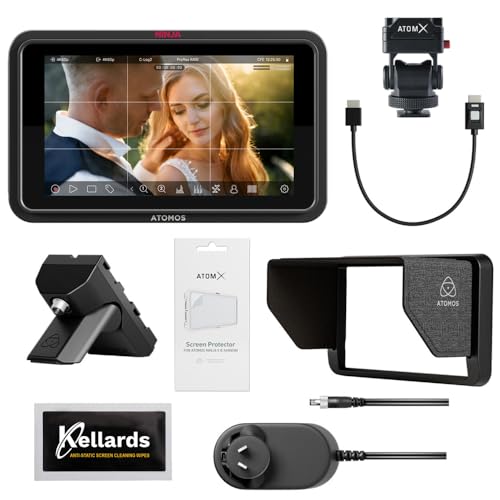
- Touch-to-focus camera control
- Up to 6K RAW to CFexpress or USB-C
- Wi-Fi 6E, NDI, and cloud-upload support
Best For: HDMI shooters wanting touch focus and connected workflows
Battery-Ready Focus Setup

- Includes NP-F770 battery and charger
- Touch-to-focus 5-inch touchscreen
- Up to 6K RAW recording
Best For: Portable HDMI rigs needing an included power solution
Best RAW Monitor-Recorder – Atomos Ninja RAW
For camera external recorders for focus pulling, the Atomos Ninja RAW combines a bright 5.2-inch HDR screen with focus peaking, EL Zone false color, waveform tools, and RAW recording. Its camera-control features and flexible power options make it suited to mobile productions using compatible HDMI or USB-C cameras.
Best For: Filmmakers who need detailed focus and exposure monitoring alongside ProRes or ProRes RAW recording.
Pros:
- 1500-nit HDR touchscreen remains highly visible in bright conditions.
- Includes focus peaking, EL Zone false color, waveform, and Onion Skin tools.
- Records ProRes, ProRes RAW, and other listed formats to CFexpress Type B or external USB-C storage.
- Supports camera control and NP-F, USB-C power bank, or DC power.
Cons:
- Some storage and network accessories are sold separately.
- Its 5.2-inch display is compact for complex on-set monitoring.
The Ninja RAW is the most feature-rich option here for operators who want focus-pulling aids, camera control, and high-quality external recording in one rugged monitor-recorder.
Best Computer Capture Unit – Blackmagic UltraStudio Mini Recorder 12G
The Blackmagic UltraStudio Mini Recorder 12G is a compact choice among camera external recorders for focus pulling when your workflow centers on a computer display. It accepts 12G-SDI and HDMI signals, supports video up to UHD 4K60, and connects to a computer through Thunderbolt 4.
Best For: Productions that route camera feeds into DaVinci Resolve, OBS, Wirecast, vMix, or other supported computer software.
Pros:
- Accepts both 12G-SDI and HDMI inputs.
- Supports common codecs up to UHD 4K60.
- Works with popular video software, including DaVinci Resolve, OBS, Wirecast, and vMix.
- Provides uncompressed or compressed 10-bit 4:2:2 YUV and 4:4:4 RGB quality.
Cons:
- Requires a computer connection through Thunderbolt 4 for output.
- Does not function as a standalone on-camera monitor-recorder in the supplied specifications.
This is best viewed as a computer-based capture interface rather than a field monitor. It makes sense when your focus or monitoring setup already lives in a desktop or laptop workflow.
Best All-Around HDMI Monitor – Atomos Ninja
The Atomos Ninja is a practical pick among camera external recorders for focus pulling, pairing a 5.2-inch monitor with recording up to 4Kp60 and a broad range of HDMI-output cameras. Its 1000-nit display, camera-mount design, and recording-assistance tools suit compact video rigs.
Best For: Shooters who want an on-camera monitor-recorder with focus-friendly viewing and flexible ProRes, DNxHD, or H.265 capture.
Pros:
- Records up to 4Kp60 in ProRes, Avid DNxHD, and H.265.
- Supports up to 6Kp30 in Apple ProRes RAW.
- 1000-nit 5.2-inch screen includes ARRI False Color and other monitoring features.
- RecordAssist and PlayBackAssist help organize recording and playback.
Cons:
- Its native display resolution is listed as 1920×1080 despite supporting higher-resolution input and recording.
- Supplied notes identify HDMI camera compatibility but do not specify camera-control functions.
The Ninja offers a balanced combination of monitoring and recording for HDMI-based cameras. It is a strong general-purpose option when RAW capability and a clean on-camera form factor matter.
Best Audio-Focused Recorder – Zoom M3 MicTrak
The Zoom M3 MicTrak is a different kind of solution for camera external recorders for focus pulling: it records production audio while moving with the camera. Its built-in shock mount, clip-resistant 32-bit float capture, and selectable pickup patterns help keep dialogue and ambience usable during fast-moving shoots.
Best For: Filmmakers who need a lightweight on-camera shotgun recorder and a dependable audio track alongside separate focus-monitoring equipment.
Pros:
- 32-bit float recording captures audio without manual gain setting and helps avoid clipping.
- Offers mono, 90-degree stereo, and 120-degree stereo pickup modes.
- Saves a Mid-Side RAW backup and can send a safety track to the camera through 3.5mm output.
- Built-in shock mount, up to 12 hours of battery life, and SDXC support up to 1TB.
Cons:
- It is an audio recorder, not a video monitor or focus-pulling display.
- Uses two AA batteries for its stated battery-powered operation.
- Its supplied specifications list one channel.
The M3 MicTrak should complement—not replace—a video monitor-recorder. Choose it when clean, flexible on-camera audio is the priority and focus pulling is handled by another device.
Professional Monitoring Pick – Blackmagic Video Assist 5'' 3G
The Blackmagic Design Video Assist 5” 3G combines a 5-inch 1080p LCD with recording, professional scopes, 3D LUTs, HDR support, and focus assist. For camera external recorders for focus pulling, it provides a practical monitoring setup with HDMI connectivity and a touchscreen interface.
Best For: Filmmakers who want a compact monitor-recorder with focus-assist tools and professional exposure scopes.
Pros:
- Built-in focus assist and professional scopes support on-set monitoring.
- Full HD 1920×1080 resolution with a bright 2500 cd/m² display.
- Supports 3D LUTs and HDR picture-quality enhancements.
- Portable 5-inch touchscreen design with HDMI connectivity.
Cons:
- Its 5-inch screen may feel small for detailed focus work compared with larger monitors.
- The supplied notes do not specify recording codecs or storage media.
This is a well-rounded choice when focus pulling, exposure evaluation, and compact monitoring matter more than a detailed list of recording specifications.
Advanced RAW Recording Pick – Atomos Ninja TX GO 5-inch
Atomos Ninja TX GO 5-inch Camera Monitor-Recorder, HDMI CFexpress Wi-Fi HDR Touchscreen ProRes RAW
Check Price On AmazonThe Atomos Ninja TX GO is a 5-inch monitor-recorder built for camera operators who need a bright touchscreen, touch-to-focus control, and flexible recording options. Among camera external recorders for focus pulling, its 1500-nit display, HDMI input/output, and support for ProRes RAW make it a particularly capable option.
Best For: Production teams needing touch-to-focus monitoring and high-quality recording, including capture up to 6K RAW to compatible media.
Pros:
- 1500-nit 5-inch touchscreen supports monitoring in bright conditions.
- Offers camera control and touch-to-focus functionality.
- Records ProRes, ProRes RAW, Avid DNx, H.265, and H.264.
- Supports capture up to 6K RAW to CFexpress Type B or compatible USB-C storage.
Cons:
- Compatible CFexpress media, drives, and some accessories may be required separately.
- Its feature-rich design may be more than needed for basic recording.
- The supplied notes list a one-year warranty, extendable to two years with registration.
The Ninja TX GO is the strongest fit here for users who want focus-oriented touchscreen control alongside a broad range of professional recording formats and modern connectivity.
Budget Focus-Assist Pick – RH35 Unlimited Recording Monitor
The SUIKUI RH35 is a compact 3.5-inch HDMI monitor-recorder with unlimited H.264 1080p30 recording and dedicated focus-assist features. For camera external recorders for focus pulling, it offers peaking, waveform, zebra, exposure assist, and false color in a small, lightweight package.
Best For: Camera users who need an affordable, compact monitor with basic recording and several focus and exposure aids.
Pros:
- Includes peaking and focus assist for on-camera focusing.
- Provides waveform, zebra, exposure assist, and false color tools.
- Records H.264 1080p30 without a stated recording limit.
- Supports HDMI input/output and recording to microSD or USB flash drive.
Cons:
- The 3.5-inch 800×480 display is less detailed than the larger Full HD options.
- Recording is limited to H.264 1080p30 rather than higher-resolution or RAW formats.
- The supplied weight details differ between the bullet and specification notes.
The RH35 makes sense for straightforward focus assistance and continuous HD capture when portability and basic monitoring tools are more important than advanced recording formats.
Premium 8K Workflow – Ninja TX
For camera external recorders for focus pulling, the Atomos Ninja TX combines a bright 5.2-inch touchscreen with camera control and professional recording options. Its 1500 cd/m² display, locking HDMI and 12G-SDI connections, and integrated Wi-Fi and timecode sync make it suited to demanding production setups.
Best For: Shooters who need a bright monitor-recorder with 12G-SDI, HDMI 2.0, and up to 8K30 ProRes RAW recording.
Pros:
- 1500 cd/m² 1920 x 1080 IPS touchscreen for clear monitoring.
- Records ProRes, Avid DNx, H.265/H.264, and up to 8K30 ProRes RAW.
- Locking 12G-SDI and HDMI 2.0 input/output support.
- Includes Wi-Fi 6, timecode sync, NDI licensing, and cross conversion.
Cons:
- Uses a CFexpress Type B slot for recording media.
- At 0.67 kg, it may add noticeable weight to a compact camera rig.
The Ninja TX is the more connectivity-focused choice in this group. It is especially compelling when SDI, high-brightness viewing, and 8K RAW capture matter more than a minimal HDMI-only setup.
Wireless Focus Workflow – Ninja TX GO Creator Bundle
The Ninja TX GO is a practical option among camera external recorders for focus pulling, with a 1500-nit touchscreen, touch-to-focus camera control, and professional monitoring tools. This bundle also includes an accessory kit and screen-cleaning wipes for a more ready-to-use monitoring setup.
Best For: HDMI-based users who want touch focus, up to 6K RAW recording, Wi-Fi 6E, and direct cloud-upload options.
Pros:
- Bright 1500-nit 5-inch touchscreen supports outdoor monitoring.
- Provides camera control and touch-to-focus functions.
- Records ProRes, ProRes RAW, Avid DNx, and H.265/H.264.
- Supports up to 6K RAW capture, NDI streaming, and Wi-Fi 6E.
Cons:
- Storage, network adapter, and calibration probe options may be sold separately.
- Powered by USB-C, NP-F battery, or AC adapter, so power planning is required.
With its touch-to-focus controls and broad recording format support, this Ninja TX GO bundle fits crews that prioritize responsive on-camera operation and connected workflows. Its HDMI input/output makes it less suited to productions specifically requiring SDI.
Battery-Ready Focus Setup – Ninja TX GO Power Bundle
For camera external recorders for focus pulling, this Ninja TX GO bundle pairs a bright 5-inch monitor-recorder with a Watson NP-F770 battery and compact AC/DC charger. It delivers touch-to-focus control, up to 6K RAW capture, and multiple recording formats while addressing the power needs of a mobile setup.
Best For: HDMI-based operators who want touch focus and a supplied NP-F battery-and-charger package.
Pros:
- Includes a Watson NP-F770 battery and compact AC/DC charger.
- 1500-nit touchscreen supports bright, detailed monitoring.
- Records ProRes, ProRes RAW, Avid DNx, and H.265/H.264.
- Captures up to 6K RAW to CFexpress Type B or compatible USB-C storage.
Cons:
- Uses HDMI input/output rather than the SDI connectivity listed for the Ninja TX.
- Compatible external storage and optional network accessories may require separate purchases.
This is the most convenient choice for buyers who want the Ninja TX GO features with a dedicated battery and charger included. It is a strong fit for portable HDMI rigs where reducing separate power purchases matters.
How We Picked the Best Camera External Recorders for Focus Pulling
We focused on features that directly affect practical focus work: screen size and visibility, focus-assist tools, input compatibility, recording quality, latency, mounting flexibility, and power options. We also considered how each unit fits different production styles, from a solo operator using a mirrorless camera to a crew working with a dedicated focus puller.
Not every product here serves the same role. Some are complete HDMI monitor-recorders, while others are capture interfaces or specialized on-camera recorders. Confirm your camera’s output format and the recorder’s supported resolution before buying.
Quick Comparison
| What to Compare | Why It Matters |
|---|---|
| Input and output | Ensures compatibility with your camera, wireless video system, or external display. |
| Recording format | Determines editing flexibility, storage needs, and post-production compatibility. |
| Focus tools | Peaking, magnification, false color, and waveform tools help confirm critical focus. |
| Screen and brightness | A larger, brighter display is easier to judge outdoors or from a focus-puller’s position. |
| Power and media | Battery type, runtime, storage media, and data rates affect shooting continuity. |
Key Buying Factors for Camera External Recorders for Focus Pulling
Prioritize Usable Focus-Assist Tools
Look for adjustable focus peaking, punch-in magnification, waveform or false-color exposure tools, and a responsive touchscreen or physical controls. These features are more valuable than resolution alone when you need to verify focus quickly during a take.
Match the Recorder to Your Camera Output
Check whether your camera sends clean HDMI, the required frame rate, and the desired bit depth or color format. HDMI monitor-recorders are common for mirrorless and compact cinema cameras, while SDI-based workflows may require a different class of device or adapter.
Choose Recording Quality Deliberately
ProRes and ProRes RAW can provide robust editing and grading options, but they require compatible cameras, media, and substantial storage. If you only need a larger viewing screen, a recorder with lighter capture settings may be more practical and affordable.
Plan the Physical and Power Setup
Consider screen placement, mounting points, cable strain, battery availability, and whether the unit can run through a full shooting day. A compact recorder is useful on a gimbal or small rig; a larger monitor may be better when the focus puller works beside the camera.
Who Should Buy Which Camera External Recorders for Focus Pulling?
Solo filmmakers and mirrorless users: Choose a compact HDMI monitor-recorder with strong focus aids, simple controls, and manageable battery requirements.
Professional cinema crews: Favor models with dependable monitoring scopes, high-quality recording formats, broad camera compatibility, and production-friendly power and mounting options.
Editors and post-focused shooters: Select a recorder that supports the codec and color workflow your editing system already handles efficiently.
Live, streaming, or capture users: A dedicated video interface or basic HDMI capture monitor may be the better fit if recording an in-camera master is less important than reliable signal delivery.
Before checkout, verify the camera’s clean-output settings, supported recorder resolution, required media, cables, and battery system. Those details usually determine whether a promising recorder works smoothly on your actual rig.