
The best compact sublimation printers make it easier to create colorful apparel, mugs, stickers, photos, and other personalized products without dedicating an entire room to equipment.
This roundup compares purpose-built dye-sublimation models with compact photo and craft printers, helping you match print size, connectivity, running costs, and project type to your needs.
Best 10 Compact Sublimation Printers Picks for 2026
Best Overall

- Dedicated 8.5-inch dye-sublimation printer
- Includes genuine Epson ink and a 150-sheet tray
- Supports Windows, macOS, Wi-Fi, USB, and Ethernet
Best For: Crafters and small businesses wanting a reliable dedicated sublimation printer
Best Ink Value

- Refillable system includes high-yield ink
- Prints, scans, and copies over Wi-Fi
- Handles paper, cardstock, envelopes, and photo media
Best For: Home offices that want low-cost everyday color printing
Best Portable Pick
Canon SELPHY QX20 Photo Printer

- Battery-powered dye-sublimation photo printer
- Prints small card-size and square stickers
- Works wirelessly with Android and iOS devices
Best For: Portable sticker-photo printing and personalizing small labels
Best Wireless Photo Printer

- 19-second 4x6-inch prints
- Wi-Fi, USB, and mobile support
- Glossy or matte finishing
Best For: Wireless event photography and quick small-format photo printing
Best Transfer-Focused Printer

- Supports media up to 8.5 inches wide
- Includes genuine Epson sublimation ink
- 150-sheet enclosed auto-feed tray
Best For: Personalized gifts, promotional products, and small sublimation businesses
Best Portable Photo Printer

- About 14-pound portable design
- 19-second 4x6-inch prints
- Includes 4x6 media and accessories
Best For: On-site events and compact wired photo-printing setups
Best Portable Photo Pick

- Includes 100 sheets and three cartridges
- Direct Wi-Fi supports up to five devices
- Laminated, water-resistant 4x6 prints
Best For: Portable smartphone photo printing
Best All-in-One Craft Choice
Liene PixCut S1 Sticker Printer
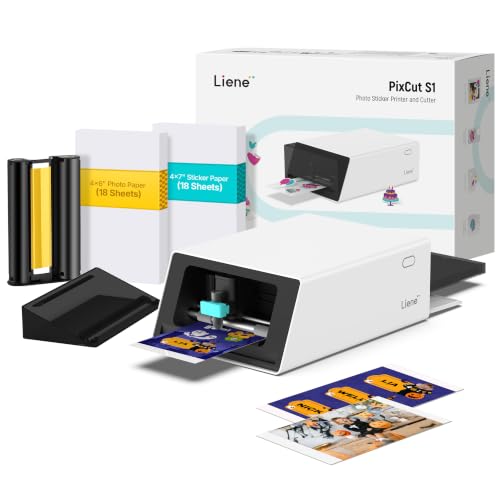
- Prints and cuts stickers in one device
- AI-assisted image extraction and cutting
- 300 dpi prints with automatic lamination
Best For: DIY stickers, labels, and craft projects
Best Premium 4x6 Option

- Includes 118 sheets and three cartridges
- Wireless printing through the HP Sprocket app
- Waterproof, smudge-proof 4x6 photo paper
Best For: Convenient home smartphone photo printing
Best Overall – Epson SureColor F170
The Epson SureColor F170 is a strong all-around choice among compact sublimation printers for crafters and small businesses. Its 8.5-inch format, included genuine Epson ink, closed 150-sheet tray, and Windows and macOS support make it practical for producing transfers for mugs, apparel, mousepads, and other compatible items.
Best For: Hobbyists, crafters, and small business owners who want a dedicated, compact sublimation setup.
Pros:
- Includes a full set of genuine Epson sublimation inks and an Epson warranty.
- PrecisionCore printhead with Precision Droplet Control supports detailed color output.
- Closed 150-sheet auto-feed tray helps keep paper cleaner and reduces frequent loading.
- Supports wireless, USB, and Ethernet connections.
Cons:
- Maximum media width is 8.5 inches.
- Does not support connections to mobile devices.
- Designed for printing only, without scanning or copying.
For buyers prioritizing dependable sublimation performance in a relatively small footprint, the F170 offers a well-rounded feature set and straightforward desktop operation. Its dedicated design is more suitable for sublimation work than a general-purpose inkjet.
Best Ink Value – Canon MegaTank G3270
The Canon MegaTank G3270 is a general-purpose wireless color printer rather than a dedicated sublimation machine, but its compact home-office design and high-yield refillable ink system may appeal to shoppers comparing compact sublimation printers with versatile everyday options. It also scans and copies for added household utility.
Best For: Home users who need an economical color printer for regular documents, photos, and occasional compatible craft-paper projects.
Pros:
- Includes enough ink to print up to 7,700 color or 6,000 black-and-white pages, according to the supplied specifications.
- Wireless printing, copying, and scanning support everyday home-office tasks.
- Handles media including cardstock, envelopes, glossy photo paper, and plain paper.
- Supports mobile devices through Wi-Fi and app control.
Cons:
- It is an inkjet, not a dedicated dye-sublimation printer.
- Single-sided printing only.
- Its listed dimensions are larger than some purpose-built compact printers.
The G3270 makes sense when low ink costs and multifunction features matter more than specialized sublimation performance. Buyers seeking consistent heat-transfer workflows should instead consider a dedicated sublimation model.
Best App-Based Option – Brother SP-1 Sublimation Printer
The Brother SP-1 is a dedicated dye-sublimation printer built around the Artspira app. For shoppers considering compact sublimation printers, its phone- and tablet-focused workflow offers a convenient way to create, import, and print designs for shirts, mugs, tumblers, bags, and hats before heat pressing them onto compatible products.
Best For: DIY crafters who prefer designing and sending projects from a phone or tablet.
Pros:
- Artspira provides access to sublimation designs and supports saved and imported images.
- Includes Brother genuine sublimation ink and a starter pack of sublimation paper.
- Designed for colorful custom projects such as apparel, drinkware, bags, and hats.
- Includes a two-year limited warranty.
Cons:
- A heat press is required and sold separately.
- The supplied notes indicate that desktop Artspira support was still forthcoming.
- Intended for US 120-volt use; other use or sale may void the warranty.
The SP-1 is appealing for creators who want an approachable mobile design workflow and a dedicated sublimation printer. It is less suitable for buyers who require a desktop-first design application or an all-in-one crafting setup.
Best Portable Pick – Canon SELPHY QX20 Photo Printer
The Canon SELPHY QX20 is an ultra-portable dye-sublimation photo printer for small sticker prints, not a full-size transfer printer. Its built-in battery, integrated paper tray, wireless mobile connection, and roughly 40-second print time make it a convenient option for shoppers comparing compact sublimation printers for photos and labels.
Best For: Travelers and mobile users who want small, personalized sticker photos from Android or iOS devices.
Pros:
- Lightweight 1.4-pound design with a built-in battery and USB-C charging.
- Prints card-size or square sticker paper through a direct mobile Wi-Fi connection.
- Produces dry, water-resistant, marker-ready prints rated to last up to 100 years.
- SELPHY Photo Layout app adds filters, stickers, and other personalization tools.
Cons:
- Paper is not included and must be purchased separately.
- Maximum print sizes are limited to 2.1 x 3.4 inches or 2.7 x 2.7 inches.
- It is intended for photos and labels rather than apparel or large sublimation transfers.
The QX20 is a good fit when portability and instant sticker printing are the priorities. Its small media formats make it a poor substitute for a standard sublimation printer used with heat-transfer blanks.
Best Wireless Photo Printer – DNP QW410 Wi-Fi Bundle
DNP QW410 4.5" Dye Sublimation Printer with WCM Plus Wi-Fi Module and 4x6" Printer Media Kit
Check Price On AmazonFor shoppers comparing compact sublimation printers, the DNP QW410 stands out as a small-format photo printer with built-in Wi-Fi through the included WCM Plus module. It produces 4×6-inch prints in about 19 seconds and supports glossy or matte finishing.
Best For: Wireless event photography, quick 4×6-inch photo printing, and users who need mobile and computer connectivity.
Pros:
- Prints 4×6-inch photos in approximately 19 seconds.
- Includes Wi-Fi connectivity for iOS, Android, Windows, and macOS devices.
- Offers 300 x 300 dpi output with glossy or matte finishes.
- Supports 4×6-inch and 4.5×8-inch media.
Cons:
- Its maximum listed media size is 4 x 6 inches, despite support for 4.5×8-inch media.
- At 22.2 pounds, it is less portable than some similarly sized printers.
- It is designed for print-only use.
The QW410 Wi-Fi bundle is a practical choice when speed and flexible connectivity matter more than large-format transfers. Its included media kit and multiple finish options make it convenient for frequent small photo runs.
Best Transfer-Focused Printer – Epson SureColor F170
The Epson SureColor F170 is a compact sublimation printer for customization businesses and personalized products. Its PrecisionCore printhead, included Epson sublimation ink, 150-sheet enclosed tray, and support for media up to 8.5 inches wide make it better suited to transfer workflows than small photo-only printing.
Best For: Beginners and small businesses producing personalized gifts, promotional products, and sublimation transfers up to 8.5 inches wide.
Pros:
- Uses PrecisionCore printhead technology with Precision Droplet Control.
- Includes a full set of Epson sublimation ink, a user guide, and power cable.
- Has a 150-sheet auto-feed tray in a dust-resistant closed design.
- Supports Wi-Fi, USB, and Ethernet connectivity.
Cons:
- Its listed print speed is about 1 page per minute.
- It is larger than the DNP QW410 at 13.7 x 14.8 x 7.4 inches.
- It is not compatible with direct email printing or camera connections.
The F170 is the more versatile pick for transfer-oriented projects and wider media. It trades the rapid output of a dedicated photo printer for an enclosed paper path, included ink, and business-friendly connectivity.
Best Portable Photo Printer – DNP QW410 4×6
If portability is a priority when comparing compact sublimation printers, this DNP QW410 is a straightforward wired option. It delivers 300 x 300 dpi 4×6-inch prints in about 19 seconds and includes the printer, paper tray, holders, power cord, booklet, warranty, and media.
Best For: On-site events, limited workspaces, and users who want a compact 4×6-inch printer with an included media bundle.
Pros:
- Compact dimensions of approximately 8 x 9.5 x 7.75 inches.
- Weighs about 14 pounds for easier transport.
- Produces 4×6-inch prints in approximately 19 seconds.
- Supports 4×6-inch and 4.5×8-inch media.
Cons:
- Connectivity is limited to wired USB 2.0.
- Its listed maximum media size is 4 x 6 inches.
- Output is limited to 300 x 300 dpi.
This QW410 bundle makes the most sense for dependable, fast photo printing away from a permanent workstation. Choose it over the Wi-Fi bundle when a lower-weight wired setup and included accessories are the bigger priorities.
Best Portable Photo Pick – Liene M100 4×6 Photo Printer
The Liene M100 is a practical choice if you want one of the more compact sublimation printers for making vibrant 4×6-inch photos at home or on the go. Its built-in Wi-Fi hotspot connects directly to phones, while thermal dye-sublimation printing produces laminated, water-resistant, scratch-resistant photos.
Best For: Families, travelers, and smartphone users who want portable 4×6 photo printing.
Pros:
- Includes 100 sheets of photo paper and three color cartridges.
- Direct Wi-Fi connectivity supports up to five simultaneous devices.
- The app offers borders, filters, brightness and contrast adjustments, plus ID and visa photo tools.
- Compact magnetic design helps with storage.
Cons:
- It prints only up to 4×6-inch photos.
- It uses Liene proprietary cartridges.
- The supplied notes advise cleaning the print head if smudges appear.
Choose the M100 when easy smartphone connectivity, included supplies, and durable 4×6 prints matter more than larger media sizes or advanced document printing.
Best All-in-One Craft Choice – Liene PixCut S1 Sticker Printer
The Liene PixCut S1 stands out among compact sublimation printers because it combines thermal dye-sublimation printing with automatic sticker cutting. Bluetooth app control lets you edit, print, and cut from a smartphone, making it a versatile option for labels, stickers, gifts, and other DIY projects.
Best For: Crafters and creators who want integrated photo printing and precision sticker cutting.
Pros:
- Prints and cuts in one workflow, with stickers made in about two minutes.
- AI image extraction helps identify subjects and guide edge-following cuts.
- Produces 300 dpi color prints with up to 16.7 million colors.
- Automatically laminated stickers are described as waterproof and scratch-resistant.
Cons:
- At 6.2 pounds, it is less portable than a basic photo printer.
- Its sticker-cutting features may be unnecessary for shoppers who only need photos.
- Operation depends on the Liene app and Bluetooth connection.
The PixCut S1 is the strongest fit here for hands-on creative work. Its extra cutting functionality adds value for makers, though a simpler photo printer may be more practical for occasional snapshots.
Best Premium 4×6 Option – HP Sprocket Studio Plus
The HP Sprocket Studio Plus is a streamlined option for shoppers comparing compact sublimation printers for wireless 4×6 photo output. It prints dry-to-the-touch color pictures from a smartphone and uses tear-resistant, smudge-proof, waterproof paper designed for lasting keepsakes.
Best For: Home users who want polished 4×6 prints with simple app-based editing.
Pros:
- Includes 118 sheets and three cartridges.
- Wi-Fi pairing works through the HP Sprocket app on Android and iOS.
- Prints vibrant, borderless 4×6 photos on durable paper.
- The app supports stickers, frames, filters, collages, photobooth images, and photo IDs.
Cons:
- It is limited to smartphone-controlled 4×6-inch printing.
- Its listed print speed is about one color page per minute, with an initial print time of 61 seconds or more.
- The maximum sheet capacity is 10 sheets.
The Sprocket Studio Plus makes sense when convenience and durable photo paper are priorities. Consider its limited format and measured print speed if you expect to produce large batches or need broader media compatibility.
How We Picked the Best Compact Sublimation Printers
We evaluated the selected models by considering their intended use, print technology, maximum output size, portability, connectivity, included supplies, and ease of setup. Because “sublimation printer” can describe several different product categories, this list includes both transfer-oriented printers for crafts and merchandise and dye-sublimation photo printers designed for fast, convenient snapshots.
We also considered whether each printer suits occasional home use, creative projects, events, or more frequent small-business production. A compact design is useful, but it should not come at the expense of reliable media handling, straightforward software, or affordable replacement supplies.
Quick Comparison
| Best For | What to Look For | Likely Fit |
|---|---|---|
| Apparel and hard-surface crafts | Transfer compatibility, color control, and larger media support | Purpose-built sublimation models |
| Instant 4×6-inch photos | Fast output, wireless printing, and bundled media | DNP, HP, or Liene photo printers |
| Portable keepsakes | Small footprint, battery-friendly operation, and mobile apps | Compact photo printers |
| Stickers and labels | Thermal printing, cutting features, and design software | All-in-one sticker printers |
| General home printing | Ink capacity, scanning, copying, and wireless access | All-in-one MegaTank models |
Key Buying Factors for Compact Sublimation Printers
Choose the Right Type of Printer
True sublimation-transfer printers are designed to print onto transfer paper for use with compatible polyester fabrics or coated blanks. They are the better choice for shirts, mugs, tumblers, and other customized products. Dye-sublimation photo printers instead produce finished photos directly and are not a substitute for transfer printing.
Check Print Size and Media Compatibility
Confirm the maximum paper or transfer size before buying. Many compact models focus on 4×6-inch photos, while transfer printers may support letter-size sheets. Also verify that your intended blanks are sublimation-compatible; ordinary cotton garments and untreated surfaces will not produce the same results.
Compare Ink, Paper, and Cartridge Costs
The purchase price is only part of the budget. Transfer printers use sublimation ink and transfer paper, while photo printers commonly require proprietary paper-and-cartridge kits. Compare the cost per finished print, included media, replacement availability, and expected waste from test prints.
Consider Workflow and Connectivity
Wi-Fi and mobile apps are convenient for casual photo printing, while USB support and dependable desktop software may matter more for design work. If you plan to print repeatedly, prioritize consistent feeding, accessible controls, and software that supports accurate color and layout adjustments.
Measure Your Workspace
Compact printers still need clearance for paper trays, cables, ventilation, and finished prints. Check the printer’s dimensions in its operating position, not only when closed or packed away.
Who Should Buy Which Compact Sublimation Printers?
Choose a purpose-built sublimation printer if you plan to make apparel, gifts, signage, or other heat-transfer products. These models offer the most relevant workflow for creative sellers and serious hobbyists.
Choose a compact dye-sublimation photo printer if your priority is quick, durable 4×6-inch photos for family events, scrapbooks, parties, or booths. Bundled media can simplify setup and make output costs easier to estimate.
Choose a portable sticker or photo printer for casual crafting, journaling, labels, and phone-based projects. These are convenient but generally more limited in size and material compatibility.
Choose an all-in-one inkjet if you need everyday documents, scanning, copying, and occasional color printing alongside craft work. It may be more versatile, but it is not necessarily a dedicated sublimation solution.