
A computer monitor with USB-C can simplify your desk by combining video, charging, and connectivity through one cable. The right model depends on whether you prioritize sharp QHD images, smooth gaming, ergonomic adjustment, or portability.
We selected 10 USB-C monitors across practical price and performance categories, from compact 1080p displays to spacious 32-inch QHD screens. Use the guide below to match specifications with your laptop, workflow, and available desk space.
Best 10 Computer Monitor with USB C Picks for 2026
Best QHD Upgrade

- 27-inch QHD IPS display with 100Hz refresh
- USB-C offers up to 15W power delivery
- HDR10, Reader Mode, and Flicker Safe features
Best For: Home offices, multimedia, and casual gaming
Best Laptop Docking Choice

- USB-C delivers up to 65W with video, audio, and data
- 27-inch QHD IPS display with 75Hz refresh
- Height, pivot, swivel, and tilt-adjustable stand
Best For: Laptop-based workstations and productivity
Best Compact High-Refresh Pick

- 23.8-inch Full HD IPS display with 144Hz refresh
- USB-C supports one-cable video and data connection
- Flicker-Free and Low Blue Light eye-care features
Best For: Small desks, office work, study, and casual gaming
Best Curved Budget Option

- 27-inch curved Full HD screen with 120Hz refresh
- USB-C, HDMI, built-in speakers, and Adaptive Sync
- HDR, anti-glare, anti-flicker, and low blue light features
Best For: Everyday work, entertainment, and casual gaming
Best for Eye-Care Workspaces
BenQ GW2790TC 27-inch USB-C Monitor

- USB-C handles video, data, and power
- 144Hz IPS display for smoother work
- Eye-care features for long sessions
Best For: Office productivity and extended daily use
Best for Budget Gaming
ViewSonic VX2416A 24-inch USB-C Monitor

- 120Hz IPS display with 1ms MPRT
- USB-C, HDMI, and DisplayPort inputs
- Variable Refresh Rate helps reduce tearing
Best For: Casual gaming and compact laptop setups
Best for Large-Screen Multitasking
LG 32U631A-B QHD USB-C Monitor
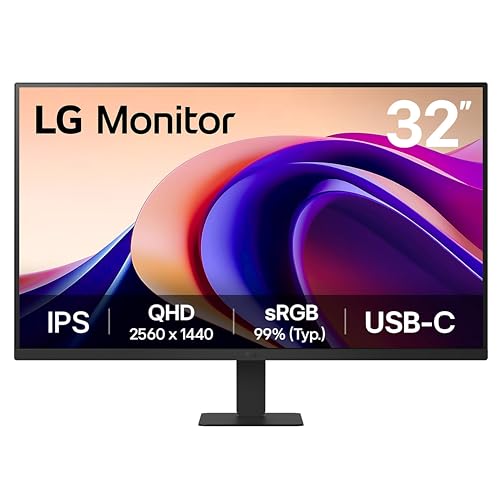
- 31.5-inch QHD IPS display
- USB-C provides up to 15W power delivery
- HDR10 and 100Hz support multimedia use
Best For: Multitasking and spacious multimedia workstations
Best Balanced Desk Pick
ViewSonic VA2448-MHU 24-Inch USB-C Monitor

- 24-inch Full HD IPS display with 120Hz refresh rate
- USB-C handles video, data, audio, and passthrough power
- HDMI, VGA, eye-care features, and Adaptive Sync
Best For: Home offices, students, and everyday desktop use
Best for Smooth Motion
MSI PRO MP242 E14C 24-Inch USB-C Monitor

- 144Hz Full HD IPS display with 1ms response time
- USB-C supports video, data, and 15W Power Delivery
- FreeSync, built-in speakers, tilt, and VESA mounting
Best For: Hybrid work-and-gaming setups
Best Portable Option
MNN 15.6-Inch USB-C Portable Monitor

- Lightweight Full HD IPS display for travel and second-screen use
- Two full-featured USB-C ports plus HDMI connectivity
- Portrait and landscape modes with smart cover stand
Best For: Travelers and mobile workspaces needing a second display
Best QHD Upgrade – LG 27U631A-B
The LG 27U631A-B is a strong computer monitor with USB-C for users who want a sharper QHD image, smooth motion, and a straightforward laptop connection. Its 27-inch IPS panel combines 2560 x 1440 resolution with a 100Hz refresh rate, HDR10, and up to 99% sRGB coverage.
Best For: Home offices, multimedia, and casual gaming where QHD detail and USB-C convenience matter.
Pros:
- QHD IPS display with wide 178-degree viewing angles
- USB-C connectivity with up to 15W power delivery
- 100Hz refresh rate, HDR10, and up to 99% sRGB coverage
- Reader Mode, Flicker Safe, and Dynamic Action Sync features
Cons:
- USB-C power delivery is limited to 15W, so it may not fully charge many laptops
- Only one HDMI port is listed
- The stand offers tilt adjustment rather than the broader ergonomic movement found on some alternatives
This LG is a well-rounded choice if image detail takes priority over high-wattage laptop charging. The 100Hz panel and comfort features also make it flexible for both work and entertainment.
Best Laptop Docking Choice – Dell S2722DC
The Dell S2722DC is a practical computer monitor with USB-C for a tidy workstation. Its USB-C connection carries power, video, audio, and data while supplying up to 65W, and the 27-inch QHD display adds useful workspace for business, education, and programming.
Best For: Laptop users who want one-cable connectivity, ergonomic adjustment, and built-in speakers.
Pros:
- USB-C provides up to 65W power delivery and carries video, audio, and data
- QHD 2560 x 1440 resolution on a 27-inch IPS display
- Height, pivot, swivel, and tilt adjustments support a flexible setup
- Built-in speakers, AMD FreeSync, and a quick-access USB-A port
Cons:
- The refresh rate is 75Hz, lower than the gaming-focused options in this roundup
- The supplied notes list a 4ms response time rather than an ultra-fast gaming specification
- It has a flat panel rather than a curved design
For a laptop-centered desk, the S2722DC has one of the most useful USB-C implementations here. Its adjustable stand and 65W delivery make it particularly convenient for daily productivity.
Best Compact High-Refresh Pick – BenQ GW2490C
The BenQ GW2490C is a compact computer monitor with USB-C aimed at home offices, study areas, and everyday gaming. Its 23.8-inch IPS panel runs at 144Hz, while USB-C simplifies connection to a laptop or MacBook with a single cable for video and data.
Best For: Smaller desks, office deployments, and users who want smooth scrolling without moving to a larger QHD display.
Pros:
- 144Hz refresh rate and 2ms response time support responsive motion
- USB-C one-cable connection for compatible laptops and MacBooks
- IPS panel with 178-degree viewing angles and 99% color gamut
- Eye-care features include Flicker-Free and Low Blue Light technology
Cons:
- Full HD resolution provides less workspace and detail than the QHD models
- The display is smaller at 23.8 inches
- The supplied notes list one HDMI port and one USB-C port
The GW2490C makes sense when desk space and fluid motion are more important than resolution. It is a focused option for routine work, study, and gaming with USB-C convenience.
Best Curved Budget Option – SANSUI ES-27C1 Curved Monitor
The SANSUI ES-27C1 is a curved computer monitor with USB-C that combines a large 27-inch Full HD screen with a 120Hz refresh rate. Built-in speakers, Adaptive Sync, HDR, and a high stated contrast ratio give it broad appeal for basic work, entertainment, and gaming.
Best For: Users seeking a curved 27-inch display with USB-C, speakers, and smooth refresh at an accessible feature level.
Pros:
- 27-inch curved screen with 120Hz refresh and 1ms MPRT response
- USB-C and HDMI connectivity plus built-in 2W speakers
- Adaptive Sync, HDR, anti-glare, anti-flicker, and low blue light features
- 110% sRGB coverage and 300-nit brightness are listed
Cons:
- Resolution is Full HD rather than QHD at this screen size
- The supplied notes do not specify USB-C power-delivery wattage
- The listed manufacturer warranty is 90 days, with additional support details provided separately
The ES-27C1 is a feature-heavy choice for shoppers who value curvature, speakers, and a fast refresh rate. Confirm the USB-C charging capability before buying if laptop power delivery is essential.
Best for Eye-Care Workspaces – BenQ GW2790TC 27-inch USB-C Monitor
The BenQ GW2790TC is a practical computer monitor with USB-C for home offices, study areas, and business workstations. Its 27-inch IPS panel combines Full HD resolution with a 144Hz refresh rate, while USB-C supports video, data, and power delivery through one cable.
Best For: Office productivity, remote work, and extended daily screen sessions.
Pros:
- USB-C provides video, data, and power delivery with one cable.
- 144Hz refresh rate supports smoother scrolling and multitasking.
- IPS display includes flicker-free and low-blue-light eye-care features.
- Height and tilt adjustment support a more flexible workstation setup.
Cons:
- Full HD resolution is less detailed than QHD on a 27-inch screen.
- The supplied information does not specify the USB-C power-delivery wattage.
This BenQ is a strong fit when comfortable office use and simple USB-C connectivity matter more than high-resolution image detail. Its adjustable design and eye-care features make it especially suitable for long workdays.
Best for Budget Gaming – ViewSonic VX2416A 24-inch USB-C Monitor
The ViewSonic VX2416A is a compact computer monitor with USB-C aimed at gaming, home use, and everyday work. Its 24-inch Full HD IPS display offers a 120Hz overclocked refresh rate, 1ms MPRT response time, and connections for USB-C, HDMI, and DisplayPort.
Best For: Casual gaming, laptop setups, and users who want flexible modern connectivity.
Pros:
- 120Hz refresh rate and 1ms MPRT response time support responsive gameplay.
- USB-C carries high-definition video, audio, and data through one cable.
- Variable Refresh Rate helps reduce tearing and stuttering.
- HDMI and DisplayPort inputs support PCs, consoles, and laptops.
Cons:
- The 24-inch Full HD screen provides less workspace than larger monitors.
- Its 250-nit brightness is suited to typical indoor use rather than bright environments.
The VX2416A prioritizes smooth motion and broad device compatibility in a smaller footprint. It is a sensible choice for a desk shared between gaming and general-purpose computing.
Best for Large-Screen Multitasking – LG 32U631A-B QHD USB-C Monitor
The LG 32U631A-B is a large computer monitor with USB-C for users who want more screen space and sharper QHD detail. Its 31.5-inch IPS panel delivers 2560 x 1440 resolution at 100Hz, with HDR10 support and USB-C charging up to 15W.
Best For: Multitasking, multimedia, and spacious desktop workstations.
Pros:
- 32-inch QHD resolution provides a spacious, detailed workspace.
- USB-C supports device connection and up to 15W power delivery.
- 100Hz refresh rate offers smoother motion than standard 60Hz.
- HDR10, up to 99% sRGB coverage, and IPS viewing angles support vivid visuals.
Cons:
- USB-C power delivery is limited to 15W, so it may not fully charge many laptops.
- Only one HDMI port and one USB port are listed in the supplied specifications.
- The large 32-inch footprint may require more desk space.
The LG stands out for buyers who value screen real estate and QHD clarity over compact dimensions. Its USB-C connection, 100Hz refresh rate, and multitasking features make it well suited to mixed work and entertainment use.
Best Balanced Desk Pick – ViewSonic VA2448-MHU 24-Inch USB-C Monitor
If you need a computer monitor with USB C for everyday work, study, and entertainment, the ViewSonic VA2448-MHU offers a practical mix of Full HD clarity, smooth 120Hz performance, and single-cable connectivity. Its IPS panel, eye-care features, and HDMI and VGA inputs make it adaptable to modern and older devices.
Best For: Home offices, students, and general desktop use where USB-C convenience and comfortable viewing matter.
Pros:
- 24-inch Full HD IPS display with wide 178-degree viewing angles.
- USB-C supports video, audio, data, and passthrough power when used with the included power adapter.
- 120Hz refresh rate, Adaptive Sync, Flicker-Free technology, and Blue Light Filter support smoother, more comfortable viewing.
- Includes HDMI, VGA, and USB-C connectivity plus 100 x 100mm mounting support.
Cons:
- Full HD resolution provides less workspace than a higher-resolution monitor.
- USB-C charging depends on using the included power adapter.
The VA2448-MHU is a well-rounded choice for buyers who want a computer monitor with USB C without giving up broad device compatibility. Its 120Hz refresh rate is useful beyond basic office work, while the 24-inch size keeps it practical for most desks.
Best for Smooth Motion – MSI PRO MP242 E14C 24-Inch USB-C Monitor
The MSI PRO MP242 E14C is a computer monitor with USB C aimed at users who want fluid motion alongside office-friendly features. Its 144Hz IPS panel, FreeSync support, built-in speakers, tilt adjustment, and 15W USB-C Power Delivery make it suitable for both productivity and casual gaming.
Best For: Workspaces that also handle gaming, video playback, and laptop connectivity.
Pros:
- 24-inch Full HD IPS screen with a 144Hz refresh rate and 1ms response time.
- USB-C supports video output, data transfer, and up to 15W Power Delivery.
- AMD FreeSync, Flicker Free, Low Blue Light, and MSI Eye-Q features support smoother and more comfortable use.
- Built-in speakers, tilt adjustment, VESA 100 x 100mm mounting, and a four-side slim bezel add flexibility.
Cons:
- Only one USB port and one HDMI port are listed.
- Full HD resolution may feel limited for users seeking more screen workspace.
Choose the MSI when motion smoothness is a priority but you still need a monitor for business or desktop tasks. The 144Hz refresh rate and FreeSync are particularly useful for fast-moving content, while USB-C Power Delivery simplifies laptop connections.
Best Portable Option – MNN 15.6-Inch USB-C Portable Monitor
For travel, flexible workspaces, and laptop screen expansion, the MNN 15.6-inch is a computer monitor with USB C designed for portability. It provides a Full HD IPS display, two full-featured USB-C ports, HDMI connectivity, landscape or portrait use, and a protective cover that doubles as a stand.
Best For: Travelers, students, remote workers, and gamers who need a lightweight second screen.
Pros:
- Lightweight 15.6-inch Full HD IPS display weighing about 1.5 pounds.
- Two full-featured USB-C ports support single-cable power and display connections on compatible devices.
- Supports landscape, portrait, copy, extended, and second-screen modes.
- Includes HDR support, HDMI connectivity, cables, and a protective smart cover that works as a stand.
Cons:
- USB-C display use requires a compatible Thunderbolt 3 or USB 3.1 Type-C DP Alt-Mode device.
- Its 60Hz refresh rate is less fluid than the desktop monitors in this roundup.
- The 15.6-inch screen is smaller than a typical full-size desk monitor.
The MNN is the most convenient choice when portability matters more than a high refresh rate or large screen. Verify that your laptop, phone, or other source supports USB-C video output before buying, then use the cover and multiple viewing modes to create a flexible second-screen setup.
How We Picked the Best Computer Monitor with USB C
We focused on monitors that offer USB-C connectivity alongside useful everyday features such as IPS panels, suitable refresh rates, built-in speakers, ergonomic adjustment, HDR support, or power delivery. The selection covers office work, home study, casual and competitive gaming, laptop-based setups, and portable use.
Because USB-C capabilities vary, we treated the port as a feature to verify rather than an automatic guarantee of full laptop docking. Some models support USB-C video input only, while others add power delivery. Check the manufacturer’s specifications before buying, especially if you want a single-cable setup.
Quick Comparison
| Best For | Recommended Type | Why It Stands Out |
|---|---|---|
| General productivity | 27-inch QHD IPS | More workspace and sharper text than standard 1080p |
| Budget office use | 24-inch 1080p IPS | Compact, affordable, and adequate for everyday tasks |
| Gaming | 120Hz–144Hz display | Smoother motion and more responsive feel |
| Large-screen work | 32-inch QHD IPS | Room for multitasking without dual monitors |
| Travel | 15.6-inch portable monitor | Lightweight second-screen flexibility |
Key Buying Factors for a Computer Monitor with USB-C
USB-C Functionality and Power Delivery
Confirm whether USB-C carries DisplayPort video, data, charging, or only one of these functions. Power delivery is listed in watts; 15W can charge smaller accessories but will not replace a high-wattage laptop charger. If you expect one-cable laptop charging, look for clearly stated USB-C PD output that matches your computer’s requirements.
Resolution and Screen Size
1080p works well on 24-inch screens and keeps costs down. QHD is a strong fit for 27-inch monitors because it provides noticeably finer text and more desktop space. A 32-inch QHD model is useful for multitasking, but make sure your desk allows a comfortable viewing distance.
Refresh Rate and Response Time
Refresh rates of 120Hz or 144Hz make scrolling and games appear smoother than 60Hz or 75Hz. They are especially useful for gaming, while office users may prefer to balance refresh rate against resolution, stand quality, and connectivity.
Ergonomics and Compatibility
Look for height, tilt, swivel, or VESA support if you spend long hours at the screen. Check your laptop’s USB-C video-output support, cable requirements, graphics performance, and available ports. FreeSync can help reduce tearing with compatible graphics hardware.
Who Should Buy Which Computer Monitor with USB C?
Choose a 27-inch QHD IPS model if you want the best all-around balance for productivity, browsing, and creative work. Select a 32-inch QHD display when a larger workspace matters more than compact dimensions. A 24-inch 1080p monitor is the sensible budget choice for email, documents, schoolwork, and general home use.
For smoother gaming, prioritize the 120Hz or 144Hz options and verify compatibility with your computer or console. If desk space and portability are your main concerns, a 15.6-inch USB-C portable monitor is better suited to travel or a flexible second-screen setup. Finally, buyers seeking a clean laptop desk should prioritize USB-C video plus adequate power delivery, not merely the presence of a USB-C-shaped port.