
The best desktop computer for 3D printing depends on more than raw graphics performance. Slicing software, CAD applications, multitasking, storage, and your printer ecosystem all influence which system makes sense.
This roundup compares 10 options, from compact mini PCs and refurbished business desktops to modern gaming systems. Use the guide below to match processor power, memory, graphics, and upgradeability to your projects.
Best 10 Desktop Computer for 3d Printing Picks for 2026
Top-Tier Powerhouse

- Ryzen 7 9800X3D and 32GB DDR5-6000
- RTX 5080 with 16GB VRAM
- 2TB NVMe SSD and 360mm liquid cooling
Best For: Advanced 3D design, rendering, and demanding multitasking
Compact Everyday Pick

- Compact 5-inch-class mini PC design
- 12GB RAM and 256GB SSD
- Dual 4K display support
Best For: Basic slicing, file management, and small workspaces
Midrange Graphics Option
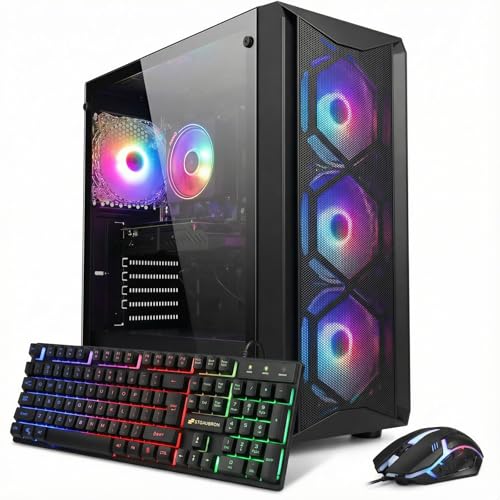
- Core i7 processor with 16GB DDR4
- RTX 3050 with 6GB GDDR6
- 512GB SSD and Wi-Fi 6
Best For: Hobbyist 3D printing, gaming, and general creative work
Office-Friendly Starter

- Core i3-14100 with 8GB DDR5
- 512GB SSD and integrated UHD Graphics 730
- Slim design with multi-monitor support
Best For: Light slicing, printer control, and office or classroom use
Best Compact Budget Workstation

- 32GB DDR4 RAM for multitasking
- 1TB SSD for fast storage
- Compact case with dual-monitor support
Best For: Space-conscious users running practical 3D-printing and office workflows
Best Multitasking Tower

- Six-core i7-8700 processor up to 4.6GHz
- 32GB RAM and 1TB SSD
- Many ports with storage and cooling expansion
Best For: CPU-focused 3D-printing workflows and heavy everyday multitasking
RGB Refurbished Performer

- Complete bundle with 24-inch monitor and peripherals
- 16GB RAM and 512GB SSD
- Dedicated 2GB GeForce GT 1030 graphics
Best For: Hobbyists wanting a ready-to-use 3D-printing desktop
Multitasking Workhorse

- Hexa-core i5-8500 processor
- 32GB DDR4 RAM and 1TB SSD
- Built-in Wi-Fi, Bluetooth, HDMI, and DisplayPort
Best For: Multitasking-heavy slicing and creative workflows
Compact Starter Station

- Space-saving small-form-factor design
- 16GB DDR4 RAM and 256GB SSD
- 4K and dual-display support
Best For: Budget-conscious makers with limited desk space
Top-Tier Powerhouse – Skytech Azure 3
For demanding 3D printing workflows, the Skytech Azure 3 is a desktop computer for 3d printing with the processing power and graphics capability suited to complex modeling, slicing, rendering, and other creative tasks. Its Ryzen 7 processor, RTX 5080 graphics, 32GB of DDR5 memory, and fast 2TB NVMe SSD provide substantial headroom for demanding software and large project files.
Best For: Advanced makers, 3D designers, and users who also want a high-end gaming and content-creation PC.
Pros:
- Ryzen 7 9800X3D processor and 32GB DDR5-6000 RAM support demanding multitasking.
- RTX 5080 with 16GB VRAM is well suited to graphics-intensive 3D work.
- Large 2TB NVMe SSD offers fast storage for applications and project files.
- 360mm liquid cooler and 850W Gold-rated power supply support sustained performance.
Cons:
- Its high-end gaming configuration may be more performance than basic modeling or slicing requires.
- The large tower and liquid-cooling setup need more desk space than a compact PC.
This is the strongest option in the group for users who want a future-ready desktop computer for 3D printing plus serious graphics, rendering, and gaming capability. It is best justified when your workloads can take advantage of its powerful dedicated GPU and ample memory.
Compact Everyday Pick – KAMRUI AK1PLUS Mini PC
The KAMRUI AK1PLUS is a compact desktop computer for 3d printing when your main needs are everyday computer use, basic slicing, file management, and a tidy workspace. Its small footprint, 12GB LPDDR4 memory, 256GB SSD, and dual-display support make it practical for a home workshop or office setup.
Best For: Beginners and home users who need a space-saving computer for light 3D-printing tasks and general productivity.
Pros:
- Small 5.04-by-5.04-by-2.05-inch design fits easily on a crowded desk.
- 12GB RAM and an SSD support responsive everyday computing.
- Dual HDMI outputs support two 4K displays at 60Hz.
- Storage can expand with M.2 and 2.5-inch drives, up to 4TB total according to the supplied notes.
Cons:
- Intel N5030 processor and integrated graphics are intended for lighter workloads rather than complex rendering.
- The included 256GB SSD may fill quickly with large 3D models and media files.
Choose the AK1PLUS when compact size, low power use, and connectivity matter more than maximum performance. It should handle basic 3D-printing preparation and office tasks, but demanding modeling or rendering may call for a stronger desktop.
Midrange Graphics Option – STGAubron Gaming PC
The STGAubron Gaming PC is a practical desktop computer for 3d printing if you want dedicated graphics without moving to a premium high-end system. Its Intel Core i7 processor, 16GB of DDR4 memory, RTX 3050 graphics, and 512GB SSD provide a balanced foundation for slicing, 3D modeling, editing, and general productivity.
Best For: Hobbyists who want a versatile PC for 3D-printing preparation, gaming, study, and light creative work.
Pros:
- Dedicated RTX 3050 graphics with 6GB GDDR6 memory offers more graphics capability than integrated video.
- 16GB RAM is suitable for everyday multitasking and many creative applications.
- 512GB SSD provides faster startup and application loading than a traditional hard drive.
- Includes Wi-Fi 6, Bluetooth 5.2, and HDMI and DisplayPort outputs.
Cons:
- The 8th-generation Core i7 platform is older than the processors in newer systems.
- 512GB of storage may require expansion for extensive model libraries and media.
- DDR4-2666 memory is less current than the DDR5 memory used by newer desktops.
This system offers a reasonable middle ground for a maker who wants dedicated graphics and broad everyday versatility. It is a better fit for moderate 3D work than the compact mini PC, while remaining less specialized and less powerful than the Skytech system.
Office-Friendly Starter – Dell Slim ECS1250
The Dell Slim ECS1250 is a sensible desktop computer for 3d printing when you prioritize a slim design, reliable office support, and straightforward everyday performance. Its Core i3-14100 processor, 8GB DDR5 memory, 512GB SSD, and integrated Intel UHD Graphics 730 are suited to basic slicing, printer control, file handling, and productivity.
Best For: Beginners, classrooms, offices, and home users doing light 3D-printing preparation alongside everyday tasks.
Pros:
- Compact slim tower design is suited to smaller workspaces.
- Core i3-14100 processor and DDR5 memory provide a modern everyday platform.
- 512GB SSD offers quick storage for applications and project files.
- Supports multiple-monitor setups and includes one-year onsite service.
Cons:
- 8GB RAM may limit heavier multitasking and more demanding 3D applications.
- Integrated graphics are less suitable for complex rendering than a dedicated GPU.
- It is designed for business and everyday use rather than high-end creative workloads.
The Dell is a good practical choice for light 3D-printing work, especially where space, support, and office features matter. Consider a more graphics-focused system if you plan to work with complex models, rendering, or intensive visual applications.
Best Dedicated Graphics Pick – STGAubron i7 Gaming Desktop
For shoppers seeking a desktop computer for 3d printing, the STGAubron offers a dedicated Radeon RX 580 graphics card, 16GB of RAM, and a 512GB SSD. Its Windows 11 setup and broad connectivity make it suitable for 3D-printing software alongside everyday productivity and creative tasks.
Best For: Users who want dedicated graphics for 3D-printing workflows, gaming, editing, and general home or office use.
Pros:
- Dedicated AMD Radeon RX 580 with 8GB of graphics memory.
- 16GB of RAM and a 512GB SSD provide a practical multitasking and storage setup.
- Includes Wi-Fi 6, Bluetooth 5.0, HDMI, DisplayPort, and six USB ports.
- Includes RGB keyboard and mouse, one-year parts-and-labor coverage, and lifetime tech support.
Cons:
- The listed Core i7-4th-generation processor is an older platform.
- 512GB of storage may feel limited for large media libraries or many installed programs.
- RGB-focused accessories and lighting may not matter to buyers seeking a simple workstation.
The dedicated graphics card gives this model an advantage over the integrated-graphics options in this roundup, particularly for graphics-assisted tasks. Buyers should weigh that benefit against the older processor and more modest SSD capacity.
Best Compact Budget Workstation – Dell OptiPlex 7050 SFF
This renewed Dell OptiPlex 7050 is a compact desktop computer for 3d printing that pairs an Intel Core i7-7700 with 32GB of DDR4 RAM and a 1TB SSD. Its small-form-factor design can fit neatly into a home office or workshop, while HDMI and DisplayPort support flexible monitor setups.
Best For: Buyers who prioritize abundant RAM, generous SSD storage, and a space-saving refurbished desktop for everyday 3D-printing work.
Pros:
- 32GB of DDR4 RAM supports multitasking and demanding browser or application workloads.
- 1TB SSD offers fast booting and substantial local storage.
- Small-form-factor case measures approximately 11.5 by 3.6 by 11.4 inches.
- Supports HDMI, DisplayPort, Wi-Fi, Bluetooth, and dual-monitor use.
Cons:
- Integrated Intel UHD Graphics 630 is less suitable for graphics-heavy work than a dedicated GPU.
- The renewed unit comes with a 90-day seller warranty.
- The older seventh-generation processor may provide less headroom for future workloads.
This OptiPlex is a sensible efficiency-focused choice when compact dimensions and memory capacity matter more than dedicated graphics. It is best matched with 3D-printing applications that do not require substantial GPU acceleration.
Best Multitasking Tower – HP ProDesk 600 G4
The HP ProDesk 600 G4 is a capable desktop computer for 3d printing built around a hexa-core Intel Core i7-8700, 32GB of DDR4 RAM, and a 1TB SSD. Its tower design, numerous ports, and available expansion options make it a practical choice for users who also edit media, stream, or manage multiple applications.
Best For: Multitaskers who want a refurbished tower with strong CPU performance, ample memory, and room for storage or cooling expansion.
Pros:
- Six-core Intel Core i7-8700 reaches speeds up to 4.6GHz.
- 32GB of DDR4 RAM and a 1TB SSD support multitasking and quick application loading.
- Provides six USB 3.0 ports, four USB 2.0 ports, USB-C, and two DisplayPort outputs.
- Offers expandable storage and cooling options, with four internal SATA connections.
Cons:
- Integrated Intel HD Graphics 630 is not a dedicated graphics solution.
- The renewed system includes a 90-day warranty.
- Display output is listed through DisplayPort, so adapters may be needed for other monitor connections.
Compared with the Dell, this HP offers a newer six-core processor and more expansion-oriented tower features, while still relying on integrated graphics. It is a strong fit for CPU-focused 3D-printing software and broader productivity workloads.
RGB Refurbished Performer – Dell OptiPlex i7 with GT 1030
This Dell OptiPlex bundle is a practical desktop computer for 3D printing users who want a ready-to-use setup with a monitor, keyboard, mouse, and headset included. Its Intel Core i7 processor, 16GB of RAM, and 512GB SSD provide a solid foundation for slicing software, design applications, and everyday multitasking, while the dedicated GeForce GT 1030 adds entry-level graphics capability.
Best For: Beginners and hobbyists who want a complete, affordable desktop setup for 3D-printing workflows and general use.
Pros:
- Includes a 24-inch 1080p monitor, keyboard, mouse, and headset.
- 16GB RAM and a 512GB SSD support responsive multitasking and quick boot times.
- Dedicated GeForce GT 1030 graphics with 2GB GDDR5 memory.
- RGB front-panel lighting with adjustable modes and colors.
Cons:
- Uses an older fourth-generation Core i7 processor and DDR3 memory.
- The GT 1030 is an entry-level graphics card, not intended for demanding 3D rendering.
- As a renewed product, it may arrive in generic packaging and includes a 90-day warranty.
For buyers seeking a complete workstation without assembling components, this renewed Dell offers useful memory, fast solid-state storage, and dedicated graphics. It is best suited to slicing, light modeling, and everyday tasks rather than intensive 3D rendering.
Multitasking Workhorse – Dell OptiPlex 3060 i5
With a hexa-core Intel Core i5-8500, 32GB DDR4 RAM, and a 1TB SSD, this Dell OptiPlex 3060 is a capable desktop computer for 3D printing and broader creative work. It offers fast storage, built-in Wi-Fi and Bluetooth, multiple USB ports, and HDMI or DisplayPort output for a flexible home or office workspace.
Best For: Users who prioritize plentiful memory, large storage, and smooth multitasking for slicing, browsing, and content-related tasks.
Pros:
- Six-core Intel Core i5-8500 processor supports demanding multitasking.
- 32GB DDR4 RAM is useful for running multiple applications and browser tabs.
- 1TB SSD provides fast booting and ample space for software and project files.
- Built-in Wi-Fi, Bluetooth, HDMI, DisplayPort, and eight USB ports offer strong connectivity.
Cons:
- Uses integrated Intel UHD Graphics 630 rather than a dedicated graphics card.
- The supplied specifications contain conflicting RAM listings, so buyers should verify the configuration.
- As a renewed product, it carries a 90-day warranty.
This OptiPlex is a strong general-purpose choice for 3D-printing preparation, especially when multiple programs or large project folders are involved. Its integrated graphics are appropriate for everyday display and slicing work, but buyers seeking GPU-intensive rendering may want a system with dedicated graphics.
Compact Starter Station – Dell OptiPlex 3050 SFF
This compact Dell OptiPlex 3050 SFF is a sensible desktop computer for 3D printing when desk space and budget matter. Its quad-core Intel Core i5-6500, 16GB DDR4 RAM, 256GB SSD, and 4K-capable display outputs cover everyday slicing, basic modeling, and general productivity, while the small-form-factor design fits neatly into a workspace.
Best For: Entry-level makers who need a compact, refurbished PC for slicing software, basic design tasks, and everyday computing.
Pros:
- Small-form-factor case measures approximately 11.2 x 3.75 x 11.5 inches.
- 16GB DDR4 RAM and an SSD support responsive everyday use.
- Supports 4K output and dual-display configurations through its video connections.
- Includes a keyboard, mouse, and USB Wi-Fi adapter.
Cons:
- 256GB of storage is more limited than the other listed options.
- Integrated Intel HD Graphics 530 is suited to basic display work rather than demanding rendering.
- Older quad-core hardware may be less comfortable with heavier multitasking.
Choose this model if you want a compact and inexpensive starting point for 3D-printing software. It handles practical slicing and office duties well, but users planning complex modeling, extensive multitasking, or GPU-heavy work should consider a more powerful system.
How We Picked the Best Desktop Computer for 3d Printing
We looked at the hardware features that matter most for a Desktop Computer for 3d Printing: processor performance, RAM, storage, graphics capability, connectivity, physical size, and upgrade potential. Slicing basic models does not require an expensive gaming PC, but complex meshes, CAD assemblies, rendering, and simultaneous applications benefit from a faster CPU, more memory, and a dedicated GPU.
The selection also includes different form factors and price classes. Compact and refurbished business desktops can be practical for entry-level printing, while newer gaming desktops offer considerably more headroom for demanding creative workloads.
Quick Comparison
- Best overall performance: Skytech Gaming Azure 3, with a Ryzen 7 9800X3D, RTX 5080, 32GB RAM, and 2TB SSD.
- Best compact option: KAMRUI AK1PLUS, suited to basic slicing, printer control, and everyday desktop tasks.
- Best budget gaming choices: The STGAubron systems provide dedicated graphics at a lower cost, though their older platforms may limit future upgrades.
- Best office-style value: Dell and HP OptiPlex or ProDesk systems offer useful RAM and SSD capacities for ordinary slicing and CAD work.
Key Buying Factors for a Desktop Computer for 3d Printing
Processor and RAM
CPU speed affects slicing, file preparation, CAD calculations, and general responsiveness. A modern quad-core processor is adequate for many users; six or eight cores are preferable for large models, complex assemblies, and multitasking. Choose at least 16GB of RAM for comfortable everyday use, while 32GB is a better long-term target for professional CAD, rendering, or multiple applications.
Graphics and Display Support
Basic slicers rely more heavily on the CPU than the GPU, so integrated graphics can be sufficient for simple models. A dedicated graphics card becomes more valuable for 3D CAD, viewport-heavy designs, simulation, texture work, and rendering. Check monitor outputs carefully, especially on small-form-factor or refurbished systems.
Storage, Connectivity, and Upgrades
An SSD makes Windows, slicers, and project files load quickly. A 512GB drive is workable, while 1TB or more is preferable if you keep CAD libraries, scans, renders, and printer profiles locally. Confirm that the computer has the USB ports, Wi-Fi, Bluetooth, and display connections your printers and accessories require. Refurbished business PCs can be excellent values, but verify expansion space, power-supply limits, and proprietary components before planning upgrades.
Who Should Buy Which Desktop Computer for 3d Printing?
Choose the Skytech system if you work with demanding CAD files, rendering, simulation, or other GPU-intensive creative tasks and want substantial performance headroom. A mini PC is a sensible choice for basic slicing, printer monitoring, office use, and limited desk space.
Budget gaming desktops are better suited to hobbyists who want dedicated graphics without paying for a premium workstation. Dell OptiPlex and HP ProDesk systems are practical for routine slicing, moderate CAD, and general productivity, particularly when you value plentiful RAM and SSD storage over the newest platform. Before purchasing any refurbished model, confirm its condition, included accessories, operating-system license, return policy, and upgrade limitations.