
Desktop robot arms have moved far beyond novelty gadgets. Today’s best models can teach coding, support AI workflows, and handle real desktop automation experiments.
If you want a compact arm for learning, prototyping, or hands-on robotics projects, this roundup focuses on the features that matter most for performance, control, and expandability.
Best 10 Desktop Robot Arms Picks for 2026
Open-Source Starter Pick
Waveshare RoArm-M2-S 4-DOF Desktop Robot Arm
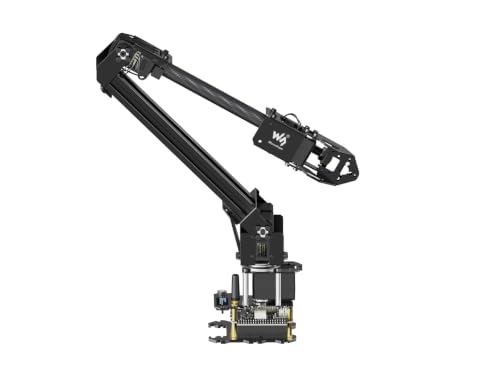
- 4-DOF desktop arm with wireless control
- Open-source codes and interface documents
- Expansion plate supports custom EoAT
Best For: Makers and students who want a flexible, developer-friendly robot arm
Education-Focused Pick
WLKATA Mirobot 6-Axis Educational Desktop Arm

- 6-axis desktop arm for broader motion
- Multiple control methods, including app and software
- Expansion interfaces support new projects
Best For: Teachers and learners who want a versatile educational robotics platform
AI Development Pick
SO-ARM101 Pro Open-Source AI Desktop Robot Arm

- LeRobot and Hugging Face compatible
- Supports imitation and reinforcement learning
- Jetson-compatible open-source DIY kit
Best For: Developers building AI robotics and learning-based manipulation projects
Sturdy STEM Pick
Hiwonder xArm1S 6-Axis Metal Desktop Robot Arm
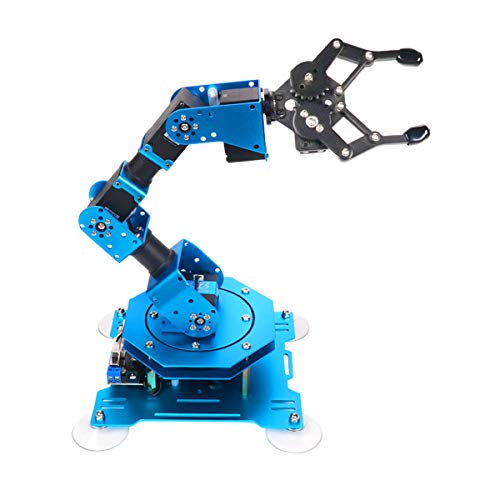
- 6-axis arm with intelligent servo feedback
- PC, app, mouse, and controller control
- Metal alloy structure with stable base
Best For: STEM learners who want a durable, hands-on desktop robot arm
AI Vision Desktop Arm
Yahboom ROS2 6DOF Embodied Intelligence Kit
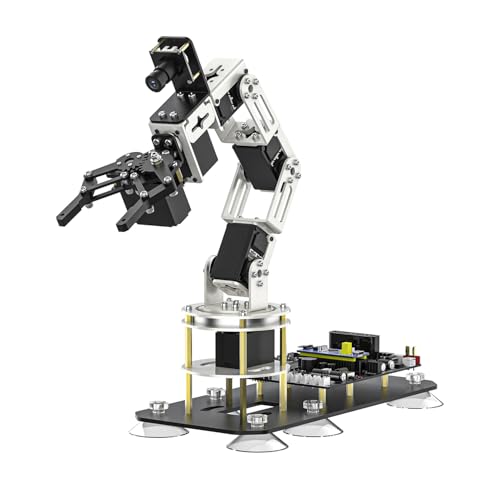
- 6DOF desktop arm with ROS2 and AI vision tools
- Virtual-machine control on Windows, no Raspberry Pi or Jetson needed
- Supports wireless handle, mobile app, and mouse control
Best For: Windows users, ROS2 learning, and AI grasping projects
Open Source Starter Arm
LewanSoul MaxArm Arduino Python Kit

- Python and Arduino support for programming practice
- ESP32 controller with WiFi, Bluetooth, and expansion ports
- Suction nozzle and multiple control methods included
Best For: Students and hobbyists building expandable robotics projects
Wireless Research Desktop Arm
Waveshare RoArm-M3-Pro 5+1 DOF Kit

- 5+1 DOF arm with 360° omnidirectional movement
- ESP32, Web app control, and wireless/wired communication
- Compatible with ROS2 and LeRobot for AI research
Best For: Makers and researchers needing a flexible AI-ready arm
Open-Source STEM Pick

- Arduino-compatible Atmega328 platform
- Open-source tutorials and examples
- Sensor expansion and app control
Best For: Arduino learners and open-source robotics projects
Feature-Rich Classroom Choice

- 6DOF arm with graphical programming
- PC, app, mouse, and handle control
- Metal build with easy tutorials
Best For: Students and hobbyists learning robotics
Premium Assembled Option
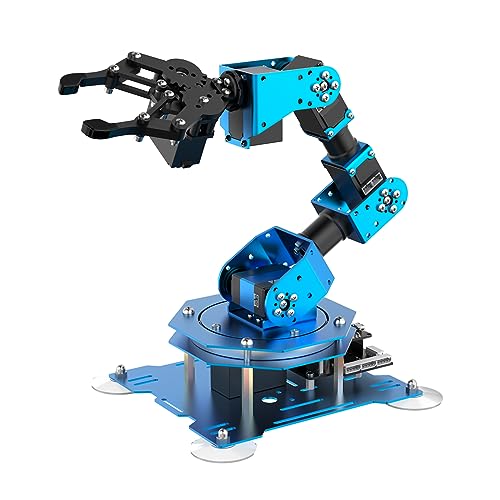
- Assembled full-metal desktop arm
- Six servos with feedback data
- PC, app, mouse, and PS2 control
Best For: Users wanting an assembled, flexible robot arm
Open-Source Starter Pick – Waveshare RoArm-M2-S 4-DOF Desktop Robot Arm
If you want a desktop robot arm that is easy to start with but still leaves room for experimentation, the Waveshare RoArm-M2-S is built around that balance. It combines a 4-DOF layout, wireless control options, and open documentation, making it a practical pick for STEM learning, secondary development, and custom end-of-arm tooling.
Best For: Makers, students, and developers who want an open-source desktop robot arm for wireless control and customization.
Pros:
- Rich graphic, video, and Wiki resources make setup and learning more approachable.
- Open-source control code and communication docs support secondary development.
- ESP32-based controller supports multiple wireless control modes and communication protocols.
- Expansion plate supports custom end-of-arm tooling for inventive projects.
Cons:
- 4-DOF design is less versatile than higher-joint arms for complex motion.
- Best suited to light-duty use, with a 0.5 kg payload at 0.5 m.
- Some buyers may prefer a more turn-key educational package.
Overall, this is a strong choice if your priority is a desktop robot arm that can be learned, controlled, and extended in multiple ways. It leans more toward experimentation and development than out-of-the-box industrial realism.
Education-Focused Pick – WLKATA Mirobot 6-Axis Educational Desktop Arm
The WLKATA Mirobot is a compact desktop robot arm aimed at education, programming, and hands-on experimentation. Its 6-axis design, multiple control methods, and reserved expansion interfaces make it a useful option if you want a learning platform that can grow into more advanced projects.
Best For: K12 learners, educators, and hobbyists who want a feature-rich desktop robot arm for programming and creative projects.
Pros:
- 6-axis desktop arm gives more motion flexibility than simpler kits.
- Supports computer software, mobile app, and virtual control modes.
- Reserved expansion interfaces support secondary development and add-on scenarios.
- Can be used for writing, drawing, engraving, handling, and palletizing demos.
Cons:
- It is a lightweight desktop platform, not a heavy-duty industrial arm.
- Some advanced modes may require software or programming familiarity.
- Best results come from users willing to explore accessories and expansion.
For a classroom or maker-space setting, this arm offers a broad mix of control options and project possibilities. It stands out when you want a desktop robot arm that supports both guided learning and creative experimentation.
AI Development Pick – SO-ARM101 Pro Open-Source AI Desktop Robot Arm
If your focus is AI robotics rather than basic motion demos, the SO-ARM101 Pro is built for that workflow. This desktop robot arm kit is open-source, compatible with LeRobot and Hugging Face, and designed for imitation learning, reinforcement learning, and real-time leader-follower control.
Best For: AI developers and robotics hobbyists building learning-based desktop robot arm projects with Jetson and LeRobot.
Pros:
- Compatible with LeRobot and Hugging Face frameworks for AI workflows.
- Supports imitation learning, reinforcement learning, and real-time leader-follower operation.
- Open-source and DIY-friendly with assembly, calibration, and deployment guides.
- Compatible with Nvidia Jetson edge devices, including reComputer Mini J4012 Orin NX 16 GB.
Cons:
- 3D-printed parts are not included, so additional fabrication is needed.
- It is aimed at developers, not casual plug-and-play users.
- Best suited to AI training tasks rather than general tabletop use.
This is the most specialized option in the group, especially if you want a desktop robot arm for modern AI robotics experiments. It is a strong fit when open-source tooling and training workflows matter more than convenience.
Sturdy STEM Pick – Hiwonder xArm1S 6-Axis Metal Desktop Robot Arm
The Hiwonder xArm1S is a desktop robot arm built for coding, creative projects, and classroom robotics work. With six high-precision intelligent servos, a metal alloy structure, and multiple control methods, it offers a sturdy learning platform for grasping, object transport, and action editing.
Best For: Older students, STEM learners, and hobbyists who want a sturdy desktop robot arm with broad control options.
Pros:
- 6-axis design with high-precision servos and position, voltage, and temperature feedback.
- Supports PC, phone app, mouse, and wireless controller input.
- Metal alloy bracket and industrial-grade bearings help with stability.
- Handles grasping and object transportation, with up to 500 g lifting capability noted.
Cons:
- More geared toward educational use than advanced open-source development.
- Best for tabletop tasks rather than large workspace automation.
- Some features depend on using the provided control ecosystem.
For buyers comparing desktop robot arms for STEM and programming, this model offers a good mix of durability, control flexibility, and hands-on learning value. It is especially appealing if you want a metal build and multiple ways to interact with the arm.
AI Vision Desktop Arm – Yahboom ROS2 6DOF Embodied Intelligence Kit
If you’re comparing desktop robot arms for AI demos and robotics learning, this Yahboom kit stands out for its virtual-machine-based control and embodied-intelligence features. It combines 6DOF movement, ROS robot control, and AI vision tools for tasks like custom model training, gesture recognition, sorting, and intelligent grasping.
Best For: Windows-based learners, ROS2 projects, and AI vision experiments on a desktop robot arm.
Pros:
- Virtual machine control avoids relying on a Raspberry Pi or Jetson Nano
- 6 bus servos support position/status readback and precise movement
- Multiple control options: wireless handle, mobile app, and computer mouse
- AI-focused features include 3D vision, multimodal matching, and OpenRouter-centered interaction
Cons:
- VM software is not supported on Mac, Windows version only
- Designed more for education and research than simple plug-and-play use
This is a strong pick if you want a desktop robot arm that leans into software-driven learning and AI experimentation. Its mix of ROS2 support, vision tools, and programming resources makes it especially useful for users who want room to grow.
Open Source Starter Arm – LewanSoul MaxArm Arduino Python Kit
For shoppers who want a practical desktop robot arm for coding and mechanics practice, the LewanSoul MaxArm focuses on approachable programming and expandability. It supports Python and Arduino, adds WiFi and Bluetooth via its ESP32 core, and includes a suction nozzle plus bus servo motion for tabletop learning projects.
Best For: Beginner-to-intermediate builders who want a programmable desktop robot arm with open-source expansion options.
Pros:
- Supports both Python and Arduino programming
- ESP32-based controller adds WiFi and Bluetooth connectivity
- Multiple control methods including app, PC, wireless controller, and mouse
- Expansion ports and sensor support make secondary development easier
Cons:
- Uses only three smart bus servos, so it is less advanced than larger multi-DOF arms
- Best suited to learning and experimentation rather than heavy-duty use
MaxArm is a flexible choice if you want a desktop robot arm that emphasizes coding practice and future add-ons. The open-source controller and broad interface support make it a good fit for STEM projects that may evolve over time.
Wireless Research Desktop Arm – Waveshare RoArm-M3-Pro 5+1 DOF Kit
This Waveshare kit is aimed at users who want a more research-friendly desktop robot arm with wireless control and modern software support. It offers 5+1 DOF movement, an ESP32 main control module, Web app control, and compatibility with ROS2 and the LeRobot project for learning and experimentation.
Best For: Makers and researchers who want a wireless desktop robot arm for ROS2, imitation learning, and custom end-effectors.
Pros:
- 5+1 DOF design with 360° omnidirectional movement range
- ESP32 control plus wireless and wired communication options
- Web app and simple coordinate control reduce setup difficulty
- Compatible with ROS2 and the LeRobot AI robotic arm project
Cons:
- More focused on advanced experimentation than casual desk use
- Details suggest a modular system, so some customization effort may be needed
If you want a desktop robot arm with strong software compatibility and room for AI research, this Waveshare model is compelling. The combination of wireless control, ROS2 support, and expandable end-effector options makes it especially versatile for serious projects.
Open-Source STEM Pick – miniArm Standard Kit
If you want a desktop robot arm for learning, the miniArm Standard Kit is built around Arduino-friendly, open-source development. It combines a 5DOF design with app control, knob-based offline action editing, and sensor expansion support, so it works well as a hands-on coding and robotics platform.
Best For: Adults and teens who want an open-source desktop robot arm for Arduino programming, sensor experiments, and secondary development.
Pros:
- Compatible with Arduino programming on the Atmega328 platform
- Open-source programs with tutorials and secondary development examples
- Supports app control plus real-time knob potentiometer control
- Expansion ports for sensors like ESP32 Cam, accelerometer, and ultrasonic modules
Cons:
- More suited to learning and development than simple plug-and-play use
- Requires interest in coding and robotics to get the most value
For buyers comparing desktop robot arms for STEM projects, this kit stands out for its open development approach and expansion options. It is a strong pick if you want a platform you can build on over time.
Feature-Rich Classroom Choice – LeArm 6DOF Desktop Kit
The LeArm is a desktop robot arm built for hands-on assembly, graphical programming, and multiple control styles. With its 6DOF layout, metal bracket structure, and included tutorial support, it fits well if you want a practical entry point into robotics and engineering.
Best For: Students, hobbyists, and engineering learners who want a desktop robot arm with broad control options and a strong build.
Pros:
- 6DOF desktop arm with remote grasping and object transport capability
- Supports PC, app, mouse, and wireless handle control
- Metal bracket construction with industrial-grade bearings for stability
- Includes easy tutorials and simple programming software
Cons:
- Assembly is part of the experience, so it is not the quickest setup
- Geared more toward learning and projects than advanced automation
Among desktop robot arms in this group, LeArm offers a balanced mix of control methods, structure, and educational support. It is a sensible choice if you want something versatile without losing the hands-on building aspect.
Premium Assembled Option – xArm1S Full Metal Robot Arm
If you want a desktop robot arm that is already assembled and ready for coding study, the xArm1S is the most polished option here. It uses six high-precision intelligent serial bus servos, supports several control methods, and includes action editing through PC, app, and offline manual input.
Best For: Buyers who want an assembled desktop robot arm with full-metal construction and advanced control flexibility.
Pros:
- Assembled version saves setup time
- 6 high-precision intelligent servos with position, voltage, and temperature feedback
- Can grasp objects up to 500g
- Supports PC, phone app, mouse, and PS2 wireless control
Cons:
- Assembled design may offer less of a build-it-yourself learning experience
- Higher capability may be more than casual users need
For shoppers comparing desktop robot arms, xArm1S leans toward performance and convenience. Its assembled format, full-metal structure, and broad control support make it a strong fit for users who want to start experimenting quickly.
How We Picked the Best Desktop Robot Arms
We focused on Desktop Robot Arms that offer a useful mix of build quality, control options, learning value, and upgrade potential. Priority went to models with strong software support, clear programming paths, and hardware that fits a desk without feeling toy-like.
We also favored arms that support modern use cases such as ESP32, Arduino, Python, ROS2, and open-source ecosystems, since these give buyers more room to learn and grow.
Quick Comparison
For beginners, simpler 4- to 5-DOF arms are easier to set up and control. For advanced users, 6-DOF arms usually provide better reach, flexibility, and task realism. Bus servos, metal construction, and grippers or suction tools often improve precision and durability.
Key Buying Factors for Desktop Robot Arms
Degrees of Freedom
More degrees of freedom usually mean more natural movement and better positioning. A 4-DOF arm is fine for basic demos, while 6-DOF models are better for programming practice, manipulation tasks, and AI/robotics experiments.
Control and Compatibility
Check whether the arm supports app control, PC software, Arduino, Python, ROS2, or serial bus control. The best Desktop Robot Arms are the ones you can actually use with your current skill level and future projects.
Build Quality and Actuation
Metal frames, high-torque servos, and bus-servo systems generally offer better repeatability and less mechanical flex. For frequent hands-on use, that matters more than flashy specs.
Workspace and Expansion
Measure your available desk space and look at payload, reach, and end-effector options. If you plan to add cameras, grippers, suction tools, or AI features later, choose a platform with expansion support from the start.
Who Should Buy Which Desktop Robot Arms?
Beginners and students should look for straightforward programming, strong tutorials, and simple setup. Makers and hobbyists may want open-source support, Python or Arduino compatibility, and upgrade-friendly hardware. Advanced users, labs, and AI-focused buyers should prioritize 6-DOF control, ROS2 support, spatial recognition features, and more robust mechanical design.
If you want the most versatile experience, choose one of the 6-DOF Desktop Robot Arms with open software support. If your goal is teaching or first-time learning, a simpler kit with clear documentation will usually be the better buy.