
The best document camera for classroom teaching makes worksheets, books, experiments, and handwritten work easy for every student to see. The right model can also double as a webcam for hybrid lessons and video calls.
We compared these 10 options by image quality, connection flexibility, viewing area, lighting, microphone features, and everyday classroom usability.
Best 10 Document Camera for Classroom Picks for 2026
Best 4K Value
IPEVO V4K Ultra HD Document Camera

- 8MP capture up to 3264 x 2448
- Full HD streaming at up to 30 fps
- Mac, Windows, and Chromebook compatible
Best For: Detailed USB classroom demonstrations
Best for Large Displays
INSWAN INS-2 4K Document Camera

- 13MP 4K video at 30 fps
- Captures documents and artwork up to A3
- Includes lighting and annotation-focused software
Best For: Large-format classroom and art presentations
Best Wireless Flexibility
IPEVO VZ-X Wireless Document Camera

- Wi-Fi, HDMI, and USB connectivity
- Up to 9–12 hours of battery life
- Wireless range of up to 33 feet
Best For: Flexible wireless and projector-based teaching
Best Budget Classroom Webcam Hybrid
PAKOTOO A3 USB Document Camera

- Works as a doc camera and webcam
- A3 capture with adjustable positioning
- Three-level LED and Full HD at 30 fps
Best For: USB-based classroom and distance learning
Best 4K Classroom Pick

- 13MP sensor with 4K video at 30 fps
- OKIOPoint supports interactive tracking and focus
- Compatible with major classroom platforms
Best For: High-resolution lessons and interactive presentations
Best Wide-Angle Option

- 120-degree lens captures tabloid-size materials
- 4K Sony CMOS imaging with swift autofocus
- AI Noise Reduction for clearer calls
Best For: Large documents, objects, and hybrid teaching
Best Budget-Friendly Classroom Camera

- A3-size coverage up to 16.5 x 11.6 inches
- Foldable arm with multi-angle positioning
- Adjustable LED brightness and exposure
Best For: Flexible USB teaching setups on a budget
Premium 4K Classroom Visualizer
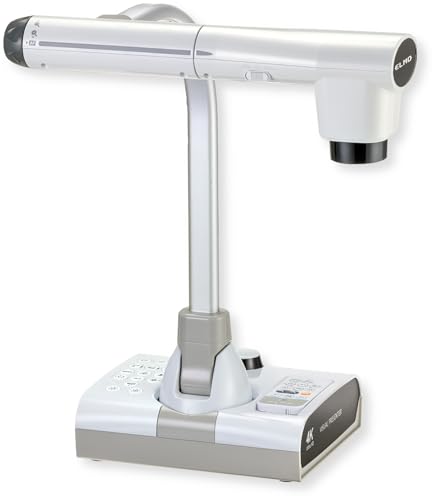
- 4K video and 12MP imaging
- HDMI, USB, and VGA outputs
- Flexible arm with SD recording
Best For: Permanent classroom setups and detailed demonstrations
Flexible USB Classroom Camera

- 8MP 4K-capable video at 30fps
- Foldable design with A3 coverage
- LED lighting and dual microphones
Best For: Portable teaching and video-conferencing setups
Adjustable USB Teaching Camera

- 10MP capture with 2160p support
- Foldable multi-angle A3 design
- Autofocus, LED, zoom, and image reversal
Best For: Remote teaching, demonstrations, and online art classes
Best 4K Value – IPEVO V4K Ultra HD Document Camera
The IPEVO V4K is a strong document camera for classroom use when sharp detail, fast focusing, and broad computer compatibility matter. Its 8MP sensor captures up to 3264 x 2448 images, while Full HD streaming can reach 30 fps for smooth demonstrations.
Best For: Teachers who need detailed live demonstrations with a Mac, Windows PC, or Chromebook.
Pros:
- 8MP Sony CMOS sensor provides high-resolution images and improved noise reduction.
- Fast autofocus and up to 30 fps Full HD streaming help reduce interruptions.
- Multi-jointed stand and compatible software support flexible classroom setups.
- Captures an area up to 13.46 x 10.04 inches.
Cons:
- USB connectivity requires a nearby compatible computer.
- It does not include wireless or HDMI connectivity.
- Listed system requirements may be demanding for older computers.
Choose the V4K if you want excellent image detail in a straightforward USB design. Its autofocus and high frame rate make it especially practical for switching between books, worksheets, and physical objects during lessons.
Best for Large Displays – INSWAN INS-2 4K Document Camera
The INSWAN INS-2 is a document camera for classroom presentations that need a wide capture area and polished image quality. Its 13MP Sony sensor records 4K video at 30 fps and its adjustable arm accommodates documents, artwork, and two-page spreads up to A3 size.
Best For: Professional educators and art instructors presenting large documents, artwork, or demonstrations.
Pros:
- 13MP sensor delivers 4K video at 3840 x 2160 and 30 fps.
- A3 capture support suits large documents and artwork.
- Dual autofocus, macro focus, brightness control, LED lighting, and an anti-glare sheet improve presentation flexibility.
- Documate software includes annotation, recording, scanning, whiteboard tools, and OCR.
Cons:
- Its larger feature set may be more than needed for simple worksheet sharing.
- Compatibility depends on the listed operating-system versions and, for iPad use, a USB-C port.
- The camera weighs 2.3 pounds, making it less lightweight than basic USB models.
The INS-2 is a particularly capable choice when classroom visuals need to look professional on a large screen. The A3 format, built-in lighting, and teaching-focused software make it well suited to art, demonstrations, and exhibition-style presentations.
Best Wireless Flexibility – IPEVO VZ-X Wireless Document Camera
The IPEVO VZ-X stands out as a document camera for classroom setups that need more than a standard USB connection. It supports Wi-Fi, HDMI, and USB, allowing teachers to connect to computers, mobile devices, Apple TV, projectors, TVs, or monitors, while its battery is rated for 9–12 hours of use.
Best For: Teachers who want wireless demonstrations or direct connection to projectors and displays.
Pros:
- Three connectivity modes—Wi-Fi, HDMI, and USB—support varied classroom equipment.
- Wireless range reaches up to 33 feet for room-wide object capture.
- Built-in LED, swiveling head, and multi-jointed stand improve positioning flexibility.
- Battery life is rated for 9–12 hours.
Cons:
- Wi-Fi and HDMI modes are limited to 1920 x 1080, while near-4K capture is available in USB mode.
- The listed focus type is manual, which may require more adjustment than autofocus models.
- At 2.6 pounds, it is relatively heavy for a portable classroom camera.
The VZ-X is the better fit when connection options and placement freedom are priorities. It can work without a computer in HDMI mode and gives teachers room to move around the classroom during demonstrations.
Best Budget Classroom Webcam Hybrid – PAKOTOO A3 USB Document Camera
The PAKOTOO PA-800 is a practical document camera for classroom and remote-teaching tasks, combining document capture with webcam functionality. It supports A3-sized material, autofocus, adjustable positioning, three LED brightness levels, and Full HD streaming at up to 30 fps.
Best For: Teachers who want an adaptable USB camera for worksheets, video calls, and distance learning.
Pros:
- 3-in-1 design works as a document camera, webcam, and live-presentation camera.
- A3 capture area handles larger papers and teaching materials.
- Three-level LED lighting and five-level exposure adjustment help in uneven lighting.
- Autofocus, image inversion, and dual microphones support remote instruction.
Cons:
- It is not fully plug and play; users must select “USB Camera” in the computer system.
- Its 5MP sensor provides less resolution than the 8MP and 13MP alternatives here.
- It uses USB connectivity and does not include HDMI output.
The PA-800 makes sense for teachers who want one flexible camera for both physical materials and online meetings. Its A3 support and built-in lighting are useful advantages, though setup may take an extra step on some computers.
Best 4K Classroom Pick – OKIOCAM S2 Pro
The OKIOCAM S2 Pro is a strong document camera for classroom demonstrations where sharp detail, smooth motion, and presentation tools matter. Its 13MP sensor captures 4K video at 30 fps, while the integrated light and broad viewing area help with documents, objects, and live lessons.
Best For: Teachers who want high-resolution demonstrations, annotation tools, and compatibility with major teaching and video-conferencing platforms.
Pros:
- 13MP sensor supports 4K resolutions with 30 fps video.
- OKIOPoint enables pointer-based tracking, zooming, and focusing through OKIOCAM Live.
- Metal weighted base, reinforced arm, integrated LED light, and a 13.6 x 10.6-inch viewing area.
- Works with Windows, Mac, Chromebooks, interactive displays, Zoom, Teams, Google Meet, and Canvas.
Cons:
- Its advanced presentation features may be more than needed for basic document viewing.
- The listed maximum viewing area may not accommodate larger-than-standard classroom materials.
Choose this model if classroom clarity and interactive software are priorities. The durable construction and broad compatibility also make it a practical long-term teaching setup.
Best Wide-Angle Option – IPEVO V4K PRO 120
The IPEVO V4K PRO 120 is a versatile document camera for classroom use when you need to show larger materials or objects. Its 120-degree lens, adjustable arm, 4K capture, and swift autofocus support both document presentation and webcam-style video calls.
Best For: Teachers and presenters who need a portable camera with a wide capture area for tabloid-size documents, larger objects, and video conferencing.
Pros:
- 120-degree lens can capture tabloid-size documents and larger objects.
- 4K resolution, Sony CMOS sensor, LED light, and swift autofocus support detailed images.
- AI Noise Reduction helps reduce ambient background noise during calls and presentations.
- USB plug-and-play compatibility with Windows, Mac, Chromebooks, Zoom, Google Meet, Skype, and Teams.
Cons:
- The camera weighs 860 grams, so it is less lightweight than some portable models.
- It uses USB connectivity and does not list HDMI output.
The V4K PRO 120 stands out for flexible framing. It is a good match for classrooms that alternate between full-page demonstrations, larger objects, and online instruction.
Best Budget-Friendly Classroom Camera – PAKOTOO KB700
The PAKOTOO KB700 is a practical document camera for classroom teaching when you need broad A3 coverage and adjustable lighting without extra display hardware. Its foldable multi-joint design supports multiple angles, while autofocus and image-reversal buttons add flexibility for lessons and remote learning.
Best For: Teachers who need an adjustable, foldable USB camera for A3 and A4 documents, 2D materials, and 3D objects.
Pros:
- Captures an area up to 16.5 x 11.6 inches for A3 paper.
- Foldable multi-joint design supports multiple angles and easier carrying.
- Three LED brightness levels, ten exposure levels, and dual microphones support varied teaching environments.
- Image reversal buttons work without software, and the camera supports Windows PCs, Macs, Chromebooks, and common meeting apps.
Cons:
- It is not plug and play; users must select “USB Camera” in the computer’s system settings.
- It does not support zoom or HDMI and is not compatible with iPad.
- USB 2.0 connectivity may be less convenient for some setups.
This model makes sense for classrooms prioritizing coverage and adjustability over advanced connectivity. Be prepared to select the camera manually and use a computer-based setup.
Premium 4K Classroom Visualizer – Elmo TT-12G
The Elmo TT-12G is a document camera for classroom use when sharp image quality, flexible positioning, and broad display connectivity matter. Its 4K video, 12MP sensor, autofocus, and large capture area support detailed demonstrations of documents, objects, and whiteboard work.
Best For: Classrooms and distance-learning setups that need premium imaging, flexible connections, and advanced recording features.
Pros:
- 4K video with a 12MP CMOS sensor and up to 192x combined zoom.
- HDMI, USB, and VGA outputs support modern and legacy displays.
- Multi-angle arm, built-in LED lighting, autofocus, and an 18.5-by-10.2-inch capture area.
- Can record audio and video directly to an SD card and supports Miracast sharing.
Cons:
- Its 6.6-pound weight and larger footprint may be less convenient for frequent transport.
- The feature set may be more than needed for basic document projection.
The TT-12G stands out for educators who want a versatile, high-resolution teaching camera with both current and legacy connection options. It is especially well suited to permanent classroom installations and detailed live demonstrations.
Flexible USB Classroom Camera – THUSTAR 8MP 4K
The THUSTAR is a compact document camera for classroom and remote-teaching use, combining 4K output, a foldable design, adjustable lighting, and broad computer compatibility. Its A3-size coverage and manual image-reversal controls are useful for lessons involving papers, books, and objects.
Best For: Teachers who need a portable plug-and-play camera for classrooms, video meetings, and distance education.
Pros:
- 8MP camera supports up to 2448P video at 30 frames per second.
- Foldable multi-joint design rotates to capture 2D and 3D materials.
- Three-level LED lighting and manual brightness controls help with varied lighting.
- Works with Windows, macOS, and Chrome OS and includes dual microphones.
Cons:
- Uses USB 2.0, which may offer less bandwidth than newer USB interfaces.
- Its listed maximum coverage specification is presented inconsistently in the supplied details.
With its compact build, A3-size coverage, integrated lighting, and dual microphones, the THUSTAR is a practical choice for educators moving between teaching spaces. It favors convenience and compatibility over the advanced outputs and recording features of premium classroom models.
Adjustable USB Teaching Camera – TreasLin 10MP
The TreasLin 10MP is a versatile document camera for classroom presentations, remote learning, and online art instruction. It offers high-resolution capture, multi-angle adjustment, image-reversal controls, LED lighting, and plug-and-play compatibility with common teaching and streaming software.
Best For: Teachers who want a flexible USB camera for documents, textbooks, 3D objects, live classes, and demonstrations.
Pros:
- 10MP lens supports 2160p, 1080p, and 720p capture modes.
- Foldable multi-joint design covers A3-size materials and rotates for 2D or 3D subjects.
- Supports autofocus or fixed focus, smooth zoom, adjustable ISO, and LED control.
- Compatible with Windows, Mac, Chromebook, Zoom, Google Meet, Teams, OBS, and other listed software.
Cons:
- USB connectivity may require an adapter or compatible port on some computers.
- The supplied notes list differing 4K frame-rate descriptions, so buyers should verify the desired mode.
The TreasLin offers a strong mix of resolution, positioning flexibility, and software compatibility for teachers. Its foldable construction and wide capture area make it particularly useful when lessons alternate between printed materials and physical objects.
How We Picked the Best Document Camera for Classroom Use
We focused on features that matter during real lessons rather than treating resolution as the only deciding factor. The shortlist includes compact USB models, wireless options, and full-featured 4K document cameras with HDMI or VGA connectivity.
Our main criteria were image clarity, autofocus performance, capture-area size, arm flexibility, built-in lighting, microphone quality, compatibility with common teaching platforms, and ease of setup. We also considered whether each camera can switch between displaying physical materials and serving as a conventional webcam.
Quick Comparison
- Best for straightforward USB teaching: IPEVO V4K and similar plug-and-play USB models.
- Best for wireless flexibility: IPEVO VZ-X, with Wi-Fi, HDMI, and USB connectivity.
- Best for high-detail A3 capture: 13MP and 4K models from INSWAN, OKIOCAM, and ELMO.
- Best for hybrid lessons: Cameras with built-in microphones and webcam compatibility.
- Best for large classrooms: Models offering HDMI or VGA output and a flexible arm.
Key Buying Factors for a Document Camera for Classroom
Resolution and Real-World Image Quality
Eight megapixels is sufficient for most worksheets and demonstrations, while 10MP, 12MP, 13MP, or 4K models provide extra detail for small print, artwork, science samples, and close-up work. Autofocus and accurate exposure can matter as much as the headline resolution.
Capture Area and Adjustability
Choose an A3-capable camera if you regularly display textbooks, maps, craft projects, or full-size paper. A flexible arm, image rotation, and foldable design make positioning easier and reduce storage space.
Connections and Software
USB is usually the simplest choice for Mac, Windows, and Chromebook classrooms. HDMI and VGA outputs are useful when connecting directly to a projector or display, while Wi-Fi helps when the camera needs to move between teaching stations. Confirm compatibility with your preferred video-conferencing or interactive-whiteboard software.
Lighting, Microphones, and Controls
Built-in LED lights help with shadows and dim rooms. Dual microphones can improve voice pickup for remote students, but they do not replace a dedicated classroom microphone in a large or noisy room. Look for convenient controls such as autofocus, image inversion, zoom, and a smart pointer.
Who Should Buy Which Document Camera for Classroom?
Choose a basic USB model if you want affordable, reliable demonstrations from a computer. Choose a 4K or high-megapixel model for detailed documents, art, technical objects, or larger groups. Choose a wireless model if moving around the classroom is important. Choose an HDMI/VGA-equipped unit when you need direct projector or monitor connection without depending on computer software.
Before buying, check desk space, operating-system support, cable length, projector inputs, and whether the included arm reaches your typical teaching area. Those practical details often determine whether a document camera becomes an everyday teaching tool or remains occasional equipment.