
The best document cameras with built-in lighting make worksheets, books, craft projects, and small objects easier to display on a screen. Integrated LEDs can improve visibility when room lighting is uneven, while autofocus, resolution, and flexible positioning determine how clearly viewers see fine details.
These 10 models range from compact plug-and-play USB cameras to 4K options with microphones, A3 coverage, and software-friendly features. Use the guide below to match image quality, lighting control, compatibility, and portability to your teaching or presentation setup.
Best 10 Document Cameras with Built in Lighting Picks for 2026
Best Large-Format 4K Pick

- 13MP Sony sensor with 4K video
- A3 capture for artwork and large pages
- LED, autofocus, anti-glare, and OCR tools
Best For: Large-format classroom and art presentations
Best for Fast Live Streaming

- 8MP Sony CMOS image sensor
- Up to 30 fps at Full HD
- Fast autofocus and multi-jointed stand
Best For: Live teaching and web conferencing
Best Plug-and-Play Classroom Choice

- 1080p video with built-in LED lights
- Plug-and-play across four operating systems
- Flexible neck, microphone, and three-year warranty
Best For: Everyday classroom teaching and tutoring
Best Value Autofocus Option
INS-1 Classic 8MP Document Camera

- 8MP Sony camera with up to 30 fps
- LED, anti-glare sheet, and brightness control
- Autofocus, macro mode, and Documate software
Best For: Everyday teaching and online instruction
Best Wide-Angle Pick

- 120° lens captures tabloid-size pages and larger objects
- 4K Sony sensor, autofocus, and built-in LED light
- Compatible with Windows, Mac, Chromebook, and major meeting apps
Best For: Wide document capture and multipurpose video calls
Best Adjustable Budget Option

- Three-level LED light and ten exposure settings
- Covers A3 documents with a foldable multi-joint arm
- Autofocus and image-reversal buttons support teaching
Best For: Classroom demonstrations and remote learning
Best Premium Presentation Features
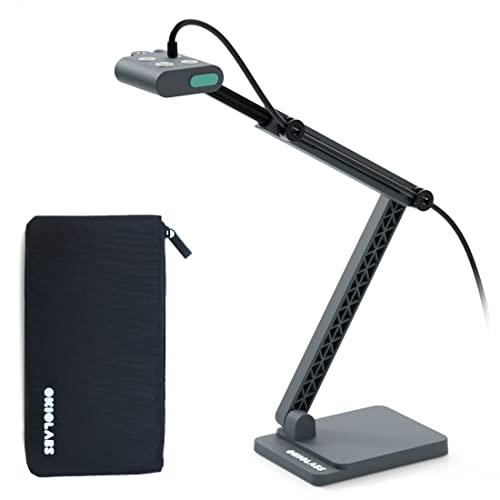
- 13MP sensor delivers 4K video at 30 fps
- Built-in LED light supports dim-location capture
- OKIOPoint software adds smart pointing, zooming, and focusing
Best For: Interactive teaching and polished live presentations
Best 4K Option

- 8MP capture with up to 2448P at 30fps
- Three-level LED ring light and brightness controls
- Foldable A3-capable design with dual microphones
Best For: Teachers and presenters needing detailed image capture and flexible lighting
Best Flexible Pick

- 5MP sensor with up to 2592×1944P resolution
- Three-level LED light with five ISO settings
- 360-degree gooseneck and plug-and-play USB-C setup
Best For: Online teaching and home-office demonstrations requiring easy adjustment
Best Foldable Visualiser
Kitchbai 4K USB Document Camera

- 8MP capture with 2448P video at 30fps
- Three-level LED light with manual brightness controls
- Foldable A3-capable design with macro focus
Best For: Portable classroom visualising and close-up live demonstrations
Best Large-Format 4K Pick – INS-2 UHD 4K Document Camera
For educators presenting oversized materials, the INS-2 is a strong choice among document cameras with built in lighting. Its 13MP Sony sensor captures 4K video, while the adjustable arm accommodates documents and artwork up to A3 size.
Best For: Professional educators, art instructors, exhibitions, and presentations involving large documents, artwork, or two-page spreads.
Pros:
- 4K capture with a 13MP Sony sensor.
- Built-in LED, brightness control, anti-glare sheet, and dual autofocus modes.
- Includes software with annotation, recording, whiteboard, zoom, and OCR tools.
- Works with Windows, Mac, iPad, Chromebook, Zoom, Microsoft Teams, and Google Meet.
Cons:
- Heavier and less compact than lower-resolution alternatives.
- Full 4K capability may be more than needed for basic worksheets.
The INS-2 stands out when image detail and coverage area matter most. Its A3 support and presentation-focused software make it especially suitable for classrooms and professional demonstrations.
Best for Fast Live Streaming – IPEVO V4K 8MP Document Camera
The IPEVO V4K is a practical option for buyers comparing document cameras with built in lighting, particularly when responsive streaming is the priority. Its 8MP Sony CMOS sensor supports high-resolution images, autofocus, and up to 30 fps at Full HD.
Best For: Live demonstrations, web conferencing, distance learning, and remote teaching where smooth video and quick focusing are important.
Pros:
- 8MP sensor captures images up to 3264 × 2448 pixels.
- Streams at up to 30 fps in Full HD.
- Fast autofocus helps reduce interruptions when changing materials.
- Multi-jointed stand and a maximum shooting area of 13.46 × 10.04 inches.
Cons:
- The supplied notes do not specify a built-in LED light.
- No zoom is listed.
- Its maximum capture area is smaller than A3-capable models.
Choose the V4K for a straightforward USB camera with strong streaming performance and quick focusing. It is especially compelling for live instruction and conferencing rather than advanced lighting control.
Best Plug-and-Play Classroom Choice – HUE HD Pro Document Camera
The HUE HD Pro keeps setup simple while still offering useful features found in document cameras with built in lighting. It provides 1080p video, built-in LED lights, a noise-reducing microphone, and broad operating-system compatibility.
Best For: Teachers, tutors, homeschoolers, and offices that want an easy-to-use camera for documents, demonstrations, and video calls.
Pros:
- Full HD 1080p streaming with built-in LED lights.
- Plug-and-play support for Windows, macOS, Chrome OS, and Linux.
- Flexible neck can be used with or without the base.
- Includes manual focus, a wide-angle lens, and a three-year warranty.
Cons:
- Manual focus requires adjustment when changing subjects.
- 1080p resolution is lower than the 4K option in this roundup.
- HUE Intuition software requires Windows or macOS.
The HD Pro is a sensible classroom-focused pick for buyers who value simple operation and flexible placement over maximum resolution. Its lighting, microphone, and long warranty add practical everyday value.
Best Value Autofocus Option – INS-1 Classic 8MP Document Camera
The INS-1 combines an 8MP sensor, built-in LED, autofocus, and a compact multi-joint design for everyday instruction. It is a capable choice among document cameras with built in lighting when you want useful presentation controls without stepping up to 4K.
Best For: Teachers, online instructors, and home users who need autofocus, flexible positioning, and clear capture for pages or small objects.
Pros:
- 8MP Sony camera supports images up to 3264 × 2448 pixels.
- Built-in LED, anti-glare sheet, and seven-step brightness control.
- Autofocus and macro capability capture objects as close as 3.9 inches.
- Includes Documate software for annotation, recording, snapshots, and digital zoom.
Cons:
- Does not provide 4K video.
- Uses a USB-A cable, which may require an adapter on some newer devices.
The INS-1 offers a balanced feature set for routine document-camera work. Its lighting and autofocus help with varied materials, while the included software adds useful controls for teaching and conferencing.
Best Wide-Angle Pick – IPEVO V4K PRO 120
If you need document cameras with built in lighting for oversized pages, demonstrations, or video calls, the IPEVO V4K PRO 120 combines a 120-degree lens with 4K capture and an integrated LED light. Its adjustable arm and USB connectivity make it a flexible choice for home, classroom, and remote-work setups.
Best For: Capturing tabloid-size documents, larger objects, and wide-angle video calls.
Pros:
- 120-degree lens covers tabloid-size documents and larger objects.
- 4K resolution, Sony CMOS sensor, autofocus, and built-in LED light support detailed images.
- Works with Windows, Mac, Chromebooks, Zoom, Google Meet, Skype, and Teams.
- AI noise reduction can help reduce ambient background noise during calls.
Cons:
- USB connectivity is required, with no wireless operation listed.
- It weighs about 860 g, so it is less lightweight than some compact document cameras.
The V4K PRO 120 stands out when coverage area matters as much as image quality. Choose it for wide presentations and multipurpose webcam use, especially if you value a sturdy, portable design and broad software compatibility.
Best Adjustable Budget Option – PAKOTOO KB700
The PAKOTOO KB700 is a practical option among document cameras with built in lighting, offering three LED brightness levels and ten exposure settings. Its foldable, multi-joint design supports flexible positioning for A3 and A4 materials, while autofocus helps keep moved objects clear.
Best For: Teachers and remote learners who need adjustable lighting and A3-size coverage.
Pros:
- Three LED brightness levels provide fill light in different environments.
- Captures an area up to 16.5 by 11.6 inches, covering A3 paper.
- Foldable, multi-joint arm supports multiple viewing angles and easier storage.
- Image reversal buttons and autofocus add useful classroom controls.
Cons:
- It is not plug and play; you must select USB Camera on the computer.
- It does not support zoom or HDMI, and it is not compatible with iPad.
- The supplied details list a one-year warranty.
The KB700 focuses on classroom practicality rather than advanced connectivity. Its adjustable light, large coverage area, and foldable construction make it appealing for teaching, provided USB setup and the lack of HDMI are acceptable.
Best Premium Presentation Features – OKIOCAM S2 Pro
For buyers comparing document cameras with built in lighting for polished presentations, the OKIOCAM S2 Pro pairs a 13MP sensor with 4K video, autofocus, and an integrated LED light. Its OKIOCAM software and OKIOPoint smart pointer add presentation and annotation tools beyond basic document display.
Best For: Live teaching, interactive presentations, and detailed document demonstrations.
Pros:
- 13MP CMOS sensor supports 4K video at up to 30 frames per second.
- Integrated LED light helps capture materials in dim locations.
- OKIOPoint can track where you point and zoom and focus on that area.
- Metal weighted base and reinforced arm are designed for durability.
Cons:
- The maximum viewing area is 13.6 by 10.6 inches, smaller than A3 coverage.
- Its advanced presentation features depend on the included OKIOCAM software.
- Connection is USB-based rather than wireless.
The S2 Pro is a strong fit when presentation controls matter as much as image quality. It offers a durable physical design, built-in lighting, and useful software features for educators and presenters who want more interactive demonstrations.
Best 4K Option – THUSTAR 8MP Document Camera
If you want document cameras with built in lighting for teaching, demonstrations, or video calls, the THUSTAR combines 8MP capture, 4K video support, and three brightness levels. Its foldable design and A3 coverage make it practical for classrooms and compact workspaces.
Best For: Teachers and presenters who need high-resolution imaging, adjustable illumination, and broad operating-system compatibility.
Pros:
- 8MP resolution with up to 2448P output and 30fps transmission.
- Built-in 14-bead LED ring light with three brightness levels.
- Foldable, multi-joint design supports A3 documents and 2D or 3D objects.
- Works with Windows, macOS, Chromebooks, Zoom, Teams, Meet, and other listed platforms.
Cons:
- Uses a USB connection rather than wireless operation.
- Its broad feature set may be more than needed for basic document sharing.
The THUSTAR is a strong choice when image detail and flexible positioning matter. Manual brightness and image-reversal controls are useful for challenging lighting and video-chat presentations, while the dual microphones add convenience for remote teaching.
Best Flexible Pick – THUSTAND 5MP Document Camera
This 5MP model is a practical option among document cameras with built in lighting, especially if you want a flexible gooseneck and straightforward USB setup. Its three-level LED light, manual ISO adjustment, and A3 coverage support teaching, conferencing, and live demonstrations.
Best For: Distance educators, tutors, and home-office users who value flexible positioning and simple plug-and-play setup.
Pros:
- 5MP sensor delivers up to 2592×1944P still resolution and 30fps streaming.
- Three-level dimmable LED fill light and five ISO exposure levels help manage uneven lighting.
- 360-degree gooseneck adjustment supports different viewing angles.
- Includes image flip, 180-degree inversion, autofocus, and macro capture to 3.94 inches.
Cons:
- It offers lower stated resolution than the 8MP models in this roundup.
- The supplied notes identify video resolution as 1080p despite the higher still-image specification.
The THUSTAND emphasizes ease of use and positioning flexibility over maximum resolution. Its dedicated AF button, adjustable exposure, and USB-C cable make it a versatile choice for everyday online instruction and demonstrations.
Best Foldable Visualiser – Kitchbai 4K USB Document Camera
The Kitchbai is designed for users who want document cameras with built in lighting, high-resolution video, and a compact form factor. It combines 8MP capture, three brightness levels, A3 coverage, and a foldable multi-joint structure for live demos and distance learning.
Best For: Educators and presenters who need a portable visualiser for documents, objects, and close-up demonstrations.
Pros:
- 8MP CMOS sensor supports up to 2448P video at 30fps.
- Three-level LED lighting and manual brightness controls help with dark or bright scenes.
- Foldable multi-joint design supports multi-angle capture and A3-size coverage.
- Macro mode focuses on objects as close as 3.94 inches and includes image inversion controls.
Cons:
- Requires a USB connection and a compatible computer.
- Its listed maximum output is 2448P rather than a full 3840×2160 4K specification.
This visualiser is a good fit for portable teaching setups where both coverage and close-up detail matter. Its built-in light, foldable construction, and dual microphones make it well suited to classroom presentations and web conferencing.
How We Picked the Best Document Cameras with Built in Lighting
We focused on models that combine a document-focused overhead design with integrated lighting or adjustable LED illumination. We compared stated resolution, capture area, autofocus behavior, microphone features, flexibility, connection type, and compatibility with common computers and video-conferencing platforms. Because specifications vary by listing and software, confirm the latest details before buying.
Resolution matters, but it is not the only measure of image quality. Sensor performance, lens design, autofocus speed, lighting control, and software support can make a lower-resolution camera more useful than a basic camera with a larger headline number.
Quick Comparison
| Best for | Features to prioritize | Why it matters |
|---|---|---|
| Classroom instruction | LED brightness control, autofocus, A3 coverage | Shows books, worksheets, and demonstrations clearly |
| Remote teaching | USB compatibility, microphone, stable stand | Reduces setup friction during video calls |
| Detailed demonstrations | 4K or high-resolution sensor, flexible positioning | Preserves small text and fine work |
| Frequent travel | Foldable arm, compact footprint, plug-and-play setup | Makes storage and relocation easier |
Key Buying Factors for Document Cameras with Built-In Lighting
Resolution and Real-World Detail
Choose 4K when you regularly show small print, diagrams, artwork, or product details and your computer and conferencing software can handle it. An 8MP or 5MP model may be sufficient for ordinary worksheets and live instruction, especially when the image is well lit.
Lighting Control
Built-in LEDs help counter shadows and dim rooms, but brightness control is important. Multiple levels let you avoid glare on glossy pages and adjust for different subjects. Look for a light positioned to illuminate the document without appearing prominently in the camera frame.
Coverage, Movement, and Focus
A3 support provides more working space than A4 and is useful for maps, posters, textbooks, and demonstrations. Check whether the arm folds, the camera head tilts or rotates, and the unit supports autofocus or manual focus. A stable base is especially important when touching or repositioning materials.
Audio and Software Compatibility
Integrated microphones are convenient for remote lessons, but they may not outperform a dedicated headset or desktop microphone. Verify USB connector requirements and operating-system support for Windows, macOS, ChromeOS, and your preferred conferencing or annotation software.
Who Should Buy Which Document Cameras with Built in Lighting?
Teachers and Tutors
Prioritize adjustable lighting, reliable autofocus, A3 coverage, and simple USB operation. A built-in microphone is useful if the camera will serve as an all-in-one remote teaching device.
Presenters and Demonstrators
Choose a higher-resolution model with a flexible arm, fast focus, and a wide enough field of view for objects and hands. Features such as image rotation, inversion, or smart pointers can improve demonstrations when supported by compatible software.
Mobile Instructors and Occasional Users
Look for a foldable design, low setup complexity, and broad computer compatibility. A compact 8MP or 5MP camera can be the better value if you mainly display standard documents rather than fine-detail artwork.
Buyers Seeking Maximum Detail
Select a 4K model with a capable sensor and dependable autofocus, but confirm that your USB connection, computer, and meeting software support the desired video quality. Better resolution cannot compensate for poor positioning, glare, or insufficient lighting.