
The best document cameras with HDMI output make it easy to display books, worksheets, experiments, and physical objects on a TV, projector, or interactive panel. They can also support USB video calls and recording, giving teachers and presenters more flexibility.
This roundup compares 10 selected models across image quality, connectivity, capture area, autofocus, lighting, portability, and classroom-friendly features so you can choose the right visualiser for your setup.
Best 10 Document Cameras with Hdmi Output Picks for 2026
Best Dual-Mode Pick
IPEVO VZ-R 8MP Document Camera
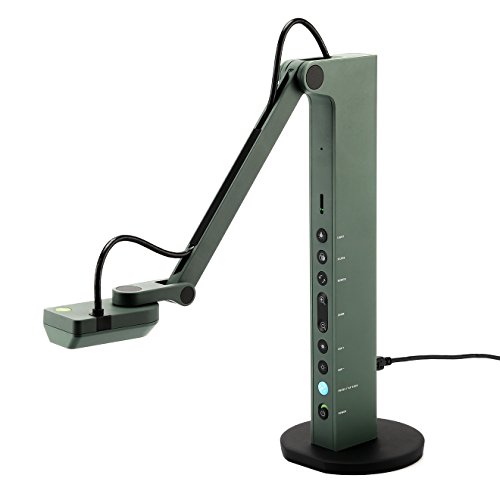
- HDMI and USB dual-mode operation
- 1080p HDMI output at 30 fps
- Autofocus with flexible multi-jointed stand
Best For: Teachers and presenters using displays and computers
Best 4K Large-Format Pick
INSWAN INS-2 UHD Document Camera

- 13MP Sony sensor with 4K at 30 fps
- Captures documents up to A3 size
- Includes lighting, mic, and teaching software
Best For: Large documents, artwork, and high-detail classroom presentations
Best Direct-Display Value
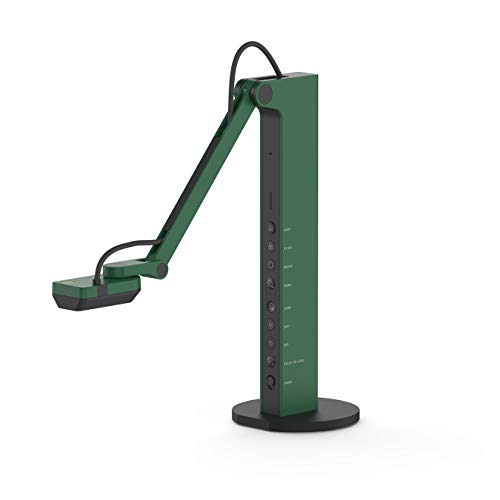
- Connects directly to TVs, monitors, and projectors
- USB mode supports major computer platforms
- 1080p HDMI video at 30 fps
Best For: Computer-free projection and hybrid presentations
Best AI-Tracking USB Pick

- 8MP capture up to 3264 × 2448 at 30 fps
- OKIOPoint AI pointer tracking
- Works with computers, iPad, and interactive displays
Best For: USB-based hybrid teaching and interactive presentations
Best Direct-Display Pick
INEBIZ IB280 HDMI Document Camera

- Direct HDMI output without a computer
- 10x optical zoom plus 30x digital zoom
- A3 capture area with LED lighting
Best For: Classrooms and presentations using projectors or interactive displays
Best High-Resolution USB Pick

- 8MP Sony sensor with up to 3264 x 2448
- 30fps Full HD streaming
- Compact design with AI pointer software
Best For: Portable computer-, Mac-, or Chromebook-based teaching
Best Foldable A3 Visualizer

- 8MP 2448p capture at up to 30fps
- Foldable design with A3 coverage
- Dual microphones and three-level LED light
Best For: USB-based classroom demos, video calls, and document teaching
Best Overall
IPEVO VZ-R Ultra 4K HDMI/USB Document Camera

- HDMI and USB dual-mode connectivity
- 13MP sensor with up to 4K HDMI video
- Autofocus, LED light, and tactile controls
Best For: Classrooms and presentations requiring high-resolution, flexible connections
Best Value
JOYUSING V508 8MP Three-Mode Document Camera

- HDMI, VGA, and USB connectivity
- 8MP capture with autofocus and 100x digital zoom
- Includes cables, adapter, remote, and manual
Best For: Schools needing versatile display connections and direct projection
Best USB Budget Pick
PAKOTOO KB700 A3 USB Document Camera

- USB 2.0 camera for Windows, Mac, and Chromebook
- Covers documents up to A3 size
- Foldable stand with autofocus and LED lighting
Best For: Computer-based teaching without a need for HDMI output
Best Dual-Mode Pick – IPEVO VZ-R 8MP Document Camera
The IPEVO VZ-R is a practical choice among document cameras with HDMI output when you need both direct display and computer-based teaching. Its HDMI mode supports up to 1080p at 30 fps, while USB mode reaches up to 3264 × 2448 at 10 fps.
Best For: Teachers and presenters who switch between projectors, displays, and computers.
Pros:
- HDMI and USB dual-mode connectivity
- Autofocus, swiveling head, and multi-jointed stand
- Works with Mac, Windows PC, and Chromebook
- Durable, lightweight glass-fiber-reinforced stand
Cons:
- HDMI mode is limited to 1920 × 1080
- USB capture is limited to 10 fps at the highest listed resolution
The VZ-R balances flexibility, portability, and straightforward controls. It is especially useful when direct HDMI projection matters as much as USB compatibility.
Best 4K Large-Format Pick – INSWAN INS-2 UHD Document Camera
The INSWAN INS-2 is suited to buyers who want high-resolution presentation quality and a broad capture area. Its 13MP Sony sensor records 4K video at 30 fps and its multi-joint arm supports documents up to A3 size.
Best For: Professional educators and art instructors showing large documents, artwork, or two-page spreads.
Pros:
- 4K Ultra HD capture at 3840 × 2160 and 30 fps
- Supports large A3-format materials
- Built-in LED, microphone, anti-glare sheet, and macro capability
- Documate software includes annotation, OCR, recording, and whiteboard tools
Cons:
- The supplied specifications list USB rather than HDMI connectivity
- Its larger-format feature set may be more than needed for basic document display
Although it is not the most direct fit for an HDMI-focused setup, the INS-2 stands out for detailed 4K images and large-format teaching materials. Verify your connection requirements before choosing it for an HDMI workflow.
Best Direct-Display Value – IPEVO VZ-R HDMI/USB
This IPEVO VZ-R is a strong option among document cameras with HDMI output because it can connect directly to a TV, monitor, or projector without a computer. It also supports USB use, webcam applications, and up to 1080p HDMI capture at 30 fps.
Best For: Presenters who need computer-free projection as well as video-conferencing flexibility.
Pros:
- Direct HDMI connection to displays and projectors
- USB mode works with Mac, Windows PC, and Chromebook
- 8MP sensor with autofocus and LED lighting
- Swiveling head and multi-jointed stand support varied angles
Cons:
- HDMI cable and wall power adapter are not included
- HDMI output is limited to 1920 × 1080
The VZ-R offers a flexible presentation setup with useful onboard controls and a webcam mode. Budget for the missing HDMI cable and wall adapter if you plan to use it as a standalone HDMI camera.
Best AI-Tracking USB Pick – OKIOCAM S2-4K Document Camera
The OKIOCAM S2-4K is designed for high-detail USB teaching and presentation workflows rather than direct HDMI connection. Its 8MP Sony Exmor R sensor captures up to 3264 × 2448 at 30 fps, while OKIOPoint AI-tracking can follow a pointer during lessons.
Best For: Hybrid classrooms and presenters using computers, iPads, or interactive displays over USB.
Pros:
- Up to 3264 × 2448 capture at 30 fps
- AI pointer tracking and feature-rich presentation software
- Captures an area up to 15.1 × 11.2 inches
- Built-in microphone and broad USB compatibility
Cons:
- The supplied specifications do not list HDMI output
- Some software and iPad features require supported operating systems or app downloads
For buyers specifically requiring HDMI, this model should be considered only if USB-to-display operation meets the need. Its strengths are smooth high-resolution streaming, low-light performance, and interactive software features.
Best Direct-Display Pick – INEBIZ IB280 HDMI Document Camera
If you need document cameras with HDMI output for a classroom or presentation setup, the INEBIZ IB280 is a practical choice for connecting directly to a TV, monitor, projector, or interactive whiteboard without a computer. Its 10x optical zoom, autofocus, A3 capture area, and built-in lighting support detailed document and 3D-object demonstrations.
Best For: Teachers and presenters who want direct HDMI display, strong zoom, and flexible positioning.
Pros:
- HDMI connection supports direct output to displays without a computer.
- 10x optical and 30x digital zoom help enlarge documents and objects.
- A3 capture area, flexible gooseneck arm, 180-degree flip lens, and LED light add setup flexibility.
- Supports autofocus, manual focus, freeze, split-screen comparison, SD recording, and USB webcam use.
Cons:
- At about 2 kg, it is less portable than compact USB-only models.
- Still image and video specifications are limited to 2MP and 1080p.
- Some annotation and editing features require the accompanying software.
The IB280 stands out when HDMI connectivity is the priority. It is more feature-focused than ultra-portable, but its optical zoom, lighting, and no-computer display support make it well suited to fixed classroom or presentation stations.
Best High-Resolution USB Pick – OKIOCAM S-4K Document Camera
The OKIOCAM S-4K is a strong option for buyers comparing document cameras with HDMI output but who primarily work through a computer or Chromebook: it uses USB and delivers up to 3264 x 2448 resolution from an 8MP Sony Exmor R sensor. Its compact design, autofocus, and software tools make it convenient for teaching, distance learning, and live demonstrations.
Best For: Teachers and remote presenters who prioritize high-resolution USB imaging and portability.
Pros:
- 8MP sensor captures images at up to Ultra HD 3264 x 2448 resolution.
- Provides up to 30fps in Full HD for smooth live streaming.
- Portable 269g design captures letter-size materials in landscape orientation.
- Includes OKIOPoint AI pointer features and software for annotation, recording, snapshots, and more.
Cons:
- Connectivity is USB only, so it does not provide direct HDMI output.
- Maximum-resolution capture is limited to 15fps.
- Its compact letter-size viewing area may be less suitable for larger A3 materials.
The S-4K is best viewed as a high-resolution USB alternative rather than an HDMI document camera. Choose it when computer-based teaching, Chromebook compatibility, and portability matter more than connecting directly to a display.
Best Foldable A3 Visualizer – Kitchbai KB-700 4K Camera
For buyers seeking document cameras with HDMI output, the Kitchbai KB-700 is another USB-based option designed for computer-led teaching and live demos. It combines 8MP, up to 2448p video, A3 coverage, a foldable multi-joint body, adjustable lighting, and dual microphones for video calls and classroom presentations.
Best For: Teachers who need a foldable A3 visualizer with built-in microphones and flexible lighting.
Pros:
- 8MP imaging supports up to 2448p output at up to 30fps.
- Captures A3-size areas and 2D or 3D objects with a multi-angle rotating design.
- Foldable construction saves space for storage and transport.
- Three-level brightness adjustment, image reversal controls, and dual noise-reducing microphones improve demonstrations and calls.
Cons:
- Uses USB connectivity and does not offer direct HDMI output.
- Manual focus behavior may require pressing the focus button when objects move.
- It is designed for Windows, macOS, and Chrome OS rather than standalone display use.
The KB-700 is a versatile USB visualizer for classrooms that need broad A3 coverage without sacrificing portability. Its microphones and lighting controls are useful extras, but shoppers specifically requiring HDMI should choose a model with a stated HDMI connection instead.
Best Overall – IPEVO VZ-R Ultra 4K HDMI/USB Document Camera
If you need document cameras with HDMI output for classroom or presentation use, the IPEVO VZ-R Ultra is a versatile choice. It supports direct HDMI connections to interactive flat panels, TVs, monitors, and projectors without a computer, while USB mode supports compatible teaching and meeting software. Its 13MP Sony CMOS sensor captures up to 4K video in HDMI mode and 4096 x 3072 resolution in USB mode.
Best For: Teachers, presenters, and remote instructors who want high-resolution imaging with both standalone HDMI and computer-based USB connectivity.
Pros:
- HDMI and USB dual-mode operation, including computer-free presentations
- 13MP sensor with up to 4K HDMI video capture
- Autofocus, built-in LED lighting, and tactile adjustment controls
- Durable, portable stand with free IPEVO Visualizer software support
Cons:
- At 1.19 kg, it is heavier than some compact document cameras
- USB and HDMI modes have different maximum resolutions
The VZ-R Ultra stands out when image quality and connection flexibility matter most. Its direct HDMI workflow is convenient for classrooms, while USB compatibility adds useful software-based teaching options.
Best Value – JOYUSING V508 8MP Three-Mode Document Camera
The JOYUSING V508 is a practical option among document cameras with HDMI output, offering HDMI, VGA, and USB connectivity. It can project directly to a monitor or projector for real-time viewing and annotation without PC software, while its 8MP sensor captures images up to 3264 x 2448. Autofocus, digital zoom, and adjustable LED lighting support everyday classroom demonstrations.
Best For: Teachers and presenters who need multiple display connections, direct projection, and a complete starter package.
Pros:
- Three connection modes: HDMI, VGA, and USB
- 8MP CMOS sensor with up to 3264 x 2448 capture
- 100x digital zoom and autofocus for close-up demonstrations
- Includes HDMI and USB cables, power adapter, remote, and manual
Cons:
- USB connectivity is specified as USB 2.0
- One-year manufacturer guarantee is shorter than some alternatives
The V508 offers broad compatibility for schools and meeting spaces that still use VGA equipment. It does not match the IPEVO’s stated 4K HDMI resolution, but its three-mode design and included accessories make setup straightforward.
Best USB Budget Pick – PAKOTOO KB700 A3 USB Document Camera
The PAKOTOO KB700 is designed for computer-based teaching rather than as a document camera with HDMI output. It connects through USB 2.0 to Windows PCs, Macs, and Chromebooks, capturing up to 2448P and covering documents as large as A3. A foldable, multi-joint design, autofocus, image reversal buttons, and three-level LED lighting make it useful for distance teaching and demonstrations.
Best For: Teachers who primarily use a computer and need an affordable, portable USB camera for A3 or A4 documents.
Pros:
- Captures an area up to 16.5 x 11.6 inches for A3 documents
- Autofocus with one-touch refocusing and macro capture
- Foldable multi-joint stand supports multiple viewing angles
- Image reversal and lighting controls operate through physical buttons
Cons:
- Does not support HDMI output
- Does not support zoom or iPad compatibility
- Not plug and play; the computer must select it as a USB camera
If HDMI output is a firm requirement, this model should be skipped. For USB-only teaching setups, however, its large coverage area, foldable design, and straightforward physical controls offer useful value.
How We Picked the Best Document Cameras with Hdmi Output
We selected models that offer practical value for teaching, training, demonstrations, and remote presentation. Our comparison focuses on HDMI availability, USB compatibility, stated resolution, capture size, focusing performance, lighting, microphone features, and ease of positioning. We also considered whether each camera suits a permanent classroom installation or a portable desk setup.
Resolution is only one part of performance. A camera with dependable autofocus, a flexible arm, and clear output can be more useful than a higher-resolution model that is difficult to position or connect.
Quick Comparison
| What to Compare | Why It Matters |
|---|---|
| HDMI output | Connects directly to displays, projectors, interactive panels, and monitors. |
| USB mode | Supports video conferencing, recording, and computer-based teaching. |
| Resolution | Higher resolution can preserve fine text and detail, especially on larger screens. |
| Capture area | A3 or near-ledger coverage accommodates worksheets, books, and larger objects. |
| Focus and lighting | Autofocus and built-in LEDs help maintain a readable image in changing conditions. |
Key Buying Factors for Document Cameras with Hdmi Output
Check the HDMI Connection and Display Requirements
Confirm whether the camera provides a direct HDMI output rather than HDMI input only. Check the supported resolution and make sure your projector, TV, monitor, or interactive display accepts the required signal. Some models also include VGA or multiple output modes, which can help with older classroom equipment.
Choose the Right Image Quality
8MP models can deliver sharp classroom images, while 13MP and 4K-capable cameras may show smaller print, diagrams, and detailed objects more clearly. Image quality also depends on lighting, lens design, focus speed, and the display itself.
Consider Size, Arm Movement, and Portability
For books and worksheets, look for A3 or near-ledger capture. A folding design is useful when the camera must move between rooms. Flexible arms and image rotation controls make it easier to show objects, handwriting, or angled materials without constantly repositioning the base.
Look for Useful Classroom Features
Built-in LED lighting can reduce shadows, while microphones support USB conferencing. AI pointers or tracking tools may help highlight content, but they should be treated as convenience features rather than essential requirements.
Who Should Buy Which Document Cameras with Hdmi Output?
For direct projector or panel use: Choose a model with reliable HDMI output and straightforward controls. This is the best fit for teachers who want plug-and-display operation without opening presentation software.
For hybrid teaching and video calls: Prioritize dual HDMI and USB operation, microphone support, and compatibility with your computer platform. These features make it easier to switch between classroom display and online meetings.
For detailed documents and demonstrations: Consider a 4K-capable or higher-megapixel camera with autofocus and strong lighting. It is especially useful for fine print, science materials, crafts, and close-up demonstrations.
For shared classrooms or mobile presenters: A foldable, lightweight design with a broad capture area is usually the most practical choice. Before buying, verify the included cables, operating-system support, and the camera’s physical footprint on your desk.