
A document scanner with a 100-sheet feeder can turn paper-heavy filing into a faster, more consistent workflow. Large automatic document feeders help you scan contracts, invoices, receipts, and forms in batches while duplex scanning captures both sides without manual flipping.
We selected 10 versatile models based on speed, connectivity, software, paper handling, and everyday usability. The lineup includes wireless desktop scanners, plug-and-scan options, flatbed combinations, and business-focused units for different workloads.
Best 10 Document Scanner with 100 Sheet Feeder Picks for 2026
Best AI-Ready Pick

- 100-sheet feeder and 45 ppm duplex scanning
- Wi-Fi, USB, cloud, and touchscreen controls
- AI-ready scan processing
Best For: Fast, connected office document scanning
Best Flatbed Versatility
Visioneer Xerox Duplex Combo Scanner

- Flatbed handles books, photos, cards, and large pages
- Duplex scanning up to 25 ppm or 50 ipm
- PC and Mac compatible with included drivers
Best For: Mixed media and office document scanning
Best Wireless Organization

- 100-sheet feeder with 45 ppm duplex scanning
- Wi-Fi 6, USB-C, touchscreen profiles, and cloud support
- Automatic file optimization and organization
Best For: Connected, organized home and office scanning
Best Overall

- 45 ppm duplex scanning with a 100-sheet feeder
- Wi-Fi 6, USB-C, touchscreen profiles, and cloud support
- Multi-feed and skew detection help protect documents
Best For: Wireless, high-volume scanning and shared workflows
Best for Business Integration

- 45 ppm/90 ipm duplex scanning with a 100-page ADF
- TWAIN and ISIS drivers support office-system integration
- Handles long pages, folded documents, and ID cards
Best For: Office batch scanning and document-management systems
Best for Simplicity
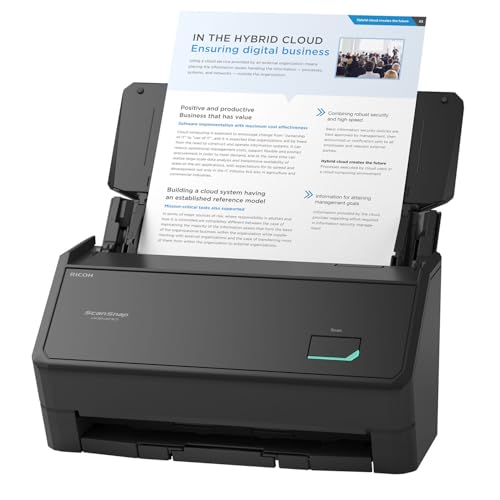
- One-touch scanning at up to 45 ppm
- 100-sheet feeder for batch document processing
- Automatic cleanup, blank-page removal, and skew correction
Best For: Simple wired scanning for mixed home-office documents
Production Powerhouse
fi-8150 100-Sheet Duplex Scanner

- 50 ppm duplex scanning with a 100-sheet feeder
- 8,000-page expected daily volume
- USB, Gigabit Ethernet, and broad media support
Best For: High-volume office archiving and department-wide batch intake
Connected Office Choice
Epson ES-580W Wireless Scanner

- 35 ppm duplex scanning with a 100-sheet ADF
- Wireless and computer-free USB or cloud workflows
- OCR supports searchable and editable files
Best For: Convenient home-office and small-business document management
Receipt Workflow Specialist

- 45 ppm duplex scanning with a 100-sheet feeder
- AI-ready receipt and document data extraction
- QuickBooks, TurboTax, Excel, cloud, and USB support
Best For: Receipt, invoice, and expense-record digitization
Best AI-Ready Pick – Epson WorkForce ES-590W
If you need a document scanner with 100 sheet feeder capacity for frequent office batches, the Epson WorkForce ES-590W combines a 100-page feeder with fast duplex scanning at up to 45 pages per minute. Its Wi-Fi, USB, touchscreen, and cloud-ready features make it flexible for both desk-based and computer-free workflows.
Best For: Offices and home users who want fast wireless scanning, touchscreen controls, and AI-ready document workflows.
Pros:
- 100-sheet Auto Document Feeder supports larger scanning batches.
- Captures both sides in one pass at up to 45 ppm.
- Offers Wi-Fi, USB, cloud, email, and USB-drive scanning options.
- Large 4.3-inch color touchscreen supports computer-free scanning.
Cons:
- Its listed minimum system requirements specify Windows, which may limit setup flexibility.
- It is larger and heavier than some compact desktop scanners.
The ES-590W is a strong all-around choice when speed, a full-size feeder, and flexible connectivity matter. AI-ready scan processing and the touchscreen add convenience for modern document management.
Best Flatbed Versatility – Visioneer Xerox Duplex Combo Scanner
The Visioneer Xerox Duplex Combo is a practical alternative for buyers who need more than a document scanner with 100 sheet feeder capacity. Its combination of flatbed scanning and an automatic document feeder handles large documents, photos, cards, books, and mixed office paperwork, with duplex speeds up to 25 ppm or 50 ipm.
Best For: Users who scan books, photos, cards, and oversized documents as well as standard office pages.
Pros:
- Flatbed design accommodates books, photos, cards, and large documents.
- Duplex scanning reaches up to 25 ppm or 50 ipm at 300 dpi.
- Supports ADF documents up to 8.5 by 118 inches.
- Compatible with both PC and Mac with included drivers.
Cons:
- The supplied notes do not specify a 100-sheet feeder capacity.
- Its flatbed-combo design has a larger footprint than compact desktop models.
This model is most compelling when scanning versatility is more important than maximizing feeder capacity. The flatbed expands what you can scan, while duplex ADF operation keeps routine document work efficient.
Best Wireless Organization – ScanSnap iX2500
The ScanSnap iX2500 is a capable document scanner with 100 sheet feeder capacity for homes and offices that want streamlined wireless organization. It scans both sides at up to 45 ppm, supports Wi-Fi 6 and USB-C, and can automatically optimize, name, and sort documents, receipts, photos, and business cards.
Best For: Users who want customizable touchscreen profiles, wireless scanning, and automated organization across computers, mobile devices, and cloud services.
Pros:
- 100-sheet feeder supports substantial document batches.
- Fast 45 ppm double-sided scanning captures both sides efficiently.
- Wi-Fi 6 and USB-C provide flexible connection options.
- Brake roller, multi-feed, and skew detection help reduce feeding problems.
Cons:
- Its broad compatibility depends on the listed operating-system versions.
- The supplied notes do not state a scan speed for photos or other media.
Choose the iX2500 if workflow customization and file organization are priorities. Its profiles, cloud support, and paper-protection features make it well suited to recurring personal or office scanning routines.
Best Plug-and-Scan Option – Canon imageFORMULA R30
The Canon imageFORMULA R30 offers a simple approach for buyers comparing a document scanner with 100 sheet feeder models. It uses a 60-sheet feeder rather than a 100-sheet one, but its embedded software requires no installation, and its USB plug-and-scan setup handles duplex batches at up to 25 pages per minute.
Best For: Windows users who want straightforward USB scanning without installing separate scanner software.
Pros:
- Embedded software requires no installation and updates automatically.
- Scans both sides simultaneously at up to 25 ppm.
- 60-sheet feeder handles documents, invoices, contracts, and business cards.
- USB setup is simple with the supplied cable.
Cons:
- Its 60-sheet feeder is smaller than the 100-sheet capacity requested by this category.
- USB is the only listed connection type.
- TWAIN and ISIS drivers are not supported.
The R30 is a sensible pick for uncomplicated, occasional-to-regular office scanning where easy setup matters more than wireless connectivity or maximum feeder capacity. Its plug-and-scan design keeps the initial workflow simple.
Best Overall – ScanSnap iX2500
The ScanSnap iX2500 is a strong all-around document scanner with 100 sheet feeder capacity for home offices and busy workspaces. It combines up to 45 ppm duplex scanning with Wi-Fi 6, USB-C, automatic image optimization, and touchscreen controls.
Best For: Users who want fast, shareable scanning with wireless connectivity and customizable profiles.
Pros:
- Scans up to 45 pages per minute and supports double-sided scanning.
- 100-sheet feeder includes multi-feed and skew detection to help prevent jams and paper damage.
- Wi-Fi 6, USB-C, cloud support, and personalized touchscreen profiles add flexibility.
- Automatically optimizes, names, and sorts scanned files.
Cons:
- Its broader feature set may be more than needed for basic USB-only scanning.
- It has a higher listed weight than the iX2400.
The iX2500 is the most feature-rich option here, especially for households or teams that need wireless access and multiple scanning workflows. Its 100-sheet feeder and paper-protection features also suit larger batches.
Best for Business Integration – Epson DS-530X
The Epson DS-530X is a practical document scanner with 100 sheet feeder capacity, fast duplex performance, and business-oriented driver support. Its USB connection, TWAIN and ISIS drivers, and 7,000-sheet peak daily duty cycle make it a fit for document-management environments.
Best For: Offices that need reliable batch scanning and compatibility with established document-management systems.
Pros:
- Scans up to 45 ppm or 90 ipm with single-pass duplex scanning.
- 100-page ADF supports batch workflows.
- TWAIN and ISIS drivers simplify integration with many systems.
- Handles extra-long pages, folded papers up to 11 x 17 inches, and ID cards.
Cons:
- USB is the only listed connection type.
- It does not list built-in wireless or cloud-direct scanning.
- At 8.2 pounds, it is the heaviest of these three models.
The DS-530X stands out when compatibility and duty-cycle capacity matter more than wireless convenience. Its specialized drivers and broad media handling make it especially useful in structured office workflows.
Best for Simplicity – ScanSnap iX2400
The ScanSnap iX2400 is a straightforward document scanner with 100 sheet feeder capacity and one-touch operation. It scans up to 45 pages per minute over a stable USB connection while automatically cleaning up, organizing, and correcting images.
Best For: Home offices and users who prefer simple wired scanning for mixed everyday documents.
Pros:
- One-touch scanning reaches speeds up to 45 pages per minute.
- 100-sheet feeder supports larger batches.
- Automatically detects size and color depth, removes blank pages and streaks, and corrects skew.
- Handles documents, receipts, photos, business cards, envelopes, and ID cards.
Cons:
- USB is the only listed connection type.
- It lacks the iX2500’s listed Wi-Fi and touchscreen features.
The iX2400 is a good choice when easy operation is the priority. It delivers the same listed top scanning speed as the iX2500 while keeping the workflow focused on one-button, wired use.
Production Powerhouse – fi-8150 100-Sheet Duplex Scanner
If you need a document scanner with 100 sheet feeder capacity for sustained batch work, the fi-8150 stands out with 50 ppm duplex scanning, a daily duty rating of 8,000 pages, and USB or Gigabit Ethernet connectivity. Its broad media handling also suits mixed office archives.
Best For: Departments digitizing large back files or processing high daily document volumes.
Pros:
- 100-sheet feeder captures both sides in one pass at up to 50 ppm.
- Rated for an expected daily volume of 8,000 pages.
- Handles receipts, cards, passports with a carrier sheet, and pages up to 240 inches long.
- Ultrasonic multifeed detection helps catch double-fed pages.
Cons:
- Its production-oriented features may be more than occasional home users need.
- Windows 10 is listed as the minimum system requirement.
The fi-8150 is the strongest choice here for throughput and duty cycle. USB 3.2, network sharing, OCR software, and flexible media support make it well suited to serious office scanning.
Connected Office Choice – Epson ES-580W Wireless Scanner
The Epson ES-580W is a practical document scanner with 100 sheet feeder capacity for home and office workflows. It scans up to 35 pages per minute in duplex, supports wireless and computer-free destinations, and uses a touchscreen to simplify everyday filing.
Best For: Home offices and small businesses that want wireless, cloud, USB, and touchscreen scanning.
Pros:
- 100-sheet ADF handles different paper types and sizes.
- Duplex scanning captures both sides with Single-Step Technology.
- Scans directly to USB, email, and services including Dropbox, Evernote, Google Drive, and OneDrive.
- OCR creates searchable PDFs and converts scans to editable Word or Excel files.
Cons:
- Its 35 ppm speed is lower than the fi-8150 and RR-620W.
- Wireless connectivity is emphasized, without a listed Ethernet connection.
Choose the ES-580W when convenience matters as much as speed. Its touchscreen, wireless workflow, and automatic image adjustments reduce the effort involved in routine document organization.
Receipt Workflow Specialist – Epson RR-620W Receipt Scanner
For receipt-heavy work, the Epson RapidReceipt RR-620W combines a document scanner with 100 sheet feeder capacity, 45 ppm duplex scanning, wireless connectivity, and receipt-focused software. Its touchscreen and financial integrations make it especially useful for turning paper records into organized data.
Best For: Freelancers, small businesses, and finance users scanning receipts, invoices, and mixed documents.
Pros:
- 100-sheet ADF and up to 45 ppm double-sided scanning support batch work.
- AI PRO technology extracts and converts receipt and document data.
- Integrates with QuickBooks, TurboTax, Excel, and more.
- 4.3-inch touchscreen enables computer-free scanning to email, cloud storage, or USB.
Cons:
- Its strongest features are specialized around receipts and financial workflows.
- Windows is listed as the minimum system requirement, with no version specified.
The RR-620W is the most targeted option for expense documentation. It offers faster duplex scanning than the ES-580W while adding receipt extraction and accounting-oriented integrations.
How We Picked the Best Document Scanner with 100 Sheet Feeder
We focused on scanners suited to recurring document work rather than occasional photo scanning. Selection factors included feeder capacity, duplex performance, rated scan speed, connection options, compatibility with common operating systems, and workflow software. Because product specifications vary, verify the exact feeder capacity and included features for the configuration you plan to buy.
We also considered practical differences between wireless models, USB-only scanners, flatbed combinations, and units designed for networked office environments. A high page-per-minute rating matters, but reliable feeding, simple controls, and useful file-management tools can matter just as much.
Quick Comparison
| Best For | Look For | Why It Matters |
|---|---|---|
| Home offices | Wireless connectivity and one-touch workflows | Scan from multiple computers with less setup. |
| Large paper batches | 100-sheet ADF and duplex scanning | Reduces reloading and manual page handling. |
| Mixed originals | Flatbed plus automatic feeder | Handles books, fragile pages, cards, and loose sheets. |
| Business networks | USB and LAN connectivity | Makes shared-office deployment easier. |
| Receipts and records | OCR, cloud support, and document software | Improves searchability and filing speed. |
Key Buying Factors for a Document Scanner with 100-Sheet Feeder
Feeder Capacity and Reliability
A 100-sheet feeder is most useful when you regularly scan multi-page packets. Check whether the stated capacity applies to standard paper and whether the scanner supports mixed paper sizes, long documents, or thicker originals. A dependable separation system and misfeed detection can save more time than a small difference in rated speed.
Speed and Duplex Scanning
Compare pages per minute and images per minute, especially when scanning double-sided documents. Duplex scanning should capture both sides in one pass, while blank-page removal can reduce cleanup. Real-world throughput will also depend on resolution, color mode, computer performance, and software settings.
Connectivity and Software
USB is usually the simplest and most reliable connection. Wi-Fi is convenient for multiple users, while Ethernet or LAN can be preferable in an office. Look for OCR, searchable PDF creation, cloud destinations, receipt tools, and compatibility with your preferred filing or accounting applications.
Document Types and Image Quality
For ordinary paperwork, a sheet-fed scanner is efficient. If you need to scan books, passports, delicate pages, or mounted originals, choose a model with a flatbed or confirm that an accessory is available. Automatic color detection, deskewing, background removal, and double-feed detection can improve consistency.
Who Should Buy Which Document Scanner with 100 Sheet Feeder?
Choose a Wireless Desktop Model
Wireless scanners suit home offices, remote workers, and small teams that send scans to several computers or cloud services. They are a strong choice when convenience and flexible placement matter more than centralized network administration.
Choose a USB Plug-And-Scan Model
A USB-first scanner is ideal for a dedicated workstation and users who want minimal setup. Plug-and-scan designs can be especially helpful for occasional users or offices that prefer not to install complex software.
Choose a Flatbed Combination
Pick a flatbed model if your workflow includes bound material, fragile originals, photos, or irregular pages alongside standard paperwork. It may be less compact, but the added flexibility can prevent the need for a second scanner.
Choose a Business-Oriented Network Scanner
For shared departments and heavier daily workloads, prioritize dependable feeding, LAN support, serviceability, and robust document-capture software. A faster or more configurable model can justify its cost when several users rely on it every day.