
Enclosed laser engravers make it easier to create customized wood, leather, acrylic, and other projects while adding a layer of protection around the working area. The right machine depends on more than laser wattage: workspace, camera features, ventilation, software, and material compatibility all affect everyday results.
We compare 10 enclosed models across compact designs, beginner-focused systems, and higher-power machines suited to frequent crafting or small-business production. Use the guide below to narrow the choices by project type, budget, and required cutting capacity.
Best 10 Enclosed Laser Engravers Picks for 2026
Most Versatile
xTool M2 10W Enclosed Laser Engraver

- 10W laser works with many craft materials
- Dual cameras simplify accurate placement
- Optional modules expand printing and material capabilities
Best For: Home crafters and DIY makers seeking an expandable machine
Best AI-Assisted Model
Creality Falcon A1C 10W Enclosed Laser Engraver

- AI camera assists with artwork and positioning
- Auto focus and 15,000mm/min speed streamline jobs
- Interchangeable platform supports multiple laser modules
Best For: Guided engraving, personalized gifts, and compact production work
Best Large-Area Value
5.5W Class 1 Enclosed Laser Engraver

- Large 300 x 300mm engraving area
- Fully enclosed with multiple safety systems
- Supports several software, file, and connection options
Best For: Larger hobby projects and versatile beginner workflows
Fast, Beginner-Friendly Pick

- 600mm/s engraving speed
- Pre-calibrated smart camera
- Class 1 enclosed design
Best For: Beginners and home crafters needing guided setup
Value 20W Option
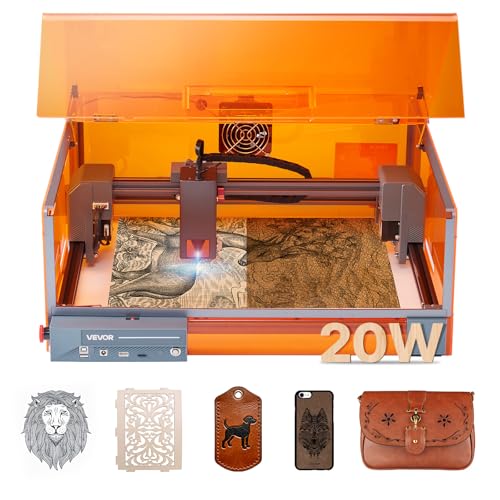
- 20W laser output
- 11.8 x 11.8-inch work area
- Class 1 safety enclosure
Best For: Budget-minded wood and leather projects
High-Power Large-Format Pick

- 40W cutting power
- 23.93 x 15.16-inch bed
- Rotary and AutoPassthrough support
Best For: Large projects, batches, and curved items
Best Connected Option
K15 Pro 10W Enclosed Laser Engraver

- Wi-Fi, USB, and TF-card control
- 300+ material compatibility
- 0.01 mm precision with expansion ports
Best For: Connected desktop engraving and small-business projects
Best Starter Bundle
BlazeX M3 10W Enclosed Laser Engraver

- Includes enclosure and honeycomb bed
- 13 materials plus tools and goggles
- Class 1 safety features and broad software support
Best For: First-time users and ready-to-start DIY projects
Best for Larger Projects
20W L2 MAX Enclosed Laser Cutter

- 20W power for thicker wood cutting
- 300 x 300 mm work area
- 20,000 mm/min maximum speed
Best For: Small-business orders and larger batch projects
Most Versatile – xTool M2 10W Enclosed Laser Engraver
The xTool M2 is one of the more adaptable enclosed laser engravers for home crafters who want room to expand. Its 10W diode laser handles materials such as wood, leather, felt, fabric, and paper, while dual cameras support accurate placement and previewing. Optional modules add color printing or finer metal and plastic engraving, but those accessories are sold separately.
Best For: Home crafters, personalized gifts, and DIY makers who want a camera-assisted machine with an expandable feature set.
Pros:
- Fully enclosed Class 1 design with real-time monitoring.
- Dual cameras enable real-time previews and the “Place & Go” workflow.
- 10W laser supports engraving and cutting across a broad range of craft materials.
- xTool Studio includes templates and an integrated AI image generator.
Cons:
- CMYK Inkjet and RA3 Lite Rotary modules are not included.
- The 36.2-pound machine requires a dedicated workspace.
The M2 is a strong choice when ease of placement and future expandability matter more than a minimalist setup. Keep the optional-module costs in mind when comparing the overall investment.
Best Compact Pick – Twotrees TS1 Mini Enclosed Laser Engraver
The Twotrees TS1 Mini is a highly compact option among enclosed laser engravers, with a small 80 x 80mm work area and a footprint suited to desks or craft tables. Its adjustable 3W laser is intended for detailed engraving and light cutting on thin materials, and Bluetooth control lets you run projects from an iOS or Android phone.
Best For: Small crafts, classroom demonstrations, maker events, and users who need a portable desktop engraver.
Pros:
- Fully enclosed acrylic cover contains light and debris.
- Bluetooth smartphone control works through the MKSLaser app.
- Compact, approximately 1kg design is easy to move and store.
- Supports materials including plywood, MDF, bamboo, paper, painted metal, and leather.
Cons:
- The 80 x 80mm work area limits project size.
- The 3W laser is intended primarily for detail work and light cutting.
- Adult supervision is recommended for family or classroom use.
The TS1 Mini makes the most sense when portability and simplicity are priorities. Its small work area is a clear trade-off, but it can be a practical entry point for small personalized projects.
Best AI-Assisted Model – Creality Falcon A1C 10W Enclosed Laser Engraver
The Creality Falcon A1C combines a 10W laser with an AI camera and a fully enclosed Class 1 structure. Its AI tools can convert photos into engraving-ready artwork, remove backgrounds, arrange designs, and recommend settings. Auto focus, up to 0.1mm positioning accuracy, and speeds up to 15,000mm/min make it suited to repeatable desktop projects.
Best For: Beginners and experienced makers who want guided design tools, quick setup, and a compact machine for gifts and décor.
Pros:
- AI camera supports automatic positioning and design preparation.
- Auto focus simplifies operation.
- Interchangeable platform supports 5W, 10W, and 1.2W Falcon modules.
- Class 1 enclosed design is intended for homes, studios, classrooms, and makerspaces.
Cons:
- Only one laser module is included with each package.
- Its 150 x 150 x 148mm work area is compact for larger projects.
- Additional modules and accessories require separate purchases.
The Falcon A1C stands out for reducing design and alignment friction. It is especially appealing if you value AI-assisted workflows and a platform that can adapt through interchangeable laser modules.
Best Large-Area Value – 5.5W Class 1 Enclosed Laser Engraver
This 5.5W model offers a notably spacious 300 x 300mm engraving area in a fully enclosed Class 1 design. It combines a fixed-focus laser with claimed 0.01mm compression focus, speeds up to 20,000mm/min, and multiple connection options. Compatibility with LightBurn, LaserGRBL, Cutlabx, common image and vector files, and optional accessories gives it a flexible workflow.
Best For: Beginners and hobbyists who want a larger work area for wood, leather, coated metal, glass, stone, and similar projects.
Pros:
- 300 x 300mm engraving area accommodates larger designs.
- Fully enclosed Class 1 structure includes auto-stop, flame sensing, an E-stop, and a safety lock.
- Supports Wi-Fi, USB, app control, and offline TF-card operation.
- Works with LightBurn, LaserGRBL, Cutlabx, and files such as JPEG, PNG, SVG, DXF, and AI.
Cons:
- The 5.5W output is less powerful than many 10W alternatives.
- Rotary and Air Assist accessories are optional rather than included.
- Its broad software and connection support may require setup time for beginners.
This model is a compelling fit when work area and safety features are more important than maximum laser power. Its modular assembly and wide connectivity also make it approachable for users planning to grow their workflow.
Fast, Beginner-Friendly Pick – Creality Falcon A1 10W
The Creality Falcon A1 10W is one of the more approachable enclosed laser engravers for makers who want a ready-to-use setup. Its pre-calibrated camera, preset parameters, and 600mm/s CoreXY motion system simplify positioning and help speed up routine projects.
Best For: Beginners and home crafters working with wood, leather, and coated materials who value easy setup and fast operation.
Pros:
- Pre-calibrated HD camera provides a full-frame view for easier object positioning.
- 600mm/s engraving speed and dual-motor CoreXY design support efficient workflows.
- Class 1 enclosed design includes auto-lock, emergency stop, and smoke control features.
- Supports Falcon software, LightBurn, LaserGRBL, and CutLabx.
Cons:
- Working area is limited to 381 × 305mm and is not compatible with the 500 × 500mm honeycomb panel.
- It cannot cut acrylic, and acrylic engraving requires a coated surface.
- Highly reflective materials, including mirror-finished metals and mirrored acrylic, are prohibited.
The Falcon A1 is a practical choice if guided setup and fast engraving matter more than a larger work area or broad material compatibility. Review its material restrictions before purchasing.
Value 20W Option – VEVOR Enclosed Laser Engraver
The VEVOR 20W is a value-focused option among enclosed laser engravers, combining a Class 1 enclosure with an 11.8 x 11.8-inch work area. Its 7,000 mm/min speed, 32-bit control board, and fine laser spot are aimed at consistent everyday engraving and cutting.
Best For: Budget-conscious users who want an enclosed 20W machine for wood, leather, paper, and suitable acrylic projects.
Pros:
- 20W output can cut 0.3-inch basswood in a single pass, according to the supplied specifications.
- Fine 0.12 x 0.15mm laser spot and aluminum frame support detailed, smoother work.
- Enclosure filters laser light and helps block smoke and noise.
- Offers LaserGRBL, LightBurn, CutLabX, Wi-Fi through CutLabX, and offline engraving options.
Cons:
- Its 7,000 mm/min speed is substantially lower than the 600mm/s rating of some competing models.
- It cannot cut metal or engrave gold, silver, copper, aluminum, and other reflective materials without appropriate treatment.
- Transparent and reflective materials require black coating and translucent or transparent acrylic cannot be cut.
The VEVOR makes sense for shoppers prioritizing wattage and enclosed operation at a value-oriented price. Its material limitations and software compatibility details should guide your project expectations.
High-Power Large-Format Pick – xTool S1 40W Rotary Bundle
The xTool S1 40W Rotary Bundle is designed for larger and more demanding projects. Among enclosed laser engravers, it stands out with a 23.93 x 15.16-inch bed, 40W laser, 600mm/s speed, rotary capabilities, and support for extended work through AutoPassthrough.
Best For: Experienced makers and small businesses handling large signs, batches of small items, curved objects, and heavier wood-cutting projects.
Pros:
- 40W output can cut 18mm cherry wood in a single pass, according to the supplied notes.
- Large bed supports projects such as door signs and batches of up to 119 dog tags.
- Rotary and Pin-point Positioning features support curved-surface engraving on items such as spoons and plates.
- Class 1 enclosure includes five flame sensors, emergency stop, and lid-open stop protection.
Cons:
- At 86.8 pounds, it is considerably heavier than the other listed machines.
- The larger, higher-power design may be more machine than casual users need.
- The rotary bundle is a more specialized purchase than a basic flat-bed engraver.
The S1 40W is the strongest fit here for production-minded buyers who need power, workspace, and rotary flexibility. Its size, weight, and specialized bundle make it less compelling for occasional small projects.
Best Connected Option – K15 Pro 10W Enclosed Laser Engraver
For shoppers comparing enclosed laser engravers, the K15 Pro 10W stands out for its flexible connectivity, compact 300 x 200 mm work area, and broad material support. It offers Wi-Fi, USB, and TF-card control, plus compatibility with CutLabX, LaserGRBL, and LightBurn across Windows, macOS, Android, and iOS.
Best For: Beginners, makers, and small businesses wanting a connected desktop engraver with room to expand.
Pros:
- Supports Wi-Fi, USB, TF cards, and mobile-app control.
- Works with more than 300 materials, including wood, acrylic, glass, leather, paper, and plastic.
- Offers 0.01 mm precision, 15,000 mm/min maximum speed, and expansion ports for accessories.
- Fully enclosed Class 1 design with a stated laser-module lifespan of over 15,000 hours.
Cons:
- The 300 x 200 mm work area is smaller than some larger-format options.
- The optional infrared laser head is an added upgrade rather than part of the standard configuration.
The K15 Pro is a versatile choice when connectivity and future expandability matter. Its enclosed format and guided setup suit newcomers, while software compatibility and accessory ports give experienced users more control over evolving projects.
Best Starter Bundle – BlazeX M3 10W Enclosed Laser Engraver
The BlazeX M3 is one of the more beginner-oriented enclosed laser engravers because it includes a protective enclosure, honeycomb bed, tools, goggles, and 13 engraving materials. Its 10W module is rated for 0.01 mm precision and supports engraving or cutting across more than 300 materials.
Best For: Beginners and hobbyists who want a ready-to-use starter package for home, studio, or educational projects.
Pros:
- Includes an enclosure, honeycomb bed, goggles, tool kit, and 13 sample materials.
- Class 1 safety design includes lid-opening and tilt-triggered automatic stops.
- Compatible with LightBurn, LaserGRBL, and CutLabX on Windows, macOS, iOS, and Android.
- Supports upgrades such as a rotary roller, risers, air assist, and purifier.
Cons:
- The 10W configuration is less powerful than the 20W option in this roundup for heavier cutting.
- Rotary, air-assist, and purifier accessories are optional upgrades.
With its included materials and honeycomb bed, the BlazeX M3 lowers the barrier to getting started. It is particularly practical for users who want safety features and software flexibility without assembling a separate collection of essential accessories.
Best for Larger Projects – 20W L2 MAX Enclosed Laser Cutter
For larger signs, batch orders, and thicker wood projects, this 20W model offers a 300 x 300 mm work area and speeds up to 20,000 mm/min. Among enclosed laser engravers, it is geared toward higher-output work while retaining 0.01 mm precision and support for common control methods and software.
Best For: Small businesses and makers handling larger designs, denser wood, or personalized batch production.
Pros:
- 20W power is designed for thicker wood and demanding cutting tasks.
- Large 300 x 300 mm work area accommodates bigger designs or multiple pieces.
- Reaches speeds up to 20,000 mm/min and uses a 0.01 mm square focus.
- Fully enclosed design includes flame detection, tilt protection, automatic shutdown, and emergency stop.
Cons:
- Its larger 21.5 x 18.48 x 8.5-inch footprint and 16-pound weight require more workspace.
- The included package details do not list a honeycomb bed or goggles.
The L2 MAX is the strongest fit here for throughput and workspace. Its 20W output, larger bed, and safety systems make it a compelling option for production-minded users, provided they have room for its larger enclosure.
How We Picked These Enclosed Laser Engravers
We evaluated the selected machines by comparing their advertised laser output, enclosure and Class 1 safety positioning, work-area dimensions, operating speed, camera or alignment features, connectivity, and suitability for common craft materials. We also considered practical workflow features such as air assist, interchangeable platforms, included ventilation provisions, and whether the design appears better suited to occasional DIY use or repeated production.
Specifications can vary by configuration and retailer, so verify the included accessories, supported software, warranty, and current safety documentation before buying. Never assume an enclosure eliminates the need for proper ventilation or safe material selection.
Quick Comparison
| Best suited to | What to prioritize | Models to consider |
|---|---|---|
| Beginners and casual crafts | Simple setup, camera alignment, compact footprint | Twotrees TS1 Mini, K15 Pro, Creality Falcon A1C |
| General home crafting | Balanced power, usable work area, reliable positioning | xTool M2, Creality Falcon A1, BlazeX M3 |
| Larger projects | At least a 300 × 300 mm work area and strong ventilation planning | 5.5W 300 × 300 mm model, VEVOR 20W, 20W DIY 300 × 300 mm model |
| Frequent production | Higher power, speed, accessory ecosystem, and service support | xTool S1 40W, Creality Falcon A1, VEVOR 20W |
Key Buying Factors for Enclosed Laser Engravers
Laser Power and Material Plans
Higher wattage can improve cutting capability and reduce the number of passes, but it does not automatically produce better engraving. Match the laser to your materials and thickness targets. Wood, leather, paper, and some acrylics are common choices, while reflective, PVC-containing, or unknown materials may be unsafe or unsuitable.
Work Area and Machine Size
Measure the projects you actually make, not just the machine’s exterior. A 300 × 300 mm bed provides more flexibility for signs and batches, while compact models are easier to place and store. Check whether the advertised area changes with a rotary attachment or other accessories.
Safety, Enclosure, and Ventilation
A Class 1 enclosed design can reduce exposure during normal operation, but users still need proper ventilation, a clear workspace, fire awareness, and manufacturer-approved settings. Look for a secure lid, viewing window, emergency controls, filtration or exhaust compatibility, and clear guidance for smoke-producing materials.
Alignment, Software, and Workflow
Built-in cameras and smart positioning can simplify layout and reduce material waste. Confirm compatibility with your computer or mobile devices, supported file types, Wi-Fi or USB requirements, and whether the software is easy to learn. Air assist and a honeycomb or interchangeable platform can also improve cutting consistency and cleanup.
Who Should Buy Which Enclosed Laser Engravers?
Choose a compact lower-power model such as the Twotrees TS1 Mini if you mainly want approachable personalization projects and have limited space. The K15 Pro or Falcon A1C may suit buyers who want a more structured enclosed workflow with connectivity or camera assistance.
For versatile home crafting, the xTool M2, Falcon A1, or BlazeX M3 offer a stronger balance of positioning features, workspace, and power. Buyers making larger signs, batches, or thicker materials should focus on the 300 × 300 mm and 20W-class options. The xTool S1 40W is the better fit for demanding workloads, provided its larger footprint, ventilation needs, and higher cost align with your workspace and production goals.