
The best external SSD with hardware encryption protects sensitive files without sacrificing the speed and portability of solid-state storage. These drives add dedicated security features such as AES encryption, PIN access, touchscreens, fingerprint authentication, or encrypted key management.
We selected 10 options spanning compact portable SSDs, rugged field-ready models, high-capacity desktop drives, and configurable enclosures. Use the guide below to match security level, speed, capacity, durability, and connectivity to your workflow.
Best 10 External SSD with Hardware Encryption Picks for 2026
Best Everyday Pick
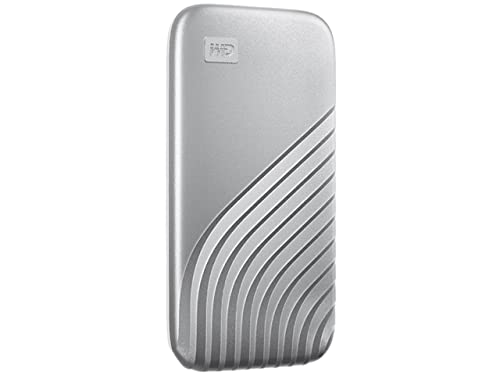
- Up to 1,050MB/s read speeds
- 256-bit AES hardware encryption
- Drop-resistant metal portable design
Best For: Everyday secure backups and portable files
Best Rugged Security

- 2TB NVMe capacity
- 256-bit AES-XTS hardware encryption
- IP67 and crush-resistant enclosure
Best For: Rugged business and multimedia storage
Best Touchscreen Controls
Kingston IronKey Vault Privacy 80
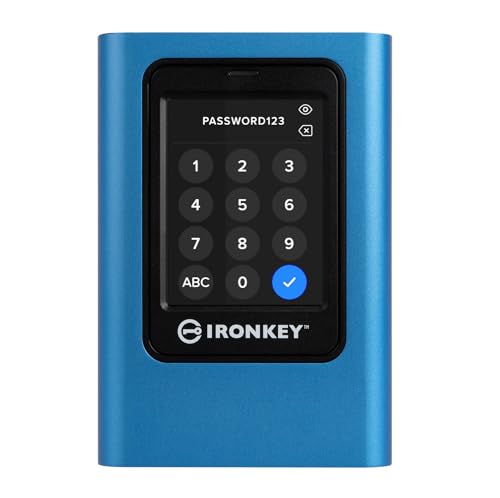
- FIPS 197-certified XTS-AES 256-bit encryption
- Touchscreen PIN and passphrase access
- Read-only modes for malware protection
Best For: Managed access to sensitive business files
Best PIN-Based NVMe Security

- Up to 1,000MB/s transfer speeds
- Separate admin and user PIN modes
- Brute-force defense and auto-lock
Best For: Fast business and financial data storage
Best High-Speed Pick

- Hardware encryption with password protection
- Up to 2,000MB/s read speed
- Touchscreen monitoring and magnetic design
Best For: Creators and users needing fast, monitored portable storage
Best Rugged Option
SanDisk Extreme 2TB Portable SSD

- 256-bit AES hardware encryption
- IP65 water and dust resistance
- Up to 3-meter drop protection
Best For: Travelers and users carrying secure storage outdoors
Best for Compliance

- FIPS 140-2 Level 2 certified
- AES 256-bit XTS hardware encryption
- Optional remote management and tamper evidence
Best For: Businesses and regulated data workflows
Best Secure Portable SSD

- Phone-based ArmorLock unlocking
- Up to 1,000MB/s read/write speeds
- Multi-user and multi-drive management
Best For: Secure portable storage for creative and business workflows
Best Regulated-Data Drive

- 256-bit AES hardware encryption
- FIPS 140-2 Level 2 validated
- CipherKey-controlled automatic locking
Best For: Regulated data in government, healthcare, and enterprise settings
Best Biometric SSD Enclosure
VCOM Fingerprint Encryption Enclosure

- Fingerprint access and physical lock button
- Supports M.2 NVMe and SATA SSDs
- USB 3.2 Gen 2 up to 10Gbps
Best For: Upgradeable encrypted storage for mixed-device users
Best Everyday Pick – WD My Passport SSD
The WD My Passport SSD is a practical external ssd with hardware encryption for everyday backups, portable work files, and compatible devices. It combines up to 1,050MB/s read speeds with password-enabled 256-bit AES hardware encryption in a compact metal case.
Best For: Everyday users who want fast, portable storage with straightforward password protection.
Pros:
- Up to 1,050MB/s read and 1,000MB/s write speeds.
- Password-enabled 256-bit AES hardware encryption.
- Shock- and vibration-resistant design with drop resistance up to 6.5 feet.
- Includes USB-C and USB-A connectivity options.
Cons:
- Its 1TB capacity may be limited for large media libraries.
- Encryption access relies on password protection rather than a dedicated hardware keypad.
With fast performance, broad cable compatibility, and a five-year limited warranty, this My Passport model is a well-rounded choice for routine secure storage.
Best Rugged Security – G-Technology ArmorLock SSD
The G-Technology ArmorLock is an external ssd with hardware encryption designed for users who need high-capacity, rugged secure storage. Its 2TB NVMe drive supports up to 1,000MB/s read and write speeds, while ArmorLock lets you unlock it with a phone instead of a traditional password.
Best For: Business, media, and field workflows where rugged protection and phone-based access are useful.
Pros:
- 2TB capacity for large business and multimedia files.
- 256-bit AES-XTS hardware encryption.
- Phone-based unlocking with multi-user and multi-drive management.
- IP67 dust and water resistance, up to 3M drop resistance, and 1,000-pound crush resistance.
Cons:
- Phone-based unlocking may be less convenient if a smartphone is unavailable.
- Its security-focused rugged construction may be more than casual users need.
This is a strong choice when storage capacity, physical durability, and managed encrypted access matter as much as transfer speed.
Best Touchscreen Controls – Kingston IronKey Vault Privacy 80
The Kingston IronKey Vault Privacy 80 is an external ssd with hardware encryption for users who prioritize dedicated, device-level access controls. It uses FIPS 197-certified XTS-AES 256-bit encryption and a touchscreen for PIN or passphrase entry, though its rated transfer speed is lower than the NVMe options here.
Best For: Business and personal users who want touchscreen authentication, configurable password rules, and write protection.
Pros:
- FIPS 197-certified XTS-AES 256-bit encryption.
- Touchscreen supports administrator and user credentials with PIN or passphrase modes.
- Configurable password rules and dual read-only modes help limit unwanted changes.
- Includes USB-C-to-C and USB-C-to-A cables.
Cons:
- Rated read and write speeds are 250MB/s.
- 960GB capacity is slightly below 1TB.
- At 285g, it is heavier than the other listed drives.
The Vault Privacy 80 favors controlled access over peak speed, making it a sensible fit for sensitive files and managed workflows that benefit from on-device authentication.
Best PIN-Based NVMe Security – Apricorn Aegis NVX
The Apricorn Aegis NVX is a compact external ssd with hardware encryption aimed at business and financial data. Its NVMe-based design reaches up to 1,000MB/s, while separate administrator and user PINs, brute-force defense, and automatic locking add layered access control.
Best For: Business and financial users who want fast storage with dedicated PIN-based security features.
Pros:
- Up to 1,000MB/s read and write speeds over USB 3.2.
- Separate administrator and user modes with PINs.
- Includes brute-force defense, recovery PINs, and unattended auto-lock.
- Compatible with multiple game consoles, including PlayStation 5, Xbox Series systems, and Nintendo Switch.
Cons:
- 500GB capacity is the smallest among these products.
- The notes do not specify a formal encryption certification.
- Three-year warranty is shorter than the five-year warranties listed for the WD and ArmorLock drives.
For users who value direct PIN control and fast transfers, the Aegis NVX offers a security-focused design, although its limited capacity may require more frequent file management.
Best High-Speed Pick – OSCOO MD600 1TB Encrypted SSD
The OSCOO MD600 is a strong choice if you want an external SSD with hardware encryption, fast transfers, and useful status information. Its touchscreen shows transfer speed, temperature, and remaining capacity, while USB 3.2 Gen 2×2 performance reaches up to 2,000MB/s read and 1,800MB/s write speeds.
Best For: Creators, mobile workflows, gaming, and users who want password-protected storage with real-time drive monitoring.
Pros:
- Built-in hardware encryption and password protection
- Up to 2,000MB/s read speed through USB 3.2 Gen 2×2
- Touchscreen monitoring for speed, temperature, and capacity
- Magnetic design and support for compatible Apple ProRes recording
Cons:
- Maximum performance depends on a compatible USB 3.2 Gen 2×2 device
- The touchscreen and magnetic features may be unnecessary for basic backups
With its combination of encryption, high throughput, and creator-focused features, the MD600 is the most feature-rich option here. Its 1TB capacity and broad USB-C device compatibility make it especially practical for active file transfers and portable media work.
Best Rugged Option – SanDisk Extreme 2TB Portable SSD
The SanDisk Extreme is a practical external SSD with hardware encryption for users who need both privacy and extra physical protection. It combines password protection with 256-bit AES hardware encryption, up to 1050MB/s read speeds, IP65 water and dust resistance, and up to 3-meter drop protection.
Best For: Travelers, photographers, gamers, and anyone carrying a larger storage drive in demanding environments.
Pros:
- 2TB capacity for large media libraries and backups
- 256-bit AES hardware encryption with password protection
- IP65 water and dust resistance
- Up to 3-meter drop protection and a convenient carabiner loop
Cons:
- Its up to 1050MB/s read speed is lower than the OSCOO MD600’s stated maximum
- Maximum performance depends on the host device and other factors
The Extreme balances secure storage, useful capacity, and rugged construction. It is a particularly sensible pick when portability and resistance to drops, water, and dust matter as much as encryption.
Best for Compliance – Kanguru Defender SSD350 1TB
The Kanguru Defender SSD350 is designed for buyers who prioritize managed security and compliance over top-end transfer speeds. This external SSD with hardware encryption uses AES 256-bit encryption in XTS mode and carries FIPS 140-2 Level 2 certification for sensitive data workflows.
Best For: Businesses, regulated environments, and Windows or Mac users who need certified encryption and optional remote management.
Pros:
- FIPS 140-2 Level 2 certified
- AES 256-bit hardware encryption in XTS mode
- Tamper-evident design with optional remote management
- Built-in Bitdefender Antivirus with a 30-day free trial
Cons:
- Stated read and write speeds of up to 120MB/s and 100MB/s are modest
- Uses USB 3.0 rather than newer high-speed USB interfaces
- Remote management and antivirus features may be more than casual users need
The Defender SSD350 is the security-focused choice in this group. Its certified encryption, tamper-evident construction, and optional management console make it better suited to organizational requirements than speed-focused everyday storage.
Best Secure Portable SSD – SanDisk G-DRIVE ArmorLock 1TB
If you need an external SSD with hardware encryption for fast, portable file access, the SanDisk Professional G-DRIVE ArmorLock combines ArmorLock security technology with up to 1,000MB/s read and write speeds. Phone-based unlocking avoids the need to remember a traditional password, while Auto Unlock can speed access on a pre-authorized device.
Best For: Creative professionals, business users, and anyone who needs secure, high-speed storage across desktops, laptops, and smartphones.
Pros:
- ArmorLock security technology with phone-based unlocking
- Auto Unlock supports quicker access with an authorized device
- Up to 1,000MB/s read and write speeds
- Supports multi-user and multi-drive management
Cons:
- 1TB capacity may be limiting for very large media libraries
- Phone-based unlocking may be less convenient for users who prefer a physical key or keypad
The G-DRIVE ArmorLock is a strong fit when portability, speed, and straightforward mobile-managed security matter more than maximum capacity. Its five-year limited warranty also adds reassurance for regular professional use.
Best Regulated-Data Drive – BUSlink CipherShield 2TB
The BUSlink CipherShield is an external SSD with hardware encryption designed for environments where device-level protection and compliance features are priorities. Its real-time 256-bit AES encryption works without storing passwords on the host system, and access is controlled with a removable CipherKey.
Best For: Government, healthcare, education, and enterprise users handling sensitive or regulated data.
Pros:
- Real-time 256-bit AES hardware encryption
- FIPS 140-2 Level 2 validation and TAA compliance
- Automatic locking when the key is removed or power is lost
- USB 3.0 and eSATA connectivity for newer and legacy systems
Cons:
- Desktop-oriented 3.5-inch design is less portable than compact SSDs
- Requires the CipherKey for access
- USB 3.0 transfer rates are lower than newer 10Gbps interfaces
With 2TB of capacity and strong compliance-oriented features, the CipherShield is better suited to controlled workspaces than casual travel. Its automatic lock behavior is especially useful for shared or higher-risk environments.
Best Biometric SSD Enclosure – VCOM Fingerprint Encryption Enclosure
For a flexible external SSD with hardware encryption, the VCOM Fingerprint Encryption SSD Enclosure adds biometric access, a physical security button, and a real-time LCD screen. It supports both M.2 NVMe and SATA SSDs, with USB 3.2 Gen 2 connectivity rated for transfer speeds up to 10Gbps.
Best For: Users who want a reusable, upgradeable encrypted enclosure for M.2 NVMe or SATA SSDs across multiple operating systems.
Pros:
- Fingerprint authentication plus a one-touch physical lock button
- Supports M.2 NVMe and SATA SSDs in 2242, 2260, and 2280 sizes
- USB 3.2 Gen 2 interface with up to 10Gbps transfer speeds
- LCD displays connection status, capacity, and security mode
Cons:
- It is an enclosure, so an SSD may need to be purchased separately
- Actual capacity and performance depend on the installed drive and host system
- Fingerprint access may be less convenient for users who prefer passwords or keys
The VCOM is a versatile choice for buyers who already have an M.2 drive or want the ability to replace and upgrade storage later. Its dual-protocol support and biometric controls make it more adaptable than a fixed-capacity external SSD.
How We Picked the Best External SSD with Hardware Encryption
We focused on the security architecture first: hardware-based AES encryption, authentication methods, certification claims, and how easily a drive can be locked or unlocked. We also considered practical storage concerns, including capacity, USB interface, advertised transfer speeds, portability, durability, and compatibility with common computers.
The lineup includes consumer-friendly password-protected models, enterprise-oriented FIPS-certified drives, touchscreen and biometric designs, rugged NVMe SSDs, and desktop solutions for larger storage needs. Advertised speeds are maximum figures; real-world performance depends on the host device, cable, file sizes, and workload.
Quick Comparison
| Best For | Recommended Type | What to Prioritize |
|---|---|---|
| Everyday secure backups | Portable encrypted SSD | Simple password access, compact design, USB-C |
| Business and regulated data | Certified secure drive | FIPS validation, policy controls, audit requirements |
| Frequent travel or field work | Rugged NVMe SSD | Shock, dust, and water resistance |
| Fast workstation transfers | 10Gbps or faster NVMe model | USB standard, sustained performance, thermal design |
| Flexible DIY storage | Encrypted SSD enclosure | Drive compatibility, authentication method, replaceability |
Key Buying Factors for an External SSD with Hardware Encryption
Security and Authentication
Look for genuine hardware encryption rather than software-only password protection. AES-256 is widely used, while FIPS 140-2 or FIPS 197 references can matter for organizations with formal compliance requirements. PIN pads, touchscreens, fingerprints, and dedicated keypads offer different balances of convenience and control.
Capacity and Performance
Choose enough space for your working files plus backups. A 500GB drive suits documents and selected project files, while 1TB or 2TB is more practical for photo libraries, video projects, and system images. Match the drive’s advertised speed to your computer’s USB port; a fast SSD connected to a slower port will be limited by that interface.
Portability and Durability
For commuting, travel, or outdoor use, prioritize a compact enclosure, sturdy construction, and documented water, dust, and shock resistance. Desktop encrypted SSDs can provide more capacity but are better suited to fixed workspaces and typically require external power.
Compatibility and Recovery
Confirm operating-system support, USB-C or USB-A cable requirements, and whether the security software or authentication system works on every computer you plan to use. Check recovery procedures before storing irreplaceable data, and keep a separate encrypted backup of critical files.
Who Should Buy Which External SSD with Hardware Encryption?
Choose a straightforward portable model for personal backups, tax records, and everyday files. Professionals handling confidential client or business data should favor a certified drive with strong authentication and clear administrative controls. Photographers, videographers, and field workers will benefit from a rugged NVMe option, while power users moving large files should select the fastest compatible USB interface. If you already own an M.2 drive or want future upgrade flexibility, an encrypted enclosure can be the most adaptable choice.