
Digitizing film makes family photos, slides, and negatives easier to preserve, organize, and share. The right scanner can turn aging analog media into convenient digital files without requiring professional lab equipment.
We selected 10 film scanners for archiving across common formats, screen sizes, resolutions, and connection options. Use the guide below to match your film collection, workflow, and quality expectations with the most suitable type of scanner.
Best 10 Film Scanners for Archiving Picks for 2026
Best All-Around Choice
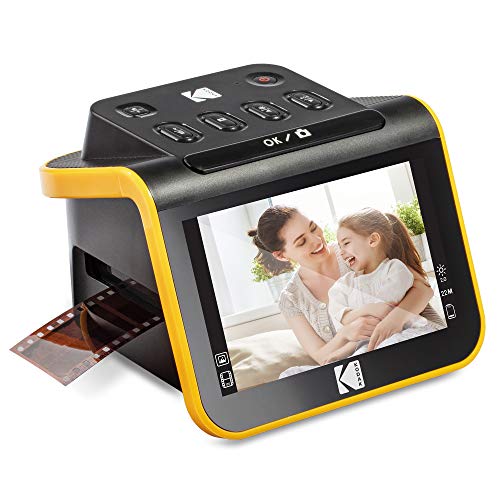
- Handles 135, 110, 126, and 50mm slide formats
- 5-inch LCD for previewing and basic edits
- Saves directly to SD or SDHC cards
Best For: Home users archiving mixed film collections
Best for Organized Archiving
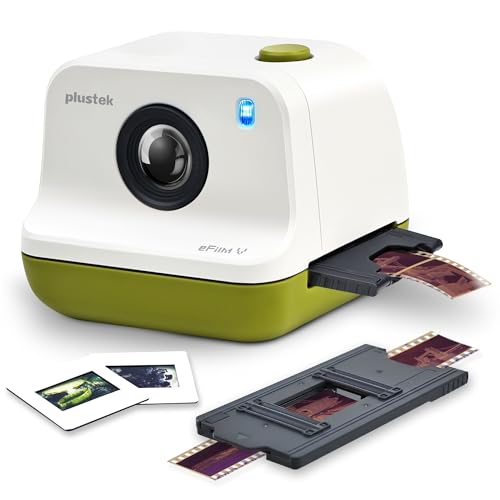
- Supports 35mm, 110, and APS film
- Manual framing helps prevent unwanted cropping
- Flexible file naming for archive management
Best For: Computer-based archival workflows
Best for Fast Batch Viewing

- Continuous-feed tray speeds up scanning
- Large 7-inch tilting LCD
- Direct saving to SD/SDHC cards
Best For: Quick home digitization of family film
Best Complete Starter Kit
DigitPro Photo and Film Scanner

- Scans film, slides, prints, and business cards
- Standalone operation with no software required
- Includes 8GB SD card and scanning accessories
Best For: Beginners digitizing mixed family media
Best for Mixed-Format Archives
Professional 22MP Film Scanner

- Scans 35mm, 120, 127, and 126K film
- Up to 22MP JPEG output
- On-device color and exposure editing
Best For: Mixed-format collections, including 120 medium format film
Best for Simple Standalone Scanning
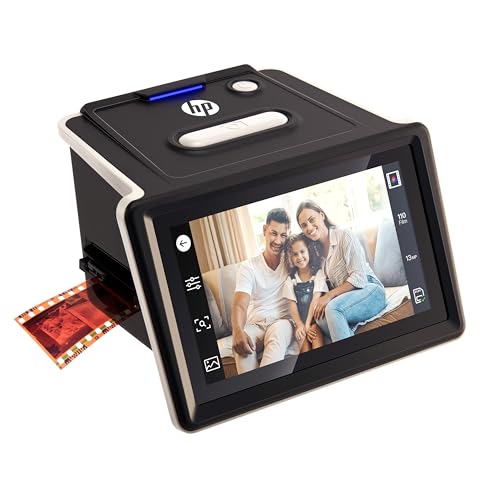
- Scans without a computer
- Supports 135, 126, and 110 formats
- 5-inch touchscreen and quick-load tray
Best For: Beginners digitizing mixed 35mm and smaller-format collections
Best for Large Touchscreen Previews

- 7-inch touchscreen for preview and editing
- Supports 135, 126, and 110 formats
- USB transfer and HDMI display output
Best For: Users who want to review and showcase scans on the device
Best All-in-One Kit
DigitConvert 22MP Film Scanner

- 22MP JPEG scans with built-in adjustments
- 5-inch LCD, Gallery Mode, and HDMI output
- Five adapters plus a 36-month warranty
Best For: Families wanting a complete home archiving kit
Best for Flexible Storage

- Scans 135, 126, 110, and Super 8 photo film
- Selectable 16MP or 22MP output
- Supports SD cards up to 128GB and HDMI viewing
Best For: Archivers who want storage and resolution flexibility
Best Touchscreen Pick
ClearScan T7 24MP Film Scanner

- 7-inch touchscreen for simpler operation
- 24MP JPEG output across several film formats
- Includes a 16GB SD card for direct storage
Best For: Beginners and families prioritizing easy controls
Best All-Around Choice – KODAK Slide N Scan 22MP
For shoppers seeking film scanners for archiving, the KODAK Slide N Scan combines broad format support with a large built-in display. It digitizes 135, 110, and 126 negatives plus 50mm slides, then saves files directly to an SD or SDHC card.
Best For: Home users archiving mixed slide and negative collections without relying on a computer during scanning.
Pros:
- Supports 135, 110, and 126 film formats plus 50mm slides.
- Large 5-inch LCD supports previewing, editing, and gallery viewing.
- Includes film adapters, a cleaning brush, USB cable, and HDMI cable.
- One-touch controls adjust color, brightness, size, and date/time.
Cons:
- SD card is required for standalone saving but is not included.
- File management and scanning depend on removable-card storage.
This is a practical choice for families wanting a straightforward archive workflow, especially when viewing and editing scans on the device matters as much as capture.
Best for Organized Archiving – Plustek eFilm V
The Plustek eFilm V is aimed at users who want more control over film scanning and file organization. For film scanners for archiving, its manual boundary adjustment, flexible file naming, and Windows/Mac compatibility make it suited to methodical digital collections.
Best For: PC and Mac users archiving 35mm, 110, and APS film who want adjustable framing and organized file management.
Pros:
- Supports 135 (35mm), 110, and APS negatives and slides.
- Manual boundary adjustment helps reduce over-cropping and black edges.
- Two resolution modes accommodate everyday scans and higher-detail output.
- Works with Windows 10/11 and macOS 12 or newer.
Cons:
- Requires a computer and software download rather than standalone operation.
- Film must be in strips, and slides must use standard 50mm frames.
- Listed resolution is 1800 dpi.
Choose this model when archive organization and framing control are priorities. Its computer-based workflow is less convenient for casual, screen-free scanning but better suited to a structured collection.
Best for Fast Batch Viewing – KODAK Slide N Scan Max
The KODAK Slide N Scan Max focuses on quick, accessible digitization. Its continuous-feed tray, 7-inch tilting LCD, and direct SD/SDHC saving make it a convenient option among film scanners for archiving family slides and negatives at home.
Best For: Users who want a large viewing screen and a simple, computer-free workflow for mixed-format film.
Pros:
- Quick-feeding tray supports continuous scanning without repositioning each frame.
- 7-inch tiltable LCD makes previews and edits easier to view.
- Handles 135, 110, and 126 film formats.
- One-touch editing includes resizing, conversion, and image adjustments.
Cons:
- SD/SDHC card storage is required for the computer-free workflow.
- The supplied notes specify Windows 7 as the minimum system requirement.
The Max is a strong fit for larger family collections where scan speed and comfortable previewing matter. It emphasizes convenience over a more traditional computer-based archival setup.
Best Complete Starter Kit – DigitPro Photo and Film Scanner
The DigitPro M129A is an all-in-one option for households archiving both film and physical prints. It scans 35mm slides, 135 and 110 negatives, printed photos, and business cards, while saving JPEGs to the included 8GB SD card.
Best For: Beginners who want a bundled, standalone scanner for mixed family photos, slides, negatives, and documents.
Pros:
- Handles film, slides, printed photos, and business cards.
- 5-inch HD screen supports straightforward previewing and editing.
- Works without a computer, software, apps, or drivers.
- Includes an 8GB SD card, holders, trays, cleaning brush, power adapter, and USB cable.
Cons:
- The listed resolution is 1080P rather than a dpi specification.
- Its 1.5 kg weight makes it less lightweight than some compact models.
- Supplied notes identify the brand as DigitPro rather than a specialist film-scanner manufacturer.
This bundle is appealing when convenience and included accessories are more important than advanced scanning controls. The three-year warranty also adds reassurance for first-time archivists.
Best for Mixed-Format Archives – Professional 22MP Film Scanner
For film scanners for archiving across multiple formats, this model stands out for its support of 35mm, 120 medium format, 127, and 126K negatives and slides. It saves JPEG scans to built-in memory or an SD card and includes on-device color and exposure adjustments.
Best For: Users archiving mixed-format collections, especially those with 120 medium format film.
Pros:
- Supports 135, 120, 127, and 126K film and slides.
- Offers up to 22 million pixels for digital JPEG files.
- Includes 128MB internal memory and support for SD cards up to 32GB.
- Allows brightness, color, preview, playback, and editing adjustments on the device.
Cons:
- SD card is not included.
- The supplied details do not specify a computer-transfer workflow.
Its broad format compatibility makes it a flexible choice for a varied archive. Choose it when medium format support is more important than a streamlined 35mm-only setup.
Best for Simple Standalone Scanning – HPFS500 Film Scanner
This HPFS500 is a practical option for film scanners for archiving when you want to digitize slides and negatives without relying on a computer during the scan. Its 5-inch touchscreen, quick-load tray, and SD card workflow are suited to organizing a varied collection.
Best For: Beginners and families who want standalone scanning for 135, 126, and 110 film.
Pros:
- Works as a standalone scanner without a computer.
- Supports 135, 126, and 110 negatives and positive slides.
- Provides a 5-inch all-angle LCD touchscreen for previewing and editing.
- Quick-load tray helps reduce pauses between scans.
Cons:
- Its 13MP CMOS sensor uses 22MP interpolation rather than a native 22MP sensor.
- Support is limited to the listed 135, 126, and 110 formats.
The HPFS500 balances ease of use and efficient handling for everyday family archives. Its standalone design is particularly useful if you prefer saving scans to SD media instead of managing a computer-based workflow.
Best for Large Touchscreen Previews – HPFS700 Film Scanner
For film scanners for archiving that emphasize hands-on review, the HPFS700 combines a 7-inch color touchscreen with a 13MP CMOS sensor. It supports several common film formats, offers on-device cropping and adjustments, and can transfer images by USB or display them through HDMI.
Best For: Users who want a large display for reviewing, editing, and showcasing digitized slides.
Pros:
- Large 7-inch color LCD touchscreen supports previewing and editing.
- Scans color and black-and-white negatives with a 13MP CMOS sensor.
- Quick-feed tray and 50mm adapter support 135, 126, and 110 formats.
- Includes USB transfer, HDMI output, and gallery mode for slideshow display.
Cons:
- The supplied resolution is listed as 1200 dpi, lower than some stated pixel-based alternatives.
- Its format support is focused on 135, 126, and 110 film.
The HPFS700 is a strong fit when scanning is only part of the experience and you also want to view or share images directly from the device. Its larger screen and HDMI output give it an advantage for convenient household display.
Best All-in-One Kit – DigitConvert 22MP Film Scanner
For film scanners for archiving, the DigitConvert offers a straightforward way to digitize 135, 110, and 126 negatives plus 135, 110, 126, and Super 8 slides. Its built-in controls, large display, and direct SD-card storage make it practical for home projects without requiring scanning software.
Best For: Families wanting a complete, easy-to-use scanner with broad film-format support and convenient TV viewing.
Pros:
- 22MP JPEG output for negatives and slides, with color, brightness, and date/time adjustments.
- Large 5-inch LCD with Gallery Mode for previews and photo display.
- Includes five film adapters, HDMI and USB cables, a cleaning brush, and a 36-month warranty.
- Transfers files to a computer or saves them directly to an SD card up to 64GB.
Cons:
- SD card is not included.
- Must remain connected to power while scanning.
- Its supported SD capacity is lower than some competing options.
This is a well-equipped choice for larger family archiving jobs, especially if you value an included accessory kit and the ability to show scanned images on a TV.
Best for Flexible Storage – PORTTA 22MP Film Scanner
The PORTTA is a practical option among film scanners for archiving, supporting 135, 126, 110, and Super 8 photo film. It works without a computer, lets you preview scans on its 5-inch screen, and offers both standard 16MP and enhanced 22MP output settings.
Best For: Users who want flexible resolution settings, high-capacity SD-card storage, and direct HDMI viewing.
Pros:
- Supports color and black-and-white negatives and slides in several common formats.
- Offers selectable 16MP or 22MP output for different scanning needs.
- Stores images directly to SD cards up to 128GB and provides HDMI output.
- Built-in tools adjust brightness, color, and image orientation before saving.
Cons:
- Super 8 support is for photo scanning only.
- Warranty coverage is two years, shorter than some alternatives.
- Requires an SD card for direct storage, and one is not specified as included.
With its larger stated storage capacity and adjustable output modes, the PORTTA suits archivers who want control over file size and a simple workflow that does not depend on a computer.
Best Touchscreen Pick – ClearScan T7 24MP Film Scanner
For film scanners for archiving, the ClearScan T7 emphasizes simple operation through a 7-inch touchscreen. It scans 35mm, 135, 126, 110, and Super 8 negatives and slides to JPEG files, with direct saving to the included 16GB SD card and no computer required.
Best For: Beginners, families, and older users who prefer touchscreen controls and a large preview display.
Pros:
- Large 7-inch touchscreen simplifies previewing, adjusting, scanning, and saving.
- 24MP output is designed to produce clear digital images from slides and negatives.
- Supports several film formats, including 35mm, 126, 110, and Super 8.
- Includes a 16GB SD card for computer-free scanning and storage.
Cons:
- One-year manufacturer warranty is shorter than the coverage listed for the other options.
- Image quality can vary with the age, exposure, and condition of the original film.
- Supplied notes do not specify HDMI output or additional included adapters.
The T7 is especially appealing when ease of use matters most. Its touchscreen and included memory card reduce setup friction, making it a friendly choice for household archiving projects.
How We Picked the Best Film Scanners for Archiving
We compared these scanners by looking at supported film formats, advertised scanning resolution, preview and control features, file-transfer options, and ease of use. The selection includes compact 35mm scanners, models that also handle 110 or 126 film, units with larger touchscreens, and an option designed for 120 medium-format film.
Resolution matters, but it is not the only measure of useful archive quality. A scanner with straightforward film holders, consistent exposure, and simple file saving may be more practical than a higher-rated model that is difficult to operate. We also considered whether each scanner suits casual family archiving, frequent home use, or more specialized collections.
Quick Comparison
- Best for simple home scanning: Choose a compact model with a built-in screen and direct JPEG saving.
- Best for mixed collections: Look for support for 35mm, 110, and 126 film, especially if your archive includes older cartridge formats.
- Best for easier browsing: A 5-inch or 7-inch LCD provides a more comfortable preview than a small display.
- Best for larger originals: A dedicated 120 medium-format scanner is the better fit for medium-format negatives.
- Best for flexible viewing: HDMI output can be useful when you want to display scans on a larger monitor or television.
Key Buying Factors for Film Scanners for Archiving
Film Formats and Holders
Confirm that the scanner accepts the formats in your collection. Most home units focus on 35mm slides and negatives, while some also support 110 and 126. Super 8 and 120 film require particular attention because compatibility varies substantially.
Resolution and Image Quality
Higher advertised megapixel ratings can provide more room for cropping, but they do not guarantee better color, sharpness, or dust handling. For basic online sharing and family records, standard dedicated film scanners may be sufficient. Choose a higher-resolution or medium-format model when you plan to print, crop, or preserve valuable originals in greater detail.
Workflow and Storage
Built-in LCD screens let you review framing before saving, while touch controls can make repeated scanning faster. Check how files are stored and transferred, such as memory cards, USB connections, or direct computer use. Also consider whether the scanner saves in a format that fits your backup and editing workflow.
Scanning Speed and Handling
If you have hundreds of frames, loading convenience and reliable film holders may matter more than a headline resolution number. A scanner that requires frequent adjustments can make a large archive time-consuming, so prioritize simple controls and a stable feed path.
Who Should Buy Which Film Scanners for Archiving?
Casual users digitizing a small box of family negatives should choose an easy-to-use scanner with a built-in display and broad compatibility. Buyers with mixed 35mm, 110, and 126 collections should prioritize format support over extra display features. If reviewing images on a larger screen is important, select a model with a 7-inch touchscreen or HDMI output.
Photographers and serious archivists should focus on the scanner’s supported original size, effective image quality, color consistency, and file workflow. For 120 film, use a scanner explicitly designed for medium format rather than assuming a 35mm model can adapt. Whichever model you choose, create multiple backups and keep the original negatives or slides stored in a cool, dry, low-light environment.