
Looking for a flight sim throttle quadrant for Airbus that feels right in the cockpit and works smoothly in your setup? The best options can improve realism, reduce button hunting, and make A320-style flying more intuitive.
In this roundup, we focus on practical controls, Airbus-style layout, software support, and value so you can choose the right throttle setup for your sim and budget.
Best 10 Flight Sim Throttle Quadrant for Airbus Picks for 2026
Best Airbus Replica Combo
Thrustmaster TCA Captain Pack X Airbus

- Officially licensed A320-style sidestick and throttle quadrant
- 31 quadrant buttons, 4 axes, and 14 remappable stick buttons
- Built-in thrust reverser and twist rudder for all-in-one control
Best For: Airbus simmers who want a realistic, expandable cockpit-style control setup.
Best Airbus-Ready Multi-Aircraft Pick
Honeycomb Bravo Throttle Quadrant

- Configurable for single-engine through four-engine aircraft
- Includes autopilot, gear, flaps, trim wheel, and reversers
- Compatible with MSFS, X-Plane, and Prepar3D
Best For: Sim pilots who want one versatile throttle quadrant for Airbus-style and multi-aircraft flying.
Best Airbus-Like Detents
Thrustmaster TCA Quadrant Airbus Edition

- Airbus-style throttle detents and reverse thrust
- Hall Effect magnetic sensors for smooth, durable input
- PC-focused quadrant with configurable buttons and axes
Best For: Airbus sim pilots who want realistic throttle behavior and a cockpit-like feel on PC.
Best for Airbus-Style Mapping
Logitech G Saitek PRO Flight Throttle Quadrant

- Three assignable axis levers
- Extra rocker switches for added controls
- Adjustable desk or yoke-side mounting
Best For: Sim pilots who want a flexible throttle quadrant for Airbus-style control mapping.
Best Airbus Add-On
TCA Quadrant Add-On Airbus Edition

- Adds 15 Airbus-inspired functions to expand your cockpit
- Magnetic sensor axes deliver smooth, precise control
- Stable non-slip base suits focused desktop sim setups
Best For: Airbus sim pilots who already own the matching Thrustmaster throttle base and want more authentic controls.
Best for Training-Style Controls
Logitech G PRO Flight Yoke System

- Includes both yoke and throttle quadrant
- 75 programmable controls for flexible sim use
- Steel shaft and desk clamps for stable control
Best For: Sim pilots who want a complete yoke package with a throttle quadrant and lots of programmable controls.
Best Airbus Controls Add-On
Thrustmaster TCA Quadrant Add-On Airbus Edition
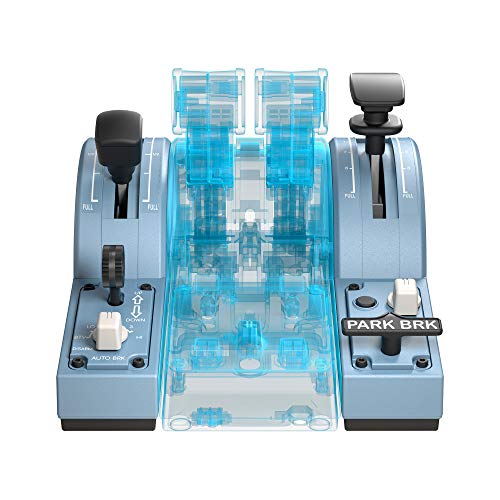
- Airbus-specific replica controls for more authentic airline flying
- Detented speed brake and flaps levers improve approach handling
- Precise magnetic sensors with programmable inputs for flexibility
Best For: Airbus sim pilots who want realistic add-on controls for airliners and some general aviation flexibility.
Best for GA Vernier Flying

- Three vernier levers for throttle, prop, and mixture
- Adds trim wheel, parking brake, flap, and gear controls
- Durable metal-heavy build for serious home cockpit setups
Best For: General aviation pilots who want precise vernier-style engine controls in MSFS.
Best Airbus Feel
THRUSTMASTER TCA Quadrant Airbus Edition

- Airbus-style throttle quadrant with detents and reverser
- Magnetic sensors for precise, contactless control
- Expandable with matching Airbus add-on modules
Best For: Airbus sim pilots who want a realistic PC throttle quadrant with room to expand.
Best Boeing-Style Pick
Thrustmaster TCA Boeing Quadrant

- Smooth Hall-effect throttle response
- Dual-engine levers with adjustable resistance
- 17 controls plus autopilot functions
Best For: Sim pilots building a Boeing-inspired airliner cockpit who want precise dual-throttle control.
Best Airbus Replica Combo – Thrustmaster TCA Captain Pack X Airbus
If you want a flight sim throttle quadrant for airbus that feels close to the real cockpit, this Thrustmaster bundle is built around an official A320-style sidestick and matching quadrant. It’s a strong fit for simmers who want authentic Airbus layouts, plenty of mappable controls, and a tidy single-cable setup for PC or Xbox.
Best For: Airbus sim fans who want a realistic all-in-one sidestick and throttle setup with native-style controls and easy expansion.
Pros:
- Officially licensed A320 1:1 replica design adds a very authentic Airbus feel
- 14 remappable buttons plus 31 quadrant buttons give you lots of control options
- Built-in thrust reverser and twist rudder reduce the need for extra hardware
- Integrated ecosystem hub helps keep setup cleaner with fewer cables
Cons:
- Airbus-focused layout is less ideal if you fly a wide mix of aircraft types
- Twist rudder is convenient, but dedicated pedals still offer finer control
- More of a full control solution than a simple standalone throttle upgrade
As a flight sim throttle quadrant for airbus, this pack stands out for its cockpit-authentic layout and practical control density. It’s especially compelling if you want a coordinated sidestick-and-throttle setup rather than piecing together separate peripherals.
Best Airbus-Ready Multi-Aircraft Pick – Honeycomb Bravo Throttle Quadrant
If you want a flight sim throttle quadrant for airbus-style procedures that can also handle GA, twin, and four-engine setups, the Honeycomb Bravo is one of the most versatile options. It combines a configurable throttle, autopilot controls, gear and flap levers, and a trim wheel in one cockpit-style unit, making it easy to build a more realistic desktop setup.
Best For: Sim pilots who want one throttle quadrant that can cover Airbus-inspired flying, airliners, and general aviation without swapping hardware.
Pros:
- Highly configurable throttle setup for single-engine through four-engine aircraft
- Includes autopilot, annunciator panel, gear, flaps, trim wheel, and thrust reversers
- Works with Microsoft Flight Simulator, X-Plane 11/12, and Prepar3D
- Durable build with 7 programmable keys and multiple switches
Cons:
- More expensive than basic throttle-only controls
- May take time to map and configure for specific aircraft
- Not a full Airbus quadrant replica, so some realism purists may want dedicated gear
This is a strong choice if you need a flight sim throttle quadrant for airbus flying but also want broad aircraft compatibility. It delivers a lot of cockpit functionality in one unit, though dedicated Airbus fans may still prefer a more exact replica layout.
Best Airbus-Like Detents – Thrustmaster TCA Quadrant Airbus Edition
If you want a flight sim throttle quadrant for airbus that feels closer to an actual Airbus cockpit, this Thrustmaster TCA Quadrant stands out for its detents, thrust reverser, and official Airbus-inspired layout. It’s a practical pick for PC sim pilots who want a more immersive civilian-aviation setup without stepping into pro-level pricing.
Best For: Airbus sim pilots who want realistic throttle detents, reverse thrust control, and a cockpit-style layout on PC.
Pros:
- Airbus-inspired design with realistic idle, climb, flex, and TO/GA detents
- Contactless Hall Effect sensors for smooth input and long-term durability
- Built-in thrust reverser and configurable axis/button assignments
- Pairs especially well with the matching Thrustmaster Airbus sidestick
Cons:
- PC-only compatibility limits use on consoles
- Most immersive when paired with the separate Airbus sidestick
- Not the simplest plug-and-play choice if you want a very basic throttle
This is a strong fit if your priority is realism over simplicity: the detents, reverse thrust, and magnetic sensors make it a convincing flight sim throttle quadrant for airbus setups, especially for users building a more authentic civilian cockpit feel.
Best for Airbus-Style Mapping – Logitech G Saitek PRO Flight Throttle Quadrant
If you want a practical flight sim throttle quadrant for airbus-style setups, this Logitech G Saitek unit gives you three assignable levers plus rocker switches for mapping throttles, flaps, spoilers, or other cockpit functions. It is a simple USB add-on that works well when you want more physical controls without jumping to a full panel system.
Best For: Sim pilots who want a flexible, affordable throttle quadrant for Airbus-style control layouts and expanded desk-mounted controls.
Pros:
- Three axis levers make it easy to assign multiple engine or flight controls
- Included rocker switches add extra functions for cockpit management
- Adjustable mounting lets you place it on top of or in front of your desk
- Swappable lever heads help tailor the layout to your preferred setup
Cons:
- Not a dedicated Airbus throttle with specific detents or lift-off behavior
- Plastic-heavy design feels more entry-level than high-end
- May require mapping and tuning in software to match your sim preferences
For simmers building a modular cockpit, this is a versatile choice rather than a true Airbus replica. As a flight sim throttle quadrant for airbus use, it works best when you value configurable controls and easy expansion over exact airliner realism.
Best Airbus Add-On – TCA Quadrant Add-On Airbus Edition
If you already own Thrustmaster’s Airbus throttle base, this add-on is a smart way to turn it into a more complete flight sim throttle quadrant for airbus setups. It adds realistic Airbus-style controls for flaps, speed brake, landing gear, trim, and autobrake, so the cockpit feels more like a true airliner panel without taking up much desk space.
Best For: Airbus sim pilots who want more authentic approach, landing, and checklist controls on top of an existing Thrustmaster TCA setup.
Pros:
- Adds 15 extra functions modeled after real Airbus cockpit controls
- Magnetic sensors provide smooth, drift-free input on 2 axes
- 10 buttons plus 5 virtual buttons give you useful customization options
- Non-slip feet help keep the unit stable during intense sessions
Cons:
- Requires the separate Thrustmaster TCA Quadrant Airbus Edition base
- Most valuable for Airbus-focused simming rather than general aviation
For pilots building an Airbus-style cockpit, this flight sim throttle quadrant for airbus adds the right extra controls without overcomplicating the setup. It’s a strong pick if you want more realism in descent, landing, and ground operations while keeping compatibility with the Thrustmaster ecosystem.
Best for Training-Style Controls – Logitech G PRO Flight Yoke System
If you want a practical flight sim throttle quadrant for airbus-style workflows, the Logitech G PRO Flight Yoke System gives you a full yoke-and-quadrant setup with plenty of programmable controls. It is aimed more at realism, muscle-memory training, and desktop compatibility than at a dedicated Airbus-style sidestick experience, but it still works well for sim pilots who want a versatile multi-engine control panel.
Best For: Sim pilots who want a complete yoke package with a throttle quadrant, lots of programmable buttons, and sturdy desk mounting.
Pros:
- Includes both a yoke and a separate throttle quadrant in one package
- 75 programmable controls help keep key aircraft functions within easy reach
- Steel shaft and desk clamps add a solid, stable feel during use
- Compatible with major PC flight sims, including Microsoft Flight Simulator, X-Plane, and Prepar3D
Cons:
- Not an Airbus-specific sidestick setup
- Requires optional software download for full functionality
- Bulkier than a compact throttle-only solution
For buyers comparing a flight sim throttle quadrant for airbus, this Logitech bundle is better viewed as a strong all-in-one starter and training option than as a true Airbus cockpit replica. If you value broad control coverage, a solid build, and easy desk mounting, it is still a very capable choice.
Best Airbus Controls Add-On – Thrustmaster TCA Quadrant Add-On Airbus Edition
Thrustmaster TCA Quadrant Add-On Airbus Edition - Add on for TCA Quadrant - for PC
Check Price On AmazonIf you already own a compatible setup and want a more authentic flight sim throttle quadrant for airbus, this add-on focuses on the airline-specific controls that matter most. It adds Airbus-style speed brake, flaps, trim, landing gear, autobrake, and parking brake inputs, making commercial approaches and landings feel more convincing.
Best For: Airbus sim pilots who want realistic add-on controls for airliners and some general aviation flexibility.
Pros:
- Airbus-style replica modules improve realism for commercial flying
- Realistic detents on the speed brake and flaps levers help with approach and landing
- H.E.A.R.T magnetic sensors plus programmable buttons add precise control
- Mechanical switches let you disable detents for broader GA use
Cons:
- It is an add-on, so it is not a standalone throttle quadrant
- Works best for users already invested in the Thrustmaster TCA ecosystem
This is a strong choice if you want a flight sim throttle quadrant for airbus that prioritizes cockpit authenticity over a universal layout. It is especially appealing for simmers who fly Airbus airliners often and want tactile, purpose-built controls instead of generic levers.
Best for GA Vernier Flying – Honeycomb Sierra TPM Module
If you need a flight sim throttle quadrant for airbus-style setup planning but spend most of your time in piston aircraft, the Honeycomb Sierra TPM Module is built around realistic vernier engine control rather than jet-style levers. Its three push-pull axes, trim wheel, parking brake, and flap/gear controls make it a strong fit for immersive general aviation cockpits in MSFS 2024 or 2020.
Best For: General aviation sim pilots who want precise throttle, prop, and mixture control with a durable, cockpit-style layout.
Pros:
- Authentic vernier throttle, prop, and mixture levers for precise GA engine management
- Trim wheel, parking brake, flap lever, and landing gear lever add useful cockpit controls
- Solid metal build and Honeycomb construction should hold up well over time
- Compatible with Microsoft Flight Simulator 2024/2020 on PC and Mac
Cons:
- Not an Airbus-style thrust lever quadrant, so it is less ideal for airliner-focused flying
- Designed mainly for piston-aircraft workflows, not jet engine management
- May be more control than casual flyers need
As a flight sim throttle quadrant for airbus users who also fly GA, this module stands out for realism and control accuracy rather than airline-style simplicity. If your hangar time is split between airliners and Cessna-style aircraft, it is a specialized but very capable add-on.
Best Airbus Feel – THRUSTMASTER TCA Quadrant Airbus Edition
THRUSTMASTER TCA Quadrant Airbus Edition (PC) TCA Quadrant Add On Airbus Edition (PC)
Check Price On AmazonIf you want a flight sim throttle quadrant for airbus that feels close to the real cockpit layout, this Thrustmaster TCA module is a strong match. It uses magnetic sensors for precise input, includes Airbus-inspired detents and a thrust reverser mechanism, and is designed for PC pilots who want a more authentic airliner setup.
Best For: Airbus sim fans who want a realistic throttle quadrant with magnetic precision and replica controls.
Pros:
- Airbus-inspired throttle design with detents and thrust reverser support
- Magnetic sensor technology for smooth, contactless precision
- Mechanical selectors let you switch to linear axis mode when needed
- Works well as a foundation for a fuller Airbus-style cockpit setup
Cons:
- PC-focused, so it is not the most flexible choice for console users
- Some Airbus functions require the add-on module sold separately
For sim pilots building an Airbus setup, this flight sim throttle quadrant for airbus stands out for authenticity, precision, and expandability. It is a smart pick if you want a throttle base that can start simple and grow into a more complete Airbus control stack.
Best Boeing-Style Pick – Thrustmaster TCA Boeing Quadrant
If you want a flight sim throttle quadrant for airbus-style or airliner-style cockpit builds, the Thrustmaster TCA Quadrant Boeing Edition is a strong choice for pilots who value smooth control, dual-engine handling, and extra onboard buttons. It’s especially useful if you want a realistic commercial-aviation feel without relying on the keyboard during longer simulator sessions.
Best For: Sim pilots building a Boeing-inspired cockpit who want precise dual-throttle control, Hall-effect sensors, and a large set of integrated switches.
Pros:
- Hall-effect sensors provide smooth, contactless throttle input with good long-term durability.
- Dual levers with adjustable resistance make multi-engine power management feel more realistic.
- 17 controls and autopilot functions reduce keyboard dependency in the cockpit.
- Works well as part of a larger Thrustmaster ecosystem with yokes, sticks, and pedals.
Cons:
- Boeing styling may be less ideal if you specifically want Airbus-style detents and layout.
- Some users may need to add matching accessories to get the full cockpit experience.
Overall, this is a polished, realistic throttle module for simmers who prioritize precision and immersion over a generic layout. If you’re shopping for a flight sim throttle quadrant for airbus or other airliner setups, this model is still worth considering when Boeing-style controls and Hall-effect smoothness matter more than airline branding.
How We Picked the Best Flight Sim Throttle Quadrant for Airbus
We prioritized Airbus-style ergonomics, reliable axis performance, useful extra controls, and compatibility with common sim platforms and PC or console setups where applicable. We also looked at how easily each unit fits into a full cockpit workflow without adding unnecessary complexity.
Quick Comparison
The best Flight Sim Throttle Quadrant for Airbus depends on how closely you want to mirror an A320 cockpit. Some picks lean toward authentic Airbus layout and add-on modules, while others emphasize all-in-one convenience, multi-aircraft flexibility, or broader control coverage.
Key Buying Factors for a Flight Sim Throttle Quadrant for Airbus
Layout and Realism
Airbus flying is centered on a clean, efficient throttle setup with detents, speed brake, flaps, and often reverse thrust behavior. If realism matters most, look for a quadrant that matches Airbus-style levers and includes controls you can reach without using the keyboard.
Axes, Detents, and Feel
Good axis resolution and a consistent lever feel matter more than flashy extras. For a Flight Sim Throttle Quadrant for Airbus, adjustable resistance, well-defined detents, and stable calibration help with takeoff, climb, and descent management.
Extra Cockpit Controls
Integrated trim, landing gear, autopilot, annunciator, and flap controls can reduce hand movement and improve immersion. These are especially useful if you want a more complete Airbus workflow rather than a basic throttle-only device.
Compatibility and Expandability
Check whether the unit is designed for PC, Xbox, or both, and whether it can expand with matching modules. If you plan to build a more advanced setup over time, modular ecosystems are often the smartest long-term choice.
Who Should Buy Which Flight Sim Throttle Quadrant for Airbus?
If you want the most Airbus-specific experience, choose a dedicated Airbus quadrant or a matching sidestick-and-throttle bundle. If you want a single control hub for multiple aircraft types, an all-in-one system with extra switches and autopilot functions may be the better fit. Budget-focused simmers should look for a straightforward quadrant with solid axes and enough customization, while advanced users may prefer modular gear that can grow with the rest of their cockpit.
For most buyers, the right choice comes down to how closely you want to replicate Airbus procedures versus how much flexibility you need across different aircraft and sim platforms.