
Looking for a more immersive Microsoft Flight Simulator setup? The right yoke can make takeoffs, trims, and landings feel far more natural than a keyboard or gamepad.
This roundup focuses on the best flight yokes for Microsoft Flight Simulator, plus the accessories and controls that matter most when building a realistic home cockpit.
Best 10 Flight Yokes for Microsoft Flight Simulator Picks for 2026
Best for Realistic Switches
Honeycomb Alpha Flight Controls Yoke

- 180° rotation with steel shaft and smooth self-centering feel
- Integrated switch panel for ignition, avionics, and lights
- Multiple handle buttons plus flexible clamp or suction mounting
Best For: Sim pilots who want a durable, cockpit-like yoke with built-in switches.
Best for Rudder Control
Logitech G Pro Flight Rudder Pedals

- Self-centering pedals with adjustable tension
- Differential toe brakes for taxiing and braking
- Solid add-on for a yoke-based sim setup
Best For: Sim pilots who want precise rudder and brake control to complement a flight yoke.
Best for Precision Control
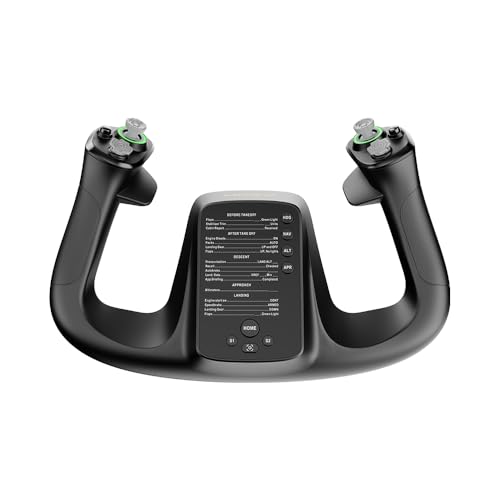
- 34 configurable inputs for trim, autopilot, and more
- Drift-free control supports accurate flying and smoother inputs
- Durable PA66 composite and aluminum quick-release build
Best For: PC sim pilots who want a compact, highly configurable yoke with precise control.
Best Rudder Pedal Pairing
Thrustmaster TFRP Flight Rudder Pedals

- Long-travel rudder axis for precise control
- Self-centering design for smooth re-centering
- Four aluminum rails and differential brakes
Best For: Sim pilots who want an affordable, realistic rudder-and-brake upgrade alongside a yoke.
Best for Full-Panel Control
Logitech G Pro Flight Yoke System

- Steel yoke shaft with smooth, accurate control
- Includes throttle quadrant for a cockpit-style layout
- 54+ programmable controls for MSFS and similar sims
Best For: Sim pilots who want a realistic yoke-and-throttle setup with lots of assignable controls.
Best for Boeing-Like Feel
Thrustmaster TCA Yoke Boeing Edition
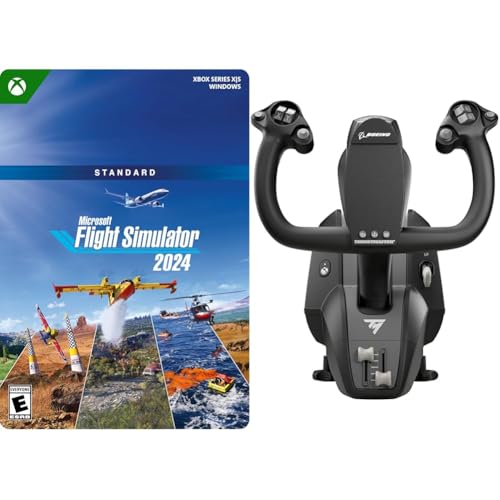
- Boeing 787-inspired 1:1 yoke design
- Pendular mechanism with 8.3-inch travel
- Includes MSFS 2024 Standard digital code
Best For: Sim pilots who want airline-style Boeing handling and an MSFS 2024 bundle.
Best for Realistic Rudder Control
Logitech G Pro Flight Yoke & Pedals

- Includes both yoke and rudder pedals in one bundle
- Self-centering pedals and toe brakes improve realism
- 54 programmable controls support complex setup needs
Best For: Sim pilots who want a complete yoke-and-pedals setup for Microsoft Flight Simulator.
Best for Xbox & PC
Thrustmaster T-Flight Hotas One

- Detachable throttle for flexible desk or lap setups
- Adjustable resistance with responsive trigger and 14 buttons
- Plug-and-play support for Xbox Series X|S and Windows PC
Best For: Xbox and PC flyers who want an easy, immersive HOTAS setup.
Best for Combat-Style Control
Logitech G X56 HOTAS Flight Controller

- 189 programmable controls for complex bindings
- Precise 16-bit stick with hall-effect sensors
- Twin throttles and adjustable spring tension
Best For: Sim pilots who want a highly customizable HOTAS for jets, spacecraft, and advanced setups.
Best for Easy Setup

- Detachable throttle for flexible desk setups
- 12 programmable buttons and 5 axes
- Adjustable resistance and dual rudder control
Best For: PC sim pilots who want a simple, customizable HOTAS for quick setup.
Best for Realistic Switches – Honeycomb Alpha Flight Controls Yoke
If you want one of the most convincing flight yokes for microsoft flight simulator, the Honeycomb Alpha is built around realism and steady control. The 180° yoke rotation, steel shaft, and dampened self-centering action make it feel closer to a real cockpit control than a basic starter unit.
Best For: Sim pilots who want a durable, full-featured yoke with an integrated switch panel for more immersive Microsoft Flight Simulator sessions.
Pros:
- Smooth 180° rotation with a steel shaft and ball bearings for precise input
- Built-in switch panel adds ignition, lighting, avionics, and main controls
- Rich handle inputs, including an 8-way hat switch and multiple rocker buttons
- Flexible mounting with clamps or a micro-suction option for thicker desks
Cons:
- Takes up more desk space than simpler yoke-only options
- Higher price than entry-level flight sim controllers
For pilots comparing flight yokes for microsoft flight simulator, the Alpha stands out because it combines realistic control feel with cockpit-style switchgear in one well-built package. It is a strong long-term choice if you care more about immersion and quality than the lowest possible cost.
Best for Rudder Control – Logitech G Pro Flight Rudder Pedals
If you’re comparing flight yokes for microsoft flight simulator and want more realism on the ground and in coordinated turns, these rudder pedals are a strong add-on. The self-centering action, adjustable tension dial, and toe brakes help make taxiing, runway corrections, and landing rollouts feel much closer to a real cockpit setup.
Best For: Sim pilots who already have a yoke and want precise pedal control for rudder input and braking.
Pros:
- Smooth, self-centering rudder action for realistic control
- Adjustable tension dial lets you tune the pedal feel
- Differential toe brakes add useful ground handling control
- Works well as a complement to a full Microsoft Flight Simulator setup
Cons:
- Not a yoke, so it won’t replace your primary flight controls
- Requires floor space and a stable setup
- Windows-only compatibility may limit some users
For simmers building out a serious cockpit, these pedals are a practical upgrade that pairs naturally with flight yokes for microsoft flight simulator. They’re especially useful if you want better rudder authority, smoother landings, and more control during taxi without overcomplicating the setup.
Best for Precision Control – MOZA Flight Controls MFY Yoke
If you want a modern, feature-rich option among flight yokes for microsoft flight simulator, the MOZA Flight Controls MFY Yoke stands out for its 180° rotation, 34 configurable inputs, and drift-free control. It is built for sim pilots who want a more customizable, responsive setup without moving into a much heavier cockpit-style device.
Best For: PC sim pilots who want a compact but highly configurable yoke for realistic control and trim-heavy flying.
Pros:
- 34 programmable inputs make it easy to map autopilot, trim, and other key functions
- Drift-free control helps improve precision during long sessions and approach work
- PA66 composite construction and aluminum quick-release parts add durability
- Customizable RGB lighting gives the setup a more personalized look
Cons:
- PC-focused, so it is not ideal if you need broad console compatibility
- More expensive than basic entry-level yokes
- May feel overbuilt if you only want a simple beginner setup
For simmers comparing flight yokes for microsoft flight simulator, this MOZA model is a strong pick if you value input density, smooth control, and a modern design over a bare-bones controller. It is especially appealing for users who fly frequently and want more real-world function mapping at their fingertips.
Best Rudder Pedal Pairing – Thrustmaster TFRP Flight Rudder Pedals
If you’re building out a serious sim setup, the Thrustmaster TFRP is a practical add-on for flight yokes for microsoft flight simulator when you want more precise taxiing, coordinated turns, and differential braking than a yoke alone can provide. The long-travel rudder axis and self-centering action make control feel smoother and more natural, while the aluminum rail system helps keep inputs consistent.
Best For: Sim pilots who already use a yoke and want realistic rudder and brake control for Microsoft Flight Simulator on PC, Xbox, or PS5.
Pros:
- Long rudder travel gives you finer control for smooth, accurate input
- Self-centering axis helps the pedals return cleanly after every maneuver
- Four aluminum rails add smooth movement and sturdy feel
- Differential brakes improve taxiing and landing control
Cons:
- It’s a pedal set, not a yoke, so it’s an extra purchase for full cockpit realism
- Best results usually require secure placement or mounting
- Some users may prefer a more premium metal-heavy build
For pilots comparing flight yokes for microsoft flight simulator, this is the kind of accessory that fills in the missing control surface and makes the whole setup feel more complete. It’s a strong choice if you want responsive rudder handling without jumping to a more expensive rig.
Best for Full-Panel Control – Logitech G Pro Flight Yoke System
If you want a more realistic desktop setup for flight yokes for microsoft flight simulator, the Logitech G PRO Flight Yoke System gives you a strong mix of immersion, control, and expandability. The steel yoke shaft feels smooth and stable, and the included throttle quadrant adds a more complete cockpit-style layout than a basic stick alone.
Best For: Sim pilots who want an all-in-one yoke and throttle setup with plenty of programmable controls for Microsoft Flight Simulator.
Pros:
- Steel shaft and realistic yoke motion help build consistent muscle memory
- Includes a throttle quadrant for a more complete sim cockpit feel
- 54+ programmable controls with POV hat, buttons, and mode switch
- Desk clamps add secure mounting for stable long sessions
Cons:
- Requires some desk space for both the yoke and throttle quadrant
- Optional software setup may take a little time to configure
- Not the cheapest option for first-time sim buyers
Overall, this is a solid pick for simmers who want a dependable yoke-first layout with enough inputs to handle most aircraft functions. For flight yokes for microsoft flight simulator, it stands out as a practical upgrade if you want realism without jumping straight into a full cockpit build.
Best for Boeing-Like Feel – Thrustmaster TCA Yoke Boeing Edition
If you want one of the more distinctive flight yokes for microsoft flight simulator, this Thrustmaster Boeing edition leans hard into realism with a 1:1 Boeing 787-inspired design and a smooth pendular mechanism. It pairs with Microsoft Flight Simulator 2024 Standard, so you get both the hardware and the sim in one package for Xbox Series X|S or Windows PC.
Best For: Sim pilots who want an airline-style Boeing yoke feel and a ready-to-fly MSFS 2024 bundle.
Pros:
- Authentic Boeing 787-inspired yoke layout and ergonomics
- Pendular motion with 8.3-inch travel for more natural control
- Metal internal structure adds stability and durability
- Includes Microsoft Flight Simulator 2024 Standard digital code
Cons:
- Digital game code may not matter if you already own MSFS 2024
- Premium-style setup is more specialized than a basic beginner yoke
This is a strong pick if you value immersion and airline-style handling over a simple entry-level controller. For buyers comparing flight yokes for microsoft flight simulator, the Boeing-inspired mechanics and bundled sim make it especially appealing for cockpit-style realism.
Best for Realistic Rudder Control – Logitech G Pro Flight Yoke & Pedals
If you want a fuller cockpit feel from your flight yokes for microsoft flight simulator, this Logitech bundle pairs a proper yoke with matching rudder pedals for more precise takeoffs, taxiing, and coordinated turns.
Best For: Sim pilots who want an all-in-one yoke-and-pedals setup that improves realism and control without piecing together separate components.
Pros:
- Includes both the yoke and rudder pedals for a more complete simulator setup
- Self-centering pedals and differential toe brakes add smooth, realistic control
- Yoke offers 54 programmable controls via buttons, POV hat, and mode switch
- Adjustable foot rests help fit a wider range of users
Cons:
- Requires more desk or floor space than a yoke-only option
- May feel like more hardware than casual players need
For buyers comparing flight yokes for microsoft flight simulator, this bundle stands out because it covers the two most important hands-and-feet controls in one matched package, making it a strong choice for training-style immersion.
Best for Xbox & PC – Thrustmaster T-Flight Hotas One
If you want a more hands-on control setup than a standard controller, the Thrustmaster T-Flight Hotas One is a practical pick for flight yokes for microsoft flight simulator-style play on Xbox and PC. Its detachable throttle, adjustable resistance, and easy USB plug-and-play setup make it a solid entry point for sim pilots who want immersive control without a complicated install.
Best For: Console and PC simmers who want an affordable HOTAS setup with quick setup and flexible desk or lap placement.
Pros:
- Detachable throttle lets you configure it for desk or lap use
- Adjustable stick resistance and responsive controls improve precision
- Works with Xbox Series X|S and Windows PC with simple plug-and-play setup
- 14 programmable buttons add useful control options for sim flying
Cons:
- It’s a HOTAS stick, not a true yoke, so it won’t mimic airliner controls
- Rudder pedals are sold separately for more complete control
As an affordable, easy-to-use controller, this is a strong option for players comparing flight yokes for microsoft flight simulator and deciding whether a HOTAS layout fits their flying style better. It’s especially appealing if you want better immersion than a gamepad without stepping into a full cockpit build.
Best for Combat-Style Control – Logitech G X56 HOTAS Flight Controller
If you want a hands-on alternative to traditional flight yokes for microsoft flight simulator, the Logitech G X56 is a strong HOTAS option with a much broader control layout. It’s built for users who want twin throttles, lots of programmable buttons, and fine-tuned stick response for jets, spacecraft, and complex sim setups.
Best For: Sim pilots who prefer a combat-style HOTAS with deep customization, twin throttles, and precise analog control.
Pros:
- 189 programmable controls give you plenty of room for custom MSFS and combat bindings
- Hall-effect sensors and a 16-bit stick help deliver smooth, precise input
- Twin throttles, mini analog sticks, and 4-spring tension options improve versatility
- RGB lighting and VR-friendly control placement suit a modern sim rig
Cons:
- Not a yoke, so it’s less ideal if you want a more traditional GA aircraft feel
- Requires two USB 2.0 ports and a fair amount of desk space
- Best results usually depend on setting up bindings and sensitivity curves
For flyers who are comparing flight yokes for microsoft flight simulator but are open to a HOTAS layout, the X56 stands out for control depth and precision rather than realism for civilian aircraft. It’s a better fit if you split your time between MSFS, space sims, or military-style flying.
Best for Easy Setup – Thrustmaster T-Flight Hotas X
If you want one of the simpler flight yokes for microsoft flight simulator-style flying on PC, the Thrustmaster T-Flight Hotas X is a practical pick. It uses a detachable throttle, programmable controls, and built-in presets so you can get airborne quickly without spending time on a complex setup.
Best For: Sim pilots who want an affordable, plug-and-play HOTAS with enough customization for casual and intermediate flying.
Pros:
- Detachable throttle gives you flexible desk or cockpit-style placement
- 12 programmable buttons and 5 axes support custom control layouts
- Adjustable stick resistance helps fine-tune handling feel
- Dual rudder control adds more precise maneuvering options
Cons:
- Not a full yoke-style controller, so it may not suit true GA sim purists
- Best suited to PC use rather than multi-platform setups
- Plastic construction is functional, but not especially premium
For flyers who care more about straightforward control and easy mapping than a traditional yoke, this is a solid entry-level choice among flight yokes for microsoft flight simulator buyers looking for a simple, reliable HOTAS.
How We Picked the Best Flight Yokes for Microsoft Flight Simulator
We focused on controls that feel accurate, stable, and practical for long sim sessions. That means strong build quality, smooth centering, enough programmable inputs, and compatibility with PC or console where relevant. We also looked at whether each setup suits a simple starter desk or a more complete cockpit build.
Quick Comparison
In general, yoke-and-throttle systems are the most authentic choice for civilian aircraft, while HOTAS setups are better for users who also fly military or space sims. Rudder pedals are not required, but they noticeably improve ground handling, taxiing, and coordinated turns. If you want a complete setup, bundle options can save time and reduce compatibility guesswork.
Key Buying Factors for Flight Yokes for Microsoft Flight Simulator
Compatibility
Check whether the yoke works with Windows PC, Xbox, or both. Some options are Microsoft Flight Simulator-focused, while others are broader flight-sim controllers.
Range of Motion and Feel
A wider rotation range can help with finer control inputs, especially during approaches. Smooth centering and adjustable resistance also matter because they affect how realistic and repeatable the controls feel.
Programmable Inputs
More buttons, switches, and hats reduce the need to reach for the keyboard. That is especially useful for trim, autopilot, gear, flaps, view changes, and engine management.
Pedals and Throttle Options
For many sim pilots, a yoke alone is only part of the setup. Rudder pedals add better yaw control, while a dedicated throttle quadrant makes multi-engine and airliner flying easier to manage.
Space and Mounting
Measure your desk depth before buying. Some yokes need more clearance than expected, and a stable mounting plan can be the difference between a smooth sim session and constant repositioning.
Who Should Buy Which Flight Yokes for Microsoft Flight Simulator?
If you want the closest feel to general aviation flying, choose a traditional yoke system with a throttle quadrant. If you are building a more complete cockpit, prioritize bundles or add rudder pedals early. If you fly a mix of aircraft and want maximum versatility, a feature-rich HOTAS may be the better all-around option. For newcomers, the best choice is usually the setup that balances comfort, input count, and compatibility with your platform.