
Photographers need more than basic file storage: a reliable duplicate of every RAW file, edited project, and finished gallery can protect years of work from drive failure. A dedicated duplicator makes that backup process faster and less dependent on a computer.
This roundup compares 10 hard drive duplicators and cloning docks, from compact dual-bay SATA stations to high-capacity multi-bay and NVMe-compatible models. We focus on drive compatibility, offline cloning, connection speed, capacity, and practical workflow features for photo storage.
Best 10 Hard Drive Duplicators for Photo Storage Picks for 2026
Most Versatile
ICY BOX Triple-Bay NVMe/SATA Cloner

- Clones NVMe and SATA drives offline
- Three tool-free bays for mixed storage
- USB 3.2 Gen 2 up to 10 Gbps
Best For: Mixed NVMe and SATA photo-storage workflows
Best for Fast SATA Duplication
StarTech Dual-Bay SATA Duplicator

- Duplicates SATA drives without a computer
- Up to 28 GB/min sector-by-sector copying
- Supports 4Kn, TRIM, and USB 3.2 Gen 2
Best For: Fast full-drive duplication of SATA photo archives
Best Value SATA Dock
Inateck Dual-Bay Offline Clone Dock
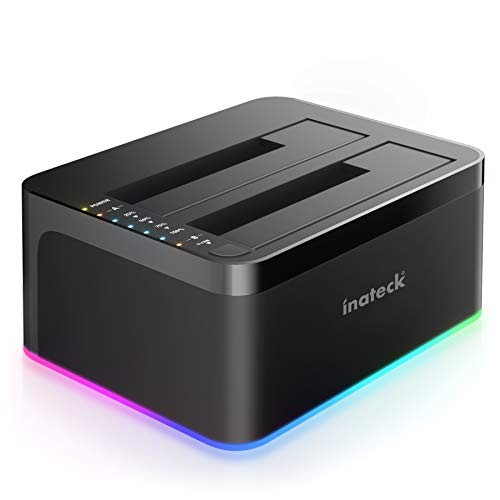
- Clones SATA drives without a computer
- Accepts 2.5- and 3.5-inch drives
- UASP-supported USB 3.0 transfers
Best For: Simple home photo backups using SATA drives
Best for Repeated Workflows
Systor Standalone HDD/SSD Duplicator

- Standalone copying without a computer
- Handles 2.5- and 3.5-inch SATA drives
- Includes DoD-compliant drive erasure
Best For: Recurring SATA duplication and sanitization tasks
Best Compact Clone Dock
Vantec NexStar JX Dual-Bay Dock

- Dual-bay SATA drive design
- Standalone clone function
- Compact footprint for desks
Best For: Home photographers cloning SATA photo-storage drives
Best High-Volume USB Duplicator

- Duplicates up to 15 USB devices
- Standalone operation with no computer
- Multiple copy and erase modes
Best For: Studios and offices duplicating USB photo storage in batches
Best Large-Capacity Multi-Bay Dock

- Five-bay SATA storage expansion
- Offline 1-to-4 duplication
- Supports up to 100TB total
Best For: Professional photographers managing large image libraries
Best Overall

- Supports 2.5-inch and 3.5-inch SATA drives
- Offline cloning without a computer
- USB 3.0 speeds up to 5Gbps
Best For: Versatile photo-storage backups and drive access
Best High-Capacity Pick

- Supports two drives up to 20TB each
- Computer-free offline cloning
- USB 3.0 with UASP support
Best For: Large photo libraries and high-capacity backups
Best USB-C Option

- USB-C connection with cable included
- Offline cloning up to 60MBps
- Mounts two SATA drives separately
Best For: USB-C computers using bare SATA photo-storage drives
Most Versatile – ICY BOX Triple-Bay NVMe/SATA Cloner
For photographers building mixed storage systems, this ICY BOX is one of the more flexible hard drive duplicators for photo storage. It supports M.2 PCIe NVMe, 2.5-inch SATA, and 3.5-inch SATA drives, while offline cloning avoids requiring a computer or additional software.
Best For: Photo workflows that use both NVMe and SATA drives and need to access or clone up to three drives.
Pros:
- Supports NVMe and 2.5/3.5-inch SATA SSDs and HDDs.
- Three independent, tool-free bays simplify drive swapping and access.
- USB 3.2 Gen 2 supports transfer rates up to 10 Gbps and includes USB-C/USB-A cabling.
- Works with Windows and macOS and includes a two-year warranty.
Cons:
- Its plastic enclosure may be less substantial than a metal duplicator.
- NVMe support may be unnecessary if your photo archive uses SATA drives only.
The three-bay layout and broad drive compatibility make this a strong choice for photographers who regularly migrate between newer NVMe storage and conventional SATA archive drives.
Best for Fast SATA Duplication – StarTech Dual-Bay SATA Duplicator
StarTech’s dual-bay dock is designed for photographers who use standard 2.5- and 3.5-inch SATA drives. It performs standalone, sector-by-sector duplication at speeds up to 28 GB per minute and can also work as a USB-connected SATA docking station.
Best For: SATA-based photo archives where full-drive duplication, 4Kn support, and fast copying are priorities.
Pros:
- Copies 2.5- and 3.5-inch SATA HDDs and SSDs without a computer.
- Sector-by-sector duplication copies the entire drive, including empty sectors.
- Rated for speeds up to 28 GB per minute with SATA III and USB 3.2 Gen 2.
- Tool-free top-loading bays include drive doors and eject buttons.
Cons:
- It supports SATA drives but not M.2 NVMe drives.
- The target drive must be equal to or larger than the source drive for duplication.
- An IDE adapter is sold separately.
With its fast stated duplication rate and useful docking function, this is a practical, professional-oriented option for backing up or migrating SATA photo-storage drives.
Best Value SATA Dock – Inateck Dual-Bay Offline Clone Dock
For straightforward hard drive duplicators for photo storage, the Inateck SA02003 keeps the setup simple. Its two bays accept common 2.5- and 3.5-inch SATA HDDs and SSDs, and offline cloning works independently of a computer.
Best For: Home photographers who want an uncomplicated dual-drive SATA dock for cloning and USB access.
Pros:
- Supports both 2.5- and 3.5-inch SATA HDDs and SSDs.
- Offline cloning does not require a computer.
- UASP support is designed to provide faster transfers over USB 3.0.
- RGB lighting indicates drive activity and sleep or removal status.
Cons:
- USB 3.0 offers a lower stated interface speed than newer USB 3.2 Gen 2 docks.
- It has two bays rather than three or more.
- The warranty is one year.
This dock covers the most common SATA photo-storage formats at a relatively simple feature level, making it a sensible pick when NVMe compatibility and advanced duplication features are not required.
Best for Repeated Workflows – Systor Standalone HDD/SSD Duplicator
The Systor SYS101HS-DP is a dedicated standalone duplicator for photographers and small businesses that repeatedly copy or sanitize SATA drives. It handles 2.5- and 3.5-inch HDDs and SSDs without adapters and maintains its stated copy speed even when multiple drives are loaded.
Best For: Repeated SATA duplication and drive-erasure tasks where standalone operation and sanitization features matter.
Pros:
- Requires no computer or software for duplication.
- Supports both 2.5- and 3.5-inch SATA HDDs and SSDs without an adapter.
- Copies at up to 90 MB per second, with speed remaining consistent as the number of loaded drives increases.
- Offers data-only or whole-drive copying and DoD 5220.22-M-compliant erasure.
Cons:
- Its stated speed is lower than the faster StarTech duplication rate in this roundup.
- It does not list NVMe compatibility.
- The warranty terms include one year of parts coverage and three years of labor rather than a two-year all-inclusive warranty.
This model is less of a general-purpose docking station and more of a task-focused duplicator, making it particularly useful for organized photo-archive migration, drive reuse, and secure media disposal.
Best Compact Clone Dock – Vantec NexStar JX Dual-Bay Dock
For photographers seeking hard drive duplicators for photo storage, the Vantec NexStar JX is a compact dual-bay SATA dock with a standalone clone function. Its USB 3.2 Gen1 connection also makes it useful for accessing compatible drives from a computer.
Best For: Home photographers who need a straightforward way to clone SATA drives without a large multi-bay setup.
Pros:
- Dual-bay design supports SATA drives.
- Standalone clone function simplifies drive duplication.
- Compact 5.67-by-4.53-by-2.32-inch footprint.
Cons:
- Supports SATA drives rather than USB flash media.
- Two-bay capacity is more limited than larger duplicators.
The NexStar JX is a practical, space-conscious choice for occasional photo-library cloning. It is best suited to users who value simplicity and portability over high-volume duplication.
Best High-Volume USB Duplicator – EZ Dupe USB Cyclone 1-to-15
The EZ Dupe USB Cyclone is a high-capacity option for photographers and businesses comparing hard drive duplicators for photo storage. It can copy to as many as 15 USB flash drives or external HDDs and SSDs without a computer, with a listed speed of up to 45MB per second.
Best For: Studios, offices, and users who need to duplicate USB-connected photo storage to many targets at once.
Pros:
- Supports 1-to-15 USB flash drives and external HDDs or SSDs.
- Standalone operation requires no computer or software.
- Offers full, partitioned, essential-file, and percentage copy modes.
- Includes quick, full, DoD 3-pass, and DoD 7-pass erase modes.
Cons:
- USB duplication is listed at up to 45MB per second.
- Its 7-pound weight makes it less portable than compact docks.
- Designed for USB media rather than direct SATA drive docking.
With independent bandwidth design and slow-drive alerts, the USB Cyclone is built for batch work. Its multiple copy and erase modes also make it more versatile than a basic one-button cloner.
Best Large-Capacity Multi-Bay Dock – ORICO 5-Bay USB-C Dock
The ORICO 5-bay docking station is aimed at photographers managing large collections of high-resolution images and videos. It accepts 2.5-inch and 3.5-inch SATA SSDs or HDDs, supports up to five 20TB drives, and can create four copies from one source with its offline duplicator function.
Best For: Professional photographers who need substantial SATA storage expansion and multi-target cloning.
Pros:
- Supports up to five SATA drives with a stated 100TB total capacity.
- Offline 1-to-4 duplication works without a computer.
- Compatible with 2.5-inch and 3.5-inch SATA HDDs and SSDs.
- Aluminum construction and vertical design support heat dissipation.
Cons:
- Cloning overwrites the target disk, so backups are required first.
- Its five-bay desktop design is less compact than a basic dock.
- USB 3.2 Gen1 may not deliver the maximum speed of every SATA drive.
The ORICO combines substantial storage expansion with convenient offline duplication. S.M.A.R.T. and TRIM support add useful drive-management features, while the USB-C and USB-A cable options broaden device compatibility.
Best Overall – SABRENT Dual-Bay HDD Cloner
For photographers building a dependable workflow around hard drive duplicators for photo storage, the SABRENT EC-HD2B combines two SATA bays, USB 3.0 connectivity, and offline cloning in a straightforward desktop dock. It supports both 2.5-inch and 3.5-inch SATA hard drives and SSDs, with support for drives up to 10TB per bay.
Best For: Photographers who want a versatile SATA dock for cloning drives or accessing two drives from a computer.
Pros:
- Supports 2.5-inch and 3.5-inch SATA HDDs and SSDs.
- Offline cloning works without a computer and supports speeds up to 60Mbps.
- USB 3.0 transfer speeds reach up to 5Gbps, with plug-and-play operation.
- Supports up to 10TB drives and includes a power supply and USB 3.0 cable.
Cons:
- Offline cloning requires the target drive to have sufficient capacity.
- It is designed for SATA drives and does not provide a stated solution for other drive interfaces.
The EC-HD2B is a practical all-purpose choice when you need both drive access and standalone duplication. Its broad 2.5-inch/3.5-inch SATA support makes it flexible for photo archives, backups, and drive upgrades.
Best High-Capacity Pick – WAVLINK Dual-Bay SATA Dock
The WAVLINK dual-bay dock is a strong option for photographers comparing hard drive duplicators for photo storage and needing room for large archives. It supports two 2.5-inch or 3.5-inch SATA HDDs or SSDs, with capacity support up to 20TB per bay, and can clone drives without a computer.
Best For: Photographers managing large libraries who want two high-capacity SATA bays and offline cloning.
Pros:
- Supports two SATA drives up to 20TB each.
- Offline cloning starts from the dock with no computer required.
- USB 3.0 and UASP support provide transfer rates up to 5Gbps.
- Includes fixed bezels for added drive stability and supports plug-and-play use.
Cons:
- The target drive must be equal to or larger than the source drive for cloning.
- Offline cloning requires attention to source and target drive placement.
With its unusually high stated capacity support and two-bay design, the WAVLINK is well suited to expanding photo storage over time. Its fixed-bezel design and included USB-C adapter add convenience for compatible setups.
Best USB-C Option – SABRENT Dual-Bay USB-C Cloner
For modern laptops and desktops, the SABRENT EC-CH2B offers a USB-C approach to hard drive duplicators for photo storage. It accepts bare 2.5-inch and 3.5-inch SATA drives, supports simultaneous access to both bays when connected to a computer, and performs one-button offline cloning without a computer.
Best For: USB-C computer users who need to clone or work with two SATA drives at once.
Pros:
- USB-C connection and included USB-C cable support newer computers.
- Copies one SATA drive to another offline at up to 60MBps.
- Both bays mount as separate drives for simultaneous computer access.
- Tool-free, hot-swappable design fits 2.5-inch and 3.5-inch SATA HDDs and SSDs.
Cons:
- Requires a computer with USB-C or a separately supplied USB-C-to-USB-A cable.
- Does not support IDE/PATA, M.2, NVMe, or Molex-powered drives.
- Offline cloning requires a target drive the same size as or larger than the source.
The EC-CH2B is especially convenient for USB-C systems and workflows that involve moving files between two mounted drives. Its strict SATA-only compatibility is worth checking before purchase, but for supported drives it offers flexible cloning and dual-drive access.
How We Picked the Best Hard Drive Duplicators for Photo Storage
We evaluated these models for the needs of photographers and other large-file users. The most important considerations were whether a unit can clone drives without a computer, which drive formats and sizes it accepts, how quickly it can move data, and how easily it fits into an existing backup workflow.
We also considered connection standards, bay count, compatibility with 2.5-inch and 3.5-inch SATA drives, support for SSDs, NVMe flexibility where available, and useful extras such as drive erasing, UASP support, status indicators, and USB-C connectivity. Performance claims vary with the source drive, destination drive, interface, and data type, so advertised speeds should be treated as best-case figures.
Quick Comparison
| Type | Best suited to | Main advantage | Watch for |
|---|---|---|---|
| Dual-bay SATA cloner | Routine camera-backup duplication | Simple offline 1:1 cloning | Usually limited to SATA drives |
| USB-C or 10Gbps dock | Fast computer-based transfers | Higher interface bandwidth | Actual speed depends on the drives |
| NVMe/SATA dock | Mixed modern storage setups | Broader drive compatibility | Check supported NVMe form factors |
| Multi-bay station | Large photo libraries and several drives | More simultaneous storage capacity | Greater desk space and power needs |
| USB media duplicator | Flash media and portable backups | Copies multiple USB devices | May not match a dedicated SATA dock for speed |
Key Buying Factors for Hard Drive Duplicators for Photo Storage
Drive Compatibility
Confirm whether the duplicator supports SATA I, II, and III, 2.5-inch laptop drives, 3.5-inch desktop drives, SSDs, or M.2 NVMe media. An adapter or enclosure may be necessary for drives that do not fit directly into the bay.
Offline Cloning Versus Computer Transfers
Offline cloning is useful when you want a direct, sector-by-sector copy from one drive to another without opening backup software. For organizing folders, verifying files, or copying selected photo sets, a dock connected to a computer is more flexible.
Speed and Connectivity
USB 3.0 is sufficient for many SATA drives, while USB-C and 10Gbps models can reduce transfer bottlenecks with faster SSDs. The slowest component still determines real-world performance.
Capacity and Workflow
Choose a destination drive at least as large as the source for cloning. Multi-bay models are helpful if you rotate several backup drives, maintain separate archives, or need convenient access to multiple photo libraries.
Safety and Verification
Cloning typically overwrites the destination drive, so look for clear indicators and controls. After copying, verify important folders and keep at least one backup disconnected or stored separately from the main workstation.
Who Should Buy Which Hard Drive Duplicators for Photo Storage?
Choose a compact dual-bay SATA model if you want straightforward, occasional offline backups of conventional 2.5-inch or 3.5-inch drives. A USB-C or 10Gbps dock is the better fit for photographers moving large libraries to a computer and using fast SSDs. Pick an NVMe-capable model if your workflow mixes newer M.2 storage with SATA drives.
Photographers managing several archive drives should consider a multi-bay station, while users duplicating memory-stick contents or multiple USB devices may prefer a dedicated USB duplicator. Whichever model you choose, pair it with a tested destination drive, label backup copies clearly, and maintain more than one copy of irreplaceable images.