
A laptop screen extender can turn a single-screen workspace into a more productive home office without requiring a full desktop setup. These portable monitors are useful for multitasking, comparing documents, keeping reference material visible, or managing communication while working.
Our roundup includes dual- and triple-screen models in several sizes, with options for different laptop ranges, connection types, and portability needs. Use the guide below to narrow the choices based on your desk, laptop, and daily workflow.
Best 10 Laptop Screen Extenders for Home Offices Picks for 2026
Best Plug-and-Play Flexibility
Funhill 14.1-inch Dual Screen Extender

- 1080p IPS display with 60Hz refresh rate
- USB-C and HDMI connectivity
- Driver-free setup with included cables
Best For: Flexible dual-screen home-office work
Best Large Triple-Screen Workspace

- Dual 16-inch 1920×1200 IPS screens
- Extra vertical space with a 16:10 ratio
- Two-cable, driver-free triple-screen setup
Best For: Large document-heavy home-office work
Best Compact Everyday Option
ROYY 14-inch Laptop Screen Extender

- 14-inch 1080p IPS display at 300 nits
- Driver-free USB-C or HDMI setup
- Landscape, portrait, mirror, and extend modes
Best For: Portable everyday multitasking
Best Ultra-Thin Triple-Screen Pick
15.6" One-Cable Laptop Extender

- Large 15.6-inch FHD IPS screens
- One-cable USB-C connection option
- Driver and possible extra-power requirements
Best For: Remote workers who prioritize a spacious triple-screen setup
Best Lightweight Triple-Screen Pick

- Lightweight 3-pound triple-screen design
- 300-nit IPS display with 100% sRGB
- Driver-free setup with adjustable stand
Best For: Portable home offices and users who value lower weight
Best Simple Dual-Screen Pick

- 14-inch 1080p portable second screen
- HDMI, DisplayPort, and USB-C connectivity
- HDR and blue-light reduction features
Best For: Everyday home-office multitasking with a portable second display
Best Standalone Triple-Screen Extender
15.6-inch P7 FHD Triple Monitor
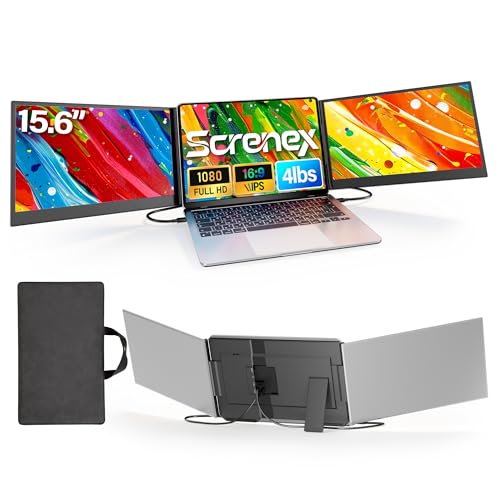
- Two 15.6-inch 1080p IPS displays
- Free-standing, hinge-friendly design
- Supports extended, mirror, and portrait modes
Best For: Large home-office workspaces needing a stable triple-screen setup
Best Cable-Saving Setup
15.6-inch ZUMWALT P7 Triple Monitor
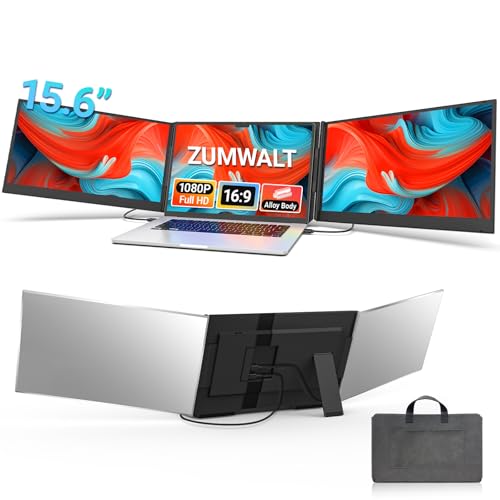
- Dual 15.6-inch 1080p displays
- Two-cable setup on compatible USB-C laptops
- Slim aluminum shell with carry bag
Best For: Multitaskers seeking a cleaner home-office workstation
Best Triple-Screen Upgrade – KYY 15.6-inch Laptop Screen Extender
For home offices that need a full multi-monitor setup, this KYY laptop screen extender adds two 15.6-inch 1080p IPS displays to create a triple-screen workspace. Its one-cable USB-C connection, adjustable stand, and rotating screens are useful for multitasking, data-heavy work, and collaborative viewing.
Best For: Stock traders, financial analysts, designers, and home-office users who want a spacious triple-screen workstation.
Pros:
- Two 15.6-inch FHD IPS screens provide a broad 1080p workspace.
- One USB-C cable can connect the extender to a compatible laptop.
- Displays rotate 360 degrees, while the stand adjusts up to 90 degrees.
- Includes the required cables and power adapter.
Cons:
- Drivers must be downloaded before use.
- Not compatible with PS5, Xbox Series X, or other gaming consoles.
- Requires compatible full-function USB-C or USB-A connectivity.
Choose this model when maximum screen real estate matters more than a minimal setup. Its dual displays and flexible positioning suit productivity-focused home offices, though users should verify compatibility and plan for the driver installation.
Best Plug-and-Play Flexibility – Funhill 14.1-inch Dual Screen Extender
This Funhill laptop screen extender is a practical choice for home offices needing a second display without driver installation. It supports USB-C or HDMI connections, includes the necessary cables, and offers a 14.1-inch 1080p IPS screen with multiple viewing and display modes.
Best For: Remote workers, programmers, traders, and users who want a flexible dual-screen setup for work or travel.
Pros:
- 1080p IPS display runs at 60Hz for clear everyday visuals.
- USB-C and HDMI connectivity support a wide range of devices.
- Includes USB-C, USB-A, HDMI, and adapter cables.
- Supports extend, duplicate, portrait, and other display modes.
Cons:
- HDMI connections require a separate USB cable for power.
- USB-C video requires a full-featured USB-C port with DP or Thunderbolt support.
- Power or cable issues may cause a black screen until connections are checked.
For a home-office buyer who values straightforward setup, the Funhill stands out with driver-free operation and broad connection options. Confirm your laptop’s USB-C capabilities before choosing a single-cable setup.
Best Large Triple-Screen Workspace – 16-inch 1200p Laptop Extender
With two 16-inch 1920×1200 IPS screens, this laptop screen extender is designed for home offices where vertical workspace is especially useful. The 16:10 aspect ratio shows more rows, code, documents, and web content, while a two-cable setup creates a large triple-screen workstation without drivers.
Best For: Remote professionals, students, traders, programmers, and content creators who need extra vertical space.
Pros:
- Dual 16-inch screens offer 1920×1200 resolution and a 16:10 workspace.
- 350-nit brightness supports sharp text and vivid visuals.
- Creates a triple-screen setup using two USB-C cables with no driver installation.
- Ultra-slim aluminum construction is designed for portability.
Cons:
- The laptop must have two full-featured USB-C ports.
- The glossy screen finish may be less suitable for brightly lit rooms.
- The larger dual-screen design may take more desk and carrying space than a single extender.
This is a strong productivity-oriented option when document length and screen area matter. Its main limitation is the demanding two-port USB-C requirement, so check your laptop before buying.
Best Compact Everyday Option – ROYY 14-inch Laptop Screen Extender
The ROYY laptop screen extender adds a compact 14-inch 1080p IPS display to a home-office laptop, helping reduce window switching during calls, research, and multitasking. It supports one-cable USB-C or HDMI-plus-USB connections and offers flexible landscape, portrait, mirror, and extended modes.
Best For: Home-office users, mobile professionals, finance workers, designers, and gamers seeking a portable second screen.
Pros:
- 300-nit 1080p IPS display provides crisp text and vivid images.
- Driver-free setup works through USB-C or HDMI with power supplied separately when needed.
- Supports extended, mirrored, landscape, and portrait viewing modes.
- Compatible with many Windows, Mac, Chrome, Linux, and console setups.
Cons:
- USB-C one-cable use requires a full-featured USB-C port.
- HDMI setups require both HDMI and USB connections.
- Some older devices may lack the required ports.
The ROYY is a sensible balance of portability, image quality, and connection flexibility for everyday home-office multitasking. Its compact size is convenient, but compatibility checks are important for older laptops and USB-C devices.
Best Ultra-Thin Triple-Screen Pick – 15.6" One-Cable Laptop Extender
For home offices that need a larger multitasking workspace, this laptop screen extender for home offices adds two 15.6-inch FHD screens to create a triple-display setup. Its one-cable connection option is convenient with a full-featured USB-C port, while USB-A connection may require the included power adapter. Driver installation is required before use.
Best For: Remote workers and multitaskers who want a large, portable triple-screen setup.
Pros:
- 15.6-inch 1080p IPS screens with a 178-degree viewing angle.
- One full-featured USB-C cable can connect both screens.
- Very slim 4mm individual screens and a carrying bag support portability.
- Supports Windows, Mac, Chrome, Android, Linux, DeX, and Switch.
Cons:
- Requires driver installation before use.
- Some laptops may need extra power to prevent flickering or operation issues.
- At about 4 pounds, it is heavier than the lighter alternatives.
This model is a strong choice when screen size and maximum workspace matter more than minimizing weight. Check your laptop’s USB-C capabilities and power requirements before buying.
Best Lightweight Triple-Screen Pick – Vixtan 14" FHD Extender
This Vixtan model is a practical laptop screen extender for home offices when you want triple-screen productivity without a particularly heavy setup. The 14-inch FHD IPS display is rated at 300 nits with 100% sRGB coverage, and the included cables support plug-and-play operation without drivers on compatible systems.
Best For: Home-office users, students, and travelers who want a lightweight adjustable triple-screen workstation.
Pros:
- Lightweight 3-pound design with a 0.3-inch thickness.
- 14-inch 1920×1080 IPS display with 300-nit brightness and 100% sRGB.
- Adjustable stand supports height changes and 180-degree horizontal rotation.
- Includes USB-C, USB-A, and HDMI connection cables; no driver is required.
Cons:
- MacBook M1, M2, and M3 models support only a single screen without a DisplayLink adapter.
- Screen flickering or low brightness may require a separate 5V/3A-or-higher power adapter.
- The listed screen finish is glossy, which may reflect nearby light.
With its lower weight, adjustable stand, and driver-free design, the Vixtan is an appealing fit for a compact home-office setup that may also move between rooms or locations. Confirm your laptop’s display support, especially for M-series MacBooks.
Best Simple Dual-Screen Pick – APILDELLA 14" FHD Extender
For a straightforward second-screen upgrade, the APILDELLA 14-inch model offers a compact laptop screen extender for home offices with 1080p resolution and several connection options. It is designed for 13- to 16-inch laptops and lists compatibility with Mac, Windows, and Chrome devices.
Best For: Home-office users who need a portable dual-screen setup for everyday multitasking.
Pros:
- 14-inch 1920×1080 display provides a clear Full HD workspace.
- Supports HDMI, DisplayPort, and USB-C connectivity.
- Includes HDR, blue-light reduction, and an IPS panel according to the specifications.
- Built-in speaker adds audio functionality to the portable monitor.
Cons:
- Supplied notes provide limited information about included cables and setup requirements.
- Designed for 13- to 16-inch laptops, so larger laptops may not fit.
- The specifications identify the display technology as LCD rather than explicitly IPS in the main display-technology field.
This is a sensible option for shoppers who want a simple portable second display rather than a triple-screen arrangement. Before ordering, verify your laptop’s available output and the connection cable you will need.
Best Standalone Triple-Screen Extender – 15.6-inch P7 FHD Triple Monitor
For shoppers comparing laptop screen extenders for home offices, this P7 model stands out for its free-standing design. It places two 15.6-inch 1080p IPS displays behind the laptop rather than hanging from the lid, creating a spacious triple-screen workstation without putting stress on the laptop hinge.
Best For: Home-office users who want large FHD side screens, a stable standalone setup, and broad operating-system compatibility.
Pros:
- Two 15.6-inch FHD IPS screens offer 178-degree viewing angles and 280-nit brightness.
- Free-standing design with a widened, non-slip stand helps protect the laptop screen and hinges.
- Supports mirror, extended, and portrait modes across Windows, Mac, Android, and Chrome OS.
- Includes connection cables, power adapter, and a carrying handbag.
Cons:
- At 3.9 pounds, it is less convenient for frequent lightweight travel.
- Laptops without full-function USB-C ports, including M1–M3 MacBooks, require additional cables and driver installation.
Its larger panels and protective stand make this a practical choice for a dedicated home-office desk. Check your laptop ports carefully before buying, especially if you use a MacBook or a system without two full-function USB-C ports.
Best Cable-Saving Setup – 15.6-inch ZUMWALT P7 Triple Monitor
This ZUMWALT P7 is designed for people who want laptop screen extenders for home offices without a cluttered desk. When paired with a laptop that has full-function USB-C ports, two USB-C cables connect its dual 15.6-inch displays for a streamlined triple-screen workspace.
Best For: Multitaskers who prioritize simple connections, a slim aluminum build, and a portable three-screen setup.
Pros:
- Two 15.6-inch 1080p displays provide expanded workspace for multitasking.
- Uses two USB-C to USB-C cables on compatible laptops, reducing cable clutter.
- Ultra-slim aluminum shell weighs about 4 pounds and includes a leather carry bag.
- Offers extended, mirror, and portrait display modes.
Cons:
- Non-full-function USB-C laptops and M1–M3 MacBooks need an H5-T cable, HDMI, USB-A power, and driver installation.
- The larger 15.6-inch panels add more weight than a compact single portable monitor.
For a home office, the combination of large screens and fewer cables can make daily multitasking more convenient. Compatibility is the key consideration, so verify your laptop’s USB-C capabilities before ordering.
Best Compact Option – CIDETTY 14-inch FHD Dual Monitor
For smaller desks, this CIDETTY model offers a more compact alternative among laptop screen extenders for home offices. Its 14-inch FHD IPS display supports dual- or triple-screen use, while built-in speakers, blue-light filtering, and anti-glare technology add useful everyday features.
Best For: Users who want a compact, portable extender with built-in speakers and HDMI/USB-C connectivity.
Pros:
- 14-inch 1080p IPS display has 178-degree viewing angles and blue-light filtering.
- Supports mirror and extended display modes for expanded multitasking.
- Built-in speakers and a 0.24-inch-thick design improve portability and convenience.
- Includes USB-C cables, HDMI-to-USB-C cable, power cables, and a protective case.
Cons:
- Its 14-inch screen is smaller than the 15.6-inch panels in the other options.
- Some M1–M3 MacBooks and Surface devices with only one Type-C port are not compatible.
- Connection generally requires the laptop to have two full-featured USB-C ports or one full-featured USB-C port plus HDMI.
This is a sensible fit for a compact home-office desk or users who regularly move between workspaces. Its connectivity requirements are specific, so confirm your laptop’s ports before purchase.
How We Picked the Best Laptop Screen Extenders for Home Offices
We focused on the features that matter most in a home-office display: screen clarity, laptop compatibility, connection flexibility, portability, and ease of setup. The selected models include common 1080p Full HD resolutions, IPS panels, USB-C and HDMI connectivity, and designs intended for laptops ranging from compact 13-inch models to larger 17.3-inch systems.
Because product specifications and laptop ports vary, treat advertised compatibility as a starting point. Confirm your laptop’s supported video output, power requirements, operating system compatibility, and physical screen dimensions before ordering.
Quick Comparison
| Feature | What to look for | Why it matters |
|---|---|---|
| Screen size | 14 to 16 inches | Balances usable workspace with portability |
| Display | 1080p IPS or better | Provides sharp text and wider viewing angles |
| Configuration | Dual or triple screen | Determines how much additional workspace you get |
| Connections | USB-C, HDMI, or both | Improves compatibility across laptops |
| Weight | Lightweight construction | Makes frequent relocation easier |
Key Buying Factors for Laptop Screen Extenders for Home Offices
Compatibility and Connections
Check whether your laptop’s USB-C port supports video output. A USB-C port used only for charging or data may not drive a monitor without an additional adapter. HDMI-based models can be more broadly compatible, but may require separate USB power or cables.
Screen Size and Resolution
Most home-office users will find 14- to 15.6-inch displays a practical compromise. Full HD resolution keeps text readable for documents, spreadsheets, and browser windows. A larger 16-inch panel can provide more room, but adds weight and may be less convenient on smaller desks.
Dual Versus Triple Displays
Dual-screen extenders are generally simpler and lighter. Triple-screen designs offer more workspace for research, messaging, and monitoring but can require additional cables, power, desk depth, and graphics support.
Setup, Power, and Ergonomics
Look for plug-and-play operation, included cables, stable hinges, and a viewing angle that aligns comfortably with your laptop. Confirm whether one cable carries both power and video or whether the extender needs a second USB connection or wall adapter.
Who Should Buy Which Laptop Screen Extenders for Home Offices?
- For everyday productivity: Choose a 14- or 15.6-inch dual-screen model with Full HD resolution and straightforward USB-C or HDMI connectivity.
- For heavy multitasking: A triple-screen extender is better suited to users managing spreadsheets, research, communication, and browser windows simultaneously.
- For small desks: Favor an ultra-thin, lightweight model with a compact footprint and adjustable positioning.
- For frequent relocation: Prioritize lower weight, a protective design, minimal cables, and broad laptop-size compatibility.
- For mixed or older laptops: Select a model offering both HDMI and USB-C, then verify the required adapters and power connections before purchase.