
If you want to learn electronics, coding, and embedded projects without a big upfront cost, microcontroller starter kits under 100 are a smart place to begin. They bundle the board, components, and tutorials you need to start building quickly.
This roundup focuses on beginner-friendly kits with practical value, clear learning paths, and enough parts to keep projects interesting as your skills grow.
Best 10 Microcontroller Starter Kits Under 100 Picks for 2026
ESP32 IoT Beginner Pick
ELEGOO ESP-32 Super Starter Kit

- Wi-Fi and Bluetooth ESP-32 board
- 35+ modules for varied projects
- 30+ guided tutorials included
Best For: Beginners who want an IoT-focused starter kit
Raspberry Pi Pico Classroom Starter

- RP2040 Pico board for learning
- MicroPython, C/C++, and Piper Make support
- Tutorials plus common project modules
Best For: Students and classrooms learning Pico basics
Arduino Wi-Fi Upgrade Kit
ELEGOO UNO R4 WiFi Super Starter Kit

- Arduino-compatible UNO R4 WiFi board
- 200+ parts for broad project coverage
- Guided tutorials for beginners
Best For: Arduino learners wanting wireless project room
ESP32 Budget Learning Kit
LAFVIN Basic ESP32 Starter Kit

- ESP32 board with Wi-Fi and Bluetooth
- Core sensors, OLED, relays, and LEDs
- Tutorials and code for beginners
Best For: Beginners wanting a compact ESP32 starter
IoT Learning Pick
SunFounder Raspberry Pi Pico W Ultimate Starter Kit

- 450+ components and 117 projects
- 27 video lessons by Paul McWhorter
- MicroPython, C/C++, and Piper Make support
Best For: Beginners who want a feature-rich Pico W kit with guided IoT projects
Classic Arduino Budget Pick
LAFVIN Project Super Starter Kit
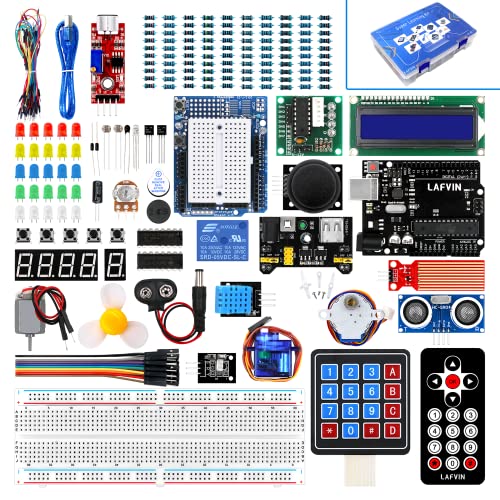
- More than 20 lessons with manuals and code
- Arduino IDE compatible
- Includes motors, LCDs, and other beginner parts
Best For: Beginners who want an Arduino-style kit with motors, displays, and tutorials
Frustration-Free Classroom Pick
DFRobot Basic Electronics Starter Kit

- 83 labeled components for easier setup
- 12 step-by-step tutorials with diagrams and code
- UNO R3 and Arduino IDE compatible
Best For: College STEM and beginner learners who want an organized, low-friction kit
Most Budget-Friendly All-in-One Pick
REXQualis Super Starter Kit for Arduino Beginners
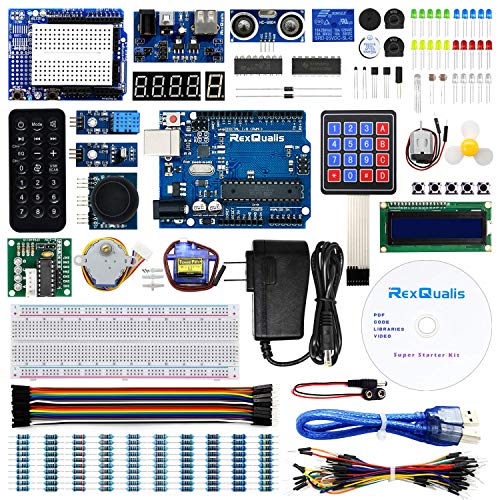
- 120-item starter bundle for beginners
- Includes 9V 1A power adapter
- Free PDF tutorial and labeled parts
Best For: First-time learners who want a broad, low-cost Arduino-compatible kit
Most Project-Rich Learning Kit
SunFounder 3-in-1 Arduino Starter Kit

- 192 items and 87 guided projects
- Covers IoT, smart car, and basic builds
- Includes online tutorials and video courses
Best For: Age 8+ beginners who want a guided, course-style kit
Best Structured Beginner Kit
ELEGOO UNO R3 Project Super Starter Kit

- 22+ guided lessons for hands-on learning
- Pre-soldered LCD and plug-in modules
- Broad mix of sensors, motors, and displays
Best For: Beginners and classrooms that want organized, lesson-based projects
ESP32 IoT Beginner Pick – ELEGOO ESP-32 Super Starter Kit
If you want microcontroller starter kits under 100 that go beyond blinking LEDs, this ELEGOO ESP-32 kit is a strong place to start. It combines an ESP-32 board with Wi-Fi, Bluetooth, and a large mix of modules, so you can learn basic circuits and move into connected projects without buying extra parts right away.
Best For: Beginners, students, and hobbyists who want an ESP32 kit with strong IoT potential and guided projects.
Pros:
- Includes over 35 modules and components for a wide range of experiments
- ESP-32 board adds Wi-Fi and Bluetooth for connected builds
- Comes with 30+ step-by-step online projects and code
- Arduino IDE compatibility keeps programming approachable for beginners
Cons:
- Best value comes if you plan to use the IoT and advanced features
- Online tutorial format may be less convenient than a fully printed guide
This kit stands out if you want one package that can grow with your skills. It covers the basics, but the real advantage is the path into smart devices, sensors, and wireless projects.
Raspberry Pi Pico Classroom Starter – LAFVIN Basic Pico Kit
For buyers searching for microcontroller starter kits under 100 that emphasize learning, this LAFVIN Raspberry Pi Pico kit keeps the focus on hands-on practice. It uses the RP2040-based Pico board and includes familiar parts like an LCD, servo, RGB LED, buzzer, and buttons, making it a practical entry point for coding and embedded basics.
Best For: Students, first-time learners, and STEM classrooms that want a Pico kit with flexible programming options.
Pros:
- Supports MicroPython, C/C++, and Piper Make graphical programming
- Includes common modules for display, sensing, input, and control
- Detailed tutorials and sample code help simplify setup
- Well suited to e-learning and beginner STEM instruction
Cons:
- 6-month warranty is shorter than some competing kits
- More focused on learning basics than advanced wireless projects
This is a solid pick if you want a straightforward educational kit rather than a feature-heavy bundle. Its mix of tutorials and common parts makes it easy to build confidence step by step.
Arduino Wi-Fi Upgrade Kit – ELEGOO UNO R4 WiFi Super Starter Kit
If you want microcontroller starter kits under 100 with room to grow, this ELEGOO UNO R4 WiFi kit is built around that idea. It pairs an Arduino-compatible UNO R4 WiFi board with a large component set and beginner tutorials, so you can start simple and move into sensors, motors, and wireless projects.
Best For: Arduino beginners, educators, and hobbyists who want a well-rounded kit with built-in Wi-Fi and Bluetooth.
Pros:
- UNO R4 WiFi board supports Arduino IDE and original Arduino shields
- Built-in Wi-Fi and Bluetooth expand project possibilities
- More than 200 components cover sensors, displays, motors, and more
- Step-by-step tutorials and graphical manuals help beginners get started
Cons:
- Larger parts count may feel overwhelming if you only want a very basic kit
- Most useful for people planning to use the wireless and shield-compatible features
This kit offers one of the broadest learning paths in the group. It is a strong choice if you want an Arduino-style starter set that can handle both first circuits and more ambitious connected builds.
ESP32 Budget Learning Kit – LAFVIN Basic ESP32 Starter Kit
Among microcontroller starter kits under 100, this LAFVIN ESP32 bundle is a practical option for beginners who want a simple path into programming and electronics. It includes an ESP32 development board, OLED display, sensors, relays, buttons, LEDs, and a tutorial with code, giving you a compact set for introductory IoT and control projects.
Best For: Beginners who want an affordable ESP32 kit with the core parts needed for hands-on practice.
Pros:
- ESP32 board adds Wi-Fi and Bluetooth connectivity
- Includes a useful mix of display, sensor, relay, and input parts
- Tutorials with code support beginner assembly and learning
- Compatible with Arduino IDE for accessible programming
Cons:
- More basic than larger kits in total part variety
- Tutorial is downloaded separately after purchase
This kit works well if you want a lower-complexity ESP32 starter without a lot of extras. It gives you the core pieces to practice wiring, coding, and small connected projects.
IoT Learning Pick – SunFounder Raspberry Pi Pico W Ultimate Starter Kit
If you want one of the more ambitious microcontroller starter kits under 100 that leans heavily into hands-on learning, this SunFounder Pico W bundle gives you a lot to explore. With 450+ components, 117 projects, and tutorials that cover MicroPython, C/C++, and Piper Make, it is built for beginners who want a guided path into both microcontroller programming and simple IoT work.
Best For: Beginners ages 8+ who want a large, tutorial-driven Pico W kit with Wi-Fi and multiple programming options.
Pros:
- Includes 450+ items and 117 projects for broad experimentation.
- Comes with 27 video tutorials led by Paul McWhorter.
- Supports MicroPython, C/C++, and Piper Make.
- Includes sensors, actuators, LEDs, LCDs, and other hardware for varied builds.
Cons:
- Best suited to learners who want a structured tutorial experience.
- Focuses on Pico W rather than an Arduino board.
Overall, this is a strong pick if you value depth, video instruction, and lots of parts over a minimal starter setup. It is especially appealing for beginners who want to move beyond blinking LEDs into connected projects.
Classic Arduino Budget Pick – LAFVIN Project Super Starter Kit
This LAFVIN set is a practical choice among microcontroller starter kits under 100 if you want to learn with an Arduino-style workflow. It includes a tutorial manual with more than 20 lessons, plus code, libraries, and datasheets, so it is geared toward beginners who want a straightforward introduction to electronics and programming.
Best For: New learners who want an Arduino IDE-compatible kit with motors, displays, and lesson-based instruction.
Pros:
- Includes a tutorial manual with more than 20 lessons.
- Works with Arduino IDE and is 100% compatible with programming.
- Has a wide mix of parts, including motors and LCDs.
- Includes servo, stepper, and DC motor components for hands-on builds.
Cons:
- Tutorial count is solid, but less extensive than some larger kits.
- Product notes do not highlight wireless or IoT features.
For beginners who want a familiar Arduino-compatible learning path with plenty of mechanical and display projects, this kit is easy to recommend. It balances instruction and hardware variety without becoming overly complex.
Frustration-Free Classroom Pick – DFRobot Basic Electronics Starter Kit
If you want a cleaner, classroom-friendly option among microcontroller starter kits under 100, this DFRobot set is designed to reduce setup friction. It comes with 83 labeled components, an UNO R3 compatible board, and 12 step-by-step tutorials that move from simple LED circuits to gesture-controlled light projects.
Best For: College STEM students, first-time builders, and self-study learners who want clearly labeled parts and guided exercises.
Pros:
- 83 components are included, covering sensors, LEDs, resistors, and a USB cable.
- Parts are individually packaged and labeled for easier sorting.
- 12 progressive tutorials include wiring diagrams, sample code, and explanations.
- Compatible with Arduino UNO R3 and Arduino IDE.
Cons:
- Less project count than the largest starter kits.
- Focuses on basics rather than advanced or wireless projects.
This is a sensible pick if you care more about a smooth learning experience than sheer part count. The labeled components and structured tutorials make it especially useful for classes and beginners who want to understand the fundamentals clearly.
Most Budget-Friendly All-in-One Pick – REXQualis Super Starter Kit for Arduino Beginners
If you want one of the more affordable microcontroller starter kits under 100, this REXQualis bundle covers the basics and then some. It is built around an Arduino UNO R3-compatible board and comes with a large mix of sensors, motors, displays, and other parts, plus a 9V 1A power adapter and a free PDF tutorial to help beginners get moving.
Best For: Beginners who want a low-cost, broad-component starter kit with a power adapter included.
Pros:
- 120 items give you a wide starting inventory for learning and small projects.
- Includes a 9V 1A power adapter, so you do not need to rely on a battery right away.
- LCD1602 comes with a pin header, which removes one soldering step.
- Free PDF tutorial and datasheet support first-time use.
Cons:
- The notes emphasize compatibility, not an official Arduino board.
- Some learning still depends on using the downloaded tutorial or contacting support.
This is a practical value option if you want a large, beginner-friendly parts mix without stretching the budget. The included adapter and prepped LCD make setup easier, while the labeled packaging helps keep the learning process organized.
Most Project-Rich Learning Kit – SunFounder 3-in-1 Arduino Starter Kit
For shoppers comparing microcontroller starter kits under 100, this SunFounder set stands out for how much guided learning it packs in. It combines a 3-in-1 path for IoT, smart car, and basic builds with 192 items, 87 projects, and online tutorials plus video courses, making it easy to move from simple exercises to more advanced ideas.
Best For: Beginners age 8+ who want lots of guided projects and structured online lessons.
Pros:
- 192 items and 87 projects provide a deep practice pool.
- 3-in-1 design covers IoT, smart car, and basic kit learning.
- Online tutorials and video courses add structured support.
- Compatible with Arduino UNO IDE and Scratch for flexible learning.
Cons:
- The larger feature set may feel like a lot for absolute first-timers.
- It is positioned as an intermediate-level kit in the model name.
This kit is a strong pick if you want a learning path rather than just a box of parts. Its mix of projects, tutorials, and component variety makes it especially useful for learners who want to build confidence step by step.
Best Structured Beginner Kit – ELEGOO UNO R3 Project Super Starter Kit
If you are looking for microcontroller starter kits under 100 that focus on clear, hands-on learning, this ELEGOO set is a strong choice. It centers on 22+ guided lessons and a well-organized parts list, so beginners can work through LEDs, sensors, displays, motors, and input modules without feeling overwhelmed.
Best For: Beginners, homeschoolers, and classroom users who want a guided Arduino learning kit.
Pros:
- 22+ guided lessons cover a wide range of starter projects.
- Includes many beginner-friendly parts like sensors, motors, buttons, and displays.
- LCD1602 arrives with a pre-soldered header for easier setup.
- Solderless breadboard and plug-in modules reduce first-build friction.
Cons:
- The setup guidance still requires careful board, port, and polarity checks.
- Younger learners are advised to work with an experienced adult.
This kit is especially appealing if you want a more structured path into Arduino-style projects. The lesson flow and organized component selection make it easier to progress from simple wiring exercises to your own custom builds.
How We Picked the Best Microcontroller Starter Kits Under 100
We looked for Microcontroller Starter Kits Under 100 that offer a strong mix of board quality, included components, tutorial support, and beginner accessibility. Priority went to kits that make it easy to start with guided projects instead of leaving you to source parts separately.
We also favored options with good platform support, such as Arduino IDE, MicroPython, or broad community documentation, since that reduces the learning curve and helps you troubleshoot faster.
Quick Comparison
Broadly, these kits fall into three groups: classic Arduino-based starter packs for general electronics learning, ESP32 kits for Wi-Fi and IoT projects, and Raspberry Pi Pico/Pico W kits for modern low-cost experimentation. Some bundles emphasize lots of components and project variety, while others focus on cleaner beginner onboarding and stronger tutorials.
Key Buying Factors for Microcontroller Starter Kits Under 100
Board Ecosystem
Choose a board family that matches your goals. Arduino UNO-style kits are best for straightforward entry-level learning, ESP32 kits are stronger for wireless and connected projects, and Pico/Pico W kits are a good fit if you want MicroPython or compact, modern hardware.
Tutorial Quality
Good instructions matter more than a huge parts count. Look for kits with clear project steps, code examples, and labeled components. That can save hours of frustration, especially if this is your first electronics kit.
Included Parts and Project Range
More components can mean more learning opportunities, but only if they’re useful. A well-rounded kit should include LEDs, resistors, sensors, a display or servo, and enough variety to build multiple project types.
Software and Compatibility
Make sure the kit supports the programming environment you prefer. Many of the best Microcontroller Starter Kits Under 100 work with Arduino IDE, while others add MicroPython or Scratch support for more flexible learning.
Who Should Buy Which Microcontroller Starter Kits Under 100?
Choose Arduino UNO-based kits if you want the most beginner-friendly path and the widest set of tutorials online. They’re ideal for learning core electronics concepts and simple coding workflows.
Choose ESP32 kits if you want Wi-Fi, Bluetooth, and smarter connected projects. These are better for makers who want to explore IoT features sooner.
Choose Raspberry Pi Pico or Pico W kits if you prefer MicroPython or want a compact board for general-purpose experimentation. They’re a strong choice for learners who want modern performance at a low cost.
In short, the best kit is the one that matches your learning style, project goals, and preferred software stack—not just the one with the most parts.