
Mini PCs with neural processing units (NPUs) are making local AI features more practical without the size, noise, or power demands of a traditional desktop. The models in this roundup span compact office systems, premium creator machines, and high-performance mini PCs built for demanding workloads.
We compare their processors, NPU capabilities, memory, storage, graphics, connectivity, and upgrade potential so you can choose the right balance of AI performance, responsiveness, and long-term value.
Best 10 Mini PC with Npu Picks for 2026
Top Performance Pick

- 55 TOPS XDNA 2 NPU for local AI tasks
- Radeon 890M graphics and 12-core Ryzen processor
- 48GB RAM, 1TB SSD, USB4, and Wi-Fi 7
Best For: AI creation, gaming, and heavy multitasking
Business-Focused Choice
ASUS ExpertCenter PN54 AI Mini PC
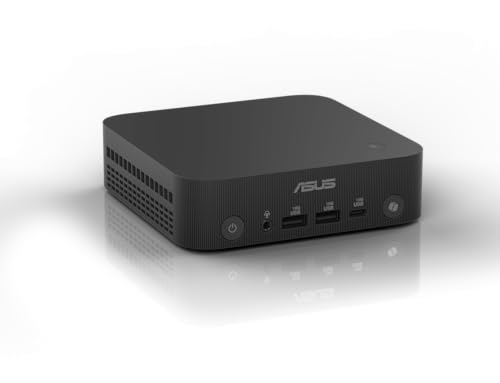
- Up to 50 TOPS XDNA2 NPU
- Four-display 4K support and dual 2.5G LAN
- Ultra-thin 0.6L chassis with toolless access
Best For: Business productivity and multi-display office setups
Professional Intel Option

- Core Ultra 9 185H with 11 TOPS Intel AI Boost NPU
- Intel Arc graphics and support for four displays
- Expandable memory up to 96GB and dual 2.5G LAN
Best For: Professional productivity and on-device AI utilities
AI Workstation Pick
GMKtec EVO-X2 Ryzen AI Max+ Mini PC

- Ryzen AI Max+ 395 with 50 TOPS NPU
- 128GB unified LPDDR5X memory and Radeon 8060S graphics
- Four displays, dual USB4, and selectable power modes
Best For: Local AI, rendering, editing, and demanding multitasking
Best Business Value

- 13 TOPS Intel AI Boost NPU
- Upgradeable DDR5 RAM and dual M.2 storage
- Compact Windows 11 Pro business design
Best For: Office productivity and compact business workspaces
Best High-Performance Choice

- 99 TOPS combined AI performance
- Upgradeable memory up to 128GB
- Quad-display, USB4, Wi-Fi 7, and 2.5Gbps Ethernet
Best For: Creators, developers, and demanding AI-assisted workloads
Best Efficient AI Workstation

- 21 TOPS combined NPU/GPU performance
- Local AI features with Windows 11 Pro
- Triple 8K display support and 2.5Gbps LAN
Best For: Efficient local AI and multi-monitor productivity
Quiet Productivity Pick

- Core Ultra 9 185H with local AI acceleration
- Quiet 65W cooling for shared environments
- Windows and Linux support with quad-display output
Best For: Quiet development, editing, Linux workstations, and office deployment
Top Performance Pick – Ryzen AI 9 HX 470 Mini PC
If you want a mini PC with NPU capabilities for local AI, gaming, and demanding multitasking, this Ryzen AI 9 HX 470 system is built for high performance. Its 55 TOPS XDNA 2 NPU, Radeon 890M graphics, 48GB of DDR5 memory, and 1TB SSD make it a particularly capable compact workstation.
Best For: Local AI workloads, 1080p gaming, content creation, and users who want substantial upgrade headroom.
Pros:
- 12-core/24-thread Ryzen AI 9 HX 470 processor with up to 5.2GHz boost speed
- Dedicated 55 TOPS NPU and Radeon 890M integrated graphics
- 48GB RAM, 1TB SSD, and support for up to 96GB RAM and 8TB storage
- USB4, 2.5GbE, Wi-Fi 7, and quad-display support
Cons:
- Its high-end hardware may be more than needed for basic office tasks
- Integrated graphics performance is still workload- and game-setting-dependent
This is the strongest all-around option here for buyers prioritizing AI capability, graphics performance, and expandability in a compact desktop. The included memory and fast connectivity also reduce the need for immediate upgrades.
Business-Focused Choice – ASUS ExpertCenter PN54 AI Mini PC
For business users seeking a mini PC with NPU acceleration, the ASUS ExpertCenter PN54 emphasizes efficient productivity, modern connectivity, and a compact design. Its Ryzen AI processor includes an XDNA2 NPU rated for up to 50 TOPS and supports up to four 4K displays.
Best For: Business offices, multi-display workstations, everyday productivity, and compact deployments that need Wi-Fi 7 and dual 2.5G LAN.
Pros:
- Up to 50 TOPS XDNA2 NPU for responsive AI features
- Supports up to four 4K displays through its video outputs
- Compact 0.6L chassis with a toolless design for customization
- Wi-Fi 7, Bluetooth 5.4, six USB ports, and dual 2.5G LAN
Cons:
- Listed configuration includes 32GB RAM with a stated 32GB maximum
- Integrated Radeon 860M graphics are aimed more at general use than high-end gaming
The PN54 is a sensible choice when office manageability, display flexibility, and networking matter more than maximum graphics power. Its small footprint and three-year manufacturer warranty add appeal for business environments.
Professional Intel Option – GEEKOM GT13 MAX AI Mini PC
The GEEKOM GT13 MAX is a practical mini PC with NPU hardware for professional workflows that benefit from on-device assistance. Its Intel Core Ultra 9 185H combines 16 CPU cores, Intel Arc graphics, and an Intel AI Boost NPU rated at up to 11 TOPS, with support for local tasks such as OCR, transcription, and document Q&A.
Best For: Professional office work, private on-device AI utilities, creative applications, and users who need extensive display and networking options.
Pros:
- 16-core/22-thread Core Ultra 9 185H processor
- Intel AI Boost NPU supports compatible local AI workloads
- Intel Arc graphics, AV1 decoding, and up to four displays
- Dual USB4, Wi-Fi 7, dual 2.5G LAN, and memory expansion up to 96GB
Cons:
- The NPU’s 11 TOPS rating is lower than the AMD alternatives in this roundup
- Supplied configuration has 16GB RAM, so demanding users may want to upgrade
This model stands out for its business-oriented feature set, upgrade potential, and stated durability testing. It is a better fit for productivity and professional AI-assisted tasks than for buyers focused primarily on maximum NPU throughput.
AI Workstation Pick – GMKtec EVO-X2 Ryzen AI Max+ Mini PC
For demanding local AI and creative workloads, the GMKtec EVO-X2 is a workstation-class mini PC with NPU performance to match its large unified memory pool. The Ryzen AI Max+ 395 provides a 50 TOPS XDNA 2 NPU, Radeon 8060S graphics, 128GB LPDDR5X memory, and selectable power modes.
Best For: Local AI inference, software development, 3D rendering, video editing, high-resolution creation, and memory-intensive multitasking.
Pros:
- 16-core/32-thread Ryzen AI Max+ 395 with up to 5.1GHz boost
- 50 TOPS NPU, Radeon 8060S graphics, and up to 126 combined TOPS
- 128GB unified LPDDR5X-8000 memory for large AI and creative workloads
- Four-display support, dual USB4, Wi-Fi 7, and three selectable performance modes
Cons:
- Onboard memory is not described as user-upgradable
- Performance mode can draw up to 120W, with brief peaks up to 140W
- Its workstation-level hardware may be excessive for everyday computing
The EVO-X2 is the most specialized choice for buyers who need abundant memory and sustained CPU, GPU, and NPU resources in a compact system. Its cooling system and selectable power profiles provide useful flexibility, but the hardware is best justified by demanding workloads.
Best Business Value – Lenovo ThinkCentre M70q Gen 6
The Lenovo ThinkCentre M70q Gen 6 is a practical mini PC with NPU for office users who want efficient AI acceleration in a compact business desktop. Its Core Ultra 3 processor, Windows 11 Pro, dual-display support, and upgradeable storage make it well suited to everyday productivity and managed workspaces.
Best For: Business productivity, office multitasking, compact deployments, and users who value upgradeable memory and storage.
Pros:
- Intel AI Boost NPU provides up to 13 TOPS of dedicated AI performance.
- Two SO-DIMM slots support up to 64GB DDR5-5600 memory, while dual M.2 slots support up to 4TB PCIe 4.0 NVMe storage.
- Compact 1L design includes Windows 11 Pro, VESA mounting support, and HDMI plus DisplayPort outputs.
Cons:
- Comes with 16GB RAM and a 512GB SSD, so demanding users may want to upgrade.
- Integrated graphics are intended for everyday productivity rather than intensive graphics workloads.
This is a strong choice when business manageability, small size, and future upgrade flexibility matter more than maximum creative or gaming performance.
Best High-Performance Choice – GEEKOM IT15 AI Mini PC
The GEEKOM IT15 is a powerful mini PC with NPU for creators, developers, and professionals who need more than basic office performance. Its Core Ultra 9 processor combines NPU, CPU, and Arc graphics resources for demanding AI-assisted work, video editing, coding, and multitasking.
Best For: Video editing, software development, local AI tasks, multi-display workstations, and demanding multitasking.
Pros:
- Advertised 99 TOPS total AI performance, including 13 TOPS from the NPU, 77 TOPS from Arc graphics, and 9 TOPS from the CPU.
- 32GB DDR5 RAM is upgradeable to 128GB, paired with a 1TB NVMe Gen 4 SSD.
- Supports up to four displays, Wi-Fi 7, 2.5Gbps Ethernet, USB4, and external GPU expansion.
- Includes quiet cooling, Linux and Ubuntu support, and a three-year warranty.
Cons:
- Its higher-end hardware may be more than casual office users need.
- Gaming performance is positioned for popular and mid-tier titles rather than guaranteed top-end AAA performance.
Choose the IT15 if you want a desktop-sized productivity experience in a small enclosure and can make use of its higher memory ceiling, fast connectivity, and broad display support.
Best Efficient AI Workstation – Bmax Core Ultra 5 Mini PC
The Bmax Core Ultra 5 system is an efficient mini PC with NPU aimed at local AI features, office work, and light creative tasks. It combines Intel AI Boost, integrated Arc graphics, Windows 11 Pro, and support for up to three 8K displays in a compact, low-power design.
Best For: Local AI productivity, privacy-conscious office users, multi-monitor setups, and light creative work.
Pros:
- Built-in NPU and integrated graphics deliver advertised combined performance of up to 21 TOPS.
- Supports local features such as photo retouching, background blur, script generation, and voice translation.
- Can drive three independent 8K displays through HDMI 2.1, DisplayPort 2.1, and full-function USB-C.
- Includes Windows 11 Pro, TPM 2.0 support, 2.5Gbps Ethernet, and Wi-Fi 6.
Cons:
- Memory is soldered 16GB LPDDR5X, limiting upgrade flexibility.
- The integrated graphics focus on productivity and light creative work rather than demanding dedicated-GPU workloads.
- Its 512GB SSD offers less starting capacity than some higher-end alternatives.
This Bmax model makes sense for users who prioritize efficient local AI features, strong display connectivity, and low-power everyday performance over expandability.
Best Value NPU Mini PC – GMKtec K15 Ultra 5
The GMKtec K15 is a practical mini PC with NPU for everyday computing, gaming, video editing, and local AI-enabled tasks. Its Core Ultra 5 125U combines an Intel AI Boost NPU rated at up to 13 TOPS with Arc graphics, 32GB of DDR5 memory, and a 1TB PCIe 4.0 SSD.
Best For: Buyers seeking a well-equipped, expandable mini PC for multitasking, creative work, light gaming, and multi-monitor setups.
Pros:
- Intel AI Boost NPU supports up to 13 TOPS for compatible AI workloads.
- 32GB DDR5 RAM and a 1TB PCIe 4.0 SSD provide a strong starting configuration.
- Supports up to four displays, including 8K output, and includes an OCuLink port for eGPU setups.
- Triple M.2 expansion slots and 2.5GbE networking add useful upgrade and connectivity options.
Cons:
- The NPU performance is more modest than the higher-end alternatives in this roundup.
- Some cooling and display features may be more than needed for basic office use.
Choose the K15 if you want a balanced NPU-equipped mini PC with generous memory, expandable storage, and gaming-friendly graphics without moving to a larger desktop.
Most Powerful NPU Mini PC – GEEKOM GT15 Max Ultra 9
The GEEKOM GT15 Max is the performance-focused mini PC with NPU in this selection. Its Core Ultra 9 285H, Arc 140T graphics, and CPU-GPU-NPU design deliver up to 99 TOPS of total platform AI performance, while 32GB of DDR5 RAM and a 1TB SSD support demanding multitasking.
Best For: Developers, creators, analysts, and power users running local AI tools, virtualization, large projects, or intensive graphics workloads.
Pros:
- Core Ultra 9 285H platform offers up to 99 TOPS of combined AI performance.
- Arc 140T graphics support creative applications, 8K playback, XeSS, and ray tracing features.
- Upgradeable memory supports up to 128GB, with dual NVMe slots for storage expansion.
- Dual USB4 ports, dual 2.5G LAN, and support for up to four displays suit professional workstations.
Cons:
- Its higher-end hardware may be excessive for simple office and streaming tasks.
- It has a higher power-oriented performance profile than lower-tier mini PCs.
The GT15 Max is the strongest choice here for users who want maximum local AI capability and desktop-class connectivity in a compact enclosure, backed by a 3-year limited warranty.
Quiet Productivity Pick – GEEKOM IT13 Max Ultra 9
The GEEKOM IT13 Max is a quiet, productivity-oriented mini PC with NPU for creators, developers, engineers, and shared workspaces. Its Core Ultra 9 185H runs at a 65W TDP and is designed for local LLM, computer vision, machine-learning, video-editing, and other demanding workflows.
Best For: Users who prioritize quiet sustained performance, Linux compatibility, multi-monitor productivity, and compact deployment in offices, schools, or home workspaces.
Pros:
- Core Ultra 9 185H combines CPU, graphics, and NPU acceleration for local AI workflows.
- IceBlast 3.0 cooling is designed to deliver 65W sustained performance with reduced noise.
- Supports Windows and major Linux distributions, including Ubuntu, Debian, and CentOS.
- Dual Ethernet and quad-display support provide flexibility for professional setups.
Cons:
- The included 16GB of DDR5 RAM is less generous than the 32GB configurations in the other picks.
- The product notes emphasize productivity and creative work more than gaming performance.
Consider the IT13 Max when quiet operation and operating-system flexibility matter as much as AI capability. Its 1TB SSD and compact design make it a sensible fit for development, editing, and multi-screen office work.
How We Picked the Best Mini PC with Npu
We evaluated these systems by looking beyond processor names and headline TOPS figures. Our comparison considers the NPU’s role in supported AI applications, CPU and integrated GPU performance, installed memory and storage, display support, connectivity, cooling, upgrade options, operating-system compatibility, and overall fit for the intended user.
Because NPU performance is useful only when software supports it, we also weighed practical workloads such as video calls, background blur, transcription, image enhancement, content creation, multitasking, and local AI tools. Specifications can vary by configuration, so verify the exact memory, storage, operating system, and port selection before buying.
Quick Comparison
| What to Compare | Best For | Why It Matters |
|---|---|---|
| Strong NPU and modern AI platform | Local AI and Copilot+ features | Improves supported AI tasks while reducing CPU and GPU load. |
| High memory capacity | Creators, developers, and power users | Helps with large projects, virtual machines, and demanding multitasking. |
| Fast integrated graphics | Light gaming and media creation | Determines performance in graphics-heavy applications and high-resolution playback. |
| Business-focused design | Office fleets and professional deployments | Prioritizes manageability, reliability, security, and serviceability. |
| Upgradeable RAM or storage | Long-term value | Lets you expand capacity instead of replacing the entire computer. |
Key Buying Factors for a Mini PC with Npu
NPU Performance and Software Support
TOPS is a useful starting point, but it is not a complete performance measure. Check whether the applications you use support the processor’s NPU and whether features require a specific operating system or AI platform. A higher-rated NPU is most valuable when your workload actually uses it.
Processor, Graphics, and Memory
Choose the CPU according to your primary workload. Office work and streaming need far less power than compiling code, editing video, or running local models. Integrated graphics vary considerably, so confirm performance expectations for gaming, 3D work, and multiple high-resolution displays. For demanding multitasking, 32GB of RAM is a sensible target; 16GB suits lighter use, while 64GB or more benefits advanced users.
Storage, Ports, and Display Output
A 1TB SSD provides useful room for applications and projects, while a 512GB drive may require earlier expansion. Look for USB4 or high-speed USB-C, multiple video outputs, fast networking, and enough USB ports for your peripherals. Confirm whether the advertised display resolution and refresh rate require specific cables or adapters.
Thermals, Noise, and Upgradeability
Compact systems can become noisy or throttle under sustained loads. Read thermal and acoustic testing when available, especially for high-wattage chips. Also check whether memory is soldered, whether a second SSD slot is included, and how easily the case can be opened.
Who Should Buy Which Mini PC with Npu?
Choose a business-oriented model if you need fleet deployment, dependable office performance, and straightforward management. A balanced Ryzen AI or Intel Core Ultra system is a strong fit for everyday productivity, video conferencing, and occasional creative work. Power users should prioritize high memory capacity, a stronger integrated GPU, fast storage, and a higher-performance NPU. For light gaming or graphics work, focus on the integrated GPU rather than NPU ratings alone. Finally, buyers who want the smallest practical desktop should select the model with the best combination of cooling, ports, and upgrade access—not simply the highest specification on the box.