
A mini PC with Thunderbolt can deliver desktop-class connectivity in a remarkably small footprint. These systems support fast external storage, docks, multiple displays, and other high-bandwidth accessories without the bulk of a traditional tower.
Our 2026 roundup covers Intel NUC systems, Beelink and MSI mini PCs, and versatile barebones options for work, home offices, media use, and more demanding workloads.
Best 10 Mini PC with Thunderbolt Picks for 2026
Performance Powerhouse

- Core i9-13900HK processor for demanding workloads
- 32GB DDR5 and 1TB SSD with expansion options
- Thunderbolt 4 plus PCIe x8 and dual 2.5GbE
Best For: Creative professionals, power users, and gamers
AI-Ready NUC
ASUS NUC 15 Pro Core Ultra 7 Barebone

- Core Ultra 7 255H with Intel Arc graphics
- Two Thunderbolt 4 ports and up to four 4K displays
- Tool-less design, Wi-Fi 7, and three-year warranty
Best For: DIY builders and multi-display business setups
Office Essential
MSI Cubi 5 Professional Mini Desktop

- Core i3 performance with 16GB RAM and 512GB SSD
- Thunderbolt 4 plus HDMI and DisplayPort
- Windows 11 Pro and three-monitor 4K support
Best For: Office productivity and remote-work setups
AI Productivity Hub
ASUS NUC 15 Pro Ultra 7 Mini PC

- Core Ultra 7 with integrated NPU for AI workloads
- 32GB DDR5 and 1TB PCIe Gen4 SSD
- Dual Thunderbolt 4, Wi-Fi 7, and 2.5GbE
Best For: AI-assisted productivity and compact creative workstations
Best Performance Pick

- Core i5-12600H with 16GB DDR5 memory
- Thunderbolt 4 supports 8K output
- Expandable memory and dual SSD slots
Best For: Multi-monitor business and home-office work
Best Quiet AI-Ready Option

- 24 TOPS offline AI computing
- Thunderbolt 4 with triple-4K support
- 10G and 2.5G dual LAN
Best For: Quiet offices, local AI, and fast network storage
Balanced Workstation

- 12th Gen Core i5 with 10 cores and 12 threads
- Thunderbolt 4 plus HDMI 2.1 and DisplayPort
- 16GB RAM, 512GB SSD, and Windows 11 Pro
Best For: Compact business and home-office setups
Multi-Display Powerhouse

- 13th Gen Core i5-13420H with up to 4.6GHz boost
- Dual Thunderbolt and dual HDMI 2.1 outputs
- Wi-Fi 6E, Bluetooth 5.3, and expandable hardware
Best For: Multi-monitor business and productivity workstations
Expandable Business Hub
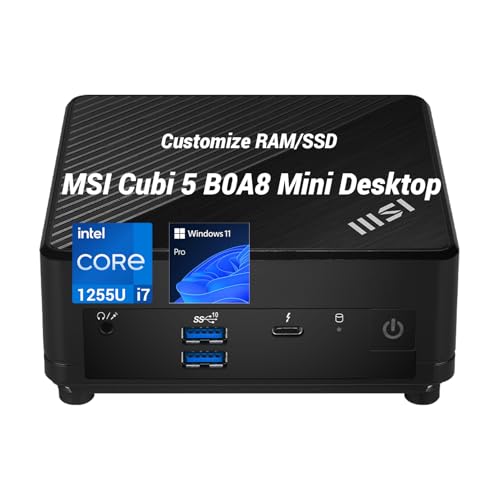
- Core i7-1255U with 10 cores and up to 4.7GHz
- Thunderbolt 4 with HDMI and DisplayPort output
- Up to 32GB RAM and 2TB SSD configurations
Best For: Expandable professional and multi-display office setups
Performance Powerhouse – Beelink GTi13 Core i9 Mini PC
For shoppers seeking a mini pc with thunderbolt for demanding workloads, the Beelink GTi13 combines a Core i9-13900HK processor with fast DDR5 memory, expandable storage, and Thunderbolt 4 connectivity. It is built for intensive multitasking, creative work, and high-speed peripheral connections.
Best For: Video editors, 3D creators, programmers, gamers, and users who need PCIe expansion or fast external storage.
Pros:
- Core i9-13900HK with 14 cores, 20 threads, and speeds up to 5.4GHz.
- 32GB DDR5 RAM and a 1TB SSD, with substantial memory and storage expansion potential.
- Thunderbolt 4 supports 40Gbps data, video output, and up to 100W PD charging.
- Dual 2.5GbE ports, Wi-Fi 6, triple-display support, and an available PCIe x8 slot.
Cons:
- Its high-performance hardware is more than needed for basic office tasks.
- The compact system weighs more than some competing mini PCs.
The GTi13 stands out when processing power and expandability matter more than the smallest possible footprint. Its Thunderbolt 4 and PCIe options give it unusual flexibility for a compact computer.
AI-Ready NUC – ASUS NUC 15 Pro Core Ultra 7 Barebone
The ASUS NUC 15 Pro is a compact mini pc with thunderbolt designed around Intel’s Core Ultra 7 255H platform and integrated Arc graphics. As a barebone kit, it suits buyers who want a flexible DIY system with advanced connectivity and long-term upgrade potential.
Best For: DIY builders, business deployments, multi-display workstations, and users prioritizing AI-capable processing.
Pros:
- Core Ultra 7 255H processor with integrated Intel Arc 140T Graphics.
- Two Thunderbolt 4 ports and HDMI 2.1 can drive up to four 4K displays.
- Wi-Fi 7, tool-less chassis access, and support for expandable DDR5 memory and storage.
- Includes a three-year manufacturer warranty and MIL-STD-810H certification.
Cons:
- As a barebone kit, buyers may need to add compatible memory and storage.
- Integrated graphics share system memory rather than using a dedicated GPU.
This NUC is a strong choice for a customized compact workstation. Its dual Thunderbolt 4 ports and four-display capability are especially useful, but the barebone format requires more planning than a ready-to-use PC.
Office Essential – MSI Cubi 5 Professional Mini Desktop
For everyday users comparing a mini pc with thunderbolt for work, the MSI Cubi 5 offers a practical Windows 11 Pro setup with a Core i3 processor, 16GB of RAM, and a 512GB SSD. Its Thunderbolt 4 port adds fast peripheral and display connectivity without taking much desk space.
Best For: Office work, remote work, browser-heavy multitasking, and compact three-monitor productivity setups.
Pros:
- Windows 11 Pro includes BitLocker, Remote Desktop, Windows Defender, and Windows Hello.
- 16GB DDR4 RAM and a 512GB PCIe SSD provide a useful ready-to-work configuration.
- Thunderbolt 4, HDMI, and DisplayPort support up to three 4K displays.
- Two RJ45 ports, Wi-Fi 6, and four USB 3.2 Gen 2 Type-A ports offer versatile connectivity.
Cons:
- The Core i3-1215U is better suited to productivity than demanding creative workloads.
- Memory is listed as expandable only up to 32GB.
The Cubi 5 focuses on dependable office functionality rather than workstation-level performance. It is a sensible fit when Windows Pro features, multiple displays, and business connectivity are the priorities.
AI Productivity Hub – ASUS NUC 15 Pro Ultra 7 Mini PC
The ASUS NUC 15 Pro is a ready-configured mini pc with thunderbolt for users who want modern AI features in a compact system. Its Core Ultra 7 255H processor, integrated NPU, 32GB of DDR5 memory, and 1TB SSD support responsive productivity and creative workflows.
Best For: Business users, local AI applications, content creators, and compact workstations needing fast storage and modern wireless connectivity.
Pros:
- Core Ultra 7 255H offers 16 cores, 16 threads, and speeds up to 5.1GHz with dedicated NPU acceleration.
- 32GB DDR5-5600 memory and a 1TB PCIe Gen4 SSD provide a strong starting configuration.
- Two Thunderbolt 4 ports support 40Gbps data, power delivery, and display connections.
- Wi-Fi 7, Bluetooth 5.4, 2.5GbE, HDMI 2.1, and dual M.2 storage support improve flexibility.
Cons:
- Integrated graphics are not a replacement for a dedicated graphics card in demanding 3D work.
- Its compact design offers less internal expansion than a full-size desktop.
This NUC balances current connectivity with AI-oriented processing in a small metal chassis. It is particularly compelling for productivity and local AI experimentation, while Thunderbolt 4 provides room for fast external devices and displays.
Best Performance Pick – MINIX NGC N512
The MINIX NGC N512 is a strong choice if you want a mini PC with Thunderbolt for demanding office multitasking and multi-monitor work. Its Core i5-12600H processor, 16GB of DDR5 memory, and PCIe 4.0 SSD provide a capable foundation, while Thunderbolt 4 supports up to 8K display output.
Best For: Business users, home offices, education, and productivity setups requiring several displays.
Pros:
- 12-core/16-thread Intel Core i5-12600H processor with speeds up to 4.5GHz.
- Expandable dual-DDR5 design supports up to 64GB of memory.
- Supports triple or quad displays, including Thunderbolt 4, HDMI, and USB-C outputs.
- Dual LAN, Wi-Fi 6, and Bluetooth 5.2 provide flexible connectivity.
Cons:
- Integrated Intel Iris Xe graphics are intended for general productivity rather than demanding dedicated-GPU workloads.
- Only one Thunderbolt 4 port is listed.
Choose this model when expandability and display flexibility matter more than the smallest possible footprint. Its upgrade-friendly memory and storage layout also make it a practical long-term work computer.
Best Business Setup – ASUS NUC 13 Pro Tall
The ASUS NUC 13 Pro Tall is a business-focused mini PC with Thunderbolt, combining a 13th-generation Core i5 processor with Windows 11 Pro and a quiet, compact chassis. Two HDMI 2.1 ports and two Thunderbolt ports make it well suited to professional multi-display desks.
Best For: Offices, conference rooms, trading stations, and professional productivity setups.
Pros:
- Intel Core i5-13420H reaches boost speeds up to 4.6GHz.
- Two HDMI 2.1 and two Thunderbolt ports support flexible multi-monitor configurations.
- Wi-Fi 6E, Bluetooth 5.3, Ethernet, and USB provide modern connectivity.
- Windows 11 Pro and quiet operation suit business environments.
Cons:
- Uses integrated Intel UHD Graphics rather than a dedicated graphics card.
- The supplied listing contains mixed memory and storage details, so verify the exact configuration before ordering.
This NUC is a sensible pick for users who prioritize a quiet, business-ready design and abundant display connectivity. Confirm the listed RAM and storage configuration to ensure it matches your needs.
Best Quiet AI-Ready Option – Beelink EQI Mini PC
The Beelink EQI is an appealing mini PC with Thunderbolt for quiet everyday computing, local AI experimentation, and fast networking. It pairs 24GB of DDR5 RAM with 24 TOPS of offline AI computing, triple-4K display support, and dual 10G and 2.5G LAN ports.
Best For: Home users, students, offices, and light local-AI or NAS-related workloads.
Pros:
- Intel Core 3 304 processor reaches up to 4.3GHz and emphasizes low power use.
- Up to 24 TOPS of offline AI computing through NPU and GPU acceleration.
- Thunderbolt 4 and HDMI support simultaneous triple-4K displays.
- Integrated 85W power supply and a 32dB cooling fan help reduce desktop clutter and noise.
Cons:
- UFS 3.1 storage is less conventional than a standard removable SSD for the included system drive.
- The processor is positioned for everyday work, streaming, and light gaming rather than high-end workloads.
- The supplied operating-system details are less specific than the Windows 11 Pro security description.
Consider the EQI if quiet operation, high-speed networking, and local AI features are priorities. Its dual M.2 slots and upgradeable memory add useful flexibility, while the Thunderbolt 4 connection supports a productive multi-screen workspace.
Balanced Workstation – MSI Cubi 5 Professional
The MSI Cubi 5 Professional is a practical mini PC with Thunderbolt for compact office setups, everyday multitasking, and high-resolution display use. Its 12th Gen Intel Core i5-1235U processor, 16GB RAM, 512GB SSD, and Windows 11 Pro provide a capable starting point for work and general productivity.
Best For: Home offices, business users, and buyers who need Thunderbolt 4, 4K display support, and a compact VESA-mountable computer.
Pros:
- 12th Gen Intel Core i5 processor with 10 cores and 12 threads
- Thunderbolt 4, HDMI 2.1, and DisplayPort connectivity
- 16GB DDR4 RAM and a 512GB PCIe NVMe SSD
- Compact design with Windows 11 Pro and Wi-Fi 6
Cons:
- Integrated Intel graphics are shared rather than dedicated
- RAM is listed with a maximum capacity of 16GB
This Cubi 5 is a well-rounded choice when you want strong office performance and modern connectivity in a small chassis. Its single Thunderbolt 4 port and multiple video outputs make it especially useful for streamlined desk setups.
Multi-Display Powerhouse – ASUS NUC 13 Pro Tall
The ASUS NUC 13 Pro Tall is a performance-focused mini PC with Thunderbolt designed for demanding productivity and multi-monitor workspaces. Its 13th Gen Intel Core i5-13420H processor, Wi-Fi 6E, and dual Thunderbolt ports suit business users who need flexible connectivity in a compact system.
Best For: Office professionals, traders, conference rooms, and users building a multi-display workstation.
Pros:
- 13th Gen Intel Core i5-13420H with boost speeds up to 4.6GHz
- Two Thunderbolt ports and two HDMI 2.1 outputs
- Supports up to four displays according to the supplied notes
- Expandable DDR4 memory and PCIe NVMe storage options
Cons:
- Integrated Intel UHD Graphics rather than a dedicated GPU
- The supplied details list differing storage capacities, so verify the selected configuration
Choose this ASUS NUC when display flexibility and processor performance matter more than having the smallest possible footprint. Its dual Thunderbolt and dual HDMI layout is particularly useful for organized multi-screen desks.
Expandable Business Hub – MSI Cubi Core i7
This MSI Cubi is a flexible mini PC with Thunderbolt for professional workloads, multi-display offices, and space-constrained desks. The Intel Core i7-1255U, configurable memory and storage, Windows 11 Pro, and support for up to three independent displays make it a strong business-oriented option.
Best For: Professional users who need expandable memory and storage, Thunderbolt 4, and a discreet VESA-mounted office computer.
Pros:
- 10-core Intel Core i7-1255U with speeds up to 4.7GHz
- Thunderbolt 4 supports up to 40Gbps and works with HDMI and DisplayPort
- Configurations are available with up to 32GB RAM and 2TB SSD storage
- Very compact 0.66L chassis with included VESA mounting support
Cons:
- Configurations vary, so memory and storage should be checked before purchase
- The upgraded unit has separate coverage terms for upgraded components
- Integrated Intel Iris Xe graphics are not intended as a dedicated gaming GPU
This Cubi stands out for buyers who want more headroom than a fixed-entry configuration can provide. Its Thunderbolt 4 port, three-display support, and upgrade-oriented configurations make it a practical foundation for demanding office workflows.
How We Picked the Best Mini PC with Thunderbolt
We focused on systems that offer Thunderbolt 4 or clearly advertised Thunderbolt support, while comparing processor capability, memory, storage, display output, upgrade potential, wireless connectivity, and overall practicality. The selection includes ready-to-use Windows PCs and barebone kits for buyers who prefer to choose their own RAM, storage, or operating system.
Because specifications and configurations can vary by seller, verify the exact model, included accessories, warranty, and port layout before ordering. Pay particular attention to whether the listed Thunderbolt port supports charging, display output, PCIe expansion, or all three.
Quick Comparison
| Best For | Recommended Type | What to Look For |
|---|---|---|
| Maximum performance | Core i9 or Ultra 7 models | Strong cooling, dual-channel memory, and fast NVMe storage |
| Office productivity | Core i5 or efficient Cubi systems | Quiet operation, multiple displays, and Windows Pro |
| DIY flexibility | ASUS NUC barebone kit | Compatible RAM, SSD, and operating-system support |
| Compact home computing | Efficient entry-level mini PCs | Low power use, Wi-Fi, and adequate display outputs |
| External expansion | Thunderbolt 4-equipped models | Dock, storage, monitor, and eGPU compatibility |
Key Buying Factors for a Mini PC with Thunderbolt
Thunderbolt Implementation
Thunderbolt 4 can connect docks, external SSDs, displays, and other peripherals through one high-speed port. Check the number of ports and whether the system supports DisplayPort tunneling, USB4 compatibility, power delivery, and the resolution or refresh rates you need.
Processor and Cooling
High-performance chips such as the Core i9-13900HK are better suited to compiling code, editing media, and sustained multitasking, but they may run warmer and louder. Efficient Core i5 and lower-power processors are often preferable for office work and always-on use.
Memory and Storage
Choose at least 16GB of RAM for modern productivity, with 32GB preferable for creative applications, virtual machines, and heavy multitasking. A 512GB SSD is a practical starting point; 1TB is more comfortable for large applications and local media.
Displays and Networking
Confirm the exact number of screens supported and the available HDMI, DisplayPort, or USB-C outputs. Gigabit Ethernet is sufficient for most offices, while 2.5GbE or 10GbE can benefit network storage and large file transfers.
Who Should Buy Which Mini PC with Thunderbolt?
Choose a high-end Beelink or ASUS NUC 15 Pro if you need strong performance for development, content creation, or demanding multitasking. Choose an MSI Cubi or ASUS NUC 13 Pro for a quiet, business-focused workstation with multiple displays. Choose the MINIX NGC N512 if compact size, Windows Pro, and broad display support are priorities. Choose a barebone ASUS NUC if you already have compatible components or want greater control over the final configuration. For basic browsing, streaming, and everyday office tasks, an efficient Beelink EQI-class system can provide a smaller power and price footprint.