
Mini PCs with DDR5 memory deliver a strong balance of speed, efficiency, and compact design for modern desktop tasks. With capable AMD and Intel processors, fast NVMe storage, and upgrade-friendly configurations, these systems can handle productivity, content creation, media playback, and select gaming workloads without taking up much desk space.
This roundup compares 10 compact computers across performance levels, memory capacities, storage options, and connectivity features so you can choose a system that fits your workload and budget.
Best 10 Mini PCs with Ddr5 Memory Picks for 2026
Compact Everyday Choice
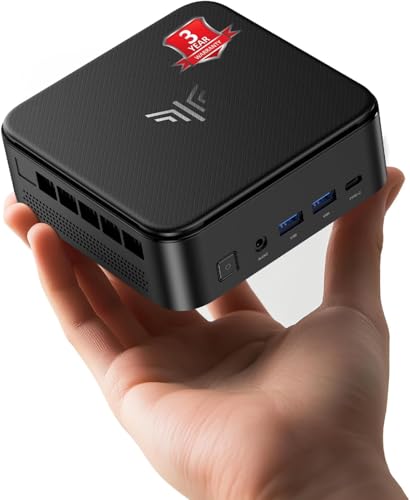
- Eight-core Ryzen 7 processor
- 16GB LPDDR5 and upgradeable 512GB SSD
- Triple 4K display support in a compact design
Best For: Home offices, study, programming, and light gaming
Balanced Gaming Value

- Ryzen 5 7640HS with Radeon 760M graphics
- 32GB DDR5 and 1TB SSD
- USB4 plus triple-display support
Best For: Moderate gaming, multitasking, and multi-monitor work
Expansion Specialist
GMKtec M7 Ultra Gaming Mini PC

- 32GB DDR5 RAM expandable to 128GB
- OCuLink supports higher-bandwidth eGPU setups
- Quad-display output and dual 2.5GbE networking
Best For: Expandable gaming, workstation, and networking builds
Workstation Value
BOSGAME P3 Lite Ryzen 7 Mini PC

- 32GB DDR5 and 1TB PCIe 4.0 NVMe SSD
- Dual M.2 slots support up to 8TB expansion
- Dual 2.5GbE, USB 4.0, and triple-4K support
Best For: Business multitasking, programming, and compact workstations
Best Gaming Value

- Ryzen 5 7640HS with Radeon 760M graphics
- 16GB dual-channel DDR5 and 1TB NVMe SSD
- Triple 4K display support with USB4
Best For: Compact gaming, creation, and productivity
Best Upgrade Platform
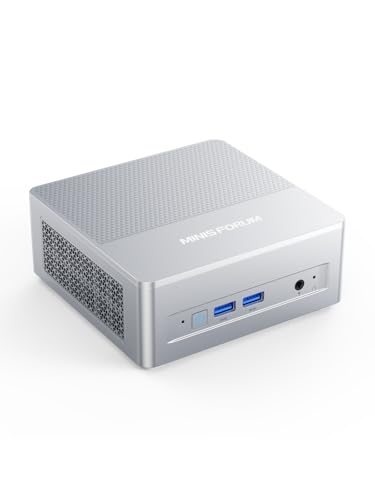
- Ryzen 7 255 with Radeon 780M graphics
- Supports up to 128GB DDR5 and two M.2 SSDs
- OCuLink, USB4, 2.5G LAN, and triple displays
Best For: DIY expansion and high-connectivity setups
Best Ready-to-Use Multitasker

- 8-core Ryzen 7 6800H with Radeon 680M
- 32GB LPDDR5 RAM and 1TB SSD included
- Dual 4K output, Wi-Fi 6, and dual LAN
Best For: Multitasking, home office, and compact gaming
Quiet Power Pick – GEEKOM AX8 Max
For shoppers comparing mini pcs with ddr5 memory, the GEEKOM AX8 Max combines a Ryzen 7 8745HS processor, 16GB of expandable DDR5 RAM, and a 1TB NVMe Gen 4 SSD. Its selectable operating modes make it suitable for quiet daily work as well as demanding gaming, rendering, and creative tasks.
Best For: Students, home users, content creators, gamers, and buyers who value quiet operation and upgrade flexibility.
Pros:
- DDR5 memory can be expanded to 128GB, while the SSD supports upgrades up to 8TB.
- IceBlast 2.0 cooling supports quieter operation, with Quiet, Normal, and Performance modes.
- Ryzen 7 8745HS and Radeon 780M graphics support gaming, 8K editing, and creative work.
- Dual 2.5GbE ports and USB4 connectivity add useful networking and expansion options.
Cons:
- The listed configuration includes 16GB of RAM, so heavier workloads may benefit from an upgrade.
- Its stronger performance features may be more than needed for basic office and web tasks.
The AX8 Max is a well-rounded choice when silent performance, fast storage, and long-term expandability matter. It is especially appealing for buyers who want a compact AMD system that can scale beyond its starting configuration.
Expansion Champion – GMKtec K15 Core Ultra 5
The GMKtec K15 is a strong option among mini pcs with ddr5 memory for buyers who need substantial memory, storage expansion, and modern connectivity. It pairs an Intel Core Ultra 5 125U with 32GB of dual-channel DDR5 RAM, a 1TB PCIe 4.0 SSD, and multiple display and expansion interfaces.
Best For: Multitaskers, content creators, gamers, and users planning large storage or external-GPU expansions.
Pros:
- 32GB of DDR5-4800 memory provides a strong starting point for demanding multitasking.
- Three M.2 expansion slots support up to 24TB of stated total storage capacity.
- Intel AI Boost NPU and Arc 140T graphics support AI workloads, gaming, and video applications.
- Oculink, 2.5GbE, Wi-Fi 6, and quad-display support provide broad connectivity.
Cons:
- The one-year limited warranty is shorter than some competing mini PCs offer.
- Its extensive expansion features may be unnecessary for simple everyday computing.
Choose the K15 if storage flexibility and connectivity are priorities. Its 32GB memory configuration and Oculink port make it particularly compelling for users building a more expandable compact workstation or gaming setup.
Compact Everyday Choice – KAMRUI Ryzen 7 7735HS
For buyers seeking mini pcs with ddr5 memory in a compact format, the KAMRUI Ryzen 7 7735HS model offers 16GB of dual-channel LPDDR5 RAM, a 512GB SSD, and an eight-core processor. It is designed for responsive multitasking, office work, content creation, programming, and light gaming.
Best For: Home offices, students, programmers, and users who need triple-display support in a small footprint.
Pros:
- Ryzen 7 7735HS delivers eight cores and 16 threads with boost speeds up to 4.75GHz.
- Dual-channel LPDDR5 memory runs at 5500MT/s, with the SSD upgradeable to 4TB.
- Supports three simultaneous 4K displays through HDMI, DisplayPort, and USB-C.
- Includes 2.5GbE, Wi-Fi 6, Bluetooth 5.2, and a broad selection of USB ports.
Cons:
- The included 512GB SSD offers less starting storage than the 1TB alternatives in this roundup.
- The LPDDR5 memory is described as onboard, so memory expansion is less flexible than SO-DIMM designs.
With its small 5.04-inch square footprint, capable processor, and triple-display output, the KAMRUI is a practical desktop replacement for space-conscious users. Consider it when compactness and everyday responsiveness matter more than maximum upgrade capacity.
Balanced Gaming Value – GMKtec M6 Ultra Ryzen 5
The GMKtec M6 Ultra stands out among mini pcs with ddr5 memory by combining 32GB of dual-channel DDR5 RAM, a 1TB SSD, and the Ryzen 5 7640HS processor. Its Radeon 760M graphics, USB4 port, and three-display support give it a versatile profile for everyday productivity, moderate gaming, and media work.
Best For: Buyers wanting a memory-rich mini PC for moderate gaming, multitasking, and multi-monitor productivity.
Pros:
- Six-core, 12-thread Ryzen 5 7640HS processor boosts up to 5.0GHz.
- 32GB dual-channel DDR5 RAM is expandable to 128GB according to the supplied specifications.
- Radeon 760M graphics support moderate gaming and hardware video encoding and decoding.
- USB4, HDMI, and DisplayPort enable three simultaneous displays, including 8K through USB4.
Cons:
- The included SSD is listed as PCIe 3.0, while some competing models use PCIe 4.0 storage.
- GMKtec provides a one-year limited warranty.
The M6 Ultra offers a sensible balance of processor performance, generous memory, and gaming-oriented graphics. It is a good fit for users who want more than basic office performance without moving to a larger desktop tower.
Power Pick – BOSGAME P3 Plus Ryzen 7 Mini PC
For shoppers comparing mini pcs with ddr5 memory, the BOSGAME P3 Plus stands out with a Ryzen 7 7840HS processor, Radeon 780M graphics, 16GB of DDR5 RAM, and a 1TB PCIe 4.0 NVMe SSD. It is a strong fit for demanding multitasking, creative work, and compact multi-monitor setups.
Best For: Gaming, 4K video editing, 3D rendering, and users who want triple-display support in a small desktop.
Pros:
- Ryzen 7 7840HS and Radeon 780M graphics support demanding workloads and gaming.
- 16GB DDR5 RAM and 1TB PCIe 4.0 SSD provide a fast starting configuration.
- Supports up to three displays and offers Wi-Fi 6E, dual Gigabit Ethernet, and USB-C video output.
- RAM can expand to 64GB, with room for a second SSD.
Cons:
- Ships with 16GB of RAM, which may be limiting for especially heavy creative projects.
- Integrated graphics are not a substitute for a dedicated gaming GPU.
The P3 Plus is a well-rounded performance option for buyers who want fast DDR5 memory, substantial storage, and versatile display connectivity without moving to a full-size desktop.
Expansion Specialist – GMKtec M7 Ultra Gaming Mini PC
The GMKtec M7 Ultra is an appealing choice among mini pcs with ddr5 memory for users who prioritize expansion and connectivity. Its Ryzen 7 PRO 6850U, 32GB dual-channel DDR5 RAM, Radeon 680M graphics, OCuLink port, and multiple display outputs create a flexible platform for gaming, work, and advanced desktop setups.
Best For: Users who need generous memory, eGPU flexibility, quad-display output, or dual-network connectivity.
Pros:
- 32GB dual-channel DDR5 RAM supports expansion up to 128GB.
- OCuLink enables higher-bandwidth eGPU connections for added graphics performance.
- Supports up to four screens, including 8K output through HDMI 2.1.
- Dual 2.5GbE ports, Wi-Fi 6E, and selectable performance modes add flexibility.
Cons:
- The included 512GB PCIe 3.0 SSD offers less starting capacity than some competing configurations.
- Its advanced expansion features may be unnecessary for basic office use.
With high memory capacity and unusually broad expansion options, the M7 Ultra is best suited to buyers who want a compact system they can adapt for gaming, networking, storage, or future upgrades.
Workstation Value – BOSGAME P3 Lite Ryzen 7 Mini PC
For practical buyers seeking mini pcs with ddr5 memory, the BOSGAME P3 Lite combines a Ryzen 7 6800H processor with 32GB dual-channel DDR5 RAM and a 1TB PCIe 4.0 NVMe SSD. Its compact design, professional networking features, and broad storage expansion make it particularly suited to productive desk setups.
Best For: Business multitasking, programming, virtualization, NAS or soft-routing projects, and quiet home-office use.
Pros:
- 32GB DDR5 RAM and a 1TB PCIe 4.0 SSD are well suited to demanding multitasking.
- Dual M.2 slots support storage expansion up to 8TB.
- USB 4.0 supports fast peripherals, PD charging, and eGPU connectivity.
- Dual 2.5GbE ports, Wi-Fi 6E, and Windows 11 Pro support professional workflows.
Cons:
- Radeon 680M integrated graphics are aimed at media playback and casual gaming rather than high-end gaming.
- The display outputs support triple 4K or a single 8K configuration, rather than the broader multi-display flexibility of some larger desktops.
The P3 Lite emphasizes work-ready memory, storage capacity, and networking instead of maximum gaming performance. It is a sensible compact workstation for users who expect to connect fast storage, multiple displays, or business networking equipment.
Best Gaming Value – GMKtec M6 Ultra
The GMKtec M6 Ultra is a strong option among mini pcs with ddr5 memory for buyers who want capable gaming, creation, and everyday multitasking performance in a compact desktop. Its Ryzen 5 7640HS, dual-channel DDR5 RAM, Radeon 760M graphics, and 1TB SSD provide a well-rounded starting configuration.
Best For: Gaming, content creation, programming, office productivity, and multi-display setups.
Pros:
- Ryzen 5 7640HS offers 6 cores, 12 threads, and speeds up to 5.0GHz.
- Dual-channel 16GB DDR5 memory and a 1TB PCIe NVMe SSD support responsive multitasking.
- Radeon 760M graphics handles popular games, 4K playback, and creative workloads.
- Supports up to three 4K displays and includes a full-function USB4 port.
Cons:
- The included 16GB RAM and 1TB SSD are below the system’s maximum upgrade capacities.
- Monitors, cables, and a compatible 100W USB-C charger are not included.
Choose this model if you want a ready-to-use mini PC with balanced performance and useful upgrade headroom. Its selectable power modes also make it easier to prioritize quieter everyday use or higher performance for demanding workloads.
Best Upgrade Platform – MINISFORUM X1 Lite-255
The MINISFORUM X1 Lite-255 stands out among mini pcs with ddr5 memory for buyers who want a flexible barebone system. Its Ryzen 7 255 processor, Radeon 780M graphics, dual DDR5 SO-DIMM slots, dual M.2 storage slots, and OCuLink connectivity create a capable foundation, but RAM and storage must be added separately.
Best For: DIY builders, multi-display productivity, lightweight gaming, and future expansion.
Pros:
- Ryzen 7 255 provides 8 cores, 16 threads, and speeds up to 4.9GHz.
- Supports dual-channel DDR5 memory up to 128GB and two PCIe 4.0 M.2 SSDs.
- Radeon 780M graphics and three display outputs support high-resolution workflows.
- Includes 2.5G LAN, Wi-Fi 6E, USB4, and OCuLink for broad connectivity options.
Cons:
- This is a barebone configuration, so memory and SSD components are not included.
- Using OCuLink requires installing the included adapter plate and occupying one M.2 slot.
This is the most expansion-focused choice in the group. It makes sense for shoppers comfortable selecting their own DDR5 kit and storage, especially those who may later add an external GPU through OCuLink.
Best Ready-to-Use Multitasker – Getorli Ryzen 7 6800H Mini PC
The Getorli Ryzen 7 6800H model is a practical choice among mini pcs with ddr5 memory when you want generous memory and storage already installed. Its 8-core processor, Radeon 680M graphics, 32GB LPDDR5 RAM, and 1TB SSD are suited to demanding multitasking, office work, gaming, and creative applications.
Best For: Heavy multitasking, home office use, everyday gaming, and dual-4K monitor setups.
Pros:
- Ryzen 7 6800H delivers 8 cores, 16 threads, and speeds up to 4.7GHz.
- 32GB LPDDR5 memory supports numerous browser tabs and complex applications.
- 1TB SSD provides quick boot times and useful built-in storage capacity.
- Includes HDMI and DisplayPort for dual 4K output, plus Wi-Fi 6 and dual Gigabit LAN.
Cons:
- The LPDDR5 memory is listed with a maximum capacity of 32GB, limiting memory upgrades.
- Its integrated Radeon 680M graphics are not a discrete graphics solution.
With 32GB of memory out of the box, this Getorli system is well suited to buyers who prefer not to configure upgrades. It offers a convenient balance of compact size, connectivity, and ready-to-use performance.
How We Picked the Best Mini PCs with Ddr5 Memory
We focused on systems that pair modern processors with DDR5 or LPDDR5 memory, fast solid-state storage, and practical connectivity for everyday desktop use. The selection includes models with 16GB and 32GB of RAM, ranging from efficient office machines to higher-performance mini PCs suited to gaming, development, and demanding multitasking.
We also considered processor class, integrated graphics capability, storage capacity, upgrade potential, cooling design, display support, and useful features such as 2.5Gbps Ethernet, dual-network connectivity, and Oculink expansion. Because specifications can vary by configuration, verify the exact memory, storage, and operating-system bundle before purchasing.
Quick Comparison
| Best For | Recommended Configuration | What to Look For |
|---|---|---|
| Everyday productivity | Ryzen 5 or Core Ultra 5, 16GB RAM | Quiet cooling, Wi-Fi, dual-display support |
| Heavy multitasking | Ryzen 7 or equivalent, 32GB RAM | More cores, 1TB SSD, upgradeable memory |
| Gaming and graphics | Ryzen 7 with Radeon 780M-class graphics | Fast DDR5, strong cooling, USB4 or Oculink |
| Storage-heavy workloads | 1TB NVMe SSD with expansion options | Accessible M.2 slot or additional drive support |
Key Buying Factors for Mini PCs with Ddr5 Memory
Processor and Integrated Graphics
The processor determines how well a mini PC handles compiling, video editing, large spreadsheets, and sustained multitasking. Ryzen 7 systems generally offer more headroom than entry-level chips, while newer Ryzen and Core Ultra platforms may provide better efficiency and AI-related features. For casual gaming, integrated Radeon graphics such as the 780M are notably stronger than basic integrated GPUs, though they do not replace a dedicated graphics card for demanding titles.
Memory Capacity and Type
Choose 16GB for office work, browsing, streaming, and light creative tasks. Select 32GB if you use virtual machines, edit media, run development tools, or keep many applications open. DDR5 usually offers higher bandwidth than older DDR4, but LPDDR5 memory may be soldered and less upgradeable. Check whether the RAM is replaceable before buying if you expect your needs to grow.
Storage and Expansion
A 1TB NVMe SSD is a practical starting point for applications, games, and media. Look for a second M.2 slot, 2.5-inch drive support, or an Oculink port if you need more storage or external graphics expansion. Barebone models can be flexible, but remember to budget separately for memory, storage, and an operating system.
Ports, Displays, and Networking
Confirm the number and type of USB ports, video outputs, and monitor connections. HDMI, DisplayPort, or USB4 can enable multi-monitor setups, while 2.5Gbps Ethernet is useful for fast local storage and network transfers. Wi-Fi generation and Bluetooth support also matter for wireless peripherals and reliable streaming.
Who Should Buy Which Mini PCs with Ddr5 Memory?
Choose a 16GB model for general office work, browsing, streaming, and a compact home server. A 32GB Ryzen 7 system is better for creators, programmers, power users, and anyone who wants longer-term performance headroom. Gaming-oriented models make the most sense for esports, older games, and lower-to-medium settings at 1080p, especially when equipped with stronger Radeon integrated graphics.
If quiet operation and low power use are your priorities, favor an efficient processor and a well-reviewed cooling design over maximum specifications. Buyers planning upgrades should prioritize accessible RAM and storage, while users who want a ready-to-run desktop should select a complete configuration with Windows, sufficient memory, and a large SSD.