
Digitizing a family photo collection is easier when you choose a scanner that matches the size, condition, and variety of your archive. The right model can turn boxes of prints, albums, slides, and negatives into organized digital files without making the process unnecessarily slow.
These 10 options cover fast automatic feeders, versatile flatbeds, and dedicated film-and-slide scanners. Use the guide below to narrow your choice by scanning speed, image quality, workflow, and the types of originals you need to preserve.
Best 10 Photo Scanners for Family Archives Picks for 2026
Fastest Family Archive Workflow
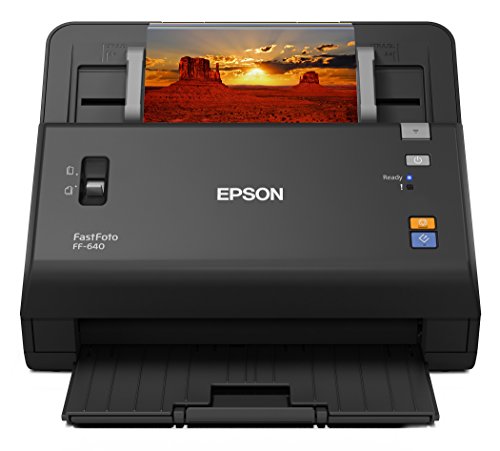
- Feeds up to 30 photos at once
- Scans up to 600 dpi
- Up to one photo per second in stated test
Best For: Large collections of loose printed photos
Simple Everyday Digitizing

- 2400 x 2400 dpi optical resolution
- Auto Scan Mode detects scan type
- Handles photos and common documents
Best For: Mixed household scanning in small batches
Professional-Grade Detail
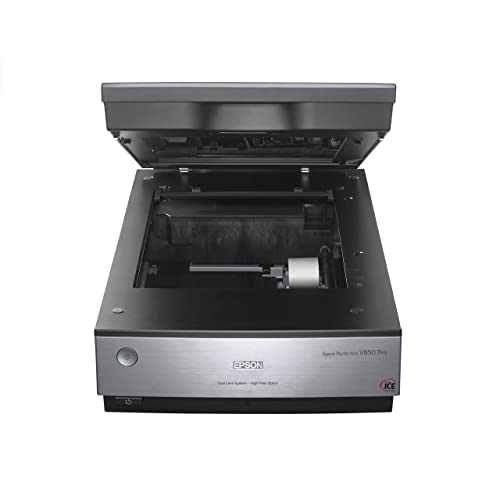
- 6400 dpi scanning resolution
- 4.0 Dmax for tonal detail
- Dual-lens system for optimized results
Best For: High-detail preservation projects
Standalone Film and Photo Conversion
Photo, Slide & Negative Scanner

- Converts photos, slides, and negatives
- 5-inch screen for previews
- Standalone operation with included SD card
Best For: Simple mixed-media family archiving
Best All-in-One Photo Organizer

- 300/600 DPI scanning for detailed copies
- Handles common, small, and panoramic prints
- Includes cleaning kit and organization software
Best For: Families digitizing varied prints with cleanup and album tools
Best Standalone Film and Slide Option

- Scans photos, negatives, slides, and name cards
- 5-inch LCD previews images without a computer
- Includes 8GB SD card and film/photo holders
Best For: Mixed family archives containing prints and film
Best High-Resolution Flatbed

- 4800 dpi optical resolution
- Scans albums, books, documents, and artwork
- Includes restoration, dust correction, OCR, and cloud tools
Best For: Detailed flatbed scanning across photos and documents
Best Compact Photo Scanner

- 4800 dpi optical resolution for detailed scans
- One-click faded-photo color restoration
- Compact, USB-powered flatbed design
Best For: Families scanning printed photos and documents in limited space
Best for Film and Slides

- 6400 dpi resolution for large photo enlargements
- Built-in scanning for 35mm film and slides
- Digital ICE reduces visible dust and scratches on film
Best For: Family archives containing prints, negatives, and slides
Best for Cloud-Friendly Workflows

- 4800 dpi optical resolution for photo enlargements
- ScanSmart supports stitching and cloud storage
- One-click restoration for faded printed photos
Best For: Families organizing scanned photos and documents digitally
Fastest Family Archive Workflow – FastFoto FF-640
For large family archives, the Epson FastFoto FF-640 is built around speed. Its automatic feeder handles up to 30 photos at a time, while scanning 4-by-6-inch photos at up to one photo per second under the stated test conditions. It is a practical choice among photo scanners for family archives when throughput matters most.
Best For: Families digitizing thousands of loose printed photos quickly.
Pros:
- Automatic feeder accommodates 30 photos per batch.
- Scans at up to 600 dpi.
- Designed to restore, save, organize, and share images.
- Includes a carrier sheet, cleaning cloth, and USB cable.
Cons:
- Requires a Windows 7-or-newer system according to the supplied requirements.
- Its automatic feeder is aimed at photos rather than a broad range of media.
The FF-640 stands out when the main challenge is volume. Its dedicated photo design and feeder can make a sizable archive less labor-intensive, though buyers should confirm computer compatibility before purchasing.
Simple Everyday Digitizing – Canon CanoScan LiDE 300
The Canon CanoScan LiDE 300 is a compact flatbed option for shoppers who want a straightforward way to digitize photos, receipts, business cards, and documents. Its Auto Scan Mode detects what you are scanning, making it a flexible entry point among photo scanners for family archives.
Best For: Households scanning photos and occasional documents one item at a time.
Pros:
- Optical resolution reaches 2400 x 2400 dpi.
- Auto Scan Mode automatically detects the scan type.
- Supports photos, receipts, business cards, and paper.
- Compact 1.7-inch-high design weighs 3.6 pounds.
Cons:
- Standard sheet capacity is one item.
- USB connectivity requires a computer connection.
- The supplied minimum system requirement is Windows 7.
This Canon is better suited to moderate, hands-on scanning than to processing boxes of photographs. Its high optical resolution and broad media support make it useful for mixed household archives, provided batch speed is not a priority.
Professional-Grade Detail – Epson Perfection V850 Pro
The Epson Perfection V850 Pro targets archive projects where fine detail and tonal quality matter more than convenience or speed. Its 6400 dpi resolution, 4.0 Dmax, and dual-lens system make it a compelling high-end choice among photo scanners for family archives.
Best For: Serious archivists seeking detailed scans and smooth shadow gradations.
Pros:
- Offers 6400 dpi resolution for detailed scans.
- 4.0 Dmax supports smooth gradations and fine shadow detail.
- Dual-lens system selects a lens for the scanning task.
- Supports Windows and Mac operating systems listed in the supplied notes.
Cons:
- Weighs 20.9 pounds and has a large footprint.
- Uses USB connectivity rather than a wireless connection.
- Its pro-oriented capabilities may be more than casual scanning requires.
The V850 Pro is a strong fit for preserving especially important images where scan quality takes precedence. It is less appealing for quick bulk work or limited desk space, but its imaging specifications are suited to demanding archive projects.
Standalone Film and Photo Conversion – Photo, Slide & Negative Scanner
The DigitPro photo, slide, and negative scanner is designed for convenient family archiving without a computer during scanning. It converts printed photos, 35mm and 110 film negatives, and slides to JPEGs, previews them on a 5-inch screen, and saves them to the included SD card.
Best For: Families digitizing mixed photos and film with a simple standalone workflow.
Pros:
- Handles printed photos, 35mm slides, and 135/110 negatives.
- Works offline without drivers, apps, or a computer.
- Includes a 5-inch HD viewing screen and one-touch controls.
- Bundle includes an 8GB SD card and a three-year warranty.
Cons:
- Uses a CMOS sensor and lists 1080P rather than a dpi specification.
- Its supported media sizes and formats are more specialized than a general flatbed’s.
- Images are saved to SD card and transferred by USB afterward.
This model is especially convenient for relatives who want to scan and preview memories without navigating computer software. Its broad film-and-photo support makes it versatile, while buyers seeking tightly specified high-resolution archival output may prefer a dedicated flatbed.
Best All-in-One Photo Organizer – Fast Photo Scanner Bundle
For families comparing photo scanners for family archives, the AMBIR bundle combines fast scanning with tools for cleaning, editing, and organizing printed memories. It supports several common print sizes, including panoramic photos, and connects to a Mac or PC with one USB cable.
Best For: Families digitizing varied print sizes and wanting built-in organization and photo cleanup tools.
Pros:
- Offers 300 or 600 DPI scanning for detailed digital copies.
- Handles sizes from 1-by-1-inch photos through 8-by-10-inch prints and panoramas up to 12 inches.
- Includes a blower, microfiber cloth, anti-static brush, and protective carrier sheet.
- Picture Studio software supports albums, tags, notes, restoration, and editing.
Cons:
- Requires a computer and USB connection rather than standalone operation.
- Designed for photos, so it may be less versatile than a general document scanner.
The AMBIR is a practical choice when the archive project includes both scanning and digital organization. Its included cleaning kit and carrier sheet are particularly useful for handling older or delicate prints.
Best Standalone Film and Slide Option – KEDOK 4-in-1 Photo Scanner
The KEDOK gives families a standalone way to work through mixed archives, including photos, negatives, slides, and name cards. Its 5-inch LCD lets you preview scans without a computer, while files can be saved to the included 8GB SD card.
Best For: Families preserving both printed photos and 35mm, 110 film, or slides without relying on a computer during scanning.
Pros:
- Scans photos, 135 and 110 negatives, 135 slides, and business cards.
- Includes a 5-inch LCD, internal memory, and an 8GB SD card.
- Supports color, brightness, resolution, and date/time adjustments.
- Includes holders, cleaning tools, and a three-year warranty.
Cons:
- Its photo holders are limited to 3R, 4R, and 5R sizes.
- At 2.2 kg, it is less lightweight than compact photo-focused scanners.
- The listed minimum system requirement is Windows 7, which may limit software compatibility information for newer systems.
Choose the KEDOK when your family archive includes film and slides as well as prints. The standalone workflow and included storage reduce the need for a computer, though its supported photo sizes are narrower than some dedicated print scanners.
Best High-Resolution Flatbed – Epson Perfection V39
The Epson Perfection V39 is a flatbed option for photo scanners for family archives when detail, document support, and flexible placement matter. Its 4800 dpi optical resolution, removable high-rise lid, and USB power make it suitable for prints, books, albums, and oversized artwork.
Best For: Families wanting a versatile flatbed scanner for photos, albums, documents, and occasional artwork.
Pros:
- Provides 4800 dpi optical resolution for detailed scans.
- Removable lid accommodates books and photo albums.
- Includes color restoration, dust correction, OCR, and scan-to-cloud software features.
- USB powered and equipped with a built-in kickstand for vertical storage.
Cons:
- Flatbed scanning generally requires placing items individually.
- It is larger and heavier than the AMBIR photo scanner, at 14.4 by 9.9 by 1.5 inches and 3.4 pounds.
- It does not list dedicated negative or slide scanning in the supplied specifications.
The V39 is a strong fit for careful, high-detail scanning and mixed household materials. Its flatbed design is less oriented toward rapid batches, but the album-friendly lid and document tools broaden its usefulness.
Best Compact Photo Scanner – Epson Perfection V19 II
For families digitizing albums, documents, and artwork, the Epson Perfection V19 II is a compact choice among photo scanners for family archives. Its 4800 dpi optical resolution is designed for detailed scans, while USB power and one-touch buttons keep setup and everyday use simple.
Best For: Families wanting an affordable, space-saving scanner for printed photos and documents.
Pros:
- 4800 dpi optical resolution supports detailed photo scans and enlargements.
- Easy Photo Fix can restore color to faded photos with one click.
- Compact, lightweight design with a removable high-rise lid.
- Letter-sized documents can scan in as quickly as 10 seconds.
Cons:
- USB connection is required; there is no wireless scanning listed.
- Designed for photos and documents, not film or slides.
The V19 II is a practical starting point for preserving a collection of printed family memories, especially when portability and straightforward operation matter more than film scanning.
Best for Film and Slides – Epson Perfection V550
The Epson Perfection V550 is a strong fit for family archives that include negatives and slides as well as prints. Its 6400 dpi optical resolution, built-in transparency unit, and Digital ICE technology provide tools for handling a broader range of legacy media.
Best For: Families preserving printed photos, 35mm negatives, and slides with one scanner.
Pros:
- 6400 dpi optical resolution supports enlargements up to 17 x 22 inches.
- Built-in transparency unit scans 35mm slides, negatives, and film.
- Digital ICE helps remove the appearance of dust and scratches on film.
- Can scan multiple photos and save them as separate files with auto edge detection.
Cons:
- At 9.6 pounds, it is substantially heavier than the compact flatbed options here.
- Uses a USB 2.0 connection rather than a listed wireless connection.
- Its larger footprint may require dedicated desk space.
Choose the V550 when film and slide preservation is part of the project. It offers more archive-oriented capability than a basic print-only scanner, though its size and weight make it less convenient to move.
Best for Cloud-Friendly Workflows – Epson Perfection V39 II
The Epson Perfection V39 II combines detailed flatbed scanning with Epson ScanSmart features for oversized projects and cloud storage. For photo scanners for family archives, it is a useful option when you want simple one-touch operation plus a more flexible digital workflow.
Best For: Families scanning printed photos and documents while organizing files through cloud services.
Pros:
- 4800 dpi optical resolution supports clear photo scans and enlargements.
- Epson ScanSmart can stitch oversized images together and send scans to cloud storage.
- Easy Photo Fix restores color to faded photos with one click.
- Compact, lightweight, USB-powered design with a removable high-rise lid.
Cons:
- USB connection is required; wireless capability is not listed.
- It is intended for photos, artwork, and documents rather than film or slides.
The V39 II is especially appealing for archive projects that extend beyond individual prints. Its scanning and cloud-oriented software features add organization flexibility without requiring a larger scanner.
How We Picked the Best Photo Scanners for Family Archives
We focused on the features that matter most when digitizing personal collections: scan quality, ease of use, handling options, productivity, and compatibility with common photo formats. The lineup includes models for large batches of standard prints as well as flatbed scanners better suited to fragile, unusual, or mixed-size originals.
We also considered optical resolution rather than relying on inflated interpolated numbers. Automatic cropping, deskewing, dust and scratch correction, film holders, one-touch workflows, and cloud or PDF features can all reduce the effort involved in a long archiving project.
Quick Comparison
- Best for high-volume print scanning: Epson FastFoto FF-640, thanks to its automatic photo feeder and batch-oriented design.
- Best for detailed photo and film work: Epson Perfection V850 Pro, with high optical resolution, dual lenses, and Digital ICE.
- Best for everyday scanning: Canon CanoScan LiDE 300 or Epson Perfection V19 II, both designed for straightforward home use.
- Best for slides and negatives: The dedicated 5-inch-screen film scanners and the Epson V550, depending on whether convenience or flatbed versatility matters more.
- Best for compact flatbed scanning: Epson Perfection V39, V39 II, or V19 II, which take up less space than many advanced photo scanners.
Key Buying Factors for Photo Scanners for Family Archives
Scanning Volume and Speed
If you have hundreds or thousands of loose prints, an automatic feeder can save substantial time. Flatbeds are slower because each image usually needs to be positioned manually, but they are often safer for delicate, curled, mounted, or irregular originals.
Resolution and File Quality
For ordinary prints, 300 to 600 dpi is usually sufficient for sharing and routine reprints. Choose a higher-resolution model when you plan to enlarge images, preserve fine detail, or scan small negatives and slides. Save important masters as TIFF files when possible, then create smaller JPEG copies for everyday use.
Print, Film, and Negative Support
Not every photo scanner handles film. If your archive includes 35mm slides or negatives, verify that the scanner includes the correct holders and software. Dedicated film scanners are convenient, while flatbeds with transparency units offer more flexibility for mixed collections.
Automation and Software
Auto crop, deskew, dust removal, color restoration, and batch naming can make a bigger practical difference than maximum resolution. Check operating-system support and whether the included software fits your preferred storage and backup workflow.
Who Should Buy Which Photo Scanners for Family Archives?
Choose the Epson FastFoto FF-640 if speed is your priority and most of your archive consists of loose photo prints. Pick a high-end Epson flatbed, such as the V850 Pro, for demanding restoration work, detailed enlargements, or a collection that includes film.
For families seeking an affordable general-purpose scanner, the Canon LiDE 300 and Epson V19 II or V39-series models are sensible choices for prints, documents, and occasional copying. Select a dedicated large-screen photo, slide, and negative scanner when simple controls and quick film conversion matter more than advanced flatbed features.
Before buying, count your originals, identify the formats you need to scan, and estimate how often you will use the device. For a major one-time archive, prioritize throughput and automation; for an ongoing preservation setup, prioritize image quality, format flexibility, and reliable software.