
Digitizing an old photo collection takes more than choosing the scanner with the highest advertised resolution. The right model should preserve detail, reduce dust and scratch cleanup, and match the way you plan to scan—one treasured print at a time or several hundred photos in a session.
We compared 10 photo scanners with Digital ICE and related restoration features, covering high-end film-capable flatbeds, fast automatic photo scanners, and simpler options for everyday archiving. Use the guide below to narrow the list by image quality, workflow, connectivity, and budget.
Best 10 Photo Scanners with Digital Ice Picks for 2026
Professional Detail Pick
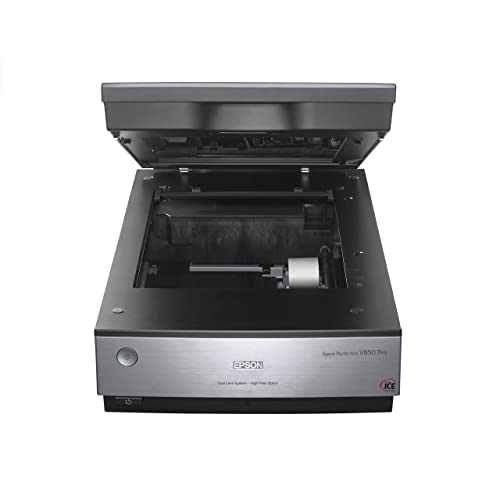
- 6400 dpi resolution and 4.0 Dmax
- CCD sensor with dual-lens system
- Built for detailed photo archiving
Best For: Serious photo scanning and enlargements
Easy Batch Digitizer

- Scans 4x6 photos in about two seconds
- Handles several common photo sizes
- Includes enhancement tools for faded images
Best For: Fast home digitization of printed photos
High-Speed Family Archive

- Batch-scans up to 36 photos
- Scans about one photo per second at 300 dpi
- Adds duplex capture and automatic enhancements
Best For: Large family photo and document collections
Standalone Film and Print Converter
DigitPro M129A Photo, Slide & Negative Scanner

- Handles prints, slides, and 110/135 negatives
- Works without a computer or installed software
- Includes a 5-inch screen and 8GB SD card
Best For: Simple offline scanning of mixed photo and film media
Smart Workflow Pick

- Scans up to 100 photos per minute
- Wi-Fi 6, USB-C, and cloud support
- Includes three photo carrier sheets
Best For: Fast, organized photo and document scanning
Film Restoration Pick
Epson Perfection V550 Photo Scanner

- Digital ICE reduces dust and scratch appearance on film
- Scans slides, negatives, and 35mm film
- 6400 dpi optical resolution
Best For: Detailed film, slide, negative, and photo restoration
Compact Photo Organizer

- Scans photos at 300 or 600 dpi
- Includes photo cleaning and protection tools
- Supports albums, tags, and editing software
Best For: Organized print-photo scanning and basic restoration
Best High-Resolution Film Scanner

- Digital ICE removes dust and scratches
- Scans slides, negatives, prints, and medium-format film
- 6400 x 9600 dpi resolution for large enlargements
Best For: Film photographers and mixed-media home archives
Best Compact Photo Scanner

- 4800 dpi optical resolution
- Easy Photo Fix restores faded photo color
- USB-powered compact flatbed design
Best For: Prints, artwork, books, and documents
Best Value Film Scanner

- 6400 dpi optical resolution
- Supports negatives, slides, photos, and paper
- 48-bit color and 16-bit grayscale depth
Best For: Mixed home scanning of film, photos, and documents
Professional Detail Pick – Epson Perfection V850 Pro
For photographers and archivists who want high-detail results, the Epson Perfection V850 Pro is a premium choice among photo scanners with digital ICE. Its 6400 dpi resolution, 4.0 Dmax, CCD sensor, and dual-lens system are designed for detailed color scans and smooth shadow gradations.
Best For: Serious photo archiving, enlargements, and users who prioritize tonal range and scanning detail.
Pros:
- 6400 dpi resolution for detailed photo scans
- 4.0 Dmax supports smooth gradations and shadow detail
- Dual-lens system selects the appropriate lens for scanning results
- Supports Windows and Mac operating systems listed by Epson
Cons:
- Large and heavy at 20.9 pounds
- USB connection rather than wireless connectivity
- More capability than casual users may need
The V850 Pro is the strongest fit here for users who value image quality over speed and portability. Its substantial size and professional-oriented feature set make it better suited to a dedicated scanning workspace.
Easy Batch Digitizer – Plustek ePhoto Z300
The Plustek ePhoto Z300 is a straightforward option for converting stacks of prints, making it a practical choice among photo scanners with digital ICE for users focused on convenience. It scans common photo sizes and can capture a 4×6 photo in about two seconds at 300 dpi.
Best For: Families digitizing large collections of standard-size printed photos without a complicated setup.
Pros:
- Scans 4×6 photos in about two seconds at 300 dpi
- Supports 3×5, 4×6, 5×7, and 8×10 photos
- Also handles letter and A4 documents
- Includes image enhancement tools for faded photos
Cons:
- Optical resolution is limited to 600 dpi
- Photos must be inserted one at a time
- Supplied minimum system requirements list Windows 7
The Z300 emphasizes simple, efficient print scanning rather than maximum resolution or advanced media support. It is a sensible match for everyday photo digitization and basic restoration work.
High-Speed Family Archive – Epson FastFoto FF-680W
The Epson FastFoto FF-680W is designed for quickly processing large personal collections, making it a compelling option among photo scanners with digital ICE. It can scan up to 36 photos in a batch, reach about one photo per second at 300 dpi, and connect over USB or Wi-Fi.
Best For: Families scanning thousands of prints, mixed-size photos, and documents with minimal manual handling.
Pros:
- Batch-scans up to 36 photos
- Offers speeds of about one photo per second at 300 dpi
- Duplex scanning captures photos and handwritten notes on the back
- Includes auto enhancement, color restoration, red-eye reduction, and de-skew tools
Cons:
- Maximum listed optical resolution is 600 dpi
- More specialized photo workflows may prefer a flatbed scanner
- Its feature set may be excessive for occasional scanning
The FF-680W stands out when throughput matters. Wireless sharing, batch feeding, document scanning, and automatic corrections make it particularly practical for large, mixed archives.
Standalone Film and Print Converter – DigitPro M129A Photo, Slide & Negative Scanner
The DigitPro M129A is a self-contained option for people who want to digitize prints, slides, and negatives without a computer. While evaluating photo scanners with digital ICE, note that this model instead emphasizes standalone operation, a 5-inch viewing screen, and direct JPEG saving to its included SD card.
Best For: Beginners and families converting mixed film and photo collections with a simple offline workflow.
Pros:
- Scans 35mm slides, 135 and 110 negatives, printed photos, and business cards
- Works without a computer, apps, or drivers
- Includes a 5-inch HD viewing screen
- Comes with an 8GB SD card and a three-year warranty
Cons:
- Supplied details do not specify an optical dpi rating
- Uses a CMOS sensor rather than a CCD sensor
- Standalone workflow may offer less advanced control than computer-connected scanners
The M129A is the convenience-focused choice for mixed media and simple transfers. Its broad format support and offline design are useful for occasional users, though detail-focused buyers may want a scanner with more specified resolution information.
Smart Workflow Pick – ScanSnap iX2500 Photo Edition
The ScanSnap iX2500 Photo Edition is a practical choice for households or offices digitizing large batches of prints alongside documents. It supports photo carrier sheets, automatic optimization, wireless or USB connections, and scanning speeds of up to 100 photos per minute, making it a versatile option among photo scanners with digital ice—although the supplied specifications do not list Digital ICE technology.
Best For: Fast photo-and-document scanning with streamlined organization and wireless connectivity.
Pros:
- Scans up to 100 photos per minute and holds up to 36 photos in its feeder.
- Includes three photo carrier sheets for delicate prints.
- Offers Wi-Fi 6, USB-C, cloud support, and touchscreen profiles.
- Automatically optimizes, names, and sorts scanned files.
Cons:
- The supplied notes do not mention Digital ICE dust and scratch removal.
- Its 600 dpi resolution is lower than dedicated film-scanning models.
The iX2500 stands out when speed, connectivity, and low-effort file organization matter more than specialized film restoration. It is particularly well suited to mixed scanning workloads.
Film Restoration Pick – Epson Perfection V550 Photo Scanner
The Epson Perfection V550 is the strongest fit here for shoppers specifically seeking photo scanners with digital ice. Its built-in transparency unit handles 35mm slides, negatives, and film, while Digital ICE technology helps remove the appearance of dust and scratches from film scans.
Best For: Restoring and enlarging photos, negatives, and slides with detailed flatbed scanning.
Pros:
- Includes Digital ICE technology for dust and scratch removal on film.
- Provides 6400 dpi optical resolution and 48-bit color depth.
- Scans 35mm slides, negatives, and film with a built-in transparency unit.
- Can scan multiple photos at once and save them as separate files.
Cons:
- Uses a USB 2.0 connection rather than wireless connectivity.
- Its standard sheet capacity is one, so batch work is more hands-on.
- The supplied minimum system requirement lists Windows 7.
For film and negative restoration, the V550 offers the most directly relevant feature set in this roundup. Its high optical resolution and Digital ICE support make it a specialized choice, though flatbed scanning is slower for large stacks of prints.
Compact Photo Organizer – AMBIR Photo Scanner Bundle
The AMBIR Photo Scanner bundle focuses on straightforward print scanning and digital organization. It supports 300 or 600 dpi, auto-cropping and deskewing, multiple photo sizes, and a cleaning kit for preparing delicate prints. The supplied notes do not specify Digital ICE technology, so consider it primarily for organized photo digitization rather than film restoration.
Best For: USB-connected photo scanning with cleaning tools, editing features, and album organization.
Pros:
- Handles photo sizes from 1×1 inches through 8×10 inches and panoramas up to 12 inches.
- Offers 300 and 600 dpi scanning options.
- Includes a blower, microfiber cloth, anti-static brush, and protective carrier sheet.
- Picture Studio software supports albums, tags, editing, and restoration tools.
Cons:
- The supplied notes do not mention Digital ICE dust and scratch removal.
- Uses a single USB connection rather than Wi-Fi.
- Its listed resolution is lower than the Epson V550’s 6400 dpi.
The AMBIR is appealing for users who want a focused print-photo setup with helpful cleaning accessories and organization software. It is less suitable for shoppers prioritizing film scanning or explicitly documented Digital ICE support.
Best High-Resolution Film Scanner – Epson Perfection V600 Photo
For shoppers comparing photo scanners with digital ICE, the Epson Perfection V600 is a strong choice for digitizing prints, 35mm film, mounted slides, and medium-format negatives. Its 6400 x 9600 dpi resolution supports detailed enlargements, while Digital ICE helps remove dust and scratches from compatible film and photo scans.
Best For: Film photographers and families digitizing mixed collections of prints, slides, and negatives.
Pros:
- Includes Digital ICE technology for dust and scratch removal.
- Scans 35mm slides, negatives, medium-format film, photos, and documents.
- 6400 x 9600 dpi resolution supports enlargements up to 17 x 22 inches.
- Built-in transparency unit holds four mounted slides or 12 negatives.
Cons:
- Uses a wired USB 2.0 connection.
- Its larger flatbed design may require more desk space than compact photo scanners.
The V600 is the most versatile option here for serious home archiving, especially when film and Digital ICE are priorities. ReadyScan LED technology also avoids a warm-up period and helps reduce power consumption.
Best Compact Photo Scanner – Epson Perfection V19 II
The Epson Perfection V19 II is a compact flatbed option for everyday photo and document scanning. While it is not a film scanner, its 4800 dpi optical resolution and Easy Photo Fix technology make it useful for restoring faded prints and creating clear digital copies.
Best For: Home users who primarily scan prints, artwork, books, and documents.
Pros:
- 4800 dpi optical resolution delivers detailed photo scans.
- Easy Photo Fix restores color to faded photos with one click.
- USB-powered design supports portability without a separate power adapter.
- Removable high-rise lid accommodates thicker materials.
Cons:
- Does not list film or slide scanning support.
- Does not include Digital ICE technology in the supplied features.
The V19 II is a practical, lightweight choice for print-focused scanning and simple restoration. Choose it over a film-oriented model only if your collection does not require negatives or slides.
Best Value Film Scanner – Epson Perfection V550 Photo
The Epson Perfection V550 is a versatile flatbed scanner for shoppers seeking photo scanners with digital ICE capabilities in a film-friendly design. It supports negatives, slides, photos, and paper, with 6400 dpi optical resolution and 48-bit color depth for detailed digital files.
Best For: Home users who want one scanner for prints, documents, slides, and negatives.
Pros:
- 6400 dpi optical resolution supports detailed scans.
- Handles negatives, slides, paper, and photos.
- 48-bit color and 16-bit grayscale depth support image detail.
- LED light source and USB connectivity provide straightforward operation.
Cons:
- The supplied notes do not specify a built-in transparency-unit capacity.
- The supplied notes do not explicitly confirm Digital ICE software support.
- At 9.6 pounds, it is less portable than compact USB-powered models.
The V550 suits shoppers who need film and photo scanning in one flatbed unit. Its specifications are compelling, but buyers who specifically require confirmed Digital ICE should verify the included software and feature set before purchasing.
How We Picked the Best Photo Scanners with Digital Ice
We focused on scanners that can produce clean, detailed digital files from photographs and, where applicable, slides or negatives. Our evaluation considers optical resolution rather than interpolated resolution, the quality and usefulness of dust-and-scratch correction such as Digital ICE, scanning speed, paper handling, software, connectivity, and ease of use.
Because scanning needs vary, the list includes both dedicated photo models and versatile document scanners. A flatbed is generally better for fragile, unusual, or oversized originals, while an automatic feeder can save substantial time when digitizing a large box of standard prints.
Quick Comparison
| Best For | Look For | Typical Strength |
|---|---|---|
| Film and maximum control | High optical resolution, film holders, Digital ICE | Detailed restoration and enlargements |
| Large photo collections | Automatic feeding, batch scanning, duplex support | Fast, low-effort archiving |
| Simple print scanning | One-touch controls, auto crop, deskew | Easy everyday digitization |
| Mixed media | Flatbed glass, slide and negative support | Flexible scanning of varied originals |
Key Buying Factors for Photo Scanners with Digital Ice
Digital ICE and Restoration Tools
Digital ICE uses infrared information to identify and reduce many surface defects in compatible film and photographic materials. It can save hours of manual retouching, but it is not a substitute for careful cleaning or a guarantee that every mark will disappear. Check which scan modes and media types support the feature.
Optical Resolution
For standard prints, 300 to 600 dpi is usually sufficient for sharing and ordinary reprints. Higher optical resolution matters more when scanning negatives, slides, small originals, or images intended for substantial enlargement. Do not choose solely by the maximum number printed on the box; sensor quality, focus, holders, and software also affect results.
Speed and Workflow
If you have hundreds of prints, feeder capacity, automatic cropping, deskew, and batch software may matter more than top-end resolution. Flatbeds are slower but offer better control for delicate photos, mixed sizes, albums, and film. Wireless connectivity can simplify sending scans to computers or mobile devices, while USB is often the most dependable option for large files.
File Quality and Software
Look for TIFF support when you want archival masters, along with JPEG or PDF for convenient sharing. Color depth, exposure correction, and dust removal controls are useful for restoration work. Confirm operating-system compatibility and whether the included software supports your preferred file destinations.
Who Should Buy Which Photo Scanners with Digital Ice?
Choose a High-Resolution Flatbed If You Need Film Scanning or Restoration Control.
Models with film holders, strong optical resolution, and Digital ICE are the better choice for slides, negatives, enlargements, and valuable originals. They take longer per image but provide greater control over framing and image quality.
Choose an Automatic Photo Scanner for a Large Family Archive.
A feeder-based model is ideal when speed and consistency are priorities. It can rapidly process standard prints with less hands-on work, though you should inspect originals first and avoid feeding brittle, curled, or irreplaceable photos without checking the manufacturer’s guidance.
Choose a Compact Flatbed or Simple Photo Scanner for Occasional Use.
For a smaller collection, a straightforward USB scanner with automatic crop and deskew can provide excellent convenience without the cost or complexity of a professional film-oriented system. Before buying, confirm the maximum media size and whether you truly need slide or negative support.