
The best plotter printers for craft projects can do far more than print: they cut vinyl, create stickers, scan designs, and produce oversized signs or art prints. The right choice depends on your materials, workspace, software, and desired project size.
This roundup compares compact electronic cutters, sticker-making machines, desktop plotters, and 24- to 36-inch large-format printers so you can choose a capable tool without paying for features you will not use.
Best 10 Plotter Printers for Craft Projects Picks for 2026
Best for Scanned Craft Designs

- Built-in scanner converts drawings into cut files
- Cuts materials up to 3 mm thick
- Includes 682 designs and automatic blade technology
Best For: Scanning artwork and cutting varied craft materials
Best Beginner Bundle
Cricut Explore 5 Essential Bundle

- Cuts more than 100 popular materials
- Works with inkjet prints for full-color projects
- Includes supplies for up to 65 projects
Best For: Beginners wanting guided design tools and starter materials
Best All-in-One Sticker Maker
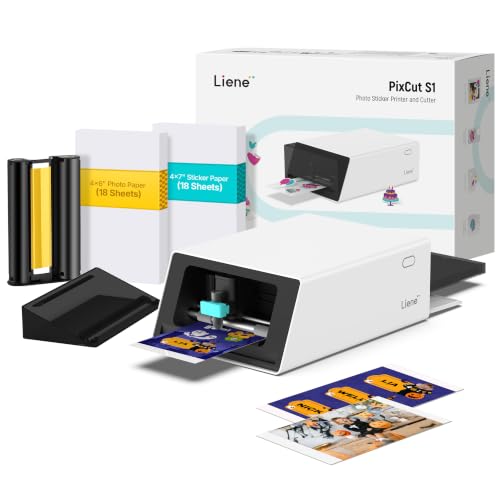
- Prints and cuts stickers in one device
- 300 dpi color thermal dye-sublimation output
- AI-assisted image extraction and precise cutting
Best For: Making durable custom stickers and labels quickly
Best for Subscription-Free Design

- Accepts 12-inch media with USB and Wi-Fi
- Includes subscription-free SCAL 5 PRO software
- Supports SVG, AI, PDF, batch, and layered designs
Best For: Flexible desktop cutting with broad file support
Best Multifunction Pick

- 24-inch wide-format printing through A1 sizes
- Flatbed scanning, copying, and enlargement
- USB, Wi-Fi, Ethernet, and cloud support
Best For: Crafters needing print, scan, and copy functions
Best Vinyl Craft Cutter
VEVOR 12-Inch Vinyl Cutting Machine
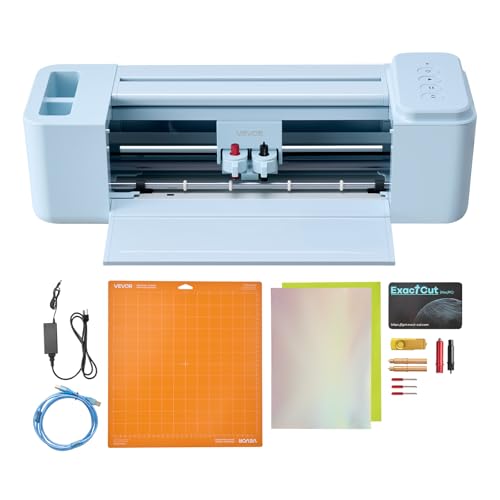
- Cuts, writes, and scores craft materials
- Includes software and 20,000+ design resources
- Supports USB, Bluetooth, Mac, Windows, Android, and iOS
Best For: Decals, cards, apparel, décor, and personalized gifts
Best Dedicated Wide-Format Printer

- 24-inch roll and cut-sheet printing
- Includes 280 ml of four-color ink
- Wi-Fi, USB, and Ethernet connectivity
Best For: Posters, banners, labels, and large printed designs
Best Wide-Cut Vinyl Option

- Cuts media up to 34.3 inches wide
- Adjustable pressure and speed controls
- Supports SVG and PDF files
Best For: Large vinyl signs, decals, labels, and heat-transfer crafts
Best Compact Large-Format Printer

- Prints rolls up to 24 inches wide
- Includes automatic horizontal cutting
- HP Click checks PDFs and supports auto-nesting
Best For: Sewing patterns, posters, maps, and wide-format artwork
Best for Oversized Craft Prints

- Handles rolls up to 36 inches wide
- Includes stand, media bin, and sheet feeder
- Automatically switches between sheet and roll media
Best For: Oversized patterns, posters, signage, maps, and studio printing
Best for Scanned Craft Designs – ScanNCut SDX125E
For craft projects that start with hand-drawn artwork, the Brother ScanNCut SDX125E is a versatile alternative to traditional plotter printers for craft projects. Its built-in scanner converts drawings and materials into cut files, while the automatic blade detects material thickness for simpler setup.
Best For: Crafters who want to scan artwork and cut paper, vinyl, fabric, felt, foam, chipboard, or balsa wood.
Pros:
- Built-in scanner can convert drawings into cut files and help position printed stickers.
- Includes 682 built-in designs, including quilting patterns and fonts.
- Automatic blade technology detects material thickness without manual blade adjustment.
- Cuts materials up to 3 mm thick and includes a 12-by-12-inch tack mat.
Cons:
- This is primarily a cutting machine rather than a standalone printer.
- It is designed for 120-volt use in the United States.
The SDX125E stands out when scanning and material flexibility matter more than integrated color printing. Its touchscreen, wireless capability, and automatic blade make it approachable for varied DIY projects.
Best Beginner Bundle – Cricut Explore 5 Essential Bundle
The Cricut Explore 5 Essential Bundle is a strong starting point for shoppers comparing plotter printers for craft projects. It cuts more than 100 materials and can work with a home inkjet printer to create full-color stickers, decals, apparel, and cards.
Best For: Beginners who want a guided app experience, included supplies, and one machine for cutting, writing, drawing, foiling, scoring, and more.
Pros:
- Precision-cuts more than 100 materials, including vinyl, iron-on, cardstock, and printable materials.
- Supports full-color projects by recognizing and cutting around inkjet-printed images.
- Bundle includes materials and accessories for up to 65 projects, plus bonus digital content.
- Bluetooth connectivity and Design Space offer templates, projects, fonts, and guided workflows.
Cons:
- Color printing requires a separate home inkjet printer.
- Some content requires additional purchases or a Cricut Access subscription.
- The deep-cutting tool for thicker materials is sold separately.
With its compact design and substantial starter bundle, the Explore 5 is suited to accessible, repeatable craft making. It is especially practical for users who value app guidance and printable designs.
Best All-in-One Sticker Maker – Liene PixCut S1
The Liene PixCut S1 combines color printing and cutting in one compact device, making it a convenient choice among plotter printers for craft projects focused on stickers and labels. Its app connects by Bluetooth, while AI image extraction helps create precise sticker outlines from photos.
Best For: Makers who want quick custom stickers, labels, badges, phone skins, and photo-based gifts without using separate printer and cutting machines.
Pros:
- Prints and cuts in one workflow, with stickers created in about two minutes.
- 300 dpi thermal dye-sublimation printing produces vivid color output.
- AI image extraction automatically recognizes subjects and follows their edges for cutting.
- Four-layer thermal printing automatically laminates stickers for waterproof and scratch-resistant results.
Cons:
- Its main focus is stickers, labels, and similar small-format projects rather than broad material cutting.
- Design and operation rely on the Liene app and Bluetooth-connected devices.
The PixCut S1 is the most streamlined option here for colorful, finished stickers. Choose it when integrated printing, automatic outlining, and durable output are more important than cutting thick materials.
Best for Subscription-Free Design – Monoprice MakerCraft Cutter
The Monoprice MakerCraft Desktop Craft Cutter and Plotter is a practical option for shoppers seeking plotter printers for craft projects with flexible software control. It accepts 12-inch media, supports USB and Wi-Fi, and includes SCAL 5 PRO software without yearly subscription fees.
Best For: Designers who want desktop cutting and plotting with broad file compatibility, batch-processing tools, and subscription-free software.
Pros:
- Accepts 12-inch media and offers both USB and Wi-Fi connectivity.
- Includes SCAL 5 PRO software with no annual subscription requirement.
- Imports and exports SVG, AI, PDF, and other file formats.
- Provides tools for rhinestone designs, shadow layers, gradients, duplication, and batch processing.
Cons:
- The supplied notes do not specify supported material thicknesses or included cutting accessories.
- It is a cutter and plotter, so the notes do not indicate integrated color printing.
The MakerCraft is compelling for users who already work with design files or want more software independence. Its touchscreen, tutorials, and workflow tools add convenience for both individual and batch projects.
Best Multifunction Pick – Canon imagePROGRAF TC-21M
For crafters who need more than wide-format printing, the Canon imagePROGRAF TC-21M combines a 24-inch printer with a flatbed scanner and copier. It is a versatile option among plotter printers for craft projects, especially when enlarging originals, printing labels, or working with media up to A1 size.
Best For: Crafters who want wide-format printing, scanning, copying, and direct USB or cloud workflows in one machine.
Pros:
- Prints on roll media up to 24 inches wide and supports sizes through A1.
- Flatbed scanner enables direct enlargements and color copying.
- Supports USB flash drives, Wi-Fi, Ethernet, and cloud printing or scanning.
- Automatic sheet feeder holds up to 100 letter-size sheets or 50 sheets of 11 x 17-inch paper.
Cons:
- Its multifunction design may be more than needed for shoppers who only print.
- Simplex operation does not provide automatic duplex printing.
The TC-21M is a strong choice when craft projects involve both physical originals and large finished prints. Its scanner, copier, and broad media support add flexibility, while the 2.7-inch tiltable touchscreen keeps operation straightforward.
Best Vinyl Craft Cutter – VEVOR 12-Inch Vinyl Cutting Machine
The VEVOR 12-inch machine is a vinyl cutter plotter rather than a conventional inkjet printer, making it useful for hands-on craft projects. It can cut, write, and score materials such as vinyl, cardstock, foil, and heat-transfer paper, with support for common image formats and multiple device types.
Best For: DIY makers creating decals, stickers, cards, apparel designs, home décor, and personalized gifts.
Pros:
- Combines cutting, writing or drawing, and scoring in one machine.
- Works with vinyl, heat-transfer paper, cardstock, foil, and specialty paper.
- Includes design software without recurring payments and more than 20,000 built-in design resources.
- Supports USB, Bluetooth, and USB-drive connections across Mac, Windows, Android, and iOS.
Cons:
- The 12-inch active surface is narrower than the 24-inch format of the Canon printers.
- It is designed for cutting and marking materials, not inkjet printing.
Choose this VEVOR model if your craft workflow centers on cutting shapes and making precise creases rather than producing printed posters. Its broad material compatibility and software-free purchasing model make it approachable for varied DIY projects.
Best Dedicated Wide-Format Printer – Canon imagePROGRAF TC-21
The Canon imagePROGRAF TC-21 is a dedicated 24-inch printer for posters, banners, labels, and other wide-format craft pieces. Its automatic roll and cut-sheet feeding, four-color ink system, and included 280 ml ink set make it a practical option for makers who want a print-focused plotter printer for craft projects.
Best For: Crafters producing vibrant posters, signs, banners, labels, and other large-format printed designs.
Pros:
- Prints on roll media up to 24 inches wide as well as sheet media.
- Automatic roll and cut-sheet feeding supports a flexible print workflow.
- Includes a full 280 ml set of cyan, magenta, yellow, and black ink.
- Offers Wi-Fi, USB, and Ethernet connectivity, plus an intuitive tiltable touchscreen.
Cons:
- Print-only design lacks the scanner and copier functions of the TC-21M.
- Its 71-pound weight and larger footprint may require dedicated workspace.
- Simplex operation does not support automatic duplex printing.
The TC-21 is the better fit when printing is the main priority and wide media handling matters more than multifunction features. Automatic feeding and a full initial ink set help reduce setup friction for recurring poster and banner work.
Best Wide-Cut Vinyl Option – VEVOR 34-Inch Vinyl Cutter
For craft projects that involve vinyl decals, signs, labels, or heat-transfer designs, this VEVOR machine is a cutter rather than a conventional inkjet plotter printer. Its 34.3-inch maximum paper feed and adjustable cutting controls make it suited to larger-format craft materials, while USB and COMPIM connectivity support Windows-based workflows.
Best For: Large vinyl signs, decals, labels, and heat-transfer craft projects.
Pros:
- Handles media up to 34.3 inches wide with a maximum cutting width of 30.7 inches.
- Adjustable cutting pressure from 20–500g and speed from 20–800mm per second.
- Supports SVG and PDF imports, installed fonts, and DM/PL and HP/GL languages.
- Includes pinch rollers and a roughened steel roller designed to help maintain stable feeding.
Cons:
- It cuts vinyl rather than printing full-color designs.
- Compatibility is focused on Windows computers using USB or COM connections.
- The supplied notes do not specify a warranty.
If your craft work centers on cutting wide vinyl, this VEVOR offers substantially more width than typical desktop machines. It is less suitable when you need printed graphics or a simple wireless setup.
Best Compact Large-Format Printer – HP DesignJet T210
HP DesignJet T210 Large Format 24-inch Plotter Printer, for Easy CAD & Poster Prints (8AG32D)
Check Price On AmazonThe HP DesignJet T210 is a practical choice for craft projects that need printed patterns, posters, maps, or other wide-format artwork. It supports rolls up to 24 inches wide, offers sheet and roll feeding, and uses HP Click software to simplify PDF-based print jobs and reduce avoidable paper waste.
Best For: Sewing patterns, posters, maps, and precise wide-format craft prints.
Pros:
- Prints on media rolls up to 24 inches wide and supports up to 13-by-19-inch sheets with the optional feeder.
- Automatic horizontal cutting and multi-size printing reduce manual handling.
- HP Click includes PDF error checking, alerts, and auto-nesting.
- Supports Wi-Fi, Gigabit Ethernet, USB 2.0, and mobile or desktop workflows.
Cons:
- The automatic sheet feeder is optional rather than included.
- HP recommends using OEM 712 ink cartridges and a 713 printhead.
- Its large-format footprint and 47.4-pound weight require dedicated space.
For makers who print rather than cut, the T210 provides a more complete large-format workflow than a vinyl cutter. Its 24-inch width is useful for patterns and posters while remaining more manageable than the 36-inch T630.
Best for Oversized Craft Prints – HP DesignJet T630
The HP DesignJet T630 is designed for craft studios and workspaces that need especially wide printed output. It accommodates rolls up to 36 inches wide, includes an automatic sheet feeder, stand, and media bin, and can switch between sheet and roll media automatically for larger patterns, posters, signage, and graphics.
Best For: Oversized sewing patterns, posters, signage, maps, and studio-scale craft prints.
Pros:
- Supports media rolls up to 36 inches wide plus sheets up to 13 by 19 inches.
- Includes an automatic sheet feeder, media bin, stand, and automatic sheet/roll switching.
- HP Click provides PDF checking, alerts, auto-nesting, and drag-and-drop file submission.
- Offers Wi-Fi, Ethernet, and USB connectivity for desktop and mobile workflows.
Cons:
- At 123 pounds and 52 inches wide, it needs substantial dedicated space.
- HP recommends OEM 712 cartridges and a 713 printhead.
- Its wide capacity may be excessive for small craft projects.
The T630 is the strongest fit here when project scale matters most. Its included stand and media handling make it more studio-ready than a basic plotter, but its size and cost implications are best justified by frequent oversized printing.
How We Picked the Best Plotter Printers for Craft Projects
We selected these 10 machines across several craft and printing categories, including electronic cutting machines, vinyl cutters, sticker printers, and large-format plotter printers. We considered cutting or printing capability, maximum media width, workflow convenience, connectivity, included accessories or software, and the types of projects each machine is best suited to handle.
Because these products serve different users, this is not a ranking based on one specification alone. A compact cutter may be a better choice for decals and paper crafts, while a wide-format printer is more appropriate for posters, technical drawings, or gallery-size artwork.
Quick Comparison
- Best for scan-and-cut workflows: Brother ScanNCut SDX125E.
- Best for beginner Cricut projects: Cricut Explore 5 Essential Bundle.
- Best for stickers and labels: Liene PixCut S1.
- Best desktop cutter with broad connectivity: Monoprice MakerCraft.
- Best for large-format multifunction printing: Canon imagePROGRAF TC-21M.
- Best for budget vinyl cutting: VEVOR 12-inch Vinyl Cutting Machine.
- Best for wide-format posters and plans: Canon imagePROGRAF TC-21.
- Best for extra-wide vinyl work: VEVOR 34-inch Vinyl Cutter.
- Best compact CAD and poster printer: HP DesignJet T210.
- Best for high-volume 36-inch output: HP DesignJet T630.
Key Buying Factors for Plotter Printers for Craft Projects
Cutting or Printing?
First decide whether you need a cutting machine, a printer, or both. Electronic cutters are designed for paper, cardstock, vinyl, fabric, and similar materials. Large-format printers create finished prints but generally do not replace a dedicated precision cutter.
Media Width and Project Size
Compact 12-inch machines fit most home craft tables and handle decals, cards, labels, and small signs. Wider 24- and 36-inch models are better for banners, posters, CAD drawings, wall art, and commercial projects, but they need substantially more space.
Software and Connectivity
Check whether the machine works with your preferred design software and operating system. USB, Wi-Fi, mobile support, built-in designs, touchscreen controls, and bundled software can make setup easier, while proprietary ecosystems may limit flexibility or add ongoing costs.
Materials, Maintenance, and Running Costs
Confirm compatible media, blade availability, ink or toner requirements, roll handling, and replacement-part pricing. A low purchase price can be less attractive if specialty materials or consumables are expensive.
Who Should Buy Which Plotter Printers for Craft Projects?
Choose a compact electronic cutter if you mainly make cards, decals, labels, apparel designs, or small gifts. A scan-and-cut model is especially useful when you want to work from hand-drawn artwork. Choose a sticker printer and cutter when producing custom labels, planner stickers, or small batches of gift products is your priority.
Desktop vinyl plotters suit makers who want a larger working width, more design control, or stronger computer connectivity. For posters, architectural drawings, signage, and oversized artwork, choose a 24-inch or 36-inch large-format printer instead. Before buying, measure your available floor and table space, estimate your typical media size, and match the machine’s workflow to the software and materials you already use.