
Finding the right plotter printer under $300 means balancing working width, material compatibility, software support, and ease of use. The models in this roundup span compact craft cutters, pen plotters, vinyl machines, and wide-format inkjet printers.
Use the comparison and buying advice below to match your budget and project type with the machine that offers the most practical combination of capability, control, and operating convenience.
Best 10 Plotter Printers Under 300 Picks for 2026
Best DIY Pen Plotter

- 310 x 256 mm drawing area
- Supports JPG, BMP, DXF, and Gcode
- Aluminum and acrylic DIY construction
Best For: Beginners and hands-on drawing projects
Best Wide-Format Office Printer

- Prints up to 13 x 19 inches
- 25 ppm black, 12 ppm color
- 500-sheet capacity with auto duplex
Best For: Wide-format office documents
Best Beginner Vinyl Plotter

- 8.5-inch compact desktop design
- Cuts 150+ materials
- Guided setup with LED screen and tutorials
Best For: Stickers, labels, and DIY crafts
Best Large-Format Multifunction Printer

- Prints roll media up to 24 inches wide
- Flatbed scanning and enlargement copying
- Supports USB, cloud, and Wi-Fi workflows
Best For: Large-format printing, scanning, and copying
Best All-Around Craft Plotter
Monoprice MakerCraft Desktop Cutter

- 12-inch media capacity with touch-screen and Wi-Fi controls
- Includes SCAL 5 PRO without recurring software fees
- Supports detailed designs and SVG, AI, and PDF files
Best For: Crafters seeking flexible, subscription-free design tools
Best Connected Vinyl Cutter
VEVOR 12-Inch Vinyl Cutting Machine
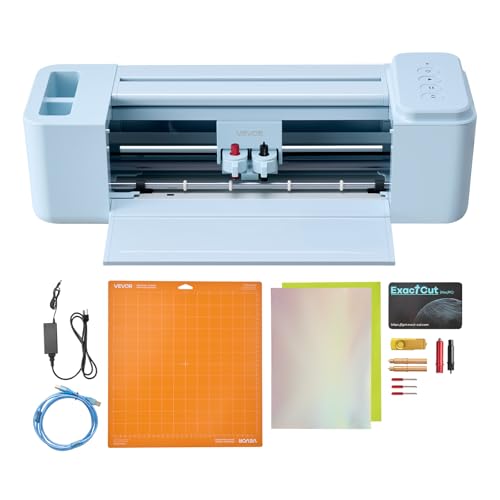
- Includes software and 20,000+ built-in design resources
- Cuts, writes, and scores multiple craft materials
- Supports USB, Bluetooth, and major desktop and mobile platforms
Best For: DIY makers creating connected, multi-material craft projects
Best Pen Plotter for Handwriting

- Automates handwriting, drawing, and engraving workflows
- Supports email merge, Hershey fonts, and 100+ fonts
- Provides 0.01 mm stated X/Y resolution with USB or Bluetooth
Best For: Users focused on precise handwriting and pen-plotter artwork
Wide-Format Workhorse

- 53.1-inch maximum feed width
- Adjustable 20–500g cutting pressure
- Windows-only compatibility
Best For: Wide-format signs, banners, and vinyl projects
Balanced Mid-Size Pick
34-Inch VEVOR Vinyl Cutter Bundle

- 34.3-inch maximum feed width
- Adjustable speed and cutting pressure
- Includes extra project supplies
Best For: Mid-size sign, label, and craft work
Most Flexible Setup
53-Inch Dual-Blade VEVOR Cutter

- Supports Windows 7–11 and macOS
- Dual blades cut, draw, or score
- Handles media up to 1mm thick
Best For: Wide-format, multi-material projects across Windows and Mac
Best DIY Pen Plotter – Desktop XY Plotter
If you are comparing plotter printers under 300 for hands-on drawing and maker projects, this desktop XY plotter offers a practical entry point. Its 310 x 256 mm work area supports handwriting, outlines, fills, grayscale images, and patterns using a ballpoint pen or pencil.
Best For: Beginners, DIY drawing enthusiasts, home crafts, and learning projects.
Pros:
- Generous 310 x 256 mm desktop drawing area.
- Supports JPG, BMP, DXF, and Gcode files.
- Works with VigoWriter and can support GRBL, benbox, and elekscam software when compatible firmware is available.
- Aluminum alloy and acrylic construction provides a hands-on assembly experience.
Cons:
- Designed for pen and pencil plotting rather than conventional ink printing.
- Assembly and software setup may require patience from first-time users.
- VigoWriter supports Chinese and English interfaces on Windows 7 and later systems.
This is a compact, engaging choice for learning plotter mechanics and creating pen-drawn artwork, especially if you value file-format flexibility over turnkey operation.
Best Wide-Format Office Printer – Epson WorkForce Pro WF-7310
Among plotter printers under 300, the Epson WorkForce Pro WF-7310 is better suited to office printing than pen plotting. It produces wide-format color documents up to 13 x 19 inches, with wireless connectivity, automatic duplexing, and a 500-sheet capacity.
Best For: Offices and home workspaces that need fast wide-format document printing.
Pros:
- Prints media up to 13 x 19 inches.
- Fast rated speeds of 25 black-and-white and 12 color ISO pages per minute.
- Two 250-sheet trays plus a rear feed provide a 500-sheet capacity.
- Includes Wi-Fi, Wi-Fi Direct, Ethernet, USB, and automatic duplex printing.
Cons:
- Designed exclusively for Epson Genuine Cartridges.
- It is an inkjet office printer, not a robotic pen plotter or vinyl cutter.
- Its 29.8-pound weight and wide footprint require substantial desk space.
Choose this model when your priority is reliable, high-volume wide-format office output with convenient networking. Its large paper capacity and duplexing are more useful for documents than craft cutting or mechanical plotting.
Best Beginner Vinyl Plotter – Likcut S41 Vinyl Cutter
For shoppers seeking plotter printers under 300 for stickers and small craft projects, the Likcut S41 combines a compact vinyl cutter with print-then-cut functionality. Its 8.5-inch desktop format handles vinyl rolls and sheets, while built-in storage helps keep tools organized.
Best For: Beginners making stickers, labels, decals, apparel designs, and home décor projects.
Pros:
- Compact 8.5-inch design with built-in storage compartments.
- Supports more than 150 materials, including vinyl, HTV, cardstock, sticker paper, and faux leather.
- Physical buttons, an LED screen, and automatic video tutorials simplify setup.
- Design platform supports uploaded artwork and cloud templates.
Cons:
- Its compact format is intended for standard letter-size materials rather than large signage.
- The product is primarily a cutting machine, so it is not a conventional wide-format printer.
- Print media details specifically list cardstock, so material compatibility should be checked for each project.
The S41 is a friendly option for craft beginners who want guided setup and broad material compatibility. It makes the most sense for small-format creative work rather than professional-scale production.
Best Large-Format Multifunction Printer – Canon imagePROGRAF TC-21M
If your plotter printers under 300 search focuses on large-format printing and scanning, the Canon imagePROGRAF TC-21M offers a broader multifunction setup. It prints roll media up to 24 inches wide, supports paper sizes through A1, and includes a flatbed scanner, copier, touchscreen, and cloud features.
Best For: Users who need large-format documents, enlargements, scanning, and copying in one machine.
Pros:
- Handles roll media up to 24 inches wide and paper sizes through A1.
- Flatbed scanner supports enlargements from smaller originals.
- Includes a 2.7-inch tiltable touchscreen, USB flash drive port, and cloud printing and scanning.
- Automatic sheet feeder holds up to 100 letter-size or 50 11 x 17-inch sheets.
Cons:
- Its 38-inch width makes it substantially larger than a desktop craft plotter.
- Printing is simplex rather than automatic duplex.
- Rated speeds are relatively modest at 16 black-and-white and 8 color pages per minute.
This Canon is the strongest fit when large media handling and scanning matter more than compactness or fast office throughput. Its combination of roll printing, copying, and scanning makes it versatile for plans, enlargements, and wide-format workflows.
Best All-Around Craft Plotter – Monoprice MakerCraft Desktop Cutter
For shoppers comparing plotter printers under 300, the Monoprice MakerCraft is a versatile desktop craft cutter with a 12-inch media capacity, touch-screen controls, Wi-Fi, and included SCAL 5 PRO software. Its design tools and broad file compatibility make it suitable for both straightforward and more detailed projects.
Best For: Crafters and designers who want flexible media handling, advanced design features, and software without recurring subscription fees.
Pros:
- Includes free SCAL 5 PRO software with no yearly subscription fees.
- Supports SVG, AI, and PDF import and export.
- Offers duplicate, batch-processing, keyboard-shortcut, rhinestone, shadow-layer, and multicolor-gradient features.
- Combines an intuitive touch-screen interface with Wi-Fi connectivity.
Cons:
- Its 18.31-pound weight makes it less portable than smaller craft machines.
- The broad feature set may be more than needed for simple cutting tasks.
The MakerCraft stands out as a feature-rich option for users who want to reduce software costs while creating more complex designs. It is a strong fit when workflow efficiency and design flexibility matter more than compactness.
Best Connected Vinyl Cutter – VEVOR 12-Inch Vinyl Cutting Machine
Among plotter printers under 300, this 12-inch VEVOR vinyl cutter is geared toward accessible DIY production. It includes design software and built-in resources, supports wired and wireless connections, and handles cutting, writing, and scoring for a range of craft materials.
Best For: DIY makers creating decals, apparel designs, cards, home decor, and personalized gifts across multiple devices.
Pros:
- Includes design software and more than 20,000 built-in design resources without recurring payments.
- Supports cutting, writing or drawing, and scoring in one machine.
- Works with USB, Bluetooth, and USB-drive access.
- Compatible with Mac, Windows, Android, and iOS devices.
Cons:
- Its 18.1-pound weight may be inconvenient for frequent relocation.
- The 12-inch active surface is intended for projects within that working width.
The VEVOR is a practical choice for users who value connectivity and an included creative ecosystem. Its multi-function operation and material compatibility make it especially useful for varied everyday craft projects.
Best Pen Plotter for Handwriting – iDraw 2.0 A4 XY Pen Plotter
For buyers searching plotter printers under 300 specifically for writing or drawing, the iDraw 2.0 is a compact A4 pen plotter rather than a conventional vinyl cutter. It focuses on precise automated handwriting, drawing, and engraving workflows, with USB and Bluetooth connectivity.
Best For: Creators, educators, and DIY users producing handwritten letters, envelopes, invitations, drawings, or precision pen-plotter artwork.
Pros:
- Supports email merge for bulk writing and Hershey fonts for a human-like handwriting effect.
- Offers a stated minimum X- and Y-axis resolution of 0.01 mm.
- Runs at twice the writing speed of the iDraw 1.0, according to the supplied specifications.
- Supports USB and Bluetooth connections, more than 100 fonts, and user-created fonts.
Cons:
- The A4 working range is smaller than the 12-inch media capacity of some craft cutters.
- Using personal fonts requires creating those fonts first.
- Software compatibility varies by operating system and task.
The iDraw 2.0 is the specialized pick in this group for automated handwriting and pen-based artwork. Its precision, bulk-writing support, and compact 10-pound design make it more focused than a general-purpose vinyl cutter.
Wide-Format Workhorse – 53-Inch VEVOR Vinyl Cutter
If you need plotter printers under 300 for large signs, banners, or craft projects, this 53-inch VEVOR model offers a generous working width and adjustable cutting controls. Its stand-mounted design and Windows compatibility make it a practical choice for sign-making workflows, though Mac users should look elsewhere.
Best For: Windows-based sign shops, decorators, and users cutting wide-format vinyl and heat-transfer materials.
Pros:
- Handles media up to 53.1 inches wide, with a maximum cutting width of 49.6 inches.
- Adjustable cutting pressure from 20–500g and speed from 20–800mm per second.
- Double spring pinch-rollers and roughened steel rollers help maintain stable media feeding.
- Supports USB, COMPIM, and U-Disk connections and can import SVG and PDF files.
Cons:
- Not compatible with Mac systems.
- The supplied notes do not specify a warranty.
This is a strong value-oriented option when width and Windows compatibility matter most. Its large format is useful for commercial-style signage, but confirm that its footprint and Windows-only operation fit your workspace.
Balanced Mid-Size Pick – 34-Inch VEVOR Vinyl Cutter Bundle
Among plotter printers under 300, this 34-inch VEVOR bundle is a practical middle-ground option for users who want more capacity than a desktop cutter without moving to an especially wide machine. It combines adjustable controls, stable rollers, and included supplies for sign, label, craft, and heat-transfer work.
Best For: Home workshops and small businesses needing a mid-size vinyl cutter for signs, labels, decoration, and crafts.
Pros:
- Supports a maximum paper feed of 34.3 inches and a cutting width of 30.7 inches.
- Cutting pressure and speed are adjustable from 20–500g and 20–800mm per second.
- Double spring pinch-rollers and roughened steel rollers help reduce media drift.
- Works with SVG and PDF files and includes extra supplies for varied projects.
Cons:
- The supplied notes do not list Mac compatibility.
- It uses COMPIM and USB interfaces, with no U-Disk interface mentioned.
This model makes sense if a 34-inch feed width is sufficient and you want a capable, adjustable cutter without the larger footprint of a 53-inch unit. Review your computer and connection requirements before buying.
Most Flexible Setup – 53-Inch Dual-Blade VEVOR Cutter
For shoppers comparing plotter printers under 300, this VEVOR cutter stands out for its dual-blade design and broader computer support. It can draw and cut or score without manual blade changes, while the built-in test function and licensed SignMaster software aim to make setup more approachable for beginners.
Best For: Windows or macOS users who want wide-format cutting with drawing, scoring, and multi-material flexibility.
Pros:
- Supports Windows 7–11 and macOS through USB, U-Disk, or serial connections.
- Dual blades enable drawing plus cutting or scoring in one setup.
- Handles sheets and rolls up to 1mm thick, including vinyl, HTV, magnetic sheets, and sticker paper.
- Built-in testing, contour detection, and dual-spring pinch rollers support easier, steadier cutting.
Cons:
- At 61.4 pounds, it is a substantial machine to place and move.
- The supplied notes specify a 53-inch maximum feed width but do not state the maximum cutting width.
This is the most versatile choice of the three for mixed operating systems and multi-step projects. Its dual-blade workflow is useful for efficiency, but the large dimensions and weight call for a dedicated workspace.
How We Picked the Best Plotter Printers Under 300
We evaluated these machines by looking at the jobs shoppers typically expect from an affordable plotter: cutting vinyl and paper, drawing or handwriting, producing wide-format documents, and handling craft or small-business workflows. Key considerations included maximum media width, supported materials, cutting or printing functions, connectivity, included software, control options, and the likely learning curve.
Because “plotter printer” can describe several different machine types, this list includes both true cutting and drawing plotters and wide-format inkjet printers. Always confirm the product’s actual function before ordering; a vinyl cutter does not print like an inkjet printer, while a wide-format printer may not cut materials at all.
Quick Comparison
| Best For | Machine Type | What to Look For |
|---|---|---|
| Small crafts | Desktop cutter | Compact footprint, simple controls, and included designs |
| Print-and-cut projects | Smart craft plotter | Print Then Cut support and software compatibility |
| Pen drawing | XY pen plotter | A4 or larger working area, pen compatibility, and precise motion |
| Signs and decals | Vinyl cutter | Cutting width, adjustable force, blade control, and media handling |
| Documents and posters | Wide-format inkjet | Paper sizes, ink costs, wireless printing, and multifunction features |
Key Buying Factors for Plotter Printers Under 300
Choose the Right Machine Category
Decide whether you need cutting, drawing, printing, or a combination. Desktop craft cutters are suited to stickers, cards, labels, and heat-transfer vinyl. Pen plotters are better for line art and handwriting effects. Wide-format inkjets handle office documents, posters, and technical drawings but generally require different consumables and maintenance.
Check Working Width and Media Support
Measure the largest project you plan to make, not just the machine’s exterior dimensions. A 12-inch cutter may be sufficient for decals and apparel designs, while larger sign work needs a wider feed path. Confirm support for adhesive vinyl, cardstock, heat-transfer material, paper, or other media you intend to use.
Review Software and Connectivity
USB, Wi-Fi, mobile compatibility, touch controls, and bundled design software can significantly affect usability. Check whether the machine works with your operating system and preferred design applications. Included software may be useful for beginners, but compatibility with standard file formats matters more for ongoing projects.
Budget for Blades, Ink, and Accessories
The purchase price is only part of the cost. Cutting machines need replacement blades, mats, and sometimes specialty tools. Inkjet models require cartridges or tanks and suitable paper. Factor in these recurring expenses, plus ventilation and workspace requirements for larger machines.
Who Should Buy Which Plotter Printers Under 300?
Choose a compact desktop cutter if you mainly make labels, cards, decals, or small apparel designs and want an accessible home setup. A print-and-cut model is the better fit for colorful stickers and projects that begin with printed artwork.
Choose a pen plotter if your priority is automated drawing, handwriting, technical line work, or experimenting with generative art. For signs, banners, and larger vinyl graphics, prioritize a wider cutter with adjustable force and speed rather than a compact craft machine.
Finally, choose a wide-format inkjet when your main need is printing documents, posters, plans, or marketing materials. Among Plotter Printers Under 300, the best option is the one that matches your workflow first—not necessarily the machine with the widest advertised capacity.