
Portable RAID enclosures make it easier to combine multiple SATA drives into flexible external storage without committing to a full NAS. The right model can improve backup capacity, transfer speeds, redundancy, or portability.
We’ve selected 10 options ranging from compact dual-bay 2.5-inch units to high-capacity four- and five-bay enclosures. Use the guide below to match drive support, RAID modes, connectivity, cooling, and capacity to your workload.
Best 10 Portable Raid Enclosures Picks for 2026
Best Expandable DAS
QNAP TR-004 4-Bay Hardware RAID Enclosure

- Four bays with hardware RAID
- USB-C connectivity for major desktop platforms
- Useful for QNAP NAS backup and expansion
Best For: QNAP users and flexible four-drive storage
Best High-Capacity Workstation Enclosure

- Five bays and up to 110TB stated capacity
- Eight hardware modes, including RAID 10
- Built-in 150W supply and active cooling
Best For: Large backups, editing workstations, and media libraries
Best Compact Dual-Drive Option
Vantec NexStar GX 2.5-Inch RAID Enclosure

- Dual 2.5-inch SATA drive support
- RAID 0, RAID 1, and individual modes
- Compact aluminum design with included stand
Best For: Portable dual-drive SSD or laptop-HDD setups
Best High-Speed Four-Bay Enclosure

- USB 3.2 Gen 2x2 interface
- Six RAID modes and up to 104TB
- Hot-swapping with 150W power supply
Best For: Large-file workflows and professional multi-drive storage
Best Dual-Bay Value
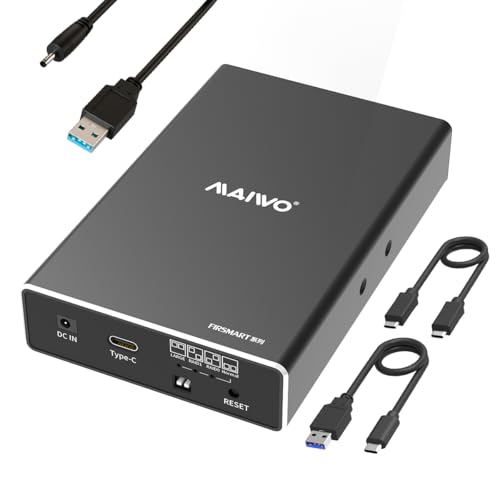
MAIWO 2-Bay SATA RAID Enclosure

- Four RAID modes for flexible storage setups
- Supports up to 48TB across two 3.5-inch drives
- Cooling fan and 48W power supply included
Best For: Two-drive backups and expandable desktop storage
Best High-Capacity Option
ORICO 4-Bay 3.5-Inch RAID Enclosure

- Supports up to 88TB across four 3.5-inch drives
- Eight RAID, cloning, and clearing modes
- 150W power supply and active airflow for multi-disk use
Best For: Large backups, media libraries, and desktop DAS storage
High-Capacity RAID Workhorse

- Four bays for 2.5- and 3.5-inch SATA drives
- Supports up to 80TB and eight storage modes
- USB 3.0/eSATA connectivity with active cooling
Best For: High-capacity personal or enterprise storage setups
Most Portable Pick
Dual-Bay 2.5-Inch RAID Enclosure
- Compact 80g aluminum enclosure
- Two 2.5-inch bays with 16TB total support
- 10Gbps USB 3.1 and four RAID modes
Best For: Mobile users who need compact dual-drive storage
Best Expandable DAS – QNAP TR-004 4-Bay Hardware RAID Enclosure
QNAP TR-004 4 Bay USB Type-C Direct Attached Storage (DAS) with hardware RAID (Diskless)
Check Price On AmazonThe QNAP TR-004 is a practical choice among portable RAID enclosures when you need four drive bays, hardware RAID, and direct USB-C connectivity. It works with Windows, macOS, and Linux and arrives diskless, so you can install the SATA drives that fit your capacity and redundancy needs.
Best For: Expanding a QNAP NAS, creating external backups, or building a flexible four-drive desktop storage setup.
Pros:
- Supports RAID 0, 1, 5, JBOD, and individual disks.
- Connects through USB Type-C and includes a USB-C-to-A cable.
- Lockable drive bays and support for four 3.5-inch SATA drives.
Cons:
- Drives are not included.
- Some older QNAP NAS models are unsupported.
- The TR-004 cannot combine its storage pool or volume with the connected NAS.
Choose the TR-004 if you want established RAID options and QNAP-focused NAS backup or expansion. Its compatibility limitations make checking your NAS model and QTS version important before buying.
Best High-Capacity Workstation Enclosure – ORICO 5-Bay RAID DAS
For buyers comparing portable RAID enclosures for large backups or media libraries, the ORICO five-bay enclosure combines broad RAID flexibility with up to 110TB of stated capacity. Its built-in 150W power supply and cooling system are designed to support multiple 2.5-inch or 3.5-inch SATA drives in a desktop workflow.
Best For: Video editing, large backup projects, and media storage across Windows, Mac, and Linux systems.
Pros:
- Supports RAID 0, 1, 3, 5, 10, JBOD, Clone, and Clear modes.
- Five bays accept 2.5-inch and 3.5-inch SATA HDDs or SSDs.
- 150W built-in power supply, aluminum shell, and an 80mm cooling fan.
Cons:
- USB 3.0 is rated for up to 230MB/s, below newer 20Gbps interfaces.
- Drives are not included.
- Capacity depends on using drives up to the stated 22TB-per-drive limit.
This ORICO model prioritizes bay count, capacity, and operating flexibility rather than the newest USB standard. It is a strong fit for a stationary workstation that needs several drives and dependable multi-disk power delivery.
Best Compact Dual-Drive Option – Vantec NexStar GX 2.5-Inch RAID Enclosure
Vantec Nexstar GX USB 3.0 Dual 2.5" SATA SSD/HDD RAID Enclosure, Black (NST-272S3-BK)
Check Price On AmazonThe Vantec NexStar GX is a compact option among portable RAID enclosures, designed for two 2.5-inch SATA SSDs or hard drives. Its USB 3.0 connection supports individual disks, RAID 0, and RAID 1, while the aluminum housing and front vents help manage heat in a small desktop footprint.
Best For: Users who want a lightweight dual-drive enclosure for laptop-sized SATA drives, SSD speed, or mirrored storage.
Pros:
- Supports individual mode, RAID 0, and RAID 1 with automatic RAID 1 rebuild.
- Compact aluminum enclosure weighing about 10.56 ounces.
- Includes an AC adapter, USB 3.0 cable, stand, and installation hardware.
Cons:
- Only supports two 2.5-inch drives.
- Drives are not included.
- Requires the included 5V/2A power adapter and may need extra power through Micro-B for some drives.
The NexStar GX makes sense when portability and a small footprint matter more than maximum bay count. It offers a straightforward way to combine two 2.5-inch drives for speed, redundancy, or separate storage.
Best High-Speed Four-Bay Enclosure – ORICO 20Gbps RAID Enclosure
The ORICO 4-bay model stands out among portable RAID enclosures for its USB 3.2 Gen 2×2 interface and support for up to 104TB across four SATA drives. It offers six RAID modes, hot-swapping, and a built-in 150W power supply for demanding storage, video, and professional data-management workflows.
Best For: Video producers, enterprise IT teams, and users transferring large files through a compatible USB4 or USB 3.2 Gen 2×2 port.
Pros:
- Supports RAID 0, 1, 5, 10, JBOD, and Normal modes.
- Rated for up to 20Gbps and supports four drives totaling up to 104TB.
- Includes hot-swapping, a 150W power supply, and active cooling.
Cons:
- Full 20Gbps performance requires a compatible USB4 or USB 3.2 Gen 2×2 connection.
- Changing RAID modes erases drive contents, so backups are required.
- Drives are not included.
This enclosure is the performance-oriented choice in the group, provided your computer has the right high-speed USB connection. Its RAID 5 and RAID 10 support, hot-swapping, and cooling also make it better suited to heavier multi-drive workloads than basic external storage.
Best Dual-Bay Value – MAIWO 2-Bay SATA RAID Enclosure
For shoppers comparing portable raid enclosures for two 3.5-inch SATA hard drives, the MAIWO dual-bay model combines flexible RAID options, USB 3.1 Gen 2 connectivity, and active cooling in a compact metal enclosure. It supports up to 48TB total capacity and includes both USB-C and USB-A cables.
Best For: Home users and small workstations that need dual-drive backups, storage expansion, or mirrored and striped storage.
Pros:
- Supports RAID 0, RAID 1, JBOD, and Normal modes.
- Holds two 3.5-inch SATA drives, with up to 24TB per drive.
- Adjustable cooling fan, aluminum-alloy construction, and a 48W power supply.
- USB 3.1 Gen 2 interface with UASP support and included USB-C and USB-A cables.
Cons:
- Designed primarily for 3.5-inch drives; 2.5-inch drives require a separate bracket.
- Mechanical-drive performance may top out around 6Gbps despite the 10Gbps interface.
The MAIWO is a practical choice when two-drive flexibility matters more than maximum bay count. Its fan and independent power supply are useful for sustained operation, while the four RAID modes cover common backup and capacity-management needs.
Best Portable Flash Design – ORICO 4-Bay 2.5-Inch RAID Enclosure
Among portable raid enclosures, the ORICO 2.5-inch all-flash model stands out for its lighter, backpack-friendly design. It supports four 2.5-inch SSDs or HDDs, offers seven RAID modes, and adds USB and SD/TF expansion for photographers and mobile video workflows.
Best For: Video editors, photographers, and traveling creators who use 2.5-inch drives and need compact storage plus card-reading and USB expansion.
Pros:
- Supports RAID 0, 1, 3, 5, 10, JBOD, and Clear modes.
- Accepts four 2.5-inch drives, with up to 8TB per drive and 40TB total according to the product notes.
- Provides USB 3.2 connectivity, two 10Gbps USB ports, and SD/TF 3.0 card slots.
- Solid-state-oriented, compact design is over 50% smaller than traditional 3.5-inch enclosures.
Cons:
- It does not support 3.5-inch drives.
- SATA-connected drives are listed at 5Gbps, below the enclosure’s 10Gbps PSSD capability.
This ORICO is the most travel-oriented option in the group. Its 2.5-inch format and integrated card slots make it especially convenient for field backups, while the broad RAID selection suits more advanced editing and data-protection setups.
Best High-Capacity Option – ORICO 4-Bay 3.5-Inch RAID Enclosure
For buyers seeking portable raid enclosures with substantial desktop capacity, this ORICO four-bay enclosure supports 3.5-inch SATA disks and up to 88TB total storage. Its eight RAID modes, 150W power supply, and active airflow make it suited to large backups and multi-drive direct-attached storage.
Best For: Large media libraries, engineering files, and users who need four-disk capacity with multiple RAID and cloning options.
Pros:
- Supports eight modes, including RAID 0, 1, 3, 5, 10, JBOD, Clone, and Clear.
- Accepts four 3.5-inch SATA drives, with support for up to 22TB per disk.
- Built-in 150W power supply supports multi-disk operation without a large external adapter.
- Aluminum body, 80mm silent fan, front and rear vents, trayless access, and safety lock.
Cons:
- Uses USB 3.0, with listed transfer performance up to 235MB/s.
- The larger 3.5-inch, four-bay design is less travel-friendly than a 2.5-inch enclosure.
The ORICO 9848RU3 prioritizes capacity, cooling, and configuration choice. It is a strong fit for a stationary or occasionally moved storage array, especially when four large hard drives and higher-power multi-disk operation are more important than the newest USB interface.
High-Capacity RAID Workhorse – 4-Bay Aluminum RAID Enclosure
For shoppers comparing portable raid enclosures, the CENMATE 4-bay model is built for high-capacity desktop storage rather than pocket portability. It accepts 2.5- and 3.5-inch SATA drives, supports up to 80TB total, and offers eight storage modes through USB 3.0 or eSATA.
Best For: Users who need a flexible four-drive enclosure for personal or enterprise storage and want RAID, clone, large, and standard modes.
Pros:
- Supports four 2.5- or 3.5-inch SATA HDDs or SSDs, with up to 80TB total capacity.
- Offers RAID 0/1/3/5/10, CLONE, LARGE, and NORMAL modes.
- Includes USB-A/C 3.0 and eSATA cables, plus a 12V power adapter.
- Aluminum construction and dual 2-inch fans help manage heat.
Cons:
- Hot-swapping is not supported.
- The eSATA connection may access only one bay unless the computer’s eSATA port supports RAID.
- Fan noise is approximately 40–50 decibels, and changing RAID modes requires a manual procedure that can cause data loss.
The CENMATE is a strong capacity-focused choice, but its manual RAID switching and lack of hot-swap support make it better suited to planned storage setups than frequent drive changes.
Fastest Feature Set – 4-Bay USB-C 3.2 Enclosure
Among portable raid enclosures, the WAVLINK stands out as a feature-rich four-bay docking station with 10Gbps USB-C 3.2, HDMI output, and independent bay power controls. It supports up to four SATA drives and combines storage expansion with workstation connectivity.
Best For: Desktop and laptop users who want fast multi-drive storage alongside USB-C expansion and up to 4K display output.
Pros:
- Supports four 3.5-inch or 2.5-inch SATA drives and up to 88TB total capacity.
- USB-C 3.2 Gen 2 provides data transfer rates up to 10Gbps.
- Includes HDMI output up to 4K at 60Hz when the host USB-C port supports video output.
- Temperature-controlled dual fans activate at 48°C, and each bay has an independent power switch.
Cons:
- 2.5-inch drives require separate 2.5-to-3.5-inch mounting brackets, which are not included.
- HDMI output depends on a compatible host USB-C video connection and USB-C-to-C cable.
- The supplied details describe hot-swapping but do not list selectable RAID modes.
The WAVLINK is more than a basic enclosure, adding display and peripheral connectivity to a fast four-bay design. It is particularly appealing for a modern USB-C workstation, provided the host supports video output.
Most Portable Pick – Dual-Bay 2.5-Inch RAID Enclosure
If portability matters most, this compact MAIWO enclosure is one of the more travel-friendly portable raid enclosures. It holds two 2.5-inch SATA HDDs or SSDs, weighs about 80g, and uses USB 3.1 Gen 2 for up to 10Gbps transfer speeds in RAID 0 mode.
Best For: Laptop users and mobile workflows that need a small dual-drive enclosure with RAID 0, RAID 1, JBOD, or standard disk operation.
Pros:
- Compact 5-by-3-by-1-inch design weighs approximately 80g.
- Supports two 2.5-inch 7mm or 9.5mm SATA HDDs or SSDs, up to 16TB total.
- Provides USB 3.1 Gen 2 connectivity with up to 10Gbps transfer speeds in RAID 0.
- Offers tool-free installation, hot-swapping, plug-and-play operation, and four RAID modes.
Cons:
- It supports only 2.5-inch drives and has a 16TB maximum capacity.
- An external power connection is required, although the power cable is included.
- Drives are not included.
The MAIWO is the practical choice when size and weight take priority over bay count. Its dual-drive layout and RAID options add flexibility, while the included power and USB cables make it easier to deploy with a laptop.
How We Picked These Portable Raid Enclosures
We focused on enclosures that support practical external-storage workflows, including backups, photo and video libraries, desktop file storage, and drive cloning. Selection criteria included bay count, supported 2.5-inch or 3.5-inch SATA drives, RAID flexibility, maximum capacity, connection standards, cooling, and ease of use.
Because these are direct-attached storage devices, compatibility matters. Most connect directly to a computer over USB, while some also offer eSATA or USB-C. An enclosure’s listed speed is a maximum interface rate, not a guarantee of real-world transfer performance; the installed drives, computer port, cable, and workload all affect results.
Quick Comparison
- Best for expandable desktop storage: Four- and five-bay models offer more capacity and RAID options.
- Best for portability: Dual-bay 2.5-inch enclosures are smaller and usually easier to move.
- Best for redundancy: RAID 1 mirrors data across two drives, reducing capacity but protecting against a single-drive failure.
- Best for speed: USB 3.2 Gen 2 or Gen 2×2 models can provide more bandwidth than USB 3.0, provided the host computer supports it.
- Best for simple backups: JBOD, normal, or independent-drive modes avoid the added complexity of RAID.
Key Buying Factors for Portable Raid Enclosures
Drive Size and Capacity
Check whether the enclosure accepts 2.5-inch drives, 3.5-inch drives, or both. Four- and five-bay units can reach much higher total capacity, but they take up more desk space and generally need a larger power adapter. Confirm the manufacturer’s maximum capacity and remember that RAID 1 provides less usable space than the combined drive total.
RAID Modes and Data Protection
RAID 0 combines drives for speed and capacity but offers no redundancy. RAID 1 mirrors data for protection. JBOD presents drives individually, while spanning modes combine capacity without the same performance characteristics as RAID 0. Hardware RAID can simplify management, but always maintain a separate backup of important files.
Connectivity, Cooling, and Usability
USB-C connectors do not automatically mean the fastest USB standard, so check the exact specification. A 10Gbps or 20Gbps interface is most useful with fast SSDs and a matching computer port. For several 3.5-inch hard drives, look for active cooling, ventilation, temperature control, tool-free trays, and accessible power controls.
Who Should Buy Which Portable Raid Enclosures?
Choose a dual-bay 2.5-inch enclosure if you value a smaller footprint, use SATA SSDs or laptop drives, and need straightforward RAID 0 or RAID 1 storage. Choose a four-bay model for a balanced mix of capacity, redundancy, and expansion. A five-bay enclosure is better for large media libraries or multi-drive backup systems where maximum capacity matters more than portability.
For frequent large-file transfers, prioritize a 10Gbps or faster interface and SSDs. For archival storage, capacity, cooling, and reliable redundancy are usually more important than peak interface speed. Before buying, verify operating-system support, included cables, drive thickness compatibility, and whether RAID configuration is controlled by hardware switches or software.