
The right portable SSD enclosure can turn an unused M.2 or 2.5-inch drive into a fast external SSD for backups, file transfers, gaming, or extra laptop storage. The best choice depends on your drive type, connection standard, and portability needs.
We compared ten options across NVMe, SATA, USB-C, USB4, tool-free installation, and rugged protection to help you choose an enclosure that matches both your hardware and workflow.
Best 10 Portable SSD Enclosures Picks for 2026
Best Dual-Protocol Value
Tool-Free NVMe & SATA M.2 Enclosure

- Supports NVMe and SATA M.2 SSDs
- Tool-free installation
- 10Gbps USB-C connectivity
Best For: Users with different types of M.2 SSDs
Best Travel-Friendly NVMe Pick

- Supports four NVMe sizes
- Includes silicone case and two cables
- Tool-free, protected design
Best For: Traveling with an M.2 NVMe drive
Best RGB Design
ASUS ROG Strix Arion NVMe Enclosure

- Aura Sync RGB lighting
- 10Gbps USB-C connectivity
- Supports 2230–2280 NVMe drives
Best For: ROG and RGB-focused NVMe users
Best Budget 2.5-Inch Pick

- Tool-free 2.5-inch SATA drive installation
- USB 3.0 speeds up to 5 Gbps with UASP
- Plug-and-play support for Windows and Mac
Best For: Reusing a 2.5-inch SATA SSD or hard drive
Best NVMe Speed Option

- USB 3.2 Gen 2 speeds up to 10 Gbps
- Supports multiple M.2 NVMe form factors
- Aluminum casing and thermal pad aid cooling
Best For: Converting a compatible M.2 NVMe SSD to USB-C storage
Best Dual-Connector Choice
BENFEI 2.5-Inch SATA Enclosure

- Includes USB Type-C and Type-A connection options
- Tool-free setup with UASP support
- Supports 2.5-inch drives up to 6TB
Best For: Using a 2.5-inch SATA drive across USB-C and USB-A devices
Best Tool-Free NVMe Pick

- Tool-free flip-open installation
- 10Gbps USB-C with aluminum cooling
- Supports 2230–2280 NVMe SSDs
Best For: Quick NVMe drive swaps and portable high-speed storage
Best Rugged Dual-Interface Option
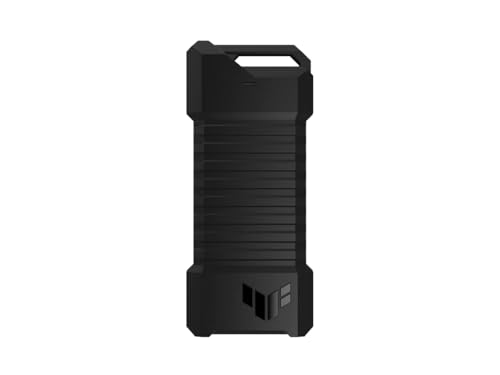
- Supports NVMe PCIe and SATA M.2 SSDs
- IP68 and MIL-STD-810H protection
- USB-C 3.2 Gen 2 up to 10Gbps
Best For: Rugged portable storage and gaming setups
Best Compact Value Design

- Pocket-sized tool-free sandwich design
- 10Gbps USB 3.2 Gen 2 with UASP
- Includes USB-C cable and USB-A adapter
Best For: Travel-friendly NVMe storage across Windows, Mac, and Linux
Best Dual-Protocol Value – Tool-Free NVMe & SATA M.2 Enclosure
If you need portable SSD enclosures that can accept either NVMe or SATA M.2 drives, the SABRENT EC-SNVE is a flexible, compact option. Its tool-free design supports 2242, 2260, and 2280 bare SSDs and connects over USB 3.2 Type-C at up to 10Gbps.
Best For: Users who want one enclosure for both M.2 NVMe and M.2 SATA SSDs.
Pros:
- Supports M.2 NVMe and SATA drives in 2242, 2260, and 2280 sizes.
- Tool-free installation takes only seconds.
- Slim aluminum construction includes a thermal pad and USB-C cable.
- Bus powered and compatible with Windows, macOS, and Linux.
Cons:
- SSD is not included.
- Does not support 2.5-inch SATA, mSATA, or drives with pre-installed heatsinks.
- Real-world transfers are limited by the host port and drive.
The EC-SNVE stands out for compatibility rather than maximum speed. Confirm that your drive is a bare M.2 model without a heatsink, then it offers a straightforward way to reuse either NVMe or SATA storage.
Best Travel-Friendly NVMe Pick – UGREEN 10Gbps M.2 Enclosure
Among portable SSD enclosures, the UGREEN NVMe model is a practical choice for carrying an M.2 drive between computers, phones, and tablets. It combines tool-free installation, 10Gbps USB-C performance, an aluminum shell, and an included silicone protective case.
Best For: Travelers and Mac mini or laptop users with an M.2 PCIe NVMe SSD.
Pros:
- Supports NVMe M.2 drives in 2230, 2242, 2260, and 2280 sizes.
- Tool-free buckle design makes installation quick and secure.
- Includes USB-C-to-C and USB-C-to-A cables plus a silicone case.
- Protection features include short-circuit and over-current safeguards.
Cons:
- Does not support SATA NGFF or mSATA SSDs.
- 10Gbps performance requires a compatible USB 3.2 Gen 2 cable and port.
- SSD is not included.
UGREEN’s enclosure is well suited to mobile use because the protective case adds portability without requiring a separate accessory. It is a focused NVMe solution, so check your SSD protocol before buying.
Best High-Speed Option – SABRENT USB4 NVMe Enclosure
For demanding workflows, this SABRENT model is one of the fastest portable SSD enclosures in the group. Its USB4 interface reaches up to 3,900MB/s, while compatibility with Thunderbolt 3, Thunderbolt 4, and USB-C ports makes it suitable for modern Windows and macOS systems.
Best For: Creators, editors, and mobile power users transferring large files.
Pros:
- Up to 3,900MB/s over USB4 and up to 2,700MB/s with Thunderbolt 3 or 4.
- Supports PCIe NVMe SSDs in 2230, 2242, 2260, and 2280 sizes.
- Integrated active cooling fan helps manage heat during extended transfers.
- Tool-free design requires no drivers or external power.
Cons:
- Does not support SATA M.2 SSDs.
- Maximum speeds require compatible USB4 or Thunderbolt hardware.
- SSD is not included.
This enclosure makes the most sense when your computer supports USB4 or Thunderbolt and your workload can benefit from faster transfers. On older USB-C ports, performance will fall back to the port’s rated speed.
Best RGB Design – ASUS ROG Strix Arion NVMe Enclosure
The ASUS ROG Strix Arion combines portable SSD enclosures functionality with a distinctive aluminum ROG design and Aura Sync RGB lighting. It supports PCIe NVMe M.2 drives from 2230 through 2280 and connects at up to 10Gbps over USB 3.2 Gen 2 Type-C.
Best For: ROG users who want a stylish NVMe enclosure with synchronized RGB lighting.
Pros:
- Supports PCIe NVMe M.2 SSDs in 2230, 2242, 2260, and 2280 sizes.
- 10Gbps USB 3.2 Gen 2 Type-C interface.
- Aluminum alloy body and thermal pads help draw heat away from the drive.
- Includes both USB-C-to-C and USB-C-to-A cables.
Cons:
- NVMe SSD is not included.
- Designed for PCIe NVMe drives rather than SATA M.2 SSDs.
- RGB features are most relevant to users in the Aura Sync ecosystem.
The ROG Strix Arion is a good fit when appearance and ecosystem integration matter as much as basic enclosure performance. Its 10Gbps connection and broad NVMe size support keep it practical for everyday external storage.
Best Budget 2.5-Inch Pick – Sabrent EC-UASP Enclosure
If you need one of the simpler portable ssd enclosures for a 2.5-inch SATA drive, the Sabrent EC-UASP is a practical option. Its tool-free design supports plug-and-play use, USB 3.0 speeds up to 5 Gbps, and UASP for compatible SATA III SSDs.
Best For: Reusing a 2.5-inch SATA SSD or notebook hard drive as portable storage.
Pros:
- Tool-free installation with hot-swappable, plug-and-play operation
- Supports 2.5-inch SATA and SATA II drives, with UASP SATA III optimization
- Backward-compatible with USB 2.0 and USB 1.1
- Works with supported Windows and Mac systems without additional drivers
Cons:
- Limited to 2.5-inch SATA drives rather than M.2 NVMe SSDs
- The enclosure uses a plastic shell
- USB 2.0 connections reduce transfer rates to up to 480 Mbps
This Sabrent model is best when compatibility with a traditional 2.5-inch SATA drive matters more than the newest interface. It is compact, lightweight, and straightforward for basic drive upgrades or file transfers.
Best NVMe Speed Option – Lexar E300 M.2 Enclosure
The Lexar E300 is one of the more capable portable ssd enclosures for M.2 NVMe drives. Its USB 3.2 Gen 2 interface offers theoretical speeds up to 10 Gbps, while the aluminum casing and thermal pad help manage heat during use.
Best For: Turning a compatible M.2 NVMe SSD into a fast, portable USB-C drive.
Pros:
- USB 3.2 Gen 2 interface with up to 10 Gbps theoretical transfer speed
- Supports 2230, 2242, 2260, and 2280 M.2 NVMe SSDs
- Aluminum alloy casing and built-in thermal pad support heat dissipation
- Tool-free installation with a compact, shock-absorbing design
Cons:
- Does not support SATA SSDs
- Requires a computer with a USB-C interface
- Maximum supported capacity is 4TB
Choose the Lexar E300 if you have an NVMe module and want a faster USB-C enclosure than a basic SATA model. Confirm your SSD uses the supported NVMe protocol before buying, since SATA M.2 drives are excluded.
Best Dual-Connector Choice – BENFEI 2.5-Inch SATA Enclosure
The BENFEI enclosure is a flexible choice among portable ssd enclosures when you want to connect a 2.5-inch SATA drive using either USB Type-C or Type-A. It installs without tools, supports UASP, and is designed for 7mm or 9.5mm drives up to 6TB.
Best For: Moving a 2.5-inch SATA SSD or hard drive between newer USB-C devices and standard USB ports.
Pros:
- USB Type-C and Type-A connection options improve device compatibility
- Tool-free, plug-and-play installation requires no driver
- Supports SATA I, II, and III drives with UASP and transfer rates up to 5 Gbps
- Includes an unconditional 18-month BENFEI warranty
Cons:
- Limited to 2.5-inch SATA drives
- Not designed for M.2 NVMe SSDs
- USB 2.0 or 1.1 connections are slower than USB 3.x
This BENFEI model makes sense for households or workspaces with a mix of USB-C and USB-A computers. Its broad operating-system support and 6TB stated capacity also make it useful for repurposing larger 2.5-inch drives.
Best Tool-Free NVMe Pick – SABRENT EC-PNVO
For portable SSD enclosures built around quick installation and sustained transfers, the SABRENT EC-PNVO is a practical NVMe-only option. Its flip-open, tool-free design accepts 2230, 2242, 2260, and 2280 M.2 PCIe SSDs, while the aluminum top and thermal pad help manage heat during 10Gbps USB-C use.
Best For: Users who want a compact, tool-free NVMe enclosure for upgrades, cloning, troubleshooting, or portable high-speed storage.
Pros:
- Tool-free flip-open installation makes swapping SSDs quick.
- Supports M.2 NVMe sizes from 2230 through 2280 and capacities up to at least 8TB.
- Aluminum cooling design helps support more stable performance during long transfers.
- USB-C plug-and-play operation requires no drivers or external power.
Cons:
- Supports NVMe SSDs only and is not compatible with M.2 SATA drives.
- Its 10Gbps interface is faster than basic USB enclosures but not a higher-speed USB4 solution.
The EC-PNVO is a strong fit when easy drive access and cooling matter more than broad SATA compatibility. Confirm that your SSD is NVMe before buying.
Best Rugged Dual-Interface Option – ASUS TUF Gaming A1
Among portable SSD enclosures, the ASUS TUF Gaming A1 stands out for combining M.2 NVMe PCIe and SATA support with a tougher exterior. Its USB-C 3.2 Gen 2 interface reaches up to 10Gbps, and the enclosure is rated for MIL-STD-810H drop resistance plus IP68 water and dust resistance.
Best For: Gamers and mobile users who need a more rugged enclosure for NVMe or SATA M.2 SSDs, including use with PCs and supported gaming consoles.
Pros:
- Supports both M.2 NVMe PCIe and SATA SSDs in 2242, 2260, and 2280 sizes.
- Q-latch mechanism simplifies SSD installation without conventional screw-based mounting.
- MIL-STD-810H drop resistance and IP68 water and dust resistance add protection.
- USB-C connectivity works with PCs, laptops, mobile devices, and the latest-generation gaming consoles.
Cons:
- Its 10Gbps interface may not match the speeds of newer higher-bandwidth enclosures.
- At about 249 g, it is heavier than minimalist portable enclosure designs.
- Warranty coverage is listed as one year.
The TUF Gaming A1 is the most protection-focused choice here and offers broader drive compatibility than NVMe-only models. It makes the most sense for travel, gaming, or environments where added resistance is valuable.
Best Compact Value Design – FIDECO M210
The FIDECO M210 is a compact choice among portable SSD enclosures, pairing a tool-free sandwich design with USB 3.2 Gen 2 performance. It supports M.2 NVMe drives with M or M+B keys in 2230, 2242, 2260, and 2280 sizes, and includes a USB-C cable with a USB-A adapter for flexible connections.
Best For: Windows, Mac, and Linux users who want a pocketable NVMe enclosure with simple installation and both USB-C and USB-A connectivity.
Pros:
- Tool-free sandwich design makes SSD installation straightforward.
- Supports several NVMe sizes and M or M+B key configurations.
- USB 3.2 Gen 2 and UASP support provide up to 10Gbps theoretical transfer speeds.
- Included USB-A adapter improves compatibility when traveling between devices.
Cons:
- Does not support M.2 SATA SSDs.
- New SSDs may need to be initialized before a computer recognizes them.
- Warranty coverage is listed as one year.
The M210 is a sensible everyday option if you need broad operating-system compatibility and a small travel footprint. Its NVMe-only design keeps the choice focused, while the included adapter helps with older USB-A equipment.
How We Picked These Portable SSD Enclosures
We focused on compatibility, interface speed, installation convenience, portability, and overall practicality. The lineup includes enclosures for M.2 NVMe drives, SATA-based M.2 drives, and 2.5-inch SATA SSDs or hard drives. We also considered whether each model supports tool-free installation, includes useful USB cables, and offers features such as cooling, shock resistance, or water protection.
Advertised speeds represent the enclosure’s maximum interface capability. Real-world performance also depends on the SSD, host computer, cable, file size, operating system, and thermal conditions.
Quick Comparison
| Best For | Recommended Type | Key Advantage |
|---|---|---|
| Maximum transfer speeds | USB4 NVMe enclosure | Higher bandwidth for compatible computers |
| Everyday external storage | 10Gbps NVMe enclosure | Good speed and broad USB-C compatibility |
| Older 2.5-inch drives | SATA-to-USB enclosure | Works with SATA SSDs and hard drives |
| Rugged travel use | Protected NVMe/SATA enclosure | Better resistance to drops, dust, or water |
| Simple upgrades | Tool-free enclosure | Faster drive installation without a screwdriver |
Key Buying Factors for Portable SSD Enclosures
Drive Compatibility
Check whether your drive is NVMe PCIe, SATA M.2, or 2.5-inch SATA. M.2 drives can look similar while using different protocols, and an NVMe-only enclosure will not operate with a SATA M.2 SSD. Some models support both protocols, which can be useful if you have multiple drives.
USB Speed and Connector Support
A 10Gbps USB 3.2 Gen 2 enclosure is a strong general-purpose choice. USB4 models can be substantially faster, but only when paired with a compatible USB4 or Thunderbolt-capable host and a suitable cable. Confirm whether the enclosure includes USB-C-to-C and USB-C-to-A cables if you use several devices.
Heat Management and Build Quality
Fast NVMe drives generate heat during sustained transfers. Aluminum bodies, thermal pads, and ventilation can help maintain performance. For travel, look for sturdy construction and, if needed, drop, dust, or water resistance.
Installation and Daily Use
Tool-free covers and latch systems make drive swaps easier, while compact designs are more convenient in a laptop bag. A short, securely fitting cable also reduces desk clutter and accidental disconnects.
Who Should Buy Which Portable SSD Enclosures?
Choose a USB4 NVMe enclosure if you regularly move large video projects, game libraries, or professional files and own a compatible high-speed computer. For most users, a 10Gbps NVMe enclosure offers the best balance of price, speed, and compatibility. Choose a dual-protocol M.2 model if you are unsure which type of drive you have or expect to use several drives.
If you are repurposing a 2.5-inch SATA SSD or hard drive, select a dedicated SATA-to-USB enclosure rather than an M.2 model. Travelers and field workers should prioritize rugged protection, while occasional users may get the most value from a simple tool-free enclosure with dependable USB-C connectivity.