
A quiet desktop can make a noticeable difference in a home office, study area, or shared workspace. The best models combine low-noise operation with dependable performance, modern connectivity, and enough storage for everyday workloads.
We’ve selected 10 quiet desktop computers spanning compact business minis, slim systems, and small-form-factor PCs. Use the guide below to match processor performance, expandability, display support, and value to your needs.
Best 10 Quiet Desktop Computers Picks for 2026
Best Overall
Dell Pro i5-14500 Business Desktop

- 14-core Intel processor with up to 5.0 GHz
- 16GB DDR5 RAM and 512GB PCIe SSD
- Ultra-quiet design with Windows 11 Pro
Best For: Demanding multitasking and business productivity
Best Slim Design
Dell Slim Core Ultra 5 Desktop

- Compact 7.7-pound slim tower
- Supports up to four FHD monitors
- 512GB SSD and Intel Core Ultra processor
Best For: Space-conscious home and office setups
Best Mini PC
HP Elite 805 Ryzen 5 Mini Desktop

- Ultra-quiet chassis under 3 pounds
- Dual 4K display support
- Windows 11 Pro with Wi-Fi 6 and USB-C
Best For: Compact business workstations and dual displays
Best Refurbished Value

- 32GB listed RAM and 1TB SSD
- Windows 11 Pro with Wi-Fi and Bluetooth
- HDMI, DisplayPort, and multiple USB ports
Best For: Affordable everyday home and office computing
Best Value Quiet Desktop

- Ultra-quiet compact tower
- 16GB RAM and 512GB PCIe SSD
- Dual 4K monitor support and broad connectivity
Best For: Everyday business and home-office productivity
Best Renewed Performance

- 32GB RAM and 1TB SSD
- Compact small-form-factor design
- HDMI, DisplayPort, Wi-Fi, and Bluetooth
Best For: Multitasking and multimedia on a budget
Best Modern Business Choice

- 10-core Intel Core Ultra 5 processor
- Ultra-quiet design with dual 4K support
- USB-C, Wi-Fi 6, TPM, and broad connectivity
Best For: Modern business multitasking and secure workspaces
Compact Everyday Pick
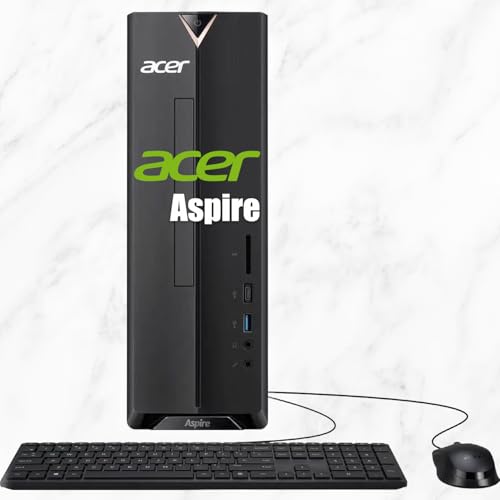
- Compact 8-liter chassis for flexible placement
- 16GB RAM and 512GB PCIe SSD
- Wi-Fi 6E plus HDMI, DisplayPort, and VGA
Best For: Students, home users, and everyday productivity
Business Productivity Pick

- Ultra-quiet design for office use
- Intel Core i3-13100 with 16GB DDR5 RAM
- Dual-monitor support with HDMI and DisplayPort
Best For: Business users and office productivity
Smallest Performance Pick
Lenovo ThinkCentre 50q Mini Desktop
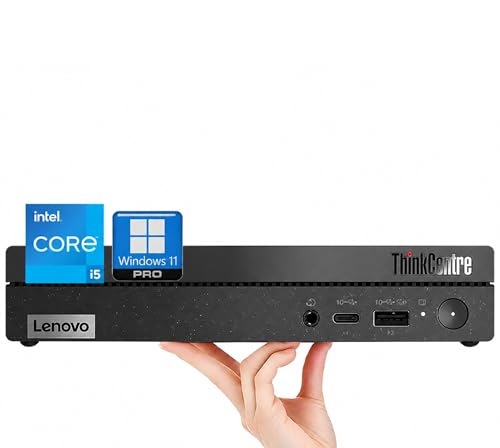
- Ultra-quiet 1-liter form factor
- Core i5 processor with 16GB RAM and 512GB SSD
- Supports two 4K monitors
Best For: Professionals and space-constrained offices
Best Overall – Dell Pro i5-14500 Business Desktop
For shoppers comparing quiet desktop computers for demanding office work, the Dell Pro combines a 14th Gen Intel Core i5-14500, 16GB of DDR5 RAM, and a 512GB PCIe SSD in an ultra-quiet tower design. Windows 11 Pro, Wi-Fi 6, and included wireless peripherals make it ready for a business or home office.
Best For: Multitasking, business applications, and users who want a well-equipped desktop with room to upgrade.
Pros:
- 14 cores and 20 threads with speeds up to 5.0 GHz for responsive multitasking.
- Fast DDR5 memory and PCIe SSD storage, with support for up to 64GB RAM and 4TB storage.
- Strong connectivity, including USB-C, HDMI, DisplayPort, Wi-Fi 6, and Bluetooth.
- Includes Windows 11 Pro plus a wireless keyboard and mouse.
Cons:
- Integrated Intel UHD Graphics 770 are intended for general productivity rather than dedicated graphics workloads.
- The tower takes more desk space than a mini PC.
This is the strongest all-around choice in the group for performance-focused office users. Its quiet design, modern processor, upgrade potential, and business-oriented security features make it a practical long-term desktop.
Best Slim Design – Dell Slim Core Ultra 5 Desktop
The Dell Slim is a good fit for quiet desktop computers in compact workspaces. Its slim 11.54-by-3.74-by-11.95-inch chassis uses an Intel Core Ultra 5-225 processor, includes a 512GB SSD, and supports flexible multi-monitor setups.
Best For: Home offices, education, and everyday business use where space-saving design matters.
Pros:
- Slim, lightweight design measuring less than four inches wide and weighing 7.7 pounds.
- Intel Core Ultra processor includes built-in AI capabilities.
- Supports up to four FHD monitors or two 4K displays through HDMI and DisplayPort.
- Tool-less access makes internal upgrades more convenient.
Cons:
- Windows 11 Home is less business-focused than Windows 11 Pro.
- Integrated Intel UHD Graphics 730 are not designed for demanding graphics work.
- The listed configuration does not specify included RAM capacity.
Choose this Dell when a neat, modern footprint and display flexibility are more important than maximum expansion. Its TPM security, recycled-material design, and one-year onsite service add practical office value.
Best Mini PC – HP Elite 805 Ryzen 5 Mini Desktop
Among quiet desktop computers, the HP Elite 805 stands out for its very small footprint and explicitly listed ultra-quiet design. It pairs a six-core AMD Ryzen 5 5650G with 16GB of DDR4 memory, a 256GB PCIe SSD, Wi-Fi 6, and dual 4K display support.
Best For: Compact business workstations, reception desks, and users who need a quiet computer with dual-display capability.
Pros:
- Mini chassis measures about 7 inches square and 1.35 inches thick, weighing less than 3 pounds.
- Ultra-quiet design is well suited to shared or distraction-sensitive workspaces.
- Supports two 4K displays through dual DisplayPort outputs.
- Includes Windows 11 Pro, Wi-Fi 6, USB-C, and keyboard and mouse.
Cons:
- 256GB SSD provides less listed storage than the other new desktops.
- DDR4 memory is older and slower than the DDR5 configuration in the Dell Pro.
- Integrated graphics are better suited to productivity than demanding visual workloads.
The HP is the most space-efficient option here and delivers a useful business feature set in a nearly unobtrusive enclosure. Consider it when quiet operation, portability, and dual-monitor support outweigh storage capacity.
Best Refurbished Value – Renewed Dell OptiPlex 3060
This renewed Dell OptiPlex 3060 is a practical value option for shoppers seeking quiet desktop computers for everyday home or office tasks. Its Intel Core i5-8500, 32GB DDR4 RAM, 1TB SSD, built-in Wi-Fi, and Windows 11 Pro provide a capable general-purpose setup.
Best For: Budget-conscious buyers who need generous memory and storage for browsing, office work, and media use.
Pros:
- 32GB of listed DDR4 RAM supports extensive multitasking.
- Large 1TB SSD offers fast boot times and ample everyday storage.
- Includes Wi-Fi, Bluetooth, HDMI, DisplayPort, and multiple USB ports.
- Windows 11 Pro and a keyboard are included, with refurbished technical support.
Cons:
- Older eighth-generation processor and DDR4 platform are less current than the new systems.
- The supplied specifications conflict on RAM capacity, listing both 32GB and 8GB; verify the configuration before buying.
- 90-day warranty is shorter than the one-year warranties listed for the other products.
This OptiPlex offers strong storage and multitasking specifications at a potentially lower refurbished-system cost. It is best for routine computing, but buyers should confirm the actual RAM configuration and understand the shorter warranty.
Best Value Quiet Desktop – Acer Aspire Business Desktop
The Acer Aspire is a practical choice among quiet desktop computers for everyday business, home-office, and general productivity tasks. Its compact tower combines 16GB of RAM, a 512GB PCIe SSD, Windows 11, and support for dual 4K monitors.
Best For: Home offices, basic business workflows, web browsing, document work, and multi-monitor setups.
Pros:
- Ultra-quiet design suits shared offices and quiet workspaces.
- 16GB memory and a PCIe SSD provide a solid everyday configuration.
- Includes HDMI, VGA, USB, Ethernet, Wi-Fi 6, Bluetooth, and an SD card reader.
- Includes a keyboard and mouse and supports dual 4K monitors.
Cons:
- Intel Celeron N4505 is intended for everyday computing rather than demanding workloads.
- Integrated Intel UHD graphics are not designed for high-end gaming or professional graphics work.
The Acer stands out for its quiet operation, useful port selection, and ready-to-use Windows 11 setup. It is a sensible fit when affordable, low-noise productivity matters more than intensive performance.
Best Renewed Performance – Dell OptiPlex 7050 SFF
The renewed Dell OptiPlex 7050 is a strong option for shoppers comparing quiet desktop computers on a budget. Its small-form-factor case pairs a quad-core Intel Core i7 processor with 32GB of DDR4 memory, a 1TB SSD, and Windows 11 Pro.
Best For: Multitasking, office applications, multimedia use, and buyers who want substantial memory and storage in a compact renewed system.
Pros:
- Compact SFF design is easy to place in a workspace.
- 32GB of RAM and a 1TB SSD support demanding multitasking and fast storage access.
- Includes HDMI, DisplayPort, USB, Ethernet, Wi-Fi, and Bluetooth connectivity.
- Professionally renewed, tested, and supplied with a keyboard, mouse, and 90-day seller warranty.
Cons:
- As a renewed 2017 model, it has an older platform than the newer desktops in this roundup.
- Integrated Intel UHD 630 graphics are better suited to general and multimedia use than intensive graphics work.
- Warranty coverage is limited to 90 days from the seller.
This OptiPlex offers particularly strong memory and SSD capacity for its class. Its renewed status and older processor should be weighed against the attractive specifications and compact office-friendly format.
Best Modern Business Choice – Dell ECT1250 Business Desktop
The Dell ECT1250 is a premium pick among quiet desktop computers, combining an ultra-quiet design with a 10-core Intel Core Ultra 5 processor, 16GB of DDR5 memory, and a 512GB PCIe SSD. It also supports dual 4K displays and arrives with Windows 11 and a keyboard and mouse.
Best For: Modern business environments, heavy multitasking, secure office setups, and users who need extensive connectivity.
Pros:
- 10-core processor with speeds up to 4.9GHz is designed for responsive multitasking.
- DDR5 memory, PCIe SSD storage, and dual 4K monitor support suit productive desk setups.
- Extensive connectivity includes USB-C, multiple USB ports, HDMI, DisplayPort, Ethernet, Wi-Fi 6, and Bluetooth.
- Includes a TPM security chip, lock slot or padlock loop, and a one-year limited warranty.
Cons:
- Integrated Intel UHD graphics are not intended for dedicated high-end gaming or graphics workloads.
- The listed 16GB RAM and 512GB SSD provide less capacity than the product’s optional configurations.
With its newer processor platform, quiet design, strong connectivity, and business-focused security features, the ECT1250 is the most forward-looking choice here. It is especially compelling for buyers building a capable, low-noise workstation.
Compact Everyday Pick – Acer Aspire SFF 8L Desktop
For shoppers seeking quiet desktop computers for browsing, homework, office tasks, and entertainment, this compact Acer Aspire offers a practical setup with 16GB of RAM, a 512GB PCIe SSD, and integrated Intel UHD Graphics. Its 8-liter chassis is designed to fit neatly on a desk or floor.
Best For: Students, home users, and everyday productivity.
Pros:
- Compact 8-liter design with front-access ports.
- 16GB DDR4 RAM and a 512GB PCIe SSD support responsive everyday use.
- Wi-Fi 6E, HDMI, DisplayPort, VGA, and six USB ports provide flexible connectivity.
- Includes Windows 11 Home, a wired keyboard, and a mouse.
Cons:
- Intel Celeron N4505 and integrated graphics are intended for everyday computing rather than demanding workloads.
- Memory is listed at a 16GB maximum, limiting future expansion.
This Acer is a sensible space-saving option when quiet desktop computers are needed for routine tasks and straightforward connectivity. Its included peripherals make it especially convenient as an out-of-the-box home or student system.
Business Productivity Pick – Dell QCT1250 Business Desktop
This Dell QCT1250 is a strong candidate for quiet desktop computers in a business or office setting. It pairs an Intel Core i3-13100 processor with 16GB of DDR5 memory, integrated Intel UHD Graphics 730, and Windows 11 Pro, while its ultra-quiet design suits shared workspaces.
Best For: Business users, office productivity, and dual-monitor workstations.
Pros:
- Ultra-quiet design is suited to office environments.
- Intel Core i3-13100 processor with four cores and eight threads supports multitasking.
- DDR5 memory can be expanded from the installed 16GB up to 64GB.
- Supports dual monitors and offers HDMI, DisplayPort, USB-C, Ethernet, Wi-Fi 6, and Bluetooth.
Cons:
- Integrated graphics are better suited to productivity and display output than graphics-intensive work.
- The listing describes configurable storage and memory options, so the exact configuration should be verified before purchase.
With Windows 11 Pro, TPM security, broad connectivity, and a one-year warranty, this Dell is oriented toward practical business deployment. It is a particularly well-rounded choice when low noise and multi-display support matter more than dedicated graphics.
Smallest Performance Pick – Lenovo ThinkCentre 50q Mini Desktop
For buyers who want quiet desktop computers with a very small footprint, the Lenovo ThinkCentre 50q combines an ultra-quiet 1-liter design with an Intel Core i5-13420H processor, 16GB of DDR4 RAM, and a 512GB PCIe NVMe SSD. It also supports two 4K displays for a more capable productivity setup.
Best For: Professionals, remote workers, and space-constrained offices.
Pros:
- Ultra-quiet 1-liter chassis minimizes desk clutter.
- Eight-core Intel Core i5 processor reaches speeds up to 4.6GHz for demanding productivity tasks.
- Supports two 4K monitors through HDMI and DisplayPort.
- Includes Wi-Fi 6, Bluetooth, Windows 11 Pro, and a vertical stand.
Cons:
- Integrated graphics are designed for productivity and display support, not dedicated-gaming workloads.
- The compact form factor may offer less internal expansion flexibility than a traditional tower.
This Lenovo is the most space-conscious option of the group while still offering a higher-tier Core i5 processor and business-focused Windows 11 Pro features. It is well suited to quiet offices, remote-work desks, and dual-monitor productivity.
How We Picked the Best Quiet Desktop Computers
We compared these systems by looking at processor generation and core count, memory, SSD capacity, physical size, stated noise design, display support, connectivity, operating system, and likely long-term usefulness. Business-focused desktops received extra consideration because they commonly prioritize stable operation, serviceability, and practical ports over flashy features.
Specifications can vary by configuration and seller, so verify the exact model, warranty, included accessories, and upgrade options before buying. “Ultra-quiet” or “quiet” design is useful guidance, but real-world noise also depends on workload, room temperature, fan profiles, and dust buildup.
Quick Comparison
| Best For | Look For | Recommended Type |
|---|---|---|
| Office productivity | 16GB RAM, SSD, modern Core i5-class CPU | Slim or business desktop |
| Small workspaces | Compact chassis, Wi-Fi, Bluetooth | Mini PC |
| Heavy multitasking | Higher core count, 16GB or more RAM | Full-size or SFF desktop |
| Multiple monitors | Two compatible video outputs | Business mini or SFF PC |
| Large local files | 512GB or 1TB SSD | SFF or standard desktop |
Key Buying Factors for Quiet Desktop Computers
Noise and Cooling
Prioritize systems that explicitly mention quiet or ultra-quiet operation, but also check ventilation. A cramped PC placed inside a cabinet may run its fans faster than a larger desktop with better airflow. SSD storage helps reduce mechanical noise because it has no spinning drive.
Processor and Memory
For documents, web apps, video calls, and streaming, a recent Core i5-class or equivalent processor with 16GB of RAM is a strong baseline. Newer Intel Core Ultra systems may offer better efficiency, while older refurbished desktops can still be practical when priced well. Choose more cores when you regularly compile code, edit media, run virtual machines, or multitask heavily.
Storage, Ports, and Displays
A 512GB PCIe SSD balances speed and capacity for most users; 1TB is preferable for large local libraries. Confirm that the video outputs support your monitor resolution and refresh rate. Wi-Fi, Bluetooth, Ethernet, USB ports, and an SD card reader can also determine whether you need adapters.
Upgradeability and Support
Mini PCs save space but usually offer fewer upgrade paths. Small-form-factor and standard desktops may provide easier access to RAM, storage, or expansion cards. Check warranty coverage and whether Windows is properly licensed, especially with refurbished models.
Who Should Buy Which Quiet Desktop Computers?
- Choose a modern business or slim desktop for reliable office work, schoolwork, browsing, and video meetings.
- Choose a mini desktop when desk space and low operating noise matter most.
- Choose a small-form-factor model if you want a balance of compact size, ports, and upgrade potential.
- Choose a higher-core newer processor for demanding multitasking and longer expected service life.
- Choose an older refurbished Dell OptiPlex when maximum value and generous RAM or storage matter more than the newest platform.
For most buyers, the safest all-around configuration is a recent processor, 16GB of memory, a 512GB SSD, dual-monitor support, and both wired and wireless networking in a chassis that fits the workspace.