
Video editing demands fast, dependable storage for large project files, high-bitrate footage, proxies, and backups. The right RAID enclosure can add capacity, improve workflow speed, and let you tailor the setup to your existing drives and computer.
We compare 10 options across Thunderbolt, USB-C, SATA, and NVMe platforms, including diskless enclosures and fully populated professional arrays. Use the guide below to match drive type, connectivity, RAID features, and capacity to your editing workflow.
Best 10 Raid Enclosure for Video Editing Picks for 2026
Best High-Capacity RAID Enclosure
ORICO 4-Bay 20Gbps RAID Enclosure

- Six RAID and drive-management modes
- Up to 104TB across four SATA drives
- USB4-ready 20Gbps interface
Best For: High-capacity video production storage
Best Hybrid Storage Expansion

- Four SATA bays plus four NVMe slots
- Up to 152TB of mixed storage
- Eight independent drives with no built-in RAID
Best For: Flexible mixed-media editing workstations
Best Premium Thunderbolt RAID System

- 36TB with dual 7200RPM hard drives
- Thunderbolt 3, USB-C, and HDMI connectivity
- RAID 0, RAID 1, or JBOD support
Best For: Ready-to-use Thunderbolt editing desks
Best High-Speed NVMe RAID Enclosure
- USB4/Thunderbolt connectivity up to 40Gbps
- Four NVMe bays with up to 32TB total
- Mac, Windows, RAID 0/1/5, and JBOD support
Best For: Fast compact SSD editing arrays
Compact Thunderbolt RAID

- Four bays for 3.5-inch or 2.5-inch SATA drives
- Up to 1527MB/s sustained performance
- Supports RAID 0, 1, 4, 5, and 10
Best For: Thunderbolt-equipped editors building a flexible four-drive array
High-Capacity Editing Array
- 160TB across eight removable Ultrastar drives
- Up to 1900MB/s read and 2000MB/s write speeds
- Built-in RAID 5 with multiple RAID options
Best For: Professional 4K, 8K, and VR editing workflows
Expandable USB-C RAID

- Five bays support up to 110TB
- RAID 0, 1, 3, 5, 10, JBOD, and CLONE modes
- USB-C compatibility with Mac, Windows, and Linux
Best For: Cross-platform editors needing flexible DAS storage
Best Overall
UGREEN 5-Bay USB-C RAID Enclosure

- Eight RAID and storage modes
- Supports five SATA drives and up to 160TB
- USB-C connectivity with automatic fan control
Best For: Editors needing flexible, high-capacity external SATA storage
Best Compact NVMe Option
NEWQ Dual-Bay M.2 RAID Enclosure

- 20Gbps transfer performance
- Supports RAID 0, RAID 1, JBOD, and Clone
- Tool-free dual-NVMe installation
Best For: Mobile editors using M.2 2280 NVMe SSDs
Best eSATA Flexibility
CENMATE 4-Bay SATA RAID Enclosure

- Eight RAID and storage modes
- Supports four SATA drives up to 80TB
- USB A/C 3.0 and eSATA connectivity
Best For: Editors building a four-drive SATA array with eSATA support
Best High-Capacity RAID Enclosure – ORICO 4-Bay 20Gbps RAID Enclosure
The ORICO 4-Bay is a practical raid enclosure for video editing when you need large-capacity SATA storage, flexible RAID options, and fast transfers. Its USB 3.2 Gen 2×2 interface can reach 20Gbps with USB4, while Thunderbolt connections are limited to about 10Gbps.
Best For: Video producers and professionals managing up to four 3.5-inch SATA drives and as much as 104TB of storage.
Pros:
- Supports RAID 0, 1, 5, 10, JBOD, and Normal modes.
- Holds up to four 26TB drives for a potential 104TB capacity.
- Includes hot-swapping, aluminum construction, and a 45dB cooling fan.
- Works with Windows, macOS, and Linux and includes a 150W power supply.
Cons:
- Requires a USB4 connection to reach the advertised 20Gbps interface speed.
- Changing RAID modes erases drive contents, so backups are required.
- It is designed for SATA drives rather than NVMe SSDs.
Choose this enclosure if capacity and hardware RAID flexibility matter more than compact size. Its cooling and power features also make it suited to sustained multi-drive workflows.
Best Hybrid Storage Expansion – TERRAMASTER D8 Hybrid 2
The TERRAMASTER D8 Hybrid 2 is a flexible alternative to a traditional raid enclosure for video editing. It combines four SATA drive bays with four M.2 NVMe slots, letting editors separate high-capacity media storage from faster SSD-based workspaces.
Best For: Editors who want eight independent drives, mixed HDD/NVMe storage, and the freedom to use third-party RAID software.
Pros:
- Supports four SATA HDDs or SSDs plus four M.2 2280 NVMe SSDs.
- Offers up to 152TB of combined capacity.
- Provides independent drives rather than imposing a built-in RAID layout.
- USB 3.2 Gen 2 delivers up to 10Gbps, with claimed single-NVMe read speeds up to 1020MB/s.
Cons:
- It has no built-in RAID; RAID requires third-party software.
- The 10Gbps interface is slower than USB4 and Thunderbolt 40Gbps enclosures.
- Drives are not included.
This model is appealing when flexibility is more important than turnkey RAID. Its combination of eight independent drives and included backup software supports adaptable editing and archival workflows.
Best Premium Thunderbolt RAID System – G-Technology 36TB G-RAID
The G-Technology G-RAID is a ready-to-use raid enclosure for video editing with 36TB of installed storage and dual Thunderbolt 3 connectivity. Its removable dual-drive design and HDMI output make it a polished option for desktop editing setups.
Best For: Mac and PC editors who prefer an installed, stackable dual-drive system with Thunderbolt 3 and configurable RAID.
Pros:
- Includes 36TB of storage using dual 7200RPM Ultrastar hard drives.
- Supports RAID 0, RAID 1, and JBOD configurations.
- Offers two Thunderbolt 3 ports, USB-C, HDMI, and daisy-chaining for additional devices.
- Uses a stackable all-aluminum enclosure and includes a five-year limited warranty.
Cons:
- It has only two internal drives, limiting RAID layout options compared with four-bay models.
- The supplied notes do not specify transfer speeds or a maximum expansion capacity.
- It is not diskless, so upgrading the included storage may be less flexible.
This is a strong fit for editors seeking a complete dual-drive solution rather than an empty enclosure. Its Thunderbolt 3 ports and daisy-chain support suit a connected desktop workflow.
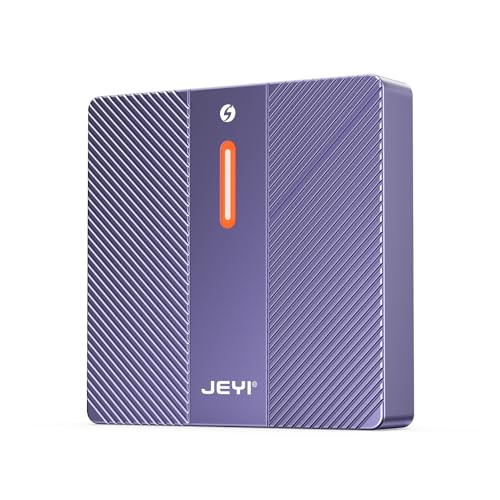
Best High-Speed NVMe RAID Enclosure – JEYI 4-Bay NVMe RAID
The JEYI 4-Bay NVMe RAID Enclosure is built for editors who want compact SSD storage and a high-speed USB4 or Thunderbolt connection. It supports up to four M.2 2280 NVMe drives and offers multiple RAID modes, though RAID configuration requires USB4 or Thunderbolt.
Best For: Intel and Apple users building a fast, compact NVMe editing array with up to 32TB of capacity.
Pros:
- Uses USB4 and Thunderbolt 3/4 connectivity with a claimed peak rate of 40Gbps.
- Supports RAID 0, RAID 1, and JBOD on Mac, plus RAID 5 on Windows.
- Accepts four M.2 2280 NVMe SSDs, with up to 8TB per drive.
- Aluminum housing, thermal pads, and a selectable turbo fan help manage heat.
Cons:
- RAID is unavailable when connected through standard USB.
- Some AMD USB4 or Thunderbolt systems may have compatibility issues.
- The six-month warranty is shorter than the warranty listed for several alternatives.
For a compatible Intel or Apple workstation, this is the speed-focused choice among these enclosures. Verify host compatibility first, especially with AMD systems, and plan for NVMe SSD costs.
Compact Thunderbolt RAID – OWC ThunderBay 4
The OWC ThunderBay 4 is a flexible raid enclosure for video editing when you want four drive bays and fast Thunderbolt connectivity in a relatively compact desktop chassis. It supports 3.5-inch and 2.5-inch SATA drives without adapters and offers several RAID configurations for balancing speed, redundancy, and capacity.
Best For: Video editors using Thunderbolt-equipped Mac or Windows computers who want a configurable four-drive storage setup.
Pros:
- Supports up to four 3.5-inch or 2.5-inch SATA drives without adapters.
- Thunderbolt 3 connectivity delivers up to 1527MB/s sustained performance.
- Supports RAID 0, 1, 4, 5, and 1+0 (10) configurations.
- Aluminum chassis is designed for quiet operation and heat dissipation.
Cons:
- Requires a computer with Thunderbolt connectivity.
- Drives are not included in the enclosure kit.
Choose the ThunderBay 4 if you value fast Thunderbolt performance and the ability to configure your own drives and RAID level. Its four-bay design is more flexible than a fixed-capacity array, though you will need to source and install the storage separately.
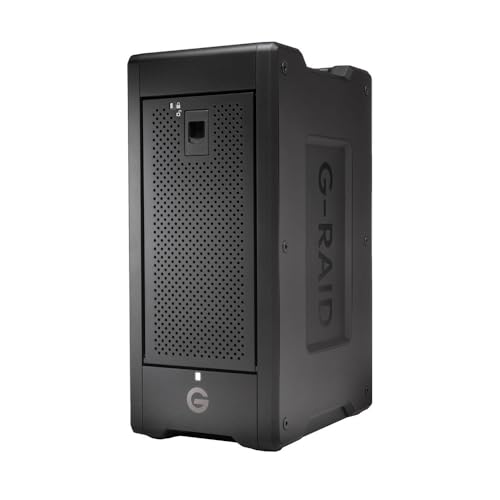
High-Capacity Editing Array – G-RAID Shuttle 8
The SanDisk Professional G-RAID Shuttle 8 is a raid enclosure for video editing built for very large projects and demanding multi-stream workflows. Its eight removable enterprise-class hard drives provide 160TB of configured capacity, while Thunderbolt 3 supports read speeds up to 1900MB/s and write speeds up to 2000MB/s.
Best For: Professional editors handling multi-stream 4K, 8K, or VR footage in studios or on location.
Pros:
- Provides 160TB of storage using eight removable 20TB Ultrastar hard drives.
- Supports high-speed Thunderbolt 3 and USB-C connections.
- Pre-configured in RAID 5 with options for RAID 0, 1, 6, 10, 50, 60, or JBOD.
- Dual Thunderbolt 3 ports support daisy-chaining, and USB-C Power Delivery provides up to 85W.
Cons:
- At 32 pounds, it is substantially less portable than smaller enclosures.
- Its large capacity and professional feature set may be excessive for lighter editing workloads.
The G-RAID Shuttle 8 is the strongest choice here for editors who need capacity, throughput, and built-in RAID flexibility in one system. It costs portability and simplicity in exchange for a much larger, mission-oriented storage platform.
Expandable USB-C RAID – Yottamaster PS500RC3
The Yottamaster PS500RC3 is a practical raid enclosure for video editing when you need five drive bays and broad operating-system compatibility. It supports up to 110TB using 3.5-inch or 2.5-inch SATA drives, with hardware or software RAID options and a USB-C interface rated for transfers up to 5Gbps.
Best For: Mac, Windows, and Linux users who want an expandable five-drive DAS for editing, backups, or general media storage.
Pros:
- Five removable trays support both 3.5-inch and 2.5-inch SATA HDDs and SSDs.
- Supports RAID 0, 1, 3, 5, 10, JBOD, and CLONE modes.
- Aluminum construction and an 80mm temperature-controlled fan aid cooling.
- Compatible with Windows, Mac, and Linux systems through USB-C.
Cons:
- USB 3.1 connectivity is limited to a maximum rated transfer rate of 5Gbps.
- New drives may need formatting and partitioning before use.
- Total drive power consumption must not exceed 78W during normal operation.
The PS500RC3 offers useful capacity and RAID flexibility at the expense of Thunderbolt-level bandwidth. It is a sensible fit for editors who prioritize multiple bays, replaceable drives, and cross-platform compatibility over maximum real-time throughput.
Best Overall – UGREEN 5-Bay USB-C RAID Enclosure
If you need a flexible raid enclosure for video editing, the UGREEN 5-bay DAS combines broad RAID support with space for both 2.5-inch and 3.5-inch SATA drives. Its USB-C connection reaches up to 5Gbps, making it practical for expanding a desktop or laptop editing setup.
Best For: Editors who want multiple RAID and storage modes, high drive capacity, and compatibility with Windows, macOS, or Linux.
Pros:
- Supports eight modes, including RAID 0, 1, 3, 5, and 10, plus PM, Large, and Clone.
- Holds up to five SATA HDDs or SSDs, with up to 160TB total capacity.
- Aluminum housing and automatic fan control help manage drive temperatures.
- Drive-status LEDs make presence, errors, and RAID rebuilding easier to monitor.
Cons:
- The 5Gbps USB-C interface is slower than newer 10Gbps or 20Gbps connections.
- Changing RAID modes requires reformatting, so data must be backed up first.
- The drives cannot be added to or managed as part of a NAS storage pool.
This is the most versatile option of the group for editors building a large external SATA array. Its capacity and RAID choices are strong, although users working with especially demanding high-bitrate workflows may prefer a faster interface.
Best Compact NVMe Option – NEWQ Dual-Bay M.2 RAID Enclosure
For a portable raid enclosure for video editing, this dual-bay NEWQ model uses M.2 2280 NVMe SSDs and a 20Gbps connection. It is designed for fast transfers, large project files, drive cloning, and compact workstation setups.
Best For: Mobile editors and professionals who already use NVMe SSDs and want RAID 0 speed, RAID 1 redundancy, or direct cloning.
Pros:
- 20Gbps transfer speed suits large files and data-intensive editing tasks.
- Supports RAID 0, RAID 1, JBOD, and Clone modes.
- Tool-free access makes SSD replacement and cloning more convenient.
- Compact aluminum construction helps with portability and heat dissipation.
Cons:
- Accepts two M.2 2280 NVMe SSDs rather than standard 2.5-inch or 3.5-inch SATA drives.
- Its listed storage capacity is up to 16TB.
- Two high-capacity SSDs may require the auxiliary USB-C input for stable operation.
This enclosure is the speed-focused choice for editors who value a small footprint and already have compatible NVMe drives. Its dual-bay design is less suitable for users seeking a large archive built from multiple SATA hard drives.
Best eSATA Flexibility – CENMATE 4-Bay SATA RAID Enclosure
The CENMATE 4-bay enclosure is a practical raid enclosure for video editing when you need support for both 2.5-inch and 3.5-inch SATA drives. It offers USB 3.0 and eSATA connections, eight RAID modes, and up to 80TB of external storage.
Best For: Editors who want a four-drive SATA enclosure with eSATA connectivity and broad compatibility across Windows, Mac, and Linux.
Pros:
- Supports RAID 0, 1, 3, 5, and 10, along with Clone, Large, and Normal modes.
- Accepts four 2.5-inch or 3.5-inch SATA HDDs or SSDs, up to 80TB total.
- Includes both USB A/C 3.0 and eSATA cables.
- Aluminum construction and dual fans help with cooling during multi-drive use.
Cons:
- The fans produce approximately 40–50dB of noise.
- Hot-swapping is not supported.
- eSATA access to multiple bays requires a computer port with RAID functionality.
CENMATE offers useful connectivity and a broad selection of RAID modes at a moderate four-bay size. Check your computer’s eSATA capabilities before buying, and consider the stated fan noise if your editing room needs to stay quiet.
How We Picked the Best Raid Enclosure for Video Editing
We selected enclosures and arrays that address different editing needs rather than treating speed as the only priority. The lineup includes compact dual-bay NVMe models, multi-bay SATA DAS units, hybrid HDD/NVMe systems, and ready-to-use professional Thunderbolt arrays. We considered interface bandwidth, drive compatibility, RAID flexibility, cooling, expandability, portability, and whether the product is diskless or supplied with storage.
For serious editing, advertised interface speed is only part of the picture. Actual performance depends on the installed drives, RAID level, computer ports, cables, file sizes, and the enclosure’s controller. RAID also is not a substitute for an independent backup.
Quick Comparison
- Best for high-speed NVMe workflows: Choose a dual-bay or four-bay NVMe enclosure when working with active projects, multicamera footage, or demanding 4K and 8K timelines.
- Best for large media libraries: Five- to eight-bay HDD systems provide much higher capacity at a lower cost per terabyte.
- Best for Mac and workstation users: Thunderbolt enclosures generally offer a strong combination of low latency, sustained throughput, and broad editing-app compatibility.
- Best for flexible expansion: Diskless SATA and hybrid models let you install drives gradually and change the storage mix later.
Key Buying Factors for a Raid Enclosure for Video Editing
Connection and Computer Compatibility
Check whether your system has Thunderbolt 3 or 4, USB 3.2 Gen 2 or Gen 2×2, USB-C, or eSATA. A USB-C connector does not automatically mean USB 20Gbps or Thunderbolt performance. Confirm the host port, included cable, operating-system support, and whether the enclosure can connect directly to your editing workstation.
Drive Type, Bays, and Capacity
HDDs are economical for footage libraries, backups, and completed projects, while NVMe SSDs are better suited to scratch files and active timelines. More bays can increase capacity and enable RAID configurations, but they also add cost, heat, noise, and power consumption. Diskless units require you to budget separately for compatible drives.
RAID Level and Data Protection
RAID 0 maximizes speed and usable capacity but has no drive redundancy. RAID 1 mirrors data for better protection, while RAID 5 or RAID 6 can balance capacity and fault tolerance when supported. JBOD and individual-disk modes are useful when you want separate volumes. Keep irreplaceable media backed up elsewhere regardless of RAID mode.
Cooling and Sustained Performance
Video transfers can run for hours, so look for active cooling, ventilation, removable drive access, and a design suitable for continuous operation. Fan noise may matter in an editing room, whereas stronger cooling can be more important for dense HDD or NVMe arrays.
Who Should Buy Which Raid Enclosure for Video Editing?
Choose a compact NVMe enclosure if portability, responsive scrubbing, and fast project transfers matter most. Choose a four- or five-bay SATA enclosure for a flexible desktop media pool built from your own HDDs or SSDs. Choose a hybrid enclosure if you want fast NVMe storage alongside high-capacity hard drives. Choose a populated Thunderbolt array when you want a professionally configured, high-capacity solution with minimal setup. Finally, prioritize redundancy and a separate backup system if the enclosure will hold your only copy of client footage or finished work.