
A dependable RAID enclosure can add redundancy, expand storage, and make local backups easier without requiring a full network-attached storage system. The right model depends on how many drives you need, which RAID levels you trust, and whether your priority is speed, capacity, or simple protection against drive failure.
We’ve gathered 10 RAID enclosures for data security, including compact dual-bay units and higher-capacity four- and five-bay models. Use the guide below to narrow the list by drive compatibility, connectivity, cooling, ease of use, and the type of data you need to protect.
Best 10 Raid Enclosures for Data Security Picks for 2026
Best Compact RAID DAS

- Four-bay hardware RAID enclosure
- Lockable trays for added physical security
- USB Type-C connectivity for major desktop platforms
Best For: Compact local backups and QNAP NAS expansion
Best Five-Bay Security-Focused RAID

- Eight RAID and disk-management modes
- Supports up to five 22TB SATA drives
- Locking mechanism and active cooling
Best For: Large backups, video files, and multi-drive desktop storage
Best USB-C Five-Bay RAID

- Five-bay enclosure rated up to 110TB
- Supports 2.5-inch and 3.5-inch SATA drives
- Hardware and software RAID management options
Best For: Large media workflows and flexible USB-C direct-attached storage
Best Four-Bay Cooling System

- Eight RAID and storage modes
- Up to 96TB across four SATA drives
- Dual cooling fans and USB-A/USB-C connectivity
Best For: Professional backups, surveillance storage, and media libraries
High-Capacity Choice
ORICO 4-Bay 20Gbps RAID Enclosure

- Six RAID modes, including RAID 5 and RAID 10
- Up to 104TB across four SATA drives
- USB 3.2 Gen 2x2 with hot-swapping
Best For: Professional, high-capacity storage and data-management workloads
Portable RAID Pick
CineRAID CR-H218P Dual-Bay Enclosure

- Supports RAID 0, RAID 1, JBOD, and Normal
- 10Gbps USB 3.1 Gen 2 interface
- Compact dual-bay design with TPU protection
Best For: Portable two-drive storage for laptops, gaming, and creative work
Simple DAS Alternative

- Four bays for 2.5- and 3.5-inch SATA drives
- Up to 80TB with USB 3.0 connectivity
- Tool-free, hot-swappable design without RAID
Best For: Expandable external storage with separately managed backups
Compact RAID Security
MAIWO Dual-Bay 2.5-Inch RAID Enclosure
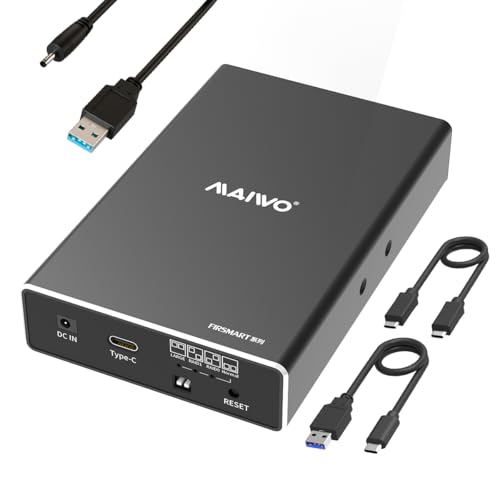
- RAID 0/1, JBOD, and Normal modes
- USB 3.1 Gen 2 up to 10Gbps
- Supports two 2.5-inch SATA drives
Best For: Portable mirrored storage with 2.5-inch drives
High-Capacity Desktop RAID
CENMATE Four-Bay RAID Enclosure with Cooling

- Four bays for 2.5- or 3.5-inch SATA drives
- RAID 0/1, Normal, and JBOD modes
- Up to 80TB with built-in cooling fans
Best For: Expandable desktop storage and personal or enterprise use
Flexible Multi-Mode RAID
CENMATE Four-Bay USB/eSATA RAID Enclosure
- Eight modes, including RAID 1, 5, and 10
- Supports four 2.5- or 3.5-inch SATA drives
- USB 3.0 and eSATA connectivity
Best For: Advanced desktop RAID configurations and high-capacity storage
Best Compact RAID DAS – QNAP TR-004
QNAP TR-004 4 Bay USB Type-C Direct Attached Storage (DAS) with hardware RAID (Diskless)
Check Price On AmazonThe QNAP TR-004 is a practical starting point for shoppers comparing RAID enclosures for data security. Its four drive bays, hardware RAID, lockable trays, and USB Type-C connection make it suitable for local backups and expandable desktop storage.
Best For: Home users, small offices, and QNAP NAS owners who need a compact, diskless direct-attached backup enclosure.
Pros:
- Supports RAID 0, 1, 5, JBOD, and individual-disk configurations.
- Lockable drive bays add physical access protection.
- Works with Windows, macOS, and Linux through USB Type-C.
- Can serve as external storage for NAS backups or NAS capacity expansion.
Cons:
- Drives are not included.
- It has compatibility limitations with certain older QNAP NAS models.
- The TR-004 cannot combine its storage pool or volume with the connected NAS.
With hardware RAID and a metal enclosure, the TR-004 offers a straightforward local-storage setup. Buyers should review the QNAP compatibility and migration limitations before using it as part of a NAS-based workflow.
Best Five-Bay Security-Focused RAID – ORICO 9858RU3
The ORICO five-bay enclosure stands out among RAID enclosures for data security with eight configuration modes, dual-backup support, locking protection, and room for up to five 3.5-inch SATA drives. It is designed for high-capacity desktop storage over USB 3.0.
Best For: Users managing large project files, video libraries, or backups who want flexible RAID options and five-drive capacity.
Pros:
- Supports RAID 0, 1, 3, 5, 10, JBOD, CLONE, and CLEAR modes.
- Accommodates up to five 22TB drives for a stated maximum of 110TB.
- Independent safety locking helps prevent unexpected drive removal.
- Aluminum construction, ventilation, and an 80mm cooling fan support sustained operation.
Cons:
- Drives are not included.
- Mode changes should be preceded by a data backup.
- USB 3.0 transfer is rated up to 5Gbps, rather than a faster USB standard.
The ORICO balances capacity, redundancy choices, and physical drive access controls. Its built-in 150W power supply and cooling design make it a compelling option for a busy desktop storage setup, provided users plan their RAID changes carefully.
Best USB-C Five-Bay RAID – Yottamaster PS500RC3
The Yottamaster PS500RC3 combines five-bay capacity with USB-C connectivity and multiple RAID choices, making it a versatile candidate among RAID enclosures for data security. It supports both 2.5-inch and 3.5-inch SATA drives and is rated for up to 110TB of storage.
Best For: Photographers, video editors, and businesses that need flexible direct-attached storage for large working files and backups.
Pros:
- Supports RAID 0, 1, 3, 5, 10, JBOD, and CLONE modes.
- Holds up to five SATA drives with a stated maximum of 110TB.
- Accepts both 2.5-inch and 3.5-inch SATA HDDs and SSDs.
- Aluminum construction and temperature-controlled fan aid cooling.
Cons:
- Drives are not included.
- New drives may need formatting and partitioning before use.
- Total drive power consumption must not exceed 78W for normal five-drive operation.
The PS500RC3 is a flexible choice when drive-size compatibility and USB-C convenience matter. Its power-consumption limit is important for buyers installing several high-power hard drives, but the RAID range and cooling features support demanding local-storage workflows.
Best Four-Bay Cooling System – MAIWO 4-Bay RAID Enclosure
The MAIWO four-bay enclosure offers broad RAID flexibility, USB-C transfer, and active cooling for shoppers evaluating RAID enclosures for data security. It supports up to four 3.5-inch SATA drives and provides LED indicators for monitoring disk status.
Best For: Professionals, businesses, and power users building a local backup, surveillance, workstation, or media-storage system.
Pros:
- Provides eight modes, including RAID 0, 1/10, 3, 5, Clone, Large/JBOD, and Normal.
- Supports up to four 24TB drives for a stated maximum of 96TB.
- USB-A/USB-C 3.1 connectivity offers transfer speeds up to 5Gbps.
- Two built-in fans help maintain drive temperatures during intensive use.
Cons:
- It is designed for 3.5-inch SATA drives rather than mixed 2.5-inch and 3.5-inch support.
- Drives are not included.
- The fans are controlled by an on/off switch rather than automatic temperature control.
The MAIWO emphasizes configuration choice and cooling in a relatively compact four-drive setup. Its 96TB ceiling and 5Gbps interface suit extensive local storage, while the manual fan switch gives users direct control over noise and airflow.
High-Capacity Choice – ORICO 4-Bay 20Gbps RAID Enclosure
For demanding raid enclosures for data security, the ORICO 4-bay enclosure combines multiple RAID configurations with a fast USB 3.2 Gen 2×2 connection. It supports up to four 3.5-inch SATA drives, with a stated total capacity of up to 104TB, making it suitable for large file libraries and professional workflows.
Best For: Video producers, enterprise IT teams, data-management professionals, and AI or research workloads needing high capacity and flexible RAID options.
Pros:
- Supports RAID 0, RAID 1, RAID 5, RAID 10, JBOD, and Normal modes.
- 20Gbps USB 3.2 Gen 2×2 connectivity, with USB4 support for the full interface speed.
- Supports four 3.5-inch SATA drives up to 26TB each, for up to 104TB total.
- Includes hot-swapping, aluminum construction, a low-noise fan, and a 150W built-in power supply.
Cons:
- Thunderbolt connections may limit storage bandwidth to about 10Gbps.
- Changing RAID modes erases drive contents, so backups are required before setup or reconfiguration.
- Its larger four-bay design is more than many basic desktop-storage users need.
This is the strongest option here for capacity, RAID flexibility, and high-throughput storage management. Confirm your host port and back up existing data before changing an array.
Portable RAID Pick – CineRAID CR-H218P Dual-Bay Enclosure
The CineRAID CR-H218P is a compact choice for raid enclosures for data security when you need mirrored or striped storage from two 2.5-inch SATA SSDs or HDDs. Its USB 3.1 Gen 2 interface supports up to 10Gbps, while the included TPU cover adds protection for portable use.
Best For: Gamers, laptop users, and creators who want a portable dual-drive enclosure with basic RAID functionality.
Pros:
- Supports RAID 0, RAID 1, JBOD, and Normal modes.
- USB 3.1 Gen 2 provides up to 10Gbps connectivity and works with USB 3.0 and 2.0.
- Supports two 2.5-inch drives, including drives up to 12.5mm thick.
- Compact aluminum enclosure with a protective gray TPU cover.
Cons:
- Only supports two 2.5-inch drives, limiting capacity compared with four-bay models.
- Bus-powered design may be less suitable for users needing a separate, high-capacity power supply.
- It offers fewer RAID modes than the ORICO four-bay option.
The CR-H218P favors portability over expansion. RAID 1 makes it a practical fit for users prioritizing a mirrored two-drive setup, while RAID 0 suits those seeking combined performance and capacity.
Simple DAS Alternative – CENMATE 4-Bay USB Enclosure
The CENMATE 4-bay enclosure is a straightforward direct-attached storage option for users comparing raid enclosures for data security but who do not need built-in RAID. It accepts 2.5- and 3.5-inch SATA drives, supports up to 80TB total, and connects through USB 3.0 at up to 5Gbps.
Best For: Individuals and businesses needing expandable, tool-free external storage without RAID or NAS management.
Pros:
- Holds four 2.5- or 3.5-inch SATA HDDs or SSDs.
- Supports up to 80TB total, based on up to 20TB per drive.
- Tool-free, hot-swappable design with USB-A and USB-C cables included.
- Aluminum construction, cooling fan, and dedicated 12V power adapter support stable operation.
Cons:
- It is explicitly a DAS enclosure with no RAID or NAS support.
- USB 3.0 limits transfer rates to up to 5Gbps.
- The fan is rated around 40–50 decibels, which may be noticeable in quiet spaces.
This model is best viewed as flexible external storage rather than a data-redundancy solution. Choose it if you plan to manage drive backups separately and value four bays, broad drive compatibility, and simple installation.
Compact RAID Security – MAIWO Dual-Bay 2.5-Inch RAID Enclosure
For users seeking compact raid enclosures for data security, the MAIWO dual-bay model supports RAID 1 mirroring alongside RAID 0, JBOD, and Normal modes. It accepts two 2.5-inch SATA SSDs or HDDs and connects over USB 3.1 Gen 2.
Best For: Portable two-drive storage setups using 2.5-inch SATA drives.
Pros:
- RAID 1 mirror mode supports a redundancy-focused setup.
- USB 3.1 Gen 2 offers transfer speeds up to 10Gbps in RAID 0 mode.
- Tool-free installation, hot swapping, and both USB Type-C to Type-A and Type-C cables are included.
- Supports up to 16TB total with two 8TB drives.
Cons:
- Only compatible with 2.5-inch SATA drives.
- An independent power connection is required.
- Drives are not included.
This is a practical choice when portability and fast USB connectivity matter more than large desktop-drive capacity. Its RAID 1 option adds a useful layer of drive-failure protection, though it should not replace a separate backup.
High-Capacity Desktop RAID – CENMATE Four-Bay RAID Enclosure with Cooling
This CENMATE enclosure is designed for larger desktop storage systems and supports both 2.5- and 3.5-inch SATA HDDs and SSDs. Among raid enclosures for data security, its RAID 1 mode, aluminum construction, and built-in cooling fans make it suited to higher-capacity personal or small-office storage.
Best For: Desktop users who need four drive bays and up to 80TB of installed capacity.
Pros:
- Supports RAID 0, RAID 1, Normal, and JBOD modes.
- Accepts four 2.5- or 3.5-inch SATA drives, up to 80TB total.
- Built-in fans and aluminum-alloy construction help with heat management.
- Includes USB A and USB C 3.0 connectivity with plug-and-play support for Windows, Mac, and Linux.
Cons:
- USB 3.0 transfer speeds are rated up to 5Gbps.
- Fan noise is approximately 40–50 decibels.
- Changing the RAID array requires resetting the unit and may cause data loss.
With four bays and broad drive-size compatibility, this model offers more expansion room than a portable dual-bay enclosure. Buyers should plan the RAID configuration carefully and accept the audible fan operation in exchange for active cooling.
Flexible Multi-Mode RAID – CENMATE Four-Bay USB/eSATA RAID Enclosure
For buyers comparing raid enclosures for data security and storage flexibility, this CENMATE four-bay enclosure offers eight selectable modes, including RAID 1, RAID 5, RAID 10, Clone, Large, and Normal. It supports 2.5- and 3.5-inch SATA drives and connects through USB 3.0 or eSATA.
Best For: Experienced users who need multiple RAID configurations and up to four SATA drives.
Pros:
- Provides RAID 0, 1, 3, 5, and 10, plus Clone, Large, and Normal modes.
- Supports up to 80TB using four drives rated up to 20TB each.
- Includes USB A/C 3.0 and eSATA cables for flexible connectivity.
- Aluminum construction, built-in fans, and a 12V power adapter support desktop operation.
Cons:
- Hot-swapping is not supported.
- RAID mode changes require a specific power-off, switch, and reset procedure and may result in data loss.
- Fan noise is approximately 40–50 decibels; eSATA multi-bay access depends on the computer’s RAID support.
This enclosure stands out for its unusually broad RAID selection, including RAID 5 and RAID 10. It is best suited to users comfortable following the configuration procedure and checking host-system compatibility before relying on the eSATA connection.
How We Picked These Raid Enclosures for Data Security
We focused on enclosures that support multiple SATA hard drives or SSDs and offer a practical way to build redundant or flexible external storage. The selection includes dual-bay, four-bay, and five-bay designs, covering entry-level backups, larger media libraries, workstation storage, and expandable home-server setups.
We also compared advertised RAID modes, USB connection speeds, drive-size compatibility, cooling features, tool-free installation, hot swapping, and maximum supported capacity. Because enclosure controllers vary, confirm the manufacturer’s RAID behavior and operating-system compatibility before moving an existing array or important data.
Quick Comparison
- Best for a straightforward four-drive DAS: QNAP TR-004.
- Best for compact mirrored storage: CR-H218P or the MAIWO dual-bay enclosure.
- Best for high-capacity multi-drive storage: the five-bay ORICO or Yottamaster models.
- Best for faster USB transfers: the ORICO 20Gbps four-bay enclosure or a 10Gbps dual-bay model.
- Best for flexible drive mixing: a four-bay enclosure that supports both 2.5-inch and 3.5-inch SATA drives.
Key Buying Factors for Raid Enclosures for Data Security
RAID Level and Redundancy
RAID 1 mirrors data across two drives and is usually the clearest choice for protecting important files from a single drive failure. RAID 5 can provide redundancy with three or more drives while preserving more usable capacity, but rebuilds can take time and place stress on the remaining disks. RAID 0 improves speed and combines capacity but provides no fault tolerance, so it should not be your only copy of important data. JBOD and independent-disk modes are useful when you want separate volumes.
Drive Compatibility and Capacity
Check whether the enclosure accepts 2.5-inch drives, 3.5-inch drives, or both. Verify the supported interface is SATA and compare the stated per-bay or total capacity with your planned disks. Mixing drive sizes may reduce usable capacity or limit available RAID configurations.
Connection Speed and Host Compatibility
USB 3.0 is sufficient for many backup tasks, while USB 3.1 Gen 2 and USB 3.2 Gen 2×2 can reduce transfer times when the computer also supports those standards. USB-C describes the connector, not necessarily the speed, so inspect the actual specification and included cables.
Cooling, Installation, and Maintenance
Fans help manage heat in multi-drive arrays, especially during long transfers or RAID rebuilds. Tool-free trays and hot-swap support make drive replacement easier, but hot swapping should only be used when the enclosure and operating system explicitly support it. A RAID enclosure is not a substitute for an independent backup.
Who Should Buy Which Raid Enclosures for Data Security?
Choose a dual-bay model if you need a compact mirrored backup for documents, photos, or a small workstation. A four-bay enclosure is a better fit for growing libraries, multiple backup targets, or RAID 5-style capacity. Choose a five-bay unit when you need more expansion room and can accommodate a larger desktop enclosure.
For data security, prioritize RAID 1 or RAID 5, drive health monitoring where available, active cooling, and a separate backup stored elsewhere. Speed-focused buyers should match the enclosure’s USB standard to the computer’s port; otherwise, a faster-rated enclosure may deliver little real-world benefit.