
Retro handhelds are more versatile when you can drop them onto a dock, charge them, and jump straight to the big screen without cable clutter. The best setups also keep your device upright, stable, and ready for quick play sessions.
This roundup focuses on retro handheld docking stations that balance compatibility, convenience, and desk-friendly design so you can choose the right fit for your handheld and your setup.
Best 10 Retro Handheld Docking Stations Picks for 2026
Feature-Rich Dock
7-in-1 Hub for Retroid Pocket 5
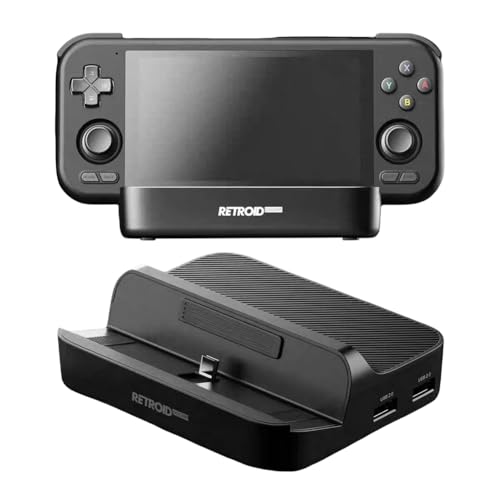
- HDMI, Ethernet, and multiple USB ports
- Works with RP5, RP4, RP4 Pro, and RP3+
- Can shift to charging-only in some setups
Best For: Retroid users who want a multiport dock for charging and connectivity
Portable TV Dock

- Detachable Core Drive keeps it pocket-size
- Works with Switch, phones, and laptops
- Case-friendly design for easy docking
Best For: Travel-friendly docking and simple TV-out setups
Precision Display Stand

- Custom fit for Retroid Pocket 4/4 Pro
- Charges while the handheld stays docked
- Supports JCSFY grips without removal
Best For: Players who want a stable charging stand with a clean desk footprint
Cooling Performance Dock

- Liquid cooling targets overheating and throttling
- Smart controls manage pump, fan, and RGB settings
- Built for the Onexfly Apex handheld PC
Best For: Hardcore Apex owners who need sustained cooling under heavy loads
Minimal Charging Dock
RP5 Display Stand With Charging Space

- Fits Retroid Pocket 5
- Charging space built in
- No assembly required
Best For: RP5 owners who want a simple upright charging stand
Compact Play Dock

- Direct USB-C charging
- Compact stable desktop design
- Six PLA color options
Best For: RP5 owners who want a compact everyday charging stand
Magnetic Charging Stand

- Magnetic charging cable simplifies dock-in charging.
- Acts as a desktop stand when not in use.
- 3D printed PLA body includes heat-insulating liner.
Best For: Miyoo Mini Plus owners who want tidy charging and desk storage
Feature-Rich Dock – 7-in-1 Hub for Retroid Pocket 5
If you’re comparing retro handheld docking stations and want one that does more than just charge, this 7-in-1 option is built around connectivity. It adds HDMI output, Gigabit Ethernet, and multiple USB ports, making it a practical dock for play, charging, and desktop-style use with compatible Retroid devices.
Best For: Retroid Pocket 5, RP4, RP4 Pro, and RP3+ owners who want a dock with display output and wired connectivity.
Pros:
- Includes 1 PD charging port, 1 4K@60 HDMI-compatible port, and 1 Gigabit Ethernet port.
- Offers 2 USB 3.0 and 2 USB 2.0 ports for accessories and data transfer.
- Compatible with Retroid Pocket 5, RP4, RP4 Pro, and RP3+.
- Can simplify charging when external power is connected.
Cons:
- RP3+ use is limited to charging-only behavior in some power setups.
- USB 3.0 ports downgrade to USB 2.0 for RP3+.
- Function switching may be less convenient if you want all ports active at once.
For buyers who want a versatile dock rather than a basic stand, this model stands out for its broad port selection. Its strengths are clearly in expansion and convenience, though RP3+ owners should pay close attention to the usage notes.
Portable TV Dock – Compact Jumpgate Hub
Among retro handheld docking stations, this portable hub is aimed at users who want a much smaller dock without giving up useful output options. The detachable Core Drive keeps the footprint pocket-sized, and the design works with Nintendo Switch, compatible smartphones, and laptops for flexible TV-out use.
Best For: Switch owners and mobile users who want a compact, case-friendly dock for TV output and basic hub duties.
Pros:
- Portable design with a detachable mini adapter.
- Smaller than the official Nintendo Switch dock.
- Compatible with many protective cases, so you may not need to remove the case.
- Works with Nintendo Switch, smartphones, and laptops.
Cons:
- AC adapter is sold separately.
- Only 2 USB ports are listed.
- USB hub functionality is more limited than larger docks.
This is a good pick if portability matters more than maximum expansion. It keeps the setup simple and travel-friendly while still covering the basics for TV-out and accessory connections.
Precision Display Stand – Retroid Pocket 4 Dock
Charging Dock for Retroid Pocket 4/4 Pro | Gaming Stand with Shelf Unit by JCSFY
Check Price On AmazonIf you want retro handheld docking stations that focus on stability instead of extra ports, this Retroid Pocket 4/4 Pro stand is a straightforward fit. It is designed to hold the device securely, allow charging while docked, and support JCSFY grips without forcing you to remove them.
Best For: Retroid Pocket 4 and 4 Pro owners who want a clean, secure charging stand.
Pros:
- Custom-designed fit for the Retroid Pocket 4 and 4 Pro.
- Built-in charger clearance lets you charge while docked.
- Compatible with all JCSFY grips.
- Minimalist look suits a desk or display setup.
Cons:
- No extra ports or media output are listed.
- Branding is inconsistent in the supplied details.
- PLA construction may feel more like a stand than a premium dock.
This is best viewed as a purpose-built stand rather than a full hub. For users who mainly want a tidy place to dock and charge, its simple design is the main advantage.
Cooling Performance Dock – Liquid-Cooled Apex Stand
This is a very different entry in the retro handheld docking stations category: instead of focusing on ports, it is built to manage heat on a high-performance handheld PC. The liquid cooling dock is designed to reduce throttling, keep performance stable during demanding gaming, and run more quietly than traditional air cooling.
Best For: Onexfly Apex owners who want aggressive thermal management for long, demanding gaming sessions.
Pros:
- Liquid cooling is designed to reduce overheating and throttling.
- CNC-machined aluminum alloy build emphasizes precision and durability.
- Smart controls can adjust pump speed, fan curves, and RGB lighting.
- Low-noise design aims for quieter gameplay.
Cons:
- Made specifically for the Onexfly Apex 8-inch handheld PC.
- Not a general-purpose dock for common retro handhelds.
- Focused on cooling rather than charging or connectivity expansion.
If your priority is sustained performance instead of accessory support, this dock is all about thermal control. It makes the most sense for users who push their handheld PC hard and want a more advanced cooling solution.
Minimal Charging Dock – RP5 Display Stand With Charging Space
If you want a simple add-on for retro handheld docking stations, this RP5 stand is built around a clean desktop setup for the Retroid Pocket 5. It keeps the handheld upright, adds a charging space, and uses a non-slip base plus a no-assembly design for quick placement on a desk or shelf.
Best For: Retroid Pocket 5 owners who want a compact display stand with charging support and a straightforward setup.
Pros:
- Compatible with the Retroid Pocket 5
- Includes charging space for convenient desktop use
- No assembly required for fast setup
- Non-slip feet help keep the stand steady
Cons:
- Designed for a single device type
- Plastic enclosure may feel basic compared with premium docks
This is a practical choice if you mainly want a stable way to park and charge your RP5 without extra complexity. The JCSFY grip compatibility and compact black design make it a simple desk companion rather than a multiport hub.
Retro Workstation Dock – Mac Mini M4 Hub With Built-In Display
For buyers comparing retro handheld docking stations styles with a desktop upgrade mindset, this Mac mini dock goes much bigger in scope. It combines a 5-inch HD display, multi-port connectivity, and an M.2 NVMe SSD enclosure in a classic Macintosh-inspired shell, making it a space-saving hub for a busy desk.
Best For: Mac mini M4 users who want a retro-looking dock with extra display, storage, and connectivity.
Pros:
- Built-in 5-inch 1280×720 HD display for quick information viewing
- Includes M.2 NVMe SSD enclosure supporting up to 8TB
- Offers 10Gbps USB-C, USB-A, card readers, HDMI-in, and audio jack
- Slide-in design helps reduce cable clutter and save desk space
Cons:
- Made for Mac mini M4 rather than handheld consoles
- Higher complexity may be more than basic dock users need
This is less of a simple stand and more of a full desktop hub with retro styling. If you want storage expansion and broad I/O in one unit, it brings a lot of functionality to a compact footprint.
Compact Play Dock – RP5 USB-C Charging Stand
This compact option is a straightforward pick among retro handheld docking stations for the Retroid Pocket 5. It uses a direct USB-C connector so the console can charge while sitting upright, and its low-profile PLA body is meant to stay stable on a desk, nightstand, or gaming station.
Best For: Retroid Pocket 5 users who want a small, stable charging stand for everyday desk use.
Pros:
- Direct USB-C connection supports charging and play
- Compact, low-profile shape saves desk space
- Stable design helps prevent tipping
- Available in six PLA color options
Cons:
- Only one USB port and one-device compatibility
- No added hub features or multiport expansion
If you just need a tidy place to dock and charge the RP5, this stand keeps things focused and simple. It is best viewed as a compact charging base rather than an all-in-one accessory.
Magnetic Charging Stand – Miyoo Mini Plus Charging Dock
If you want a cleaner way to power up one of the most popular retro handheld docking stations, this Miyoo Mini Plus charging dock keeps the setup simple. It uses a magnetic charging cable and a stand-style base so you can drop the console in place instead of repeatedly plugging and unplugging a cable.
Best For: Miyoo Mini Plus owners who want a tidy charging setup that also works as desktop storage.
Pros:
- Magnetic alignment makes charging easier and faster to set up.
- Works as a desktop display stand when the console is not charging.
- 3D printed PLA construction with a 3M sponge liner for added heat insulation.
- Compact size keeps your desk looking neat and organized.
Cons:
- Made specifically for the Miyoo Mini Plus, so it is not broadly universal.
- Plastic build may feel less premium than molded accessories.
As a practical dock, it focuses on convenience and cable cleanup rather than extra features. If your goal is a simple charging base that doubles as a display stand, this is a well-matched retro handheld accessory.
Retro Console Hub – Blue 3-in-1 USB-C Dock
This retro handheld docking stations-style USB-C hub is a compact way to add display, charging, and data ports in one small accessory. It combines 4K HDMI output, 100W PD pass-through charging, and a USB 3.0 port, with a game-console-inspired shell that is more about desktop flair than emulation.
Best For: Laptop, tablet, phone, or handheld gaming device users who need a small 3-in-1 USB-C hub with a retro look.
Pros:
- Offers HDMI video, USB 3.0 data, and PD charging in one compact unit.
- Supports up to 4K@60Hz output with compatible host devices.
- 100W PD pass-through helps keep devices powered while in use.
- Portable, game-inspired design is easy to carry and looks fun on a desk.
Cons:
- Requires a USB-C host that supports video output or DisplayPort Alt Mode.
- Decorative screen and buttons are not functional controls.
- Actual performance depends on your charger, cable, and connected device.
This is a useful pick if you want a travel-friendly docking-style adapter with broader device support than a console-specific stand. The retro styling is a nice bonus, but the real value is in the simple 3-in-1 expansion.
Best Simple Pick – Yellow 3-in-1 USB-C Dock
Among retro handheld docking stations and desk accessories, this yellow USB-C hub is built for users who want the same 3-in-1 function in a brighter finish. It turns one compatible USB-C port into HDMI output, USB 3.0 data, and USB-C PD charging while keeping the footprint small enough for a bag or laptop sleeve.
Best For: Anyone who wants the same compact 3-in-1 USB-C dock in a yellow retro-console style.
Pros:
- Combines 4K@60Hz HDMI, USB 3.0 data, and 100W PD pass-through.
- Compact body is easy to carry between home, office, or travel setups.
- Retro game-console styling adds a distinctive desk look.
- Works with compatible laptops, tablets, phones, and handheld gaming devices.
Cons:
- Requires USB-C video support on the host device.
- The screen and buttons are decorative only.
- Charging and display performance depend on the connected gear.
If you want the same feature set as the blue version but prefer a more eye-catching color, this is the straightforward choice. It is a practical compact dock first, with the retro design serving as the visual hook.
How We Picked the Best Retro Handheld Docking Stations
We prioritized docks that solve the most common handheld pain points: reliable charging, stable support, simple TV or monitor output, and practical port layouts. Compatibility matters most, so we looked for models aimed at popular handhelds as well as USB-C hubs that work across multiple devices.
We also weighed build quality, footprint, and whether a dock is better suited to a permanent desk setup or a more portable travel kit. Features like HDMI support, USB expansion, and card readers can add value, but only if they fit the way you actually use your handheld.
Quick Comparison: What Each Type Does Best
There are three main styles in this roundup. Device-specific charging cradles are usually the simplest and cleanest-looking choice. Multiport USB-C hubs are the most flexible if you want one dock for several devices. Larger desktop dock stations with added storage or displays are better for users who want a more complete station rather than just a charging base.
Best for Simple Charging
If you mainly want a neat place to charge and display your handheld, a compact dock with the correct fit is usually enough.
Best for TV Play
If you plan to connect to a monitor or television often, focus on HDMI support, power delivery, and stable video output.
Best for Multipurpose Setups
If you want to connect accessories, storage, or multiple peripherals, choose a hub-style dock with the right mix of ports.
Key Buying Factors for Retro Handheld Docking Stations
Compatibility: The biggest factor is whether the dock is made for your exact handheld or uses a standard USB-C connection. A device-specific dock may fit better, while a universal hub may offer more flexibility.
Power delivery: Look for enough wattage to charge your handheld while playing or outputting video. Underpowered docks can be inconvenient or unreliable.
Video output: If you want docked gaming on a display, confirm HDMI support and check the resolution and refresh rate. For most buyers, stable 1080p or 4K support is more than enough.
Port selection: Extra USB ports can help with controllers, storage, or accessories. If you need only charging, don’t pay for ports you won’t use.
Stability and size: A dock should hold your device securely without wobble, especially if you remove and replace it often. Small desks may benefit from compact vertical designs.
Who Should Buy Which Retro Handheld Docking Stations?
Buy a device-specific dock if you own one handheld and want the cleanest fit, easiest charging, and a dedicated place on your desk.
Buy a USB-C hub dock if you use multiple devices, want HDMI output, or need extra ports for accessories and storage.
Buy a premium station if you want a more complete desktop setup with expanded functionality, even if it takes up more space.
For most shoppers, the best Retro Handheld Docking Stations are the ones that match your exact handheld, power needs, and how often you actually play docked versus handheld. Choose the simplest option that covers your daily routine, and you’ll get the best mix of convenience and value.