
Robot arms for hobbyists can turn a desk into a practical robotics lab, whether you want to learn coding, test automation ideas, or build a standout STEM project.
This roundup focuses on approachable kits with useful features like app control, bus servos, open-source support, and expandable platforms.
Best 10 Robot Arms for Hobbyists Picks for 2026
Open-Source Wireless Learner

- Python and Arduino support
- WiFi, Bluetooth, and ESP32 control
- Sensor ports for expansion
Best For: Hobbyists who want open-source learning and wireless control
DIY Mechanical Builder
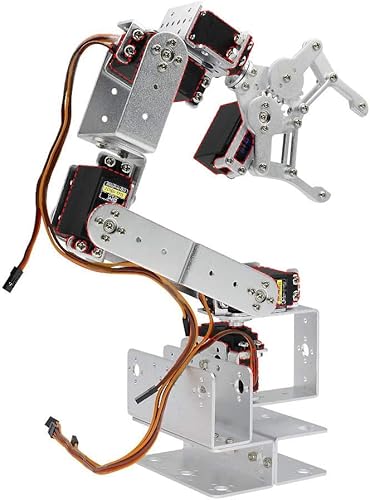
- 6DOF aluminum mechanical build
- No soldering required
- Servos sold separately
Best For: Builders who want to choose their own servos
Memory Motion Starter

- 4-axis beginner-friendly design
- Records and repeats up to 170 actions
- Tutorials and support included
Best For: Beginners who want an easy DIY arm with motion replay
Wireless Expansion Pick
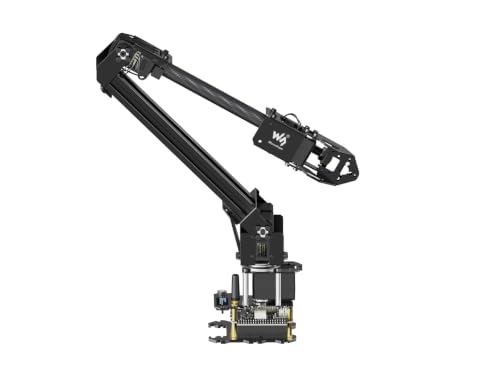
- ESP32 wireless control
- Open-source with ROS2 support
- Expansion plate for custom tooling
Best For: Makers who want open-source control and expansion
Open-Source Starter Pick

- Arduino-compatible and open source
- App control plus knob-based operation
- Sensor ports for expansion projects
Best For: Hobbyists who want an expandable beginner-to-intermediate Arduino arm
Most Versatile Desktop Kit

- 6DOF desktop arm with 6 digital servos
- PC, app, mouse, and handle control
- Metal build with tutorials included
Best For: Hobbyists and students who want a sturdy, multi-control desktop kit
Expandable Standard Build

- Includes sensor modules in the standard kit
- Arduino-compatible and open source
- App control with knob and offline editing
Best For: Hobbyists who want the fuller miniArm package for sensor projects
Starter Build for Coding Practice
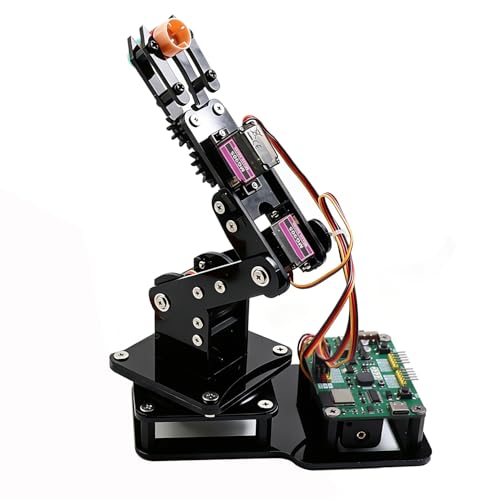
- Pre-programmed ESP32-C3 board for quick start
- Joystick and web app control with no app install
- Motion record and loop playback for simple automation
Best For: Beginners and teens learning robotics and coding
Heavy-Duty Desktop Performer
Hiwonder xArm1S 6DOF Metal Arm
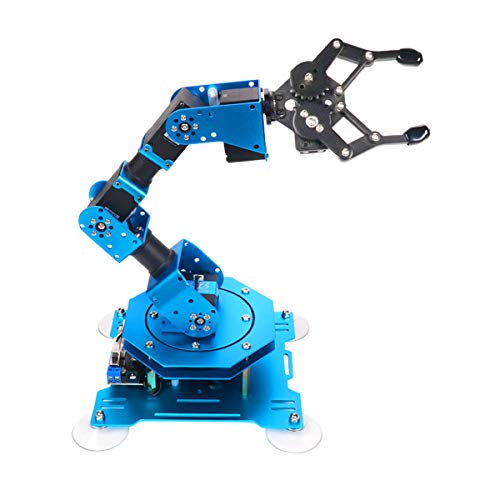
- Full-metal 6DOF desktop build with stable base
- Intelligent servos add feedback for position, voltage, and temperature
- Supports PC, app, mouse, and wireless controller control
Best For: Hobbyists wanting a sturdier 6-axis learning platform
Most Expandable Open-Source Pick
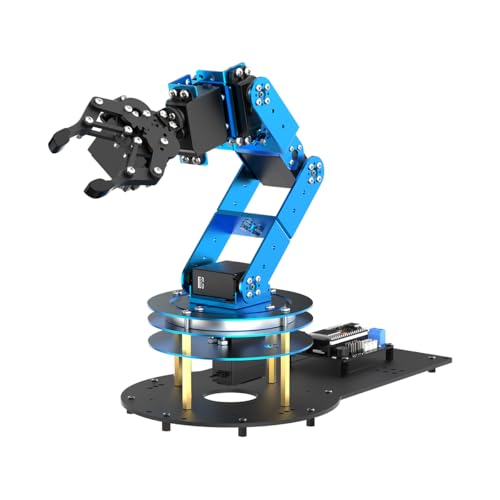
- ESP32 and Arduino-compatible open-source platform
- Inverse kinematics with 6 smart PWM servos
- 200+ tutorials plus sensor expansion support
Best For: Advanced makers focused on upgrades and experimentation
Open-Source Wireless Learner – MaxArm Robotic Arm Kit
If you’re comparing robot arms for hobbyists, the LewanSoul MaxArm stands out as a feature-rich starter kit for learning programming and robotics on a desktop. Its link mechanism and inverse kinematics help the end effector move along the x, y, and z axes, while Python, Arduino, app, PC, wireless controller, and mouse control give you plenty of ways to experiment.
Best For: Hobbyists who want an open-source, expandable arm with wireless control and strong programming flexibility.
Pros:
- Supports Python and Arduino for cross-platform learning and control.
- Includes WiFi and Bluetooth on an ESP32-based open-source controller.
- Reserves many sensor ports for expansion and secondary development.
- Uses precision bus servos for accurate movement and heavier payloads.
Cons:
- Geared more toward learning and development than simple plug-and-play use.
- Requires programming interest to take full advantage of its features.
The MaxArm is a strong pick if you want a hobby robot arm that can grow with your skills. It offers a lot of room for coding, wireless projects, and add-on sensors without feeling like a closed system.
DIY Mechanical Builder – ROT3U Aluminium Robot Arm Kit
For hobbyists who enjoy assembling their own robot arms for hobbyists projects, the diymore ROT3U is a bare mechanical kit that focuses on structure rather than electronics. It uses an aluminum build with a 6DOF layout, 355mm radius of gyration, and 180-degree rotation angle, but it ships without servos, so you can choose the motors that fit your build.
Best For: Builders who want a hands-on mechanical arm kit and prefer selecting their own servos.
Pros:
- 6DOF aluminum design for a more advanced mechanical build.
- No soldering required for assembly.
- Lets you choose servos, with MG996R suggested for higher-force joints.
- Compact industrial-style arm with substantial reach for a kit.
Cons:
- Does not include servos, so you must source those separately.
- Assembly help may be needed if the guide/manual is missing.
This is a better fit for hobbyists who like customizing the full motion stack themselves. It’s less of an out-of-the-box robot and more of a mechanical foundation for a personal project.
Memory Motion Starter – Arduino Robot Arm Kit
If you want robot arms for hobbyists that are easy to learn on, this Arduino-compatible kit is built around step-by-step assembly and programming support. The 4-axis arm can grab objects in different directions, and the memory function can record up to 170 actions and repeat them, which makes it useful for experimenting with basic automation.
Best For: Beginners, teens, and adults who want a small DIY arm with repeat-action learning features.
Pros:
- Includes tutorials and support to help with building and programming.
- 4-axis design can open and rotate through multiple directions.
- Can record up to 170 actions and replay them.
- Designed as a beginner-friendly educational kit.
Cons:
- Requires two batteries, which are not included.
- Smaller acrylic build may be less robust than aluminum kits.
This kit is a practical entry point if you want to learn by assembling and programming a simple arm. The repeat-motion feature adds a fun automation angle without making the project overly complex.
Wireless Expansion Pick – RoArm-M2-S Robotic Arm Kit
For hobbyists looking at robot arms for hobbyists with a stronger development focus, the Waveshare RoArm-M2-S combines a 4-DOF layout with ESP32-based wireless control and open-source support. It includes a user-friendly WEB app, rich tutorials, ROS2 compatibility, and an expansion plate for custom end-of-arm tooling, making it a flexible desktop platform for experimentation.
Best For: Makers who want wireless control, open-source development, and expansion options.
Pros:
- Open-source control code and communication interface documents.
- Supports multiple wireless control modes with an onboard ESP32.
- Comes with a WEB app, tutorials, and ROS2 compatibility.
- Lightweight design with expandable end-of-arm tooling support.
Cons:
- 4-DOF design may be less versatile than higher-DOF arms for some tasks.
- Payload is limited to 0.5kg at 0.5m, so it suits lighter projects.
The RoArm-M2-S is a smart choice if you care about software, connectivity, and future expansion as much as the hardware itself. It’s especially appealing for hobbyists who want a wireless, development-ready desktop arm.
Open-Source Starter Pick – miniArm Starter Kit
If you’re comparing robot arms for hobbyists and want a kit that supports real learning, the miniArm Starter Kit is built around Arduino-compatible, open-source programming. It adds practical hardware like a Bluetooth module, a 6-channel knob controller, and expansion ports for sensors, making it a flexible choice for coding, control experiments, and secondary development.
Best For: Hobbyists who want an open-source Arduino robot arm with room to expand using sensors and app control.
Pros:
- Arduino-compatible Atmega328 platform with open-source programs and tutorials
- Supports app control, knob potentiometers, and offline action editing
- Includes high-precision digital servos and Bluetooth connectivity
- Expansion ports support sensor add-ons like ESP32 Cam, touch, and ultrasonic modules
Cons:
- Starter kit version does not include the sensor modules listed in the standard kit
- Best suited to users comfortable with programming and development
- Designed for adult hobbyists rather than casual toy use
The miniArm Starter Kit is a strong pick if you want a hands-on project arm that goes beyond basic movement. Its open platform and sensor expansion options make it especially appealing for hobbyists planning to tinker, learn, and build custom robotics projects.
Most Versatile Desktop Kit – LeArm 6DOF Robot Arm
For robot arms for hobbyists who want a desktop kit with multiple control options, the LeArm 6DOF is built for hands-on assembly, graphical programming, and creative demonstrations. It combines 6 digital servos, a metal bracket structure, and included tutorials, so it fits well if you want a project that is practical to build and easy to start controlling.
Best For: Hobbyists, students, and robotics learners who want a sturdy 6DOF desktop arm with flexible control methods.
Pros:
- 6DOF desktop arm with 6 high-quality digital servos
- Supports PC, app, mouse, and wireless handle control
- Metal structure with stable base and industrial-grade bearings
- Includes easy tutorials and simple programming software
Cons:
- Requires assembly, so it is better for users who enjoy building kits
- Powered by an AC adapter rather than batteries
- Bulkier desktop footprint than smaller hobby arm kits
LeArm stands out as a versatile choice when you want a robot arm that can handle both learning and creative use. The control variety and sturdy build make it especially appealing for hobbyists who want a reliable tabletop platform for experimentation.
Expandable Standard Build – miniArm Standard Kit
If you want robot arms for hobbyists with a bit more out-of-box capability, the miniArm Standard Kit keeps the same open-source Arduino foundation while adding the standard kit’s included accessories. It is aimed at users who want a programmable aluminum arm with sensor expansion potential and a more complete starting package for experimentation.
Best For: Hobbyists who want an open-source Arduino arm with the included standard kit accessories and room for sensor-based projects.
Pros:
- Arduino-compatible Atmega328 platform with open-source programs and tutorials
- Standard kit includes add-ons such as glowing ultrasonic sensor, touch sensor, acceleration sensor, and ESP32Cam module
- Supports app control, knob potentiometers, and offline action editing
- High-precision digital servos and multiple expansion ports for secondary development
Cons:
- More advanced than a simple plug-and-play robot arm
- Designed for users interested in programming and development work
- Aluminum build and education focus make it less of a casual tabletop toy
The Standard Kit is the better pick if you want the miniArm platform with more included components right away. It is still very much a hobbyist robot arm, but the extra sensor package makes it easier to explore more advanced projects sooner.
Starter Build for Coding Practice – Smart 4DOF ESP32 Robot Arm
If you want robot arms for hobbyists that are approachable, hands-on, and easy to experiment with, this 4DOF ESP32 kit is built for just that. It comes pre-programmed for immediate use, supports both joystick control and a web app, and adds motion recording with loop playback for simple automation demos.
Best For: Beginners, teens, and DIY makers who want a starter robot arm for coding and tabletop robotics projects.
Pros:
- Pre-programmed ESP32-C3 board lets you start using it right away.
- Dual control modes: included joysticks or web app, with no app installation needed.
- Motion record and loop playback make it useful for learning sequences and basic automation.
- Supports Arduino and MicroPython, plus open-source code and tutorials.
Cons:
- Batteries are not included.
- 4DOF design is more limited than larger 6DOF desktop arms.
- Best suited to lightweight objects only.
This is a practical entry point if you want a hobby robot arm that mixes building, control, and coding without a steep setup process. Its flexibility and learning focus make it a strong pick for home labs and STEM projects.
Heavy-Duty Desktop Performer – Hiwonder xArm1S 6DOF Metal Arm
For robot arms for hobbyists who want a more advanced desktop build, the Hiwonder xArm1S offers a full-metal 6DOF platform with strong servo feedback and multiple control options. It is designed for grasping, object transport, custom actions, and graphical programming, making it a capable choice for experimentation and STEM learning.
Best For: Makers and students who want a stable 6-axis robot arm with richer control and programming options.
Pros:
- 6DOF full-metal construction with aluminum alloy bracket and industrial-grade bearings.
- High-precision intelligent servos provide position, voltage, and temperature feedback.
- Supports PC, phone app, mouse, and wireless controller input.
- Can grasp objects up to 500g, giving it more practical handling ability.
Cons:
- More complex and larger than beginner-focused robot arm kits.
- Requires a bigger commitment for setup and learning than simpler 4DOF models.
- Metal desktop build is less portable than lightweight kits.
This model stands out when you want a sturdier platform with more degrees of freedom and broader control methods. It is a better fit for hobbyists who are ready to move beyond entry-level motion and into more ambitious coding and manipulation projects.
Most Expandable Open-Source Pick – LeArm 6DOF Arduino Robot Arm
If your goal is to explore robot arms for hobbyists with room to grow, the LeArm Open Source kit is built around expandability, tutorials, and programming depth. Its ESP32 controller, Arduino compatibility, inverse kinematics, and sensor support make it especially attractive for makers who want to tinker beyond basic arm movement.
Best For: Advanced hobbyists, students, and makers who want an open-source robot arm for programming, experiments, and upgrades.
Pros:
- ESP32-based and fully compatible with Arduino programming.
- 6 smart PWM servos and inverse kinematics help deliver smooth, precise motion.
- Multiple control options: app, PC software, and wireless controller.
- Extensive learning support with 200+ tutorials, sample experiments, and open-source code.
Cons:
- More advanced feature set may be overkill for casual beginners.
- Best suited to users who want to spend time on programming and expansion.
- Rechargeable battery is included in the platform, but overall build is more involved than simple plug-and-play kits.
LeArm is the most flexibility-focused option here, especially if you care about upgrades, sensor add-ons, and open-source experimentation. It is a strong choice for serious hobby projects, classroom builds, and creative development work.
How We Picked These Robot Arms for Hobbyists
We looked for kits that offer a strong mix of build quality, learning value, control options, and beginner friendliness. For Robot Arms for Hobbyists, that usually means clear documentation, accessible programming support, and parts that are realistic to assemble without specialized workshop tools.
We also favored models with multiple control paths, such as Arduino, ESP32, Python, MicroPython, app control, or PC software, because those make it easier to start simple and grow into more advanced projects.
Quick Comparison: What Matters Most
In practice, the biggest differences come down to degrees of freedom, servo type, and control ecosystem. A 4-DOF arm is often easier to learn with and smaller on a desk. A 5DOF or 6DOF arm usually gives you more natural motion, better reach, and more interesting programming challenges.
Bus servo designs and full-metal frames tend to feel more robust, while lighter educational kits may be more affordable and easier for first-time builders. If you want experimentation, open-source support and expansion options matter more than raw lifting strength.
Key Buying Factors for Robot Arms for Hobbyists
Degrees of Freedom
More joints generally mean more realistic movement and more programming possibilities. If your goal is simple learning, 4-DOF may be enough. If you want smoother positioning, pick 5DOF or 6DOF.
Control and Programming Support
Check whether the kit works with Arduino, Python, ESP32, or MicroPython, and whether it includes app or PC software control. The best choice depends on whether you want visual control first or code-first learning.
Assembly Difficulty
Some Robot Arms for Hobbyists ship as near-complete kits, while others require full assembly. Choose based on your patience and experience level. No-solder or simplified builds are better for beginners.
Materials and Servos
Metal frames can improve durability, and bus servos can deliver smoother, more coordinated motion. For lighter desk use and education, standard servo-based kits can still be a smart value.
Expansion and Tutorials
Good tutorials, open-source files, and upgrade paths add long-term value. These features matter if you want to move beyond basic pick-and-place tasks into automation, scripting, or custom end effectors.
Who Should Buy Which Robot Arms for Hobbyists?
Beginners and teens should lean toward simpler kits with guided tutorials, app control, and straightforward assembly. Makers who already code may prefer ESP32, Arduino, or Python-compatible arms for deeper customization.
If you want a durable desktop platform for experimentation, look for 5DOF or 6DOF models with stronger construction and broader software support. If you mainly want an affordable learning project, a compact 4-DOF arm can be the best starting point.
In short, the right choice depends on whether you value ease of use, programming flexibility, or mechanical capability most. Match the arm to your learning goals, workspace, and comfort level, and you’ll get far more from the build.