
Robot arms for indoor use can be a fun way to learn coding, robotics, and automation without needing a large workspace. The best options balance control, build quality, and ease of setup for your skill level.
Whether you want a beginner-friendly STEM kit, a desktop project arm, or an advanced open-source platform, this roundup helps you choose a model that fits your space and goals.
Best 10 Robot Arms for Indoor Use Picks for 2026
Desktop Learning Arm
LewanSoul LeArm 6DOF Programming Kit

- 6DOF desktop arm for grasping and custom actions
- PC, app, mouse, and wireless handle control
- Metal build with anti-stall protection and tutorials
Best For: Beginners, students, and hobbyists learning robotics indoors
Wooden STEM Builder
Robot Arm Kits for Kids and Teens

- Teaches circuits, movement, and STEM basics
- Wood build with motors, PCB board, and wires
- No soldering required; batteries not included
Best For: Kids, teens, and families wanting a hands-on indoor STEM project
AI Research Arm

- Full-metal 6-axis arm with AI vision tools
- Open-source platform for imitation learning and VLA work
- PC, app, remote, Arduino, and voice control support
Best For: Advanced robotics users, educators, and AI lab projects indoors
Modular STEM Arm Car
ACEBOTT 4-in-1 Smart Robot Kit

- 5DOF programmable arm plus tank car modules
- Compatible with Arduino and Scratch
- App and IR remote control with guided tutorials
Best For: Kids and teens wanting a modular indoor robotics build
Heavy-Duty DIY Build
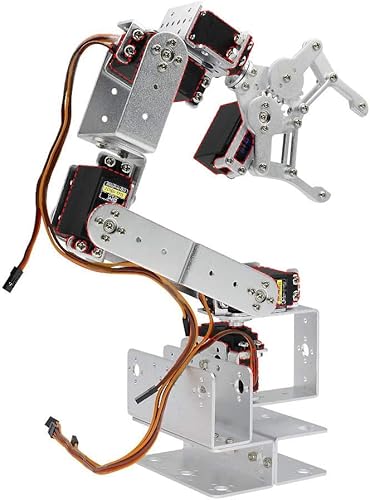
- Aluminum kit with a 460mm height
- 6DOF layout and 180-degree rotation
- Servos not included; assembly required
Best For: DIY indoor builders who want a larger custom robot arm
Learning Starter

- Includes tutorials for assembly and programming
- Records up to 170 actions and repeats them
- Small 4-axis acrylic desktop kit
Best For: Beginners and students learning robotics indoors
Advanced Desktop Platform
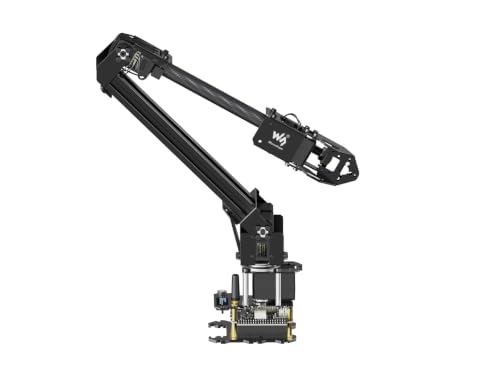
- ESP32-based kit with wireless control modes
- Open-source docs support secondary development
- 0.5kg payload at 0.5m with 360-degree base
Best For: Advanced indoor makers and prototyping setups
Open-Source STEM Pick
Arduino 5DOF miniArm Starter Kit

- Arduino-compatible on the Atmega328 platform
- Open-source code with tutorials and examples
- App control plus knob-based manual editing
Best For: Teens and adults learning indoor robotics and sensor expansion
Easy Indoor Builder
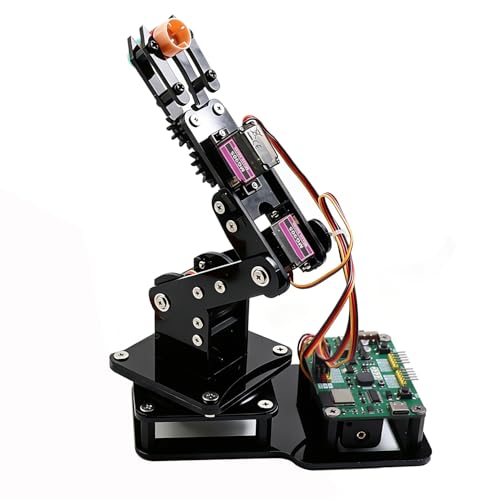
- Pre-programmed ESP32-C3 board
- Joystick and web app control
- Record-and-loop motion playback
Best For: Beginners and STEAM learners wanting easy indoor control
Advanced Research Platform

- Fully assembled with gripper included
- Python SDK plus ROS1/ROS2 compatibility
- Up to 1.5kg payload and 767mm reach
Best For: Researchers and advanced makers building indoor robotics projects
Desktop Learning Arm – LewanSoul LeArm 6DOF Programming Kit
If you want robot arms for indoor use that focus on hands-on learning, the LewanSoul LeArm is built as a desktop 6DOF kit with PC, app, mouse, and wireless handle control. It is geared toward creative projects, object transport, custom actions, and beginner-friendly robotics practice, with tutorials and simple programming software included.
Best For: Students, hobbyists, and beginners who want a stable indoor robot arm for learning robotics and programming.
Pros:
- 6DOF desktop arm supports grasping, transport, and custom actions
- Multiple control options: PC, app, mouse, and wireless handle
- Metal bracket structure with high-torque base and industrial-grade bearings
- Anti-stall protection and gear clutches help extend servo life
Cons:
- Designed as an educational kit, so assembly and setup are part of the experience
- Needs an AC adapter; batteries are not required
Overall, this is a solid indoor robot arm if your priority is learning, controlled movement, and a sturdy tabletop build rather than advanced AI features.
Wooden STEM Builder – Robot Arm Kits for Kids and Teens
For families comparing robot arms for indoor use, this wooden STEM kit is aimed at hands-on building and basic electronics learning. It includes motors, PCB microcontroller boards, and wires, and it is designed to teach how circuits work while giving kids and teens a challenging assembly project.
Best For: Kids, teens, and beginners who want an indoor robot arm project focused on building, circuits, and STEM learning.
Pros:
- Teaches basic circuits and mechanical movement through assembly
- No soldering required and includes all needed accessories
- Wood construction offers a hands-on, puzzle-like build
- Suitable for a wide age range, from kids to adults
Cons:
- Requires 6 AA batteries, which are not included
- More of a science project than a powered smart arm
This kit makes sense if you want an indoor robotics activity that blends building, problem-solving, and early engineering concepts into one project.
AI Research Arm – Hiwonder NexArm Standard Kit
If you need robot arms for indoor use with more advanced capabilities, the Hiwonder NexArm is aimed at embodied AI, imitation learning, and programming work. It combines a full-metal 6-axis arm with magnetic encoder servos, AI vision tools, voice interaction, and open-source support for developers and university labs.
Best For: Advanced users, educators, and lab teams working on AI, robotics programming, and imitation learning indoors.
Pros:
- Full-metal 6-axis arm with 500mm reach and 500g payload
- Magnetic encoder servos and curve smoothing for precise, smooth motion
- Includes AI vision features, voice control, and hand-eye coordinated grasping
- Open-source support with PC, app, remote, and Arduino control options
Cons:
- Built for advanced learning, so it may be more complex than beginner kits
- Geared toward adult and university-level use rather than casual play
As an indoor platform, this kit stands out for experimentation, multimodal AI workflows, and serious robotics development rather than simple tabletop tasks.
Modular STEM Arm Car – ACEBOTT 4-in-1 Smart Robot Kit
Among robot arms for indoor use, the ACEBOTT 4-in-1 kit stands out because it combines a programmable 5DOF arm with a tank-style robot car platform. It is built around an ESP32 controller, includes guided tutorials and assembly videos, and supports both app and remote control for indoor or outdoor play.
Best For: Kids and teens who want a modular indoor robotics kit that also expands into a robot car build.
Pros:
- 4-in-1 modular design adds flexibility beyond a standard arm kit
- 5DOF programmable arm for grabbing, lifting, and placing objects
- Compatible with Arduino and Scratch for beginner-friendly coding
- Includes app and IR remote control for flexible operation
Cons:
- Modular system may be more involved than a simple single-purpose arm
- Tank-tracked parts are useful, but the kit is still primarily a learning build
This is a practical pick if you want an indoor robot arm that doubles as a broader STEM platform and gives kids more than one way to build and play.
Heavy-Duty DIY Build – Aluminum 6DOF Clamp Claw Kit
If you want robot arms for indoor use and don’t mind a hands-on build, this aluminum 6DOF kit gives you a full-size mechanical arm project with a 460mm height and a 180-degree rotation range. It arrives as unassembled parts without servos, so it’s best for makers who want to choose their own motors and complete the build themselves.
Best For: DIY users who want a larger indoor robot arm platform and are comfortable sourcing servos separately.
Pros:
- Aluminum construction gives it a sturdy, industrial-style build.
- 6DOF design and 180-degree rotation support flexible movement.
- Large clamp opening and 355mm radius of gyration suit tabletop handling tasks.
- No soldering required, which helps simplify assembly.
Cons:
- Servos are not included, so you must buy compatible ones separately.
- Assembly is required, making it less convenient for plug-and-play use.
- If the guide/manual is missing, you may need to contact the seller for help.
This is a better fit for indoor hobby workbench setups than casual buyers, since it’s a kit-first product with customization built in. If you want a substantial robot arm platform and are okay assembling it from scratch, it offers a lot of room for experimentation.
Learning Starter – Arduino Robot Arm Memory Kit
For shoppers comparing robot arms for indoor use, this mini Arduino kit stands out as a beginner-friendly learning project that can memorize and repeat movements. It includes hardware, tools, and step-by-step assembly and programming tutorials, making it a practical choice for a desk or classroom workspace.
Best For: Beginners, teens, and adults who want an indoor educational robot arm for coding and electronics practice.
Pros:
- Built-in tutorials help guide both assembly and programming.
- Can record up to 170 actions and repeat them once.
- Flexible 4-axis design includes multiple rotation points for grabbing tasks.
- Designed as an educational kit for math, programming, electronics, and science.
Cons:
- You need to prepare two batteries separately.
- It is a small acrylic kit, so it is not meant for heavy-duty indoor work.
- Best suited to learning and demonstrations rather than larger payload tasks.
This is a strong pick if your main goal is learning rather than industrial-style performance. It offers a clear path from build to programming, with enough movement features to stay engaging on an indoor desk setup.
Advanced Desktop Platform – ESP32 Smart Robotic Arm Kit
If you need robot arms for indoor use with more room for expansion, this ESP32-based desktop kit is built around wireless control and open development. The 4-DOF design, 360-degree base, and expansion plate make it a flexible option for users who want to experiment with custom end tools or secondary development.
Best For: Makers and advanced learners who want a wireless indoor robotic arm with open-source development support.
Pros:
- ESP32 control and multiple wireless modes support flexible indoor operation.
- Open-source codes and interface documents help with secondary development.
- 360-degree omnidirectional base and 4-DOF layout expand movement options.
- Lightweight design with a 0.5kg payload rating at 0.5m.
Cons:
- More advanced than basic beginner kits, so it may take more setup effort.
- Payload is limited to 0.5kg at 0.5m, so it is not for heavy lifting.
- Best results depend on using the tutorials and development resources provided.
This is a good fit if you want a desktop robot arm that goes beyond simple learning exercises. Its wireless control options and open development focus make it especially appealing for indoor prototyping and experimentation.
Open-Source STEM Pick – Arduino 5DOF miniArm Starter Kit
If you’re comparing robot arms for indoor use as a hands-on learning tool, the miniArm Starter Kit is built around Arduino compatibility and open-source development. It gives hobbyists and students a compact platform for coding practice, secondary development, and sensor expansion, with support for app control and knob-based manual operation.
Best For: Teens and adults who want an open-source Arduino robot arm for coding, tinkering, and sensor-based indoor projects.
Pros:
- Compatible with Arduino programming on the Atmega328 platform
- Open-source programs plus tutorials and secondary development examples
- Supports app control, knob potentiometers, and offline action editing
- Expansion ports for sensors like ESP32 Cam, accelerometer, touch sensor, and ultrasonic sensor
Cons:
- Starter Kit version does not include all listed sensors and modules
- Better suited to learning and experimentation than simple plug-and-play use
The miniArm makes sense if your priority is indoor robotics education and customization rather than ready-made automation. Its strength is the open platform, which gives you room to expand the build as your programming skills improve.
Easy Indoor Builder – ESP32 4DOF Smart Robot Arm
For shoppers looking at robot arms for indoor use, this ESP32-based kit is aimed at quick building, simple control, and classroom-style learning. It comes pre-programmed, supports Arduino and MicroPython, and adds joystick or web app control so you can start experimenting without immediate code uploads.
Best For: Beginners, teens, and STEAM learners who want an indoor robot arm kit with easy control options and motion playback.
Pros:
- Pre-programmed ESP32-C3 control board for immediate use
- Dual control options: joysticks or a web-based interface
- Motion record and loop playback for repeatable routines
- Supports both Arduino and MicroPython with open-source resources
Cons:
- Batteries are not included
- 4DOF design is less capable than larger multi-axis arms
This is a practical indoor kit if you want a guided build with flexible controls and basic automation features. It favors accessibility and learning over advanced payload or research-grade performance.
Advanced Research Platform – reBot B601-DM 6+1 DoF Arm
If you need robot arms for indoor use in a lab, classroom, or development space, the reBot B601-DM is the most research-focused option here. It arrives assembled and supports open-source hardware and software, plus Python SDK, ROS1/ROS2, and other robotics workflows for AI and manipulation projects.
Best For: Researchers, universities, and advanced makers who need an assembled indoor robotic arm for development and experimentation.
Pros:
- Fully assembled, reducing setup time
- Open-source hardware and software with documentation
- Python SDK, ROS1/ROS2, LeRobot, Pinocchio, and Isaac Sim support
- High-spec platform with 6-axis arm, gripper, up to 1.5kg payload, and up to 767mm reach
Cons:
- Likely more complex than beginner-focused kits
- Designed more for development and research than casual use
This arm is the strongest pick when your indoor use case involves serious robotics work, from teleoperation to embodied AI experiments. It offers the most capability, but it also assumes you’re comfortable working in advanced software and hardware environments.
How We Picked the Best Robot Arms for Indoor Use
We focused on Robot Arms for Indoor Use that offer practical desk-friendly dimensions, clear control options, and enough expandability to grow with the user. We also prioritized models with solid educational value, dependable materials, and support for common platforms like Arduino, ESP32, Python, and app-based control.
Quick Comparison
The best choice depends on experience and intended use. Entry-level kits are ideal for hands-on learning and simple movement demos, while higher-end open-source arms are better for programming, AI experiments, and more advanced robotics workflows. If you want the easiest setup, look for assembled or mostly assembled models; if you want to learn building fundamentals, choose a kit.
Key Buying Factors for Robot Arms for Indoor Use
Degrees of Freedom
More axes usually mean more motion flexibility, but also more complexity. A 4DOF arm is often enough for basic sorting, lifting, and demonstration tasks, while 5DOF and 6DOF models handle more realistic manipulation and training projects.
Control and Software Support
Check whether the arm works with PC software, app control, Arduino, MicroPython, Python SDKs, or ROS. For indoor learning, software compatibility matters as much as hardware because it determines how easy the arm is to program and automate.
Build Quality and Size
Metal frames and stronger servos generally improve durability and stability. For indoor setups, compact desktop-friendly designs are easier to place on a table, but make sure the arm still has enough reach for your workspace.
Learning Curve
Some kits are designed for beginners and include tutorials or simple movement memory features. Others are aimed at teens, adults, and STEM learners who want open-source access and room for custom projects. Choose based on how much assembly and coding you want to do.
Who Should Buy Which Robot Arms for Indoor Use?
Beginners and younger learners should look for easy-to-assemble kits with guided tutorials and straightforward controls. Teens, hobbyists, and educators may prefer programmable arms with Arduino or app support for classroom-style projects. Advanced makers and robotics enthusiasts should consider open-source Robot Arms for Indoor Use with Python, ROS, or AI development features, especially if future expandability is a priority.
If you want the best long-term value, match the arm to your current skill level and the software ecosystem you plan to use most often.