
Looking for robot arms under 300 that actually deliver real learning, hands-on building, and coding practice? The best options in this range balance features, durability, and classroom-friendly value.
Whether you want a simple STEM kit for a beginner or a programmable arm for Arduino, ESP32, or Python projects, this roundup helps you narrow the field fast.
Best 10 Robot Arms Under 300 Picks for 2026
Wood STEM Starter

- Wood DIY build with motors, PCB board, and wiring
- Teaches circuits, mechanical movement, and problem-solving
- No soldering required, but batteries are not included
Best For: Kids and beginners who want a challenging STEM build
Embodied AI Lab Arm

- 6-axis metal arm with encoder servos and inverse kinematics
- Works with LeRobot, AI vision, and voice interaction
- Open-source control with PC, app, remote, and Arduino
Best For: Advanced AI and robotics users, labs, and developers
2-in-1 STEM Rover

- Combines a robotic car and a lifting arm in one kit
- Includes remote control, battery, charger, and tools
- Supports grabbing, angle changes, and programming
Best For: Kids who want a remote-controlled STEM build
Desktop Programming Arm

- 6DOF arm with digital servos and graphical programming
- Metal bracket build with stable base and anti-stall protection
- Works with PC, app, mouse, and wireless handle
Best For: Teens, students, and hobbyists
Mechanical STEM Pick
Thames & Kosmos Bionic Robotic Arm

- Nearly 300-piece mechanical build
- No batteries or motors needed
- Joystick-controlled arm and claw
Best For: Families and kids learning robotic arm mechanics through building
Coding-Focused Desktop Arm
Hiwonder xArm1S 6DOF Robotic Arm
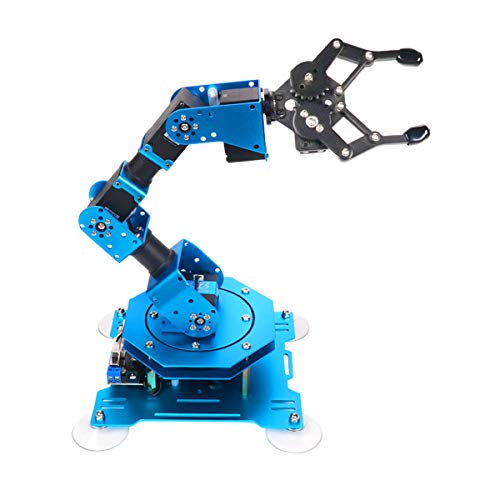
- 6DOF metal desktop arm
- PC, app, mouse, and controller control
- Built for programming and action editing
Best For: Teens and hobbyists learning programming with a robotic arm
Open-Source Expansion Pick
Waveshare RoArm-M2-S 4-DOF Kit
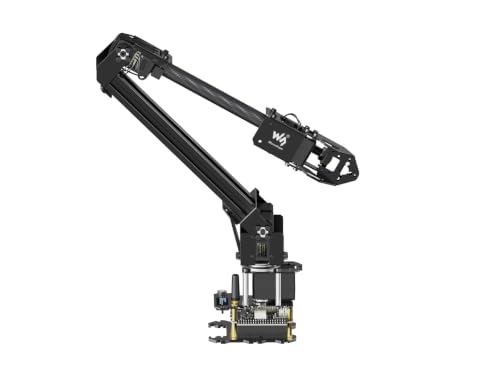
- ESP32-based wireless control
- Open-source code and interface docs
- Expansion plate for custom tooling
Best For: Makers who want a customizable open-source robot arm kit
Open-Source Learning Pick
miniArm Arduino 5DOF Smart Robot Arm

- Arduino-compatible and open source
- App, knob, and offline action control
- Sensor ports for expansion projects
Best For: Teens and adults learning coding and secondary development
Dual-Control Classroom Pick
SIYEENOVE ESP32 4DOF Robot Arm
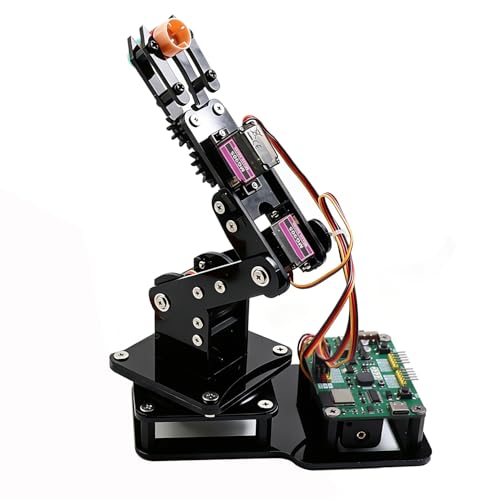
- Pre-programmed ESP32-C3 board
- Joystick and web app control
- Arduino and MicroPython support
Best For: Beginners and students who want easy setup and dual control
Advanced Wireless Pick
LewanSoul MaxArm Arduino Python Kit

- Link mechanism with inverse kinematics
- Python, Arduino, WiFi, and Bluetooth support
- Multiple control methods and sensor ports
Best For: Adult makers wanting precision and wireless expandability
Wood STEM Starter – Robot Arm Kit for Kids
If you’re comparing robot arms under 300 for a hands-on starter project, this wooden DIY kit is built around learning by doing. It combines a mechanical arm with motors, PCB microcontroller boards, and wiring, so kids can explore circuits and basic control while assembling a real moving build.
Best For: Kids, tweens, and beginners who want a challenging STEM build with a mechanical payoff.
Pros:
- Teaches basic electronics, circuits, and mechanical movement through assembly
- Wood construction adds a satisfying puzzle-like building experience
- No soldering required, and it includes the needed accessories for assembly
- Designed as a giftable STEM project for ages 8 and up
Cons:
- Requires 6 AA batteries, which are not included
- Best suited to hands-on builders rather than casual toy play
- Wood kit assembly may be challenging for younger children without help
This is a strong entry-level pick if you want a robot arm that emphasizes learning, patience, and basic engineering concepts. It is less about advanced programming and more about building confidence with a real mechanical system.
Embodied AI Lab Arm – NexArm Standard Kit
Among robot arms under 300, this kit stands out for serious AI and programming work rather than casual desk use. The NexArm Standard Kit uses a metal 6-axis design with encoder servos, inverse kinematics, and open-source control options aimed at developers, university labs, and advanced learners.
Best For: Advanced users building embodied AI projects, imitation learning demos, or robotics lab setups.
Pros:
- Metal 6-axis arm with magnetic encoder servos and inverse kinematics
- Integrated with the LeRobot ecosystem for community models, datasets, and simulations
- Includes AI vision features, voice interaction, and hand-eye coordinated grasping
- Open-source support with PC/App/remote control, Arduino programming, and tutorials
Cons:
- Geared toward adults and advanced users, not beginner toy buyers
- Needs technical setup to get the most from AI and programming features
- Less about simple play and more about development and experimentation
If you want a robotics platform that can grow into vision, voice, and multimodal AI experiments, this is the most capable option here. It is a better fit for builders who value software flexibility and research-style use cases.
2-in-1 STEM Rover – VANLINNY Robotic Arm Kit
If you want robot arms under 300 that offer more than one mode of play, this 2-in-1 kit is a practical pick. It combines a robotic car and a lifting arm in one build, giving kids a straightforward entry into assembly, remote operation, and basic programming concepts.
Best For: Kids who want a remote-controlled STEM build with both vehicle and arm functions.
Pros:
- Two-in-one design combines a robotic car with a functional arm
- Arm supports lifting, angle adjustment, object grabbing, and programming control
- Includes battery, charging cable, assembly tools, and remote control
- ABS and aluminum alloy build is designed for durability and safe edges
Cons:
- Requires assembly, with build time listed at about 2 hours
- More of an interactive STEM toy than a dedicated robot arm platform
- Advanced users may outgrow the feature set quickly
This is a good value choice if your priority is variety and kid-friendly engagement. The combined car-and-arm design makes it easier to keep play interesting while still reinforcing STEM skills.
Desktop Programming Arm – LewanSoul LeArm Kit
For buyers comparing robot arms under 300, this desktop kit is a strong middle ground between hobby toy and learning platform. The LeArm is a 6DOF arm with digital servos, multiple control methods, and tutorial support, making it useful for students, engineers, and robotics learners.
Best For: Teens, students, and hobbyists who want a programmable desktop robot arm.
Pros:
- 6DOF design supports grasping, transport, custom actions, and graphical programming
- Metal bracket structure and strong base are built for stability
- Multiple control options include PC, app, mouse, and wireless handle
- Includes tutorials and simple programming software for learning
Cons:
- Manual assembly and programming mean it is not plug-and-play
- More suited to educational use than casual toy play
- Requires a learning curve for users new to robotics control
This is a solid pick if you want a more serious tabletop robot arm with real control flexibility. It offers enough structure for learning, but also enough capability to support creative projects and coursework.
Mechanical STEM Pick – Thames & Kosmos Bionic Robotic Arm
If you want robot arms under 300 that focus on hands-on learning rather than electronics, this Thames & Kosmos kit is a strong pick. It builds a working robotic arm from nearly 300 pieces and uses joysticks with nylon cables to create precise, intuitive movement without batteries or motors.
Best For: Kids and families who want a STEM build that teaches mechanical engineering, biomimicry, and robotic arm basics through assembly and play.
Pros:
- Nearly 300-piece build with a real working arm and claw
- No motors or electricity required
- Joystick controls open, close, and rotate the arm
- Full-color manual includes scientific context and experiments
Cons:
- Assembly may need help for younger builders
- More of a mechanical STEM toy than a powered robot arm
This kit stands out if you value tactile construction and a clear introduction to how robotic arms work. It is less about advanced coding and more about mechanical understanding, making it a practical educational choice.
Coding-Focused Desktop Arm – Hiwonder xArm1S 6DOF Robotic Arm
For shoppers comparing robot arms under 300 with a stronger programming angle, the Hiwonder xArm1S is built for control, coding, and experimentation. It offers 6DOF movement, remote grasping, object transport, and graphical programming, making it a more advanced desktop robot arm for STEM learning.
Best For: Teens and hobbyists who want a metal robotic arm for programming practice, action editing, and multi-method control.
Pros:
- 6-axis, 6DOF desktop arm with graphical programming support
- Multiple control options: PC, app, mouse, and wireless controller
- High-precision servos with position, voltage, and temperature feedback
- Metal build and high-torque base designed for stable operation
Cons:
- Best suited to older users and hands-on tinkerers
- More complex than simple build-and-play kits
This is the most software-oriented option in the group, so it makes sense if coding and action editing matter more than beginner-friendly assembly. The strong servo system and metal construction also make it feel more like a serious desktop robotics platform.
Open-Source Expansion Pick – Waveshare RoArm-M2-S 4-DOF Kit
The Waveshare RoArm-M2-S is a smart desktop option to consider if you want robot arms under 300 with open control and expansion flexibility. It uses an ESP32-based main module, supports wireless control, and comes with web tutorials plus open control code and interface documents for secondary development.
Best For: Makers and STEM users who want an open-source robotic arm kit with flexible wireless control and customization options.
Pros:
- Open-source control code and communication interface documents
- ESP32-based wireless control with multiple communication modes
- Supports ROS2 and host-computer use
- Expansion plate supports custom end-of-arm tooling
Cons:
- Only 4DOF, so it is less capable than 6-axis arms
- Geared more toward development than casual play
With its tutorials, open documentation, and expansion support, this kit is clearly aimed at users who want to build and modify, not just operate a finished arm. It is a strong pick if you want a lightweight, wireless platform for experimentation and secondary development.
Open-Source Learning Pick – miniArm Arduino 5DOF Smart Robot Arm
If you’re comparing robot arms under 300 for coding and STEM practice, the miniArm is built around Arduino-friendly learning and open-source development. It includes app control, knob potentiometer control, and expansion ports for sensors, so it’s aimed at users who want to tinker, program, and build on top of the base kit.
Best For: Teens and adults who want an open-source Arduino robot arm for hands-on programming and secondary development.
Pros:
- Compatible with Arduino programming and open-source tutorials
- Supports app control and offline action editing with knob potentiometers
- High-performance hardware includes a Bluetooth module and high-precision digital servos
- Multiple expansion ports support sensor add-ons like ESP32 Cam and ultrasonic modules
Cons:
- Starter kit version does not include the sensor add-ons listed in the standard kit
- Designed for users comfortable with programming and experimentation
Overall, miniArm stands out if you want a compact aluminum robot arm that supports real learning rather than just basic motion. It’s especially appealing for anyone planning to expand into sensor-based projects and custom coding.
Dual-Control Classroom Pick – SIYEENOVE ESP32 4DOF Robot Arm
For shoppers looking at robot arms under 300 for STEAM education, this 4DOF ESP32 kit focuses on quick setup and flexible control. It arrives with a pre-programmed control board, supports Arduino and MicroPython, and lets you switch between joystick control and a web app without installing an app.
Best For: Beginners, students, and DIY makers who want a ready-to-use coding robot arm with dual control options.
Pros:
- Pre-programmed ESP32-C3 board means you can start using it right away
- Dual-mode control with included joysticks or a web-based interface
- Motion record and loop playback add easy demonstration and automation features
- Supports both Arduino and MicroPython for flexible learning
Cons:
- Batteries are not included
- It is a 4DOF design, so it’s less complex than higher-DOF alternatives
This is a practical choice if you want a classroom-friendly kit that blends building, control, and simple programming. The open-source and expandable platform also gives it room to grow with your skills.
Advanced Wireless Pick – LewanSoul MaxArm Arduino Python Kit
If you want one of the more advanced robot arms under 300 for programming practice, MaxArm leans into precision control and expandability. Its link mechanism and inverse kinematics support movement along the x, y, and z axes, while Python, Arduino, WiFi, and Bluetooth options make it a strong fit for technical learners.
Best For: Adult makers and STEM learners who want a precise, expandable robot arm with wireless control options.
Pros:
- Link mechanism with inverse kinematics for x, y, and z movement
- Supports Python and Arduino programming
- Multiple control methods including apps, PC, wireless controllers, and mouse
- Sensor ports and ESP32 expansion support secondary development
Cons:
- More technical than a beginner-only toy kit
- Starter kit focus may require extra effort for advanced projects
MaxArm is the best fit when you care more about capability than simplicity. Between the bus servos, trajectory planning, and wireless support, it offers a more serious build for hands-on robotics work.
How We Picked These Robot Arms Under 300
We focused on builds that offer the best mix of price, functionality, and long-term use. Priority went to kits with clear assembly support, dependable control options, and enough capability to keep beginners from outgrowing them too quickly. We also favored models that fit common buyer goals, including STEM learning, coding practice, and hobby robotics.
Quick Comparison of the 10 Picks
For faster shopping, group the options by use case. Entry-level STEM kits are best for younger builders and first-time makers. Midrange programmable arms suit users who want software, app, or remote control without a steep learning curve. More advanced Robot Arms Under 300 tend to offer metal construction, multiple degrees of freedom, and stronger support for Arduino, ESP32, or Python-based projects.
Best for Beginners
Choose simpler kits with fewer DOF, guided assembly, and straightforward controls.
Best for Coding and Open-Source Projects
Look for robot arms with Arduino, ESP32, PC software, app control, or Python support.
Best for Hands-On Engineering
More advanced models usually provide better build quality, more precise motion, and stronger expansion potential.
Key Buying Factors for Robot Arms Under 300
Degrees of freedom: More DOF generally means more flexible movement, but it can also add setup complexity. Four-DOF kits are often easier for beginners, while 5DOF and 6DOF arms offer more realistic motion for learning and experimentation.
Control method: Decide whether you want remote control, joystick control, app control, or programming via Arduino, MicroPython, or PC software. The right control style matters more than flashy specs if this is for a first-time user.
Build material and stability: Metal arms usually feel sturdier, while lighter educational kits can be easier to assemble and safer for younger users. For Robot Arms Under 300, a solid base and smooth joints are just as important as raw lift capability.
Learning support: Tutorials, code examples, and documented assembly steps can make or break the experience. A kit that is easier to learn often becomes the better value.
Expansion potential: If you plan to grow into sensors, vision, suction tools, or open-source projects, choose a platform designed for upgrades.
Who Should Buy Which Robot Arms Under 300?
Kids and first-time builders: Pick the most straightforward STEM kits with clear instructions and simple controls.
Teens and students: Choose programmable arms that connect classroom learning with real coding and engineering skills.
Makers and hobbyists: Go for open-source, multi-DOF Robot Arms Under 300 with stronger hardware and software flexibility.
Advanced learners: If you want a platform for experimentation, prioritize compatibility, servo quality, and room to expand over cosmetic features.
In short, the best choice is the one that matches your skill level and project goals. Focus on ease of setup, control options, and upgrade path, and you’ll get far better value from your robot arm purchase.