
Robot arms are a smart way to turn STEM learning into a hands-on project, whether you want basic motion control, coding practice, or advanced AI experimentation.
In this roundup, we focus on options that are practical to build, useful to program, and suited to different skill levels, from beginner-friendly kits to more capable open-source platforms.
Best 10 Robot Arms Picks for 2026
LeArm Desktop 6DOF Kit
LewanSoul Programmable Robot Arm

- 6DOF desktop arm with digital servos
- PC, app, mouse, and handle control
- Metal build with tutorials and software
Best For: Students and hobbyists learning robotics and programming
2-in-1 STEM Robot Set

- Combines a robot car and 4DOF arm
- Includes remote control and charging gear
- Built for STEM learning and hands-on play
Best For: Kids ages 8-14 and beginner STEM projects
AI Vision Learning Platform
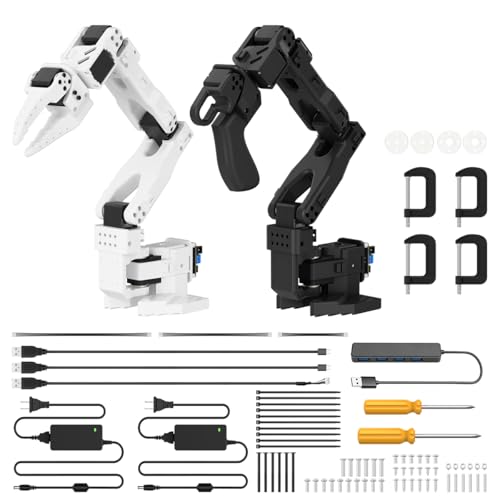
- Open-source compatible with LeRobot
- Dual-camera system for vision and awareness
- 12 bus servos with debugging board
Best For: Advanced users exploring AI and imitation learning
Wooden Mechanical Hand

- Wooden build teaches circuits and mechanics
- No soldering required with included accessories
- Good for ages 8+ and classroom use
Best For: Families and students learning STEM basics through building
AI Training Arm Kit
SO-ARM101 Pro Open-Source 6-DOF Arm

- LeRobot and Hugging Face compatible
- Improved wiring and wider motion
- Leader-follower control for RL training
Best For: AI robotics developers and Jetson users
STEM Coding Arm
Hiwonder xArm1S 6-Axis Metal Robot
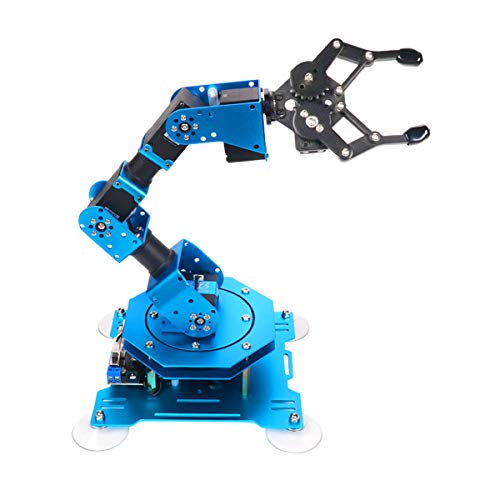
- 6-axis metal desktop robot arm
- Servo feedback for position, voltage, temperature
- PC, app, mouse, and controller support
Best For: STEM learners and coding-focused hobbyists
Mechanical STEM Arm
Thames & Kosmos Bionic Robotic Arm Kit

- No motors or batteries needed
- Joystick and nylon cable control
- Nearly 300-piece STEM build
Best For: Young builders learning mechanical robotics
Beginner Arduino Kit

- Step-by-step assembly and programming tutorials
- Records and repeats up to 170 actions once
- Compact 4-axis arm with rotating joints
Best For: Learning robotics, electronics, and coding basics
AI Learning Platform

- Built for embodied imitation learning workflows
- Dual cameras support vision-aware manipulation
- 12 high-torque servos with debugging tools
Best For: Advanced AI robotics and open-source development
Wireless Open-Source Arm
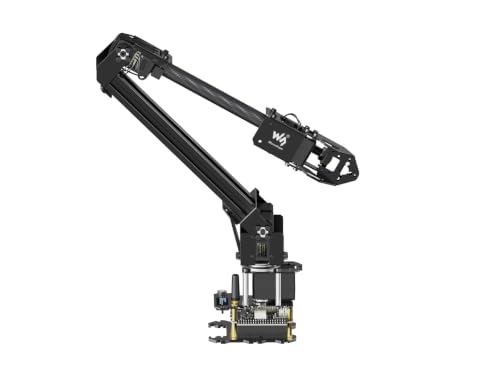
- ESP32-based control with wireless modes
- Open-source code and secondary development support
- Web app plus ROS2 compatibility
Best For: Wireless desktop projects and custom development
LeArm Desktop 6DOF Kit – LewanSoul Programmable Robot Arm
If you want a hands-on robot arm for learning, building, and experimenting, the LewanSoul LeArm is a strong desktop kit to consider. It offers 6DOF movement, multiple control options, and tutorial support, making it practical for students and hobbyists who want a programmable arm without jumping into a more advanced research platform.
Best For: Students, hobbyists, and beginners who want a metal desktop robot arm for creative projects and robotics learning.
Pros:
- 6DOF desktop arm with high-quality digital servos for grasping and custom actions
- Supports PC, app, mouse, and wireless handle control
- Metal bracket structure with anti-stall protection and industrial-grade bearings
- Includes easy tutorials and simple programming software for learning
Cons:
- Uses AC adapter power rather than battery operation
- Best suited to tabletop use, not portable play
- Primarily aimed at learning and projects rather than fast setup
The LeArm stands out as a structured learning kit with enough control flexibility to keep it useful as skills grow. For buyers comparing robot arms for education or creative desktop projects, it offers a balanced mix of build quality, programmability, and support material.
2-in-1 STEM Robot Set – VANLINNY Robotic Arm Kit
This VANLINNY robot arm kit is a good pick if you want a kid-friendly STEM build that combines assembly, remote control, and hands-on play. It pairs a robotic car with a 4DOF arm, so it gives children a broader introduction to robot arms while still staying approachable for entry-level projects.
Best For: Kids and beginners ages 8-14 who want a STEM robot arm kit with building, remote control, and simple programming play.
Pros:
- 2-in-1 design combines a robotic car and a flexible robotic arm
- 4DOF arm supports lifting, angle adjustment, and grabbing
- Includes battery, USB charging cable, tools, and remote control
- ABS and aluminum alloy construction with smooth edges for durability
Cons:
- Requires assembly, with build time listed at about 2 hours
- Less advanced than larger 6DOF or research-focused robot arms
- Best suited to tabletop and family/classroom-style play
As a learning toy, this kit leans more toward fun and foundational STEM skills than advanced robotics. It makes sense for families or classrooms that want a robot arm set with multiple play modes and an easier entry point.
AI Vision Learning Platform – Hiwonder SO-ARM101 Kit
If you are shopping for a more serious robot arm platform, the Hiwonder SO-ARM101 is aimed at AI and imitation learning workflows rather than casual play. With open-source compatibility, dual cameras, and high-torque bus servos, it is built for developers, researchers, and advanced hobbyists who want a capable learning and experimentation rig.
Best For: Adults, developers, and advanced hobbyists exploring AI robotics, imitation learning, and open-source robot arm projects.
Pros:
- Compatible with the LeRobot open-source framework for embodied learning
- Dual-camera system supports manipulation and environmental awareness
- 12 high-torque bus servos with magnetic feedback for smoother motion
- Includes BusLinker V3.0 debugging board and PC control software
Cons:
- Better suited to advanced users than casual beginners
- More complex than standard educational robot arm kits
- Focused on research and development rather than simple toy use
This kit is less about plug-and-play fun and more about experimentation with modern AI robotics tools. If your goal is to study robot arms through open-source software, vision, and calibration, it is one of the more specialized options here.
Wooden Mechanical Hand – STEM Robot Arm Kit
This wooden robot arm kit is a straightforward entry into robotics, circuits, and mechanical assembly. It uses motors, PCB microcontroller boards, and wires, so it is best viewed as a science project that teaches how mechanical movement and electronics work together.
Best For: Kids, teens, and families who want a hands-on wooden robot arm kit for STEM learning and problem-solving.
Pros:
- Introduces robotics, circuits, and mechanical movement in one build
- Wooden parts and precise tutorial make it a tangible STEM project
- No soldering required, and all accessories are included for assembly
- Suitable for ages 8+ and works as a gift or classroom activity
Cons:
- Requires 6 AA batteries, which are not included
- Wood construction may feel less advanced than metal robot arms
- Designed more for learning and assembly than automated performance
For buyers who want an educational build instead of a high-tech programmable platform, this kit keeps the focus on fundamentals. It is a practical choice if your priority is a satisfying DIY robot arm project that teaches core STEM concepts.
AI Training Arm Kit – SO-ARM101 Pro Open-Source 6-DOF Arm
If you want robot arms for AI experimentation, this SO-ARM101 Pro kit is built for LeRobot and Hugging Face workflows rather than casual tabletop play. It is a low-cost, open-source 6-DOF arm designed for imitation learning, reinforcement learning, and real-world robotics development, with compatibility for NVIDIA Jetson edge devices.
Best For: Developers and robotics enthusiasts building AI training projects with LeRobot, Hugging Face, or Jetson.
Pros:
- Fully compatible with LeRobot and Hugging Face for datasets, simulation, training, and deployment
- Improved wiring helps prevent disconnection at joint 3 and removes range-of-motion limitations from the prior version
- Real-time leader-follower tracking supports human correction during RL training
- Open-source and DIY-friendly with assembly, calibration, and deployment guides included
Cons:
- 3D-printed parts are not included
- Focused on development and training rather than plug-and-play use
- Requires assembly and calibration to get started
This kit stands out if you want a practical robotics platform for learning and testing AI methods on a physical arm. The included servo motors and open documentation make it a strong entry point for hands-on robotics research.
STEM Coding Arm – Hiwonder xArm1S 6-Axis Metal Robot
Among robot arms for learning and tinkering, the Hiwonder xArm1S is a desktop 6-axis metal kit geared toward coding, graphical programming, and creative project building. Its intelligent serial bus servos add position, voltage, and temperature feedback, making it a hands-on platform for robotics education.
Best For: Students, hobbyists, and educators who want a sturdy programming-focused robot arm.
Pros:
- 6 high-precision intelligent servos provide feedback on position, voltage, and temperature
- Strong torque supports grasping objects up to 500g
- Multiple control options include PC, phone app, mouse, and wireless controller
- Metal alloy structure with industrial-grade bearings for added stability
Cons:
- Primarily designed for education and learning, not industrial deployment
- Desktop size limits larger workspace use
- Assembly and programming are part of the experience
If you want a robot arm that balances structure, feedback, and flexible control methods, this kit is an appealing STEM option. It is especially useful for learning coding and experimenting with custom motion routines.
Mechanical STEM Arm – Thames & Kosmos Bionic Robotic Arm Kit
If you want robot arms that teach mechanics instead of electronics, this Thames & Kosmos kit is a strong fit. It builds a working bionic arm from nearly 300 pieces and uses joysticks and nylon cables to control the arm and claw, with no batteries or motors required.
Best For: Kids and teens who want a hands-on mechanical STEM build with no electronics.
Pros:
- No batteries or electricity required
- Joystick-and-cable system offers intuitive, precise movement
- Nearly 300 pieces create a substantial building challenge
- Step-by-step manual includes robotics and engineering science context
Cons:
- Best suited to ages 10+ with help or 14+ independently
- Plastic-and-cable build is for learning, not powered automation
- Requires a fairly involved assembly process
This kit is a smart pick if you want a tactile introduction to how robotic arms work. It combines an engaging build with clear mechanical lessons, making it more educational than a typical toy.
Beginner Arduino Kit – Smart Robot Building Kit
If you want robot arms as a hands-on way to learn electronics and coding, this Arduino kit keeps things approachable. It includes the hardware and tools to build the arm step by step, plus tutorials to help you assemble and program it with less guesswork.
Best For: Beginners, teens, and adults who want a compact DIY robot arm for learning programming and robotics basics.
Pros:
- Step-by-step build kit with hardware and tools included
- Can memorize and repeat up to 170 actions once
- 4-axis design with rotating base, elbow, wrist, and clip
- Includes easy-to-follow assembly and programming tutorials
Cons:
- Requires two batteries, which you need to provide separately
- Small acrylic build may be better for learning than heavy-duty use
This is a practical entry-level option if your main goal is learning rather than maximum payload or advanced automation. Its strength is the teaching experience: build it, program it, and use the record-and-repeat function to see results quickly.
AI Learning Platform – SO-ARM101 Advanced Kit
For buyers interested in robot arms that go beyond simple motion control, this Hiwonder kit is built around embodied imitation learning and AI vision. It is positioned as an open-source development platform with dual cameras, high-torque servos, and PC debugging tools for serious experimentation.
Best For: Adult developers, researchers, and advanced hobbyists exploring AI robotics and open-source imitation learning.
Pros:
- Compatible with the LeRobot open-source framework
- Dual-camera system supports manipulation and environment awareness
- 12 high-torque bus servos with magnetic feedback
- Includes BusLinker V3.0 debugging board and PC software
Cons:
- Advanced kit is geared toward experienced users rather than beginners
- Manufacturer recommends age 16+ and adult use
This is the most research-oriented pick in the group, and its value comes from AI-focused features rather than simple tabletop demos. If you need an open-source robot arm for learning modern imitation-learning workflows, it offers a strong development foundation.
Wireless Open-Source Arm – RoArm-M2-S Desktop Kit
If you’re comparing robot arms for wireless control and secondary development, this Waveshare desktop kit is designed to be flexible. It uses an ESP32-based control system, includes a web application for visual coordinate control, and supports ROS2 plus multiple communication modes.
Best For: Makers and developers who want an open-source desktop arm with wireless control and expansion options.
Pros:
- Cross-platform web app with visualized coordinate control
- Open-source control code and communication interface documents
- Supports ROS2, wireless and wired communication, and secondary development
- Lightweight 4-DOF design with a 360° base and expansion plate
Cons:
- 0.5 kg payload at 0.5 m is modest for a robot arm
- Focused on development and experimentation rather than heavy lifting
Overall, this is a versatile desktop option if you want a programmable robot arm that can grow with your projects. It stands out for open-source flexibility, wireless control, and broad support resources.
How We Picked These Robot Arms
We prioritized build quality, control options, documentation, learning value, and overall versatility. The best Robot Arms in this roundup also offer a clear path from simple movement to more advanced use, so you can keep using them as your skills improve.
We also looked at whether a kit is better for kids, teens, hobbyists, or more technical users who want coding, open-source support, or AI vision features.
Quick Comparison
If you want a simple educational project, choose a basic mechanical or 4-DOF kit. If you want coding and automation practice, a 6-DOF robot arm with app, PC, or Arduino support is a better fit. For advanced experimentation, open-source AI-ready Robot Arms with high-torque servos and vision support offer the most room to grow.
Key Buying Factors for Robot Arms
Degrees of Freedom
More axes usually mean more natural movement and better training value. Basic 4-DOF models are easier to learn, while 6-DOF Robot Arms are better for complex positioning and programming.
Control and Compatibility
Check whether the kit supports app control, PC software, Arduino, ESP32, or open-source frameworks. The right control method should match your experience level and project goals.
Build Materials and Actuation
Metal frames, higher-torque servos, and smoother joints generally improve durability and repeatability. Lighter educational kits can still be excellent for learning, but advanced users should look for stronger hardware.
Learning Content
Good tutorials matter as much as the hardware. Clear instructions, example code, and assembly guidance make Robot Arms more approachable for beginners and classrooms.
Who Should Buy Which Robot Arms?
Beginners and younger students should look for simpler STEM kits with easy setup and safe, guided control. Teens, makers, and hobbyists will usually get more value from programmable Robot Arms that support coding and movement memorization. Advanced users, researchers, and AI builders should focus on open-source platforms with strong servos, modular expansion, and support for vision-based projects.
In short, the best Robot Arms are the ones that match your skill level today while leaving room for more ambitious projects tomorrow.