
If you want a more immersive rig, sim racing button boxes with ignition add the tactile controls that a wheel alone can’t match. They make truck sims, endurance racing, and cockpit setups feel more natural and efficient.
Our roundup focuses on practical layouts, reliable input options, and the features that matter most for easy installation and daily use.
Best 10 Sim Racing Button Boxes with Ignition Picks for 2026
Truck-Style Immersion
European Truck Switch Panel with Ignition

- Red illuminated engine start button
- Five-in-one panel with toggle switches and brake knob
- USB plug-and-play on Windows 10+
Best For: Truck sim players who want a simple physical ignition panel
Clean PC Control Hub
SIM-PANEL Gen 2 Horizontal Button Box
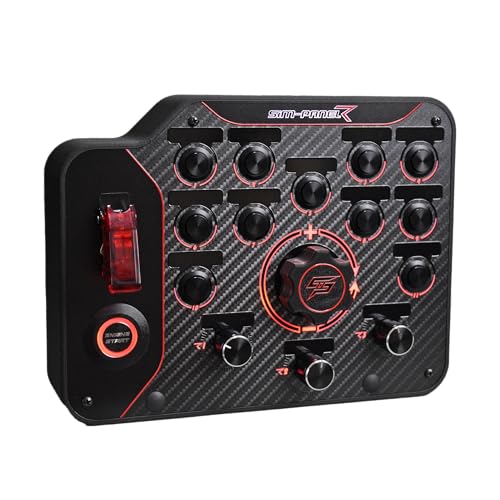
- Individually programmable buttons
- Horizontal layout with ergonomic access
- Desk clamp and 75mm VESA mounting support
Best For: PC sim racers who want a customizable horizontal button box
Truck Sim Command Center
27-Button Customizable Box with Ignition
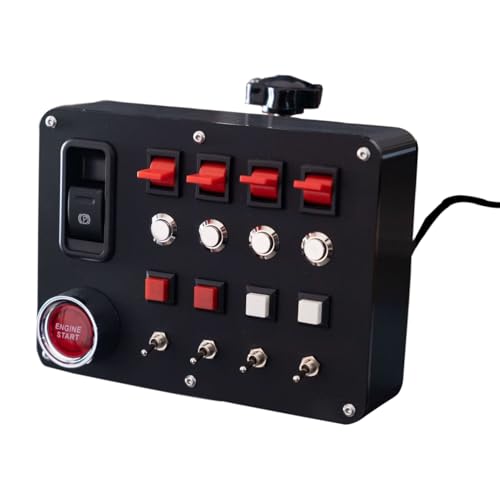
- Realistic start switch with ignition-style action
- 27 inputs with custom lettering options
- LED backlighting and SimHub lighting support
Best For: PC truck sim drivers who want a customizable button box with a realistic start switch
Vertical Rig Control
SIM-PANEL Gen 2 Vertical Button Box

- Vertical layout for compact visibility
- Individually programmable controls
- Desk clamps and VESA mount support
Best For: PC sim racers who want a vertical, mountable control panel
Truck Sim Realism Pick
SIM-PANEL Classic 2 Button Box

- Ignition switch and brake knobs for realism
- Desk clamps plus 100mm VESA mounting
- 11 backlight colors with Simlink customization
Best For: ATS/ETS2 drivers who want a stable, realistic control panel
Programmable All-Rounder

- Dedicated engine start button and 30 programmable inputs
- Driver-free USB setup for PC
- RGB halo lighting with adjustable color and brightness
Best For: Players who want a versatile, multi-sim control box with ignition-style controls
Premium Finish Upgrade
Sim-Panel Classic 2 Button Box

- Black brushed aluminum finish with stainless steel buttons
- Ignition switch and brake knobs for realism
- Desk clamps and 100mm VESA mounting
Best For: Truck sim users who want a premium-looking, stable control panel
Carbon Fiber One-Touch Box
Programmable Metal Control Panel

- Genuine carbon fiber faceplate with full-metal housing
- Dedicated one-touch start plus 32-key customizable profile
- Driver-free plug-and-play for compatible PC sim use
Best For: PC sim racers wanting a durable, ignition-style control box
Premium Brushed Aluminum Comm Box

- True-to-life ignition switch and brake knobs
- Integrated desk clamps with 100mm VESA mounting
- Fully functional CB microphone and RGB backlighting
Best For: ATS/ETS2 players seeking realism and cabin-style controls
RGB Multi-Control Panel

- 19 physical controls across 9 input types
- Up to 30 programmable functions with engine start
- RGB lighting plus clamp and VESA mounting options
Best For: PC sim users who want one versatile control panel for multiple sim genres
Truck-Style Immersion – European Truck Switch Panel with Ignition
If you’re shopping for sim racing button boxes with ignition, this truck-style panel is aimed at players who want physical start-up controls and a more hands-on feel in ATS, ETS2, and other driving sims. It combines a red illuminated engine start button, toggle switches, and a brake knob in a compact USB setup that Windows 10 and above can recognize automatically.
Best For: Truck sim players who want a simple physical ignition panel with extra switch controls.
Pros:
- Includes a red illuminated engine start button for a more realistic ignition feel
- Five-in-one layout adds multiple toggle switches plus a brake knob
- USB connection with automatic recognition on Windows 10 and above
- Carbon fiber face plate gives it a more polished, race-style look
Cons:
- Feature set is more focused on truck and driving sims than deep customization
- Product details list limited warranty coverage
This is a practical pick if your priority is adding a real ignition button and a few essential controls without building a more complex custom panel. It looks best as an immersion upgrade for truck sim rigs rather than a fully programmable command center.
Clean PC Control Hub – SIM-PANEL Gen 2 Horizontal Button Box
Among sim racing button boxes with ignition-style control layouts, this horizontal SIM-PANEL Gen 2 is built for PC users who want a tidy, fully programmable control surface. Its USB connection, individually programmable button modes, and ergonomic horizontal layout make it a strong fit for racers who want quick access to functions without cluttering the rig.
Best For: PC sim racers who want a customizable horizontal button box with an organized layout.
Pros:
- Individually programmable buttons let you assign multiple functions
- Horizontal layout is designed for easy visibility and fast reach
- Includes customizable backlighting for a more personal setup
- Desk clamp and 75mm VESA mounting support improve rig integration
Cons:
- PC only, so it is not compatible with consoles
- No dedicated ignition switch is listed in the product details
This is a good choice if you want a modern button box that focuses on organization, programmability, and flexible mounting rather than truck-specific hardware. It suits mixed sim racing use where clean control access matters more than themed controls.
Truck Sim Command Center – 27-Button Customizable Box with Ignition
If you’re comparing sim racing button boxes with ignition for truck sim and PC setups, this 27-button control box stands out for its start switch, parking brake switch, and wide customization options. It is built for PC use with multiple wheel-base compatibility notes, making it a practical add-on for ATS, ETS2, and other simulation titles where quick control access matters.
Best For: PC truck sim drivers who want a customizable button box with a realistic start switch.
Pros:
- One-button start switch is designed to act like a real car ignition process
- Includes an electronic parking brake switch for added immersion
- 27 input buttons offer plenty of mapping flexibility
- LED backlighting and SimHub lighting support add visual customization
Cons:
- 3D-printed construction may show small print lines
- Customization and setup may be more involved than a basic plug-in panel
This model is a strong fit if you want more than just a few switches and prefer a control hub that can be mapped and personalized extensively. It leans toward enthusiasts who value immersion, customization, and a real ignition-style start sequence.
Vertical Rig Control – SIM-PANEL Gen 2 Vertical Button Box
For buyers looking at sim racing button boxes with ignition-style convenience, this vertical SIM-PANEL Gen 2 gives PC racers a compact, programmable control layout that fits well on a rig or desk. It uses USB power, supports customizable backlighting, and includes desk clamps plus VESA mounting options for cleaner installation.
Best For: PC sim racers who want a vertical, mountable control panel with customizable buttons.
Pros:
- Individually programmable button modes for flexible mapping
- Vertical layout helps keep controls visible and within reach
- Includes desk clamps and 75mm VESA mounting compatibility
- Customizable backlighting adds a more personalized setup
Cons:
- PC only, so it is not suitable for console setups
- No dedicated ignition switch is listed in the supplied details
This version makes sense if your goal is to save space while keeping a dedicated button box close at hand. It is more of a clean, modular control solution than a specialty ignition-focused panel, which may suit general sim racing setups better.
Truck Sim Realism Pick – SIM-PANEL Classic 2 Button Box
If you want sim racing button boxes with ignition controls that feel purpose-built for ATS and ETS2, this SIM-PANEL panel focuses on realism and sturdy everyday use. It combines an ignition switch, brake knobs, and brushed stainless steel buttons with a matte black enclosure, while the integrated desk clamps and 100mm VESA option help keep it locked in place during long sessions.
Best For: Truck sim players who want a stable, realistic side panel with physical ignition-style controls.
Pros:
- True-to-life ignition switch and brake knobs add realism.
- Integrated desk clamps and 100mm VESA mounting improve stability.
- Enhanced backlighting offers 11 color options, with fuller customization through Simlink.
- Brushed stainless steel buttons and matte black finish give it a premium look and feel.
Cons:
- Built specifically around ATS/ETS2 use cases, so it may be less versatile than broader control panels.
- Custom full-spectrum lighting requires Simlink.
This is a strong pick if your priority is a realistic truck-sim control box that mounts securely and keeps the key controls close at hand. The layout is straightforward, tactile, and aimed at immersion rather than excess complexity.
Programmable All-Rounder – PXN CB1 PC Button Box
This PXN CB1 is a flexible option in sim racing button boxes with ignition support, especially if you want one panel that can handle racing, truck, and farming sims. It offers 19 buttons and switches, including a dedicated engine start button, plus RGB halo lighting and driver-free USB setup for an easier PC connection.
Best For: PC sim racers who want a highly programmable control box with a built-in engine start button.
Pros:
- 19 buttons across 9 switch types provide up to 30 programmable inputs.
- Includes a dedicated engine start button, plus encoders, toggles, and directional controls.
- Driver-free USB connection keeps setup simple on PC.
- RGB backlighting can be adjusted for color and brightness, with a rear light switch for quick on/off.
Cons:
- Initial in-game button mapping is required.
- Most lighting controls exclude the joystick.
- Best results depend on matching it to supported PXN wheel bases or PC use.
If you want a control panel that offers a lot of mapped functions without needing extra software overhead, the CB1 is a practical choice. It leans into flexibility and input variety, making it useful beyond just racing titles.
Premium Finish Upgrade – Sim-Panel Classic 2 Button Box
For sim racing button boxes with ignition controls that emphasize feel and finish, this Sim-Panel Classic 2 leans into a premium aluminum build and truck-sim realism. It pairs a true-to-life ignition switch and brake knobs with brushed stainless steel buttons, plus integrated desk clamps and a 100mm VESA mounting option for a secure setup.
Best For: Truck sim fans who want a premium-feeling panel with realistic ignition-style controls.
Pros:
- Premium black brushed aluminum finish gives it a refined look.
- True-to-life ignition switch and brake knobs improve immersion.
- Integrated desk clamps and 100mm VESA mounting support stable placement.
- Enhanced backlighting offers 11 colors, with deeper customization available through Simlink.
Cons:
- Focused on ATS/ETS2 truck sim use, so it may be less general-purpose than larger button boxes.
- Advanced lighting customization depends on Simlink.
This model is a good fit if you care about a more upscale finish but still want practical, tactile controls. It keeps the feature set focused on realism, stability, and visibility rather than packing in extra functions.
Carbon Fiber One-Touch Box – Programmable Metal Control Panel
If you want sim racing button boxes with ignition-style control in a compact, rugged layout, this MiYee unit is built around quick access and easy mapping. It combines a genuine carbon fiber faceplate, full-metal housing, and a dedicated one-touch start button, making it a practical pick for PC sim racers who want a more durable cockpit control panel.
Best For: PC sim racers who want a sturdy, plug-and-play button box with a dedicated start button and lots of programmable inputs.
Pros:
- Full-metal unibody housing with a genuine carbon fiber faceplate for a durable feel.
- Includes 10 CNC-machined buttons, 3 metal toggles, 6 programmable rotary encoders, and a dedicated one-touch start.
- Driver-free plug-and-play setup for compatible PC racing and truck sim games.
- 32-key customizable profile gives plenty of room for key mapping.
Cons:
- Best suited to PC use, so it may not fit console setups.
- Focused on controls rather than extra realism features like lighting or comms.
Overall, this is a strong choice if you care most about durable hardware and flexible control mapping. The dedicated start button makes it especially appealing for sim racers who want ignition-style functionality without a more complex panel.
Premium Brushed Aluminum Comm Box – ATS/ETS2 Immersion Panel
For sim racing button boxes with ignition-style details, this SIM-PANEL Classic 2 leans heavily into realism and desk-friendly stability. It pairs a true-to-life ignition switch, brake knobs, and a fully functional CB microphone with a premium brushed aluminum finish, making it a natural fit for truck sim setups that value immersion as much as controls.
Best For: Truck sim players who want a realistic ATS/ETS2 control box with ignition-style switches and CB communications.
Pros:
- True-to-life ignition switch and brake knobs add realism to the setup.
- Integrated desk clamps plus 100mm VESA mounting support for stable placement.
- Brushed stainless steel buttons and premium black brushed aluminum finish.
- Fully functional CB microphone for multiplayer immersion.
Cons:
- Geared most directly toward ATS/ETS2-style trucking use.
- May be more feature-rich than needed if you only want basic racing inputs.
This panel stands out if you want a more immersive truck-sim cockpit with physical controls that feel closer to the real thing. The ignition switch and CB mic make it especially appealing for players building a detailed over-the-road setup.
RGB Multi-Control Panel – 30-Function Sim Box
This PXN CB1 is a flexible option in the world of sim racing button boxes with ignition-like controls, especially if you want one panel for multiple sim genres. With 19 physical controls, up to 30 programmable functions, and a dedicated engine start key, it’s designed to replace keyboard shortcuts with a more organized hardware setup on PC.
Best For: PC sim users who want a versatile control panel for racing, trucking, farming, or flight sims.
Pros:
- 19 physical controls across 9 input types for broad mapping flexibility.
- Up to 30 programmable functions, including a dedicated engine start key.
- RGB lighting with adjustable color and brightness for visibility and customization.
- Tool-free clamp and 100 × 100 mm VESA support for desks and rigs.
Cons:
- Requires PC/Windows use, so it is not aimed at console players.
- More general-purpose than a highly specialized racing-only panel.
The CB1 is a good pick if you want one button box that can cover several simulator types without relying on your keyboard. Its mix of rotary encoders, toggles, and engine start control makes it especially useful for compact cockpits and multi-sim setups.
How We Picked the Best Sim Racing Button Boxes with Ignition
For this guide, we focused on Sim Racing Button Boxes with Ignition that balance realism, input variety, and ease of setup. We looked for useful control counts, clear labeling, durable build materials, and layouts that work well for both truck sim and racing-style cockpits. USB compatibility, programming flexibility, and mounting convenience also mattered.
Quick Comparison
Some buyers want a compact control panel for essential functions, while others need a more specialized truck-style box with ignition and extra toggles. In general, more controls help reduce keyboard use, but a simpler panel can be easier to memorize and place neatly in a tight cockpit.
Key Buying Factors for Sim Racing Button Boxes with Ignition
Control Layout
Choose a layout that matches how you drive. Truck sim users may prefer a wide spread of switches, rotary controls, and a dedicated ignition feel, while racing users may prioritize fast access to pit, camera, fuel, and lighting functions.
Compatibility and Programming
Look for PC-friendly USB devices with driver-free operation or straightforward software support. Programmable buttons are especially helpful if you play multiple games or want each control mapped to a specific in-game action.
Build Quality and Feel
Metal faceplates, firm switches, and well-spaced controls usually last longer and feel better in daily use. If you value a premium cockpit look, brushed aluminum or carbon-fiber-style finishes can also be a plus.
Mounting and Size
Measure your available space before buying. Horizontal panels suit wider desks and sim rigs, while vertical designs can fit tight spaces more easily. Make sure the mounting style works with your wheel stand, desk, or full cockpit.
Who Should Buy Which Sim Racing Button Boxes with Ignition?
If you mainly play ATS or ETS2, choose a panel with an ignition-style layout and enough switches for lights, wipers, and drivetrain controls. If you race across multiple PC titles, a programmable button box with versatile inputs may be the smarter choice. Beginners should favor simpler, easy-to-learn layouts, while advanced sim racers may want more switches, encoders, and custom mappings for maximum control.
Overall, the best Sim Racing Button Boxes with Ignition are the ones that match your games, fit your rig, and give you the right mix of realism and convenience without adding unnecessary clutter.