
If you want quicker readouts, cleaner telemetry, and a more immersive cockpit, sim racing dashboards with LED display can make a real difference. They help keep essential data in view without forcing you to look away from the track.
In this roundup, we focus on practical options for PC sim racers, from simple display units to more advanced dashboard-and-button-box hybrids.
Best 10 Sim Racing Dashboards with LED Display Picks for 2026
Top Pick
DV480 Pro V5 5-inch Dash with 16 RGB LEDs

- 5-inch touchscreen with 60Hz display
- 16 customizable RGB LEDs for shift and race cues
- Supports 87+ racing games with Sim software
Best For: Racers who want a compact, customizable dash with broad compatibility
Runner-Up
CNC Aluminum Gear and Speed Display Panel

- Shows gear, speed, semaphore, and DRS data
- SIMHUB-compatible for custom layouts
- USB-C with side or vertical adjustable mounting
Best For: Drivers who want a focused telemetry display for race-status info
Most Customizable Controls
19-Button RGB Control Box with 30 Programmable Options

- 19 buttons with 30 programmable functions
- RGB backlight with 7 lighting effects
- PC-compatible for racing, truck, and flight sims
Best For: Sim racers and sim fans who want programmable control plus lighting
Premium Sim Hub Pick
SSG DV-8 Wide-Screen Sim Racing Dashboard

- Real-time telemetry for lap, tire, and fuel data
- 20 RGB LEDs with SimHub integration
- CNC aluminum enclosure with wheelbase mount
Best For: Competitive sim racers who want wide-screen telemetry and visual cues
Control Hub Pick
PXN CB1 30-Button RGB Sim Panel

- 30 programmable buttons for sim control
- Adjustable RGB lighting with multiple effects
- Windows PC plug-and-play with broad sim support
Best For: PC sim racers who want a dedicated, highly programmable control box
Telemetry Display Pick
Retox Triple Module Racing Dashboard

- 1.8" LCD plus 8x8 LED matrix
- 8-digit display for lap, fuel, and timing data
- Universal bracket and acrylic cover included
Best For: PC sim racers who want a compact dashboard with multiple display types
Value Control Pick

- 19 physical controls across 9 input types
- Up to 30 programmable functions
- Tool-free clamp plus VESA mounting support
Best For: Sim racers and sim users who want a compact, driver-free control panel with flexible mounting
Triple Display Sim Dash
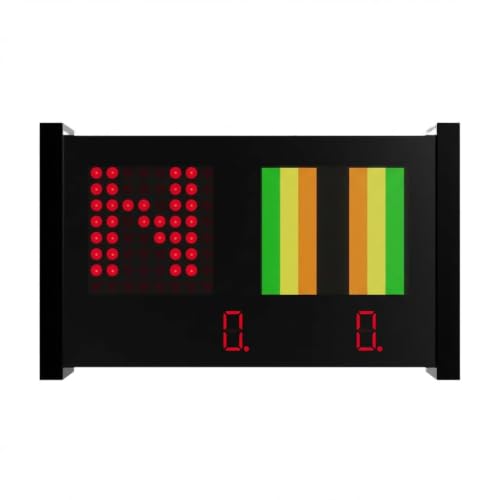
- 1.8" LCD plus 8x8 LED matrix and 8-digit display
- Shows telemetry, lap times, sector times, and fuel data
- PC-only with acrylic cover and universal bracket
Best For: PC sim racers wanting multi-format telemetry and shift-light visuals
PC Racing Button Box

- USB PC button box with ergonomic design
- Adds dedicated racing controls to a rig
- No telemetry screen or LED display included
Best For: PC racers needing extra hands-on controls beside a dashboard
Custom Layout Racing Button Box

- Programmable buttons with customizable backlighting
- Vertical ergonomic layout for fast access
- Desk clamps and VESA mounting included
Best For: PC racers who prioritize programmable controls and mounting flexibility
Top Pick – DV480 Pro V5 5-inch Dash with 16 RGB LEDs
If you want sim racing dashboards with led display features that feel close to a real motorsport add-on, the DV480 Pro V5 is built around a 5-inch touchscreen, adjustable height, and 16 customizable RGB LEDs. It is designed to work with simulator software rather than mirror your desktop, so it stays focused on telemetry and race data while leaving your PC resources alone.
Best For: Racers who want a compact, customizable dash with strong game compatibility and a clean aluminum build.
Pros:
- 5" screen with 60Hz refresh, 350 brightness, and wide viewing angle
- 16 RGB LEDs with adjustable color and brightness for race cues
- Supports 87+ main racing games and works with simulator software
- CNC-machined 6061 aluminum alloy housing with durable hardware
Cons:
- Does not display your computer desktop; it needs simulator software running
- Mounting is dependent on wheel base bracket spacing and setup
- Accessories may need a reshipment if the order arrives incomplete
Overall, this is a well-rounded dashboard choice if you want a dedicated race display with flexible lighting and broad sim support. The touchscreen, LED customization, and solid metal construction make it a practical upgrade for a serious rig.
Runner-Up – CNC Aluminum Gear and Speed Display Panel
For sim racing dashboards with led display functionality centered on clean telemetry, this gear and speed panel is built to show gear state, speed, semaphore, DRS, and other SIMHUB-driven data. Its softer, clearer lighting is aimed at improving readability, and the USB Type-C connection plus adjustable bracket help it fit a range of rigs.
Best For: Drivers who want a focused telemetry display for gear, speed, and race-status info.
Pros:
- Displays gear state, speed, semaphore, DRS, and other custom SIMHUB data
- Full CNC aluminum metal shell with oxidation finish
- USB Type-C interface for stable transmission
- Mounting bracket supports side or vertical installation with multi-angle adjustment
Cons:
- Designed around SIMHUB software for configuration
- More of a display panel than a full-screen dashboard
- Compatibility is listed around specific wheelbase ecosystems
This is a solid pick if you care more about clean, glanceable race data than a large dashboard screen. The metal build and flexible mounting make it a straightforward add-on for a focused sim cockpit.
Most Customizable Controls – 19-Button RGB Control Box with 30 Programmable Options
If you want sim racing dashboards with led display features plus more hands-on control, this racing control box adds 19 buttons, 30 programmable options, and RGB backlighting. It is aimed at PC sim users who want quick access to functions like turn signals, wipers, cruise control, horn, and engine start/stop without relying only on on-screen telemetry.
Best For: Sim racers, truck sim fans, and flight sim users who want a programmable control box with lighting effects.
Pros:
- 19 buttons with 30 programmable options for custom control
- RGB backlight with 7 lighting effects and adjustable color/brightness
- Supports popular racing simulators and works with PC
- Sturdy mounting bracket fits desks up to 7 cm thick
Cons:
- It is a control box, not a traditional dash screen
- Best suited to users who want programmable inputs more than telemetry
- Compatibility is described for specific sim titles and PC setups
This is the right choice if you want more tactile control on your rig and still like the look of RGB lighting. It is less about live dashboard readouts and more about giving you a customizable command center for sim sessions.
Premium Sim Hub Pick – SSG DV-8 Wide-Screen Sim Racing Dashboard
The SimSport Gadget SSG DV-8 fits the sim racing dashboards with led display category for racers who want more telemetry and more lighting feedback in one unit. It shows lap times, tire temperatures, fuel levels, and other real-time data, while its 20 RGB LEDs provide customizable shift, flag, and event cues through SimHub.
Best For: Competitive sim racers who want a wide-screen, SimHub-ready dashboard with strong visual feedback.
Pros:
- Real-time telemetry including lap times, tire temperatures, and fuel levels
- 20 RGB LEDs for customizable shift points, flags, and race events
- Wide-screen display with flexible layout options
- CNC-machined anodized aluminum enclosure with SimHub support
Cons:
- Designed around SimHub, so it is best for users already in that ecosystem
- Wheelbase mount only, which may limit placement options
- Heavier than some compact dash units at 2.4 pounds
For racers who want a more advanced telemetry display with plenty of visual feedback, the DV-8 is a strong premium option. Its wide-screen layout and RGB indicators make it especially useful when you want at-a-glance race data without clutter.
Control Hub Pick – PXN CB1 30-Button RGB Sim Panel
If you want sim racing dashboards with led display-style cockpit control without adding a screen, the PXN CB1 is a practical hardware panel for PC sim setups. It focuses on fast access to common driving and simulator functions with 30 programmable buttons, adjustable RGB lighting, and broad compatibility across racing, trucking, and farming titles on Windows.
Best For: PC sim racers who want a dedicated, highly programmable control box for quick access to in-game actions.
Pros:
- 30 programmable buttons give you flexible control mapping for racing and other sim genres.
- Supports turn signals, wipers, cruise control, horns, and engine start/stop-style functions.
- Adjustable RGB lighting lets you switch effects and tune color and brightness.
- USB plug-and-play compatibility with Windows 7/8/10/11 and supported PXN gear.
Cons:
- It is a button box, not a true telemetry display with live numbers or shift lights.
- Designed for PC and Windows use only.
- Install options are practical, but the focus is on controls rather than screen-based data.
Overall, this is a solid cockpit utility piece if your priority is fast, tactile control over on-screen telemetry. It suits drivers who want a compact sim-rig controller with lighting and heavy customization, not a dedicated dashboard display.
Telemetry Display Pick – Retox Triple Module Racing Dashboard
For buyers comparing sim racing dashboards with led display, the Retox Sim Racing Triple Module stands out because it combines a 1.8″ LCD, an 8×8 LED matrix, and an 8-digit numerical display in one compact unit. That gives you a layered telemetry setup for speed, RPM, gear position, lap times, fuel, alerts, and custom visual indicators on a PC racing rig.
Best For: PC sim racers who want a compact dashboard with multiple display types for richer telemetry.
Pros:
- Triple display design combines LCD, LED matrix, and segmented number readout.
- LCD panel shows speed, RPM, gear position, and other real-time data.
- 8×8 LED matrix can handle shift lights, alerts, and custom patterns.
- Includes acrylic cover and universal bracket for wheel-base compatibility.
Cons:
- PC platform only; it does not support PS4, PS5, or Xbox.
- Very compact, so the displays prioritize essential telemetry over a large screen layout.
- Release timing is listed for August 2025, so availability may vary.
As a telemetry-focused dashboard, this model offers more visual data presentation than a basic LED shift-light strip. It is a good fit if you want a small but information-dense cockpit display for a PC sim rig.
Value Control Pick – PXN CB1 19-Control Sim Panel
The PXN CB1 19-Control panel is a strong fit if you want sim racing dashboards with led display-like cockpit organization but prefer dedicated inputs over a screen. It replaces keyboard commands with a physical control panel for PC sims, offering 19 controls, up to 30 programmable functions, and customizable RGB lighting for better visibility in a dark rig.
Best For: Sim racers and sim users who want a compact, driver-free control panel with flexible mounting.
Pros:
- 19 physical controls across 9 input types make mapping straightforward.
- Up to 30 programmable inputs expand customization across supported sims.
- RGB lighting improves visibility and adds cockpit atmosphere.
- Tool-free clamp and 100 x 100 mm VESA support help with desks and rigs.
Cons:
- It is a control panel rather than a true display dashboard.
- Built for Windows PC simulation environments only.
- Best suited to users who want hardware inputs more than live telemetry readouts.
In practice, this is more of a cockpit workflow tool than a visual dashboard. If your setup needs fast access to mapped controls and simple RGB illumination, it is a versatile option for PC sim rigs.
Triple Display Sim Dash – Retox Triple Module Dashboard
For sim racing dashboards with led display, this Retox triple-module unit stands out by combining a 1.8″ LCD, an 8×8 LED matrix, and an 8-digit numerical readout in one PC-only package. It’s built to show real-time telemetry like speed, RPM, gear position, lap times, sector times, and fuel data, while the LED matrix adds programmable shift lights, alerts, and custom visual indicators.
Best For: PC sim racers who want a single dashboard that mixes telemetry, shift lights, and numeric data.
Pros:
- Triple display setup combines LCD, LED matrix, and 8-digit readout
- Shows speed, RPM, gear, lap time, sector time, and fuel data
- Programmable LED matrix supports shift lights, alerts, and custom patterns
- Includes protective acrylic cover and universal bracket
Cons:
- PC platform only
- Not compatible with PS4, PS5, or Xbox
- May be more complex than simpler single-display dashboards
Overall, this is a feature-rich choice for racers who want more than a basic dash readout. The mix of screen types gives you both at-a-glance visual cues and precise numerical telemetry on the same unit.
PC Racing Button Box – Sim-Panel R Button Box
While this is not one of the sim racing dashboards with led display, it can still be useful as a PC racing control panel if you want dedicated inputs alongside your main telemetry hardware. This Sim-Panel R model uses USB connectivity and an ergonomic layout, making it a practical add-on for quick in-race adjustments on a PC setup.
Best For: PC sim racers who need a dedicated button box for extra controls.
Pros:
- USB-connected PC controller for racing setups
- Ergonomic design for easier control access
- Compact button-box format for added functions
Cons:
- No LED display or telemetry screen
- PC compatible only
- Less useful if you specifically want dashboard-style data readouts
This is best viewed as a support accessory rather than a dashboard replacement. If your rig already has telemetry display hardware, a dedicated button box like this can add convenience without taking up much space.
Custom Layout Racing Button Box – SIM-PANEL R Gen 2 Vertical
This SIM-PANEL R Gen 2 is another practical PC racing control option, but it is not a telemetry dashboard with an LED display. Instead, it focuses on individually programmable buttons, customizable backlighting, and an ergonomic vertical layout that keeps controls easy to see and reach during a race.
Best For: PC sim racers who want a programmable button box with flexible mounting.
Pros:
- Individually programmable button modes
- Customizable backlighting for easier identification
- Vertical layout designed for fast, ergonomic access
- Includes desk clamps and VESA mounting options
Cons:
- No LED telemetry display
- PC compatible only
- Not intended as a data dashboard for speed or lap metrics
If you want control input more than on-screen data, this model makes sense. It brings organized, customizable inputs to a rig while leaving telemetry display duties to other hardware.
How We Picked the Best Sim Racing Dashboards with LED Display
We looked for Sim Racing Dashboards with LED Display that offer useful at-a-glance data, sensible mounting options, and broad compatibility with popular sim racing setups. We also favored products that balance display quality, usability, and value rather than adding features you may never use.
Quick Comparison
The best choice depends on how you race. Pure dashboard units are ideal if you mainly want speed, gear, flags, and telemetry visible at a glance. Button-box hybrids are better if you want display feedback plus extra controls for pit strategy, camera changes, or menu navigation. If you race in a compact setup, size and mounting flexibility matter as much as screen style.
Key Buying Factors for Sim Racing Dashboards with LED Display
Display Type and Readability
LCD screens are great for detailed telemetry, while LED arrays and segmented displays are excellent for quick-glance signals like RPM, flags, or gear position. For the clearest daily use, choose a layout that matches the information you actually watch while driving.
Compatibility and Software Support
Check whether the unit is intended for PC use and whether it works with your preferred sim titles. Some products rely on companion software or specific integrations, so ease of setup can be just as important as hardware quality.
Controls and Functionality
If you want more than a dashboard, look for programmable buttons, rotary inputs, or multi-function layouts. These extras can reduce keyboard dependence and make racing sessions smoother, especially in endurance events.
Mounting and Build Quality
Dashboard placement affects how natural the setup feels. A stable bracket, compact footprint, and solid housing help the unit stay readable and usable during intense driving. For shared rigs or frequent adjustments, simple mounting is a major plus.
Who Should Buy Which Sim Racing Dashboards with LED Display?
Choose a straightforward dashboard if your priority is clean telemetry and immersion. Pick a button-box style unit if you want both display information and extra inputs for better race control. If you are building a more advanced cockpit, the most versatile Sim Racing Dashboards with LED Display are usually the ones that combine visibility, programmability, and reliable mounting in one compact device.