
A good handbrake can transform your rally, drift, and tight-corner driving by giving you finer rear-end control than a controller or wheel alone.
Below, we focus on sim racing handbrakes for Xbox that balance compatibility, feel, mounting, and value so you can pick the right setup faster.
Best 10 Sim Racing Handbrakes for Xbox Picks for 2026
Best for Multi-Platform Consoles
- Works with supported Xbox wheel bases and select PS-compatible setups
- Included table clamp helps with quick desktop mounting
- Windows app adds calibration and firmware update options
Best For: Console racers who need one handbrake for supported Xbox and PlayStation wheel setups.
Best Value Clamp Pick

- Clamp-on mount for easy rig installation
- Analog handbrake feel for drifting and rally
- USB connection suits PC sim racing setups
Best For: PC racers who want an affordable clamp-mounted handbrake for drifting and rally practice.
Best for G920 Players
MAD HORNETS 14Bit X1 XSS XSX Handbrake

- Plug-and-play USB setup
- 14-bit Hall sensor for progressive control
- All-steel, compact design
Best For: Xbox G920 owners who want a dedicated handbrake with simple setup and a precise feel.
Best for Thrustmaster Xbox Owners

- Works with supported Thrustmaster Xbox wheels
- Metal build with stainless steel clamp
- Windows app for calibration and tuning
Best For: Thrustmaster Xbox racers who want a compatible, adjustable handbrake.
Best PC-Only Pick
aikeec USB Handbrake for Logitech & Thrustmaster

- USB plug-and-play setup on Windows PCs
- Hall sensor for consistent drift and rally control
- Adjustable handle angle and height for cockpit rigs
Best For: Windows sim racers who want an affordable standalone handbrake for drifting and rally games.
Best Xbox-Compatible Value

- Works with Logitech G920 and Thrustmaster TX on Xbox
- Includes a table clamp for quick mounting
- PC app supports calibration and firmware updates
Best For: Xbox racers with supported wheel bases who want an affordable handbrake with easy mounting.
Best for Xbox Compatibility
64-bit USB PC Handbrake for G920

- Works with Xbox One and Xbox Series S/X when paired correctly
- Hall-effect sensor provides smoother progressive braking
- Plug-and-play USB setup with a solid metal build
Best For: Xbox racers using a Logitech G920 who want an easy handbrake add-on with PC support.
Best Xbox-Compatible Choice
HCXLELD Sim Racing Handbrake for Console

- Works with supported Xbox wheel bases
- Windows app adds calibration and firmware tools
- Includes a table clamp for quick mounting
Best For: Xbox sim racers with a supported Logitech or Thrustmaster wheel who want a configurable handbrake.
Best Heavy-Duty Pick

- Xbox Series X/S, Xbox One, G920, and PC support
- Hall effect sensor for progressive analog control
- All-steel build with clamp mount for compact rigs
Best For: Xbox racers who want a sturdy, plug-in-style analog handbrake for drifting and rally play.
Best for Logitech G29/G920 Owners

- Xbox support for Logitech G920 owners
- Doesn’t use up the H-shifter port
- Metal build with included clamp
Best For: Logitech G920 or G29 owners who want a dedicated console handbrake.
Best for Multi-Platform Consoles – HCXLELD Sim Racing Handbrake
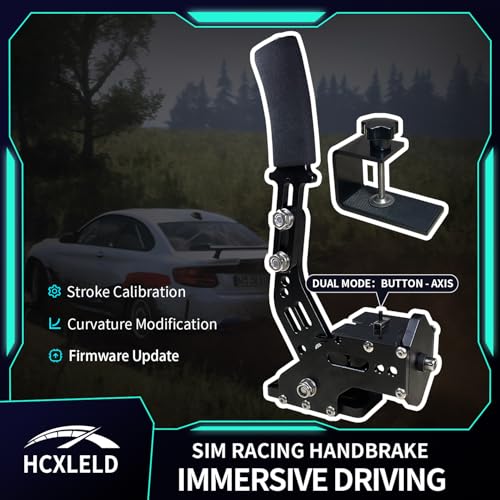
If you want one of the more flexible sim racing handbrakes for xbox, this HCXLELD unit is built around broad console compatibility and a simple clamp-on setup. It works with supported Logitech and Thrustmaster wheels on Xbox, and it can also be used with PS4/PS5 setups when connected and configured correctly.
Best For: Console racers who want a handbrake that can move between Xbox and PlayStation-compatible wheel bases without adding much setup hassle.
Pros:
- Supports Xbox Series X|S and Xbox One with Logitech G920/G923 and Thrustmaster TX
- Also compatible with PS4/PS5 wheel setups like the G29/G923 and T300 series
- Included table clamp makes desk mounting easier out of the box
- Windows software allows calibration, dead zone, curvature, and firmware updates
Cons:
- Compatibility is limited to specific wheel models, not all sim rigs
- Console setup can be picky about USB routing and PS4 mode requirements
- Some wheel/game combinations may need workaround mapping for axis support
For buyers comparing sim racing handbrakes for xbox, this is a practical pick if you already own a supported Logitech or Thrustmaster base and want cross-platform flexibility. It is less universal than higher-end PC-focused options, but the included clamp and configuration tools make it appealing for console racers.
Best Value Clamp Pick – Jetmilai USB Handbrake for PC
If you want a simple analog e-brake for drifting and rally practice, the Jetmilai handbrake is a practical budget-minded option to consider alongside other sim racing handbrakes for xbox setups. It’s built around a clamp-on design and USB connection, so it’s easy to mount and get moving for PC-based sim racing.
Best For: PC sim racers who want an affordable, clamp-mounted analog handbrake for drifting, rally, and casual practice.
Pros:
- Clamp mount helps keep installation straightforward
- Analog handbrake feel is useful for drift control and modulation
- USB connection makes it easy to pair with many PC racing setups
- Compact black design fits neatly into a starter rig
Cons:
- PC-focused product, so Xbox compatibility may require extra hardware or may not be supported
- Not as feature-rich as higher-end load-cell-style handbrakes
- Best suited to lighter-use home rigs rather than heavy-duty setups
Overall, this is a solid entry-level pick if you’re shopping for sim racing handbrakes for xbox but are open to a PC-first model with a straightforward clamp-and-play setup. It makes the most sense for drivers who value easy mounting and analog control over console-native compatibility.
Best for G920 Players – MAD HORNETS 14Bit X1 XSS XSX Handbrake
If you want one of the more direct-fit sim racing handbrakes for xbox, this MAD HORNETS unit is aimed at Logitech G920 owners who play on Xbox Series X|S or PC. It keeps the setup simple with USB plug-and-play support, while the 14-bit Hall sensor design gives you a more progressive pull than basic on/off handbrakes.
Best For: G920 racers on Xbox who want a dedicated, easy-to-install handbrake with a more precise feel.
Pros:
- Plug-and-play USB setup with no driver installation
- 14-bit Hall sensor and progressive response for finer control
- All-steel structure feels sturdy and built for frequent use
- Compact design takes up less cockpit space
Cons:
- Only supports Logitech G920, so compatibility is limited
- Not a universal handbrake for every Xbox wheelbase setup
- USB3.0 branding is less important than actual game support
For buyers comparing sim racing handbrakes for xbox, this is a strong niche pick if you already use a G920 and want a dedicated handbrake without extra setup hassle. The main tradeoff is compatibility, but within the right setup it offers a solid, more realistic braking feel.
Best for Thrustmaster Xbox Owners – HCXLELD Sim Racing Handbrake
If you’re shopping for sim racing handbrakes for xbox and already run a supported Thrustmaster wheel, this HCXLELD option is built to slot in without a full cockpit upgrade. It focuses on console compatibility, adjustable feel, and a sturdy metal clamp, making it a practical add-on for rally and drifting.
Best For: Thrustmaster Xbox users who want a metal handbrake with broad console support and adjustable tuning on Windows.
Pros:
- Supports several Thrustmaster Xbox wheels, including TMX, T128X, T248X, and TX
- Aluminum alloy body with a stainless steel clamp for a more rigid setup
- Windows app allows stroke, dead zone, curvature, and firmware adjustments
Cons:
- Only works with specific Thrustmaster models, not universal across all wheels
- TMX axis support on Xbox needs a workaround, which may require extra setup
- Console use may involve firmware checks and setup steps before it feels plug-and-play
For sim racing handbrakes for xbox, this is a strong match if you already own the right Thrustmaster base and want a tougher-feeling, more adjustable handbrake. It’s less of a universal upgrade and more of a targeted choice for compatible Xbox racers.
Best PC-Only Pick – aikeec USB Handbrake for Logitech & Thrustmaster
If you’re comparing sim racing handbrakes for xbox, this aikeec model is important to note because it is a PC-only USB handbrake. It works well as an extra drift and rally control for Windows sim setups, but it does not support Xbox One, PS4/PS5, or Mac.
Best For: PC sim racers who want an affordable, easy-to-install handbrake for drifting, rally stages, and upgraded wheel-cockpit setups.
Pros:
- Plug-and-play USB design with no driver installation required
- Hall sensor offers smooth, accurate braking with auto calibration
- Adjustable height and angle for different rigs and cockpit positions
- Compatible with popular Windows wheel bases like Logitech and Thrustmaster
Cons:
- Not compatible with Xbox, PlayStation, or Mac
- Only works on Windows PC racing setups
- Requires a supported sim game and wheel configuration
This is a solid budget-friendly add-on if your priority is PC drifting performance rather than console support. For buyers specifically searching for sim racing handbrakes for xbox, this is not the right fit, but it makes sense for Windows racers who want a reliable standalone handbrake with straightforward setup.
Best Xbox-Compatible Value – HCXLELD Sim Racing Handbrake
If you want one of the more affordable sim racing handbrakes for xbox that still covers the main console ecosystems, this HCXLELD unit is worth a look. It supports Logitech G920 and Thrustmaster TX setups on Xbox Series X|S and Xbox One, while also working with select PlayStation-compatible wheels, making it a flexible pick for mixed-rig households.
Best For: Xbox racers using a G920 or TX wheel who want a simple handbrake with included table clamp and console-ready setup.
Pros:
- Supports Logitech G920 and Thrustmaster TX on Xbox Series X|S and Xbox One
- Includes a table clamp for easier desk or cockpit mounting
- Doesn’t use up the wheel’s H-shifter port, so it can work alongside a shifter
- PC app adds calibration, dead zone, curvature, and firmware updates
Cons:
- Compatibility is limited to specific wheel models, not all Xbox setups
- Some features need the Windows app and a bit of setup
- G29 users have console-mode limitations, especially on PS5
For sim racing handbrakes for xbox, this is a practical option if your rig already centers on a supported G920 or TX wheel. It’s not the most universal choice, but the included clamp and shifter-friendly design make it a solid value pick for straightforward rally or drift use.
Best for Xbox Compatibility – 64-bit USB PC Handbrake for G920
If you want one of the more versatile sim racing handbrakes for xbox, this 2-in-1 USB model is aimed at players using a Logitech G920 on Xbox Series S/X or Xbox One, while still working with PC setups. It uses a Hall-effect sensor for progressive input, and the metal build plus compression spring should give it a more realistic lever feel than basic button-style handbrakes.
Best For: Racers who need a plug-and-play handbrake option for Xbox with a G920 wheel and also want PC compatibility for games like Assetto Corsa or iRacing.
Pros:
- Compatible with Xbox One, Xbox Series S/X, and PC when used with supported setups
- Hall-effect, non-contact design for smoother progressive braking and longer life
- Plug-and-play USB connection with no driver installation required
- Mostly metal construction for a more solid, durable feel
Cons:
- Xbox support depends on pairing with a Logitech G920 wheel
- Not as universal as some standalone PC handbrakes
- Best results may require compatible sim titles and settings tweaks
For buyers comparing sim racing handbrakes for xbox, this is a strong compatibility-first pick rather than a fancy standalone upgrade. The key appeal is simple setup, Hall-sensor progressiveness, and support for common Logitech ecosystems.
Best Xbox-Compatible Choice – HCXLELD Sim Racing Handbrake for Console
If you want one of the more versatile sim racing handbrakes for xbox, this HCXLELD model is built to work with Logitech G920 and Thrustmaster TX setups on Xbox Series X|S and Xbox One, while also covering supported PS and PC wheel bases. It is a practical pick if you need a console-friendly handbrake that can still be tuned through Windows when you move to a PC rig.
Best For: Xbox racers using a supported wheel base who want a handbrake that also adapts well to Windows tuning and mixed-console setups.
Pros:
- Supports Logitech G920 and Thrustmaster TX on Xbox consoles
- Windows hub app allows calibration, dead zone, curvature, and firmware updates
- Includes a table clamp for easier desk or rig mounting
- Does not use the wheel’s H-shifter port, so it can work alongside an H-pattern shifter
Cons:
- Only works with specific supported wheel bases on PS/Xbox
- Console axis support is limited, with some mapping workarounds needed
- PS5 users must use PS4 mode for compatibility
This is a strong fit if you want a flexible, budget-conscious option among sim racing handbrakes for xbox and already own a supported Logitech or Thrustmaster wheel. The setup details matter, but once configured, it gives you the basics most console racers need.
Best Heavy-Duty Pick – BGQG Hall Sensor Handbrake
If you want one of the more versatile sim racing handbrakes for xbox, this BGQG unit is aimed at players who need broad console support plus a progressive analog feel. Its Hall effect sensor, all-steel frame, and clamp mount make it a practical add-on for drifting and rally-style driving without taking up much space.
Best For: Xbox Series X/S and Xbox One racers who want a sturdy, analog handbrake with simple clamp-on installation.
Pros:
- Compatible with Xbox Series X/S, Xbox One, G920, and Windows PC
- Hall sensor design delivers smoother, more precise analog input
- All-steel construction adds durability and a solid braking feel
- Compact clamp mount suits smaller sim rigs and desk setups
Cons:
- Windows PC setup is the most straightforward; console compatibility can be game-dependent
- Not as refined as higher-end handbrakes with more adjustment options
- Best suited to entry and mid-level rigs rather than pro-level builds
Overall, this is a sensible choice if you want sim racing handbrakes for xbox that prioritize compatibility, durability, and a progressive pull over flashy extras. It fits well for drivers building a compact rally or drift setup on a budget-conscious rig.
Best for Logitech G29/G920 Owners – HCXLELD Sim Racing Handbrake
If you need one of the more compatible sim racing handbrakes for xbox, this HCXLELD unit is built specifically around Logitech G920 support on Xbox Series X|S and Xbox One, plus G29 support on PlayStation. It’s a focused pick for players who already use those wheels and want a dedicated e-brake without giving up the shifter port.
Best For: Logitech G920 or G29 owners who want a dedicated handbrake for console drifting and rally setups.
Pros:
- Supports Logitech G920 on Xbox Series X|S and Xbox One
- Does not block the wheel’s H-shifter port, so you can use both together
- Aluminum-alloy body with a stainless steel clamp for sturdier mounting
- Included clamp helps it fit a range of sim cockpits and desks
Cons:
- Only works with G29/G920, not other steering wheels
- Axis support is limited on console and may require remapping in some games
- PS5 support relies on PS4 mode, which adds setup friction
For console racers locked into Logitech hardware, this is a practical add-on rather than a universal upgrade. If your setup matches, it’s a straightforward way to get a usable handbrake in the sim racing handbrakes for xbox category.
How We Picked the Best Sim Racing Handbrakes for Xbox
We prioritized compatibility first, then looked at control precision, mounting method, and whether each unit makes sense for Xbox-focused sim racers. For Sim Racing Handbrakes for Xbox, the most important detail is not just whether a product says “Xbox” in the listing, but whether it works properly with your wheel base, console setup, and supported game.
We also favored products with stronger input resolution, reliable sensors, and hardware that should hold up under repeated use in rally and drift sessions.
Quick Comparison
Most of the options here fall into two groups: direct Xbox-compatible handbrakes that pair with supported wheel ecosystems, and USB handbrakes that are better suited for PC-first setups. If you play on Xbox Series X/S or Xbox One, confirm the product works with your exact wheel base, since some units are only compatible with specific Logitech, Thrustmaster, or similar wheels.
If your priority is drifting and trail braking, look for smoother analog control and better sensor quality. If you want simple installation, a clamp and plug-and-play design may matter more than advanced tuning.
Key Buying Factors for Sim Racing Handbrakes for Xbox
Compatibility
Check the full compatibility list carefully. Many Sim Racing Handbrakes for Xbox are not universal; they may require a supported wheel base or a specific console pathway. Make sure the handbrake matches your wheel model and your version of Xbox.
Sensor Type and Resolution
Higher-resolution sensors usually provide more consistent braking input. Hall effect and higher-bit designs tend to offer smoother wear resistance and more precise modulation than basic digital-style units.
Mounting and Ergonomics
A sturdy table clamp or rigid mounting solution helps prevent movement during aggressive inputs. Handle shape, lever travel, and adjustment range also affect comfort and repeatability.
Setup Simplicity
Some handbrakes are easy to install but limited in ecosystem support, while others need more setup but offer better feel. Choose based on whether you want convenience or tuning flexibility.
Who Should Buy Which Sim Racing Handbrakes for Xbox?
Choose a console-compatible model if Xbox is your main platform and you want the smoothest path to setup. Pick a PC USB handbrake if you also race on Windows and want broader tuning options or a more universal accessory.
Drifters should favor stronger modulation and a stable mount, while casual racers may prefer the simplest plug-and-play option. If you are building a more serious rig, prioritize durability and sensor quality over the lowest price.