
Choosing from the best soldering microscopes under 300 can make PCB repair faster, more accurate, and far less frustrating. The right model should give you a stable image, enough working distance for iron and tweezers, and a screen that stays easy to read during long sessions.
This roundup focuses on practical options for hobbyists, repair techs, and bench users who want clear magnification without overspending. Whether you need HDMI output, a large display, or a stand that supports delicate board work, the picks below are built around real soldering needs.
Best 10 Soldering Microscopes Under 300 Picks for 2026
Editor's Pick
Andonstar AD246S-M 3-Lens 2160P HDMI Microscope

- 3-lens setup for soldering, coins, and slides
- 2160P video with HDMI output
- Metal boom arm stand for bench work
Best For: Electronics repair users who want a flexible multi-lens microscope.
Most Versatile
TOMLOV TriL110 3-Lens 2500X Digital Microscope

- Dedicated 1500X soldering lens
- 10.1-inch IPS screen with 178° viewing
- 12 LEDs plus side and bottom lights
Best For: Users who want a big-screen microscope with easy lens switching.
Best Big-Screen Option
Andonstar AD249S-M 10.1" HDMI Microscope

- 3-lens setup for soldering and repair
- 10.1-inch display with 2160P recording
- Adjustable metal boom arm stand
Best For: Buyers who want a larger screen and a sturdy, adjustable microscope.
Best Budget-Friendly Pick
TOMLOV DM10 10.1" Soldering Magnifier

- 10.1-inch IPS screen
- 5X-1200X range for repair and hobby use
- USB output plus 10 LED lighting
Best For: Users who want a straightforward soldering microscope with a large screen.
Max Workstation Pick
Andonstar AD409 Max Digital Microscope

- UV-filtered metal lens helps protect against heat, smoke, and dust
- Oversized Max station creates a much larger soldering area
- Includes helping hands, tool holder, and endoscope for wider inspection
Best For: Bench-based soldering and repair with extra workspace
Multi-Lens Pro Pick
Andonstar AD246S-M Plus 7" HDMI Microscope

- Three-lens design covers soldering, inspection, and other micro work
- Boom-arm station includes extension base, helping hands, and tool holder
- HDMI, remote control, 2160P recording, and measurement software add flexibility
Best For: All-purpose users who want lens versatility and a soldering-ready station
Budget Hands-Free Pick
5" LCD Digital Soldering Microscope with C-Clamp

- 5-inch IPS screen for bench viewing
- Flexible arm and C-clamp free up both hands
- PC view works without driver downloads
Best For: Budget PCB repair and solder-joint inspection
Most Versatile View
TOMLOV TM3K-3D 7" Magnetic Dual Lens Scope
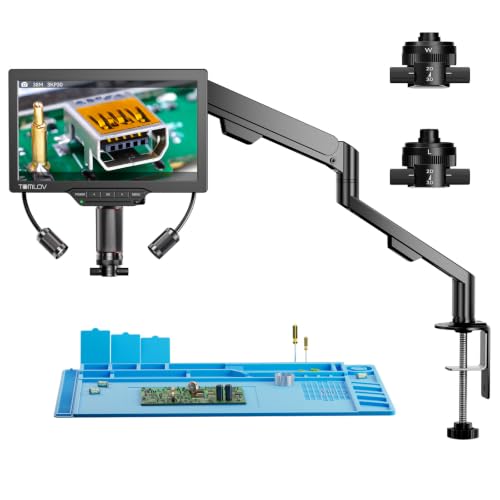
- 3D side-viewing with 360° rotation
- Magnetic L and W lenses for quick switching
- 7-inch IPS screen with 3K UHD
Best For: Repair work that needs angled viewing and lens flexibility
Industrial Camera Style Pick
NICE-POWER 13MP HDMI VGA Microscope

- 13MP camera with 1080P HDMI/VGA output
- 150X C-mount lens with up to 1000mm working distance
- 56-LED adjustable ring light and foldable stand
Best For: Camera-based electronics repair on an external display
Editor's Pick – Andonstar AD246S-M 3-Lens 2160P HDMI Microscope
If you want one of the more versatile soldering microscopes under 300, the Andonstar AD246S-M is built around a 3-lens design that covers PCB repair, coin viewing, and biological slides. Its L lens is the one aimed at soldering and repairing, while the metal boom arm stand is meant to handle a larger work envelope in high-temperature environments.
Best For: Electronics repair users who want a flexible multi-lens microscope with HDMI output and a stable soldering stand.
Pros:
- 3-lens system gives you dedicated options for soldering, coins, and slides
- 2160P video recording plus HDMI output for easier viewing on a larger screen
- Upgraded metal boom arm stand is adjustable and suited to soldering setups
- Includes useful extras like slides, tweezers, remote, and a 32GB card
Cons:
- Best macro-versatility may be more than some users need for basic PCB work
- Lens swapping requires removing and installing screws
- Most useful features depend on pairing with a screen or computer workflow
Overall, this is a strong all-around pick if you want a soldering microscope that can do more than board inspection alone. The combination of the L lens, HDMI support, and sturdy stand makes it especially practical for bench use.
Most Versatile – TOMLOV TriL110 3-Lens 2500X Digital Microscope
The TOMLOV TriL110 stands out among soldering microscopes under 300 because it combines three dedicated lenses with a large 10.1-inch IPS screen. For soldering, the 1500X lens is the main attraction, and the taller stand with a larger base gives you the space and stability needed for precision work.
Best For: Users who want a big-screen microscope with easy lens switching and strong soldering support.
Pros:
- Three lenses let you move quickly between coin, soldering, and biological viewing
- 10.1-inch IPS screen offers a wide 178-degree viewing angle
- 12 built-in LEDs plus gooseneck side lights and slide bottom light improve visibility
- Taller 12.6-inch stand and larger base help create a stable work area
Cons:
- The 2500X biological lens requires extremely close focusing distance
- Large-screen design takes up more bench space than compact models
- Some users may only need the soldering lens and not the extra viewing modes
If you want a soldering microscope that feels like a full inspection station, the TriL110 is easy to justify. Its screen size, lighting system, and dedicated soldering lens make it a practical choice for detailed bench work.
Best Big-Screen Option – Andonstar AD249S-M 10.1" HDMI Microscope
The Andonstar AD249S-M is a straightforward choice for soldering microscopes under 300 if you prefer a larger 10.1-inch display and a proven 3-lens layout. The lens made for soldering and repairing is the main draw here, while HDMI output and the upgraded boom arm stand make it easier to use on a busy electronics bench.
Best For: Buyers who want a larger screen and a sturdy, adjustable microscope for electronics repair.
Pros:
- 3-lens design covers soldering, coin viewing, and biological slide use
- 2160P recording and HDMI output help when working on a bigger display
- Adjustable metal boom arm stand is designed for larger work envelopes
- Includes a 32GB card and useful accessories for getting started
Cons:
- Lens changes require manual screw removal and installation
- Focus and working distance setup may take some adjustment
- Feature set is broad, so it may be more than a simple solder-only user needs
This model makes sense if you want the same core repair-friendly design as the AD246S-M but prefer the larger 10.1-inch viewing experience. It is a practical bench microscope for users who value screen size and a stable stand.
Best Budget-Friendly Pick – TOMLOV DM10 10.1" Soldering Magnifier
If you are comparing soldering microscopes under 300 and want something simple but capable, the TOMLOV DM10 focuses on the essentials: a 10.1-inch IPS screen, a workable 5X-1200X range, and real-time USB output for bigger-screen viewing. It is set up for practical inspection tasks like PCB checks, SMD work, watch repair, and general hobby use.
Best For: Users who want a straightforward soldering microscope with a large screen and easy-to-use controls.
Pros:
- 10.1-inch IPS display gives a clear, easy-to-view workspace
- 5X-1200X magnification covers coins, soldering, watches, plants, and more
- USB output supports live viewing on a computer
- 10 LED lights plus side lights help improve visibility across different setups
Cons:
- Not as feature-rich as some multi-lens microscopes in this roundup
- Fewer advanced extras than models built around a dedicated boom-arm platform
- Higher-end photo specs may matter more to imaging-focused users than casual repair users
The DM10 keeps the formula focused on day-to-day use rather than complexity, which is appealing for many repair benches. If you want a large-screen microscope that is easy to operate and covers the basics well, it is a sensible option.
Max Workstation Pick – Andonstar AD409 Max Digital Microscope
If you want soldering microscopes under 300 that feel built for serious bench work, the Andonstar AD409 Max stands out with its oversized station, metal lens, and UV filter design. It’s aimed at users who need a larger work area, clearer protection from soldering heat and smoke, and an all-in-one setup for repair tasks.
Best For: Technicians and hobbyists who want a spacious soldering microscope station with endoscope support.
Pros:
- High-quality metal lens with a UV filter to help block heat, smoke, and dust
- Large 2024 Max station with a much bigger soldering workspace
- Includes helping hands, tool holder, repair mat, and endoscope for wider viewing
- 7? No—10.1-inch IPS display, HDMI output, 2160P recording, and wireless remote control
Cons:
- PC output does not support the endoscope
- Best fit for bench setups with more room than ultra-compact stations
Overall, the AD409 Max is the most workspace-focused option here, with a feature set that leans into soldering and maintenance instead of casual viewing. If your priority is a capable bench station rather than a tiny footprint, it’s an easy model to shortlist.
Flexible Arm Value Pick – LM109A 10.1" Digital Microscope
For buyers comparing soldering microscopes under 300, the LM109A is appealing because it trades a traditional stand for a flexible arm that opens up a much larger working area. The 10.1-inch IPS screen, dual lighting, and simple USB output make it a practical choice for PCB work, watch repair, and other precision tasks.
Best For: Users who want flexible positioning and a spacious soldering setup without a complicated system.
Pros:
- Heavy-duty 32cm flexible arm extends up to 27.5 inches for better reach
- Large 10.1-inch IPS screen with wide viewing angle
- Dual lighting system with 8 LEDs plus a 56-LED ring light
- USB plug-and-play support for Windows and Mac
Cons:
- Not a dedicated soldering station bundle like the most workshop-focused models
- Coin and inspection use is emphasized alongside electronics work
The LM109A is a smart pick if you value movement and bench flexibility over a bulkier station-style setup. Its arm design and lighting give it a strong mix of practicality and ease of use for everyday electronics repair.
Multi-Lens Pro Pick – Andonstar AD246S-M Plus 7" HDMI Microscope
If you need soldering microscopes under 300 that can do more than one job, the Andonstar AD246S-M Plus brings a versatile three-lens system to the bench. It combines a dedicated soldering lens with higher-magnification options, plus an upgraded boom-arm station and useful accessories for repair and inspection work.
Best For: Users who want a flexible multi-lens microscope for soldering, inspection, and general micro work.
Pros:
- Three-lens system covers soldering, coins, and biological-style inspection needs
- Upgraded pro boom arm station with extension base for a larger soldering area
- Includes tool holder, soldering helping hands, clips, and anti-static mat
- HDMI output, remote control, 2160P recording, and measurement software support
Cons:
- More complex than a basic single-lens soldering microscope
- Best suited to users who will actually use the lens-swapping versatility
The AD246S-M Plus is the most versatile option in this group, especially if your bench work extends beyond solder joints into general inspection. It’s a strong fit when you want a true all-purpose microscope setup with a soldering-friendly station.
Budget Hands-Free Pick – 5" LCD Digital Soldering Microscope with C-Clamp
If you want soldering microscopes under 300 for PCB repair, this model focuses on the essentials: a built-in 5-inch IPS screen, a flexible arm, and a C-clamp that helps keep both hands free. It is a practical choice for bench work when you want a direct view of solder joints without relying on a separate computer.
Best For: Budget-conscious electronics repair, solder joint inspection, and users who want a self-contained screen on the bench.
Pros:
- 5-inch IPS display helps reduce neck and eye strain during longer sessions.
- C-clamp and flexible goose-neck stand are useful for keeping the microscope stable while you work.
- Plug-and-play PC viewing uses built-in apps on Windows or Mac, with no driver download required.
- Designed for inspection of micro-details such as solder joints and electronics repair work.
Cons:
- Not auto-focus; sharp images require manual distance and focus-wheel adjustment.
- A Micro SD card is required for saving videos and photos and is not included.
- Built-in screen is meant for micro-details, not for full-screen views of larger objects.
This is a straightforward bench microscope for users who value simplicity and a low-friction setup over advanced imaging features. If your priority is an affordable soldering helper with a built-in display, it covers the basics well.
Most Versatile View – TOMLOV TM3K-3D 7" Magnetic Dual Lens Scope
For shoppers comparing soldering microscopes under 300, this TOMLOV stands out for its 3D side-viewing design and magnetic dual-lens setup. It is built for repair work where multiple angles matter, and the 7-inch IPS screen plus 3K resolution give you a more detailed on-bench view for electronics, jewelry, and other precision tasks.
Best For: Users who want a more flexible inspection setup for PCB repair, micro soldering, and angled viewing.
Pros:
- 3D side-viewing and 360° rotation help inspect solder joints and components from multiple angles.
- Magnetic L and W lenses make it easy to switch between long-distance PCB work and wider views.
- 3K UHD image quality on a 7-inch IPS screen provides a clear, easy-to-read display.
- Flexible arm stand and adjustable LED gooseneck spotlight support precision work with less glare.
Cons:
- More complex than a basic benchtop microscope if you only need simple inspection.
- Its broader feature set may be more than casual users need for occasional soldering.
This is the most feature-rich option in the group, especially if you need better viewing angles and lens flexibility for repair work. It suits users who want a microscope that can adapt to more than one task on the bench.
Industrial Camera Style Pick – NICE-POWER 13MP HDMI VGA Microscope
If you are looking at soldering microscopes under 300 and want more of an industrial camera setup, this NICE-POWER model is built around a 13MP microscope camera with HDMI and VGA output. Its 150X C-mount lens and adjustable foldable stand make it a practical choice for electronics repair, especially when you want to send the image to a larger display.
Best For: Users who want a camera-based microscope for electronics repair, HDMI/VGA viewing, and adjustable bench positioning.
Pros:
- 13MP camera outputs 1080P HD through HDMI and VGA.
- 150X zoom C-mount lens offers up to 1000mm working distance and 1-150X display magnification.
- 56-LED ring light is adjustable and rated up to 60,000 lux for brighter viewing.
- Flexible foldable stand can be positioned at different angles for more comfortable observation.
Cons:
- Uses a separate display setup rather than a built-in screen.
- Remote control works only in HDMI output mode.
- Remote control battery is not included.
This model makes the most sense if you prefer a camera-and-monitor workflow over an all-in-one microscope screen. It is a solid fit for repair benches that already use HDMI or VGA displays.
How We Picked the Best Soldering Microscopes Under 300
For Soldering Microscopes Under 300, we prioritized image clarity, working distance, stand stability, display size, and ease of setup. We also favored models that are useful on a busy bench, including units with HDMI output, built-in screens, flexible stands, and lighting that helps reveal pads, joints, and traces.
Quick Comparison
In this price range, the biggest differences are screen size, lens design, and mounting style. Larger displays are easier on the eyes for extended work, while 3-lens and dual-lens setups can improve flexibility for different board sizes. Clamp or articulated stands are better for tighter benches, while heavier bases can feel more stable during fine soldering tasks.
Key Buying Factors for Soldering Microscopes Under 300
Working Distance and Clearance
You need enough room to move a soldering iron, hot air nozzle, or tweezers under the lens. A microscope with poor clearance may look sharp on paper but feel awkward in real use.
Screen Quality and Output
Look for a display or HDMI output that stays crisp at the magnification you actually use. A clean, low-latency image helps when inspecting joints or placing small components.
Stand Stability
Bench vibration can ruin precision work. A solid base, rigid arm, or secure C-clamp can matter as much as magnification.
Lighting and Focus Control
Integrated LEDs, adjustable brightness, and smooth focus make it easier to see solder bridges, cold joints, and lifted pads. Good lighting also reduces eye strain over long sessions.
Magnification Range
Higher numbers are not always better. For Soldering Microscopes Under 300, choose a usable range that matches PCB repair, rework, and inspection instead of chasing maximum zoom alone.
Who Should Buy Which Soldering Microscopes Under 300?
If you want the easiest all-around bench setup, choose a microscope with a large screen and a stable stand. If your workspace is tight, a compact clamp-mounted model may be the better fit. For users who inspect boards, coins, or small parts in addition to soldering, a multi-lens design can offer more flexibility. If you work on delicate repairs for long periods, prioritize image clarity and comfortable viewing over raw magnification.
Overall, the best choice depends on how you solder, how much bench space you have, and whether you value a bigger display, better stand control, or more versatile optics. Focus on practical usability first, and you’ll get more from any of the Soldering Microscopes Under 300 in this roundup.