
Choosing the right microscope can make fine-pitch soldering faster, cleaner, and far less frustrating. The best models give you a stable image, enough working distance, and a screen size that keeps your hands free.
This roundup focuses on soldering microscopes that balance clarity, ease of use, and real bench practicality, so you can compare options for repair, inspection, and detailed electronics work.
Best 10 Soldering Microscopes Picks for 2026
Editor’s Choice
Andonstar AD249S-M Plus 3-Lens 10.1" HDMI Microscope

- 3-lens system for soldering, general inspection, and slide viewing
- 10.1-inch screen with HDMI output for larger viewing
- Includes boom arm stand, helping hands, tool holder, and 32GB card
Best For: repair benches that need a large-screen microscope station
Runner-Up
TOMLOV DM9B 7" Coin and Soldering Microscope

- 7-inch LCD screen for built-in viewing
- Black metal base and adjustable stand improve stability
- 8 LEDs, gooseneck lights, 12MP photos, 1080P video, and 16GB card
Best For: collectors and hobbyists who want an easy built-in display
Best Compact Station
Andonstar AD246S-M Plus 7" HDMI Soldering Microscope

- 3-lens design for soldering, inspection, and slides
- 7-inch HDMI monitor saves bench space
- Includes boom arm stand, helping hands, tool holder, and 32GB card
Best For: compact benches that still need HDMI viewing and accessory support
Budget Pick
5" LCD Soldering Microscope with C-Clamp Stand

- 5-inch IPS screen keeps the setup compact
- C-clamp and flexible arm support hands-free repair work
- Plug-and-play PC mode with no extra driver installs
Best For: budget electronics repair and small workspaces
Premium Multi-Lens Pick
Andonstar AD249S-M 3 Lens 2160P HDMI Digital Microscope

- Three interchangeable lenses for soldering, coins, and slides
- 2160P output with HDMI support for larger-screen viewing
- Upgraded metal boom arm stand for bench soldering work
Best For: Users who want a versatile bench microscope for repair and mixed-use inspection
Compact Bench Clamp Pick
4.3 Inch Digital Soldering Microscope with C-Clamp

- C-clamp stand keeps the bench clear for soldering
- 4.3-inch screen for live PCB and solder-joint viewing
- Manual focus with 50X-1000X magnification
Best For: Anyone who wants a compact, hands-free microscope for PCB repair
Versatile HDMI Repair Pick
Andonstar AD246S-M 3 Lens 2160P

- Three-lens setup for soldering, coins, and slides
- 2160P HDMI output for larger-screen viewing
- Adjustable metal boom arm with remote and software support
Best For: Repair-focused buyers who want a flexible bench microscope with HDMI
4K HDMI Flex-Arm Pick
4K 30FPS HDMI Digital Soldering Microscope with Flex Arm Stand
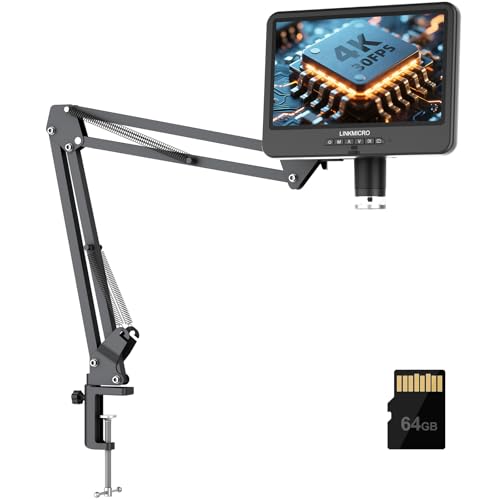
- 4K 30FPS HDMI output on built-in and external displays
- Flexible arm stand reaches 27.5 inches with 23.6-inch height
- Built-in mic, 8-level LEDs, and 64GB card included
Best For: Bench-based repair work, tutorials, and large-screen inspection
Versatile Workbench Choice
Andonstar AD210 10.1 Inch LCD Digital Microscope for Soldering, Coin

- 10.1-inch IPS screen with 1080P video and 12MP photos
- 1cm to 26cm working distance with sturdy metal stand
- Top, side, and bottom lights plus 32GB card and remote
Best For: Mixed-use buyers who need soldering, coin, and slide viewing
Editor’s Choice – Andonstar AD249S-M Plus 3-Lens 10.1" HDMI Microscope
If you want one of the more flexible soldering microscopes for electronics repair, the Andonstar AD249S-M Plus stands out for its 3-lens setup and large 10.1-inch display. It is built to handle soldering, repair work, and other close-up tasks, while the upgraded boom arm stand and accessory layout help keep a workbench organized.
Best For: Electronics repairers who want a large-screen microscope station with extra workspace and multiple lens options.
Pros:
- 3-lens design covers soldering, general inspection, and high-magnification viewing.
- 10.1-inch monitor and HDMI output make viewing comfortable on a larger screen.
- Upgraded stand adds an extension base, component storage boxes, tool holder, helping hands, and anti-static mat.
- Includes 32GB SD card, remote, and adjustable LED lighting with 8 brightness levels.
Cons:
- Many of the strongest features are tied to the full station setup, so it takes more bench space.
- Lens switching requires removing and installing screws.
Overall, this is a feature-rich choice for buyers who want a microscope that also functions as a more complete soldering workstation. The combination of HDMI viewing, bundled accessories, and multi-lens flexibility makes it especially practical for repair-heavy desks.
Runner-Up – TOMLOV DM9B 7" Coin and Soldering Microscope
The TOMLOV DM9B is a practical pick if you want soldering microscopes with a simpler all-in-one design and a built-in screen. Its 7-inch LCD display, metal base, and adjustable lighting make it useful for PCB inspection, coin work, and other detailed close-up tasks without needing a separate monitor.
Best For: Hobbyists and collectors who want a stable microscope with a built-in screen and easy day-to-day inspection.
Pros:
- 7-inch LCD screen provides a comfortable built-in viewing experience.
- Black metal base helps reduce glare and reflections around the work area.
- 8 LED lights plus two flexible gooseneck lights help control shadows and brightness.
- Includes 12MP photo capture, 1080P video, PC connection, and 16GB storage.
Cons:
- Designed for light soldering tasks rather than a full-featured soldering station.
- Magnification is listed up to 1200X, which may be more than some buyers need for routine bench use.
This model is a solid middle-ground option for buyers who want a microscope that works well on a bench but stays straightforward to use. The built-in screen and improved lighting setup make it especially convenient for repeated inspection work.
Best Compact Station – Andonstar AD246S-M Plus 7" HDMI Soldering Microscope
The Andonstar AD246S-M Plus brings the same 3-lens versatility found in larger soldering microscopes, but with a smaller 7-inch HDMI monitor and a more compact station footprint. It is aimed at users who want a repair-friendly setup with helpful accessories, clear output, and enough flexibility for soldering, inspection, and educational viewing.
Best For: Users who want a compact soldering microscope station with HDMI output and useful bench accessories.
Pros:
- 3-lens system supports soldering, coin viewing, and biological slide use.
- 7-inch HDMI monitor keeps the station smaller than the 10.1-inch version.
- Upgraded boom arm stand adds an extension base, storage boxes, tool holder, and helping hands.
- Includes remote control, 32GB SD card, 8-level LED lighting, and measurement software support.
Cons:
- Lens changes still require removing and installing screws.
- Smaller screen may be less immersive than a larger bench monitor setup.
If you want a more space-conscious repair station, this model keeps the core Andonstar feature set while shrinking the display size. It is a good match for buyers who want bench organization and HDMI viewing without committing to a larger unit.
Budget Pick – 5" LCD Soldering Microscope with C-Clamp Stand
This 5-inch LCD model is a straightforward option for soldering microscopes when you want hands-free viewing and a compact stand. It is built for PCB repair and other micro-detail work, with a flexible arm, built-in screen, and simple PC viewing that avoids extra software installation.
Best For: Budget-minded electronics users who need a compact microscope for soldering checks and inspection.
Pros:
- 5-inch IPS display reduces the need to use an external monitor.
- C-clamp stand keeps the workspace open and helps free both hands.
- Plug-and-play PC connection works through built-in Camera or Photo Booth apps.
- Flexible arm and manual focus wheel make distance and sharpness adjustments simple.
Cons:
- Micro SD card is required for saving but is not included.
- Not an autofocus unit, so getting a sharp image depends on manual adjustment.
- Screen size is smaller than larger bench microscopes.
This is the most minimal setup in the group, but it covers the basics well for close PCB inspection and quick repair work. If you value simplicity and a smaller footprint over extra station features, it is an easy model to work with.
Premium Multi-Lens Pick – Andonstar AD249S-M 3 Lens 2160P HDMI Digital Microscope
If you want one of the more versatile soldering microscopes for bench work, the Andonstar AD249S-M stands out for its three interchangeable lenses and upgraded boom arm stand. It is built to handle PCB repair, phone work, coin viewing, and even biological slides, while the 2160P output and HDMI support make it easier to inspect details on a larger screen without straining your eyes.
Best For: Electronics repairers and hobbyists who want a flexible microscope that can also handle coins, slides, and general inspection.
Pros:
- Three-lens design covers soldering, close inspection, and broader viewing tasks
- 2160P recording with HDMI output helps when you want a bigger, clearer display
- Pro metal boom arm is adjustable and suited to high-temperature soldering environments
- Includes useful extras like a 32GB card, remote control, slides, and tweezers
Cons:
- Lens changes require removing and reinstalling screws
- Its many features may be more than you need if you only want a basic soldering view
- Best at a workbench setup rather than a tiny portable kit
Overall, this is a strong all-purpose choice if you want soldering support plus extra imaging flexibility in one package. The AD249S-M is especially appealing when you need a microscope that can move beyond PCB checks and still remain practical for bench use.
Compact Bench Clamp Pick – 4.3 Inch Digital Soldering Microscope with C-Clamp
This compact soldering microscope is designed for PCB inspection and electronics repair when you want a smaller screen setup that still keeps both hands free. The C-clamp stand positions the microscope above the bench, while the 4.3-inch display gives a live close-up view of solder joints, SMD parts, and phone logic boards.
Best For: Bench users who want a compact, hands-free microscope for close PCB and solder-joint inspection.
Pros:
- C-clamp stand helps keep the work area clear for soldering tools and boards
- 4.3-inch screen provides real-time viewing for close inspection
- Manual focus and 50X-1000X magnification cover common repair tasks
- Eight adjustable LED lights help reduce glare on reflective parts
Cons:
- Phone viewing, WiFi, and HDMI are not supported
- Micro SD card is required for saving media and is not included
- Manual focus means you need to set lens distance carefully
If you mainly need a practical repair tool rather than a feature-heavy microscope, this model keeps the setup straightforward. It is a good fit for close-up soldering work where bench space and hands-free access matter more than advanced connectivity.
Versatile HDMI Repair Pick – Andonstar AD246S-M 3 Lens 2160P
The Andonstar AD246S-M is another strong option among soldering microscopes if you want a three-lens system with a pro boom arm and HDMI output. It is aimed at electronics repair, but it also supports coin viewing and biological slides, making it a flexible bench microscope for users who want more than one job from the same unit.
Best For: Electronics repair users who want a versatile microscope with HDMI output and a bench-friendly boom arm.
Pros:
- Three interchangeable lenses support soldering, general viewing, and slide observation
- 2160P recording and HDMI output help with larger-screen monitoring
- Adjustable metal boom arm is designed for soldering environments
- Includes measurement software support, remote control, and 32GB storage card
Cons:
- Lens swapping requires removing and reinstalling screws
- Like the AD249S-M, it is more of a bench system than a simple compact tool
- Its versatility may be unnecessary if you only need basic PCB inspection
For buyers who want a repair-first microscope with extra flexibility, the AD246S-M covers the essentials well. The combination of HDMI viewing, adjustable positioning, and included accessories makes it a practical choice for regular bench use.
4K HDMI Flex-Arm Pick – 4K 30FPS HDMI Digital Soldering Microscope with Flex Arm Stand
This soldering microscope is built for work that benefits from a larger screen, steadier positioning, and real-time 4K viewing. The LINKMICRO LM208S-A pairs a 10.1-inch IPS display with 4K 30FPS HDMI output, plus a flexible arm stand that gives you extra reach for PCB repair, soldering, and inspection without crowding your bench.
Best For: Electronics repair users who want a large-screen 4K HDMI microscope with flexible positioning and audio recording support.
Pros:
- 4K 30FPS HDMI output for smooth, lag-free viewing on the built-in screen or an external monitor
- Upgraded flexible arm stand with up to 27.5 inches of reach and 23.6 inches of working height
- Built-in microphone supports synchronized audio recording with 4K video
- Includes 8-level adjustable LED lighting, 64GB card, remote, and USB/HDMI connectivity
Cons:
- Large setup is better suited to a dedicated workbench than a compact desk
- Designed around HDMI and USB viewing, so it is less minimalist than simpler stand-only scopes
If you want a soldering microscope that feels closer to a professional inspection station than a basic hobby tool, this model stands out for its big screen, strong reach, and recording features. It is especially appealing for repair work, tutorials, and detailed inspection tasks where stable viewing matters.
Versatile Workbench Choice – Andonstar AD210 10.1 Inch LCD Digital Microscope for Soldering, Coin
The Andonstar AD210 is a versatile soldering microscope built around a large 10.1-inch IPS display and a sturdy metal stand. It gives you the room and lighting options to move between PCB repair, coin inspection, and even slide viewing, making it a practical all-rounder for hobbyists who need one microscope for several jobs.
Best For: Users who want a flexible microscope kit for soldering, coins, and general inspection.
Pros:
- 10.1-inch IPS display with 178° viewing angle and 1080P video support
- Wide 1cm to 26cm working distance for soldering, coin viewing, and other tasks
- Upgraded metal stand with direct vertical movement and a 12.6-inch max height
- Includes top, side, and bottom lighting plus a 32GB card and remote control
Cons:
- 1080P output is not as detailed as higher-end 4K models
- More feature-rich than a basic soldering-only microscope, so it may be more than some users need
For buyers who want broad versatility rather than a single-purpose setup, the AD210 is an easy recommendation. It offers enough reach, lighting control, and accessory support to handle soldering tasks while still serving as a capable general-purpose digital microscope.
Long-Reach Boom Arm Pick – Andonstar AD109 Digital Microscope with 10.1" Screen for Soldering Repair
The Andonstar AD109 is a practical soldering microscope for users who need generous reach and easy positioning over larger boards. Its 10.1-inch IPS screen, 70cm boom arm, and dual LED lighting setup make it a strong fit for electronics repair, coin work, and detailed inspection from a comfortable viewing position.
Best For: Soldering and repair work that benefits from a long boom arm and flexible placement.
Pros:
- 10.1-inch IPS HD screen with 1080p video and 12MP photos
- Extra-long boom arm extends to 27.56 inches and rotates 360 degrees with a 170° tilt range
- 8+56 LED lighting system creates adjustable 3D-style coin viewing
- USB-C connectivity works with Mac and Windows for plug-and-play use
Cons:
- Still limited to 1080p, so it does not match 4K alternatives
- Remote batteries are not included
If your soldering bench needs more reach and less repositioning, the AD109 is a smart pick. It combines a long boom arm with a large display and flexible lighting, which makes it especially useful when you want to keep larger PCBs and tools comfortably in view.
How We Picked the Best Soldering Microscopes
We prioritized Soldering Microscopes that are practical for PCB repair, component inspection, and rework. Key factors included image clarity, screen size, working distance, stand stability, magnification range, and how easy each unit is to position over a board.
We also favored models that make bench work more comfortable, especially those with HDMI output, built-in displays, or flexible stands that reduce eye strain and keep tools clear.
Quick Comparison
In this lineup, larger-screen models are best for general repair benches and shared workstations, while compact units suit tighter spaces and portable setups. Three-lens systems offer more versatility for changing board sizes and working distances, while simpler single-screen models can be easier for beginners.
Key Buying Factors for Soldering Microscopes
Screen Size and Image Stability
A bigger display is not always essential, but it can help with prolonged inspection and soldering. Look for a stable image with low lag so movements under the lens stay predictable.
Working Distance and Stand Design
The best Soldering Microscopes leave enough room for iron tips, tweezers, and hot-air tools. A sturdy stand or clamp matters just as much as magnification because wobble can make precise work harder.
Magnification and Field of View
Higher magnification helps with tiny joints, but too much zoom can narrow your view. Choose a range that lets you inspect both the whole board and individual pads without constant repositioning.
Lighting and Connectivity
Good illumination is essential for seeing solder fillets, bridges, and component markings. HDMI output, if included, can improve responsiveness and make the microscope easier to integrate into a shop or training setup.
Who Should Buy Which Soldering Microscopes?
Beginners and hobbyists often do well with compact, easy-to-set-up Soldering Microscopes that keep the workflow simple. If you repair dense PCBs, choose a model with a larger screen, a stable stand, and enough clearance for hand tools.
For professional benches, a display-heavy setup with flexible positioning and stronger ergonomics is usually the better long-term choice. If portability matters most, a smaller LCD model may be the most convenient option.
Overall, the best choice is the one that matches your workspace, board sizes, and how often you need to solder versus inspect. Prioritize usability first, then magnification and display features.