
A dependable enclosure can turn a spare SSD into a fast, reusable backup drive without the cost of a prebuilt external disk. The right choice depends on your SSD’s interface, the ports on your computer, and how much capacity or flexibility you need.
This roundup covers compact NVMe and SATA enclosures, multi-drive docks, RAID-capable designs, and hybrid options for home, office, and enthusiast backup setups.
Best 10 SSD Enclosures for Backups Picks for 2026
Best for Tool-Free NVMe Backups
Sabrent EC-PNVO NVMe Enclosure

- Tool-free flip-open installation
- USB 3.2 Gen 2 up to 10Gbps
- Aluminum cooling for sustained transfers
Best For: Portable NVMe backups and drive cloning
Best for Affordable SATA Backups
Benfei 2.5-Inch SATA Enclosure

- Fits 2.5-inch SATA SSDs and HDDs
- Tool-free plug-and-play setup
- Includes Type-C/Type-A connectivity
Best For: Everyday backups from 2.5-inch SATA drives
Best for Portable NVMe Backup Versatility
UGREEN 10Gbps M.2 NVMe Enclosure

- Supports several NVMe sizes and key types
- Includes USB-C and USB-A cables
- Compact aluminum body with silicone case
Best For: Traveling with NVMe backups across multiple devices
Best for Multi-Drive Backup Workstations
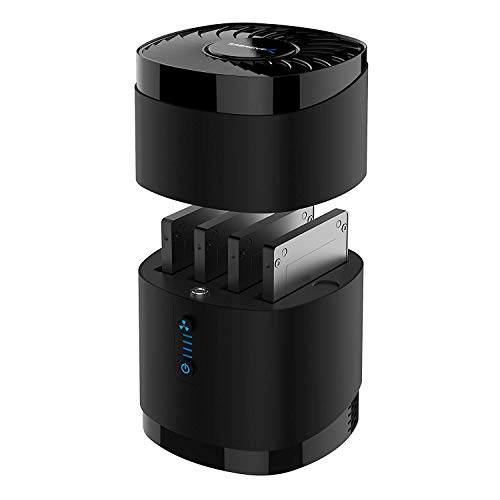
- Holds four 2.5-inch SATA drives
- Supports up to 16TB per bay
- Built-in fan for extended operation
Best For: Desktop backup workflows using multiple SATA drives
Best Dual-Drive Protection

- RAID 1, RAID 0, JBOD, and Clone modes
- Tool-free dual M.2 2280 NVMe installation
- Aluminum design with 20Gbps transfers
Best For: Redundant backups and direct SSD cloning
Best Simple SATA Option
SABRENT 2.5-Inch USB 3.0 Enclosure

- Tool-free 2.5-inch SATA drive installation
- USB 3.0 transfers up to 5Gbps
- Plug-and-play with UASP and broad OS support
Best For: Single-drive SATA backups
Maximum-Capacity Hybrid Pick
CENMATE Hybrid HDD/NVMe Enclosure

- Holds one SATA drive and three M.2 NVMe SSDs
- Supports up to 46TB combined capacity
- USB 3.2 Gen 2 with USB-A and USB-C cables
Best For: Multi-drive backup setups needing high capacity and NVMe flexibility
Simple Large-Drive Value
ORICO 3.5-Inch USB 3.0 Enclosure

- Supports one 3.5-inch SATA HDD or SSD
- Handles drives up to 20TB
- Includes 12V/2A power adapter and UASP
Best For: Single-drive desktop backups using high-capacity SATA storage
Flexible SATA Swap Pick
SABRENT 2.5/3.5-Inch Enclosure

- Fits both 2.5-inch and 3.5-inch SATA drives
- Tool-free drive swapping with USB 3.0 UASP
- Includes a 12V/2A power adapter
Best For: Rotating different-size SATA drives for backup tasks
Best for Tool-Free NVMe Backups – Sabrent EC-PNVO NVMe Enclosure
For fast SSD enclosures for backups, the Sabrent EC-PNVO combines a tool-free flip-open design with USB 3.2 Gen 2 performance. It supports M.2 NVMe drives in common lengths from 2230 through 2280, but it does not support M.2 SATA SSDs.
Best For: Users who want a quick, portable NVMe enclosure for backups, cloning, troubleshooting, and large file transfers.
Pros:
- Tool-free installation makes swapping an NVMe SSD quick and simple.
- USB-C connectivity supports transfer rates up to 10Gbps.
- Aluminum construction and a direct-contact thermal pad help manage heat during sustained transfers.
- Supports NVMe drives up to at least 8TB and includes a USB-C cable.
Cons:
- Compatible with M.2 NVMe drives only, not M.2 SATA SSDs.
- Requires a USB-C connection to reach its advertised interface speed.
This is a practical choice when backup speed and easy drive access matter more than broad SATA compatibility. Confirm your SSD uses the NVMe protocol before buying.
Best for Affordable SATA Backups – Benfei 2.5-Inch SATA Enclosure
The BENFEI enclosure is a flexible option among SSD enclosures for backups if you use a standard 2.5-inch SATA SSD. Its tool-free shell accepts 7mm or 9.5mm drives and includes both Type-C and Type-A connection options for convenient use across computers and compatible devices.
Best For: Users backing up data from 2.5-inch SATA SSDs or hard drives with a simple, broadly compatible enclosure.
Pros:
- Tool-free, plug-and-play installation requires no driver.
- Supports 2.5-inch SATA I/II/III drives up to 6TB.
- USB Type-C/Type-A design provides flexible connection options.
- Supports UASP and transfer rates up to 5Gbps.
Cons:
- Designed for 2.5-inch SATA drives, not M.2 NVMe SSDs.
- Limited to 7mm and 9.5mm drive thickness.
Choose this model for straightforward SATA backup duty and wide operating-system compatibility. It is especially useful if you already have a spare 2.5-inch drive rather than an M.2 SSD.
Best for Portable NVMe Backup Versatility – UGREEN 10Gbps M.2 NVMe Enclosure
The UGREEN M.2 NVMe enclosure is a versatile pick for SSD enclosures for backups, offering 10Gbps USB 3.2 Gen 2 performance, tool-free installation, and both USB-C and USB-A cables. It supports M-key and B&M-key NVMe drives in sizes 2230 through 2280, up to 8TB.
Best For: Travelers and multi-device users who need a compact NVMe backup enclosure with flexible cable compatibility.
Pros:
- Supports NVMe M-key and B&M-key SSDs from 2230 to 2280.
- USB 3.2 Gen 2 supports transfer rates up to 10Gbps with a suitable cable.
- Includes USB-C-to-C and USB-C-to-A cables plus a silicone case.
- RTL9210 chipset supports UASP, TRIM, and multiple protection features.
Cons:
- Does not support SATA NGFF or mSATA SSDs.
- 10Gbps performance requires a compatible USB-C 3.2 Gen 2 data connection.
With its compact aluminum body and included cables, this enclosure is well suited to moving backups between newer USB-C systems and older USB-A computers. Verify that your drive is NVMe before installation.
Best for Multi-Drive Backup Workstations – Sabrent DS-4SSD Four-Bay Dock
For managing several drives, the Sabrent DS-4SSD offers a different approach to SSD enclosures for backups: a four-bay USB 3.0 docking station for 2.5-inch SATA SSDs or HDDs. Its tool-free bays and built-in fan make it suited to repeat drive swaps and extended backup sessions.
Best For: Users who regularly back up, access, or rotate multiple 2.5-inch SATA drives from one desktop station.
Pros:
- Holds up to four 2.5-inch SATA SSDs or HDDs at once.
- Supports drives up to 16TB each and up to 12.5mm thick.
- Tool-free magnetic covers make drive access and swapping convenient.
- Built-in whisper-quiet fan supports cooling during continuous operation.
Cons:
- USB 3.0 limits the interface to up to 5Gbps.
- Not compatible with RAID or 15mm drives.
- Its desktop dock design is less portable than a single-drive enclosure.
This dock makes the most sense for a backup workstation or drive-rotation setup rather than occasional travel. It provides capacity and convenient access, but it does not provide RAID functionality.
Best Dual-Drive Protection – 20Gbps M.2 RAID Enclosure
For buyers comparing SSD enclosures for backups, this dual-bay M.2 NVMe enclosure stands out for its RAID 1 redundancy, direct clone mode, and 20Gbps USB 3.2 connectivity. It supports two M.2 2280 NVMe SSDs and includes tool-free drive installation.
Best For: Users who need redundant backups, disk cloning, or flexible two-drive storage.
Pros:
- Supports RAID 0, RAID 1, JBOD, and offline Clone mode.
- 20Gbps transfer speeds suit large files and data-intensive backups.
- Tool-free installation makes swapping SSDs convenient.
- Aluminum housing helps with heat dissipation while remaining portable.
Cons:
- Designed for M.2 2280 NVMe SSDs rather than 2.5-inch SATA drives.
- Dual high-capacity drives may require the auxiliary USB-C input for stable operation.
This is the most backup-focused option here, especially if automatic mirroring is more important than simplicity. Its multiple modes also let you switch between redundancy, speed, independent drives, and cloning.
Best Simple SATA Option – SABRENT 2.5-Inch USB 3.0 Enclosure
The SABRENT EC-UASP is a straightforward choice among SSD enclosures for backups when you have a 2.5-inch SATA SSD or notebook hard drive. Its tool-free design, plug-and-play setup, and USB 3.0 connection keep everyday external storage simple.
Best For: Users converting a 2.5-inch SATA SSD or HDD into a portable backup drive.
Pros:
- Tool-free installation makes drive setup quick.
- Supports standard 2.5-inch SATA and SATA II drives.
- USB 3.0 provides transfer rates up to 5Gbps and remains backward-compatible with USB 2.0 and 1.1.
- UASP support is optimized for SSD use.
Cons:
- Supports only one drive at a time.
- USB 3.0 is slower than the newer 10Gbps and 20Gbps options.
- The plastic enclosure offers less heat-dissipation capability than an aluminum model.
If you want an uncomplicated enclosure for a spare SATA SSD, this compact SABRENT model covers the basics without RAID controls or extra expansion features. It is a practical fit for routine single-drive backups.
Best Multi-Bay Workspace – ORICO 4-Bay All-Flash Enclosure
For photographers and editors managing several drives, the ORICO 4-bay enclosure combines flexible RAID storage with USB expansion and card slots. It supports 2.5-inch SSDs and HDDs, offers up to 10Gbps through USB 3.2 Gen 2, and is designed for high-capacity backup workflows.
Best For: Video editors, photographers, and users building large multi-drive backup storage.
Pros:
- Supports seven modes, including RAID 0, 1, 3, 5, 10, JBOD, and CLEAR.
- Four-bay design supports up to 8TB per drive and up to 40TB total across five bays as specified.
- Includes two 10Gbps USB ports plus SD and TF card slots.
- Compact all-flash design is suited to carrying in a backpack or camera bag.
Cons:
- It supports 2.5-inch drives and does not accommodate 3.5-inch drives.
- Its many RAID and expansion features may be more than needed for a basic single-drive backup.
- Actual transfer speed depends on whether the connection uses the 10Gbps USB interface or the SATA interface rated at 5Gbps.
This ORICO enclosure is the most expandable pick in the group. Its RAID choices, card readers, and multi-drive capacity make it particularly useful when backups are part of a larger photography or video-production workflow.
Maximum-Capacity Hybrid Pick – CENMATE Hybrid HDD/NVMe Enclosure
For shoppers comparing ssd enclosures for backups, the CENMATE stands out by combining one 2.5/3.5-inch SATA drive bay with three M.2 NVMe slots. It supports up to 22TB on the SATA drive and up to 8TB per M.2 SSD, with USB 3.2 Gen 2 connectivity and included USB-A and USB-C cables.
Best For: Users who want a single enclosure for large-capacity HDD storage and multiple NVMe SSD backups.
Pros:
- Supports one SATA HDD/SSD plus three M.2 NVMe SSDs.
- Offers a stated maximum combined capacity of 46TB.
- Includes USB-A and USB-C cables with USB 3.2 Gen 2 connectivity.
- Tool-free tray design simplifies drive installation and removal.
Cons:
- The continuously running cooling fans may be audible.
- Its larger multi-drive design is less portable than a single-drive enclosure.
- It is not a bus-powered, cable-only solution because it uses active cooling and multiple drive bays.
The CENMATE is the most expandable option here, especially for backup workflows that mix high-capacity SATA storage with faster NVMe drives. Choose it if capacity and flexibility matter more than a compact footprint or silent operation.
Simple Large-Drive Value – ORICO 3.5-Inch USB 3.0 Enclosure
The ORICO 3588US3 is a straightforward choice for ssd enclosures for backups when you need a single 3.5-inch SATA drive enclosure. It supports SATA HDDs or SSDs up to 20TB, includes a 12V/2A power adapter, and uses USB 3.0 with UASP support.
Best For: Desktop users backing up one high-capacity 3.5-inch SATA drive.
Pros:
- Supports 3.5-inch SATA I, II, and III HDDs or SSDs up to 20TB.
- Tool-free installation provides plug-and-play setup.
- Includes the required 12V/2A power adapter and USB 3.0 cable.
- Auto-sleep mode and an activity LED add practical convenience.
Cons:
- USB 3.0 is limited to a stated transfer rate of up to 5Gbps.
- Only supports one drive at a time.
- The included power adapter means it needs a wall outlet for operation.
With its single-drive layout and bundled power supply, the ORICO is easy to position as a dedicated backup enclosure for a desktop setup. It is a practical fit for large SATA drives, though users wanting several SSDs or newer 10Gbps connectivity should look elsewhere.
Flexible SATA Swap Pick – SABRENT 2.5/3.5-Inch Enclosure
The SABRENT EC-KSL3 is a useful option among ssd enclosures for backups if you rotate 2.5-inch and 3.5-inch SATA drives. Its tool-free design accepts either SATA form factor, uses USB 3.0 with UASP, and includes a 12V/2A adapter for reliable operation with larger drives.
Best For: Users who swap different-size SATA HDDs and SSDs for backup or file-transfer tasks.
Pros:
- Accommodates both 2.5-inch and 3.5-inch SATA HDDs and SSDs.
- Tool-free slide-and-click installation makes drive changes quick.
- Includes a 12V/2A AC adapter and supports plug-and-play use on Windows, macOS, and Linux.
- Aluminum housing and an internal shock-absorbing tray support durability and heat dissipation.
Cons:
- It does not support M.2, NVMe, SAS, or IDE/PATA drives.
- USB-C-only computers require a separate USB-C-to-USB-A adapter.
- It is not bus-powered and requires a wall outlet.
The SABRENT offers the broadest physical SATA-drive flexibility of these single-drive options. It makes sense for backup users with both laptop-size and desktop-size SATA drives, provided the drive type and power requirements fit your setup.
How We Picked These SSD Enclosures for Backups
We selected models across the most useful enclosure categories: M.2 NVMe, 2.5-inch SATA, 3.5-inch SATA, multi-bay storage, and hybrid designs. We considered advertised interface speed, drive compatibility, tool-free installation, cooling, portability, RAID or cloning features, included connectivity, and practical backup capacity.
Because enclosure performance depends on the drive, host port, cable, and file-transfer workload, rated speeds should be treated as maximum interface figures rather than guaranteed sustained results. Compatibility is equally important: an NVMe enclosure cannot accept a SATA M.2 drive unless it specifically supports both protocols.
Quick Comparison
- Best for a single NVMe SSD: Choose a USB-C M.2 enclosure with 10Gbps or faster connectivity.
- Best for a 2.5-inch SATA SSD: A tool-free SATA-to-USB enclosure is simple, portable, and usually does not need a separate power adapter.
- Best for multiple drives: Four-bay docks and RAID enclosures provide easier capacity expansion and drive management.
- Best for mixed hardware: Hybrid enclosures support more than one drive format, but they are typically larger and less portable.
- Best for cloning: Look for dedicated clone mode and confirm whether it works without a computer.
Key Buying Factors for SSD Enclosures for Backups
Drive Interface and Size
Check whether your drive is NVMe PCIe, M.2 SATA, or 2.5-inch or 3.5-inch SATA. M.2 drives also require the correct physical length, commonly 2280. A mismatch can make an enclosure unusable even when the connector looks similar.
Speed and Host Connectivity
USB 3.0 generally supports up to 5Gbps, while USB 3.2 Gen 2 and many USB-C enclosures support up to 10Gbps. Some newer models advertise 20Gbps. Your computer must have a matching port, and the cable must support the rated speed. For routine incremental backups, reliability and compatibility often matter more than peak throughput.
Cooling and Power
NVMe drives and multi-bay arrays can generate substantial heat during large transfers. Aluminum bodies, ventilation, thermal pads, or an active fan can help maintain performance. Multi-drive 3.5-inch units normally require external power; portable 2.5-inch SATA enclosures are usually bus-powered.
RAID, Cloning, and Data Safety
RAID 1 can provide redundancy, while RAID 0 improves capacity or speed at the cost of fault tolerance. JBOD treats drives independently. Cloning copies one drive to another, but neither RAID nor cloning replaces an independent backup. Keep important files in at least two separate locations.
Who Should Buy Which SSD Enclosures for Backups?
Choose a compact NVMe enclosure if you are reusing an M.2 SSD, moving large files, or want a fast portable backup. Pick a 2.5-inch SATA enclosure for an older laptop SSD or a straightforward, low-power travel setup. A 3.5-inch enclosure is better for desktop hard drives and high-capacity archival disks.
Users managing several drives should consider a powered multi-bay dock or RAID enclosure. For mixed collections, a hybrid model offers broader compatibility, while a dedicated cloning enclosure suits drive upgrades and offline duplication. Before buying, confirm the drive type, required cable, operating-system support, and whether the enclosure’s speed and backup features match your actual workflow.