
Finding the best sublimation printer for mugs means looking beyond print quality. You also need reliable dye-sublimation ink, compatible transfer paper, and a mug press that applies consistent heat and pressure.
These 10 picks include compact printers, starter bundles, and complete heat-press packages for beginners, crafters, and small businesses. Use the guide below to match the right setup to your mug-making goals.
Best 10 Sublimation Printer for Mugs Picks for 2026
Best Compact Printer

- Genuine Epson ink included
- Enclosed 150-sheet paper tray
- Wireless, USB, and Ethernet connectivity
Best For: Desktop mug sublimation projects and small businesses
Best All-in-One Mug Press

- Handles 11-30 oz drinkware
- Digital time and temperature controls
- Includes paper, tape, and gloves
Best For: Mug and tumbler transfers across multiple sizes
Best Multi-Size Press
BetterSub Tumbler and Mug Press

- Supports mugs and straight skinny tumblers
- LCD time and temperature controls
- Adjustable pressure with dual knobs
Best For: Small workshops handling varied drinkware projects
Best Overall
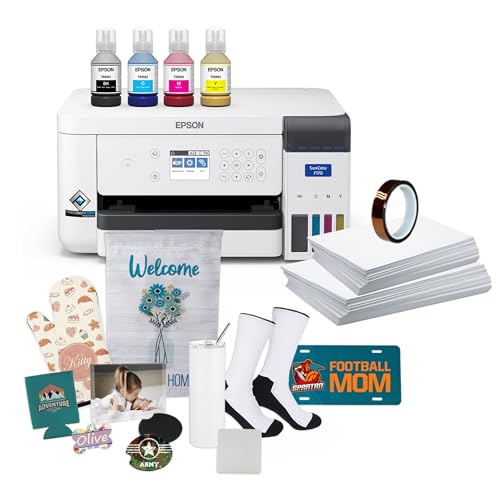
- Genuine Epson ink included
- PrecisionCore printhead for detailed output
- Compact design with 150-sheet enclosed tray
Best For: Hobbyists and small businesses wanting a reliable Epson starter setup
Best Automatic Press
HTVRONT Auto Tumbler Heat Press

- Automatically adjusts pressing pressure
- Supports 10–30 oz drinkware
- Emergency stop and 15-minute auto-off
Best For: Crafters adding automated drinkware pressing to their sublimation setup
Best Starter Bundle
Brother SP-1 Sublimation Printer

- Includes ink, paper, blanks, and heat tape
- Wi-Fi, Ethernet, Mac, Windows, and app compatible
- Includes design software and sublimation artwork
Best For: Beginners and small businesses wanting an all-in-one launch bundle
Professional Pick
Sawgrass SG500 Sublimation Printer

- 1200 x 1200 dpi color output with SubliJet UHD CMYK inks
- Wi-Fi connectivity and print-head auto-maintenance
- Supports standard and extended media sizes
Best For: Small businesses and home-based sublimation entrepreneurs
Complete Mug Bundle
Super-Tank Wireless Sublimation Printer

- Includes mug press, mugs, ink, and transfer paper
- Ink bundle offers up to 10,000 pages of stated yield
- Wireless printing with 5760 x 1440 optimized dpi
Best For: Beginners seeking a ready-to-start mug-printing package
Startup Kit
8-in-1 Sublimation Printer and Heat Press Combo

- Includes 15 x 15-inch heat press and eight attachments
- Supports mugs, tumblers, shirts, hats, and plates
- Pre-filled chipless ink and setup videos included
Best For: Beginners and startup sellers producing multiple product types
Best Compact Printer – Epson SureColor F170
If you want a dedicated sublimation printer for mugs, the Epson SureColor F170 is a compact, purpose-built option for producing color transfers. It supports paper sizes from 3.5 x 5 to 8.5 x 14 inches and includes genuine Epson sublimation ink, making it suitable for mug designs as well as other coated items.
Best For: Hobbyists, crafters, and small businesses that want a reliable desktop sublimation printer with broad connectivity and a covered paper tray.
Pros:
- Includes a full set of genuine Epson sublimation inks.
- PrecisionCore printhead with Precision Droplet Control is designed for detailed image output.
- 150-sheet enclosed auto-feed tray helps reduce paper handling and dust exposure.
- Supports wireless, USB, and Ethernet connections on Windows and macOS.
Cons:
- Maximum media width is 8.5 inches.
- Mobile-device connectivity is not supported.
- A separate heat press is needed to transfer designs onto mugs.
The F170 is a strong all-around starting point when print quality, included OEM ink, and straightforward desktop operation matter more than oversized media support.
Best All-in-One Mug Press – VEVOR 11-30 oz Tumbler Press
The VEVOR 11-30 oz tumbler press is a practical companion for a sublimation printer for mugs, handling the heat-transfer stage after your design is printed. Its broad size range and digital controls make it useful for ceramic mugs, Mason jars, stainless steel bottles, and other cups.
Best For: Beginners and makers who need one press for common mug and tumbler sizes, with transfer supplies included.
Pros:
- Works with 11-30 oz cups and tumblers.
- Adjustable temperature from 32°F to 482°F and time from 0-999 seconds.
- Includes sublimation paper, tape, and gloves.
- Automatic shutoff after 30 minutes of inactivity and over-temperature warning.
Cons:
- This is a heat press, not a printer.
- Its compatibility is focused on 11-30 oz cups.
- At 11.5 pounds and roughly 17 x 13 x 9 inches, it requires dedicated workspace.
Choose this model when you already have—or plan to add—a sublimation printer and want a digitally controlled press that covers several popular drinkware sizes.
Best App-Connected Printer – Brother SP-1 Sublimation Printer
The Brother SP-1 brings app-based design creation to a sublimation printer for mugs and other DIY projects. Through the Artspira app, you can import images, access more than 100 designs, and send projects from a phone or tablet before heat pressing them onto compatible items.
Best For: Crafters who prefer designing from a mobile device and want a starter package with Brother ink and sublimation paper.
Pros:
- Artspira supports saved images, built-in designs, and poster-style image conversion.
- Includes Brother genuine black, cyan, magenta, and yellow sublimation ink plus starter paper.
- Wi-Fi connectivity supports a mobile-focused workflow.
- Designed for projects including mugs, tumblers, shirts, bags, and hats.
Cons:
- A heat press is required and sold separately.
- The listed workflow centers on iOS and the Artspira app; a desktop version is noted as forthcoming.
- It is intended for US 120-volt use.
The SP-1 is a convenient choice for mobile-first makers, especially those who value guided design tools and a straightforward path from app creation to heat-pressed mug projects.
Best Multi-Size Press – BetterSub Tumbler and Mug Press
The BetterSub press complements a sublimation printer for mugs by handling both standard mug transfers and straight tumbler projects. It supports 11- and 15-ounce mugs, 16-, 20-, and 30-ounce skinny tumblers, and compatible attachments from 6 to 31 ounces.
Best For: DIY users, small workshops, and custom-product sellers who want one adjustable press for mugs and straight drinkware.
Pros:
- Supports 11 oz and 15 oz mugs plus several straight tumbler sizes.
- LCD controls offer 0-482°F temperature and 0-1,000-second time settings.
- Dual pressure knobs help apply even pressure.
- Works with ceramic, stainless steel, glass, metal, and aluminum drinkware.
Cons:
- This unit presses transfers but does not print them.
- Attachments may need to be changed for different drinkware sizes.
- The heating pad should not be run empty for an extended period.
BetterSub is a flexible pick for makers who expect to switch between mugs and skinny tumblers, provided they are comfortable with manual pressure adjustment and attachment changes.
Best Overall – Epson SureColor F170
The Epson SureColor F170 is a strong sublimation printer for mugs when you want dependable color output, genuine OEM ink, and a compact setup. Its PrecisionCore printhead, enclosed 150-sheet tray, and included starter supplies make it practical for home crafters and small businesses.
Best For: Hobbyists, crafters, and small business owners seeking a reliable, space-saving Epson setup.
Pros:
- Includes a full set of genuine Epson sublimation inks and a full manufacturer warranty.
- PrecisionCore printhead with Precision Droplet Control supports clear, detailed images.
- Includes paper, thermal tape, and starter blanks, with USB, Ethernet, and wireless connectivity.
Cons:
- Maximum media width is 8.5 inches.
- Mobile-device connection is not supported.
- Print speed is listed at one page per minute.
Choose the F170 if print consistency, included OEM supplies, and a tidy paper-handling design matter more than mobile printing or high-volume speed.
Best Automatic Press – HTVRONT Auto Tumbler Heat Press
The HTVRONT Auto Tumbler Heat Press is not a printer, but it is a useful companion for a sublimation printer for mugs. It automatically adjusts pressure, reaches up to 390°F, and is designed for mugs, tumblers, glassware, cups, and bottles in supported sizes.
Best For: Crafters who want a faster, more hands-off way to apply sublimation designs to drinkware.
Pros:
- Automatically applies pressure based on the drinkware diameter.
- Fits supported drinkware from 2.9 to 3.2 inches in diameter and 10 to 30 ounces.
- Includes automatic shutoff after 15 minutes and an emergency stop function.
Cons:
- It is a heat press, not a sublimation printer.
- Its supported diameter range may not fit every mug or tumbler.
- Maximum temperature is 390°F, so users should follow the supplied parameters for each material.
Pair this press with a compatible sublimation printer when your workflow includes frequent drinkware projects and you value automatic operation over manual pressing.
Best Starter Bundle – Brother SP-1 Sublimation Printer
The Brother SP-1 is a practical sublimation printer for mugs if you want a bundled entry point with ink, paper, blanks, tape, and design resources. Wi-Fi, Ethernet, Windows, Mac, and app compatibility also give this package flexibility for craft rooms and small businesses.
Best For: Beginners and entrepreneurs who want printer supplies and project materials included in one bundle.
Pros:
- Includes full CMYK ink, 160 transfer sheets, 50 sublimation blanks, and heat-resistant tape.
- Supports Wi-Fi and Ethernet connectivity plus Windows, Mac, and app compatibility.
- Bundle includes Artspira software, 100 designs, and additional design cards.
Cons:
- Uses a limited warranty rather than a full warranty.
- Its 600 x 600 dpi resolution is lower than the Epson F170’s listed resolution.
- It is a print-only device and does not include a built-in heat press.
The SP-1 stands out when bundled value and included creative materials are priorities, especially for buyers starting several mug and other sublimation projects at once.
Professional Pick – Sawgrass SG500 Sublimation Printer
The Sawgrass SG500 is a strong choice if you need a reliable sublimation printer for mugs and other custom products. It combines 1200 x 1200 dpi color output, SubliJet UHD CMYK inks, Wi-Fi connectivity, and software designed to simplify color management. Its compact desktop footprint suits home businesses and small production spaces.
Best For: Small businesses, home-based entrepreneurs, and users who want consistent results on mugs, drinkware, apparel, and other sublimation blanks.
Pros:
- Professional-grade, high-definition color output with dedicated CMYK sublimation inks.
- Supports media up to 8.5 x 14 inches, with bypass printing up to 8.5 x 51 inches.
- Includes access to MySawgrass and Sawgrass Print Utility for design and print control.
- Offers Wi-Fi connectivity and automatic print-head maintenance.
Cons:
- The maximum standard media size is 8.5 x 14 inches.
- It is designed for 110/120V US and North American electrical outlets.
The SG500 is the most printer-focused option here, making it a practical fit when print consistency and long-term reliability matter more than receiving a complete mug-press setup.
Complete Mug Bundle – Super-Tank Wireless Sublimation Printer
This super-tank package is a convenient sublimation printer for mugs if you want the printer, ink, transfer paper, and mug-press equipment together. It includes PC Universal ink bottles with a stated yield of up to 10,000 pages, wireless printing capability, and a maximum 5760 x 1440 optimized dpi resolution.
Best For: Beginners and home users who want an all-in-one mug-design bundle with a printer, press, coated mugs, ink, and transfer supplies.
Pros:
- Includes a mug press, coated mugs, sublimation paper, ink bottles, and setup materials.
- Ink bundle is rated for up to 10,000 pages.
- Offers high stated resolution of 5760 x 1440 optimized dpi.
- Supports wireless printing from computers and mobile devices.
Cons:
- Maximum listed media size is A4 or 8.5 x 11 inches.
- The package has a one-year parts-and-labor warranty.
- It is a print-only device rather than an all-in-one printer.
For shoppers starting a mug business or hobby, this bundle reduces the need to source compatible equipment separately. Its included press and supplies make it especially approachable for first projects.
Startup Kit – 8-in-1 Sublimation Printer and Heat Press Combo
This starter kit is aimed at anyone building a small custom-products operation around a sublimation printer for mugs. Along with the printer, it includes a 15 x 15-inch heat press and eight attachments for mugs, tumblers, hats, plates, and shirts. Pre-filled chipless sublimation ink and setup videos are included to help shorten the learning curve.
Best For: Etsy sellers, startup businesses, and beginners who want one package for mugs, tumblers, apparel, hats, and plates.
Pros:
- Combines a printer with a 15 x 15-inch heat press and eight attachments.
- Includes mug, 30-ounce tumbler, hat, and plate attachments.
- Digital temperature control reaches up to 480°F.
- Pre-filled chipless ink, setup videos, and beginner guidance are included.
Cons:
- The supplied details do not specify the printer’s resolution or print speed.
- The kit has a one-year warranty.
- Its broad attachment set may be more equipment than needed for mug-only projects.
This is the broadest equipment package of the three. It makes sense when you plan to sell several types of personalized products, but a mug-only buyer may prefer a more focused printer and press bundle.
How We Picked the Best Sublimation Printer for Mugs
We compared the selected products by evaluating printer format, included supplies, ink availability, press compatibility, ease of setup, and overall usefulness for mug projects. Some options are dedicated sublimation printers, while others are bundles that add a mug press, blanks, transfer paper, tape, or other essentials.
Because printer-only and all-in-one packages serve different buyers, we considered both the quality of the core equipment and the practical value of the complete setup. Before buying, confirm that the included printer uses genuine sublimation ink and that the press supports the mug sizes and shapes you plan to decorate.
Quick Comparison
- Printer-only options: Best when you already own a compatible mug press and want to choose supplies separately.
- Printer starter bundles: Useful for beginners who need ink, paper, blanks, and accessories in one purchase.
- Tumbler and mug presses: Ideal for shoppers who already have a sublimation printer but need consistent heat transfer equipment.
- Complete combo kits: Convenient for launching a broader crafting setup involving mugs, tumblers, shirts, and other blanks.
- High-yield packages: Worth considering for frequent production, especially when replacement ink and paper costs matter.
Key Buying Factors for a Sublimation Printer for Mugs
Printer and Ink Compatibility
Choose a printer designed for sublimation or a bundle that clearly includes compatible dye-sublimation ink. Standard inkjet ink will not produce the same results and generally cannot be swapped casually. Check replacement ink pricing, availability, and expected yield before committing.
Print Size and Resolution
Mug designs often use relatively small transfer sheets, but a larger paper format can provide more flexibility for tumblers, shirts, and multiple designs. Look for a resolution and color system suited to detailed artwork, gradients, and brand graphics.
Press Size, Temperature, and Pressure
A good mug press should heat evenly and hold the blank securely. Confirm its supported capacity, including 11- or 15-ounce mugs, 20- or 30-ounce tumblers, and straight versus tapered shapes. Adjustable temperature and time controls make it easier to follow blank-specific instructions.
Included Supplies and Ongoing Costs
Starter materials can reduce setup friction, but calculate the long-term cost of sublimation paper, heat-resistant tape, blanks, protective paper, and ink. A lower-priced bundle may be less economical if essential consumables are difficult to replace.
Who Should Buy Which Sublimation Printer for Mugs?
Beginners should look for a printer bundle with genuine ink, transfer sheets, sample blanks, and clear instructions. A complete kit is convenient if you do not already own a heat press.
Experienced crafters may prefer a dedicated printer or a separate mug press so they can select higher-quality blanks and control each part of the workflow.
Small businesses should prioritize dependable ink supply, consistent press performance, manageable print volume, and total operating cost over the lowest initial price. If you plan to expand beyond mugs, choose a setup with a flexible paper size and a press compatible with multiple blank types.