
Creating custom tumblers requires more than a good design file. You need dependable sublimation printing, compatible transfer supplies, and the right heat-press setup for your drinkware.
These 10 options include dedicated printers, starter bundles, and tumbler presses to help you choose a setup that matches your workflow, workspace, and production goals.
Best 10 Sublimation Printer for Tumblers Picks for 2026
Best Compact Printer

- Genuine Epson ink included
- PrecisionCore printhead for detailed transfers
- Wireless, USB, and Ethernet connectivity
Best For: Hobbyists and small businesses wanting a compact, supported printer
Best Automatic Press
HTVRONT Auto Tumbler Heat Press

- Automatic pressure adjustment
- Fits 2.9–3.2-inch drinkware
- Auto-off and emergency stop features
Best For: Beginners and crafters seeking easier tumbler pressing
Best Starter Bundle
Brother SP-1 Sublimation Printer Kit

- CMYK ink and transfer paper included
- 50 blanks plus heat-resistant tape
- Wi-Fi, Ethernet, and app compatibility
Best For: Beginners wanting an all-in-one sublimation setup
Best Versatile Press
CoolSub 30oz Tumbler Heat Press
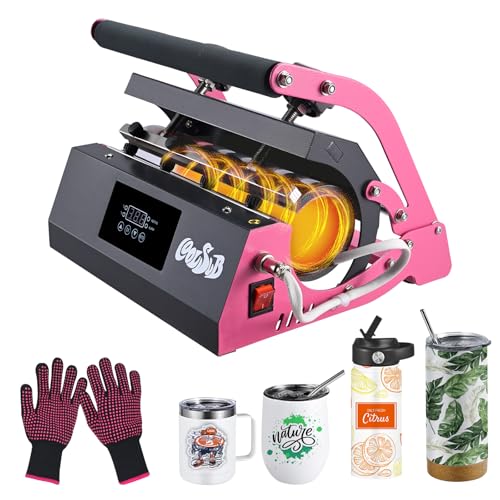
- Handles 11–30 oz drinkware
- 2.6–3.4-inch diameter range
- Adjustable pressure and digital controls
Best For: Crafters using varied tumbler and mug sizes
Best Dedicated Tumbler Press

- Supports 12-30oz straight tumblers
- Digital heat and time controls
- 500W operation with fuse protection
Best For: Users who already have or plan to buy a sublimation printer
Best for Growing Shops
Sawgrass SG500 Sublimation Printer

- Vivid CMYK SubliJet UHD inks
- Prints up to 8.5 x 14 inches
- Bypass tray supports long prints
Best For: Home businesses and small shops making drinkware and apparel
Best Compact Workstation

- OEM sublimation ink and maintenance tank included
- 150-sheet enclosed auto-feed tray
- Compact Epson PrecisionCore printing
Best For: Hobbyists and small businesses needing consistent transfers
Best All-in-One Starter Bundle
Brother SP-1 Tumbler Press Kit

- Printer and 7-in-1 heat press included
- Tumblers, mugs, blanks, paper, and tape included
- Wi-Fi, Ethernet, Windows, Mac, and app support
Best For: Beginners and small businesses starting tumbler projects
Best Authorized Epson Kit
SureColor F170 Starter Package
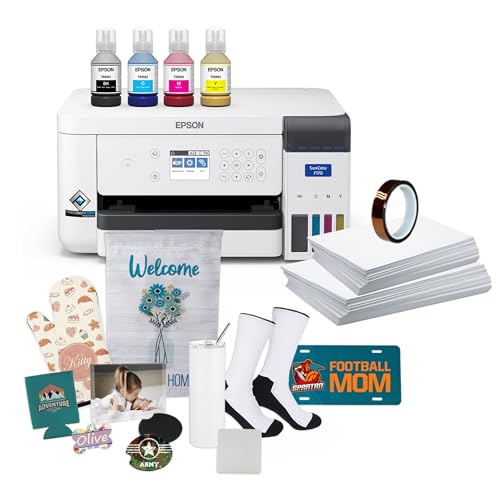
- Epson-authorized product with manufacturer warranty
- OEM ink, two paper sizes, and thermal tape included
- 150-sheet tray and PrecisionCore printhead
Best For: Crafters wanting an Epson starter setup with supplies
Best Compact Printer – Epson SureColor F170
If you need a dependable sublimation printer for tumblers and other small-format projects, the Epson SureColor F170 is a compact, purpose-built option. It includes genuine Epson sublimation ink, supports Windows and macOS, and offers wireless, USB, and Ethernet connectivity. Its 8.5-inch maximum media width suits many tumbler-transfer workflows, although it does not connect directly to mobile devices.
Best For: Hobbyists, crafters, and small businesses that want a compact Epson printer with genuine ink and straightforward computer-based setup.
Pros:
- Includes a full set of genuine Epson sublimation inks with auto-stop bottles for cleaner refills.
- PrecisionCore printhead and Precision Droplet Control support sharp, detailed color transfers.
- Closed 150-sheet feeder helps protect paper from dust and reduces paper preparation.
- Offers wireless, USB, and Ethernet connectivity in a space-saving design.
Cons:
- Maximum media width is 8.5 inches, limiting larger-format designs.
- Mobile-device connectivity is not supported.
The F170 is a strong choice when print quality, genuine manufacturer support, and a tidy compact footprint matter more than oversized media capacity or mobile printing.
Best Automatic Press – HTVRONT Auto Tumbler Heat Press
The HTVRONT Auto Tumbler Heat Press is a practical companion to a sublimation printer for tumblers, automating pressure and heating for a simpler workflow. It accommodates drinkware from 2.9 to 3.2 inches in diameter and reaches up to 390°F/200°C. Automatic shutoff and an emergency stop add useful safety features for home crafting and small-business production.
Best For: Beginners, crafters, and small businesses pressing compatible tumblers, mugs, glasses, cups, and water bottles with minimal manual adjustment.
Pros:
- Automatically applies pressure based on the tumbler’s diameter.
- Extended heat plate supports tumblers, mugs, glassware, cups, water bottles, and sippy cups.
- Automatic shutoff activates after 15 minutes of inactivity.
- Emergency stop releases the heat pad and halts heating quickly.
Cons:
- Compatible diameter range is limited to 2.9–3.2 inches.
- Maximum temperature is 390°F, so users should follow the supplied material parameters.
Choose this model if convenience and repeatable operation are priorities. Its automatic controls can reduce routine adjustments, but its narrower diameter range requires careful blank selection.
Best Starter Bundle – Brother SP-1 Sublimation Printer Kit
For shoppers building a complete sublimation setup, the Brother SP-1 Starter Bundle combines a sublimation printer for tumblers with supplies for getting started. The package includes a full CMYK ink set, transfer paper, 50 blanks, heat-resistant tape, designs, and access to Artspira software. Wi-Fi and Ethernet connectivity, along with Windows, Mac, and app compatibility, makes it flexible for home crafting or small-business projects.
Best For: New sublimation users who want a printer plus blanks, paper, tape, designs, and software in one package.
Pros:
- Includes CMYK ink, 160 total transfer sheets, 50 sublimation blanks, and heat-resistant tape.
- Supports projects on metal tumblers, mugs, apparel, totes, coasters, and more.
- Includes Artspira software, 100 sublimation designs, and 500 design cards.
- Offers Wi-Fi and Ethernet connectivity with Windows, Mac, and app compatibility.
Cons:
- The 600 x 600 dpi resolution is more modest than some higher-resolution sublimation printers.
- The bundle’s included blanks and paper may not match every user’s preferred formats or materials.
The SP-1 bundle stands out for convenience: instead of sourcing every accessory separately, beginners receive the core printer supplies and creative resources needed to start making tumbler transfers.
Best Versatile Press – CoolSub 30oz Tumbler Heat Press
The CoolSub Tumbler Heat Press is a versatile finishing machine to pair with a sublimation printer for tumblers. Its detachable 10.6-inch heating attachment handles 11–30 oz drinkware with diameters from 2.6 to 3.4 inches, while the digital panel allows temperature settings up to 440°F and time settings up to 999 seconds. Adjustable pressure also helps accommodate different tumbler and mug thicknesses.
Best For: Home crafters and small businesses working with varied tumblers, glass cans, ceramic mugs, and coated water bottles.
Pros:
- Supports 11–30 oz tumblers and drinkware from 2.6 to 3.4 inches in diameter.
- Detachable 10.6-inch heating attachment provides broad coverage.
- Adjustable pressure knob helps accommodate different item thicknesses.
- Digital controls offer temperature settings from 0–440°F and time settings from 0–999 seconds.
Cons:
- Its six-month warranty is shorter than the one-year warranty listed for some comparable presses.
- For 11- and 15-ounce items, simultaneous two-piece pressing may require suitable compatible blanks.
This press is a good fit when flexibility matters. Its broad size range and adjustable controls make it more adaptable than a press designed around one narrow tumbler diameter.
Best App-Connected Pick – Brother SP1 Sublimation Printer
The Brother SP1 is a practical sublimation printer for tumblers and other polyester-coated projects when you want a guided, mobile-first workflow. Its Artspira app offers more than 100 designs, supports saved images, and helps you move from design to print before heat pressing.
Best For: Crafters who want app-based design tools and a straightforward setup for tumblers, mugs, shirts, bags, and hats.
Pros:
- Artspira supports importing and saving up to 20 printing images.
- Includes Brother Genuine cyan, magenta, yellow, and black sublimation ink plus starter sublimation paper.
- Wi-Fi connectivity and a maximum media size of 8.5 x 11 inches suit common DIY projects.
- Brother describes the system as producing long-lasting transfers on polyester-coated items.
Cons:
- A heat press is required and must be purchased separately.
- The current workflow is centered on iOS devices; the desktop version is listed as coming soon.
- It is intended for US 120-volt use.
The SP1 is a convenient choice if creative software and an included starter supply matter more than large-format output. For tumbler projects, remember that the printer creates the transfer; a compatible heat press is still essential.
Best Dedicated Tumbler Press – 12-30oz Tumbler Heat Press
This dedicated tumbler heat press complements a sublimation printer for tumblers by applying controlled heat to straight drinkware and similar blanks. Its 500-watt design supports several container sizes, with digital temperature and time controls for repeatable projects.
Best For: DIY users pressing straight tumblers, mugs, glasses, can coolers, and compatible bottles in multiple sizes.
Pros:
- The 10.6-inch heating attachment accommodates 12-30oz straight skinny tumblers and several other straight containers.
- LCD controls offer a 0-450°F temperature range and 0-999-second time control.
- Automatic timing starts when the handle is lowered and provides a completion beep.
- Built-in fuse protection, a non-slip handle, and non-slip foot pad support safer operation.
Cons:
- It is a heat press, not a printer, so a separate sublimation printer and transfer supplies are needed.
- The attachment is designed for straight vessels and may not suit tapered or unusually shaped drinkware.
- Full-wrap projects may require rotating the tumbler and pressing again.
For shoppers building a complete tumbler setup, this machine fills the pressing side of the workflow. Its broad size range and automatic timing make it a useful companion to a printer, provided your blanks are straight and fit the attachment.
Best for Growing Shops – Sawgrass SG500 Sublimation Printer
The Sawgrass SG500 is a sublimation printer for tumblers and other hard or soft substrates, aimed at users who want more control over color and workflow. It includes SubliJet UHD CMYK inks, Wi-Fi, and software tools designed for both home businesses and small production environments.
Best For: Hobbyists, small businesses, and entrepreneurs producing drinkware, apparel, signage, and promotional items.
Pros:
- SubliJet UHD CMYK inks are formulated for vivid, consistent results on hard and soft substrates.
- Prints media up to 8.5 x 14 inches, with the bypass tray supporting prints up to 8.5 x 51 inches.
- MySawgrass and Sawgrass Print Utility provide templates, design tools, and color-control features.
- Wi-Fi connectivity and automatic print-head maintenance support a convenient desktop workflow.
Cons:
- A heat press is still required to transfer designs onto tumblers.
- The printer uses simplex printing rather than automatic duplex printing.
- It is designed for standard 110/120-volt US and North American outlets.
The SG500 is the strongest fit here for users who expect their sublimation work to grow beyond occasional crafts. Its larger media options and software ecosystem add flexibility, while the included ink and paper bundle helps get projects started.
Best Compact Workstation – Epson SureColor F170
The Epson SureColor F170 is a practical sublimation printer for tumblers and other personalized products when you want a dedicated desktop machine. It includes OEM sublimation ink, a 150-sheet enclosed auto-feed tray, and Epson’s PrecisionCore MicroTFP printhead in a compact design.
Best For: Hobbyists and small businesses that need consistent sublimation transfers for tumblers, mugs, shirts, and gifts.
Pros:
- Includes a full set of genuine Epson sublimation inks and a maintenance tank.
- PrecisionCore printhead provides controlled, vibrant color output.
- Enclosed 150-sheet tray helps reduce paper preparation and dust exposure.
- Compact footprint suits home studios and workspaces.
Cons:
- Maximum media size is A4.
- USB connectivity is listed, with no mobile-device support.
- The printer is print-only and does not include a heat press.
This F170 is a strong choice if print consistency and a tidy desktop setup matter more than an all-in-one bundle. You will still need a compatible heat press and tumbler blanks to complete projects.
Best All-in-One Starter Bundle – Brother SP-1 Tumbler Press Kit
This Brother SP-1 bundle is an appealing sublimation printer for tumblers when you want printing and pressing equipment together. Along with the printer and full CMYK ink set, it includes a 7-in-1 heat press, tumbler and mug blanks, paper, heat-resistant tape, and design resources.
Best For: Beginners, crafters, and small businesses seeking a ready-to-start tumbler customization package.
Pros:
- Combines the Brother SP-1 printer with a 7-in-1 tumbler, cup, and mug press.
- Includes six 20-ounce tumblers, three wine tumblers, mugs, and additional blanks.
- Full CMYK ink set, 160 sublimation sheets, and heat-resistant tape are included.
- Supports Wi-Fi and Ethernet connectivity and works with Windows, Mac, and the Artspira app.
Cons:
- The large bundle may require more storage space than a printer-only setup.
- Its listed print resolution is 600 x 600 dpi.
- Consumables and blanks will eventually need replacement.
For someone building a tumbler business or craft station from scratch, this package reduces the need to source compatible accessories separately. It is less suitable if you already own a heat press and supplies.
Best Authorized Epson Kit – SureColor F170 Starter Package
This Epson SureColor F170 package is a useful sublimation printer for tumblers for buyers who want an authorized-product bundle with starter supplies. It includes Epson OEM ink, two paper sizes, thermal tape, a 150-sheet auto-feed tray, and Epson’s PrecisionCore printhead.
Best For: Crafters and small-business owners who want an Epson F170 with basic paper and taping supplies included.
Pros:
- Sold through an Epson authorized partner with Epson documentation and manufacturer warranty.
- Includes OEM sublimation ink with auto-stop bottles for cleaner refills.
- Starter kit includes 8.5 x 11-inch and 8.5 x 14-inch sublimation paper plus thermal tape.
- Dust-resistant 150-sheet tray supports more efficient batch printing.
Cons:
- Mobile-device connections are not supported.
- The package is a printer starter kit, not a complete heat-press setup.
- Its compact media and tray format may not suit larger production needs.
This version makes sense when warranty confidence and immediately usable starter supplies are priorities. Like the other F170 configuration, it is best paired with a compatible heat press for tumbler production.
How We Picked the Best Sublimation Printer for Tumblers Options
We focused on the equipment needed to produce consistent tumbler transfers, including dedicated sublimation printers, bundled ink and paper, starter supplies, and compatible heat presses. We considered print format, included accessories, expected learning curve, workspace requirements, and whether each option is better suited to occasional crafting or repeat production.
Because a printer alone cannot transfer artwork onto a tumbler, this list also includes press-focused products. Check each listing carefully to confirm whether it contains a printer, a heat press, or a complete starter setup.
Quick Comparison
| Setup type | Best for | What to check |
|---|---|---|
| Printer only | Users who already own a press | Ink, paper size, maintenance supplies |
| Printer bundle | New crafters starting quickly | Included blanks, transfer sheets, and accessories |
| Tumbler heat press | Users who already have a sublimation printer | Diameter range, heating controls, and fit |
| Printer-and-press bundle | All-in-one beginners | Press versatility and replacement supply costs |
Key Buying Factors for a Sublimation Printer for Tumblers
Printer Size and Output
Most tumbler artwork uses a relatively narrow transfer, so an 8.5-by-11-inch printer can be sufficient for many projects. Choose a larger-format model if you expect to make oversized designs, gang multiple transfers, or expand into larger products.
Ink and Color Consistency
Use a printer designed for sublimation rather than converting a standard inkjet unless you understand the compatibility and warranty implications. Bundles with genuine ink can simplify setup and make color results more predictable. Confirm whether replacement cartridges or refill supplies are readily available.
Press Compatibility
A tumbler press should accommodate the sizes and shapes you plan to decorate, such as skinny 20-ounce and 30-ounce tumblers, mugs, glasses, or jars. Adjustable temperature and time controls are useful, while a secure, even fit helps prevent faded areas, ghosting, and uneven transfers.
Included Supplies and Operating Costs
Starter paper, tape, blanks, and maintenance components add value, but they should not be the only reason to choose a product. Compare the ongoing cost of ink, transfer sheets, blank tumblers, and replacement heating accessories before committing to a high-volume workflow.
Who Should Buy Which Sublimation Printer for Tumblers?
Choose a printer-only model if you already have a reliable tumbler press and want better control over paper, blanks, and production materials.
Choose a printer bundle if you are new to sublimation and want ink, transfer sheets, or blanks included with the initial purchase. Bundles can reduce compatibility guesswork while you learn the process.
Choose a dedicated tumbler press if you own a sublimation printer but need consistent heat and pressure around cylindrical drinkware.
Choose an all-in-one bundle if you want to begin with one coordinated setup. Prioritize a versatile press, genuine consumables, clear instructions, and accessible replacement supplies over the largest accessory count.