
The best sublimation printers for artists make it easier to turn original artwork into vibrant designs for shirts, mugs, tote bags, gifts, and other coated or polyester blanks. The right model depends on your preferred project size, print volume, workflow, and budget.
This roundup compares ten options ranging from compact dedicated sublimation printers to wide-format systems and starter bundles. Use the guide below to narrow the list based on ink costs, connectivity, included supplies, and long-term creative flexibility.
Best 10 Sublimation Printers for Artists Picks for 2026
Best Compact Pick

- Purpose-built dye-sublimation printer
- Includes genuine Epson ink
- 150-sheet enclosed auto-feed tray
Best For: Artists and crafters needing a compact, supported sublimation setup
Best for Growing Shops

- Vivid CMYK SubliJet UHD inkset
- Bypass tray supports prints up to 8.5 x 51 inches
- Includes design and print-management software
Best For: Artists and small businesses building a broader product workflow
Best Wide-Format Alternative

- Prints media up to 11 by 17 inches
- Refillable ink-tank design
- Adds scan, copy, and fax functions
Best For: Artists needing a versatile wide-format studio all-in-one
Best All-Inclusive Starter

- Includes ink, paper, blanks, and heat-resistant tape
- Adds Artspira and sublimation design resources
- Supports Wi-Fi, Ethernet, Windows, Mac, and app workflows
Best For: Beginners wanting a ready-to-start sublimation craft bundle
Wide-Format Photo Pick
Epson Expression Photo HD XP-15000

- Six-color Claria Photo HD ink system
- Prints borderless sizes up to 13 x 19 inches
- Rear tray supports specialty media and cardstock
Best For: Wide-format artwork and specialty-paper printing
Small-Business Workhorse
Epson SureColor F170 Dye-Sublimation Printer
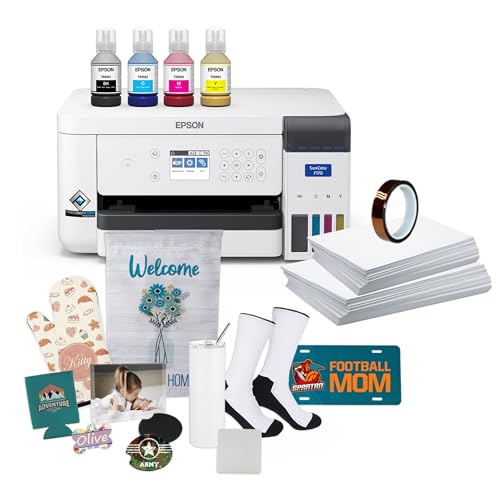
- Dedicated dye-sublimation system with PrecisionCore printhead
- Includes OEM ink, paper, starter blanks, and thermal tape
- 150-sheet dust-resistant auto-feed tray
Best For: Desktop sublimation production for crafters and small shops
Best Compact Epson Option
SureColor F170 Sublimation Printer

- Compact 10.2-pound desktop design
- Includes genuine Epson ink and maintenance tank
- Enclosed 150-sheet auto-feed tray
Best For: Hobbyists and small studios making personalized sublimation products
Best Compact Pick – Epson SureColor F170
For artists seeking sublimation printers for artists, the Epson SureColor F170 is a compact, purpose-built option for producing color transfers on items such as apparel, mugs, mousepads, and other compatible blanks. Its included OEM ink, enclosed paper tray, and straightforward Windows and macOS setup make it practical for home studios and small creative businesses.
Best For: Hobbyists, crafters, and small-business owners who want a compact Epson sublimation printer with genuine ink and manufacturer support.
Pros:
- Includes a full set of genuine Epson sublimation inks with auto-stop bottles.
- PrecisionCore printhead with Precision Droplet Control for detailed color output.
- 150-sheet enclosed auto-feed tray helps reduce paper handling and dust exposure.
- Supports USB, Ethernet, and wireless connectivity for Windows and macOS computers.
Cons:
- Maximum media width is 8.5 inches, limiting oversized artwork.
- Mobile-device connectivity is not supported.
- Print-only design does not include scanning or copying.
The F170 is a focused, space-saving choice when reliable sublimation output and included Epson supplies matter more than large-format capability or mobile printing.
Best for Growing Shops – Sawgrass SG500
The Sawgrass SG500 is one of the more business-ready sublimation printers for artists, combining vivid CMYK SubliJet UHD inks with desktop-friendly sizing. It handles media up to 8.5 by 14 inches, with a bypass tray available for longer prints up to 8.5 by 51 inches.
Best For: Home-based entrepreneurs, artists, and small businesses producing apparel, drinkware, signage, and promotional products.
Pros:
- Includes a full 31 mL set of CMYK SubliJet UHD inks plus paper.
- Supports standard prints up to 8.5 by 14 inches and longer bypass-tray projects.
- MySawgrass and Sawgrass Print Utility provide templates and color-management controls.
- Offers Wi-Fi connectivity and automatic printhead maintenance.
Cons:
- Designed for 110/120V US and North American outlets.
- Its standard format is not intended for very large regular sheets.
- Wi-Fi and USB are listed, but Ethernet connectivity is not specified.
With its software ecosystem, extended bypass printing, and included ink bundle, the SG500 is a strong fit for artists who expect their sublimation workflow to expand.
Best Wide-Format Alternative – Epson EcoTank ET-15000
The Epson EcoTank ET-15000 can appeal to artists comparing sublimation printers for artists who also need a general-purpose studio machine. It is an 11-by-17-inch wireless all-in-one with printing, scanning, copying, and faxing, and its notes identify standard or sublimation ink as supported use.
Best For: Artists who want wide-format capability and everyday office functions alongside potential sublimation use.
Pros:
- Supports media up to 11 by 17 inches for larger artwork than compact sublimation models.
- Refillable EcoTank system includes black and color ink bottles.
- Combines printing, scanning, copying, and faxing in one machine.
- Offers Wi-Fi, Ethernet, USB, automatic duplexing, and a 250-sheet capacity.
Cons:
- It is an inkjet all-in-one rather than a dedicated dye-sublimation printer.
- The supplied notes do not specify a dedicated sublimation ink bundle.
- Its larger 26.5-pound, 11-by-17-inch design requires more workspace.
The ET-15000 is best considered a versatile wide-format alternative, especially when scanning and copying are as important as transfer printing; dedicated sublimation users should verify ink and workflow requirements before buying.
Best All-Inclusive Starter – Brother SP-1 Bundle
The Brother SP-1 bundle is a convenient entry point for artists shopping sublimation printers for artists because it packages the printer with CMYK ink, transfer paper, blanks, heat-resistant tape, and design resources. Its compact footprint and Wi-Fi, Ethernet, Windows, Mac, and app compatibility suit hands-on creative projects.
Best For: New sublimation crafters, artists, and entrepreneurs who want supplies and design assets included with the printer.
Pros:
- Includes a full CMYK ink set, 160 transfer sheets, 50 blanks, and four tape rolls.
- Supports 8.5-by-11-inch and 8.5-by-14-inch paper sizes.
- Includes Artspira, 100 sublimation designs, and 500 SoFontsy design cards.
- Works with Wi-Fi and Ethernet plus Windows, Mac, and app-based workflows.
Cons:
- 600-by-600 dpi resolution is lower than the listed resolution of some competing models.
- The included 50 blanks may not match every artist’s preferred materials or formats.
- It is a print-only device without scanning or copying functions.
For beginners, the SP-1’s extensive starter contents can reduce the number of separate purchases needed to begin making transfers, while its compact design keeps it suitable for a craft room or small studio.
Wide-Format Photo Pick – Epson Expression Photo HD XP-15000
For artists comparing sublimation printers for artists, the Epson Expression Photo HD XP-15000 is better suited to producing detailed artwork and transfer-ready designs on specialty paper than to direct dye-sublimation printing. Its six-color Claria Photo HD system, including red and gray inks, supports a wide color gamut and strong black-and-white output.
Best For: Artists who need borderless, wide-format prints for creative projects and specialty media.
Pros:
- Prints up to 13 x 19 inches, including borderless sizes.
- Six-color ink system includes red and gray for expanded color and enhanced monochrome prints.
- 50-sheet rear tray accommodates specialty media, including cardstock.
- Offers wireless connectivity, automatic two-sided printing, and a 200-sheet front tray.
Cons:
- It is an inkjet photo printer, not a dedicated dye-sublimation printer.
- Epson recommends using Genuine Cartridges; non-genuine ink may cause damage not covered by the limited warranty.
- A heat press and compatible sublimation workflow are not included.
The XP-15000 stands out when image quality, paper flexibility, and 13 x 19-inch output matter most. Choose it for artwork and transfer preparation, but look to a dedicated sublimation model for a complete garment-and-product transfer setup.
Creative App Starter – Brother SP-1 Sublimation Printer
The Brother SP-1 is a purpose-built option for artists searching for sublimation printers for artists, pairing dye-sublimation printing with the Artspira mobile app. You can create or import designs, print them, and heat-press them onto polyester-coated products such as shirts, mugs, bags, hats, and tumblers.
Best For: Crafters and artists who want an app-guided sublimation workflow for small custom projects.
Pros:
- Designed specifically for dye-sublimation projects.
- Artspira provides more than 100 sublimation designs and supports importing and saving up to 20 images.
- Supports custom projects on polyester-coated items, with Brother Genuine Sublimation Ink included.
- Includes starter sublimation paper and offers Wi-Fi connectivity.
Cons:
- A heat press is required and must be purchased separately.
- The workflow is currently centered on the Artspira phone or tablet app; the desktop version is noted as forthcoming.
- Maximum media size is 8.5 x 11 inches, limiting larger designs.
The SP-1 is an approachable choice for hands-on creative work, especially if mobile design tools fit your process. Its 8.5 x 11-inch format is best for smaller apparel and giftable products rather than oversized transfers.
Small-Business Workhorse – Epson SureColor F170 Dye-Sublimation Printer
For artists and small shops evaluating sublimation printers for artists, the Epson SureColor F170 offers a dedicated dye-sublimation setup with a full set of OEM inks and starter supplies. Its PrecisionCore printhead, closed 150-sheet tray, and support for Windows and macOS make it a practical desktop solution for repeat transfer work.
Best For: Hobbyists, crafters, and small business owners producing consistent 8.5-inch-wide sublimation transfers.
Pros:
- Dedicated dye-sublimation printer with PrecisionCore printhead and Precision Droplet Control.
- Bundle includes Epson sublimation ink, sublimation paper in two sizes, starter blanks, and thermal tape.
- 150-sheet auto-feed tray is enclosed in a dust-resistant design.
- Supports wireless, USB, and Ethernet connectivity and includes auto-stop ink bottles for cleaner refills.
Cons:
- Maximum media width is 8.5 inches, so it is not intended for wide-format transfers.
- Mobile-device connections are not supported.
- Printing is simplex rather than automatic duplex.
The F170 is the most complete dedicated sublimation package of the three, particularly for users who value OEM supplies and a closed paper tray. Its compact format is well suited to smaller products and production runs, though artists needing larger transfers should consider a wider printer.
Best All-in-One Value – Pinckney Super-Tank Sublimation Printer
For artists seeking sublimation printers for artists that also handle everyday document tasks, the Pinckney Super-Tank model combines dye-sublimation printing with scanning and copying. Its cartridge-free tank design and included ink bundle make it a practical option for home studios and small creative workflows.
Best For: Artists who want an all-in-one, Wi-Fi-capable printer for sublimation transfers, scanning, and copying.
Pros:
- Includes high-capacity sublimation ink tanks, including 127 mL of black ink and 85 mL of each color.
- Built-in scanner and copier add useful everyday functionality.
- Supports multiple paper sizes and media lengths, including sheets up to 8.5 x 47.2 inches.
- Offers up to 5760 x 1440 dpi resolution and an easy-fill nozzle system.
Cons:
- Uses simplex printing rather than automatic duplex printing.
- Color output is listed at approximately 5 pages per minute.
- Printed sublimation transfers may look dull on paper before heat application.
This Pinckney model is a flexible starter choice when studio space and budget matter. Its all-in-one format is convenient, though artists should plan for routine nozzle checks and alignment if print quality changes.
Best for Large-Format Production – Epson SureColor F570
Artists producing larger designs or repeat jobs may appreciate the Epson SureColor F570, one of the more capable sublimation printers for artists in this selection. It supports rolls and sheets up to 24 inches wide and includes professional workflow software for layout, nesting, repeats, and color controls.
Best For: Studios and small production businesses creating large-format transfers, awards, mugs, mousepads, and related products.
Pros:
- Accommodates roll and sheet media up to 24 inches wide and 100 feet long.
- Includes two full ink sets, sublimation paper, remote installation, and technical support.
- PrecisionCore MicroTFP printhead provides precision droplet control and nozzle verification technology.
- Includes a 50-sheet auto-feed tray and built-in cutter.
Cons:
- At 151 pounds, it is substantially heavier than the desktop models here.
- Its maximum listed color and black-and-white speeds are approximately 1 page per minute.
- Designed for specialized printing rather than scanning or copying.
The F570 is best viewed as a production-oriented investment rather than a casual craft printer. Its wide media support and advanced software are valuable for artists who need scale, but its size and workflow make less sense for occasional small transfers.
Best Compact Epson Option – SureColor F170 Sublimation Printer
The Epson SureColor F170 is a compact choice for artists comparing sublimation printers for artists for home studios, personalized gifts, and small-batch projects. It comes with genuine Epson sublimation ink, a maintenance tank, and a dust-resistant 150-sheet auto-feed tray.
Best For: Hobbyists and small studios making apparel transfers, tumblers, mugs, and other compatible personalized products.
Pros:
- Compact desktop design weighs 10.2 pounds and fits smaller workspaces.
- Includes a full set of genuine Epson sublimation inks and a maintenance tank.
- 150-sheet enclosed auto-feed tray helps reduce paper preparation and dust exposure.
- PrecisionCore MicroTFP printhead supports controlled droplets and vibrant color output.
Cons:
- Maximum media size is A4, limiting larger-format projects.
- Connectivity is listed as USB, and the product is not compatible with mobile devices.
- Its listed resolution is 600 x 1200 dpi, lower than the Pinckney model’s stated resolution.
The F170 offers a straightforward, ready-to-use setup for artists who prioritize dependable desktop operation over wide-format capacity. Verify that USB connectivity and A4 media meet your workflow before choosing it for a home studio.
How We Picked the Best Sublimation Printers for Artists
We focused on printers that fit common artist workflows, including apparel decoration, handmade gifts, small-batch product lines, and studio production. The selection includes dedicated sublimation machines, converted or bundle-configured options, wide-format printers, and packages with useful starter supplies.
Our comparison emphasizes practical factors: supported media size, included ink and accessories, wireless connectivity, maintenance requirements, ease of setup, and the ability to scale from occasional projects to regular order fulfillment. Because sublimation requires compatible dye-sublimation ink, transfer paper, heat, and suitable blanks, buyers should confirm exactly what each listing includes before ordering.
Quick Comparison
- Compact desktop choices: The Epson SureColor F170 and similar small-format models suit artists who mainly create letter-size transfers and have limited workspace.
- Starter bundles: The Sawgrass SG500 and Brother SP-1 packages may be convenient for beginners who want ink, paper, blanks, or accessories included.
- Wide-format flexibility: The Epson EcoTank ET-15000, Epson XP-15000, and Epson F570 are better suited to larger artwork or more varied project sizes, subject to ink and setup compatibility.
- All-in-one convenience: Cartridge-free and multifunction options can add scanning and copying, but verify that the specific configuration is intended for sublimation.
Key Buying Factors for Sublimation Printers for Artists
Print Size and Project Type
Choose a compact printer if your work is primarily small apparel graphics, mugs, ornaments, and standard transfer sheets. Wide-format models provide more room for oversized shirts, banners, panels, and multiple designs on one sheet, but they require more space and typically involve higher operating costs.
Ink System and Maintenance
Dedicated sublimation printers are generally the simplest route because they are designed around compatible dye-sublimation ink. If considering an EcoTank, cartridge-free, or inkjet model, check whether the listing includes sublimation ink and whether changing ink types is supported. Regular printing, proper storage, and scheduled maintenance help reduce clogged nozzles and wasted transfers.
Workflow and Connectivity
Wi-Fi can make a studio workflow easier, especially when artwork is prepared on multiple computers or tablets. Also check driver support, operating-system compatibility, color-management options, and whether the printer handles the paper sizes you use most often.
Total Cost of Ownership
Compare more than the initial price. Factor in replacement ink, transfer paper, maintenance tanks, heat-press equipment, compatible blanks, and wasted prints during color calibration. Bundles can be useful, but confirm the quantity and quality of every included item.
Who Should Buy Which Sublimation Printers for Artists?
Choose a compact F170-style printer if you want a straightforward desktop setup for standard-size art and occasional to moderate production. Choose the Sawgrass SG500 or Brother SP-1 bundle if you are starting from scratch and value included supplies. Choose a wide-format Epson option if larger artwork or greater layout flexibility is central to your business. Consider the F570 for a more production-oriented studio that can use its larger format and higher capacity. Finally, choose an all-in-one or cartridge-free model only after confirming its sublimation configuration, warranty terms, and ongoing ink support.